2014 SUBARU TRIBECA tow
[x] Cancel search: towPage 167 of 426
3-34Instruments and controls
.Grease, wax, insects or other mate-rial on the windshield or the wiperblades results in jerky wiper operationand streaking on the glass. If youcannot remove those streaks afteroperating the washer or if the wiperoperation is jerky, clean the outer sur-face of the windshield or rear windowand the wiper blades using a sponge orsoft cloth with a neutral detergent ormild abrasive cleaner. After cleaning,rinse the window glass and wiperblades with clean water. The glass iscleanif no beads form on the glasswhen you rinse with water..If you cannot eliminate the streakingeven after following this procedure,replace the wiper blades with newones. For replacement instructions,refer to“Replacementof wiper blades”F11-29.
&Windshield wiper and washer
switches
The wiper operates only when the ignitionswitch is in the“ON”or“Acc”position.
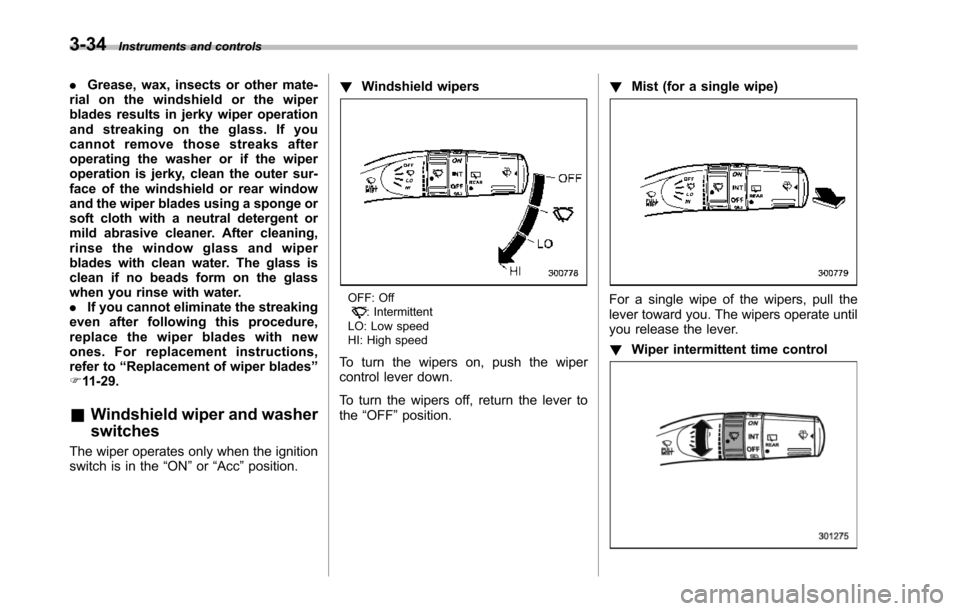
!Windshield wipers
OFF: Off: IntermittentLO: LowspeedHI: High speed
To turn the wipers on, push the wipercontrol lever down.
To turn the wipers off, return the lever tothe“OFF”position.
!Mist (for a single wipe)
For a single wipe of the wipers, pull thelever toward you. The wipers operate untilyou release the lever.
!Wiper intermittent time control
Page 171 of 426
3-38Instruments and controls
NOTE
The outside mirror defogger also oper-ates while the rear window defogger isoperating.
Mirrors
Always check that the inside and outsidemirrors are properly adjusted before youstart driving.
&Type A inside mirror (if
equipped)
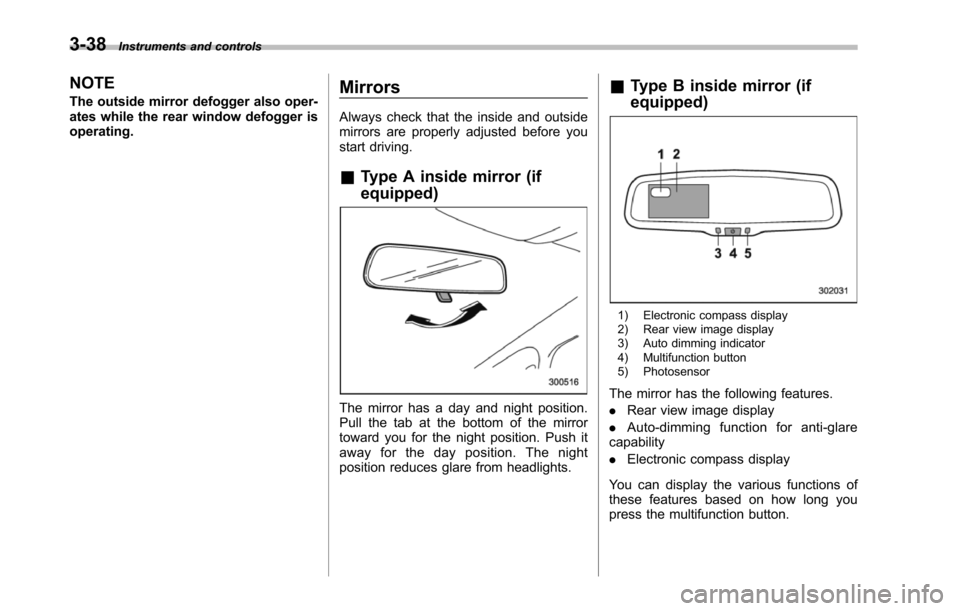
The mirror has a day and night position.Pull the tab at the bottom of the mirrortoward you for the night position. Push itaway for the day position. The nightposition reduces glare from headlights.
&Type B inside mirror (if
equipped)
1) Electronic compass display2) Rear view image display3) Auto dimming indicator4) Multifunction button5) Photosensor
The mirror has the following features.
.Rear view image display
.Auto-dimming function for anti-glarecapability
.Electronic compass display
You can display the various functions ofthese features based on how long youpress the multifunction button.
Page 173 of 426
3-40Instruments and controls
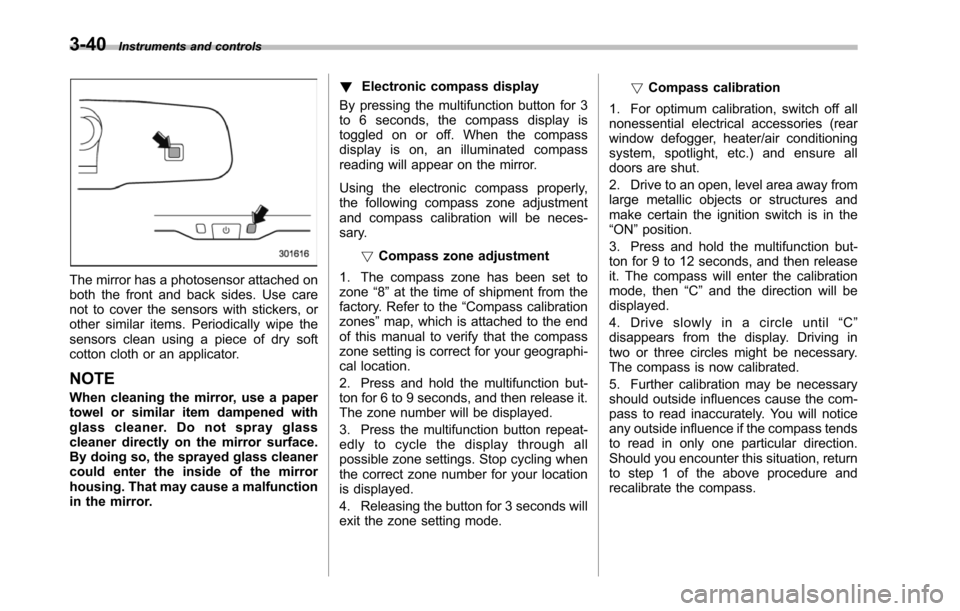
The mirror has a photosensor attached onboththe front and back sides. Use carenot to cover the sensors with stickers, orother similar items. Periodically wipe thesensors clean using a piece of dry softcotton cloth or an applicator.
NOTE
When cleaning the mirror, use a papertowel or similar item dampened withglass cleaner. Do not spray glasscleaner directly on the mirror surface.By doing so, the sprayed glass cleanercould enter the inside of the mirrorhousing. That may cause a malfunctionin the mirror.
!Electronic compass display
By pressing the multifunction button for 3to 6 seconds, the compass display istoggled on or off. When the compassdisplay is on, an illuminated compassreading will appear on the mirror.
Using the electronic compass properly,the following compass zone adjustmentand compass calibration will be neces-sary.
!Compasszone adjustment
1. The compass zone has been set tozone“8”at the time of shipment from thefactory. Refer to the“Compass calibrationzones”map, which is attached to the endof this manual to verify that the compasszone setting is correct for your geographi-cal location.
2. Press and hold the multifunction but-ton for 6 to 9 seconds, and then release it.The zone number will be displayed.
3. Press the multifunction button repeat-edly to cycle the display through allpossible zone settings. Stop cycling whenthe correct zone number for your locationis displayed.
4. Releasing the button for 3 seconds willexitthe zone setting mode.
!Compass calibration
1. For optimum calibration, switch off allnonessential electrical accessories (rearwindow defogger, heater/air conditioningsystem, spotlight, etc.) and ensure alldoors are shut.
2. Drive to an open, level area away fromlarge metallic objects or structures andmake certain the ignition switch is in the“ON”position.
3. Press and hold the multifunction but-ton for 9 to 12 seconds, and then releaseit. The compass will enter the calibrationmode,then“C”and the direction will bedisplayed.
4. Drive slowly in a circle until“C”disappears from the display. Driving intwo or three circles might be necessary.The compass is now calibrated.
5. Further calibration may be necessaryshould outside influences cause the com-pass to read inaccurately. You will noticeany outside influence if the compass tendsto read in only one particular direction.Shouldyou encounter this situation, returnto step 1 of the above procedure andrecalibrate the compass.
Page 184 of 426
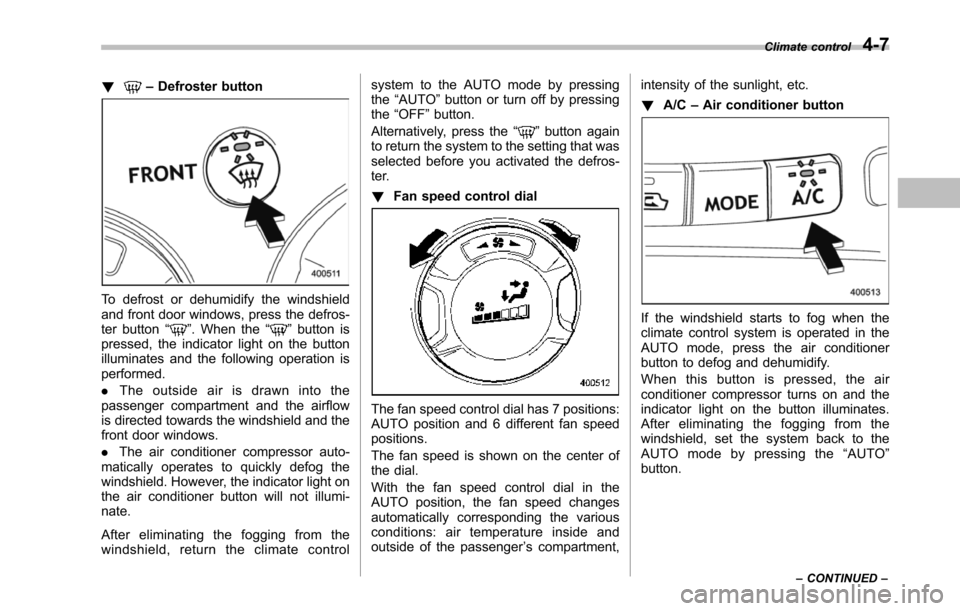
!–Defroster button
To defrost or dehumidify the windshieldand front door windows, press the defros-ter button“”. When the“”button ispressed, the indicator light on the buttonilluminates and the following operation isperformed.
.The outside air is drawn into thepassenger compartment and the airflowis directed towards the windshield and thefront door windows.
.The air conditioner compressor auto-matically operates to quickly defog thewindshield. However, the indicator light onthe air conditioner button will not illumi-nate.
After eliminating the fogging from thewindshield, return the climate control
system to the AUTO mode by pressingthe“AUTO”button or turn off by pressingthe“OFF”button.
Alternatively, press the“”button againto return the system to the setting that wasselected before you activated the defros-ter.
!Fan speed control dial
The fan speed control dial has 7 positions:AUTO positionand 6 different fan speedpositions.
The fan speed is shown on the center ofthe dial.
With the fan speed control dial in theAUTO position, the fan speed changesautomatically corresponding the variousconditions: air temperature inside andoutside of the passenger’s compartment,
intensity of the sunlight, etc.
!A/C–Air conditioner button
If the windshield starts to fog when theclimate control system is operated in theAUTO mode, press the air conditionerbutton to defog and dehumidify.
When this button is pressed, the airconditioner compressor turns on and theindicator light on the button illuminates.After eliminating the fogging from thewindshield, set the system back to theAUTO mode by pressing the“AUTO”button.
Climate control4-7
–CONTINUED–
Page 226 of 426
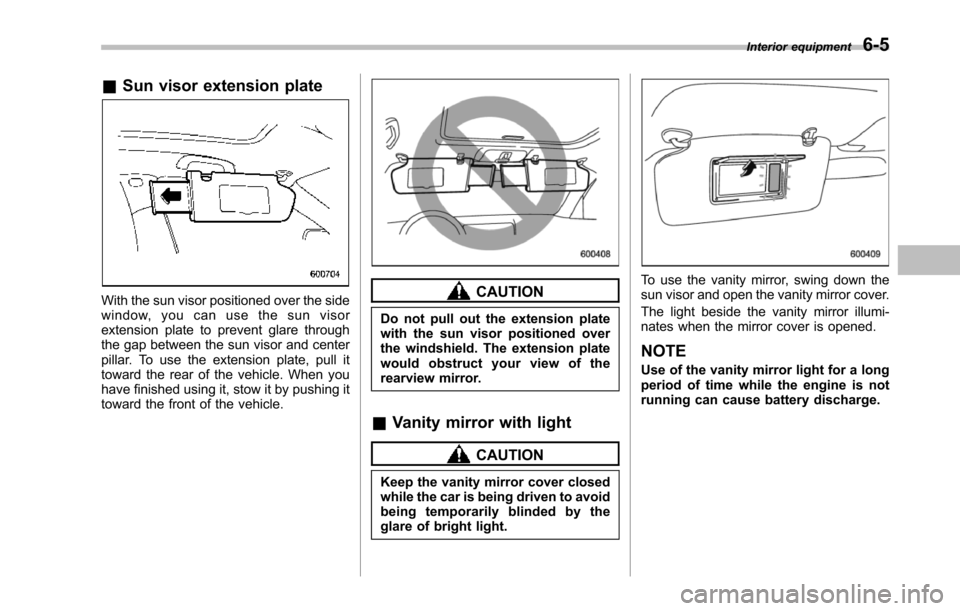
&Sun visor extension plate
With the sun visor positioned over the sidewindow, you can use the sun visorextension plate to prevent glare throughthe gap between the sun visor and centerpillar. To use the extension plate, pull ittoward the rear of the vehicle. When youhave finished using it, stow it by pushing ittoward the front of the vehicle.
CAUTION
Do not pull out the extension platewith the sun visor positioned overthe windshield. The extension platewould obstruct your view of therearview mirror.
&Vanity mirror with light
CAUTION
Keep the vanity mirror cover closedwhile the car is being driven to avoidbeing temporarily blinded by theglare of bright light.
To use the vanity mirror, swing down thesun visor and open the vanity mirror cover.
The light beside the vanity mirror illumi-nates when the mirror cover is opened.
NOTE
Use of the vanity mirror light for a longperiod of time while the engine is notrunning can cause battery discharge.
Interior equipment6-5
Page 261 of 426
7-14Starting and operating
is started.
If the select lever does not move from the“P”position with the brake pedal de-pressed, the select lever button pushedin, and the ignition switch in the ONposition, refer to“Shift lock function”F7-14.
!R (Reverse)
This position is for backing the vehicle.
To shift from the“N”to“R”position, stopthe vehicle completely then move thelever to the“R”position while pushingthe select leverbutton.
!N (Neutral)
This position is for restarting a stalledengine.
In this position the wheels and transmis-sion are not locked. In this position, thetransmission is neutral; the vehicle will rollfreely, even on the slightest incline unlessthe parking brake or foot brake is applied.
Avoid coasting with the transmissionneutral.
During coasting, there is no engine brak-ing effect.
NOTE
When the ignition switch has beenturned to the“LOCK”position, move-ment of the select lever from the“N”
position to the“R”position is possiblefor a limited time period by depressingthe brake pedal and then becomesimpossible. If the select lever becomesimpossible to be moved after a limitedtime period, turn the ignition switch tothe“ON”position. You will then be ableto move the select lever to the“P”position.
WARNING
Do not drive the vehicle with theselect lever in the“N”(Neutral)position. Engine braking has noeffect in this condition and the riskof an accident is consequently in-creased.
!D (Drive)
This position is for normal driving.
The transmission automatically shifts intoa suitable gear from 1st to 5th according tothe vehicle speed and the accelerationyou require.
When more acceleration is required in thisposition, depress the accelerator pedalfully to the floor and hold that position. Thetransmission will automatically downshiftto 4th, 3rd, 2nd or 1st gear. When yourelease the pedal, the transmission will
return to the original gear position.
To use the SPORT mode, move the leverfrom this position into the manual gate.
To use the manual mode, move the leverfrom this position into the manual gatethen move it toward the“+”end or“!”end.
!While climbing a grade
When drivingup a hill, undesired upshift to4th or 5th gear is prevented from takingplace when the accelerator is released.This minimizes the chance of subsequentdownshifting to a lower gear when accel-erating again. This prevents repeatedupshifting and downshifting resulting in asmoother operation of the vehicle.
NOTE
The transmission may downshift to 2ndor 1st gear, depending on the way theaccelerator pedal is depressed to ac-celerate the vehicle again.
&Shift lock function
The shift lock function helps prevent theimproper operationof the select lever.
.The select lever cannot be operatedunless the ignition switch is turned to the“ON”position and the brake pedal isdepressed.
.The select lever cannot be moved from
Page 264 of 426
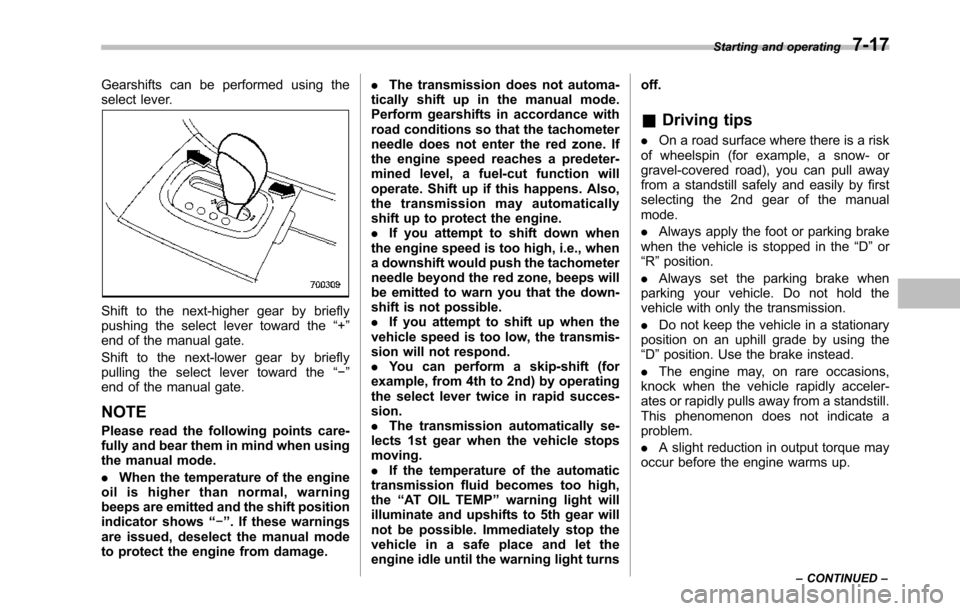
Gearshifts can be performed using theselect lever.
Shift to the next-higher gear by brieflypushing the select lever toward the“+”end of the manual gate.
Shift to the next-lower gear by brieflypulling the select lever toward the“!”end of the manual gate.
NOTE
Pleaseread the following points care-fully and bear them in mind when usingthe manual mode.
.When the temperature of the engineoil is higher than normal, warningbeeps are emitted and the shift positionindicator shows“!”. If these warningsare issued, deselect the manual modeto protect the engine from damage.
.The transmission does not automa-tically shift up in the manual mode.Perform gearshifts in accordance withroad conditions so that the tachometerneedle does not enter the red zone. Ifthe engine speed reaches a predeter-mined level, a fuel-cut function willoperate. Shift up if this happens. Also,the transmission may automaticallyshift up to protect the engine..If you attempt to shift down whenthe engine speed is too high, i.e., whena downshift would push the tachometerneedle beyond the red zone, beeps willbe emitted to warn you that the down-shift is not possible..If you attempt to shift up when thevehicle speed is too low, the transmis-sion will not respond..You can perform a skip-shift (forexample, from 4th to 2nd) by operatingthe select lever twice in rapid succes-sion..The transmission automatically se-lects 1st gear when the vehicle stopsmoving..If the temperature of the automatictransmission fluid becomes too high,the“AT OIL TEMP”warning light willilluminate and upshifts to 5th gear willnot be possible. Immediately stop thevehicle in a safe place and let theengineidle until the warning light turns
off.
&Driving tips
.On a road surface where there is a riskof wheelspin (for example, a snow- orgravel-covered road), you can pull awayfrom a standstill safely and easily by firstselecting the 2nd gear of the manualmode.
.Always apply the foot or parking brakewhen thevehicle is stopped in the“D”or“R”position.
.Always set the parking brake whenparking your vehicle. Do not hold thevehicle withonly the transmission.
.Do not keep the vehicle in a stationaryposition on an uphill grade by using the“D”position. Usethe brake instead.
.The engine may, on rare occasions,knock when the vehicle rapidly acceler-ates or rapidly pulls away from a standstill.This phenomenon does not indicate aproblem.
.A slight reduction in output torque mayoccur before the engine warms up.
Starting and operating7-17
–CONTINUED–
Page 270 of 426
warning light illuminate simultaneously,take the following steps.
1. Stop the vehicle in the nearest safe,flat location.
2. Shut down the engine, apply theparking brake, and then restart it.
3. Release the parking brake. If bothwarning lights turn off, the EBD systemmay be malfunctioning.
Drive carefully to the nearest SUBARUdealer and have the system inspected.
4. If both warning lights illuminate againand remain illuminated after the enginehas been restarted, shut down the engineagain, apply the parking brake, and checkthe brake fluid level. Refer to“Brake fluid”F11-17.
5. If the brake fluid level is not below the“MIN”mark, the EBD system may bemalfunctioning. Drive carefully to thenearest SUBARU dealer and have thesystem inspected.
6. If the brake fluid level is below the“MIN”mark, DO NOT drive the vehicle.Instead, have the vehicle towed to thenearest SUBARU dealer for repair.
WARNING
.Driving with the brake systemwarning light illuminated is dan-
gerous. This indicates your brakesystem may not be workingproperly. If the light remainsilluminated, have the brakes in-spected by a SUBARU dealerimmediately.
.If at all in doubt about whetherthe brakes are operating prop-erly, do not drive the vehicle.Have your vehicle towed to thenearest SUBARU dealer for re-pair.
Vehicle Dynamics Control
system
WARNING
Always use the utmost care indriving–overconfidence becauseyou are driving with a Vehicle Dy-namics Control system equippedvehicle could easily lead to a ser-ious accident.
CAUTION
.Even if your vehicle is equippedwith Vehicle Dynamics Controlsystem, winter tires should beused when driving on snow-cov-ered or icy roads; in addition,vehicle speed should be reducedconsiderably. Simply having aVehicle Dynamics Control sys-tem does not guarantee that thevehicle will be able to avoidaccidents in any situation.
.Activation of the Vehicle Dy-namics Control system is anindication that the road beingtravelled on has a slippery sur-face; since having Vehicle Dy-namics Control is no guarantee
Starting and operating7-23
–CONTINUED–