2014 SUBARU TRIBECA steering
[x] Cancel search: steeringPage 177 of 426
3-44Instruments and controls
Tilt steering wheel
WARNING
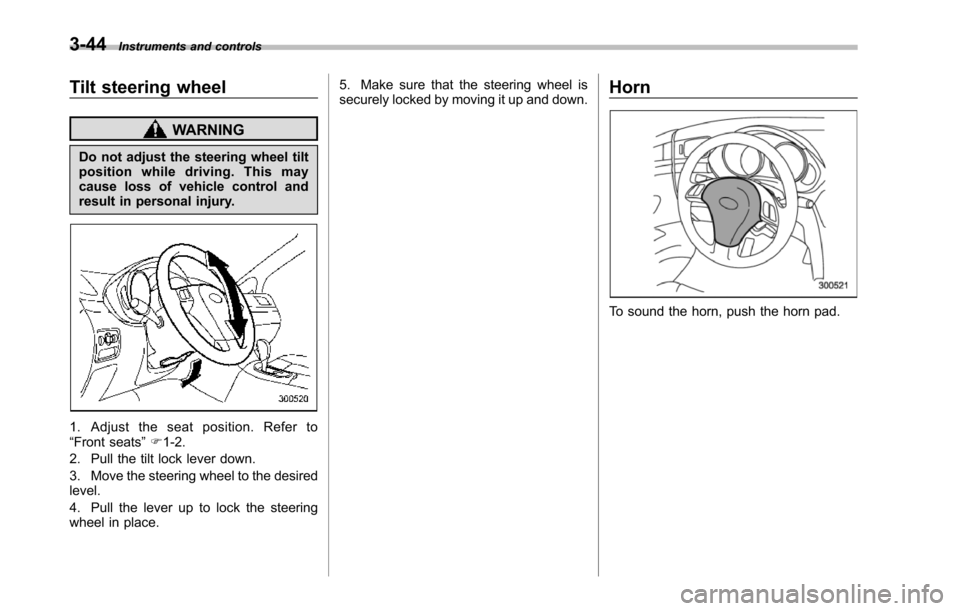
Do not adjust the steering wheel tiltposition while driving. This maycause loss of vehicle control andresult in personal injury.
1. Adjust the seat position. Refer to“Front seats”F1-2.
2. Pull the tilt lock lever down.
3. Move the steering wheel to the desiredlevel.
4. Pull the lever up to lock the steeringwheel in place.
5. Make sure that the steering wheel issecurely locked by moving it up and down.Horn
To sound the horn, push the horn pad.
Page 217 of 426
5-26Audio
!How to unload CDs from the player
!Ejecting a CD from the player
Of the discs loaded, you can select andremove only one disc.
1. Use the disc select button (9) to selectthe disc to be ejected.
2. Briefly press the“”button (8). Theselected disc will be ejected. The discnumber indicator will flash at this time.When you remove the ejected disc, thedisc number indicator will turn off.
To remove more discs in succession,repeat Steps 1 and 2.
!Ejecting all discs from the player(all disc ejection mode)
1. If you press and hold the“”button(8), the player will produce a beep soundand will enter the all disc ejection mode.
2. Remove the disc that has beenejected. The other discs loaded will thenbe ejected one after another. If you do notremove the disc that has been ejected, the“All disc ejection mode”will be canceled.
NOTE
.Avoid driving the vehicle with a CDstickingout, because vibration mightmake it fall out..If you press the“”buttonwhile
the player is in all disc ejection mode,the mode will be cancelled followingejection of the disc that is currentlybeing ejected..If you press the“CD”button whilethe player is in all disc ejection mode,the player will draw in the discs thathave been ejected and play them.
Audio control buttons
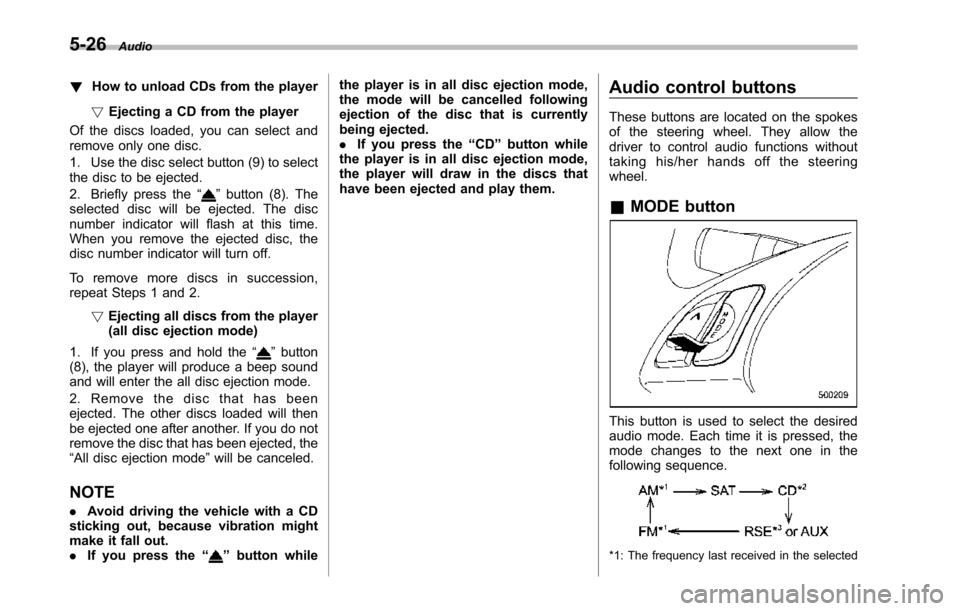
These buttons are located on the spokesof the steering wheel. They allow thedriver to control audio functions withouttaking his/her hands off the steeringwheel.
&MODE button
This button is used to select the desiredaudio mode. Each time it is pressed, themode changesto the next one in thefollowing sequence.
*1: The frequency last received in the selected
Page 248 of 426
Fuel...................................................................... 7-2Fuel requirements............................................... 7-2Fuel filler lid and cap........................................... 7-3
State emission testing (U.S. only)...................... 7-5
Preparing to drive............................................... 7-7
Starting the engine.............................................. 7-7
Stopping the engine............................................ 7-8
Remote engine start system (dealer option)..... 7-8Starting your vehicle........................................... 7-9Remote start safety features................................ 7-9Entering the vehicle while it is running via remotestart.................................................................. 7-9Entering the vehicle following remote engine startshutdown.......................................................... 7-9Pre-heating or pre-cooling the interior of thevehicle............................................................. 7-10Service mode..................................................... 7-10Remote engine start transmitter programmingand programmable feature option..................... 7-10System maintenance.......................................... 7-11
Automatic transmission..................................... 7-12Select lever........................................................ 7-13Shift lock function.............................................. 7-14Selectionof manual mode.................................. 7-16Driving tips........................................................ 7-17SPORT mode..................................................... 7-18
Power steering................................................... 7-18
Braking............................................................... 7-19Braking tips....................................................... 7-19Brake system.................................................... 7-19Disc brake pad wear warning indicators............. 7-20
ABS (Anti-lock Brake System).......................... 7-20ABS system self-check...................................... 7-21ABS warning light.............................................. 7-21
Electronic Brake Force Distribution (EBD)system............................................................. 7-22Steps to take if EBD system malfunctions.......... 7-22
Vehicle Dynamics Control system.................... 7-23Vehicle Dynamics Control system monitor.......... 7-25Traction Control system OFF switch................... 7-25
Tire pressure monitoring system (TPMS)........ 7-27
Parking your vehicle......................................... 7-28Parking brake.................................................... 7-28Parking tips....................................................... 7-29
Cruise control.................................................... 7-29To set cruise control.......................................... 7-30To temporarily cancel the cruise control............. 7-31To turn off the cruise control.............................. 7-31To change the cruising speed ............................ 7-31Cruise control indicator light.............................. 7-32Cruise control set indicator light........................ 7-32
Starting and operating
7
Page 255 of 426
7-8Starting and operating
started. The fuel injection system auto-matically lowers the idle speed as theengine warms up.
While the engine is warming up, makesure that the select lever is at the“P”or“N”position and that the parking brake isapplied.
NOTE
.The engine may be difficult to startwhen the battery has been discon-nected and reconnected (for mainte-nance or other purposes). This diffi-culty is caused by the electronicallycontrolled throttle’sself-diagnosisfunction. To overcome it, keep theignition switch in the“ON”positionfor approximately 10 seconds beforestartingthe engine..To p r o t e c t t h e e n g i n e w h i l e t h eselect lever is in the“P”or“N”position, the engine is controlled sothat the engine speed may not becometoo high even if the accelerator pedal isdepressed hard.
Stopping the engine
WARNING
Do not stop the engine when thevehicle is moving. This will causeloss of power to the power steeringand the brakebooster, making steer-ing and braking more difficult. Itcould also result in accidental acti-vation of the“LOCK”position on theignition switch, causing the steeringwheel to lock.
The ignition switch should be turned offonly whenthe vehicle is stopped and theengine is idling.
Remote engine start system
(dealer option)
WARNING
.Do not start the engine using theremote start system in an en-closed environment (e.g. closedgarage). Prolonged operation ofa motor vehicle in an enclosedenvironment can cause a harmfulbuild-up of Carbon Monoxide.Carbon Monoxide is harmful toyour health. Exposure to highlevels of Carbon Monoxide cancause headaches, dizziness or inextreme cases unconsciousnessand/or death.
.Before performing any servicingof the vehicle, temporarily placethe remote engine start system inservice mode to prevent thesystem from unexpectedly start-ing the engine.
Page 265 of 426
7-18Starting and operating
&SPORT mode
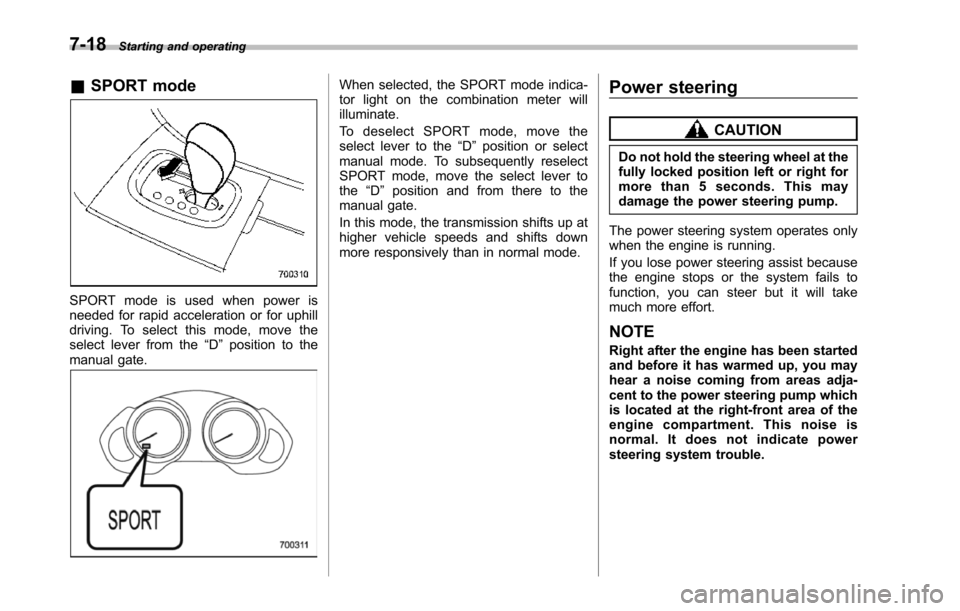
SPORT mode is used when power isneeded for rapid acceleration or for uphilldriving. To select this mode, move theselect lever from the“D”position to themanual gate.
When selected, the SPORT mode indica-tor light on the combination meter willilluminate.
To d e s e l e c t S P O R T m o d e , m o v e t h eselect lever to the“D”position or selectmanual mode. To subsequently reselectSPORT mode, move the select lever tothe“D”position and from there to themanual gate.
In this mode, the transmission shifts up athigher vehicle speeds and shifts downmore responsivelythan in normal mode.
Power steering
CAUTION
Do not hold the steering wheel at thefully locked position left or right formore than 5 seconds. This maydamage thepower steering pump.
The power steering system operates onlywhen the engine is running.
If you lose power steering assist becausethe engine stops or the system fails tofunction, you can steer but it will takemuch more effort.
NOTE
Right after the engine has been startedand before it has warmed up, you mayhear a noise coming from areas adja-centto the power steering pump whichis located at the right-front area of theengine compartment. This noise isnormal. It does not indicate powersteering system trouble.
Page 268 of 426
constant brake pedal pressure.Do not pump the brake pedalsince doing so may defeat theoperation of the ABS system.
The ABS system prevents the lock-up ofwheels which may occur during suddenbraking or braking on slippery road sur-faces. This helps prevent the loss ofsteering control and directional stabilitycaused by wheel lock-up.
When the ABS system is operating, youmay hear a chattering noise or feel a slightvibration in the brake pedal. This is normalwhen the ABS operates.
The ABS system will not operate when thevehicle speed is below approximately 6mph (10 km/h).
&ABS system self-check
You may feel a slight shock in the brakepedal and hear the operating sound ofABS from the engine compartment justafter the vehicle is started. This is causedby an automatic functional test of the ABSsystem being carried out and does notindicate any abnormal condition.
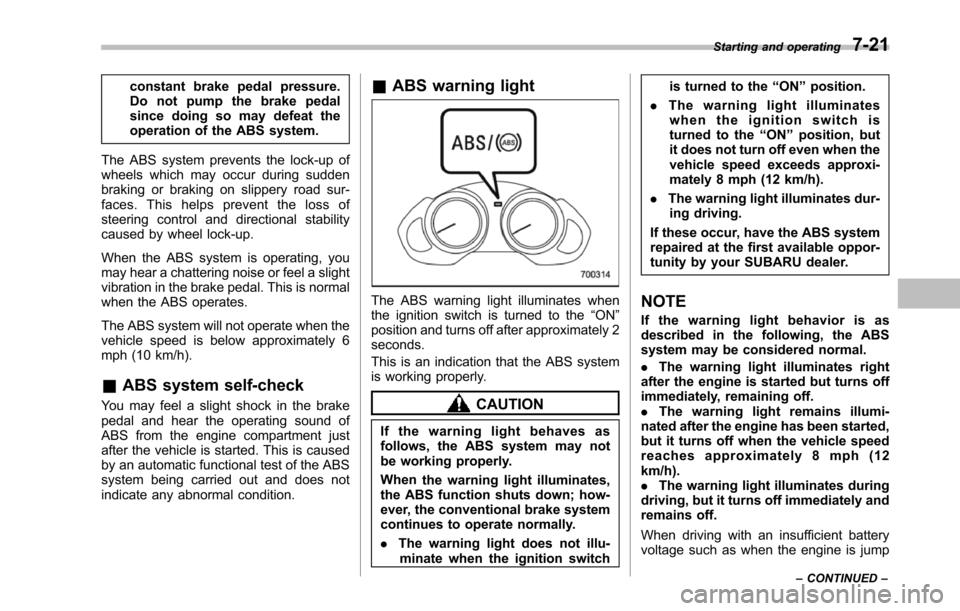
&ABS warning light
The ABS warning light illuminates whenthe ignition switch is turned to the“ON”position and turns off after approximately 2seconds.
This is an indication that the ABS systemis working properly.
CAUTION
If the warning light behaves asfollows, the ABS system may notbe working properly.
Whenthe warning light illuminates,the ABS function shuts down; how-ever, the conventional brake systemcontinues to operate normally.
.The warning light does not illu-minatewhen the ignition switch
is turned to the“ON”position.
.The warning light illuminateswhen the ignition switch isturned to the“ON”position, butit does not turn off even when thevehicle speed exceeds approxi-mately 8 mph (12 km/h).
.The warning light illuminates dur-ing driving.
If these occur, have the ABS systemrepaired at the first available oppor-tunity by your SUBARU dealer.
NOTE
If the warning light behavior is asdescribed in the following, the ABSsystem may be considered normal.
.The warning light illuminates rightafterthe engine is started but turns offimmediately, remaining off..The warning light remains illumi-nated after the engine has been started,but it turns off when the vehicle speedreaches approximately 8 mph (12km/h)..The warning light illuminates duringdriving, but it turns off immediately andremains off.
When driving with an insufficient batteryvoltage suchas when the engine is jump
Starting and operating7-21
–CONTINUED–
Page 271 of 426
7-24Starting and operating
that full vehicle control will bemaintained at all times and underall conditions, its activationshould be seen as a sign thatthe speed of the vehicle shouldbe reduced considerably.
.Whenever suspension compo-nents, steering components, oran axle are removed from avehicle equipped with VehicleDynamics Control system, havean inspection of that systemperformed by an authorizedSUBARU dealer.
.The following precautions shouldbe observed in order to ensurethat the Vehicle Dynamics Con-trol system is operating properly.
–All four wheels should befitted with tires of the samesize, type, and brand. Further-more, the amount of wearshould be the same for allfour tires.
–Keep the tire pressure at theproper level as shown on thevehicle placard attached tothe driver’s side door pillar.
In the event of wheelspin and/or skiddingon a slippery road surface and/or during
cornering and/or an evasive maneuver,the Vehicle Dynamics Control systemadjusts the engine’soutputandthewheels’respective braking forces to helpmaintain traction and directional control.
.Traction Control Function
The traction control function is designed toprevent spinning of the driving wheels onslippery road surfaces, thereby helping tomaintain traction and directional control.Activation of this function is shown bysteady illumination of the Vehicle Dy-namics Control operation indicator light.
.Skid Suppression Function
The skid suppression function is designedto help maintain directional stability bysuppressing the wheels’tendency to slidesideways during steering operations. Acti-vation of this function is shown by flashingof the Vehicle Dynamics Control operationindicator light.
NOTE
.Slight twitching of the brake pedalmay be felt when the Vehicle DynamicsControl system operates; a small de-gree of vehicle or steering wheel shak-ingmay also be noticed in this situa-tion. These are normal characteristicsof Vehicle Dynamics Control operationand are no cause for alarm..When driving off immediately after
starting the engine, a short operationnoise may be noticed coming from theengine compartment. This noise isgenerated as a result of a check beingperformed on the Vehicle DynamicsControl system and is normal..Depending on the timing of activa-tion of the brakes, the brake pedal mayseem to jolt when you drive off afterstarting the engine. This is a conse-quence of the Vehicle Dynamics Con-trol operational check and is normal..In the circumstances shown in thefollowing list, the vehicle may be lessstable than it feels to the driver. TheVehicle Dynamics Control System maytherefore operate. Such operation doesnot indicate a system malfunction.–on gravel-covered or ruttedroads–on unfinished roads–when the vehicle is towing atrailer–when the vehicle is fitted withsnow tires or winter tires.Activation of the Vehicle DynamicsControl system will cause operation ofthe steering wheel to feel slightlydifferent compared to that for normalconditions.
.Even if the vehicle is equipped witha Vehicle Dynamics Control system, it
Page 276 of 426
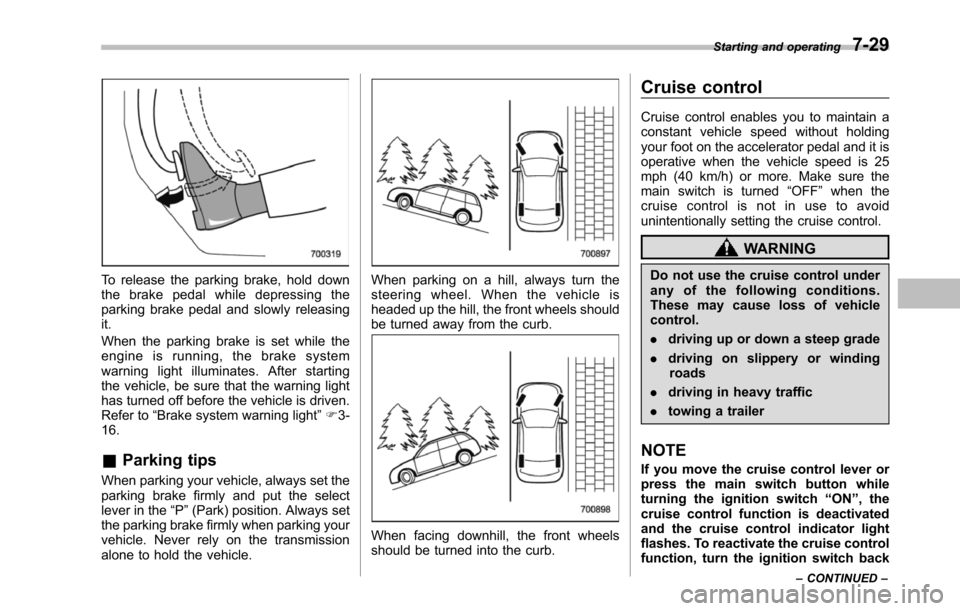
To release the parking brake, hold downthe brake pedal while depressing theparkingbrake pedal and slowly releasingit.
When the parking brake is set while theengine is running, the brake systemwarning light illuminates. After startingthe vehicle, be sure that the warning lighthas turned off before the vehicle is driven.Refer to“Brake system warning light”F3-16.
&Parking tips
When parking your vehicle, always set theparking brake firmly and put the selectlever in the“P”(Park) position. Always setthe parking brake firmly when parking yourvehicle. Never rely on the transmissionalone to hold the vehicle.
When parking on a hill, always turn thesteering wheel. When the vehicle isheadedup the hill, the front wheels shouldbe turned away from the curb.
When facing downhill, the front wheelsshould be turned into the curb.
Cruise control
Cruise control enables you to maintain aconstant vehicle speed without holdingyour foot on the accelerator pedal and it isoperative when the vehicle speed is 25mph (40 km/h) or more. Make sure themain switch is turned“OFF”whenthecruise control is not in use to avoidunintentionally setting the cruise control.
WARNING
Do not use the cruise control underany of the following conditions.These may cause loss of vehiclecontrol.
.driving up or down a steep grade
.driving on slippery or windingroads
.driving in heavy traffic
.towing a trailer
NOTE
If you move the cruise control lever orpress the main switch button whileturning the ignition switch“ON”, thecruise control function is deactivatedand the cruise control indicator lightflashes.To reactivate the cruise controlfunction, turn the ignition switch back
Starting and operating7-29
–CONTINUED–