2014 SKODA YETI lights
[x] Cancel search: lightsPage 76 of 248
CAUTION■If the ignition is switched off while the windscreen wipers are switched on,
the windscreen wipers will continue wiping in the same mode after the igni-
tion is turned back on. The windscreen wipers could freeze up in cold tempera-
tures between the time the ignition was turned off and when it was turned
back on again.■
In cold temperatures and during the winter, check before the journey or be-
fore switching on the ignition that the wiper blades are not frozen to the
windscreen. If the windscreen wipers are switched on when the blades are fro-
zen to the windscreen, this may damage both the blades and windscreen wip-
er motor!
■
Carefully peel frozen wiper blades off the pane.
■
Remove snow and ice from the windscreen wipers before driving.
■
If the windscreen wipers are handled carelessly, there is a risk of damage to
the windscreen.
■
Do not switch on the ignition if the front wiper arms are retracted. The wiper
arms could damage the paint of the bonnet.
■
If there is an obstacle on the windscreen, the wiper will try to push away the
obstacle. The wiper stops automatically after 5 attempts to eliminate the ob-
stacle, in order to avoid a damage to the wiper. Remove the the obstacle and
switch the wiper on again.
Note
■ Each time the ignition switches off for the third time, the position of the
windscreen wipers changes. This counteracts an early fatigue of the wiper rub-
bers.■
The rear window wiper only operates if the boot lid is closed.
■
To avoid streaking, the wiper blades must be kept clean » page 174.
■
The windscreen washer nozzles for the windscreen are heated when the en-
gine is running and the outside temperature is less than approx. +10 °C.
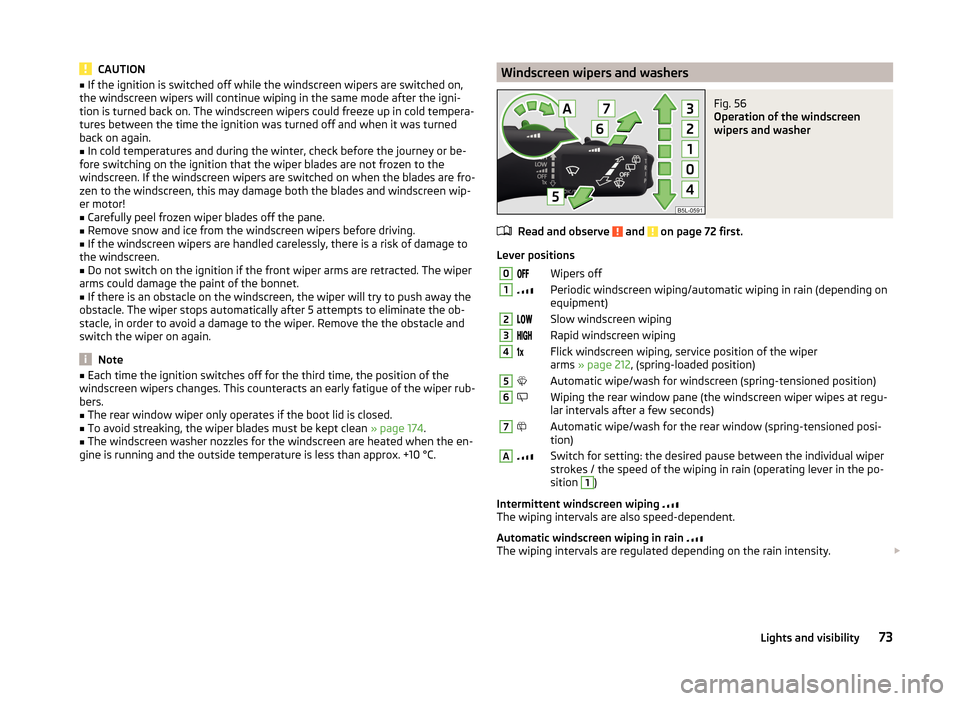
Windscreen wipers and washersFig. 56
Operation of the windscreen
wipers and washer
Read and observe and on page 72 first.
Lever positions
0Wipers off1Periodic windscreen wiping/automatic wiping in rain (depending on
equipment)2Slow windscreen wiping3Rapid windscreen wiping4 Flick windscreen wiping, service position of the wiper
arms » page 212 , (spring-loaded position)5Automatic wipe/wash for windscreen (spring-tensioned position)6Wiping the rear window pane (the windscreen wiper wipes at regu-
lar intervals after a few seconds)7Automatic wipe/wash for the rear window (spring-tensioned posi-
tion)ASwitch for setting: the desired pause between the individual wiper
strokes / the speed of the wiping in rain (operating lever in the po-
sition 1
)
Intermittent windscreen wiping
The wiping intervals are also speed-dependent.
Automatic windscreen wiping in rain
The wiping intervals are regulated depending on the rain intensity.
73Lights and visibility
Page 77 of 248

Automatic wipe/wash for windscreen
The wash system operates immediately, the windscreen wipers wipe some- what later. The wash system and the windscreen wiper operate simultaneous-
ly at a speed of more than 120 km/h.
Letting go of the lever will cause the windscreen wash system to stop and the
wiper to continue for another 3-4 wiper strokes (depending on the period of
spraying of the windscreen).
At a speed of more than 2 km/h, the wiper wipes once again 5 seconds after
the last wiper stroke in order to wipe the last drops from the windscreen. This
function can be activated/deactivated by a specialist garage.
Automatic wipe/wash for the rear window
The wash system operates immediately, the windscreen wiper wipes some-
what later.
Letting go of the operating lever will cause the windscreen wash system to
stop and the wiper to continue for another 2-3 wiper strokes (depending on
the spraying duration). The operating lever remains in position 6
» Fig. 56 .
Automatic rear window wiping
If the lever is in position
2
or
3
» Fig. 56 , the rear window is wiped every
30 or 10 seconds if the vehicle's speed exceeds 5 km/h.
If automatic windscreen wiping in rain is activated (the operating lever is in the position
1
) the function is only active if the windscreen wipers operate in
continuous mode (no break between each wiping process).
Automatic rear window wiping can be activated/deactivated via the MAXI DOT
display in the menu item Rear wiper » page 47 .
Winter setting of the windscreen wiper
If the windscreen wipers are in rest position, they cannot be folded out from
the windscreen. For this reason we recommend adjusting the windscreen wip-
ers in winter so that they can be folded out from the windscreen easily.
› Switch on the windscreen wipers.
› Switch off the ignition.
The windscreen wipers remain in the position in which they were when
switching off the ignition.
The service position can also be used as a winter position » page 213.
Note■
If the operating lever is in the position 2 or 3 and the speed of the vehicle
drops below 4 km / h, the wiping speed is switched to a lower wiping level.
The original setting is restored step by step when the speed of the vehicle ex-
ceeds 8 km/h.■
The rear window is wiped once automatically if the windscreen wipers are on
when reverse gear is selected.
Headlight cleaning system
Read and observe
and on page 72 first.
After the ignition is switched on, the headlights are always cleaned at the first
and after every tenth spray of the windscreen (setting
5
» Fig. 56 on page 73 ),
when the low beam or main beam is switched on.
You should remove stubborn dirt (such as insect residues) from the headlight
lenses at regular intervals, for example when refuelling. The following guide-
lines must be observed » page 172, Headlight glasses .
To ensure the proper operation of the cleaning system during the winter, any snow should be removed from the washer nozzle fixtures and ice should be
cleared with a de-icing spray.
CAUTION
Never remove the nozzles from the headlight cleaning system by hand – risk of
damage!
Rear mirror
Introduction
This chapter contains information on the following subjects:
Interior mirror
75
Exterior mirrors
76
74Using the system
Page 78 of 248

WARNING■Make sure that the mirror is not covered by ice, snow, mist or other ob-
jects.■
Convex (curved outward) or aspheric exterior mirrors increase the field of
vision. They do, however, make objects appear smaller in the mirror. These
mirrors are therefore only of limited use for estimating distances to the fol-
lowing vehicles.
■
Whenever possible use the interior mirror for estimating the distances to
the following vehicles.
WARNINGThe mirrors with automatic dimming contain an electrolyte liquid which can
escape if mirror glass is broken.■
The leaking electrolytic fluid can irritate the skin, eyes and breath appara-
tus. Immediately seek out fresh air and leave the vehicle. If this is not pos-
sible, at least open the window.
■
If you swallow electrolytic fluid, seek medical assistance immediately.
■
If your eyes or skin come into contact with the electrolytic fluid, immedi-
ately wash the affected area for a few minutes long with a lot of water.
Then consult a doctor immediately.
Interior mirror
Fig. 57
Interior mirror: manual dimming / auto-dimming / light sensor
Read and observe
on page 75 first.
Mirrors with manual dimming » Fig. 57
Basic position of the mirror
Mirror blackout
12Mirror with automatic dimming » Fig. 57
Warning light - lights when dimming is activated
Switch for the activation of the automatic mirror dimming
Light sensor
Light sensor on the back of the mirror
Mirror with automatic dimming
If the automatic dimming is enabled, the mirror dims automatically depending
on the light falling on the sensors.
When the interior lights are switched on or the reverse gear is engaged, the
mirror always moves back into the basic position (not dimmed).
Do not attach external navigation devices to the windscreen or in the vicinity
of the interior mirror »
.
WARNINGThe illuminated display of an external navigation unit can lead to opera-
tional faults to the automatic dimming interior mirror – risk of accident.
CAUTION
Automatic mirror dimming only operates correctly if the light striking the sen-
sor is not affected by other objects.
Note
If the automatic interior mirror dimming is switched off, the exterior mirror
dimming is also switched off.ABCD75Lights and visibility
Page 83 of 248

When automatic storage is activated, the current positions of the driver's seat
and the external mirrors are saved in the memory of the remote control key
each time the vehicle is locked. When the vehicle is next unlocked using the
same key, the driver's seat and the external mirrors assume the positions stor-
ed in the memory of this key 1)
.
Saving front passenger mirror settings when reversing
Above the MAXI DOT display in the menu item Mirror down The lowering func-
tion for the mirror on the passenger side when reversing must be ena-
bled » page 47 .›
Unlock the vehicle with the remote control key.
›
Switch on the ignition.
›
Adjust the rotary knob for the mirrors to the position
or in right-hand drive
to the position
» page 76 .
›
Engage reverse gear.
›
Adjust the front passenger's mirror to the desired position » page 76.
›
Disengage reverse gear.
The adjusted position of the exterior mirror is stored in the remote control key
memory.
Disable the function of automatic storage
›
Unlock the vehicle with the remote control key.
›
Press and hold the SET button
A
» Fig. 61 on page 79 . At the same time,
press the button on the remote control key within 10 seconds.
The successful deactivation of the automatic storage function for each key is confirmed by an acoustic signal.
Stopping the ongoing adjustment
›
Press any button on the driver's seat.
Or
›
Press the button on the remote control key.
Front seat functions
Introduction
This chapter contains information on the following subjects:
Front seat heating
80
Front armrest
81
Folding front passenger seat
81
Front seat heating
Fig. 62
Buttons for heating the front
seats
The seat backrests and seats can be heated electrically.
The seat heating can only be switched on when the engine is running.
Buttons for the seat heater » Fig. 62
Left seat heating
Right seat heating
Switching on
›
Press the corresponding symbol button or
» Fig. 62 .
Pressing once switches the seat heating on at its maximum level.
With repeated pressing of the switch, the intensity of the heating is reduced
until it is switched off.
The level of the seat heating is indicated by the number of illuminated warning
lights in the switch.
1)
The vehicle must be locked and unlocked with the same key to save the seat and exterior mirror position
to the key.
80Using the system
Page 104 of 248

Removable storage boxFig. 103
Storage box
Read and observe and on page 96 first.
The storage box » Fig. 103 is placed under the variable loading floor and can be
taken out.
There is a storage space for the vehicle tool kit under the storage
box » page 198 , Vehicle tool kit .
WARNINGThe removable storage box must be located under the variable loading
floor for the safe use of the variable loading floor.
Removable light
Fig. 104
Light operation / removal
Read and observe
and on page 96 first.
The removable light is located on the right side of the luggage compartment. If the light is in the holder, then part
B
» Fig. 104 is lit.
If the light is outside the holder, then the part A is lit.
The lamp is fitted with magnets. Therefore it is possible to attach the lamp, for
example on the vehicle body, after removing it.
Remove the light from the holder›
Grasp the lamp in the areas of the arrow
D
» Fig. 104 and swivel it in the
direction of the arrow
1
.
Use of removed light
›
If you press button
C
» Fig. 104 , the lamp lights up with 100 % light intensi-
ty.
›
If you press button
C
again, the lamp lights up with 50 % light intensity.
›
Press
C
button once again - the light goes out.
Reinserting the lamp the holder
›
Switch off the ignition » .
›
First of all, place the deactivated light in the holder on the side facing the
boot lid and then press on the light from the other side until it is clicks into
place.
The lamp is supplied by three rechargeable type AAA batteries. The rechargea-
ble batteries are constantly charged when the engine is running. It takes ap-
prox. 3 hours to fully charge the rechargeable batteries.
Replace batteries » page 211.
Luggage compartment light
If the light is in the holder, it is automatically switched on when the boot lid is
opened.
If the lamp is in the holder, it is automatically switched off when the boot lid is
closed.
CAUTION
■ If the lamp is not switched off and it is correctly inserted in the holder, the
bulbs in the front part A » Fig. 104 of the lamp are automatically switched off.■
If the lamp is not correctly inserted into the holder, it does not light up when
the boot lid is opened and the rechargeable batteries are not charged.
■
The removable lamp is not watertight and must therefore be protected
against moisture.
101Transporting and practical equipment
Page 109 of 248

An overview of the available settings for adjusting the direction of the air
outletSet the direction of the air outletActive air outlet nozzles » Fig. 109
and » Fig. 110 1, 2 , 41, 2 , 4 , 5 , 7 3, 4 , 64 , 5 , 7
Note
■
To ensure that the heating and air conditioning systems work properly, do
not block the air outlet vents.■
The air outlet vents 6 » Fig. 110 are only fitted on vehicles with the higher
centre console.
Air distribution control
Read and observe
and on page 104 first.
Recirculated air mode prevents polluted air outside the vehicle from getting in-to the vehicle, e.g. when driving through a tunnel or in a traffic jam.
In recirculated air mode air is sucked out of the interior of the vehicle and then
fed back into the interior.
Heating and air conditioning (manual air conditioning)
To turn the recirculation mode on or off, press the Symbol key
.
The air recirculation mode is automatically turned off by turning the air distri-
bution control
C
to position
» Fig. 111 on page 107 or » Fig. 112 on
page 107 .
Recirculated air mode can be switched on again from this position by repeat-
edly pressing the symbol button .
Climatronic (automatic air conditioning)
To turn the recirculation mode on, press the Symbol key
repeatedly until
the indicator light is lit on the left side of the button.
To activate the automatic recirculation mode, press the Symbol key re-
peatedly until the indicator light is lit on the right side of the button.
Climatronic has an air quality sensor for the detection of the pollutant concen-
tration in the sucked-in air.
If a considerable increase in concentration of pollutants is recognised by the
air quality sensor, recirculated air mode will temporarily be switched on.
If the concentration of pollutants decreases to the normal level, the air distri-
bution control is automatically switched off so that fresh air can be guided into
the vehicle interior.
If the air quality sensor does not automatically switch on the recirculated air
mode in the event of an unpleasant odour, you can switch it on yourself by
pressing the button . The indicator light lights up in the button on the left
side.
To turn off the air recirculation or to deactivate the automatic air recircula-
tions , press the
button of press the
symbol button repeatedly until
the warning lights in the button go out.WARNINGThe recirculation system cannot be switched on for a longer period of time,
because there is no supply of fresh air from the outside. “Stale air” may re-
sult in fatigue in the driver and occupants, reduce attention levels and also
cause the windows to mist up. The risk of having an accident increases.
Switch off recirculated air mode as soon as the windows start to mist up.
CAUTION
We recommend not smoking in the vehicle when the recirculating air operation
is switched on. The smoke sucked from inside the vehicle is deposited on the
evaporator of the air conditioner. This produces a permanent odour when the
air conditioning system is operating which can only be eliminated through con-
siderable effort and expense (replacement of compressor).
Note
The automatic air distribution control operates only if the outside temperature
is higher than approx. 2 °C.106Using the system
Page 110 of 248

HeatingFig. 111
Heating Controls
Read and observe
and on page 104 first.
Individual functions can be switched on or off by turning the knob or pressing the respective button. If the function is switched on, the warning light lights
up.
Functions of the individual controls » Fig. 111
Setting temperature ›
Lower temperature
›
Increase temperature
Set the blower level (level 0: blower, level 4: the highest blower speed)
Set the direction of the air outlet » page 105
›
Air flow to the windows
›
Air flow to the upper body
›
Air flow in the footwell
›
Airflow to the windows and into the footwell
Switching the rear window heater on/off » page 71
Switching on / off aux. heater (parking heater) on / off » page 111
Switch recirculation on/off » page 106
ABCAir conditioning (manual air conditioning)Fig. 112
Controls of the air conditioning
Read and observe
and on page 104 first.
Individual functions can be switched on or off by turning the knob or pressing the respective button. If the function in the button illuminates the warning
light.
Functions of the individual controls » Fig. 112
Setting temperature ›
Lower temperature
›
Increase temperature
Set the blower level (level 0: Blowers, level 4: the highest blower speed)
Set the direction of the air outlet » page 105
›
Air flow to the windows
›
Air flow to the upper body
›
Air flow in the footwell
›
Airflow to the windows and into the footwell
Switching the cooling system on/off
Switching the rear window heater on/off » page 71
Switching on/off aux. heater (parking heater) on/off » page 111
Switch recirculation on/off » page 106
Operation of the seat heater on the front left seat » page 80
Operation of the seat heater on the front right seat » page 80
ABC107Heating and air conditioning
Page 111 of 248

Note■The warning light in the button lights after activation, even if not all of
the conditions for the function of the cooling system have been met. By light-
ing up of the indicator light in the button, the operational readiness of the
cooling system is signalled.■
During operation of the air conditioning, an increase in engine idle speed may
occur under certain circumstances in order to ensure sufficient heating com-
fort.
Climatronic (automatic air conditioning)
Fig. 113
Controls the Climatronic
Read and observe
and on page 104 first.
The Climatronic in automatic mode ensures the best-possible setting of the
temperature of the outflowing air, the blower stage and air distribution.
The system also takes sunlight into account, which eliminates the need to al-
ter the settings manually.
Individual functions can be switched on or off by turning the knob or pressing
the respective button. If the function in the button illuminates the warning
light.
Functions of the individual controls » Fig. 113
Adjust the temperature for the left side or for both sides
›
Lower temperature
›
Increase temperature
Interior temperature sensor
ABDepending on equipment fitted:
›
Switching the windscreen heater on/off » page 71
›
Switching on/off aux. heating (standard heating) on/off » page 111
Adjust the temperature for the right side ›
Lower temperature
›
Increase temperature
Operation of the seat heater on the front left seat » page 80
Operation of the seat heater on the front right seat » page 80
Adjust the blower speed › + Increase speed
› - Reduce speed
Switch the intensive windscreen heater on/off
Air flow to the windows
Air flow to the upper body
Air flow in the footwell Automatic recirculation, switch on or off » page 106
Switching the rear window heater on/off » page 71
Switching automatic mode on
Switching Climatronic system off »
Switching the cooling system on/off
Switch the temperature setting in Dual mode on/off
After the cooling system is switched off, only the ventilation function remains active whereby the minimum temperature that can be reached is the outside
temperature.
Setting temperature
The interior temperature for the left and right side can be set separately or to-
gether.
The temperature for both sides, is set by turning the knob
A
» Fig. 113 (the
indicator light in the button is not illuminated).
The temperature for the right side is adjusted by turning the knob
D
(the in-
dicator light in the button is lit).
The temperature for the left side is adjusted by turning the knob
A
(the indi-
cator light in the button is lit).
The interior temperature can be set between +18 °C and +26 ℃. The interior
temperature is regulated automatically within this range.
CD108Using the system