2014 SKODA OCTAVIA low beam
[x] Cancel search: low beamPage 78 of 280
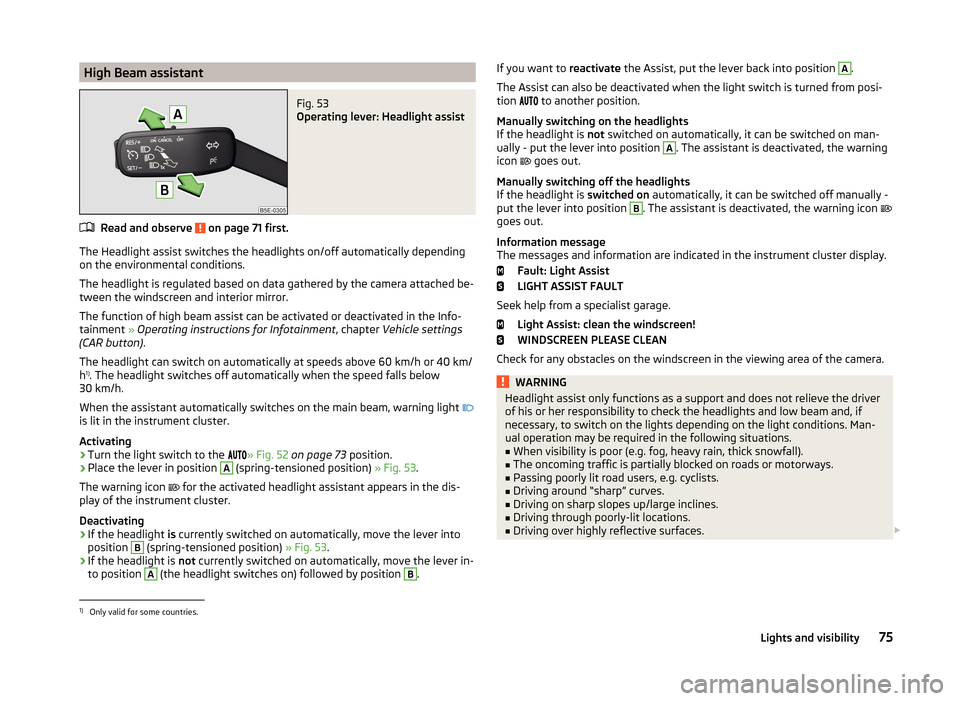
High Beam assistantFig. 53
Operating lever: Headlight assist
Read and observe on page 71 first.
The Headlight assist switches the headlights on/off automatically depending
on the environmental conditions.
The headlight is regulated based on data gathered by the camera attached be-
tween the windscreen and interior mirror.
The function of high beam assist can be activated or deactivated in the Info- tainment » Operating instructions for Infotainment , chapter Vehicle settings
(CAR button) .
The headlight can switch on automatically at speeds above 60 km/h or 40 km/
h 1)
. The headlight switches off automatically when the speed falls below
30 km/h.
When the assistant automatically switches on the main beam, warning light
is lit in the instrument cluster.
Activating
›
Turn the light switch to the » Fig. 52
on page 73 position.
›
Place the lever in position
A
(spring-tensioned position) » Fig. 53.
The warning icon for the activated headlight assistant appears in the dis-
play of the instrument cluster.
Deactivating
›
If the headlight is currently switched on automatically, move the lever into
position
B
(spring-tensioned position) » Fig. 53.
›
If the headlight is not currently switched on automatically, move the lever in-
to position
A
(the headlight switches on) followed by position
B
.
If you want to reactivate the Assist, put the lever back into position A.
The Assist can also be deactivated when the light switch is turned from posi-
tion
to another position.
Manually switching on the headlights
If the headlight is not switched on automatically, it can be switched on man-
ually - put the lever into position A
. The assistant is deactivated, the warning
icon
goes out.
Manually switching off the headlights
If the headlight is switched on automatically, it can be switched off manually -
put the lever into position
B
. The assistant is deactivated, the warning icon
goes out.
Information message
The messages and information are indicated in the instrument cluster display.
Fault: Light Assist
LIGHT ASSIST FAULT
Seek help from a specialist garage. Light Assist: clean the windscreen!
WINDSCREEN PLEASE CLEAN
Check for any obstacles on the windscreen in the viewing area of the camera.
WARNINGHeadlight assist only functions as a support and does not relieve the driver
of his or her responsibility to check the headlights and low beam and, if
necessary, to switch on the lights depending on the light conditions. Man-
ual operation may be required in the following situations.■
When visibility is poor (e.g. fog, heavy rain, thick snowfall).
■
The oncoming traffic is partially blocked on roads or motorways.
■
Passing poorly lit road users, e.g. cyclists.
■
Driving around “sharp” curves.
■
Driving on sharp slopes up/large inclines.
■
Driving through poorly-lit locations.
■
Driving over highly reflective surfaces.
1)
Only valid for some countries.
75Lights and visibility
Page 79 of 280

WARNING (Continued)■The windscreen around the camera is dirty, iced up, misted up, or covered
by stickers.■
Near the camera lens there is a light source, such as the screen of an ex-
ternal navigation system.
CAUTION
Do not attach any stickers or similar objects in front of the camera on the
windscreen to avoid impairing the function or its reliability.
Fog lights
Fig. 54
Light switch: Turn on front and
rear fog light
Read and observe on page 71 first.
Switching on/off
›
Turn the light switch to position
,
or
» Fig. 54 .
›
Pull the light switch to position
1
.
The rear fog light is switched off in the reverse order.
The warning light
lights up in the instrument cluster when the fog lights are
switched on » page 34.
Fog lights with the CORNER function
Read and observe
on page 71 first.
The CORNER function improves illumination of the vehicle surroundings when
turning, parking and the like, by switching on the fog lights on the respective
side of the vehicle.
The CORNER function is switched on automatically if the following conditions
are met.
The turn signal is switched on or the front wheels are turned sharply to
the right or left 1)
.
The engine is running.
The vehicle is stopped or moves at a speed of no more than 40 km/h.
The low beam is switched on or the light switch is in the position and
the low beam is switched on.
The daytime running lights are not switched on.
The fog lights are not switched on.
Note
The two fog lights are switched on when you shift into the reverse gear.
Rear fog light
Read and observe
on page 71 first.
Switching on/off
›
Turn the light switch into position or
» Fig. 54
on page 76 .
›
Pull the light switch to position
2
.
The rear fog light is switched off in the reverse order.
The warning light lights up in the instrument cluster when the rear fog light
is switched on » page 34.
If the vehicle is not fitted with fog lights, the rear fog light is switched on by
pulling out the light switch directly to the only possible setting.
1)
If both switch-on conditions are conflicting, for example, if the front wheels are turned to the left and
the right turn signal light is switched on, the turn signal light has the higher priority.
76Using the system
Page 80 of 280

Only the rear fog light on the trailer lights up if the vehicle has a factory-fitted
towing device or a towing device from ŠKODA original accessories and it is
driven with a trailer.
COMING HOME / LEAVING HOME
Read and observe
on page 71 first.
COMING HOME (hereinafter referred to only as a function) switches the light
automatically for a short time after leaving the vehicle.
LEAVING HOME (hereinafter referred to only as a function) switches the light
automatically for a short time when approaching the vehicle.
The daytime running lights are switched on automatically if the following
conditions are met.
The light switch is in position
» Fig. 52 on page 73 .
The visibility in the vehicle environment is reduced.
The ignition is switched off.
The parking aid is activated.
The function is switched on (the driver's door is opened/the car is un-
locked via the remote control).
The function switches on the following light, depending on the equipment
fitted.
› Parking lights
› Low beam
› Entry lighting in the exterior mirrors
› Licence plate light
Poorer visibility is evaluated by a sensor mounted in the bracket of the interior
mirror.
COMING HOME
The light turns on automatically when you open the driver's door on (within 60
seconds of turning off the ignition).
The light turns off 10 seconds after closing all the doors and the boot lid or af-
ter the pre-set time has expired.
If a door or the boot lid remains open, the light goes out after 60 seconds.
LEAVING HOME
The light turns on automatically after the vehicle is unlocked with the remote
control.
The light turns off after 10 seconds or after a pre-set time or after the vehicle
is locked.
Enabling / disabling and setting function
The functions and setting of the lighting duration can be activated or deactiva-
ted in the Infotainment » Operating instructions for Infotainment , chapter Ve-
hicle settings (button CAR) .
CAUTION
■
Do not attach any stickers or similar objects in front of the light sensor on
the windscreen to avoid impairing the function or its reliability.■
If this function is activated constantly, the battery will be heavily discharged
particularly in short-haul traffic.
Hazard warning light system
Fig. 55
Button for hazard warning light
system
Read and observe on page 71 first.
Switching on/off
›
Press the button
» Fig. 55 .
All the turn signal lights on the vehicle flash at the same time when the hazard
warning light system is switched on. The warning light for the turn signals and
the warning light in the button also flash at the same time. The hazard warn-
ing light system can also be operated if the ignition is switched off.
If one of the airbags is deployed, the hazard warning light system will switch
on automatically.
If the turn signal light is switched on when the hazard warning light and the
ignition are both switched on, then only the turn signal light on the corre-
sponding vehicle side will flash.
77Lights and visibility
Page 81 of 280

WARNINGSwitch on the hazard warning light system if, for example, the following oc-
curs.■
You encounter a traffic congestion.
■
The vehicle has to be parked on the roadside, due to a fault for example.
Parking lights
Read and observe
on page 71 first.
The parking light is provided for a temporary lighting of the parked vehicle.
Parking light switching on
›
Switch off the ignition.
›
Place the control lever into position
A
or
B
as far as it can go
» Fig. 51 on
page 73 - the parking light on the right/left-hand side of the vehicle is
switched on.
If the right or left turn signal light has been switched on and the ignition is
switched off, the parking light is not automatically switched on.
Switching on the side light on both sides
›
Turn the light switch
A
to position » Fig. 50
on page 71 and lock the vehi-
cle.
After pulling out the ignition key and opening the driver's door, an audible
warning sounds. After a few seconds or after closing the driver's door, the au-
dible alarm is turned off, but the parking lights will remain switched on.
CAUTION
Turning on the parking light means the battery is heavily loaded, especially
over short distances.
Driving abroad
Read and observe
on page 71 first.
The low beam is set asymmetrically. It illuminates the side of the road on
which the vehicle is being driven to a greater extent.
When driving in countries with opposing traffic system (traffic on the left/
right), asymmetric headlight adjustment can dazzle oncoming traffic. In order
to avoid this, the headlights must be adjusted at a specialist garage.
You can adjust the Xenon headlights yourself by setting the travel mode in In- fotainment » Operating instructions for Infotainment , chapter Vehicle settings
(button CAR) .
Note
You can find out more information on adjusting the headlights at a specialist
garage.
Interior lights
Introduction
This chapter contains information on the following subjects:
Front interior light
78
Rear interior lights
79
Front door warning light
79
Entry space lighting
80
Note
With the ignition off, the light turns off automatically after about 10 minutes.
Front interior light
Fig. 56
Operation of the front light: Variant 1/variant 2
Positions of rocker switch
A
. » Fig. 56
Switching on
Control with the door contact switch (middle position)
Switching off
78Using the system
Page 86 of 280
Automatic windscreen wiping in rain can be activated or deactivated in the In-
fotainment » Operating instructions for Infotainment , chapter Vehicle settings
(CAR button) .
Automatic wiping/washing for the windscreen
The wash system operates immediately, the windscreen wipers wipe some- what later. The wash system and the windscreen wiper operate simultaneous-
ly at a speed of more than 120 km/h.
Letting go of the operating lever will cause the windscreen wash system to
stop and the wipers to continue for another 2-3 wiper strokes (depending on
the spraying duration).
At a speed of more than 2 km/h, the wiper wipes once again 5 seconds after
the last wiper stroke in order to wipe the last drops from the windscreen. This
function can be activated/deactivated by a specialist garage.
Automatic wiping/washing for the rear window
The wash system operates immediately, the windscreen wiper wipes some-
what later.
Letting go of the operating lever will cause the windscreen wash system to
stop and the wiper to continue for another 2-3 wiper strokes (depending on
the spraying duration). The operating lever remains in position 6
.
Automatic rear window wiping
If the lever is in position
2
or
3
» Fig. 63 , the rear window is wiped every
30 or 10 seconds if the vehicle's speed exceeds 5 km/h.
If automatic windscreen wiping in rain is activated (the operating lever is in the position
1
) the function is only active if the windscreen wipers operate in
continuous mode (no break between each wiping process).
Automatic rear window wiping can be activated or deactivated in the Infotain-
ment » Operating instructions for Infotainment , chapter Vehicle settings (CAR
button) .
Winter setting of the windscreen wiper
If the windscreen wipers are in rest position, they cannot be folded out from
the windscreen. For this reason we recommend adjusting the windscreen wip-
ers in winter so that they can be folded out from the windscreen easily.
› Switch on the windscreen wipers.
› Switch off the ignition.
The windscreen wipers remain in the position in which they were when
switching off the ignition.
The service position can also be used as a winter position » page 227.
Note
■
If the operating lever is in the position 2 or 3 and the speed of the vehicle
drops below 4 km / h, the wiping speed is switched to a lower wiping level.
The original setting is restored step by step when the speed of the vehicle ex-
ceeds 8 km/h.■
The rear window is wiped once automatically if the windscreen wipers are on
when reverse gear is selected.
Headlight cleaning system
Read and observe
and on page 81 first.
After the ignition is switched on, the headlights are always cleaned at the first
and after every tenth spray of the windscreen (setting
5
» Fig. 63 on
page 82 ), when the low beam or main beam is switched on.
You should manually remove stubborn dirt (such as insect residues) from the headlight lenses at regular intervals, for example after refuelling. The follow-
ing guidelines must be observed » page 184, Headlight glasses .
To ensure the proper operation of the cleaning system during the winter, any snow should be removed from the washer nozzle fixtures and ice should be
cleared with a de-icing spray.
CAUTION
Never remove the nozzles from the headlight cleaning system by hand – risk of
damage!
Note
The headlamp cleaning system works with an ambient temperature of about
-12 ° C to + 39 ° C.
Rear mirror
Introduction
This chapter contains information on the following subjects:
Interior mirror
84
Exterior mirrors
85
83Lights and visibility
Page 140 of 280

Driving through water and driving off of made-up roads
Introduction
This chapter contains information on the following subjects:
Driving through water
137
Driving off paved roads
137WARNINGImmediately after driving through water, mud, slush and the like, braking
effectiveness will be temporarily impaired » page 130, Information on brak-
ing . For this reason, sudden and violent braking manoeuvres are to be
avoided - there is a risk of accident!
Driving through water
Fig. 136
Maximum permissible water lev-
el when driving through water
Read and observe on page 137 first.
The following must be observed to avoid damage to the vehicle when driving through bodies of water (e.g. flooded roads).
›
Therefore determine the depth of the water before driving through bodies of
water.
The water level must not reach above the web of the lower beam » Fig. 136.
›
Do not drive any faster than at a walking speed.
At a higher speed, a water wave can form in front of the vehicle which can
cause water to penetrate into the air induction system of the engine or into
other parts of the vehicle.
›
Never stop in the water, do not reverse and do not switch the engine off.
CAUTION■ If water penetrates into the intake system of the engine, there is a risk of se-
rious damage to the engine parts!■
When driving through water, some vehicle parts such as the chassis, the
electrics or the transmission can be severely damaged.
■
Oncoming vehicles can generate water waves which can exceed the permis-
sible water level for your vehicle.
■
Potholes, mud or rocks can be hidden under the water, making it difficult or
impossible to drive through the body of water.
■
Do not drive through salt water, as the salt can cause corrosion. An vehicle
coming into contact with salt water is to be thoroughly rinsed with fresh wa-
ter.
Driving off paved roads
Read and observe
on page 137 first.
Only drive on such roads and in such terrain, which match the vehicle parame-ters » page 238 , Technical data as well as your driving skills.
The driver is always responsible for deciding whether the vehicle can handle
travelling in the given terrain.
WARNINGDrive particularly aware and pro-actively outside paved roads.■Always adjust your driving to the current terrain and weather conditions.
Excessive speed or incorrect driving manoeuvres can cause damage to the
vehicle and lead to serious injuries.■
Objects trapped under the floor of the vehicle can damage the fuel lines,
the brake system, the seals and other parts of the chassis. Check the un-
derside of the vehicle and remove the trapped objects.
■
Combustible objects such as dry leaves or twigs caught under the base of
the vehicle could ignite on hot vehicle parts - risk of fire!
CAUTION
■ Pay attention to the ground clearance of the vehicle! When driving over ob-
jects which are larger than the ground clearance, the chassis and its compo-
nents can get damaged.■
Drive slowly in unknown terrain and watch out for unexpected obstacles,
such as potholes, rocks, stumps, etc.
■
Check up on confusing sections of unpaved roads before travelling on them
and consider whether such travelling is possible without risk.
137Starting-off and Driving
Page 178 of 280

Detaching›Unhook the breakaway cable of the trailer from the security eyeletB
» Fig. 178.
›
Pull the trailer cable connected out of the 13-pin socket.
›
Remove the trailer from the ball head.
›
Place cap
5
on to the ball head » Fig. 166 on page 169 .
›
Grip the 13-pin socket at point
A
and swivel in the opposite direction to the
arrow » Fig. 178 .
Exterior mirrors
You have to have additional exterior mirrors fitted if you are not able to see
the traffic behind the trailer with the standard rear-view mirrors. The national
legal requirements must be observed.
Headlights
The front of the vehicle may lift up when a trailer is being towed and the head-
lights may dazzle other road users.
Adjust the headlights using the headlight beam control » page 71, Operating
the lights 1)
.
Power to the trailer power grid
For the electrical connection between the vehicle and trailer, the trailer's pow-
er supply is provided by the vehicle.
The power supply works with ignition on or off.
WARNING■ Incorrectly or improperly connected electrical installations may cause the
entire vehicle electronics to malfunction, and may lead to accidents and se-
rious injury from electric shock.■
Work on the electrical system must only be carried out by specialist ga-
rages.
■
Never directly connect the trailer's electrical system with the electrical
connections for the tail lights or other current sources.
■
After attaching the trailer and connecting the power socket, check that
the rear lights on the trailer are working correctly.
■
The handbrake on the vehicle must be applied when attaching and dis-
connecting the trailer.
■
Never use the safety eye to tow a vehicle!
Loading a trailer
The vehicle/trailer combination must be balanced. whereby the maximum per-
missible drawbar load must be utilised. If the drawbar load is too low, it jeop-
ardises the performance of the vehicle/trailer combination.
Distribution of the load
Distribute the load in the trailer in such a way that heavy items are located as
close to the trailer axle as possible. Secure the items from slipping.
The distribution of the weight is very poor if your vehicle is unladen and the
trailer is laden. Drive at a particularly low speed if you cannot avoid driving
with this combination.
Tyre pressure
Correct the tyre inflation pressure on the vehicle for a “full load” » page 204.
Towing capacity and trailer weight
The permissible trailer load must not be exceeded under any circumstan-
ces » page 238 , Technical data .
The details given in the vehicle's technical documentation always take prece-
dence over the details in the Owner's Manual.
The trailer loads specified apply only to altitudes up to 1 000 metres above
mean sea level.
The engine output falls as the height increases, as does the ability to climb.
Therefore, for every additional 1000 m in height (or part), the maximum per-
missible towed weight must be reduced by 10%.
The towed weight is made up of the actual weights of the loaded towing vehi-
cle and the loaded trailer.
The trailer and drawbar load information on the type plate of the towing de-
vice are merely test data for the towing device. The vehicle-specific values are
detailed in the vehicle documents.WARNING■ The maximum permissible axle and drawbar load and the permissible
weight of the trailer must not be exceeded - risk of accident!■
Sliding cargo can significantly adversely affect stability and driving safety
- risk of accident!
1)
Applies to vehicles with bi-xenon headlights.
175Hitch and trailer
Page 219 of 280

WARNING (Continued)■In case of incorrect treatment of the wheel bolts, the wheel can loosen
when the car is moving.■
Drive cautiously and only at a moderate speed until the tightening torque
has been checked.
Loosening/tightening wheel bolts
Fig. 200
Changing a wheel: Loosening the
wheel bolts
Before removing the wheel bolts, remove the wheel bolt caps.
Release
›
Push the wheel wrench onto the wheel bolt to the stop 1)
.
›
Grasp the end of the wrench and turn the bolt about one turn in the direction
of the arrow » Fig. 200.
Tightening
›
Push the wheel wrench onto the wheel bolt to the stop 1)
.
›
Grasp the end of the wrench and turn the bolt against the direction of the
arrow » Fig. 200 , until it is tight.
After tightening the wheel bolts, replace the caps.
WARNINGIf it proves difficult to undo the bolts, carefully apply pressure to the end of
the wrench with your foot. Keep hold of the vehicle when doing so, and
make sure you keep your footing.Raising the vehicleFig. 201
Jacking points for the jack Version 1/version 2
Fig. 202
Schematic diagram: Positioning the jack
The jack from the vehicle tool kit must be used in order to raise the vehicle.
Position the car jack at the jacking point closest to the flat tyre .
Jacking points – version 1
The jacking points are located on the metal bar of the lower beam.
Their positions are indicated by embossed markings
A
» Fig. 201 in the side of
the lower beam.
Jacking points – version 2
The mounting points are located on the metal bar of the lower beam in the re-
cess at the bottom of the plastic lower-beam casing
B
» Fig. 201 .
1)
Use the appropriate adapter for undoing and tightening the anti-theft wheel bolts
» page 217.
216Do-it-yourself