2014 SKODA CITIGO esc
[x] Cancel search: escPage 5 of 164

Table of Contents
Board literature4
Notes
5
Structure and more information about the
Owner's Manual
6
Abbreviations
Safety
Passive Safety
8
General information
8
Correct and safe seated position
9
Seat belts
11
Using seat belts
11
Inertia reels and belt tensioners
14
Airbag system
15
Description of the airbag system
15
Airbag overview
16
Deactivating airbags
18
Transporting children safely
19
Child seat
19
Fastening systems
22
Using the system
Cockpit
27
Overview
26
Instruments and control lights
28
Instrument cluster
28
Multi-function display (MFD)
30
Warning lights
33
Unlocking and opening
39
Unlocking and locking
39
Luggage compartment lid
43Electric Windows44Mechanical windows45
Panorama sliding/tilting roof
46
Lights and visibility
48
Lights
48
Indoor Lighting
51
Visibility
52
Windscreen wipers and washers
52
Rear mirror
54
Seats and head restraints
55
Seats and head restraints
55
Seat features
57
Transporting and practical equipment
60
Useful equipment
60
Luggage compartment
65
Roof rack
68
Heating and air conditioning
70
Heating, ventilation, cooling
70
Communication and multimedia
73
Telephone and Move & Fun
73
Driving
Starting-off and Driving
76
Starting and turning off the engine
76
Brakes and parking
77
Manual gear changing and pedals
79
Automated transmission
80
Running in and economical driving
82
Driving through water and driving off of
made-up roads
83
Assist systems
84
Braking and stabilisation systems
84
Parking aid
85
Cruise Control System
87
START-STOP
88City Safe Drive90Tyre pressure monitoring92
General Maintenance
Care and maintenance
93
Modifications, adjustments and technical alterations
93
Washing vehicle
96
Cleaning vehicle exterior
97
Interior care
101
Inspecting and replenishing
103
Fuel
103
Engine compartment
107
Engine oil
110
Coolant
111
Brake fluid
113
Vehicle battery
113
Wheels
117
Tyres and wheel rims
117
Approved tyre / rim combinations
120
Winter operation
121
Do-it-yourself
Emergency equipment and self-help
122
Emergency equipment
122
Reserve and temporary spare
123
Changing a wheel
124
Puncture repair kit
127
Jump-starting
130
Towing the vehicle
131
Remote control
132
Emergency unlocking/locking
133
Replacing windscreen wiper blades
134
Fuses and light bulbs
135
Fuses
135
Replacing bulbs
1382Table of Contents
Page 7 of 164

Board literature
You will always find this Owner's and the Service Plan included in the on-
board literature for your vehicle.
Depending on the equipment, the on-board literature can also include the Ra-
dio operating instructions and in some countries also the brochure On the
road .
Owner's Manual
These operating instructions apply to all body variants of the vehicle and all
related model versions as well as all equipment levels .
This owner's manual describes all possible equipment variants without identi-
fying them as special equipment, model variants or market-dependent equip-
ment. Consequently, this vehicle does not contain all of the equipment com-
ponents described in this Owner's Manual.
The level of equipment of your vehicle refers to your purchase contract of the
vehicle. For any questions regarding the scope of equipment, please contact a
ŠKODA Partner.
The Pictures in this manual are for illustrative purposes only. The illustrations
can differ in minor details from your vehicle; they are only intended to provide
general information.
ŠKODA AUTO a.s. pursues a policy of constant product and model develop-
ment. Changes in terms of supply scope are possible at any time with regard to
design, equipment and technology. The information listed in this operating
manual corresponds to the information available at the time of going to press.
It is therefore not possible for legal claims to be made based on the technical
data, illustrations and information contained in this Owner's Manual.
Service schedule
The service schedule includes the documentation of the vehicle handover,
warranty information and service events.
The radio instruction manual
The radio operating instructions contains a description of the operation of the
radio.
On-the-road brochure
The On-the-road brochure contains phone numbers of importers and service
offices in individual countries, together with emergency numbers.4Board literature
Page 10 of 164
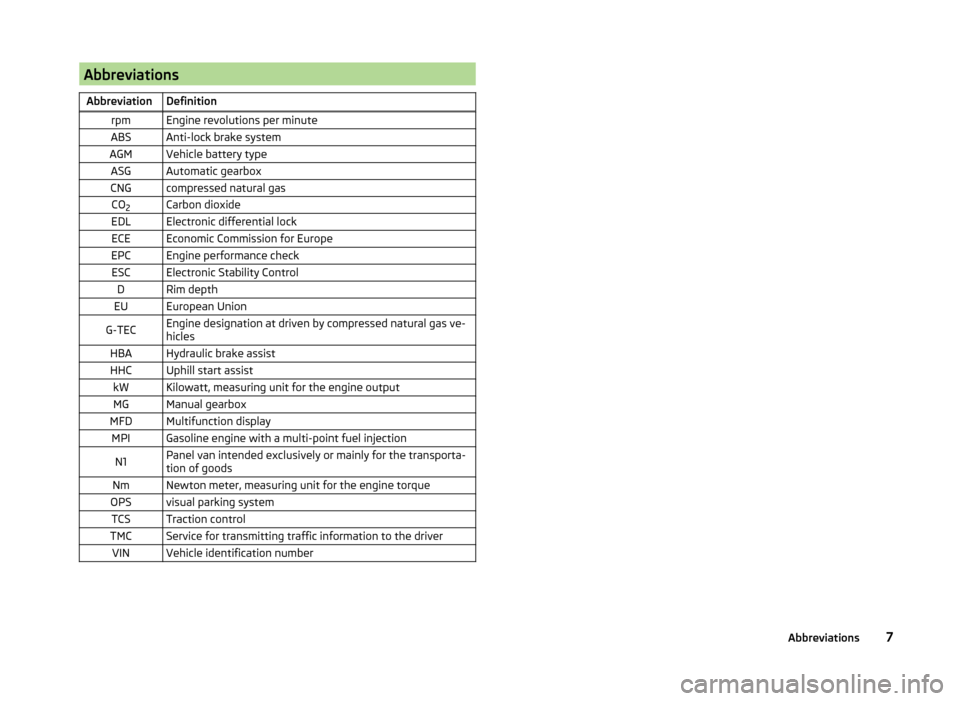
AbbreviationsAbbreviationDefinitionrpmEngine revolutions per minuteABSAnti-lock brake systemAGMVehicle battery typeASGAutomatic gearboxCNGcompressed natural gasCO2Carbon dioxideEDLElectronic differential lockECEEconomic Commission for EuropeEPCEngine performance checkESCElectronic Stability ControlDRim depthEUEuropean UnionG-TECEngine designation at driven by compressed natural gas ve-
hiclesHBAHydraulic brake assistHHCUphill start assistkWKilowatt, measuring unit for the engine outputMGManual gearboxMFDMultifunction displayMPIGasoline engine with a multi-point fuel injectionN1Panel van intended exclusively or mainly for the transporta-
tion of goodsNmNewton meter, measuring unit for the engine torqueOPSvisual parking systemTCSTraction controlTMCService for transmitting traffic information to the driverVINVehicle identification number7Abbreviations
Page 18 of 164

Airbag system
Description of the airbag system
Introduction
This chapter contains information on the following subjects:
System description
15
Airbag deployment
15
The airbag system provides, as a supplement to the seat belts, additional oc-
cupant protection during severe frontal and side collisions.
WARNING■ An airbag can only offer you optimal protection in combination with a
fastened seat belt .■
The airbag is not a substitute for the seat belt, but instead forms part of
the complete passive vehicle safety concept.
■
To ensure passengers are protected with the greatest possible effect
when the airbag is deployed, the front seats must be correctly adjusted to
match the body size » page 9, Correct and safe seated position .
■
If you do not fasten the seat belts when driving, lean too far forward or
adopt an incorrect seated position, you are exposing yourself to increased
risk of injury in the event of an accident.
WARNINGInformation on the use of the airbag system■If there is a fault, the airbag system must be checked by a specialist ga-
rage immediately. Otherwise, there is a risk that the airbag will not be de-
ployed in the event of an accident.■
No modifications of any kind must be made to parts of the airbag system.
■
Any work on the airbag system including the installation and removal of
system components due to other repair work (e.g. removal of the steering
wheel) must only be carried out by a specialist garage.
■
Never make any changes to the front bumper or bodywork.
■
It is prohibited to manipulate individual parts of the airbag system, as this
might result in the airbag being deployed.
■
The protective function of the airbag system is sufficient for only one ac-
cident. The airbag system must then be replaced if the airbag has been de-
ployed.
System description
Read and observe
on page 15 first.
The functional status of the airbag system is indicated by the indicator light
in the instrument cluster » page 38.
When the airbags are deployed, they fill with gas and inflate.
A grey white or red, non-harmful gas is released when the airbag is inflated.
This is perfectly normal and is not an indication of a fire in the vehicle.
Depending on the vehicle equipment, the airbag system consists of the
following modules.
› Electronic control unit.
› Front airbag for the driver and the front passenger
» page 16.
› Side airbags Head-thorax
» page 17;
› Airbag warning light in the instrument cluster
» page 38,
Airbag system
.
› Key switch for the front passenger airbag
» page 18.
› Warning light for the front passenger airbag deactivation/activation in the
middle of the dash panel » page 18.
Note
■
The airbag system needs no maintenance during its working life.■If you sell your vehicle, provide the complete vehicle documentation to the
new owner. Please note that the information relating to the possibility of de-
activating the front passenger airbag must be included!■
When disposing of vehicle or parts of the airbag system, it is important to
comply with the national legal requirements.
Airbag deployment
Read and observe
on page 15 first.
The airbags inflate in fractions of a second and at a high speed in order to beable to offer additional protection in the event of an accident.
The airbag system is only functional when the ignition is switched on.
In certain accident situations, several airbags may be deployed simultaneously.
The airbags are not deployed in the case of minor frontal and side collisions,
rear-end collisions, tilting of the vehicle and vehicle rollover.
15Airbag system
Page 19 of 164

Deployment factors
It is not possible to generally determine which deployment conditions apply to
the airbag system in every situation. An important role is played by factors
such as the type of object that the vehicle hits (hard/soft), the impact angle,
vehicle speed etc.
A decisive factor for the deployment of the airbags is the deceleration which
occurs. The control unit analyses the nature of the collision and activates the
relevant restraint system.
If the vehicle deceleration which occurs and is measured during the collision
remains below the prescribed reference values specified in the control unit,
the airbags are not deployed although the vehicle may well suffer severe dam-
age to the bodywork as a consequence of the accident.
The following airbags will be deployed in the event of a severe frontal
collision.
› Driver’s front airbag.
› Front passenger airbag.
The following airbags will be deployed in the event of a severe side collision.
› Head-Thorax side airbag on the crash side.
When an airbag is deployed, the following events occur.
› The interior lighting illuminates (if the switch for the interior light is in the
door contact position).
› The hazard warning lights are switched on.
› All doors are unlocked.
› The fuel supply to the engine is interrupted.
Airbag overview
Introduction
This chapter contains information on the following subjects:
Front airbags
16
Side airbags Head-Thorax
17Front airbagsFig. 7
Driver airbag in the steering wheel/front passenger airbag in the
dashboard
Fig. 8
Safe distance to steering wheel/gas-filled airbags
In the event of a severe frontal collision, the front airbag system offers addi-
tional protection for the head and chest area of the driver and front passenger.
The front airbag for the driver is housed in the steering wheel » Fig. 7 –
.
The front airbag for the front seat passenger is located in the dash panel
above the stowage compartment » Fig. 7 –
.
When the airbags are deployed, they inflate in front of the driver and front
passenger » Fig. 8 -
. The forward movement of the driver and of the front
passenger is cushioned when they make contact with the fully inflated airbag
and the risk of injury to head and chest is thus reduced.
16Safety
Page 34 of 164

The driving data is displayed on the multifunction display.
The multifunction display only operates if the ignition is switched on. After the ignition is switched on, the function that was last selected before switching
off the ignition is displayed.WARNING■ Concentrate fully at all times on your driving! As the driver you are fully
responsible for the operation of your vehicle.■
Even at temperatures of around +4 °C, black ice may still be on the road
surface! You should therefore not only rely on the outside temperature dis-
play for accurate information as to whether there is ice on the road.
Note
In certain national versions the displays appear in the Imperial system of
measures.
Operation
Fig. 22
Buttons on the control lever
Read and observe on page 31 first.
Some features of the multi-function display can be operated with the buttons
on the control lever » Fig. 22.
Operation description
ButtonActionOperationABriefly push up or downSelect data / set data valuesBPress brieflyView information / confirm specificationMemoryFig. 23
Multi-function display - Display
example of the memory
Read and observe on page 31 first.
The multifunction display is equipped with two automatic memories, 1 and 2.
The display of the selected memory is displayed at the position indicated by
the arrow » Fig. 23.
Single-trip memory
Total trip memory
Select memory
›
Select the corresponding element of the multifunction display » page 32,
Multifunction display details .
›
Confirm details again to select the desired memory.
Reset memory
›
Select the corresponding element of the multifunction display » page 32,
Multifunction display details .
›
Select the desired memory.
›
Press and hold to confirm the selected memory.
The following values of the selected memory are set to zero. › Average fuel consumption.
› Distance driven.
› Average speed.
› Driving time.
Single-trip memory (memory 1)
The single-trip memory collates the driving information from the moment the
ignition is switched on until it is switched off.
New data will also flow into the calculation of the current driving information if
the trip is continued within 2 hours after switching off the ignition.
31Instruments and control lights
Page 36 of 164

The display is updated regularly while you are driving.
Current driving speed
The current speed, which is identical to the display of the speedometer1
» Fig. 19 on page 28 is displayed.
Coolant temperature
The current coolant temperature is displayed.
Warning against excessive speeds
Set the speed limit, for example, for the maximum permissible speed in
town » page 33 , Warning at excessive speeds .
Warning at excessive speeds
Read and observe
on page 31 first.
Adjust the speed limit while the vehicle is stationary
›
Select the menu item (warning when limit is exceeded).
›
Activate the speed limit option by confirming this menu item (the value flash-
es).
›
Set the desired speed limit, e.g. 50 km/h.
›
Store the speed limit by confirming the set value, or wait several seconds;
your settings will be saved automatically.
This allows you to set the speed in 5 km/h intervals.
Adjusting the speed limit while the vehicle is moving
›
Select the menu item (warning when limit is exceeded).
›
Drive at the desired speed, e.g. 50 km/h.
›
Confirm the current speed as the speed limit.
If you wish to adjust the set speed limit, you can do so in 5 km/h intervals (e.g.
the accepted speed of 47 km/h increases to 50 km/h or decreases to 45 km/h).
›
Store the speed limit, or wait several seconds; your settings will be saved au-
tomatically.
Change or disable speed limit
›
Select the menu item (warning when limit is exceeded).
›
By confirming the stored value, the speed limit is disabled.
›
By reconfirming, the option to change the speed limit is activated.
If the set speed limit is exceeded, an audible signal will sound as a warning. At
the same time the message (warning against excessive speed) appears on
the display with the set limit value.
The set driving mode remains stored even after switching the ignition on and
off.
Read and observe on page 31 first.
The time is set as follows.
›
Select the time display on the instrument cluster » page 31, Operation .
›
Press the button
6
» Fig. 19 on page 28 and keep it pressed down until the
time display appears.
›
Press button
3
to change the value. For quick value change, hold down the
button.
›
Press button
6
to select the minutes display until it flashes.
›
Press button
3
to change the value. For quick value change, hold down the
button.
›
Confirm the set value by pressing the button
6
again, or wait for around 5
seconds. The setting is saved automatically (the value stops flashing).
Warning lights
Introduction
This chapter contains information on the following subjects:
Handbrake
34
Braking system
34
Seat belt warning light
34
Alternator
34
Engine oil
35
Coolant
35
Automated transmission
35
Power steering
36
Electronic Stability Control (ESC)
36
Traction Control System (TCS)
36
Antilock brake system (ABS)
37
Tyre pressure
37
Rear fog light
37
Exhaust inspection system
37
Engine performance check
38
Airbag system
38
33Instruments and control lights
Page 39 of 164

If the warning light illuminates after you switch on the ignition, seek assis-
tance from a specialist garage.
If the warning light
or also the warning light
illuminates and an acoustic
signal sounds, this means that the automatic gearbox has overheated.›
Stop and allow the transmission to cool down or drive more quickly than
20 km/h (12 mph).
If the warning light
illuminates repeatedly , park the vehicle, shut off the en-
gine and allow the gearbox to cool down.
Further information » page 80, Automated transmission .
Power steering
Read and observe
on page 34 first.
If the warning light
or
illuminates while driving or after switching on the
ignition does not extinguish, there is an error in the electromechanical power
steering.
If the indicator light
illuminates, this indicates a
complete failure of the
power steering and the steering assist has failed (significantly higher steering
forces).
If the indicator light
illuminates, this indicates a
partial failure of the power
steering and the steering forces can be greater.
›
Stop the car, turn the ignition off and on again.
If the indicator light does not illuminate after the engine has been turned on
again, the power steering is fully operational again.
If the warning light illuminates again, then immediately obtain assistance from
an authorised dealer.
Note
If the vehicle's battery has been disconnected and reconnected, the warning
light illuminates after switching on the ignition. If the warning light does
not extinguish after moving a short distance, this means there is an error in
the system. Seek assistance from a specialist garage immediately. Electronic Stability Control (ESC)
Read and observe
on page 34 first.
The warning light
flashes to show that the ESC is currently operating.
If the warning light
illuminates , there is a fault in the ESC. Seek assistance
from a specialist garage immediately.
As the ESC operates in conjunction with the ABS, the ESC warning light will al-
so come on if the ABS system fails.
If the warning light
illuminates immediately after you start the engine, the
ESC might be switched off due to technical reasons.
›
Switch the ignition off and on again.
If the indicator light
does not illuminate after you switch the engine back
on, the ESC is fully functional again.
Further information » page 84, Electronic Stability Control (ESC) .
Note
If the vehicle's battery has been disconnected and reconnected, the warning
light illuminates after switching on the ignition. If the warning light does
not extinguish after moving a short distance, this means there is an error in
the system. Seek assistance from a specialist garage immediately.
Traction Control System (TCS)
Read and observe
on page 34 first.
The warning light
flashes it shows that the TCS currently operating.
If the warning light
illuminates permanently, there is a fault in the TCS.
Seek assistance from a specialist garage immediately.
The fact that the TCS operates together with the ABS means that the TCS
warning light will also come on if the ABS system is not operating properly.
If the warning light
illuminates immediately after you start the engine, the
TCS might be switched off due to technical reasons.
›
Switch the ignition off and on again.
If the warning light
does not illuminate after you switch the engine back
on, the TCS is fully functional again.
Further information » page 85, Traction Control System (TC) .
36Using the system