2014 PORSCHE 911 TURBO lock
[x] Cancel search: lockPage 83 of 300
Lights, Turn Signals and Windshield Wipers 81
Porsche Dynamic Light System Plus (PDLS Plus)
High Beam Assistant
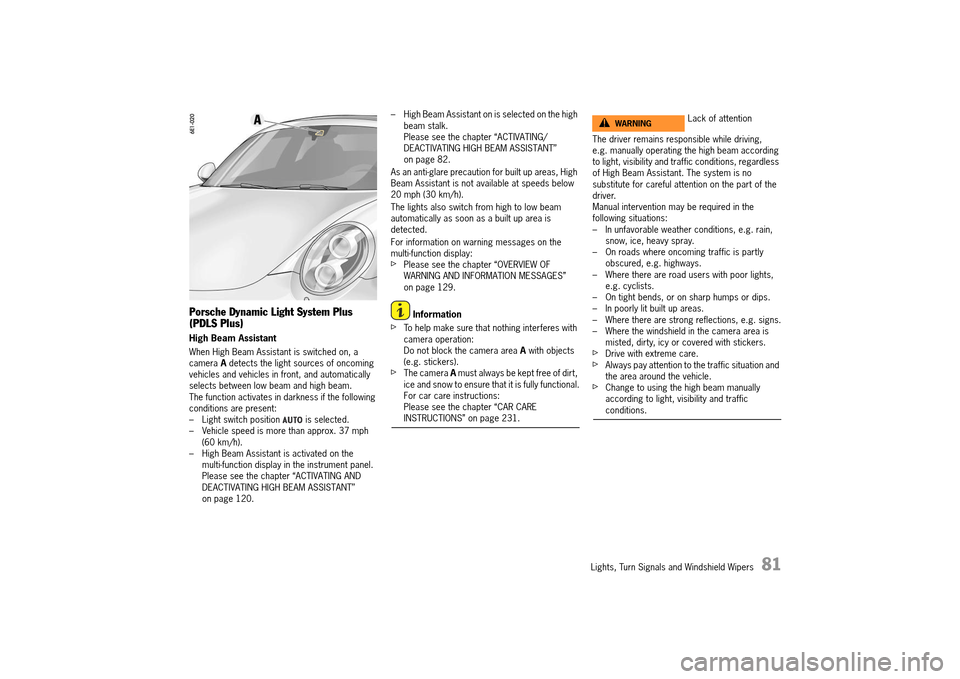
When High Beam Assistant is switched on, a camera A detects the light sources of oncoming vehicles and vehicles in front, and automatically selects between low beam and high beam.The function activates in darkness if the following conditions are present:– Light switch position is selected.– Vehicle speed is more than approx. 37 mph (60 km/h).– High Beam Assistant is activated on the multi-function display in the instrument panel.Please see the chapter “ACTIVATING AND DEACTIVATING HIGH BEAM ASSISTANT” on page 120.
– High Beam Assistant on is selected on the high beam stalk.Please see the chapter “ACTIVATING/DEACTIVATING HIGH BEAM ASSISTANT” on page 82.
As an anti-glare precaution for built up areas, High Beam Assistant is not available at speeds below 20 mph (30 km/h).
The lights also switch from high to low beam automatically as soon as a built up area is detected.
For information on warning messages on the multi-function display:fPlease see the chapter “OVERVIEW OF WARNING AND INFORMATION MESSAGES” on page 129.
Information
fTo help make sure that nothing interferes with camera operation:Do not block the camera area A with objects (e.g. stickers).fThe camera A must always be kept free of dirt, ice and snow to ensure that it is fully functional.For car care instructions: Please see the chapter “CAR CARE INSTRUCTIONS” on page 231.
The driver remains responsible while driving, e.g. manually operating the high beam according to light, visibility and traffic conditions, regardless of High Beam Assistant. The system is no substitute for careful attention on the part of the driver.Manual intervention may be required in the following situations:– In unfavorable weather conditions, e.g. rain, snow, ice, heavy spray.– On roads where oncoming traffic is partly obscured, e.g. highways.– Where there are road users with poor lights, e.g. cyclists.– On tight bends, or on sharp humps or dips.– In poorly lit built up areas.– Where there are strong reflections, e.g. signs.– Where the windshield in the camera area is misted, dirty, icy or covered with stickers.fDrive with extreme care.fAlways pay attention to the traffic situation and the area around the vehicle.fChange to using the high beam manually according to light, visibility and traffic conditions.
Lack of attentionWARNINGh
14_991_Turbo_21.book Seite 81 Mittwoch, 9. April 2014 2:19 14
Page 85 of 300
Lights, Turn Signals and Windshield Wipers 83
Switching on and off (on vehicles WITH High Beam Assistant)
If the High Beam Assistant was deactivated or if the requirements are not met, high beam can be switched on and off manually.
The following conditions must be met: – Darkness– The light switch position is selected.fSwitching on : Push the stalk twice to the front pressure point 3. The indicator light on the tachometer lights up.fSwitching off : Push the stalk once to the rear pressure point 4.
Operating the headlight flasher
fPush the stalk once to the rear pressure point 4. The indicator light on the tachometer lights up briefly.
For information on High Beam Assistant: fPlease see the chapter “HIGH BEAM ASSISTANT” on page 81.
Parking light
The parking light can only be switched on when the ignition is switched off.fMove the stalk up 2 or down 1 to switch on the right or left parking light.
If the parking light is switched on, the message “ Parking light on” will appear on the multi- function display in the instrument panel after the ignition is switched off.
For information on warning messages on the multi- function display:fPlease see the chapter “OVERVIEW OF WARNING AND INFORMATION MESSAGES” on page 129.
Emergency Flasher
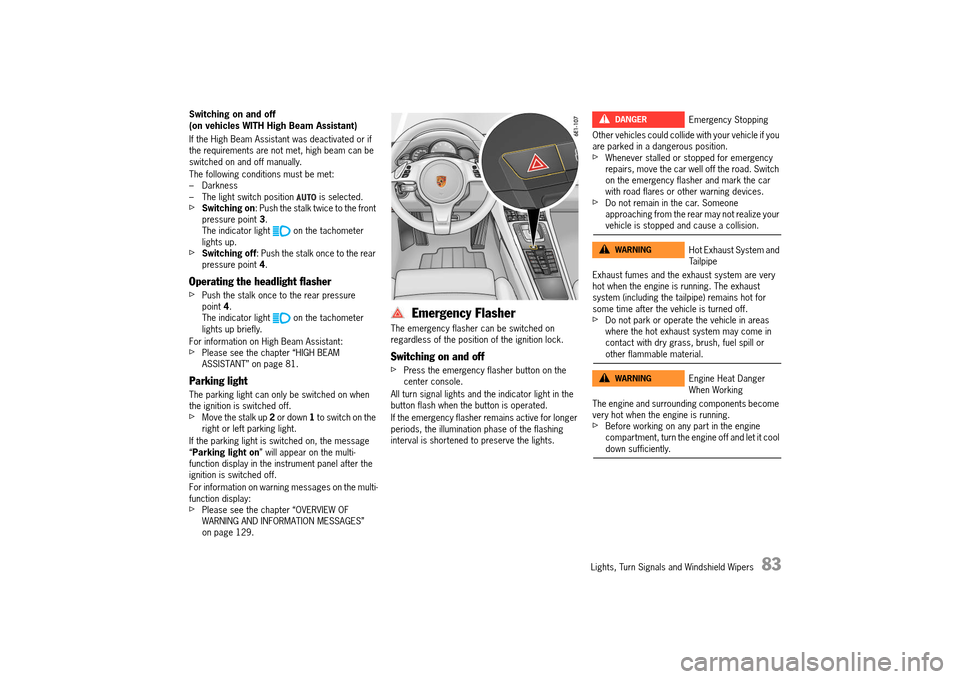
The emergency flasher can be switched on regardless of the position of the ignition lock.
Switching on and off
fPress the emergency flasher button on the center console.
All turn signal lights and the indicator light in the button flash when the button is operated.
If the emergency flasher remains active for longer periods, the illumination phase of the flashing interval is shortened to preserve the lights.
Other vehicles could collide with your vehicle if you are parked in a dangerous position.fWhenever stalled or stopped for emergency repairs, move the car well off the road. Switch on the emergency flasher and mark the car with road flares or other warning devices.fDo not remain in the car. Someone approaching from the rear may not realize your vehicle is stopped and cause a collision.
Exhaust fumes and the exhaust system are very hot when the engine is running. The exhaust system (including the tailpipe) remains hot for some time after the vehicle is turned off.fDo not park or operate the vehicle in areas where the hot exhaust system may come in contact with dry grass, brush, fuel spill or other flammable material.
The engine and surrounding components become very hot when the engine is running.fBefore working on any part in the engine compartment, turn the engine off and let it cool down sufficiently.
Emergency Stopping
Hot Exhaust System and Tailpipe
Engine Heat Danger When Working
DANGERh
WARNINGh
WARNINGh
14_991_Turbo_21.book Seite 83 Mittwoch, 9. April 2014 2:19 14
Page 86 of 300

84 Lights, Turn Signals and Windshield Wipers
A- Button for interior/reading lights B - Switching automatic interior/reading lights on/off
Interior/Reading Lights
Interior/reading lights
Switching interior/reading lights on and off
fPress button A.
Dimming (brightness adjustment)
fPress button A for at least 1 second and hold until the desired level of brightness is achieved.
Switching automatic interior/ reading lights on and off
Depending on equipment, the interior/reading lights can be switched on and off using button B or in the multi-function display menu.
Using button „B“:
fPress button B.
When automatic interior/reading lights are switched off, the indicator light in the button lights up.
When the automatic interior lighting is switched on in darkness, the interior lighting is– switched on: when a door is unlocked or opened, or when the ignition key is removed from the ignition lock.– switched off: when both doors have been closed, after a delay of approx. 120 seconds. The off delay time can be preset on the multi-function display.The interior lighting goes out as soon as the ignition is switched on or the vehicle is locked.fPlease see the chapter “SETTING INTERIOR LIGHTING OFF DELAY” on page 121.
In the multi-function display menu:
On the multi-function display, you can set whether the interior/reading lights should be switched on or remain switched off when a door is unlocked or opened or when the ignition key is removed from the ignition lock:fPlease see the chapter “ACTIVATING OR DEACTIVATING INTERIOR LIGHTS WHEN THE DOOR IS OPENED (DEPENDING ON EQUIPMENT)” on page 120.
The off delay for the interior/reading lights when both doors are closed can be set on the multifunction display:fPlease see the chapter “SETTING INTERIOR LIGHTING OFF DELAY” on page 121.
Switching off of interior/reading lights to protect the battery
In darkness, the interior lighting is switched off 16 minutes after the engine stops to preserve the vehicle battery.
In daylight conditions, interior lights that were switched on manually are switched off automatically after 1 minute.
Orientation lighting
Lights in the overhead operating console and at the ignition lock help vehicle occupants to locate important controls in the vehicle in darkness and ensure better overall orientation. The lights are switched on when the vehicle is unlocked and switched off again automatically when the vehicle is locked.
Dimming (brightness adjustment)
The brightness of the orientation lighting is adjusted on the multi-function display.fPlease see the chapter “ADJUSTING BRIGHTNESS OF ORIENTATION LIGHTING” on page 121.
Ambient lighting
If the vehicle is driven at night, a discreet light provides subtle illumination for the passenger compartment. The ambient lighting is switched off automatically when the vehicle is locked.
14_991_Turbo_21.book Seite 84 Mittwoch, 9. April 2014 2:19 14
Page 101 of 300

Instrument Panel and Multi-Function Display 99
Info
Oil measurement LimitsSettings
Station/Track
Answer/Reject/End
Phonebook
Previous calls
Received calls
Manual zoom Auto zoom3D map North up
Show destination/position
Destination input
Start/Stop route guidance
Since
Total
To destination
Fill info Tire typePartial/full load Comfort/standard pressure
Start StopRoundInt.
Torque
Current speed
Setting the speed
Menu scope
Audio
Vehicle menu
Upper line
PCM display
Lower line
Shift request
Brightness
Exterior lights
Interior lights
Wiper
Revers. opt.
Door lock/unlock
Comfort Entry
Auto Memory
Air flow
Vent. panel
Auto air circ.
Time
Date
DST (+01:00)
Time Chrono
Speedometer
Temperature
Tire pressure
Consumption
German/French...
ParkAssist
Warn. tones
◊ button
Messages
Service interval
Limit 1/Limit 2
Display
Light & Visibility
Locking
Air conditioning
Date & Time
Units
Language
Volume
Steering wheel op.
Fact. settings
Last destination
Stored destinations
POIs
Cont.
Reset
Vehicle
Audio
Telephone
Map
Navigation
Trip
Tire pressure
Allwheel
Chrono
G-Force
Performance
ACC
14_991_Turbo_21.book Seite 99 Mittwoch, 9. April 2014 2:19 14
Page 124 of 300

122 Instrument Panel and Multi-Function Display
Adjusting reversing options
You can configure the exterior mirror to lower automatically when reverse gear is engaged.
Lowering exterior mirror on passenger’s side when parking
You can configure the door mirror on the passenger’s side to tilt downwards automatically when reverse gear is engaged to provide a better view of the curb.
Locking settings
The locking and unlocking settings on the vehicle can be adjusted.The Easy Entry function can be switched on and off.
Setting door unlocking
You can configure specific doors to unlock when the vehicle is unlocked.
Available setting options: –“ All doors” All doors are unlocked when the vehicle is unlocked.–“ Driver’s door” The driver’s door is unlocked when the vehicle is unlocked.
Setting door locking
You can configure the doors to remain unlocked or lock automatically after a delay on entering the vehicle.
Available setting options: –“ Off” The doors are not locked automatically after entering the vehicle.–“ After ign. on” The doors are locked automatically when the ignition is switched on.–“ After drive-off” The doors are locked automatically after driving off.
Switching Comfort Entry on and off
You can configure the driver’s seat and steering wheel to move back automatically and allow the driver to get in and out of the vehicle more easily.
1. Main menu “Vehicle” > “ Settings” > “ Light & Visibility” > “ Revers. opt.” and confirm.
1. Main menu “Vehicle” > “ Settings” > “ Light & Visibility” > “ Revers. opt.” and confirm.
2. Select “Lowering mirr.”. in the main menu.
3. Confirm your selection.
Exterior mirror is lowered.
Exterior mirror is not lowered.
1. Main menu “Vehicle” > “ Settings” > “ Locking” and confirm.
1. Main menu “Vehicle” > “ Settings” > “ Locking”
2.“Door unlock” and confirm.
3. Select the desired setting and confirm.
1. Main menu “Vehicle” > “ Settings” > “ Locking”
2.“Door lock” and confirm.
3. Select the desired setting and confirm.
1. Main menu “Vehicle” > “ Settings” > “ Locking”
2.Select “Comfort Entry”. in the main menu.
3. Confirm your selection.
Comfort Entry is activated.
Comfort Entry is deactivated.
14_991_Turbo_21.book Seite 122 Mittwoch, 9. April 2014 2:19 14
Page 125 of 300

Instrument Panel and Multi-Function Display 123
Switching Auto Memory on and off
It is possible to determine whether personal settings are to be stored automatically on the car key when locking the vehicle.
For further information on storing and retrieving personal settings:fPlease see the chapter “STORING PERSONAL SETTINGS” on page 143.
Folding exterior mirrors in and out automatically
You can configure the exterior mirrors to fold in automatically when the vehicle is locked.
Setting air conditioning
The automatic air conditioning can be changed individually.
Adjusting air flow
The strength of the air flow and the air quantity can be adjusted.
Available setting options: –“ Soft” –“ Normal” –“ Strong”
Switching extended ventilation panel on and off
The extended ventilation panel on top of the dashboard can be switched on or off.
Switching automatic air-recirculation mode on/off
You can configure the fresh air supply to adjust automatically to the air quality.
1. Main menu “Vehicle” > “ Settings” > “ Locking”
2.Select “ Auto Memory”.
3.Confirm your selection.
Auto Memory is activated.
Auto Memory is deactivated.
1. Main menu: Select “Vehicle” > “ Settings” > “ Locking”
2.Select “Mirror retract”.
3.Confirm your selection.
Exterior mirrors are folded in.
Exterior mirrors are not folded in.
1. Main menu “Vehicle” > “ Settings” > “ Air conditioning” and confirm.
1. Main menu “Vehicle” > “ Settings” > “ Air conditioning”
2.“Climate style” and confirm.
3. Select the desired setting and confirm.
1. Main menu “Vehicle” > “ Settings” > “ Air conditioning”
2.Select “Vent. panel”. in the main menu.
3. Confirm your selection.
Ventilation panel is activated.
Ventilation panel is deactivated.
1. Main menu “Vehicle” > “ Settings” > “ Air conditioning”
2.Select “Automatic air circ.”. in the main menu.
3. Confirm your selection.
Automatic air-recirculation mode is activated
Automatic air-recirculation mode is deactivated
14_991_Turbo_21.book Seite 123 Mittwoch, 9. April 2014 2:19 14
Page 126 of 300

124 Instrument Panel and Multi-Function Display
Setting date and time
The date and time displays on the vehicle can be adjusted individually.
Information
On vehicles with Porsche Communication Management (PCM), the date and time are set and synchronized automatically by satellite navigation signals (GPS).Some setting options may be temporarily unavailable, depending on satellite signal reception.
Setting the time
The time, time format and time zone can be set in the “ Time” menu.
Displaying GPS time
The time can be synchronized via the GPS signal and displayed.
Setting the time format
The time can be displayed in 12-hour or 24-hour format.
Available setting options: –“ 12h” –“ 24h”
Setting current time
On vehicles without Porsche Communication Management (PCM), the hours and minutes can be set separately when setting the time.
Setting time zone
The time zone of the vehicle clock can be set individually on vehicles with Porsche Communication Management (PCM).
1. Main menu “Vehicle” > “ Settings” > “ Date & Time” and confirm.
1. Main menu “Vehicle” > “ Settings” > “ Date & Time” > “ Time” and confirm.
1. Main menu “Vehicle” > “ Settings” > “ Date & Time” > “ Time”
2.Select “GPS time”.
3.Confirm your selection.
Time synchronized with GPS.
Time not synchronized with GPS.
1. Main menu “Vehicle” > “ Settings” > “ Date & Time” > “ Time”
2.“Format” and confirm.
3. Select the desired setting and confirm.
1. Main menu “Vehicle” > “ Settings” > “ Date & Time” > “ Time”
2.Select “Hour/Minute”. in the main menu.
3. Set the desired time and confirm the setting.
1. Main menu “Vehicle” > “ Settings” > “ Date & Time” > “ Time”
2.Select “Zone” and confirm.
3. Set the desired time zone and confirm.
14_991_Turbo_21.book Seite 124 Mittwoch, 9. April 2014 2:19 14
Page 127 of 300

Instrument Panel and Multi-Function Display 125
Setting the date
The date and date format can be changed in the “ Date” menu.
Setting the date format
The date format can be adjusted.
Available setting options: –“ DD.MM.YYYY” –“ MM/DD/YYYY” –“ YYYY/MM/DD”
Setting the current date
The day, month and year can be set individually on vehicles without the navigation module.
Setting Daylight Saving Time
The vehicle clock can be configured to change to Daylight Saving Time.
Displaying time in stopwatch on dashboard
You can configure the stopwatch on the dashboard to display the time.
Setting units
You can select the units of measurement for vehicle displays such as the speed on the digital speedometer in the instrument panel, the temperature gauge in the air-conditioning displays and the tire pressure display on the multi-function display.
1. Main menu “Vehicle” > “ Settings” > “ Date & Time” > “ Date” and confirm.
1. Main menu “Vehicle” > “ Settings” > “ Date & Time” > “ Date”
2.“Format” and confirm.
3. Select the desired setting and confirm.
1. Main menu “Vehicle” > “ Settings” > “ Date & Time” > “ Date” and confirm.
2. “Date”. in the main menu.
3. Set the desired date and confirm the setting.
1. Main menu “Vehicle” > “ Settings” > “ Date & Time”
2.Select “ DST (+01:00)”
3.Confirm your selection.
Daylight Saving Time is activated.
Daylight Saving Time is deactivated.
1. Main menu “Vehicle” > “ Settings” > “ Date & Time”
2.Select “Time – Chrono” in the main menu.
3. Confirm your selection.
Time is displayed.
Time is not displayed.
1. Main menu “Vehicle” > “ Settings” > “ Units” and confirm.
14_991_Turbo_21.book Seite 125 Mittwoch, 9. April 2014 2:19 14