2014 PORSCHE 911 TURBO lights
[x] Cancel search: lightsPage 122 of 300

120 Instrument Panel and Multi-Function Display
Adapting lower status area
You can assign the current time and outside temperature to the lower status area B in the multi-function display.
Available display contents: –“ Time” –“ Temperature” –“ Time & Temp.”
Adjusting display brightness
The brightness of the multi-function display can be adjusted to suit individual requirements.
Light and visibility settings
The exterior lights, interior lighting and visual aids for reversing the vehicle can be adapted individually.
Adjusting exterior lights
You can adapt the exterior light functions on the vehicle e.g. off delays of the Welcome Home and Entry functions in the “ Exterior lights” menu.
Activating and deactivating High Beam Assistant
High Beam Assistant can be activated and deactivated. The settings remain stored when the ignition is switched on and off.
Adjusting off delay for Welcome Home and Entry functions
The off delay of the Welcome Home and Entry functions can be adapted individually.
Adjusting interior lights
Interior light functions on the vehicle can be adapted individually in the “ Interior lights” menu.
Activating or deactivating interior lights when the door is opened (depending on equipment)
You can configure the interior lights to be switched on when the door is opened.
1. Main menu “Vehicle” > “ Settings” > “ Display”
2.“Lower line” and confirm.
3. Select the desired display contents and confirm.
1. Main menu “Vehicle” > “ Settings” > “ Display”
2.“Brightness” and confirm.
3. Adjust to the desired display brightness and confirm the setting.
1. Main menu “Vehicle” > “ Settings” > “ Light & Visibility” and confirm.
1. Main menu “Vehicle” > “ Settings” > “ Light & Visibility” > “ Exterior lights” and confirm.
1. Main menu: Select “Vehicle” > “ Settings” > “ Light & Visibility” > “ Exterior lights”
2.Select “High beam assist.”
3.Confirm your selection.
High Beam Assistant is activated.
High Beam Assistant is deactivated.
1. Main menu “Vehicle” > “ Settings” > “ Light & Visibility” > “ Exterior lights”
2.“Fade-out” and confirm.
3. Set desired off delay and confirm the setting.
1. Main menu: Select “Vehicle” > “ Settings” > “ Light & Visibility” > “ Interior lights” and confirm.
1. Main menu “Vehicle” > “ Settings” > “ Light & Visibility” > “ Interior lights”
2.Select “by opening door” in the display.
14_991_Turbo_21.book Seite 120 Mittwoch, 9. April 2014 2:19 14
Page 123 of 300

Instrument Panel and Multi-Function Display 121
Adjusting brightness of orientation lighting
The brightness of the orientation lighting can be adapted individually.
Ambient lighting
The brightness of the ambient lighting can be adapted individually.
Setting interior lighting off delay
The off delay for the lighting in the passenger compartment after closing the vehicle doors can be adapted individually.
Setting activation of the rear wiper when reverse gear is engaged
You can configure the rear wiper to automatically perform a series of wipes when it is raining when reverse gear is engaged.
Available setting options: –“ Automatic” The rear wiper performs a series of wipes when reverse gear is engaged.–“ Manual” The rear wiper is not activated when reverse gear is engaged.
Activating and deactivating rain sensor operation
You can configure the windshield wiper to adjust its speed automatically when it is raining.
Available setting options: –“ Automatic” Wiper speed is adjusted automatically.–“ Manual” Wiper speed must be adjusted manually using the wiper stalk.
3. Confirm your selection.
Interior lights are activated.
Interior lights are deactivated.
1. Main menu “Vehicle” > “ Settings” > “ Light & Visibility” > “ Interior lights”
2.“Ambient light” and confirm.
3. Adjust to the desired brightness and confirm the setting.
1. Main menu “Vehicle” > “ Settings” > “ Light & Visibility” > “ Interior lights”
2.Select “Ambient light” and confirm.
3. Adjust to the desired brightness and confirm the setting.
1. Main menu “Vehicle” > “ Settings” > “ Light & Visibility” > “ Interior lights”
2.“Fade-out” and confirm.
3. Set desired off delay and confirm the setting.
1. Main menu “Vehicle” > “ Settings” > “ Light & Visibility” > “ Wiper”
2.“Rear wiper” and confirm.
3. Select the desired setting and confirm.
1. Main menu “Vehicle” > “ Settings” > “ Light & Visibility” > “ Wiper”
2.Select “Rain sensor” and confirm.
3. Select the desired setting and confirm.
14_991_Turbo_21.book Seite 121 Mittwoch, 9. April 2014 2:19 14
Page 139 of 300
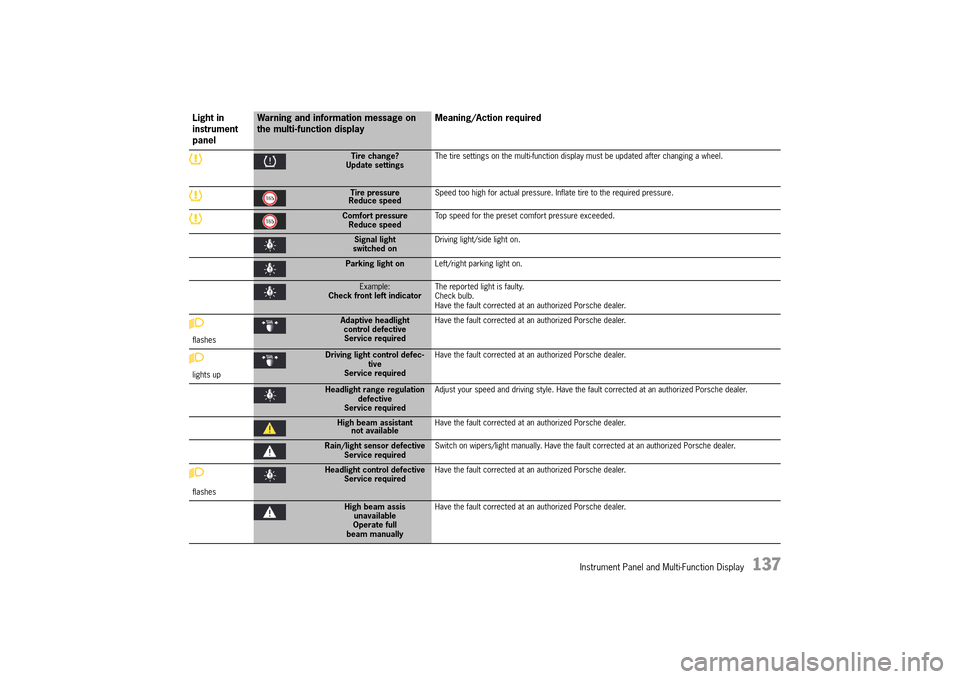
Instrument Panel and Multi-Function Display 137
Tire change? Update settings The tire settings on the multi-function display must be updated after changing a wheel.
Tire pressure Reduce speed Speed too high for actual pressure. Inflate tire to the required pressure.
Comfort pressure Reduce speed Top speed for the preset comfort pressure exceeded.
Signal light switched on Driving light/side light on.
Parking light on Left/right parking light on.
Example: Check front left indicator The reported light is faulty. Check bulb.Have the fault corrected at an authorized Porsche dealer.
flashes
Adaptive headlight control defectiveService required
Have the fault corrected at an authorized Porsche dealer.
lights up
Driving light control defec- tiveService required
Have the fault corrected at an authorized Porsche dealer.
Headlight range regulation defectiveService required
Adjust your speed and driving style. Have the fault corrected at an authorized Porsche dealer.
High beam assistant not available Have the fault corrected at an authorized Porsche dealer.
Rain/light sensor defective Service required Switch on wipers/light manually. Have the fault corrected at an authorized Porsche dealer.
flashes
Headlight control defective Service required Have the fault corrected at an authorized Porsche dealer.
High beam assis unavailableOperate fullbeam manually
Have the fault corrected at an authorized Porsche dealer.
Light in instrument panel
Warning and information message on the multi-function display Meaning/Action required
14_991_Turbo_21.book Seite 137 Mittwoch, 9. April 2014 2:19 14
Page 146 of 300

144 Personal Settings
Information
If the “ Auto Memory” function is activated, the settings stored manually on the key are overwritten each time the vehicle is locked.
Storage by pressing key button in the driver’s door
fThe ignition must be switched on.1. Press the SET button. The LED in the button lights up.2. Press key button within 10 seconds. 3. The ergonomic and comfort settings (key- specific) are stored. Storage is acknowledged acoustically and the LED in the SET button goes out.
In what situation is it useful to store the settings on key button ?
You would like to store/retrieve some of the settings when stationary or during driving and not only when locking/unlocking the vehicle. Ensure that the “ Auto Memory” function is deactivated. Otherwise, the settings will be overwritten when locking the vehicle.
Retrieving the settings from the car key
Ergonomic and comfort settings can be individually retrieved from the car key.
Automatic retrieval through unlocking of the vehicle
The settings are retrieved from the car key being used when the vehicle is unlocked and the driver's door is opened.
By pressing key button in the driver’s doorfPress and hold key button until all settings are retrievedorfWith the driver’s door open and the ignition switched off, briefly press key button . The settings are automatically retrieved.
Why do the settings on key button not correspond to the ones I have stored?
If the “ Auto Memory” function is activated in the multi-function display, all the ergonomic and comfort settings are stored on the key when locking the vehicle. Settings stored on key button are overwritten in the process.
Storing settings on buttons 1 and 2
Ergonomic settings can be individually assigned to buttons 1 and 2 in the driver’s door.fThe ignition must be switched on. 1. Press the SET button. The LED in the button lights up.2. Press button 1 or 2 or within 10 seconds. 3. The ergonomic settings are stored on the relevant button. Storage is acknowledged acoustically and the LED in the SET button goes out.
Retrieving settings with buttons 1 or 2
Retrieve ergonomic settings with buttons 1 or 2 in the driver's door.
fPress and hold button 1 or 2 until all settings are retrievedorfWith the driver’s door open and the ignition switched off, briefly press button 1 or 2. The settings are automatically retrieved or
Preventing automatic storage of settings on car key when locking
This function must be deactivated on the multi- function display.
For information on switching the automatic storage function on and off:fPlease see the chapter “SWITCHING AUTO MEMORY ON AND OFF” on page 123.
14_991_Turbo_21.book Seite 144 Mittwoch, 9. April 2014 2:19 14
Page 149 of 300

Driving and Driving Safety 147
Ignition lock position 0 – Ignition off (initial position)
The engine and ignition are off in ignition lock position 0. The ignition key can be removed in this position.
Ignition lock position 1 – Ignition on
fTurn ignition key to position 1.
All electrical equipment can be switched on. The warning lights on the instrument panel light up for a lamp check.fPlease see the chapter “INSTRUMENT PANEL USA MODELS” on page 90.
If a load is not switched on for 10 minutes after switching on the ignition, the ignition must be switched on again. Turn the ignition key to ignition lock position 0 (initial position) first.
The ignition key cannot be removed when the ignition is switched on or when the engine has been started.
To remove the ignition key: fStop the vehicle.fMove PDK selector lever to position P.fSwitch ignition off.fRemove the ignition key.
Ignition lock position 2 – Start engine
fTurn ignition key to ignition lock position 2.
The key is reset automatically from position 2 to position 1 when you start the engine.
Emergency operation with Porsche Entry & Drive
Interference in radio transmission between the vehicle and ignition lock or a discharged ignition lock battery can disable the Porsche Entry & Drive comfort function.
If this happens, the control unit can be removed from the ignition lock and the vehicle can be started using the ignition key.
For information on removing the control unit from the ignition lock: fPlease see the chapter “EMERGENCY OPERATION – UNLOCKING THE IGNITION KEY/CONTROL UNIT” on page 28.
Starting and Stopping the Engine
The immobilizer can be deactivated and the engine started only using an authorized ignition key.fPlease see the chapter “IMMOBILIZER” on page 217.
Exhaust gas contains colorless and odorless carbon monoxide (CO), which is toxic even in low concentrations. Carbon monoxide can cause unconsciousness and even death if inhaled.fNever start or let the engine running in an enclosed, unventilated area. It is not recommended to sit in your car for prolonged periods with the engine on and the car not moving.
Exhaust fumes and the exhaust system are very hot when the engine is running. The exhaust system remains hot for some time after the engine is turned off.fDo not park or drive your vehicle where combustible materials, such as dry grass or leaves, can come into contact with the hot exhaust system.fIf your car catches on fire for any reason, call the fire department. Do not endanger your life by attempting to put out the fire.
Exhaust Gas
Exhaust System Fire Hazard
WARNINGh
WARNINGh
14_991_Turbo_21.book Seite 147 Mittwoch, 9. April 2014 2:19 14
Page 150 of 300

148 Driving and Driving Safety
An unattended vehicle with a running engine is potentially hazardous. If warning lights come on to indicate improper operation, no one would be present to observe the light and turn off the engine.fNever leave the engine idling unattended.
Starting the vehicle
fOperate the footbrake.fMove PDK selector lever to the P or N position.fDo not press the accelerator pedal.The engine control unit will provide the correct starting mixture.fTurn the ignition key or control unit (Porsche Entry & Drive) to ignition lock position 2. The starting process is carried out and completed automatically as soon as ignition lock position 2 (start engine) is reached. The ignition key or control unit is reset automatically to ignition lock position 1 (ignition on).fDo not operate the starter for more than approx. 10 seconds. If necessary, repeat the starting procedure after a pause of approx. 10 seconds. Turn the ignition key back to ignition lock position 0 (initial position) first. The first operation of the starter is ended automatically when the engine starts.If the engine does not start, subsequent starter operations will not be ended automatically.fDo not warm up the engine when stationary. Drive off immediately. Avoid high revs and full throttle until the engine has reached operating temperature.
fIf the vehicle battery power is too weak, the engine can be started with jump leads.
For information on jump-lead starting: fPlease see the chapter “EXTERNAL POWER SUPPLY, EMERGENCY STARTING WITH JUMPER CABLES” on page 273.
Information
To ensure a good battery charge condition, thereby ensuring that the battery will start the engine, all electrical loads that are not required should be switched off when the ignition is switched on and when engine revs are low (in traffic jams, in city traffic or in lines).
Stopping
fOnly remove the ignition key when the vehicle is stationary.fOnly switch the ignition off when the vehicle is stationary, as there is no power steering and brake booster assistance when the engine is switched off.fWhen leaving the vehicle, always remove the ignition key, apply the electric parking brake and engage selector-lever position P. The control unit always remains in the ignition lock on vehicles with Porsche Entry & Drive.
Engine components become very hot when the engine is running.fBefore working on any part in the engine compartment, turn the engine off and let it cool down sufficiently.
The exhaust pipe is hot when the engine is running and remains hot for some time after the vehicle is turned off. fTo prevent injury, make a point of noting where your vehicle’s exhaust pipe is, avoid placing your legs near the exhaust pipe when loading and unloading cargo in the rear, and closely supervise children around the vehicle during time when the exhaust pipe could be hot. A hot exhaust pipe can cause painful skin burns.
Radiator fan
The fan can start running depending on the temperature, even with the engine switched off.fExercise extreme care that parts of the body, articles of clothing or jewelry do not get caught in the radiator fan. fExercise extreme caution when working in the area of the radiator fans.
For information on radiator fans:fPlease see the chapter “RADIATOR FAN, ENGINE COMPARTMENT BLOWERS” on page 221.
NOTICE
Hot Engine PartsWARNINGh
Hot Exhaust Tailpipe
Radiator Fan
WARNINGh
WARNINGh
14_991_Turbo_21.book Seite 148 Mittwoch, 9. April 2014 2:19 14
Page 151 of 300

Driving and Driving Safety 149
Auto Start Stop function
The engine stops automatically when the vehicle is
stopped, e.g. at traffic lights or in a traffic jam, if all the preconditions for stopping the engine automatically are met. The engine can also stop automatically
during a stop at walking pace. The Auto Start Stop function thus helps to save fuel.
The ignition stays on even when the engine switches off automatically. All safety functions are still available.
Preconditions for stopping the engine automatically
– Auto Start Stop function switched on. – Engine compartment lid closed.– Brake pedal pressed– Move PDK selector lever to the D, N or P position, or to a manually selected transmission range 1 or 2. – Engine, transmission and air conditioning are at operating temperature.– Battery has reached its target voltage.– Vehicle was driven at a speed of more than approx. 1 mph (2 km/h) for at least 1.5 seconds since the engine last stopped automatically.
Information
When the ignition is on, the battery is discharged. If the vehicle is parked for an extended period, the battery can discharge fully and be damaged (exhaustive discharge).
Stopping the engine
The Auto Start Stop function stops the engine once the vehicle stops moving or during the stopping process.1. Use the footbrake to stop the vehicle. 2. Keep the footbrake pressed. orMove PDK selector lever to position P.
Information
– The engine can also be stopped subsequently (not immediately after the vehicle comes to a stop) if the exceptions are set aside and the preconditions for stopping the engine automatically continue to be met.fPlease see the chapter “EXCEPTIONS FOR THE AUTO START STOP FUNCTION” on page 150.– When adaptive cruise control is switched on, the engine stops automatically when the vehicle is stationary if the vehicle in front also comes to a stop.
Starting the engine
The Auto Start Stop function starts the engine:fIn PDK selector-lever position D, N or manually selected transmission range 1 or 2: Release the footbrake.orPress the accelerator.orMove the steering wheel.orMove PDK selector lever to position R.
You can drive off normally.
Information
When adaptive cruise control is switched on, the engine starts automatically if the following preconditions are met:– The vehicle in front drives off.orThe accelerator is pressed.orSpeed and distance control is resumed using the control stalk (position 4, RESUME).fPlease see the chapter “INTERRUPTING AND RESUMING CRUISE CONTROL AND DISTANCE CONTROL” on page 164.– Switching off adaptive cruise control starts the engine automatically and the vehicle moves (crawls) when in gear.
14_991_Turbo_21.book Seite 149 Mittwoch, 9. April 2014 2:19 14
Page 152 of 300

150 Driving and Driving Safety
Information
The engine will start automatically in certain situations, e.g. if the vehicle starts rolling, if air conditioning causes reduced comfort, or if the brake vacuum is reduced.The engine is stopped again automatically if the preconditions for stopping the engine automatically are then met again.
Exceptions for the Auto Start Stop function
The Auto Start Stop function is deactivated e.g.: – When Sport mode is activated.– When PSM is off.– In maneuvering mode.– When A/C MAX mode is activated.– When the “Windshield defrost” function is active. – At altitudes above approx. 9,843 ft. (3,000 meters)
For information on switching on and off the Auto Start Stop function:fPlease see the chapter “SWITCHING AUTO START STOP FUNCTION AND COASTING MODE ON AND OFF” on page 150.
The Auto Start Stop function is available with limited functionality in the following situations, e.g.:– If the air conditioning or passenger compartment heating is operated at a high setting or if the defrost function is run for long time periods.– If the battery charging condition is low.– On upward or downward slopes.– During internal vehicle test procedures, e.g. automatic engine checks.
Information
If one of these situations arises after the engine has stopped automatically, the engine can be restarted automatically.
Reaction after leaving the vehicle (selector-lever position D or N selected)
If the vehicle is left after an automatic stop when PDK selector-lever position D or N is engaged, an automatic engine start is executed to remind the driver that the Auto Start Stop function is still active.
In selector-lever position D, the electric parking brake is additionally engaged.
The brake warning light on the instrument panel and the indicator light on the switch light up.fPlease see the chapter “OVERVIEW OF WARNING AND INFORMATION MESSAGES” on page 129.
Reaction after leaving the vehicle (selector-lever position P selected)
If the vehicle is left after an automatic stop when PDK selector-lever position P is engaged, in order to open the garage door, for example, no automatic engine start is executed. Auto Start Stop mode is resumed if the driver closes the driver’s door and presses the brake within 30 seconds of leaving the vehicle.
If one of these requirements is not met, the engine has to be started manually. The
message “ Please start engine manually” will appear on the multi-function display in the instrument panel.fPlease see the chapter “OVERVIEW OF WARNING AND INFORMATION MESSAGES” on page 129.
Switching Auto Start Stop function and coasting mode on and off
Switching off
fPress button . The indicator light on the button lights up.Automatic stopping of the engine is suppressed and gliding mode is switched off.
Switching on
fPress button . The indicator light on the button goes out.The engine is automatically stopped when the vehicle stops and gliding mode is switched on.fPlease see the chapter “DRIVING IN COASTING MODE” on page 174.
14_991_Turbo_21.book Seite 150 Mittwoch, 9. April 2014 2:19 14