Page 29 of 389
1
Monitoring27
Instrument panels
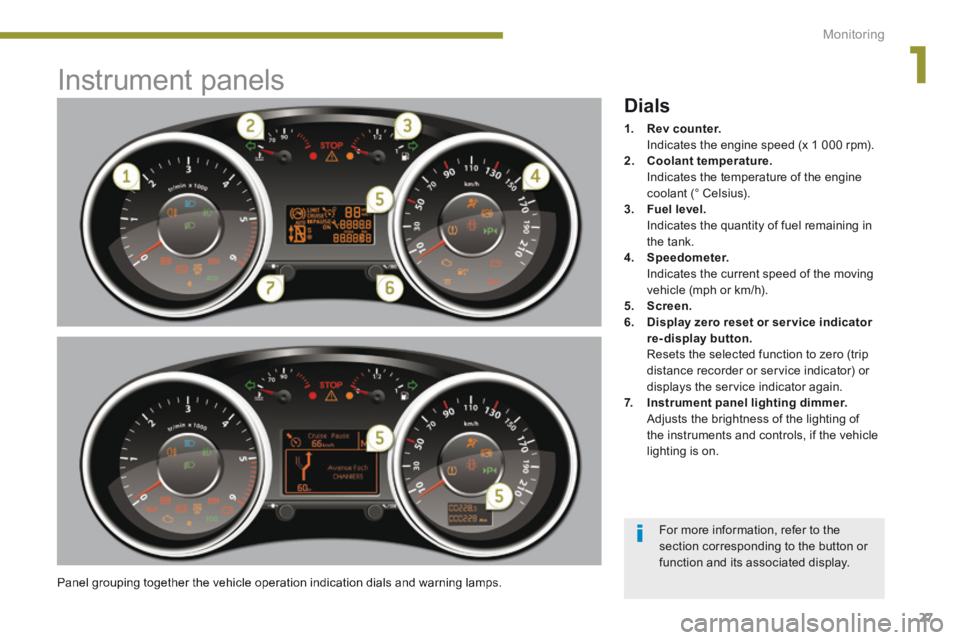
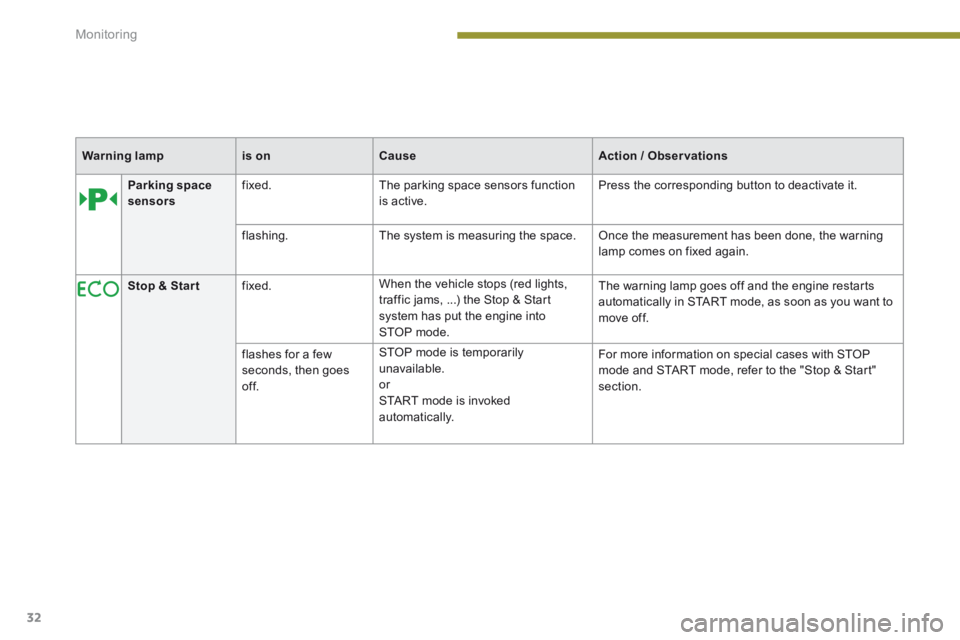
Panel grouping together the vehicle operation indication dials and warning lamps.
Dials
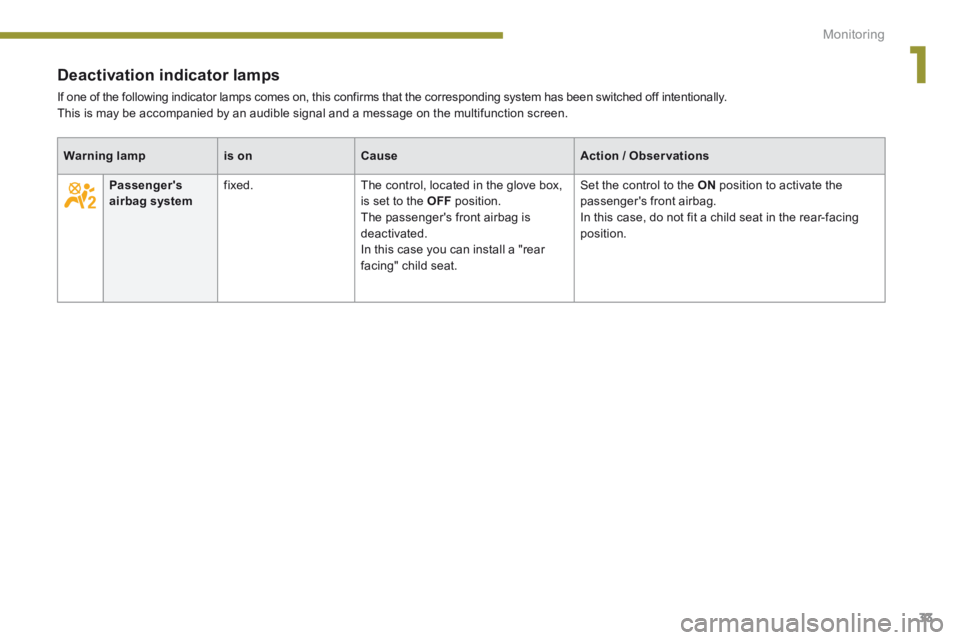
1. Rev counter. Indicates the engine speed (x 1 000 rpm). 2. Coolant temperature. Indicates the temperature of the engine coolant (° Celsius). 3. Fuel level. Indicates the quantity of fuel remaining in the tank. 4. Speedometer. Indicates the current speed of the moving vehicle (mph or km/h). 5. Screen.6. Display zero reset or ser vice indicator re-display button. Resets the selected function to zero (trip distance recorder or service indicator) or displays the service indicator again. 7. Instrument panel lighting dimmer. Adjusts the brightness of the lighting of the instruments and controls, if the vehicle lighting is on.
For more information, refer to the section corresponding to the button or function and its associated display.
Page 30 of 389
Monitoring
28
Screen(s)
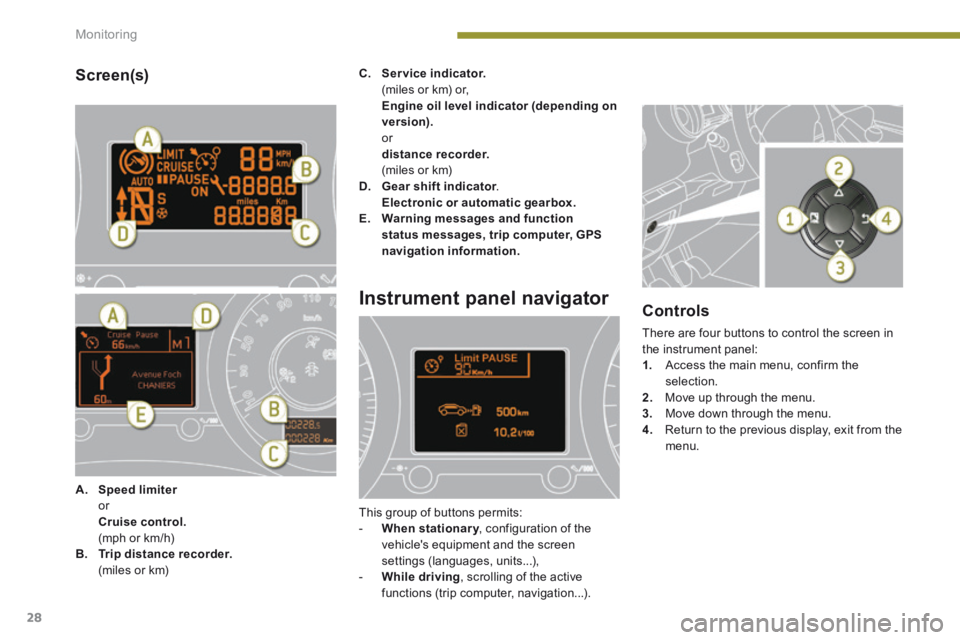
A. Speed limiter Speed limiter Speed limiter or Cruise control. (mph or km/h) B. Trip distance recorder. (miles or km)
C. Service indicator. (miles or km) or, Engine oil level indicator (depending on version). or distance recorder. (miles or km) D. Gear shift indicator . Gear shift indicator . Gear shift indicator Electronic or automatic gearbox.E. Warning messages and function status messages, trip computer, GPS navigation information.
Instrument panel navigator
This group of buttons permits: - When stationary , configuration of the When stationary , configuration of the When stationary
vehicle's equipment and the screen settings (languages, units...), - While driving , scrolling of the active functions (trip computer, navigation...).
Controls
There are four buttons to control the screen in the instrument panel: 1. Access the main menu, confirm the selection. 2. Move up through the menu. 3. Move down through the menu.
4. Return to the previous display, exit from the menu.
Page 31 of 389

1
Monitoring29
Vehicle parameters
This menu allows you to activate or deactivate certain driving and comfort equipment * : - wiper linked with reverse gear (refer to the "Visibility" section), - selective unlocking (refer to the "Access" section), - guide-me-home and welcome lighting (refer to the " Visibility" section), - interior mood lighting (refer to the "Visibility" section), - directional headlamps (refer to the "Visibility" section),
- automatic or manual parking brake (refer to the "Driving" section).
Choice of units
This menu allows you to select the units: temperature (°Celsius or °Fahrenheit) and fuel consumption (l/100 km, mpg or km/l).
Choice of language
This menu allows you to select the display language.
Main menu
Press button 1 for access to the main menu and select one of the following functions: - " Vehicle parameters", - "Choice of language", - "Choice of units". Press button 2 or 3 to move in the screen. Press button 1 again to confirm the selection.
Indicator and warning lamps
When the ignition is switched on
Certain warning lamps come on for a few seconds when the vehicle's ignition is switched on. When the engine is started, these same warning lamps should go off. If they remain on, before moving off, refer to the information on the warning lamp concerned.
Associated warnings
The illumination of certain warning lamps may be accompanied by an audible signal and a message in the multifunction screen.
Visual indicators informing the driver that a system is in operation (operation or deactivation indicator lamps) or of the occurrence of a fault (warning lamp).
The main menu and its associated functions can only be accessed when stationary, via buttons 1 to 4 . A message appears in the screen, above a certain speed threshold, indicating that the main menu cannot be displayed. The trip computer displays can only be
accessed while driving, via buttons 2and 3 (refer to the "Trip computer" section).
The warning lamps may come on continuously (fixed) or flash. Certain warning lamps may come on in one of two different modes. Only by relating the type of illumination to the operating status of the vehicle can it be ascertained whether the situation is normal or whether a fault has occurred.
* According to country.
Page 32 of 389

Monitoring
30
Diesel engine pre-heating fixed. The ignition switch is at the 2nd position (ignition on). Wait until the warning lamp has switched off before starting. The duration for which the warning lamp is on is
determined by the climatic conditions.
Operation indicator lamps
If one of the following indicator lamps comes on, this confirms that the corresponding system has come into operation.
Warning lampis onCauseAction / Observations
Left-hand direction indicator
flashing with buzzer. The lighting stalk is pushed down.
Right-hand direction indicator
flashing with buzzer. The lighting stalk is pushed up.
Sidelamps fixed. The lighting stalk is in the "Sidelamps" position.
Dipped beam headlamps fixed. The lighting stalk is in the "Dipped beam headlamps" position.
Main beam headlamps fixed. The lighting stalk is pulled towards you. Pull the stalk to return to dipped beam headlamps.
Front foglamps fixed. The front foglamps are switched on. Turn the ring on the stalk rear wards twice to switch off the front foglamps.
Rear foglamps fixed. The rear foglamps are switched on. Turn the ring on the stalk rear wards to switch off the rear foglamps.
Page 33 of 389
1
Monitoring31
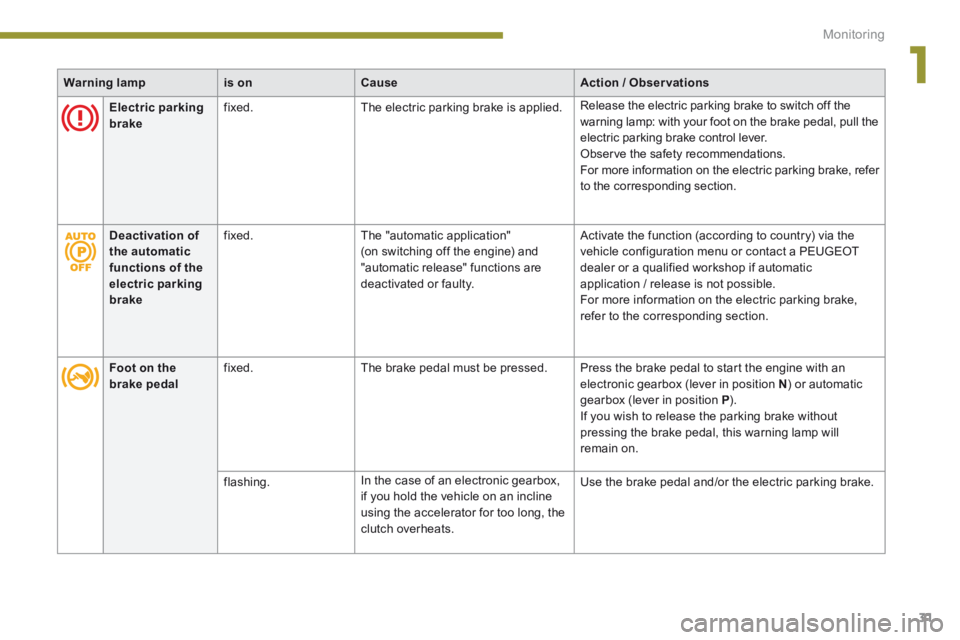
Warning lampis onCauseAction / Observations
Electric parking brake fixed. The electric parking brake is applied. Release the electric parking brake to switch off the warning lamp: with your foot on the brake pedal, pull the electric parking brake control lever. Observe the safety recommendations. For more information on the electric parking brake, refer to the corresponding section.
Foot on the brake pedal fixed. The brake pedal must be pressed. Press the brake pedal to start the engine with an electronic gearbox (lever in position N ) or automatic gearbox (lever in position P ). If you wish to release the parking brake without pressing the brake pedal, this warning lamp will remain on.
flashing. In the case of an electronic gearbox, if you hold the vehicle on an incline using the accelerator for too long, the clutch overheats.
Use the brake pedal and/or the electric parking brake.
Deactivation of the automatic functions of the electric parking brake
fixed. The "automatic application" (on switching off the engine) and "automatic release" functions are deactivated or faulty.
Activate the function (according to country) via the vehicle configuration menu or contact a PEUGEOT dealer or a qualified workshop if automatic application / release is not possible. For more information on the electric parking brake, refer to the corresponding section.
Page 34 of 389
Monitoring
32
Parking space sensors fixed. The parking space sensors function is active. Press the corresponding button to deactivate it.
flashing. The system is measuring the space. Once the measurement has been done, the warning lamp comes on fixed again.
Stop & Star t fixed. When the vehicle stops (red lights, traffic jams, ...) the Stop & Start system has put the engine into STOP mode.
The warning lamp goes off and the engine restarts automatically in START mode, as soon as you want to move off.
flashes for a few seconds, then goes of f.
STOP mode is temporarily unavailable. or START mode is invoked automatically.
For more information on special cases with STOP mode and START mode, refer to the "Stop & Start" section.
Warning lampis onCauseAction / Observations
Page 35 of 389
1
Monitoring33
Deactivation indicator lamps
If one of the following indicator lamps comes on, this confirms that the corresponding system has been switched off intentionally. This is may be accompanied by an audible signal and a message on the multifunction screen.
Warning lampis onCauseAction / Observations
Passenger's airbag system fixed. The control, located in the glove box, is set to the OFF position. The passenger's front airbag is
deactivated. In this case you can install a "rear facing" child seat.
Set the control to the ON position to activate the passenger's front airbag. In this case, do not fit a child seat in the rear-facing
position.
Page 36 of 389
Monitoring
34
Warning lamps
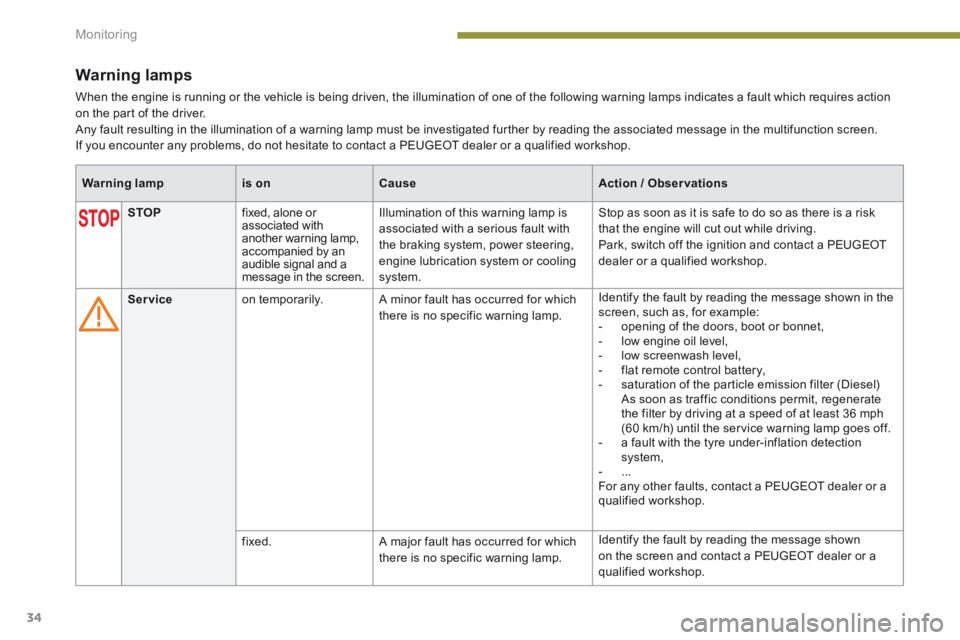
When the engine is running or the vehicle is being driven, the illumination of one of the following warning lamps indicates a fault which requires action on the part of the driver. Any fault resulting in the illumination of a warning lamp must be investigated further by reading the associated message in the multifunction screen. If you encounter any problems, do not hesitate to contact a PEUGEOT dealer or a qualified workshop.
Warning lampis onCauseAction / Observations
STOP fixed, alone or associated with another warning lamp, accompanied by an audible signal and a message in the screen.
Illumination of this warning lamp is associated with a serious fault with the braking system, power steering, engine lubrication system or cooling system.
Stop as soon as it is safe to do so as there is a risk that the engine will cut out while driving. Park, switch off the ignition and contact a PEUGEOT dealer or a qualified workshop.
Service on temporarily. A minor fault has occurred for which there is no specific warning lamp.
Identify the fault by reading the message shown in the screen, such as, for example: - opening of the doors, boot or bonnet, - low engine oil level, - low screenwash level, - flat remote control battery, - saturation of the particle emission filter (Diesel) As soon as traffic conditions permit, regenerate the filter by driving at a speed of at least 36 mph (60 km/h) until the service warning lamp goes off. - a fault with the tyre under-inflation detection system, - ... For any other faults, contact a PEUGEOT dealer or a qualified workshop.
fixed. A major fault has occurred for which there is no specific warning lamp.
Identify the fault by reading the message shown on the screen and contact a PEUGEOT dealer or a qualified workshop.