2014 NISSAN VERSA NOTE ECU
[x] Cancel search: ECUPage 134 of 372
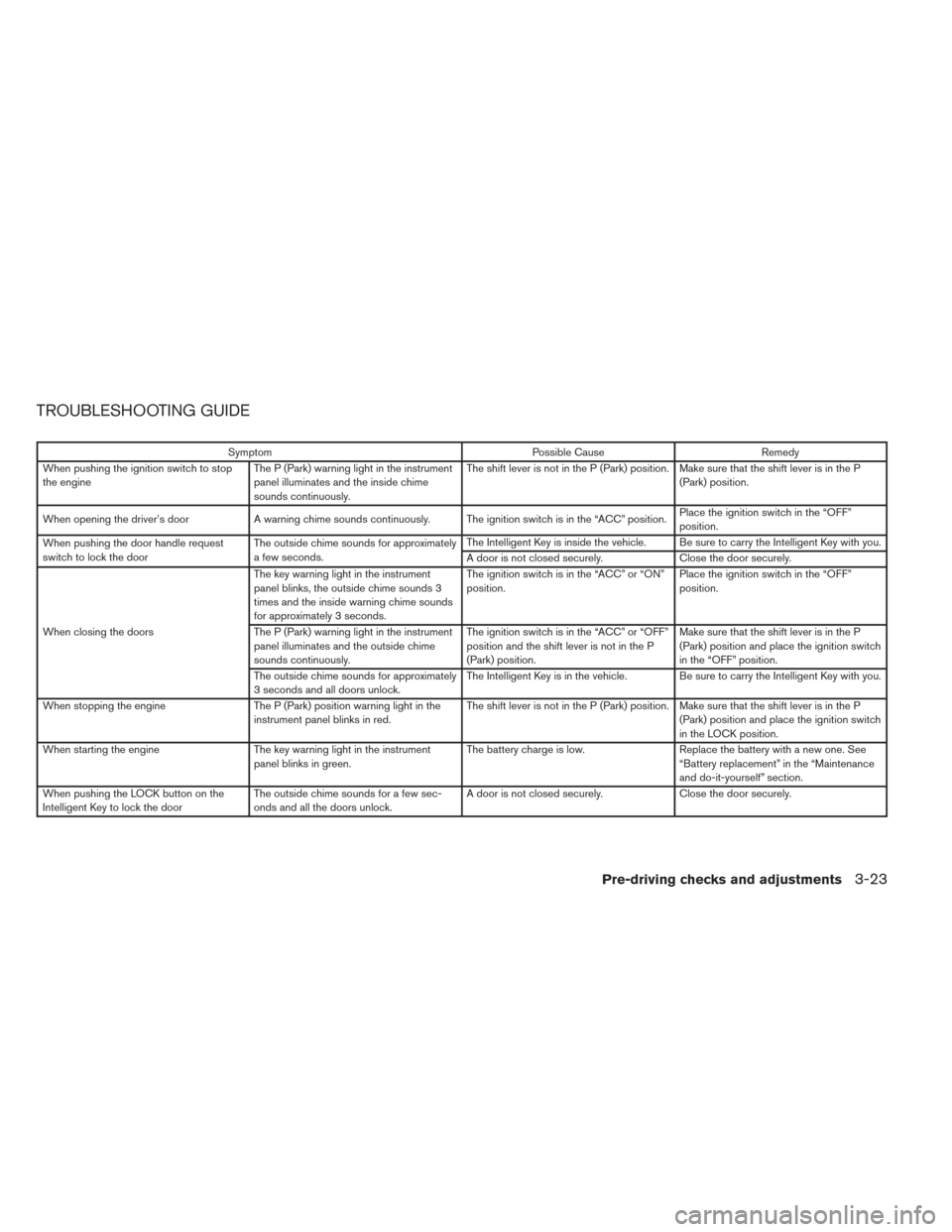
TROUBLESHOOTING GUIDE
SymptomPossible CauseRemedy
When pushing the ignition switch to stop
the engine The P (Park) warning light in the instrument
panel illuminates and the inside chime
sounds continuously. The shift lever is not in the P (Park) position. Make sure that the shift lever is in the P
(Park) position.
When opening the driver’s door A warning chime sounds continuously. The ignition switch is in the “ACC” position. Place the ignition switch in the “OFF”
position.
When pushing the door handle request
switch to lock the door The outside chime sounds for approximately
a few seconds. The Intelligent Key is inside the vehicle. Be sure to carry the Intelligent Key with you.
A door is not closed securely.
Close the door securely.
When closing the doors The key warning light in the instrument
panel blinks, the outside chime sounds 3
times and the inside warning chime sounds
for approximately 3 seconds.
The ignition switch is in the “ACC” or “ON”
position.
Place the ignition switch in the “OFF”
position.
The P (Park) warning light in the instrument
panel illuminates and the outside chime
sounds continuously. The ignition switch is in the “ACC” or “OFF”
position and the shift lever is not in the P
(Park) position.Make sure that the shift lever is in the P
(Park) position and place the ignition switch
in the “OFF” position.
The outside chime sounds for approximately
3 seconds and all doors unlock. The Intelligent Key is in the vehicle. Be sure to carry the Intelligent Key with you.
When stopping the engine The P (Park) position warning light in the
instrument panel blinks in red. The shift lever is not in the P (Park) position. Make sure that the shift lever is in the P
(Park) position and place the ignition switch
in the LOCK position.
When starting the engine The key warning light in the instrument
panel blinks in green. The battery charge is low.
Replace the battery with a new one. See
“Battery replacement” in the “Maintenance
and do-it-yourself” section.
When pushing the LOCK button on the
Intelligent Key to lock the door The outside chime sounds for a few sec-
onds and all the doors unlock. A door is not closed securely.
Close the door securely.
Pre-driving checks and adjustments3-23
Page 136 of 372
WARNING
The rear hatch must be closed securely
before driving. An open rear hatch could
allow dangerous exhaust gases to be
drawn inside the vehicle. See “Exhaust
gas (carbon monoxide)” in the “Starting
and driving” section of this manual.
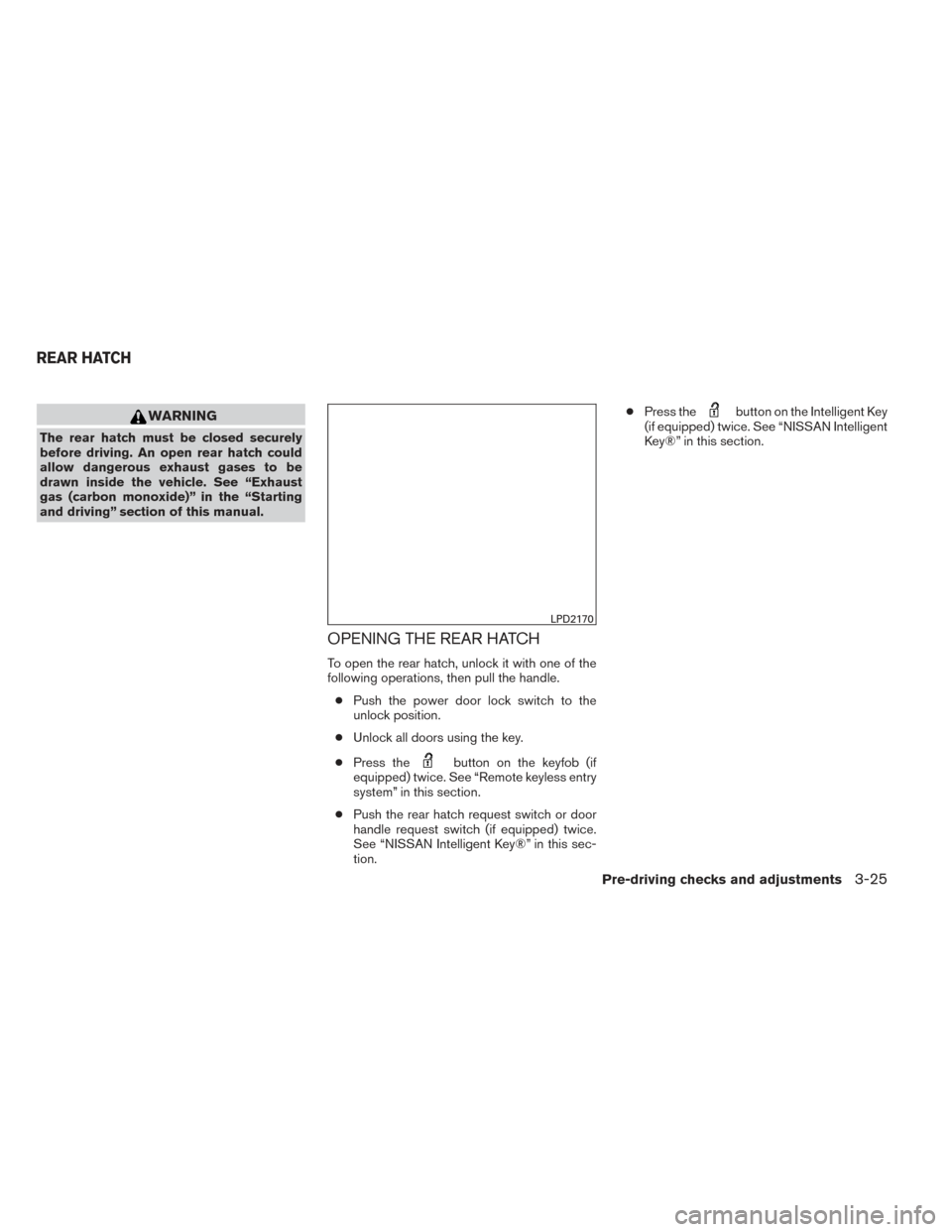
OPENING THE REAR HATCH
To open the rear hatch, unlock it with one of the
following operations, then pull the handle.● Push the power door lock switch to the
unlock position.
● Unlock all doors using the key.
● Press the
button on the keyfob (if
equipped) twice. See “Remote keyless entry
system” in this section.
● Push the rear hatch request switch or door
handle request switch (if equipped) twice.
See “NISSAN Intelligent Key®” in this sec-
tion. ●
Press the
button on the Intelligent Key
(if equipped) twice. See “NISSAN Intelligent
Key®” in this section.
LPD2170
REAR HATCH
Pre-driving checks and adjustments3-25
Page 137 of 372
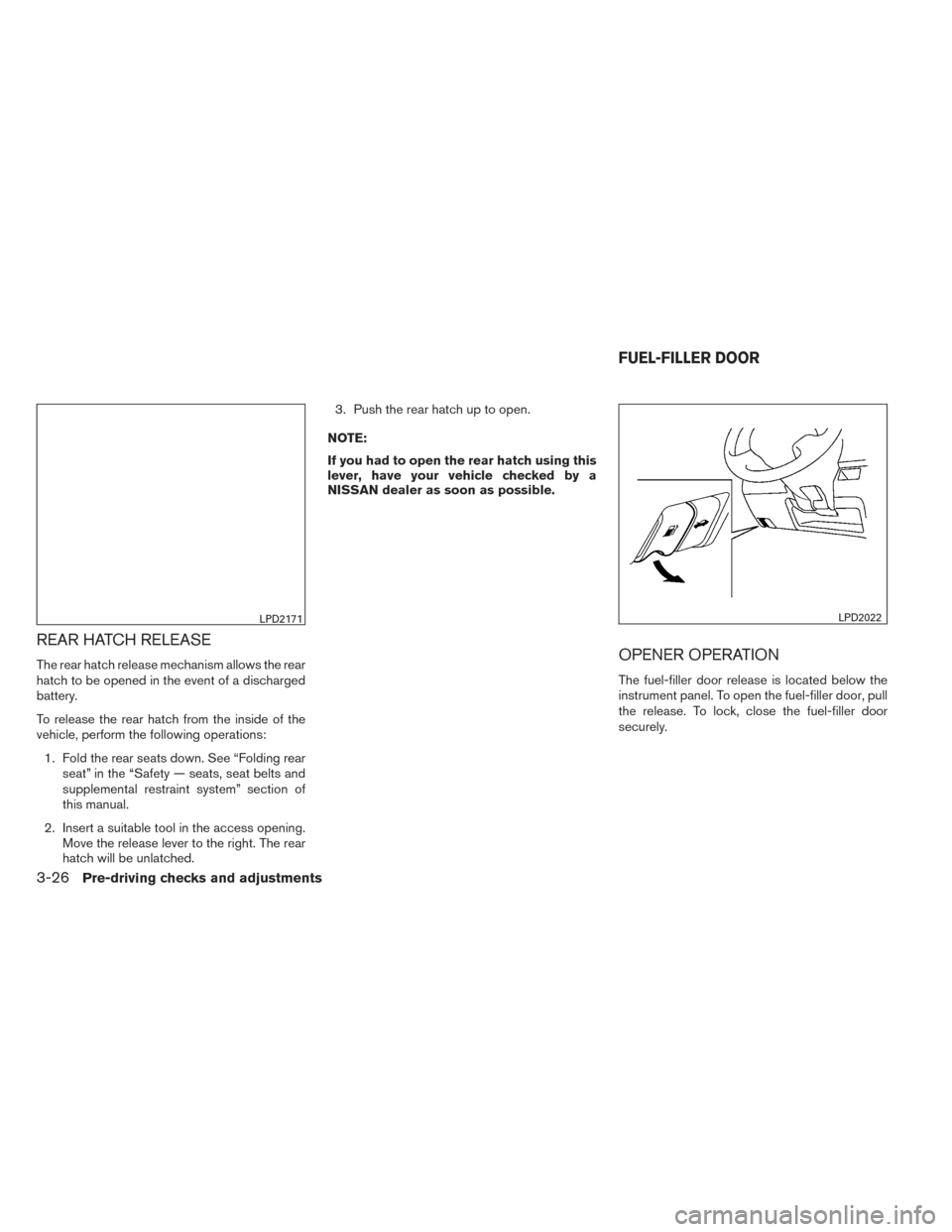
REAR HATCH RELEASE
The rear hatch release mechanism allows the rear
hatch to be opened in the event of a discharged
battery.
To release the rear hatch from the inside of the
vehicle, perform the following operations:1. Fold the rear seats down. See “Folding rear seat” in the “Safety — seats, seat belts and
supplemental restraint system” section of
this manual.
2. Insert a suitable tool in the access opening. Move the release lever to the right. The rear
hatch will be unlatched. 3. Push the rear hatch up to open.
NOTE:
If you had to open the rear hatch using this
lever, have your vehicle checked by a
NISSAN dealer as soon as possible.OPENER OPERATION
The fuel-filler door release is located below the
instrument panel. To open the fuel-filler door, pull
the release. To lock, close the fuel-filler door
securely.
LPD2171LPD2022
FUEL-FILLER DOOR
3-26Pre-driving checks and adjustments
Page 152 of 372
message appears on the screen or a button on
the unit (such as the
button) is pressed
and held for two seconds.
Reset all settings/memory:
Select the “Reset All Settings/Memory” key to
return all settings to default and to clear the
memory.
Info
For information about the “Info” key, see the
separate Navigation System Owner’s Manual.
XM
For XM setup, refer to “Audio system” in this
section.
BUTTON
To change the display brightness, press
the
button. Pressing the button again will
change the display to the day or the night display.
If no operation is performed within 5 seconds, the
display will return to the previous display.
Press and hold the
button for more than
two seconds to turn the display off. Press the
button again to turn the display on. When the shift lever is shifted into the R (Re-
verse) position, the monitor display shows a rear-
ward view from the vehicle.
WARNING
Failure to follow the warnings and instruc-
tions for proper use of the RearView
Monitor could result in serious injury or
death.
●
The RearView Monitor is a convenience
but it is not a substitute for proper back-
ing. Always turn and look out the win-
dows, and check mirrors to be sure that
it is safe to move before operating the
vehicle. Always back up slowly.
● The system is designed as an aid to the
driver in showing large stationary ob-
jects directly behind the vehicle, to help
avoid damaging the vehicle.
● The system cannot completely elimi-
nate blind spots and may not show ev-
ery object. ●
Underneath the bumper and the corner
areas of the bumper cannot be viewed
on the RearView Monitor because of its
monitoring range limitation. The system
will not show small objects below the
bumper, and may not show objects
close to the bumper or on the ground.
● Objects viewed in the RearView Moni-
tor differ from actual distance because
a wide-angle lens is used.
● Objects in the RearView Monitor will
appear visually opposite than when
viewed in the rear view and outside
mirrors.
● When washing the vehicle with high-
pressure water, be sure not to spray it
around the camera. Otherwise, water
may enter the camera unit causing wa-
ter condensation on the lens, a mal-
function, fire or an electric shock.
● Make sure that the hatch is securely
closed when backing up.
● Do not put anything on the rearview
camera. The rearview camera is in-
stalled on top of the hatch.
REARVIEW MONITOR (if so
equipped)
Monitor, climate, audio, phone and voice recognition systems4-9
Page 158 of 372
WARNING
●The Around View Monitor is a conve-
nience feature. It is not a substitute for
proper vehicle operation because it has
areas where objects cannot be viewed.
The four corners of the vehicle in par-
ticular are blind spots where objects do
not appear in the bird-eye, front or rear
views. Always look out the windows and
check with your own eyes to be sure
that it is safe to move before operating
the vehicle. Always operate the vehicle
slowly.
● The driver is always responsible for
safety during parking and other
maneuvers.
● Do not use the Around View Monitor
with the outside mirror in the stored
position, and make sure that the liftgate
is securely closed when operating the
vehicle using the Around View Monitor.
● The distance between objects viewed
on the Around View Monitor differs
from the actual distance.
● The cameras are installed on the front
grille, the outside mirrors and above the
rear license plate. Do not put anything
on the cameras. ●
When washing the vehicle with high-
pressure water, be sure not to spray it
around the cameras. Otherwise, water
may enter the camera unit causing wa-
ter condensation on the lens, a mal-
function, fire or an electric shock.
● Do not strike the cameras. They are
precision instruments. Doing so could
cause a malfunction or cause damage
resulting in a fire or an electric shock.
CAUTION
Do not scratch the camera lens when
cleaning dirt or snow from the front of the
camera.
With the ignition switch in the ON position, press
the CAMERA button or move the shift lever to the
R (Reverse) position to operate the Around View
Monitor. The monitor displays various views of
the position of the vehicle in a split screen format.
Available views: ● Bird-Eye View
The surrounding view of the vehicle from
above.
● Front-Side View
The view around and ahead of the front
passenger’s side wheel. ●
Rearview
An approximately 150-degree view of the
rear of the vehicle.
The system is designed as an aid to the driver in
situations such as slot parking or parallel parking.
AROUND VIEW® MONITOR (if so
equipped)
Monitor, climate, audio, phone and voice recognition systems4-15
Page 245 of 372
WARNING
●Do not leave children or adults who
would normally require the assistance
of others alone in your vehicle. Pets
should also not be left alone. They
could accidentally injure themselves or
others through inadvertent operation of
the vehicle. Also, on hot, sunny days,
temperatures in a closed vehicle could
quickly become high enough to cause
severe or possibly fatal injuries to
people or animals.
● Properly secure all cargo to help pre-
vent it from sliding or shifting. Do not
place cargo higher than the seatbacks.
In a sudden stop or collision, unsecured
cargo could cause personal injury.
EXHAUST GAS (carbon monoxide)
WARNING
● Do not breathe exhaust gases; they
contain colorless and odorless carbon
monoxide. Carbon monoxide is danger-
ous. It can cause unconsciousness or
death. ●
If you suspect that exhaust fumes are
entering the vehicle, drive with all win-
dows fully open, and have the vehicle
inspected immediately.
● Do not run the engine in closed spaces
such as a garage.
● Do not park the vehicle with the engine
running for any extended length of time.
● Keep the rear vent windows, lift gates,
doors and trunk lids (if so equipped)
closed while driving, otherwise exhaust
gases could be drawn into the passen-
ger compartment. If you must drive with
one of these open, follow these
precautions:
1. Open all the windows.
2. Turn the air recirculation mode off and set the fan speed control to the
highest level to circulate the air.
● The exhaust system and body should be
inspected by a qualified mechanic
whenever:
a. The vehicle is raised for service.
b. You suspect that exhaust fumes are entering into the passenger
compartment. c. You notice a change in the sound of
the exhaust system.
d. You have had an accident involving damage to the exhaust system, un-
derbody, or rear of the vehicle.
THREE-WAY CATALYST
The three-way catalyst is an emission control
device installed in the exhaust system. Exhaust
gases in the three-way catalyst are burned at
high temperatures to help reduce pollutants.
WARNING
●The exhaust gas and the exhaust sys-
tem are very hot. Keep people, animals
or flammable materials away from the
exhaust system components.
● Do not stop or park the vehicle over
flammable materials such as dry grass,
waste paper or rags. They may ignite
and cause a fire.
PRECAUTIONS WHEN STARTING
AND DRIVING
5-2Starting and driving
Page 253 of 372
NISSAN VEHICLE IMMOBILIZER
SYSTEM
The NISSAN Vehicle Immobilizer system will not
allow the engine to start without the use of the
registered key.
If the engine fails to start using a registered key
(for example, when interference is caused by
another registered key, an automated toll road
device or automatic payment device on the key
ring) , restart the engine using the following pro-
cedure:1. Leave the ignition switch in the ON position for approximately 5 seconds.
2. Place the ignition switch in the OFF or LOCK position, and wait approximately
10 seconds.
3. Repeat steps 1 and 2.
4. Restart the engine while holding the device (which may have caused the interference)
separate from the registered key.
If the no start condition re-occurs, NISSAN rec-
ommends placing the registered key on a sepa-
rate key ring to avoid interference from other
devices.
WARNING
Do not operate the push-button ignition
switch while driving the vehicle except in
an emergency. (The engine will stop when
the ignition switch is pushed 3 consecu-
tive times in quick succession or the igni-
tion switch is pushed and held for more
than 2 seconds.) If the engine stops while
the vehicle is being driven, this could lead
to a crash and serious injury.
When the ignition switch is pushed without de-
pressing the brake pedal or the clutch pedal
(MT) , the ignition switch position will illuminate as
follows: Push center
● once to change to ACC.
● two times to change to ON.
● three times to return to OFF.
The ignition switch will automatically return to the
LOCK position when any door is either opened or
closed with the switch in the OFF position.
The ignition lock is designed so that the ignition
switch position cannot be switched to OFF until
the shift lever is moved into the P (Park) position
or N (Neutral) position (MT) .
When the ignition switch cannot be pushed to-
ward the OFF position, proceed as follows: 1. Move the shift lever into the P (Park) position or N (Neutral) position (MT) .
2. Push the ignition switch. The ignition switch position will change to the ON position.
3. Push the ignition switch again to the OFF position.
The shift lever can be moved from the P
(Park) position if the ignition switch is in
the ON position and the brake pedal is
depressed.
LSD2014
PUSH-BUTTON IGNITION SWITCH (if
so equipped)
5-10Starting and driving
Page 255 of 372
ACC (Accessories):
This position activates electrical accessories,
such as the radio, when the engine is not running.
ACC has a battery saver feature that will turn the
ignition switch to the OFF position after 30 min-
utes under the following conditions:● all doors are closed.
● shift lever is in P (Park) .
The battery saver feature will be cancelled if any
of the following occur: ● any door is opened.
● shift lever is moved out of P (Park) .
● ignition switch changes position.
ON (Normal operating position):
This position turns on the ignition system and
electrical accessories.
CAUTION
Do not leave the vehicle with the ignition
switch in ACC or ON positions when the
engine is not running for an extended pe-
riod. This can discharge the battery.
EMERGENCY ENGINE SHUT OFF
To shut off the engine in an emergency situation
while driving, perform the following procedure:
– Rapidly push the push-button ignition switch 3 consecutive times in less than 1.5 seconds, or
– Push and hold the push-button ignition switch for more than 2 seconds.
NISSAN INTELLIGENT KEY®
BATTERY DISCHARGE
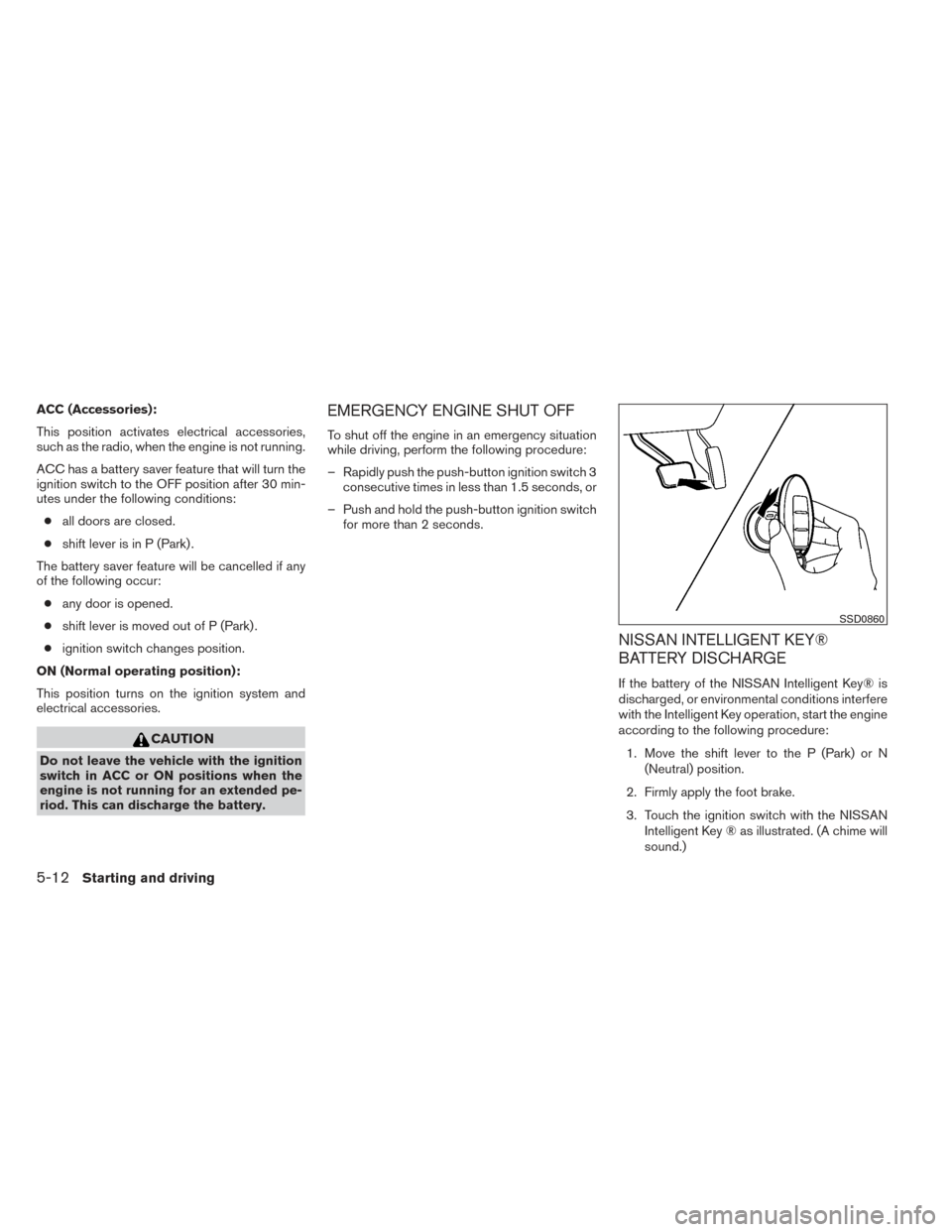
If the battery of the NISSAN Intelligent Key® is
discharged, or environmental conditions interfere
with the Intelligent Key operation, start the engine
according to the following procedure:
1. Move the shift lever to the P (Park) or N (Neutral) position.
2. Firmly apply the foot brake.
3. Touch the ignition switch with the NISSAN Intelligent Key ® as illustrated. (A chime will
sound.)
SSD0860
5-12Starting and driving