2014 NISSAN VERSA NOTE ECU
[x] Cancel search: ECUPage 52 of 372
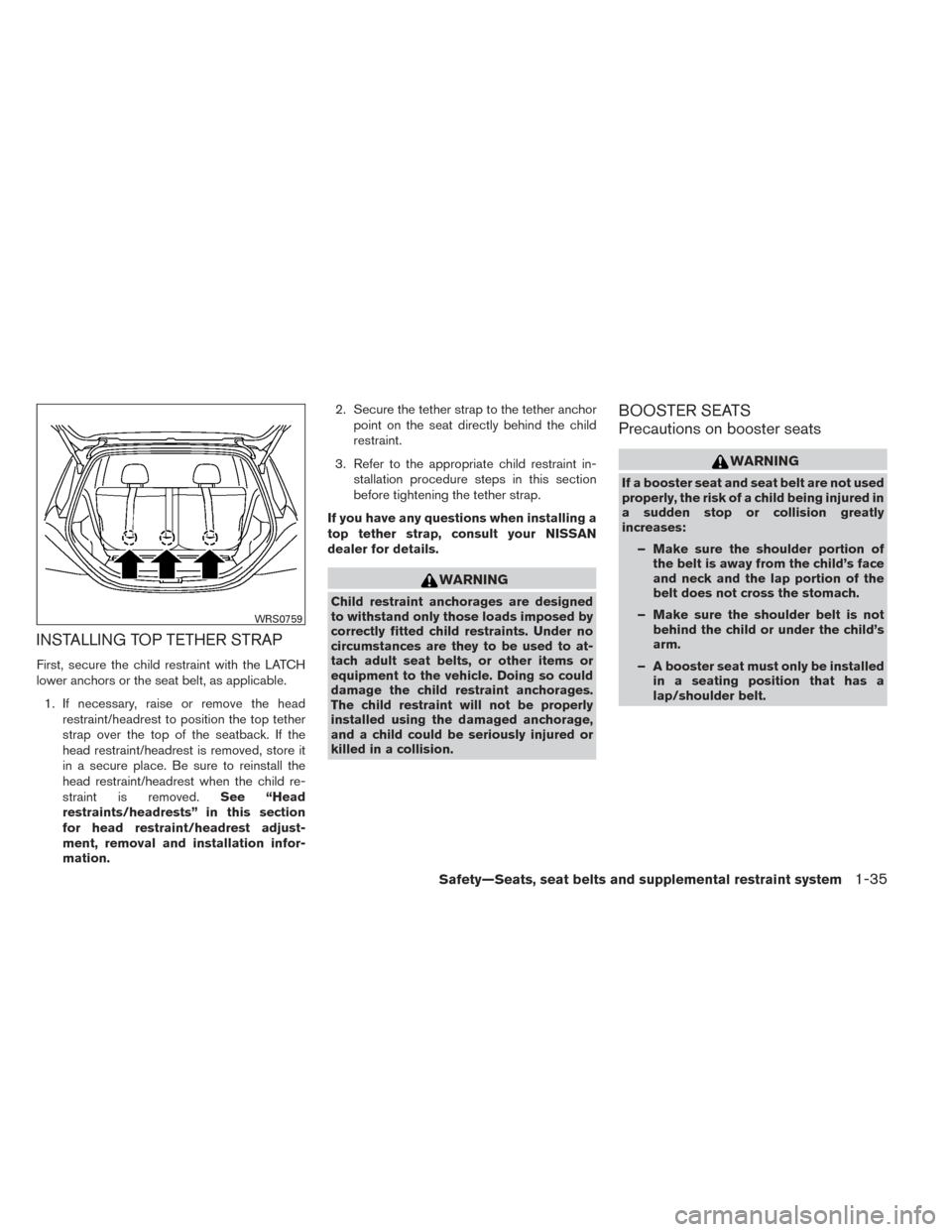
INSTALLING TOP TETHER STRAP
First, secure the child restraint with the LATCH
lower anchors or the seat belt, as applicable.1. If necessary, raise or remove the head restraint/headrest to position the top tether
strap over the top of the seatback. If the
head restraint/headrest is removed, store it
in a secure place. Be sure to reinstall the
head restraint/headrest when the child re-
straint is removed. See “Head
restraints/headrests” in this section
for head restraint/headrest adjust-
ment, removal and installation infor-
mation. 2. Secure the tether strap to the tether anchor
point on the seat directly behind the child
restraint.
3. Refer to the appropriate child restraint in- stallation procedure steps in this section
before tightening the tether strap.
If you have any questions when installing a
top tether strap, consult your NISSAN
dealer for details.
WARNING
Child restraint anchorages are designed
to withstand only those loads imposed by
correctly fitted child restraints. Under no
circumstances are they to be used to at-
tach adult seat belts, or other items or
equipment to the vehicle. Doing so could
damage the child restraint anchorages.
The child restraint will not be properly
installed using the damaged anchorage,
and a child could be seriously injured or
killed in a collision.
BOOSTER SEATS
Precautions on booster seats
WARNING
If a booster seat and seat belt are not used
properly, the risk of a child being injured in
a sudden stop or collision greatly
increases: – Make sure the shoulder portion of the belt is away from the child’s face
and neck and the lap portion of the
belt does not cross the stomach.
– Make sure the shoulder belt is not behind the child or under the child’s
arm.
– A booster seat must only be installed in a seating position that has a
lap/shoulder belt.
WRS0759
Safety—Seats, seat belts and supplemental restraint system1-35
Page 55 of 372
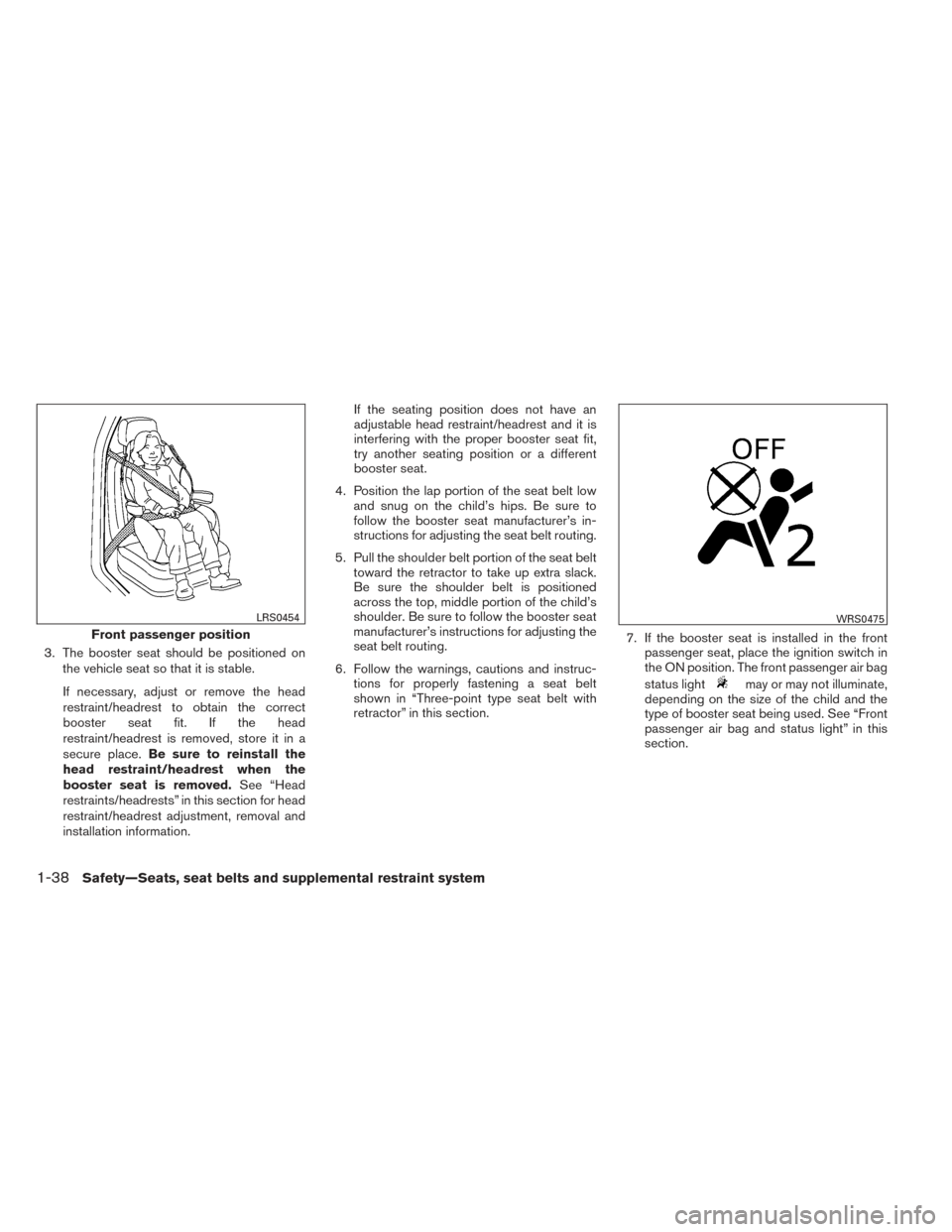
3. The booster seat should be positioned onthe vehicle seat so that it is stable.
If necessary, adjust or remove the head
restraint/headrest to obtain the correct
booster seat fit. If the head
restraint/headrest is removed, store it in a
secure place. Be sure to reinstall the
head restraint/headrest when the
booster seat is removed. See “Head
restraints/headrests” in this section for head
restraint/headrest adjustment, removal and
installation information. If the seating position does not have an
adjustable head restraint/headrest and it is
interfering with the proper booster seat fit,
try another seating position or a different
booster seat.
4. Position the lap portion of the seat belt low and snug on the child’s hips. Be sure to
follow the booster seat manufacturer’s in-
structions for adjusting the seat belt routing.
5. Pull the shoulder belt portion of the seat belt toward the retractor to take up extra slack.
Be sure the shoulder belt is positioned
across the top, middle portion of the child’s
shoulder. Be sure to follow the booster seat
manufacturer’s instructions for adjusting the
seat belt routing.
6. Follow the warnings, cautions and instruc- tions for properly fastening a seat belt
shown in “Three-point type seat belt with
retractor” in this section. 7. If the booster seat is installed in the front
passenger seat, place the ignition switch in
the ON position. The front passenger air bag
status light
may or may not illuminate,
depending on the size of the child and the
type of booster seat being used. See “Front
passenger air bag and status light” in this
section.
Front passenger position
LRS0454WRS0475
1-38Safety—Seats, seat belts and supplemental restraint system
Page 66 of 372
ger air bag to be automatically turned OFF. For
small adults it may be turned OFF, however if the
occupant takes his/her weight off the seat cush-
ion (for example, by not sitting upright, by sitting
on an edge of the seat, or by otherwise being out
of position) , this could cause the sensor to turn
the air bag OFF. Always be sure to be seated and
wearing the seat belt properly for the most effec-
tive protection by the seat belt and supplemental
air bag.
NISSAN recommends that pre-teens and chil-
dren be properly restrained in a rear seat.
NISSAN also recommends that appropriate child
restraints and booster seats be properly installed
in a rear seat. If this is not possible, the occupant
detection sensor is designed to operate as de-
scribed above to turn the front passenger air bag
OFF for specified child restraints as required by
the regulations. Failing to properly secure child
restraints and to use the ALR mode may allow the
restraint to tip or move in an accident or sudden
stop. This can also result in the passenger air bag
inflating in a crash instead of being OFF. See
“Child restraints” in this section for proper use
and installation.
If the front passenger seat is not occupied, the
passenger air bag is designed not to inflate in a
crash. However, heavy objects placed on the
seat could result in air bag inflation, because of
the object’s weight detected by the occupantdetection sensor. Other conditions could also
result in air bag inflation, such as if a child is
standing on the seat, or if two children are on the
seat, contrary to the instructions in this manual.
Always be sure that you and all vehicle occupants
are seated and restrained properly.
Using the passenger air bag status light, you can
monitor when the front passenger air bag is au-
tomatically turned OFF with the seat occupied.
The light will not illuminate when the front pas-
senger seat is unoccupied.
If an adult occupant is in the seat but the passen-
ger air bag status light is illuminated (indicating
that the air bag is OFF) , it could be that the
person is a small adult, or is not sitting on the seat
properly or not using the seat belt properly.
If a child restraint must be used in the front seat,
the passenger air bag status light may or may not
be illuminated, depending on the size of the child
and the type of child restraint being used. If the air
bag status light is not illuminated (indicating that
the air bag might inflate in a crash) , it could be
that the child restraint or seat belt is not being
used properly. Make sure that the child restraint is
installed properly, the seat belt is used properly
and the occupant is positioned properly. If the air
bag status light is not illuminated, reposition the
occupant or child restraint in a rear seat.
If the passenger air bag status light will not illu-
minate even though you believe that the child
restraint, the seat belts and the occupant are
properly positioned, the system may be sensing
an unoccupied seat (in which case the air bag is
OFF) . Your NISSAN dealer can check that the
system is OFF by using a special tool. However,
until you have confirmed with your dealer that
your air bag is working properly, reposition the
occupant or child restraint in a rear seat.
The NISSAN Advanced Air Bag System and
passenger air bag status light will take a few
seconds to register a change in the passenger
seat status. For example, if a large adult who is
sitting in the front passenger seat exits the ve-
hicle, the passenger air bag status light will go
from OFF to ON for a few seconds and then to
OFF. This is normal system operation and does
not indicate a malfunction.
If a malfunction occurs in the front passenger air
bag system, the supplemental air bag warning
light
, located in the meter and gauges area
of the instrument panel, will blink. Have the sys-
tem checked by a NISSAN dealer.
Safety—Seats, seat belts and supplemental restraint system1-49
Page 74 of 372
2 Instruments and controls
Instrument panel...................................2-2
Meters and gauges ................................2-3
Speedometer and odometer . . ...................2-3
Tachometer ....................................2-5
Engine coolant temperature gauge ...............2-6
Fuel gauge ....................................2-6
Trip computer ..................................2-7
Service interval reminder (if so equipped) .........2-8
Warning/indicator lights and audible reminders .......2-9
Checking bulbs ............................... 2-10
Warning lights ................................ 2-10
Indicator lights ................................ 2-14
Audible reminders ............................. 2-17
Security systems ................................. 2-17
NISSAN vehicle immobilizer system
(if so equipped) ............................... 2-17
Windshield wiper and washer switch ...............2-19
Switch operation .............................. 2-19
Rear window wiper and washer switch ..............2-20
Rear window and outside mirror defroster switch .....2-20
Headlight and turn signal switch. . ..................2-21
Headlight control switch ........................ 2-21
Daytime running light system (Canada only) . . ....2-22 Instrument brightness control
...................2-22
Turn signal switch ............................. 2-23
Fog light switch (if so equipped) ................2-23
Horn ............................................ 2-23
Heated seats (if so equipped) ......................2-24
Vehicle Dynamic Control (VDC) off switch ...........2-25
Power outlet ..................................... 2-26
Storage ......................................... 2-27
Map pockets .................................. 2-27
Seatback pockets ............................. 2-27
Storage trays ................................. 2-28
Cup holders . . . ............................... 2-28
Glove box .................................... 2-29
Cargo cover (if so equipped) ....................2-30
Divide-n-hide adjustable floor
(if so equipped) ............................... 2-31
Grocery
hooks................................ 2-32
Windows ........................................ 2-33
Power windows (if so equipped) ................2-33
Manual windows (if so equipped) ................2-35
Interior light ...................................... 2-36
Map light (if so equipped) ......................... 2-37
Luggage compartment light ........................2-37
Page 82 of 372
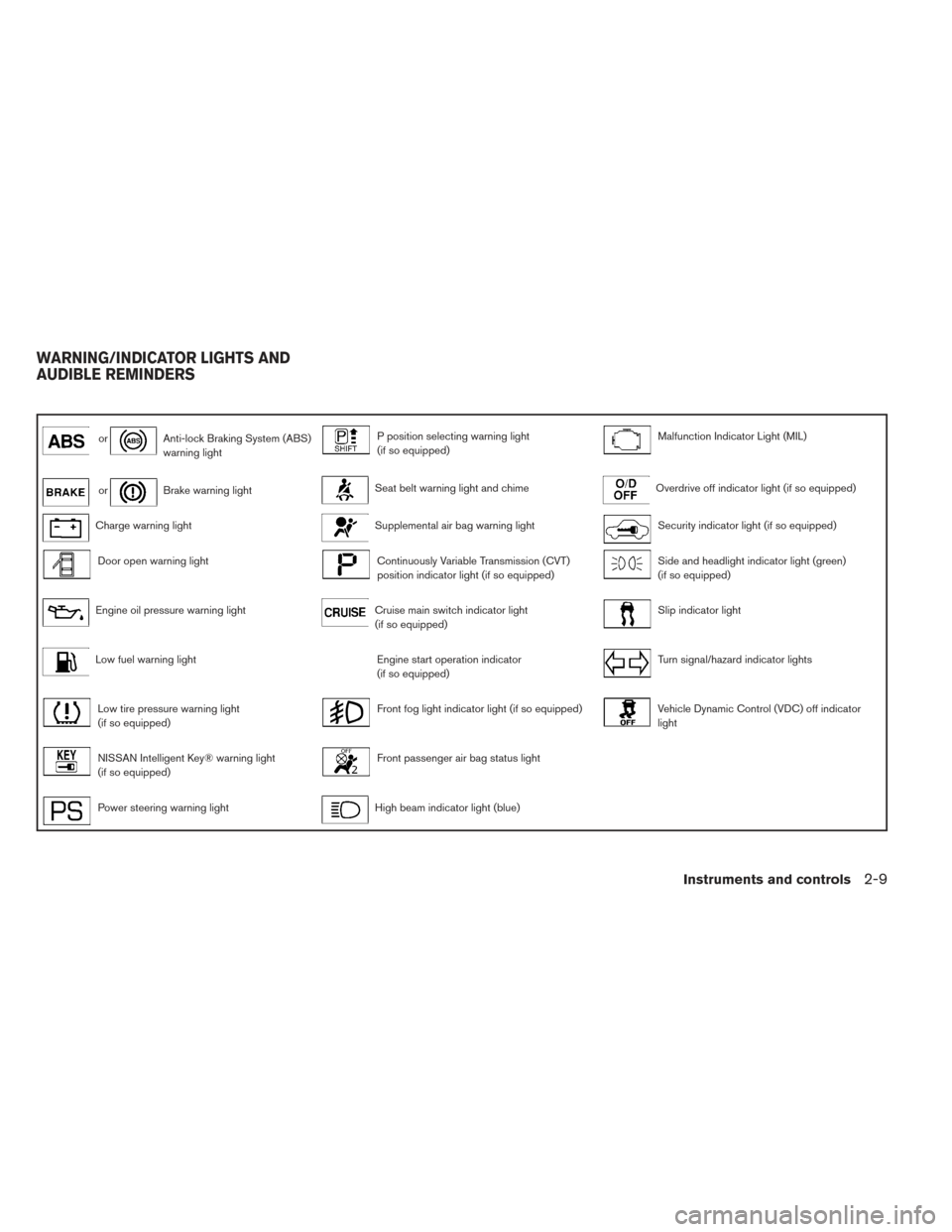
orAnti-lock Braking System (ABS)
warning lightP position selecting warning light
(if so equipped)Malfunction Indicator Light (MIL)
orBrake warning lightSeat belt warning light and chimeOverdrive off indicator light (if so equipped)
Charge warning lightSupplemental air bag warning lightSecurity indicator light (if so equipped)
Door open warning lightContinuously Variable Transmission (CVT)
position indicator light (if so equipped)Side and headlight indicator light (green)
(if so equipped)
Engine oil pressure warning lightCruise main switch indicator light
(if so equipped)Slip indicator light
Low fuel warning lightEngine start operation indicator
(if so equipped)Turn signal/hazard indicator lights
Low tire pressure warning light
(if so equipped)Front fog light indicator light (if so equipped)Vehicle Dynamic Control (VDC) off indicator
light
NISSAN Intelligent Key® warning light
(if so equipped)Front passenger air bag status light
Power steering warning lightHigh beam indicator light (blue)
WARNING/INDICATOR LIGHTS AND
AUDIBLE REMINDERS
Instruments and controls2-9
Page 84 of 372
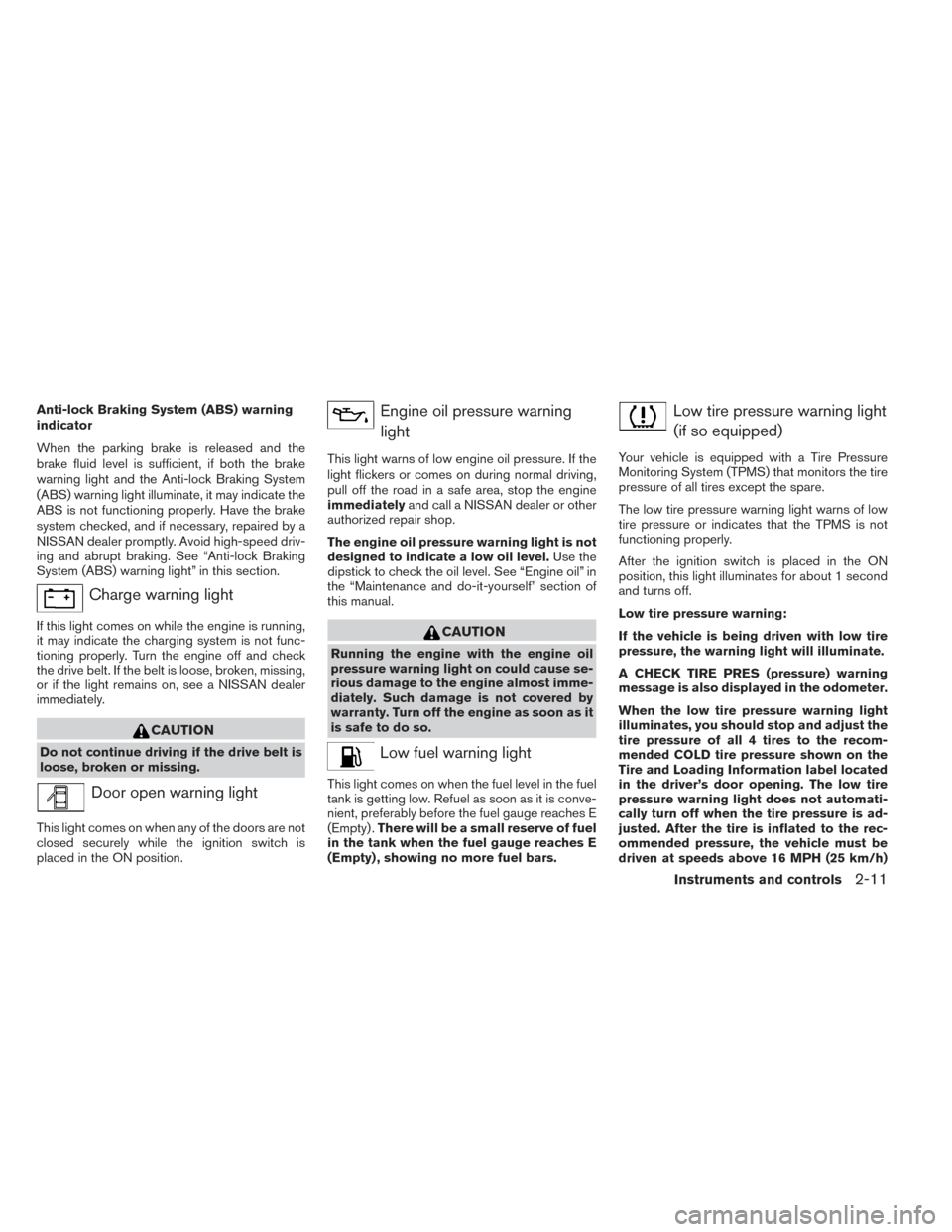
Anti-lock Braking System (ABS) warning
indicator
When the parking brake is released and the
brake fluid level is sufficient, if both the brake
warning light and the Anti-lock Braking System
(ABS) warning light illuminate, it may indicate the
ABS is not functioning properly. Have the brake
system checked, and if necessary, repaired by a
NISSAN dealer promptly. Avoid high-speed driv-
ing and abrupt braking. See “Anti-lock Braking
System (ABS) warning light” in this section.
Charge warning light
If this light comes on while the engine is running,
it may indicate the charging system is not func-
tioning properly. Turn the engine off and check
the drive belt. If the belt is loose, broken, missing,
or if the light remains on, see a NISSAN dealer
immediately.
CAUTION
Do not continue driving if the drive belt is
loose, broken or missing.
Door open warning light
This light comes on when any of the doors are not
closed securely while the ignition switch is
placed in the ON position.
Engine oil pressure warninglight
This light warns of low engine oil pressure. If the
light flickers or comes on during normal driving,
pull off the road in a safe area, stop the engine
immediately and call a NISSAN dealer or other
authorized repair shop.
The engine oil pressure warning light is not
designed to indicate a low oil level. Use the
dipstick to check the oil level. See “Engine oil” in
the “Maintenance and do-it-yourself” section of
this manual.
CAUTION
Running the engine with the engine oil
pressure warning light on could cause se-
rious damage to the engine almost imme-
diately. Such damage is not covered by
warranty. Turn off the engine as soon as it
is safe to do so.
Low fuel warning light
This light comes on when the fuel level in the fuel
tank is getting low. Refuel as soon as it is conve-
nient, preferably before the fuel gauge reaches E
(Empty) . There will be a small reserve of fuel
in the tank when the fuel gauge reaches E
(Empty) , showing no more fuel bars.
Low tire pressure warning light
(if so equipped)
Your vehicle is equipped with a Tire Pressure
Monitoring System (TPMS) that monitors the tire
pressure of all tires except the spare.
The low tire pressure warning light warns of low
tire pressure or indicates that the TPMS is not
functioning properly.
After the ignition switch is placed in the ON
position, this light illuminates for about 1 second
and turns off.
Low tire pressure warning:
If the vehicle is being driven with low tire
pressure, the warning light will illuminate.
A CHECK TIRE PRES (pressure) warning
message is also displayed in the odometer.
When the low tire pressure warning light
illuminates, you should stop and adjust the
tire pressure of all 4 tires to the recom-
mended COLD tire pressure shown on the
Tire and Loading Information label located
in the driver’s door opening. The low tire
pressure warning light does not automati-
cally turn off when the tire pressure is ad-
justed. After the tire is inflated to the rec-
ommended pressure, the vehicle must be
driven at speeds above 16 MPH (25 km/h)
Instruments and controls2-11
Page 87 of 372
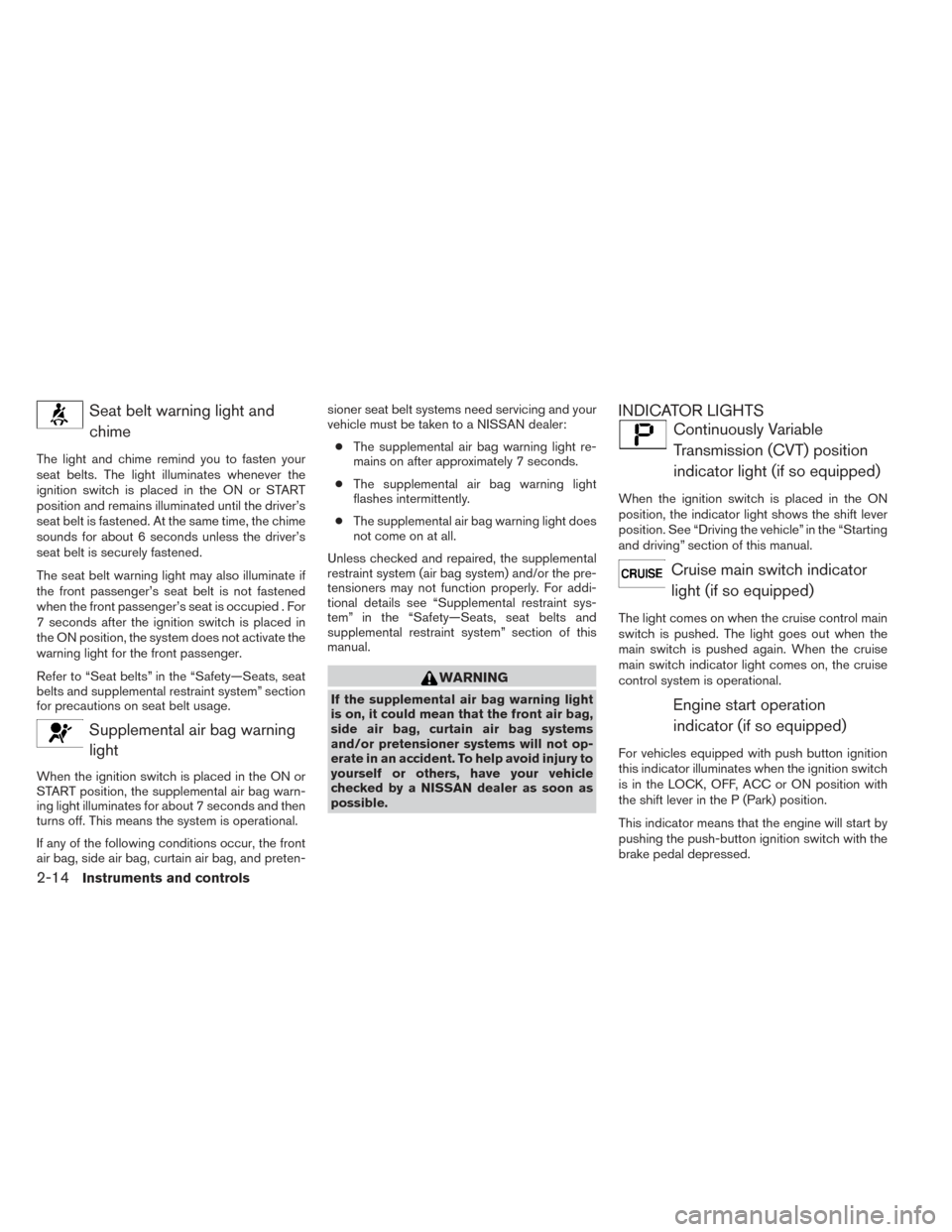
Seat belt warning light andchime
The light and chime remind you to fasten your
seat belts. The light illuminates whenever the
ignition switch is placed in the ON or START
position and remains illuminated until the driver’s
seat belt is fastened. At the same time, the chime
sounds for about 6 seconds unless the driver’s
seat belt is securely fastened.
The seat belt warning light may also illuminate if
the front passenger’s seat belt is not fastened
when the front passenger’s seat is occupied . For
7 seconds after the ignition switch is placed in
the ON position, the system does not activate the
warning light for the front passenger.
Refer to “Seat belts” in the “Safety—Seats, seat
belts and supplemental restraint system” section
for precautions on seat belt usage.
Supplemental air bag warninglight
When the ignition switch is placed in the ON or
START position, the supplemental air bag warn-
ing light illuminates for about 7 seconds and then
turns off. This means the system is operational.
If any of the following conditions occur, the front
air bag, side air bag, curtain air bag, and preten- sioner seat belt systems need servicing and your
vehicle must be taken to a NISSAN dealer:
● The supplemental air bag warning light re-
mains on after approximately 7 seconds.
● The supplemental air bag warning light
flashes intermittently.
● The supplemental air bag warning light does
not come on at all.
Unless checked and repaired, the supplemental
restraint system (air bag system) and/or the pre-
tensioners may not function properly. For addi-
tional details see “Supplemental restraint sys-
tem” in the “Safety—Seats, seat belts and
supplemental restraint system” section of this
manual.
WARNING
If the supplemental air bag warning light
is on, it could mean that the front air bag,
side air bag, curtain air bag systems
and/or pretensioner systems will not op-
erate in an accident. To help avoid injury to
yourself or others, have your vehicle
checked by a NISSAN dealer as soon as
possible.
INDICATOR LIGHTS
Continuously Variable Transmission (CVT) position
indicator light (if so equipped)
When the ignition switch is placed in the ON
position, the indicator light shows the shift lever
position. See “Driving the vehicle” in the “Starting
and driving” section of this manual.
Cruise main switch indicatorlight (if so equipped)
The light comes on when the cruise control main
switch is pushed. The light goes out when the
main switch is pushed again. When the cruise
main switch indicator light comes on, the cruise
control system is operational.
Engine start operationindicator (if so equipped)
For vehicles equipped with push button ignition
this indicator illuminates when the ignition switch
is in the LOCK, OFF, ACC or ON position with
the shift lever in the P (Park) position.
This indicator means that the engine will start by
pushing the push-button ignition switch with the
brake pedal depressed.
2-14Instruments and controls
Page 89 of 372
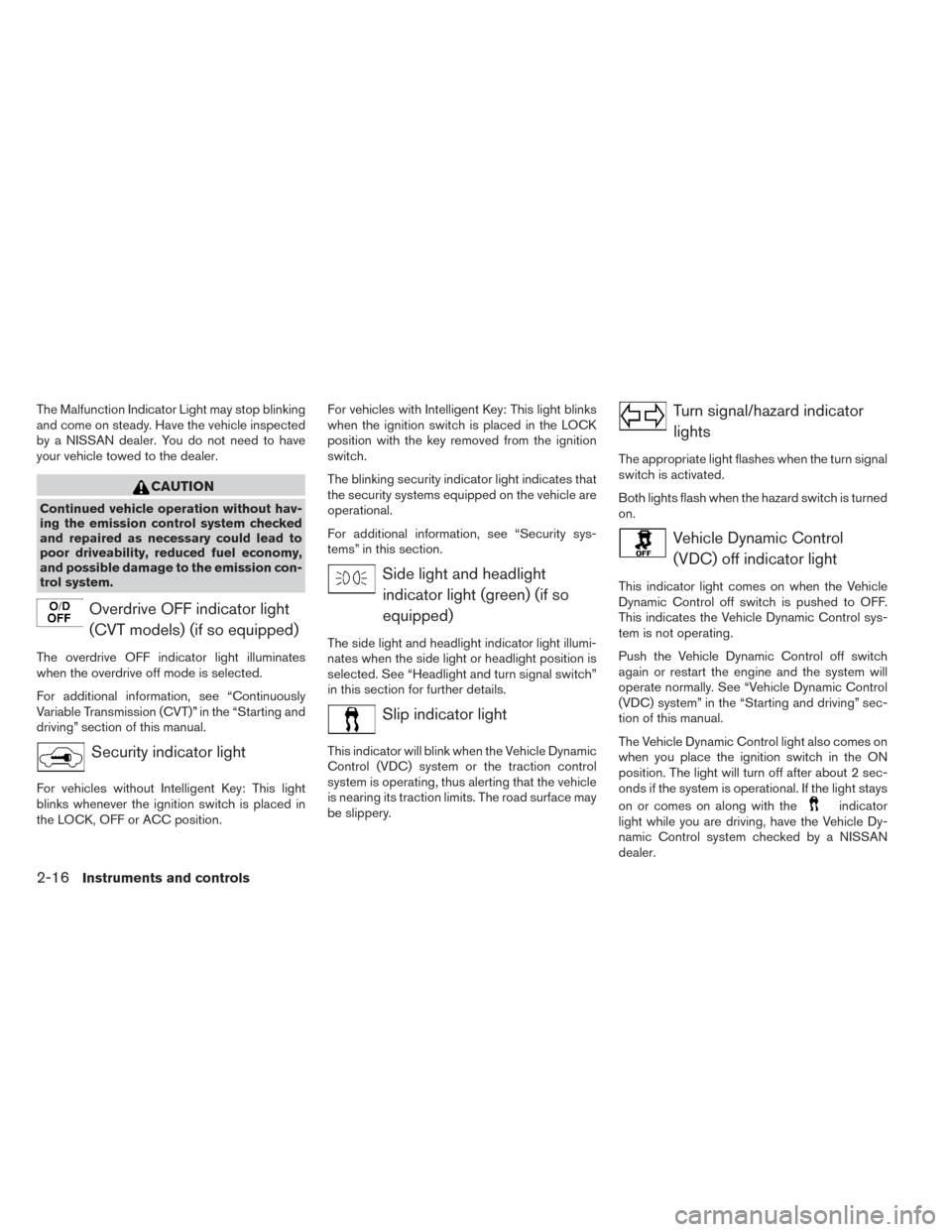
The Malfunction Indicator Light may stop blinking
and come on steady. Have the vehicle inspected
by a NISSAN dealer. You do not need to have
your vehicle towed to the dealer.
CAUTION
Continued vehicle operation without hav-
ing the emission control system checked
and repaired as necessary could lead to
poor driveability, reduced fuel economy,
and possible damage to the emission con-
trol system.
Overdrive OFF indicator light(CVT models) (if so equipped)
The overdrive OFF indicator light illuminates
when the overdrive off mode is selected.
For additional information, see “Continuously
Variable Transmission (CVT)” in the “Starting and
driving” section of this manual.
Security indicator light
For vehicles without Intelligent Key: This light
blinks whenever the ignition switch is placed in
the LOCK, OFF or ACC position. For vehicles with Intelligent Key: This light blinks
when the ignition switch is placed in the LOCK
position with the key removed from the ignition
switch.
The blinking security indicator light indicates that
the security systems equipped on the vehicle are
operational.
For additional information, see “Security sys-
tems” in this section.
Side light and headlight
indicator light (green) (if so
equipped)
The side light and headlight indicator light illumi-
nates when the side light or headlight position is
selected. See “Headlight and turn signal switch”
in this section for further details.
Slip indicator light
This indicator will blink when the Vehicle Dynamic
Control (VDC) system or the traction control
system is operating, thus alerting that the vehicle
is nearing its traction limits. The road surface may
be slippery.
Turn signal/hazard indicatorlights
The appropriate light flashes when the turn signal
switch is activated.
Both lights flash when the hazard switch is turned
on.
Vehicle Dynamic Control(VDC) off indicator light
This indicator light comes on when the Vehicle
Dynamic Control off switch is pushed to OFF.
This indicates the Vehicle Dynamic Control sys-
tem is not operating.
Push the Vehicle Dynamic Control off switch
again or restart the engine and the system will
operate normally. See “Vehicle Dynamic Control
(VDC) system” in the “Starting and driving” sec-
tion of this manual.
The Vehicle Dynamic Control light also comes on
when you place the ignition switch in the ON
position. The light will turn off after about 2 sec-
onds if the system is operational. If the light stays
on or comes on along with the
indicator
light while you are driving, have the Vehicle Dy-
namic Control system checked by a NISSAN
dealer.
2-16Instruments and controls