2014 NISSAN QUEST ECO mode
[x] Cancel search: ECO modePage 229 of 482
4-46Monitor, heater, air conditioner, audio, phone and voice recognition systems
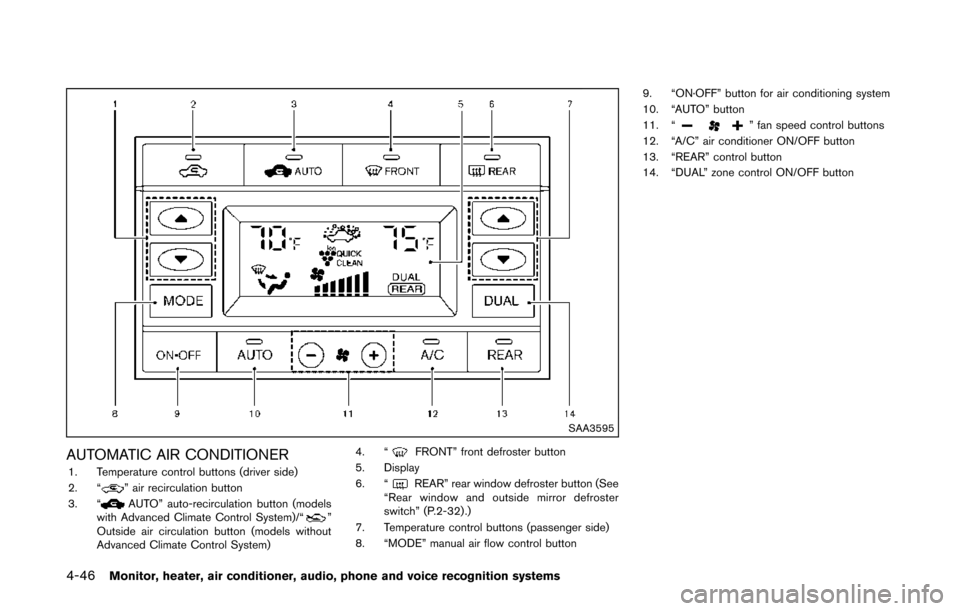
SAA3595
AUTOMATIC AIR CONDITIONER1. Temperature control buttons (driver side)
2. “” air recirculation button
3. “AUTO” auto-recirculation button (models
with Advanced Climate Control System)/“”
Outside air circulation button (models without
Advanced Climate Control System) 4. “
FRONT” front defroster button
5. Display
6. “
REAR” rear window defroster button (See
“Rear window and outside mirror defroster
switch” (P.2-32) .)
7. Temperature control buttons (passenger side)
8. “MODE” manual air flow control button 9. “ON·OFF” button for air conditioning system
10. “AUTO” button
11. “
” fan speed control buttons
12. “A/C” air conditioner ON/OFF button
13. “REAR” control button
14. “DUAL” zone control ON/OFF button
Page 230 of 482
Automatic operation (AUTO)
The AUTO mode may be used year-round as the
system automatically controls constant tempera-
ture, air flow distribution and fan speed after the
desired temperature is set manually.
To turn the heater and air conditioner on or off,
push the “ON·OFF” button.
Cooling and dehumidified heating:
1. Push the “AUTO” button.(The AUTO indicator light will illuminate.)
2. If the A/C indicator light does not illuminate, push the “A/C” button.
(The A/C indicator light will illuminate.)
3. Push the temperature control buttons (“
” and “”) (driver’s side) to set the
desired temperature.
.The temperature can be set within the range of 60 to 908F (18 to 328C) .
.When “DUAL” does not appear on thedisplay:
— Pushing the “AUTO” button changes both the driver’s and front passenger’s
side temperature.
— Pushing the “DUAL” button allows the user to independently change the front
passenger’s side temperature with the
passenger side temperature control but- tons (“
” and “”) . (“DUAL” will
appear on the display.)
To cancel the separate temperature
setting, push the “DUAL” button (“DUAL”
will disappear from the display) and the
driver’s side temperature setting will be
applied to both the driver’s and front
passenger’s sides.
4. Models with Advanced Climate Control System:
.Push the “AUTO” auto-recirculation
button. The indicator light on the “
AUTO” auto-recirculation button will illu-
minate. In this mode, the sensor detects
odors and gas to automatically switch
between the air recirculation mode and
the outside air circulation mode. (See
“Advanced climate control system” (P.4-
50) for details.)
Models without Advanced Climate Control
System:
.Push and hold the air recirculation “”
button or outside air circulation “”
button (the one with the indicator light
on) for more than 2 seconds to set the
automatic control between the air recir-
culation and outside air circulation
modes. (The “
” and “” indicator
lights will blink twice.)
The following conditions need to be met for the automatic air intake control mode to function
properly.
.
The air flow control is not in the front
defroster mode (the indicator light on the
front defroster “
FRONT” button is
turned off).
. The outside temperature is approximately
328F(0 8C) or above.
A visible mist may be seen coming from the
ventilators in hot, humid conditions as the air is
cooled rapidly. This does not indicate a mal-
function.
Heating (A/C off):
1. Push the “AUTO” button.
(The AUTO indicator light will illuminate.)
2. If the A/C indicator light illuminates, push the “A/C” button.
(The A/C indicator light will turn off.)
3. Push the temperature control buttons (“
” and “”) (driver’s side) to set the
desired temperature.
When the DUAL mode is turned off (“DUAL”
does not appear on the display):
.Pushing the “AUTO” button changes both the driver’s and front passenger’s
side temperature.
Monitor, heater, air conditioner, audio, phone and voice recognition systems4-47
Page 231 of 482
4-48Monitor, heater, air conditioner, audio, phone and voice recognition systems
.Pushing the “DUAL” button allows theuser to independently change the front
passenger’s side temperature with the
passenger side temperature control but-
tons (“
”or“”) . (“DUAL” will
appear on the display.)
To cancel the separate temperature
setting, push the “DUAL” button (“DUAL”
will disappear from the display) and the
driver’s side temperature setting will be
applied to both the driver’s and front
passenger’s sides.
4. Models with Advanced Climate Control System:
.Push the “AUTO” auto-recirculation
button. The indicator light on the “
AUTO” auto-recirculation button will illu-
minate. In this mode, the sensor detects
odors and gas to automatically switch
between the air recirculation mode and
the outside air circulation mode. (See
“Advanced climate control system” (P.4-
50) for details.)
Models without Advanced Climate Control
System:
.Push and hold the air recirculation “”
button or outside air circulation “”
button (the one with the indicator light
on) for more than 2 seconds to set the
automatic control between the air recir- culation and outside air circulation
modes. (The “
”or“” indicator
light will blink twice.)
The following conditions need to be met for the
automatic air intake control mode to function
properly.
. The air flow control is not in the front
defroster mode (the indicator light on the
front defroster “
FRONT” button is
turned off).
. The outside temperature is approximately
328F(0 8C) or above.
NOTE:
. Do not set the temperature lower than
the outside air temperature. Doing so
may prevent the temperature from
being controlled properly.
. To dehumidify the air, push the “A/C”
button before turning on the heater.
Dehumidified defrosting/defogging:
1. Push the front defroster “
FRONT”
button. (The indicator light will illuminate.)
2. Push the temperature control buttons (“
” and “”) to set the desired
temperature.
.To remove frost from the outside surface
of the windshield quickly, set the tem-
perature control and fan speed control to their maximum position.
.After the windshield is cleared, push the
“AUTO” button to set to the automatic
mode.
.When the front defroster “FRONT”
button is pushed, the air conditioner will
automatically turn on sensing the outside
air temperature to defog the windshield.
Do not select the air recirculation mode
for the best defogging performance.
NOTE:
Do not set the temperature too low when
the front defroster mode is on (the indi-
cator on the front defroster “
FRONT”
button is illuminated) . Doing so may fog
up the windshield.
Manual operation
The manual mode can be used to control the
heater and air conditioner to your desired
settings.
Fan speed control:
Push the fan speed control button “
”to
increase the fan speed.
Push the fan speed control button “
”to
decrease the fan speed.
Push the “AUTO” button to change the fan
speed to the automatic mode.
Page 232 of 482
Air flow control:
Push the “MODE” button to change the air flow
mode.
: Air flows from the center and side ventila-tors.
: Air flows from the center and side ventila-tors, and foot outlets.
: Air flows mainly from the foot outlets.
: Air flows from the defroster and foot outlets.
Temperature control:
Push the temperature control buttons (“
”
and “”) to set the desired temperature.
The temperature can be set within the range of
60 to 908F (18 to 328C) .
Air recirculation:
Push the air recirculation “
” button to
recirculate interior air inside the vehicle. The
indicator light on the air recirculation “
”
button will illuminate.
The air recirculation mode cannot be activated
when the air conditioner is in the front defrosting
mode.
Outside air circulation:
. Models with Advanced Climate Control
System:
Push the air recirculation “
” button twice
to draw outside air into the passenger compartment. The indicator light on the air
recirculation “
” button will turn off.
. Models without Advanced Climate Control
System:
Push the outside air circulation “
” button
to draw outside air into the passenger
compartment. The indicator light on the
outside air circulation “
” button will turn
on.
Automatic air intake control:
. Models with Advanced Climate Control
System:
Push the “
AUTO” auto-recirculation”
button to switch to the automatic air intake
control mode. The indicator light on the
“
AUTO” auto-recirculation button will
illuminate. In this mode, the sensor detects
odors and gas to automatically switch
between the air recirculation mode and the
outside air circulation mode. (See “Ad-
vanced climate control system” (P.4-50) for
details.)
. Models without Advanced Climate Control
System:
To switch to the automatic control mode,
push the intake air control button for about 2
seconds. The indicator lights (both air
recirculation “
” and outside air circula-
tion “” buttons) will flash twice, and then the intake air will be controlled automatically.
The following conditions need to be met for the
automatic air intake control mode to function
properly.
. The air flow control is not in the front
defroster mode (the indicator light on the
front defroster “
FRONT” button is
turned off).
. The outside temperature is approximately
08C (328F) or above.
Monitor, heater, air conditioner, audio, phone and voice recognition systems4-49
Page 233 of 482
4-50Monitor, heater, air conditioner, audio, phone and voice recognition systems
SAA3670
Advanced climate control system (if so
equipped)
The advanced climate control system keeps the
air inside of the vehicle clean, using the ion
control and the automatic air intake control with
exhaust gas detecting sensor.
Push the “
AUTO” auto-recirculation button
(the indicator light on the “AUTO” auto-
recirculation button will illuminate) to activate the
ion control and the automatic air intake control.
Ion control:
This unit generates highly concentrated Plas-
macluster
®ions into the air blown from the
ventilators and reduces odor absorbed into the interior trim.
When the air conditioner is turned on, the
system generates Plasmacluster
®ions automa-
tically.
“The high-density Plasmacluster
®ions gener-
ated in the air conditioner’s air stream not only
suppress airborne bacteria and reduce the
adherence of odors to the interior trim, but also
have a proven skin moisture preserving effect.”
The amount of Plasmacluster
®ions increases
according to the amount of air flow. When the air
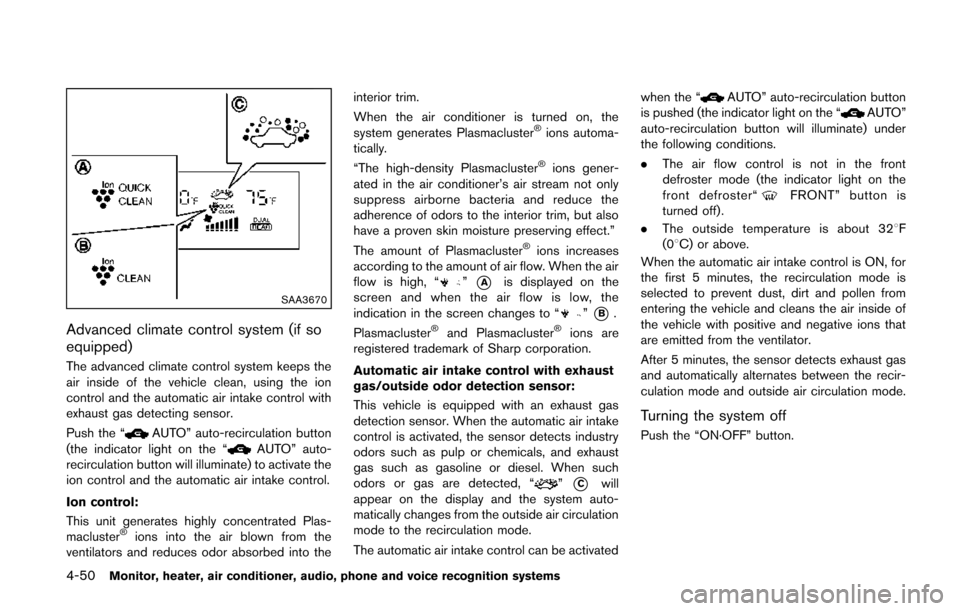
flow is high, “
”*Ais displayed on the
screen and when the air flow is low, the
indication in the screen changes to “
”*B.
Plasmacluster®and Plasmacluster®ions are
registered trademark of Sharp corporation.
Automatic air intake control with exhaust
gas/outside odor detection sensor:
This vehicle is equipped with an exhaust gas
detection sensor. When the automatic air intake
control is activated, the sensor detects industry
odors such as pulp or chemicals, and exhaust
gas such as gasoline or diesel. When such
odors or gas are detected, “
”*Cwill
appear on the display and the system auto-
matically changes from the outside air circulation
mode to the recirculation mode.
The automatic air intake control can be activated when the “
AUTO” auto-recirculation button
is pushed (the indicator light on the “AUTO”
auto-recirculation button will illuminate) under
the following conditions.
. The air flow control is not in the front
defroster mode (the indicator light on the
front defroster“
FRONT” button is
turned off).
. The outside temperature is about 328 F
(08C) or above.
When the automatic air intake control is ON, for
the first 5 minutes, the recirculation mode is
selected to prevent dust, dirt and pollen from
entering the vehicle and cleans the air inside of
the vehicle with positive and negative ions that
are emitted from the ventilator.
After 5 minutes, the sensor detects exhaust gas
and automatically alternates between the recir-
culation mode and outside air circulation mode.
Turning the system off
Push the “ON·OFF” button.
Page 234 of 482
Rear air conditioning system
To control the rear air conditioning system
independently with the front air conditioner
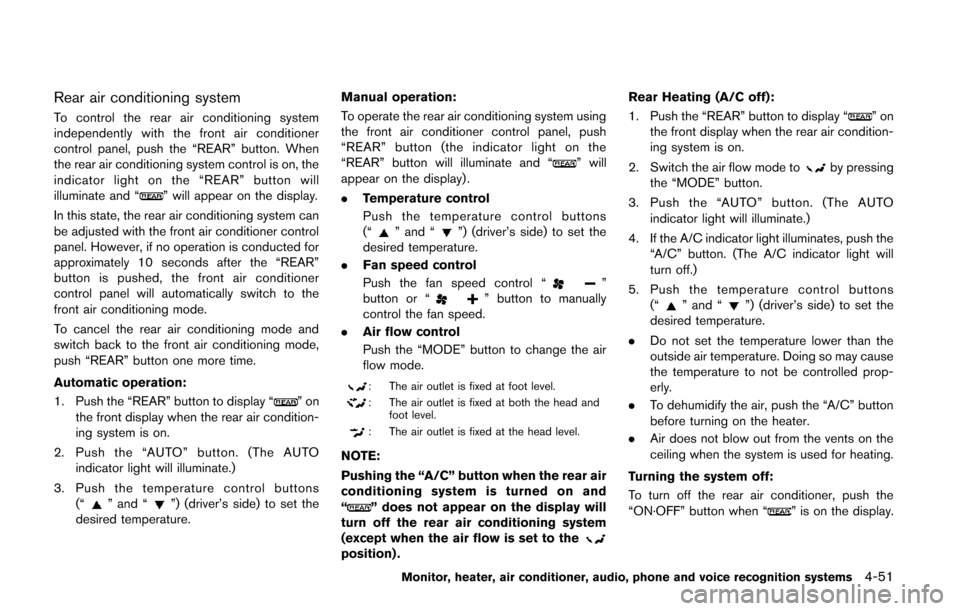
control panel, push the “REAR” button. When
the rear air conditioning system control is on, the
indicator light on the “REAR” button will
illuminate and “
” will appear on the display.
In this state, the rear air conditioning system can
be adjusted with the front air conditioner control
panel. However, if no operation is conducted for
approximately 10 seconds after the “REAR”
button is pushed, the front air conditioner
control panel will automatically switch to the
front air conditioning mode.
To cancel the rear air conditioning mode and
switch back to the front air conditioning mode,
push “REAR” button one more time.
Automatic operation:
1. Push the “REAR” button to display “
”on
the front display when the rear air condition-
ing system is on.
2. Push the “AUTO” button. (The AUTO indicator light will illuminate.)
3. Push the temperature control buttons (“
” and “”) (driver’s side) to set the
desired temperature. Manual operation:
To operate the rear air conditioning system using
the front air conditioner control panel, push
“REAR” button (the indicator light on the
“REAR” button will illuminate and “
” will
appear on the display) .
. Temperature control
Push the temperature control buttons
(“
” and “”) (driver’s side) to set the
desired temperature.
. Fan speed control
Push the fan speed control “
”
button or “” button to manually
control the fan speed.
. Air flow control
Push the “MODE” button to change the air
flow mode.
: The air outlet is fixed at foot level.
: The air outlet is fixed at both the head and
foot level.
: The air outlet is fixed at the head level.
NOTE:
Pushing the “A/C” button when the rear air
conditioning system is turned on and
“
” does not appear on the display will
turn off the rear air conditioning system
(except when the air flow is set to the
position) . Rear Heating (A/C off):
1. Push the “REAR” button to display “
”on
the front display when the rear air condition-
ing system is on.
2. Switch the air flow mode to
by pressing
the “MODE” button.
3. Push the “AUTO” button. (The AUTO indicator light will illuminate.)
4. If the A/C indicator light illuminates, push the “A/C” button. (The A/C indicator light will
turn off.)
5. Push the temperature control buttons (“
” and “”) (driver’s side) to set the
desired temperature.
. Do not set the temperature lower than the
outside air temperature. Doing so may cause
the temperature to not be controlled prop-
erly.
. To dehumidify the air, push the “A/C” button
before turning on the heater.
. Air does not blow out from the vents on the
ceiling when the system is used for heating.
Turning the system off:
To turn off the rear air conditioner, push the
“ON·OFF” button when “
” is on the display.
Monitor, heater, air conditioner, audio, phone and voice recognition systems4-51
Page 235 of 482
4-52Monitor, heater, air conditioner, audio, phone and voice recognition systems
SAA3517
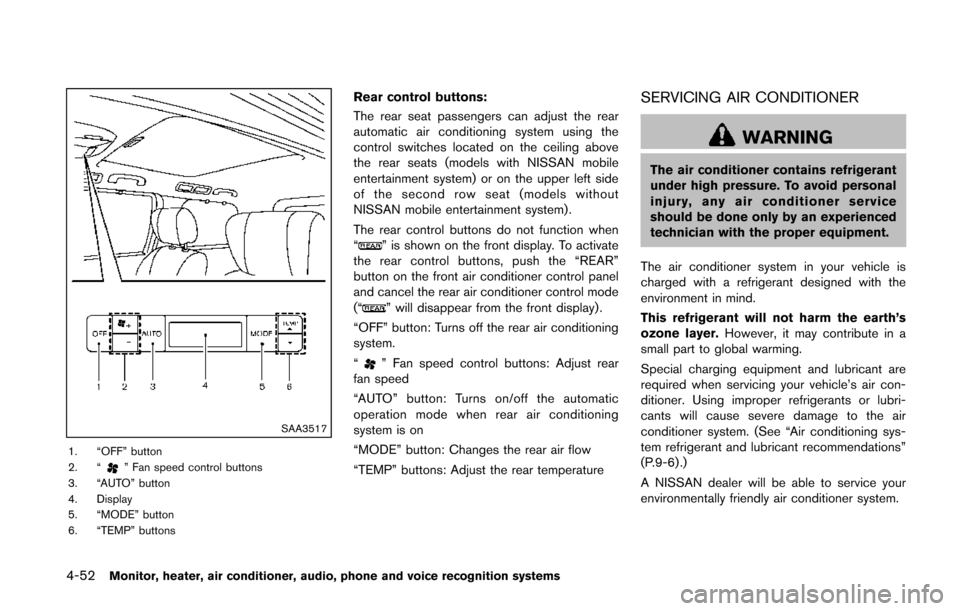
1. “OFF” button
2. “” Fan speed control buttons
3. “AUTO” button
4. Display
5. “MODE” button
6. “TEMP” buttons
Rear control buttons:
The rear seat passengers can adjust the rear
automatic air conditioning system using the
control switches located on the ceiling above
the rear seats (models with NISSAN mobile
entertainment system) or on the upper left side
of the second row seat (models without
NISSAN mobile entertainment system) .
The rear control buttons do not function when
“
” is shown on the front display. To activate
the rear control buttons, push the “REAR”
button on the front air conditioner control panel
and cancel the rear air conditioner control mode
(“
” will disappear from the front display) .
“OFF” button: Turns off the rear air conditioning
system.
“
” Fan speed control buttons: Adjust rear
fan speed
“AUTO” button: Turns on/off the automatic
operation mode when rear air conditioning
system is on
“MODE” button: Changes the rear air flow
“TEMP” buttons: Adjust the rear temperature
SERVICING AIR CONDITIONER
WARNING
The air conditioner contains refrigerant
under high pressure. To avoid personal
injury, any air conditioner service
should be done only by an experienced
technician with the proper equipment.
The air conditioner system in your vehicle is
charged with a refrigerant designed with the
environment in mind.
This refrigerant will not harm the earth’s
ozone layer. However, it may contribute in a
small part to global warming.
Special charging equipment and lubricant are
required when servicing your vehicle’s air con-
ditioner. Using improper refrigerants or lubri-
cants will cause severe damage to the air
conditioner system. (See “Air conditioning sys-
tem refrigerant and lubricant recommendations”
(P.9-6) .)
A NISSAN dealer will be able to service your
environmentally friendly air conditioner system.
Page 237 of 482
4-54Monitor, heater, air conditioner, audio, phone and voice recognition systems
SAA0306
FM radio reception:
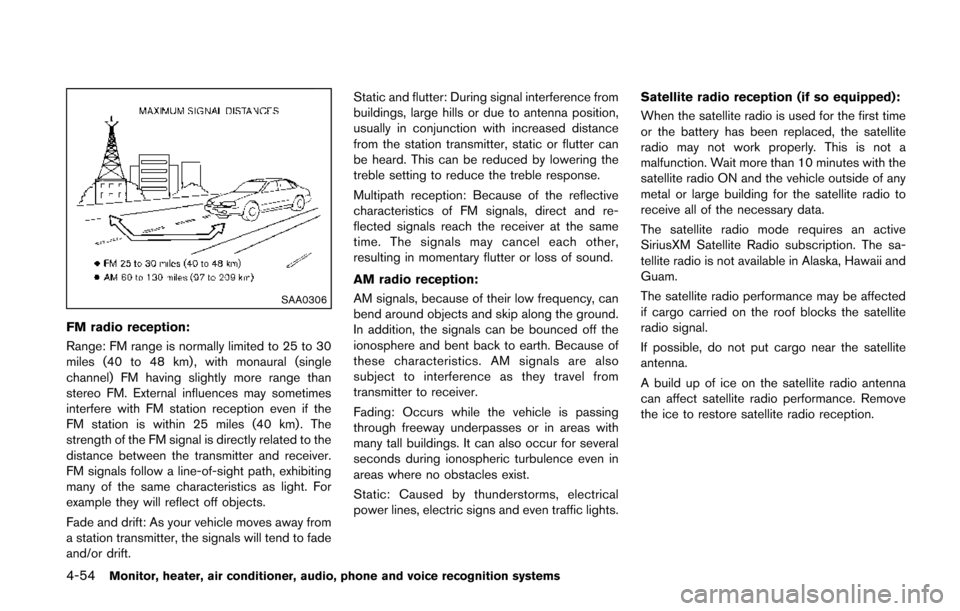
Range: FM range is normally limited to 25 to 30
miles (40 to 48 km) , with monaural (single
channel) FM having slightly more range than
stereo FM. External influences may sometimes
interfere with FM station reception even if the
FM station is within 25 miles (40 km). The
strength of the FM signal is directly related to the
distance between the transmitter and receiver.
FM signals follow a line-of-sight path, exhibiting
many of the same characteristics as light. For
example they will reflect off objects.
Fade and drift: As your vehicle moves away from
a station transmitter, the signals will tend to fade
and/or drift.Static and flutter: During signal interference from
buildings, large hills or due to antenna position,
usually in conjunction with increased distance
from the station transmitter, static or flutter can
be heard. This can be reduced by lowering the
treble setting to reduce the treble response.
Multipath reception: Because of the reflective
characteristics of FM signals, direct and re-
flected signals reach the receiver at the same
time. The signals may cancel each other,
resulting in momentary flutter or loss of sound.
AM radio reception:
AM signals, because of their low frequency, can
bend around objects and skip along the ground.
In addition, the signals can be bounced off the
ionosphere and bent back to earth. Because of
these characteristics. AM signals are also
subject to interference as they travel from
transmitter to receiver.
Fading: Occurs while the vehicle is passing
through freeway underpasses or in areas with
many tall buildings. It can also occur for several
seconds during ionospheric turbulence even in
areas where no obstacles exist.
Static: Caused by thunderstorms, electrical
power lines, electric signs and even traffic lights. Satellite radio reception (if so equipped):
When the satellite radio is used for the first time
or the battery has been replaced, the satellite
radio may not work properly. This is not a
malfunction. Wait more than 10 minutes with the
satellite radio ON and the vehicle outside of any
metal or large building for the satellite radio to
receive all of the necessary data.
The satellite radio mode requires an active
SiriusXM Satellite Radio subscription. The sa-
tellite radio is not available in Alaska, Hawaii and
Guam.
The satellite radio performance may be affected
if cargo carried on the roof blocks the satellite
radio signal.
If possible, do not put cargo near the satellite
antenna.
A build up of ice on the satellite radio antenna
can affect satellite radio performance. Remove
the ice to restore satellite radio reception.