2014 NISSAN QUEST ECO mode
[x] Cancel search: ECO modePage 211 of 482
4-28Monitor, heater, air conditioner, audio, phone and voice recognition systems
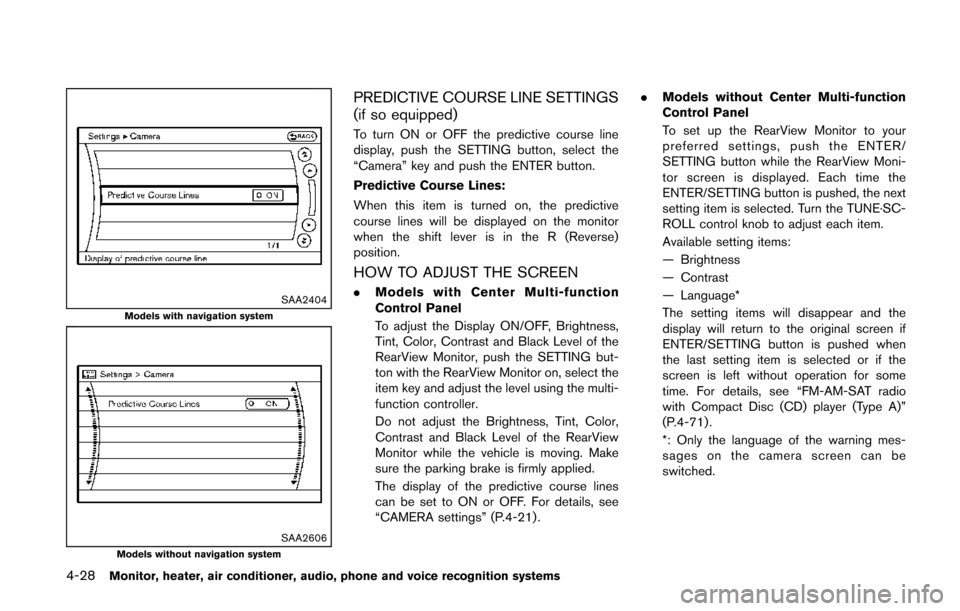
SAA2404Models with navigation system
SAA2606Models without navigation system
PREDICTIVE COURSE LINE SETTINGS
(if so equipped)
To turn ON or OFF the predictive course line
display, push the SETTING button, select the
“Camera” key and push the ENTER button.
Predictive Course Lines:
When this item is turned on, the predictive
course lines will be displayed on the monitor
when the shift lever is in the R (Reverse)
position.
HOW TO ADJUST THE SCREEN
.Models with Center Multi-function
Control Panel
To adjust the Display ON/OFF, Brightness,
Tint, Color, Contrast and Black Level of the
RearView Monitor, push the SETTING but-
ton with the RearView Monitor on, select the
item key and adjust the level using the multi-
function controller.
Do not adjust the Brightness, Tint, Color,
Contrast and Black Level of the RearView
Monitor while the vehicle is moving. Make
sure the parking brake is firmly applied.
The display of the predictive course lines
can be set to ON or OFF. For details, see
“CAMERA settings” (P.4-21) . .
Models without Center Multi-function
Control Panel
To set up the RearView Monitor to your
preferred settings, push the ENTER/
SETTING button while the RearView Moni-
tor screen is displayed. Each time the
ENTER/SETTING button is pushed, the next
setting item is selected. Turn the TUNE·SC-
ROLL control knob to adjust each item.
Available setting items:
— Brightness
— Contrast
— Language*
The setting items will disappear and the
display will return to the original screen if
ENTER/SETTING button is pushed when
the last setting item is selected or if the
screen is left without operation for some
time. For details, see “FM-AM-SAT radio
with Compact Disc (CD) player (Type A)”
(P.4-71) .
*: Only the language of the warning mes-
sages on the camera screen can be
switched.
Page 212 of 482
OPERATING TIPS
.When the shift lever is shifted to the R
(Reverse) position, the monitor screen auto-
matically changes to the RearView Monitor
mode. However, the radio can be heard.
. When the temperature is extremely high or
low, the screen may not clearly display
objects. This is not a malfunction.
. When strong light is directly coming on the
camera, objects may not be displayed
clearly. This is not a malfunction.
. Vertical lines may be seen in objects on the
screen. This is due to strong reflected light
from the bumper. This is not a malfunction.
. The screen may flicker under fluorescent
light. This is not a malfunction.
. The colors of objects on the RearView
Monitor may differ somewhat from the actual
color of objects. This is not a malfunction.
. Objects on the monitor may not be clear in a
dark environment. This is not a malfunction.
. If dirt, rain or snow accumulates on the
camera, the RearView Monitor may not
display objects clearly. Clean the camera.
. Do not use alcohol, benzine or thinner to
clean the camera. This will cause discolora-
tion. To clean the camera, wipe with a cloth
dampened with diluted mild cleaning agent
and then wipe with a dry cloth. .
Do not damage the camera as the monitor
screen may be adversely affected.
. Do not use wax on the camera window.
Wipe off any wax with a clean cloth
dampened with mild detergent diluted with
water. When you push the CAMERA button on the
center multi-function control panel or shift the
shift lever into the “R” (Reverse) position while
the ignition switch is in the ON position, the
Around View Monitor operates. The monitor
displays various views of the position of the
vehicle.
Available views:
.
Bird-eye View
The surrounding view of the vehicle.
. Front-side View
The view around and ahead of the front
passenger’s side wheel.
. Front View
The view to the front of the vehicle.
. Rear View
The view to the rear of the vehicle.
The system is designed as an aid to the driver in
situations such as slot parking or parallel
parking.
Monitor, heater, air conditioner, audio, phone and voice recognition systems4-29
AROUND VIEWTMMONITOR (if so
equipped)
Page 222 of 482
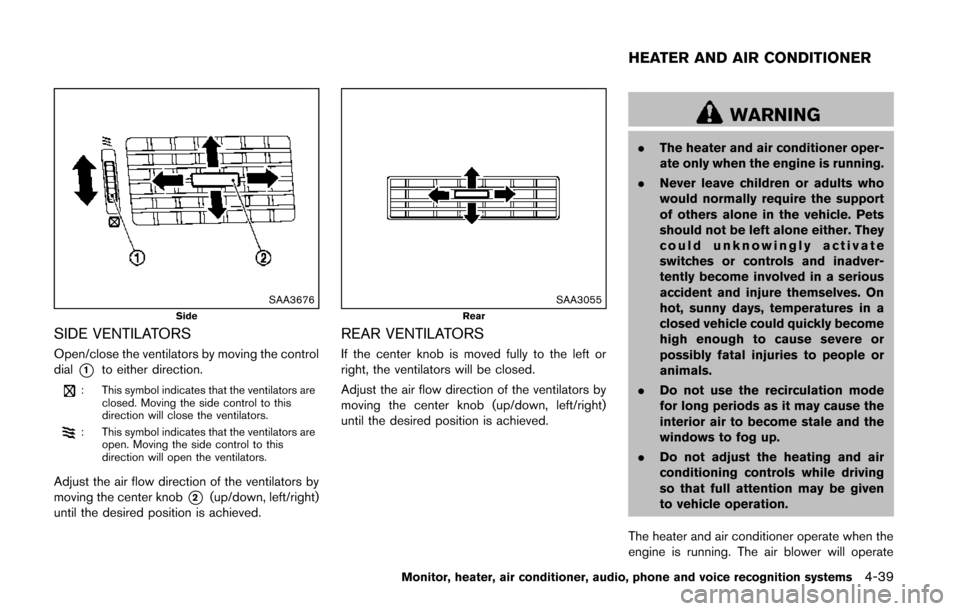
SAA3676Side
SIDE VENTILATORS
Open/close the ventilators by moving the control
dial
*1to either direction.
: This symbol indicates that the ventilators areclosed. Moving the side control to this
direction will close the ventilators.
: This symbol indicates that the ventilators areopen. Moving the side control to this
direction will open the ventilators.
Adjust the air flow direction of the ventilators by
moving the center knob
*2(up/down, left/right)
until the desired position is achieved.
SAA3055Rear
REAR VENTILATORS
If the center knob is moved fully to the left or
right, the ventilators will be closed.
Adjust the air flow direction of the ventilators by
moving the center knob (up/down, left/right)
until the desired position is achieved.
WARNING
. The heater and air conditioner oper-
ate only when the engine is running.
. Never leave children or adults who
would normally require the support
of others alone in the vehicle. Pets
should not be left alone either. They
could unknowingly activate
switches or controls and inadver-
tently become involved in a serious
accident and injure themselves. On
hot, sunny days, temperatures in a
closed vehicle could quickly become
high enough to cause severe or
possibly fatal injuries to people or
animals.
. Do not use the recirculation mode
for long periods as it may cause the
interior air to become stale and the
windows to fog up.
. Do not adjust the heating and air
conditioning controls while driving
so that full attention may be given
to vehicle operation.
The heater and air conditioner operate when the
engine is running. The air blower will operate
Monitor, heater, air conditioner, audio, phone and voice recognition systems4-39
HEATER AND AIR CONDITIONER
Page 224 of 482
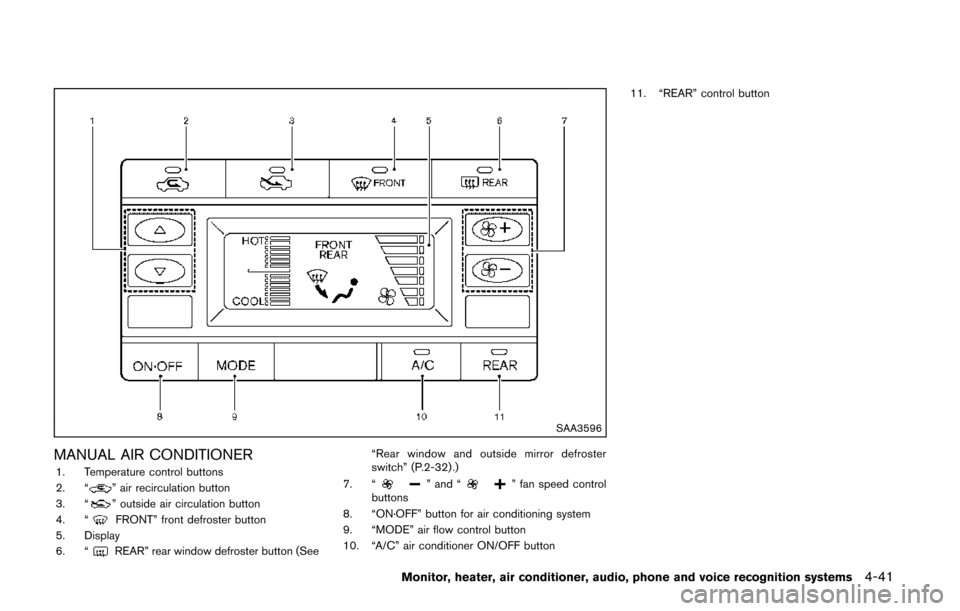
SAA3596
MANUAL AIR CONDITIONER1. Temperature control buttons
2. “” air recirculation button
3. “” outside air circulation button
4. “FRONT” front defroster button
5. Display
6. “
REAR” rear window defroster button (See “Rear window and outside mirror defroster
switch” (P.2-32) .)
7. “
” and “” fan speed control
buttons
8. “ON·OFF” button for air conditioning system
9. “MODE” air flow control button
10. “A/C” air conditioner ON/OFF button 11. “REAR” control button
Monitor, heater, air conditioner, audio, phone and voice recognition systems4-41
Page 225 of 482
4-42Monitor, heater, air conditioner, audio, phone and voice recognition systems
Controls
To turn off the heater and air conditioner, push
the “ON·OFF” button.
Fan speed control:
Push the fan speed control button “
”to
increase the fan speed.
Push the fan speed control button “
”to
decrease the fan speed.
A/C (Air Conditioner) operation:
Push the A/C button to turn on or off the air
conditioner. When the air conditioner is on, the
A/C indicator light on the button illuminates.
Air flow control:
Push the “MODE” button to change the air flow
mode.
: Air flows from the center and side ventila- tors.
: Air flows from the center and side ventila-tors, and foot outlets.
: Air flows mainly from the foot outlets.
: Air flows from the defroster and foot outlets.
Temperature control:
Push the temperature control buttons (“
”
and “”) to set the desired temperature.
Air recirculation:
Push the air recirculation “
” button to recirculate interior air inside the vehicle. The
indicator light on the air recirculation “
”
button will illuminate.
The air recirculation mode cannot be activated
when the air conditioner is in the front defrosting
mode.
Outside air circulation:
Push the outside air circulation “
” button to
draw outside air into the passenger compart-
ment. The indicator light on the outside air
circulation “
” button will turn on.
Heater operation
Heating:
This mode is used to direct heated air to the foot
outlets.
1. Push the outside air circulation “
” button
to switch to the outside air circulation mode.
(The indicator light turns on.)
2. Push the air flow control button to change to the
mode.
3. Push the fan speed control buttons to set the desired fan speed.
4. Push the temperature control buttons to set the desired temperature between the middle
and the hot position. Ventilation:
This mode directs outside air to the side and
center ventilators.
1. Push the outside air circulation “
” button
to switch to the outside air circulation mode.
(The indicator light turns on.)
2. Push the air flow control button to change to the
mode.
3. Push the fan speed control
buttons to
set the desired position.
Bi-level heating:
This mode directs cool air from the side and
center vents and warm air from the foot outlets.
When the temperature is set to the maximum hot
or cool position, the air between the ventilators
and the foot outlets is the same temperature.
1. Push the outside air circulation “
” button
to switch to the outside air circulation mode.
(The indicator light turns on.)
2. Push the air flow control button to change to the
mode.
3. Push the fan speed control buttons to set the desired fan speed.
4. Push the temperature control buttons to set the desired temperature.
Page 226 of 482
Heating and defogging:
This mode heats the interior and defogs the
windows.
1. Push the air flow control button to change tothe
mode.
2. Push the fan speed control
buttons to
set the desired fan speed.
3. Push the temperature control buttons to set the desired temperature.
When the
mode is selected, the air
conditioner will automatically turn on. This will
dehumidify the air and help to defog the
windows. The A/C indicator light will illuminate
when the air conditioner automatically turns on.
The air conditioner and A/C indicator light will
remain on in all flow control modes until the A/C
button is pressed.
Air conditioner operation
The air conditioner system should be operated
for approximately 10 minutes at least once a
month. This helps prevent damage to the air
conditioner system due to the lack of lubrication.
Cooling:
This mode is used to cool and dehumidify the air.
1. Push the outside air circulation “
” button
to switch to the outside air circulation mode.
(The indicator light turns on.) 2. Push the air flow control button to change to
the
mode.
3. Push the fan speed control buttons to set the desired fan speed.
4. Push the A/C button on. (The A/C indicator light will illuminate.)
5. Push the temperature control buttons to set the desired temperature between the middle
and the cool position.
. For quick cooling when the outside tem-
perature is high, push the air recirculation
button to switch to the air recirculation
mode. (The indicator light turns on.) Be sure
to turn off the air recirculation mode for
normal cooling.
. A visible mist may be seen coming from the
ventilators in hot, humid conditions as the air
is cooled rapidly. This does not indicate a
malfunction.
Dehumidified heating:
This mode is used to heat and dehumidify the
air.
1. Push the outside air circulation “
” button
to switch to the outside air circulation mode.
(The indicator light turns on.)
2. Push the air flow control button to change to the
position. 3. Push the fan speed control buttons to the
desired fan speed.
4. Push the A/C button on. (The A/C indicator light will illuminate.)
5. Push the temperature control buttons to set the desired temperature between the middle
and the hot position.
Dehumidified or defrosting/defogging:
This mode is used to defog the windows and
dehumidify the air.
1. Push the front defroster button
on. (The
indicator light turns on.)
2. Push the fan speed control buttons to set the desired fan speed.
3. Push the temperature control buttons to set the desired temperature.
When the
mode is selected, the air
conditioner will automatically turn on. This will
dehumidify the air and help to defog the
windows. The A/C indicator light will illuminate
when the air conditioner automatically turns on.
The air conditioner and A/C indicator light will
remain on in all flow control modes until the A/C
button is pushed.
To remove frost from the outside surface of the
windshield quickly, set the temperature to the
maximum hot position and the fan speed to
maximum position.
Monitor, heater, air conditioner, audio, phone and voice recognition systems4-43
Page 227 of 482
4-44Monitor, heater, air conditioner, audio, phone and voice recognition systems
Rear air conditioning system
Operating from front control buttons:
To control the rear air conditioning system
independently with the front air conditioner
control panel, push the “REAR” button. When
the rear air conditioning system control is on, the
indicator light on the “REAR” button will
illuminate and “REAR” will appear on the display.
In this state, the rear air conditioning system can
be adjusted with the front air conditioner control
panel. However, if no operation is conducted for
approximately 10 seconds after the “REAR”
button is pushed, the front air conditioner
control panel will automatically switch to the
front air conditioning mode.
To cancel the rear air conditioning mode and
switch back to the front air conditioning mode,
push “REAR” button one more time.
.Temperature control
Push the temperature control buttons
(“
” and “”) to set the desired
temperature.
. Fan speed control
Push the fan speed control “
”
button or “” button to control the
fan speed.
. Air flow control
Push the “MODE” button to change the air flow mode.
: The air outlet is fixed at foot level.
: The air outlet is fixed at both the head and
foot level.
: The air outlet is fixed at the head level.
NOTE:
Pushing the “A/C” button when the rear air
conditioning system is turned on and
“REAR” does not appear on the display
will turn off the rear air conditioning
system (except when the air flow is set to
the
position) .
. Rear Heating (A/C off)
1. Push the “REAR” button to display “REAR” on the front display when the rear air
conditioning system is on.
2. Switch the air flow mode to
by pressing
the “MODE” button.
3. If the A/C indicator light illuminates, push the “A/C” button. (The A/C indicator light will
turn off.)
4. Push the temperature control buttons (“
” and “”) to set the desired
temperature between the middle and the
hot position.
. To dehumidify the air, push the “A/C” button
before turning on the heater. .
Air does not blow out from the vents on the
ceiling when the system is used for heating.
Turning the system off:
To turn off the rear air conditioner, push the
“ON·OFF” button when “REAR” is on the
display.
Page 228 of 482
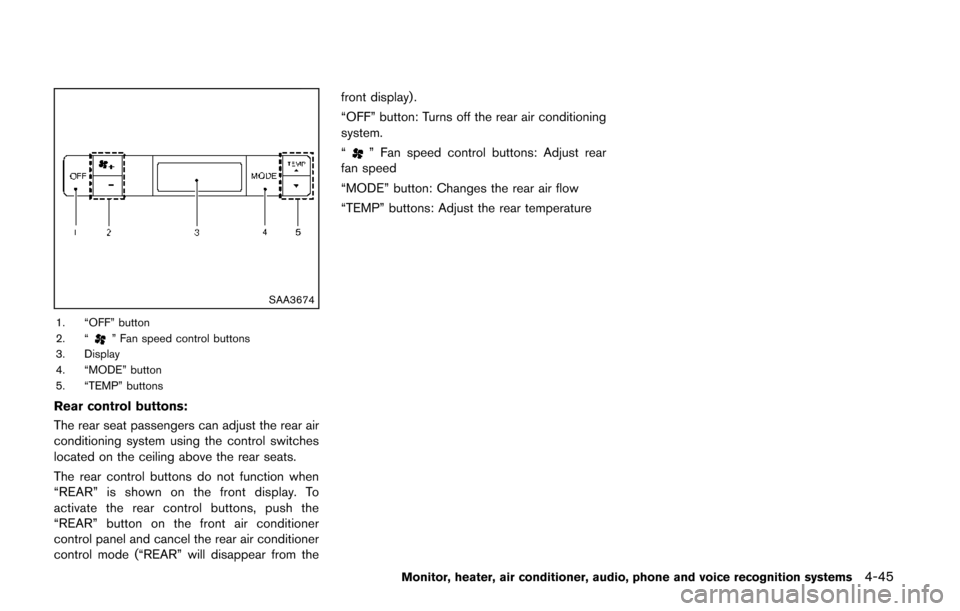
SAA3674
1. “OFF” button
2. “” Fan speed control buttons
3. Display
4. “MODE” button
5. “TEMP” buttons
Rear control buttons:
The rear seat passengers can adjust the rear air
conditioning system using the control switches
located on the ceiling above the rear seats.
The rear control buttons do not function when
“REAR” is shown on the front display. To
activate the rear control buttons, push the
“REAR” button on the front air conditioner
control panel and cancel the rear air conditioner
control mode (“REAR” will disappear from the front display) .
“OFF” button: Turns off the rear air conditioning
system.
“
” Fan speed control buttons: Adjust rear
fan speed
“MODE” button: Changes the rear air flow
“TEMP” buttons: Adjust the rear temperature
Monitor, heater, air conditioner, audio, phone and voice recognition systems4-45