2014 NISSAN QUEST ECO mode
[x] Cancel search: ECO modePage 113 of 482
2-34Instruments and controls
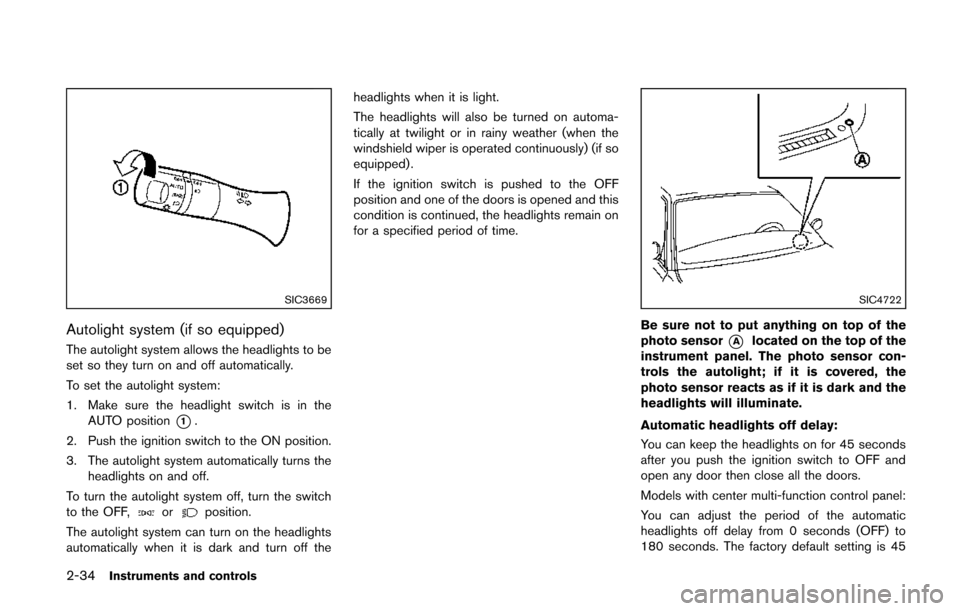
SIC3669
Autolight system (if so equipped)
The autolight system allows the headlights to be
set so they turn on and off automatically.
To set the autolight system:
1. Make sure the headlight switch is in theAUTO position
*1.
2. Push the ignition switch to the ON position.
3. The autolight system automatically turns the headlights on and off.
To turn the autolight system off, turn the switch
to the OFF,
orposition.
The autolight system can turn on the headlights
automatically when it is dark and turn off the headlights when it is light.
The headlights will also be turned on automa-
tically at twilight or in rainy weather (when the
windshield wiper is operated continuously) (if so
equipped) .
If the ignition switch is pushed to the OFF
position and one of the doors is opened and this
condition is continued, the headlights remain on
for a specified period of time.
SIC4722
Be sure not to put anything on top of the
photo sensor
*Alocated on the top of the
instrument panel. The photo sensor con-
trols the autolight; if it is covered, the
photo sensor reacts as if it is dark and the
headlights will illuminate.
Automatic headlights off delay:
You can keep the headlights on for 45 seconds
after you push the ignition switch to OFF and
open any door then close all the doors.
Models with center multi-function control panel:
You can adjust the period of the automatic
headlights off delay from 0 seconds (OFF) to
180 seconds. The factory default setting is 45
Page 114 of 482
seconds.
For automatic headlights off delay setting, see
“Vehicle information and settings (models with
center multi-function control panel)” (P.4-8).
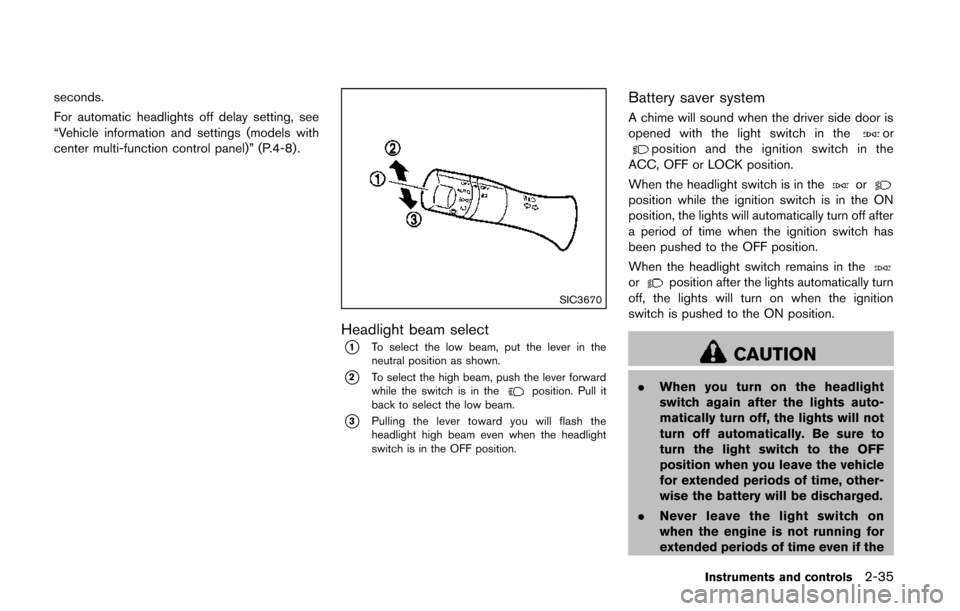
SIC3670
Headlight beam select
*1To select the low beam, put the lever in the
neutral position as shown.
*2To select the high beam, push the lever forward
while the switch is in theposition. Pull it
back to select the low beam.
*3Pulling the lever toward you will flash the
headlight high beam even when the headlight
switch is in the OFF position.
Battery saver system
A chime will sound when the driver side door is
opened with the light switch in theorposition and the ignition switch in the
ACC, OFF or LOCK position.
When the headlight switch is in the
orposition while the ignition switch is in the ON
position, the lights will automatically turn off after
a period of time when the ignition switch has
been pushed to the OFF position.
When the headlight switch remains in the
orposition after the lights automatically turn
off, the lights will turn on when the ignition
switch is pushed to the ON position.
CAUTION
. When you turn on the headlight
switch again after the lights auto-
matically turn off, the lights will not
turn off automatically. Be sure to
turn the light switch to the OFF
position when you leave the vehicle
for extended periods of time, other-
wise the battery will be discharged.
. Never leave the light switch on
when the engine is not running for
extended periods of time even if the
Instruments and controls2-35
Page 136 of 482
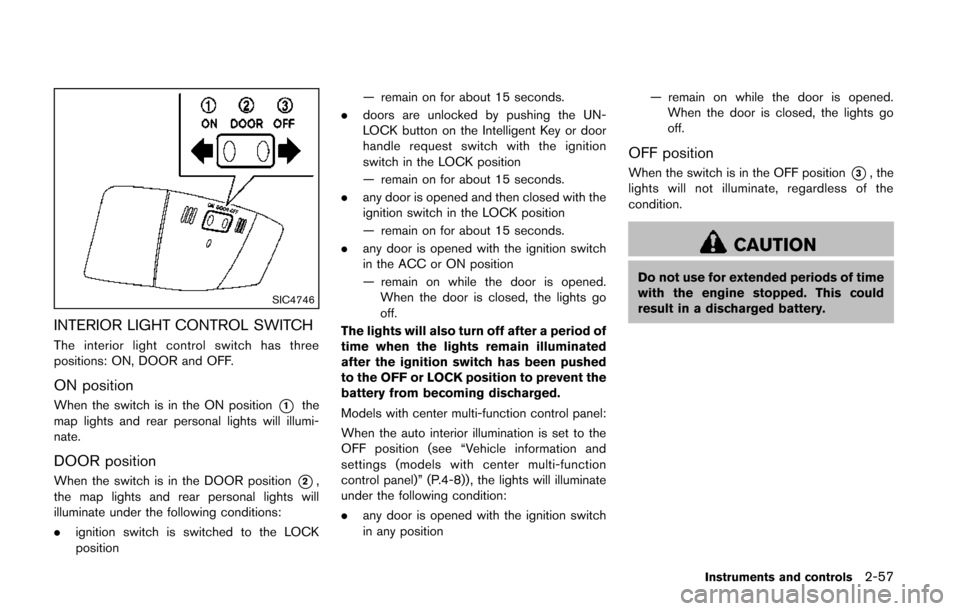
SIC4746
INTERIOR LIGHT CONTROL SWITCH
The interior light control switch has three
positions: ON, DOOR and OFF.
ON position
When the switch is in the ON position*1the
map lights and rear personal lights will illumi-
nate.
DOOR position
When the switch is in the DOOR position*2,
the map lights and rear personal lights will
illuminate under the following conditions:
. ignition switch is switched to the LOCK
position — remain on for about 15 seconds.
. doors are unlocked by pushing the UN-
LOCK button on the Intelligent Key or door
handle request switch with the ignition
switch in the LOCK position
— remain on for about 15 seconds.
. any door is opened and then closed with the
ignition switch in the LOCK position
— remain on for about 15 seconds.
. any door is opened with the ignition switch
in the ACC or ON position
— remain on while the door is opened.
When the door is closed, the lights go
off.
The lights will also turn off after a period of
time when the lights remain illuminated
after the ignition switch has been pushed
to the OFF or LOCK position to prevent the
battery from becoming discharged.
Models with center multi-function control panel:
When the auto interior illumination is set to the
OFF position (see “Vehicle information and
settings (models with center multi-function
control panel)” (P.4-8)) , the lights will illuminate
under the following condition:
. any door is opened with the ignition switch
in any position — remain on while the door is opened.
When the door is closed, the lights go
off.
OFF position
When the switch is in the OFF position*3, the
lights will not illuminate, regardless of the
condition.
CAUTION
Do not use for extended periods of time
with the engine stopped. This could
result in a discharged battery.
Instruments and controls2-57
Page 138 of 482
The HomeLink®Universal Transceiver provides a
convenient way to consolidate the functions of
up to three individual hand-held transmitters into
one built-in device.
HomeLink
®Universal Transceiver:
. Will operate most Radio Frequency (RF)
devices such as garage doors, gates, home
and office lighting, entry door locks and
security systems.
. Is powered by your vehicle’s battery. No
separate batteries are required. If the
vehicle’s battery is discharged or is dis-
connected, HomeLink
®will retain all pro-
gramming.
When the HomeLink
®Universal Transcei-
ver is programmed, retain the original
transmitter for future programming proce-
dures (Example: new vehicle purchases) .
Upon sale of the vehicle, the programmed
HomeLink
®Universal Transceiver buttons
should be erased for security purposes.
For additional information, refer to “Pro-
gramming HomeLink
®” (P.2-59) .
WARNING
. Do not use the HomeLink®Universal
Transceiver with any garage door
opener that lacks safety stop and reverse features as required by
federal safety standards. (These
standards became effective for
opener models manufactured after
April 1, 1982) . A garage door opener
which cannot detect an object in the
path of a closing garage door and
then automatically stop and reverse,
does not meet current federal safety
standards. Using a garage door
opener without these features in-
creases the risk of serious injury or
death.
. During the programming procedure
your garage door or security gate
will open and close (if the transmit-
ter is within range) . Make sure that
people or objects are clear of the
garage door, gate, etc. that you are
programming.
. Your vehicle’s engine should be
turned off while programming the
HomeLink
®Universal Transceiver.
Do not breathe exhaust gases; they
contain colorless and odorless car-
bon monoxide. Carbon monoxide is
dangerous. It can cause uncon-
sciousness or death.
PROGRAMMING HomeLink®
If you have any questions or are having difficulty
programming your HomeLink®buttons, refer to
the HomeLink®web site at: www.homelink.com
or call 1-800-355-3515.
NOTE:
It is also recommended that a new battery
be placed in the hand-held transmitter of
the device being programmed to
HomeLink
®for quicker programming and
accurate transmission of the radio-fre-
quency.
1. Position the end of your hand-held transmit- ter 1-3 in (26-76 mm) away from the
HomeLink
®surface, keeping the HomeLink®
indicator light*1in view.
Instruments and controls2-59
HomeLink®UNIVERSAL
TRANSCEIVER (if so equipped)
Page 141 of 482
2-62Instruments and controls
CLEARING THE PROGRAMMED IN-
FORMATION
The following procedure clears the programmed
information from both buttons. Individual buttons
cannot be cleared. However, individual buttons
can be reprogrammed, see “Reprogramming a
single HomeLink
®button” (P.2-62).
To clear all programming
1. Press and hold the two outer HomeLink®
buttons until the indicator light begins to
flash in approximately 10 seconds. Do not
hold for longer than 20 seconds.
2. Release both buttons.
HomeLink
®is now in the programming mode
and can be programmed at any time beginning
with “Programming HomeLink
®” - Step 1.
REPROGRAMMING A SINGLE
HomeLink®BUTTON
To reprogram a HomeLink®Universal Transcei-
ver button, complete the following.
1. Press and hold the desired HomeLink
®
button. DO NOT release the button.
2. The indicator light will begin to flash after 20 seconds. Without releasing the HomeLink
®
button, proceed with “Programming
HomeLink®” - Step 1. For questions or comments, contact HomeLink
®
at: www.homelink.com or 1-800-355-3515.
The HomeLink®Universal Transceiver button
has now been reprogrammed. The new device
can be activated by pushing the HomeLink
®
button that was just programmed. This proce-
dure will not affect any other programmed
HomeLink
®buttons.
IF YOUR VEHICLE IS STOLEN
If your vehicle is stolen, you should change the
codes of any non-rolling code device that has
been programmed into HomeLink
®. Consult the
Owner’s Manual of each device or call the
manufacturer or dealer of those devices for
additional information.
When your vehicle is recovered, you will
need to reprogram the HomeLink
®Univer-
sal Transceiver with your new transmitter
information.
FCC Notice:
For USA:
This device complies with Part 15 of the
FCC Rules. Operation is subject to the
following two conditions: (1) This device
may not cause harmful interference, and
(2) this device must accept any interfer-
ence received, including interference that
may cause undesired operation. NOTE:
Changes or modifications not expressly
approved by the party responsible for
compliance could void the user’s authority
to operate the equipment.
For Canada:
This device complies with RSS-210 of
Industry Canada. Operation is subject to
the following two conditions: (1) this
device may not cause interference, and
(2) this device must accept any interfer-
ence, including interference that may
cause undesired operation of the device.
Page 148 of 482
CAUTION
Always carry the mechanical key in-
stalled in the key.
VALET HAND-OFF
When you have to leave a key with a valet, give
them the Intelligent Key itself after removing the
mechanical key to protect your belongings.
To prevent the glove box from being opened
during valet hand-off, follow the procedures
below.
1. Remove the mechanical key from the In-telligent Key.
2. Lock the glove box with the mechanical key.
3. Hand the Intelligent Key to the valet, keeping the mechanical key in your pocket or bag.
Insert the mechanical key into the Intelligent
Key when you retrieve your vehicle.
For glove box lock, see “Storage” (P.2-43) .
WARNING
. Always have the doors locked while
driving. Along with the use of seat
belts, this provides greater safety in
the event of an accident by helping
to prevent persons from being
thrown from the vehicle. This also
helps keep children and others from
unintentionally opening the doors,
and will help keep out intruders.
. Before opening any door, always
look for and avoid oncoming traffic.
. Do not leave children unattended
inside the vehicle. They could un-
knowingly activate switches or con-
trols. Unattended children could
become involved in serious acci-
dents.
SPA2527-B
LOCKING WITH MECHANICAL KEY
The power door lock system allows you to lock
or unlock all doors simultaneously using the
mechanical key.
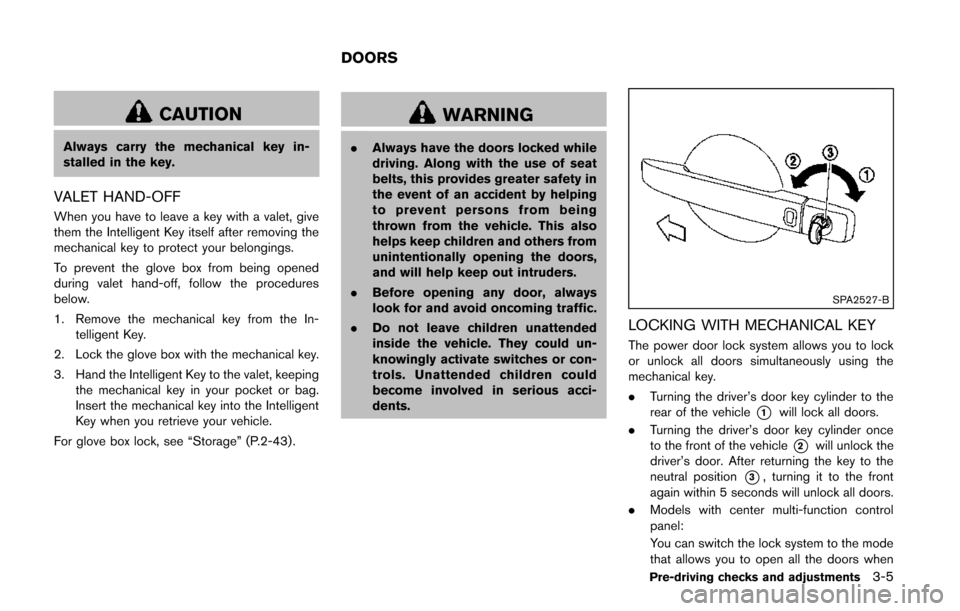
.Turning the driver’s door key cylinder to the
rear of the vehicle
*1will lock all doors.
. Turning the driver’s door key cylinder once
to the front of the vehicle
*2will unlock the
driver’s door. After returning the key to the
neutral position
*3, turning it to the front
again within 5 seconds will unlock all doors.
. Models with center multi-function control
panel:
You can switch the lock system to the mode
that allows you to open all the doors when
Pre-driving checks and adjustments3-5
DOORS
Page 154 of 482
SPA2071
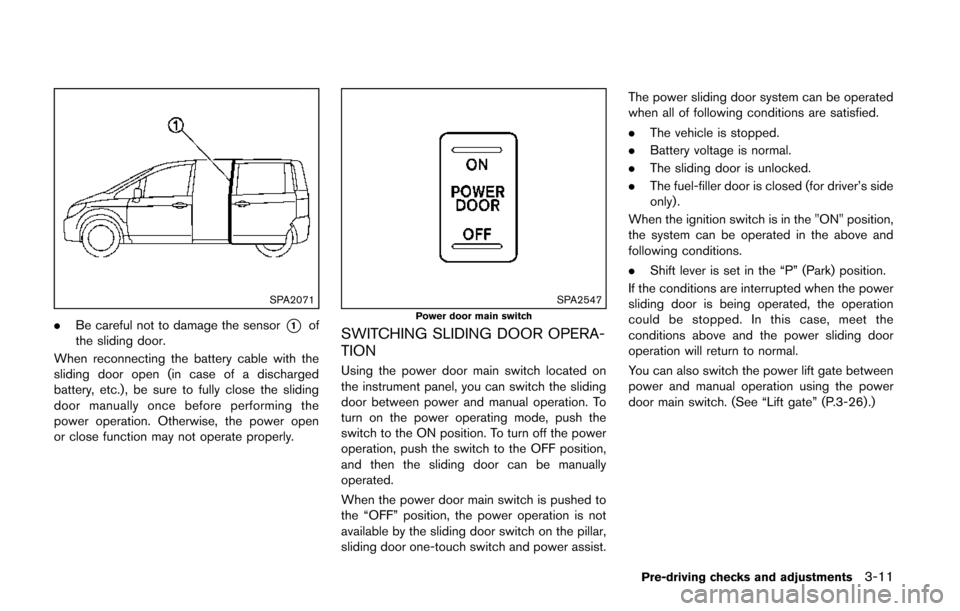
.Be careful not to damage the sensor*1of
the sliding door.
When reconnecting the battery cable with the
sliding door open (in case of a discharged
battery, etc.), be sure to fully close the sliding
door manually once before performing the
power operation. Otherwise, the power open
or close function may not operate properly.
SPA2547Power door main switch
SWITCHING SLIDING DOOR OPERA-
TION
Using the power door main switch located on
the instrument panel, you can switch the sliding
door between power and manual operation. To
turn on the power operating mode, push the
switch to the ON position. To turn off the power
operation, push the switch to the OFF position,
and then the sliding door can be manually
operated.
When the power door main switch is pushed to
the “OFF” position, the power operation is not
available by the sliding door switch on the pillar,
sliding door one-touch switch and power assist. The power sliding door system can be operated
when all of following conditions are satisfied.
.
The vehicle is stopped.
. Battery voltage is normal.
. The sliding door is unlocked.
. The fuel-filler door is closed (for driver’s side
only).
When the ignition switch is in the "ON" position,
the system can be operated in the above and
following conditions.
. Shift lever is set in the “P” (Park) position.
If the conditions are interrupted when the power
sliding door is being operated, the operation
could be stopped. In this case, meet the
conditions above and the power sliding door
operation will return to normal.
You can also switch the power lift gate between
power and manual operation using the power
door main switch. (See “Lift gate” (P.3-26) .)
Pre-driving checks and adjustments3-11
Page 165 of 482
3-22Pre-driving checks and adjustments
SPA2850Type C
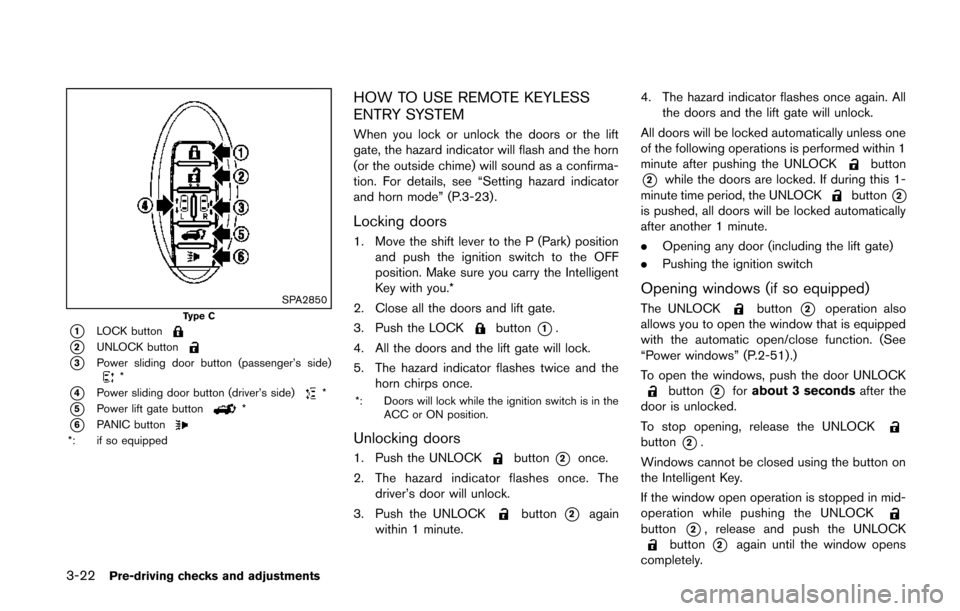
*1LOCK button
*2UNLOCK button
*3Power sliding door button (passenger’s side)*
*4Power sliding door button (driver’s side)*
*5Power lift gate button*
*6PANIC button*: if so equipped
HOW TO USE REMOTE KEYLESS
ENTRY SYSTEM
When you lock or unlock the doors or the lift
gate, the hazard indicator will flash and the horn
(or the outside chime) will sound as a confirma-
tion. For details, see “Setting hazard indicator
and horn mode” (P.3-23) .
Locking doors
1. Move the shift lever to the P (Park) positionand push the ignition switch to the OFF
position. Make sure you carry the Intelligent
Key with you.*
2. Close all the doors and lift gate.
3. Push the LOCK
button*1.
4. All the doors and the lift gate will lock.
5. The hazard indicator flashes twice and the horn chirps once.
*: Doors will lock while the ignition switch is in the ACC or ON position.
Unlocking doors
1. Push the UNLOCKbutton*2once.
2. The hazard indicator flashes once. The driver’s door will unlock.
3. Push the UNLOCK
button*2again
within 1 minute. 4. The hazard indicator flashes once again. All
the doors and the lift gate will unlock.
All doors will be locked automatically unless one
of the following operations is performed within 1
minute after pushing the UNLOCK
button
*2while the doors are locked. If during this 1-
minute time period, the UNLOCKbutton*2is pushed, all doors will be locked automatically
after another 1 minute.
. Opening any door (including the lift gate)
. Pushing the ignition switch
Opening windows (if so equipped)
The UNLOCKbutton*2operation also
allows you to open the window that is equipped
with the automatic open/close function. (See
“Power windows” (P.2-51).)
To open the windows, push the door UNLOCK
button*2for about 3 seconds after the
door is unlocked.
To stop opening, release the UNLOCK
button*2.
Windows cannot be closed using the button on
the Intelligent Key.
If the window open operation is stopped in mid-
operation while pushing the UNLOCK
button*2, release and push the UNLOCKbutton*2again until the window opens
completely.