2014 NISSAN QUEST rear view mirror
[x] Cancel search: rear view mirrorPage 206 of 482
The system is designed as an aid to the driver in
situations such as slot parking or parallel
parking.
When the shift lever is shifted into the R
(Reverse) position, the monitor display shows
the view to the rear of the vehicle.
WARNING
.The RearView Monitor is a conve-
nience but it is not a substitute to
check behind the vehicle when
backing up.
. The driver is always responsible for
safety during parking and other
maneuvers.
. Objects viewed in the RearView
Monitor differ from actual distance
because a wide-angle lens is used.
Objects in the RearView Monitor
will appear visually opposite like
ones viewed in the inside and out-
side mirrors.
. Make sure that the lift gate is
securely closed when backing up.
. Underneath the bumper and the
corner areas of the bumper cannot
be viewed on the RearView Monitor because of its monitoring range
limitation.
. Do not put anything on the Rear-
View camera. The RearView camera
is installed above the license plate.
. When washing the vehicle with
high-pressure water, be sure not to
spray it around the camera. Other-
wise, water may enter the camera
unit causing water condensation on
the lens, a malfunction, fire or an
electric shock.
. Do not strike the camera. It is a
precision instrument. Otherwise, it
may malfunction or cause damage
resulting in a fire or an electric
shock.
CAUTION
Do not scratch the camera lens when
cleaning dirt or snow from the lens.
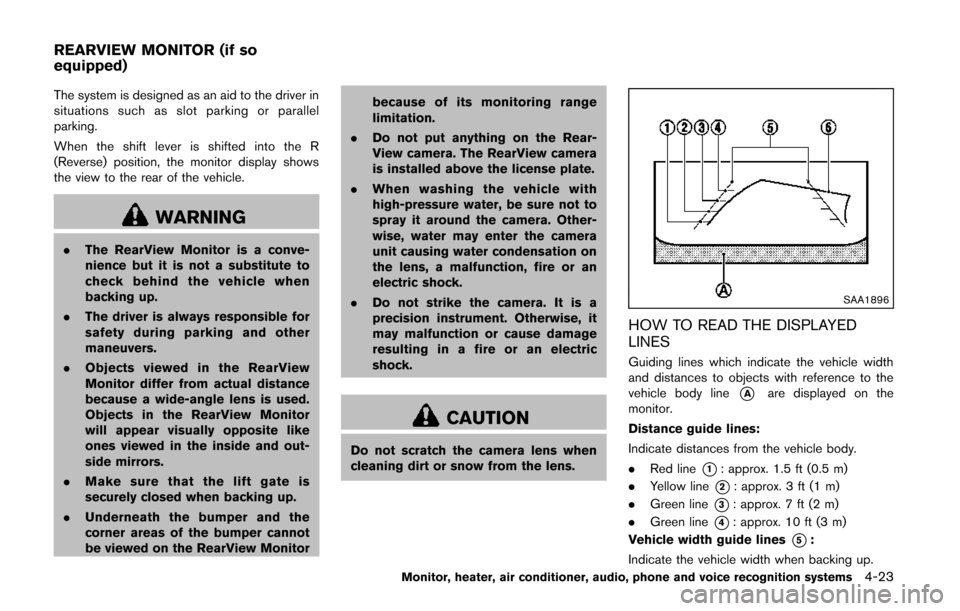
SAA1896
HOW TO READ THE DISPLAYED
LINES
Guiding lines which indicate the vehicle width
and distances to objects with reference to the
vehicle body line
*Aare displayed on the
monitor.
Distance guide lines:
Indicate distances from the vehicle body.
. Red line
*1: approx. 1.5 ft (0.5 m)
. Yellow line
*2: approx. 3 ft (1 m)
. Green line
*3: approx. 7 ft (2 m)
. Green line
*4: approx. 10 ft (3 m)
Vehicle width guide lines
*5:
Indicate the vehicle width when backing up.
Monitor, heater, air conditioner, audio, phone and voice recognition systems4-23
REARVIEW MONITOR (if so
equipped)
Page 207 of 482
4-24Monitor, heater, air conditioner, audio, phone and voice recognition systems
Predictive course lines*6(if so
equipped):
Indicate the predictive course when backing up.
The predictive course lines will be displayed on
the monitor when the shift lever is in the R
(Reverse) position and the steering wheel is
turned. The predictive course lines will move
depending on how much the steering wheel is
turned and will not be displayed while the
steering wheel is in the neutral position.
The vehicle width and predictive course lines are
wider than the actual width and course.
WARNING
. Always turn and check that it is safe
to do so before backing up. Always
back up slowly.
. If the tires are replaced with differ-
ent sized tires, the predictive course
line may be displayed incorrectly.
. On a snow-covered or slippery road,
there may be a difference between
the predictive course line and the
actual course line.
. The displayed lines will appear
slightly off to the right because the
rear view camera is not installed in the rear center of the vehicle.
. The distance guide line and the
vehicle width line should be used
as a reference only when the vehicle
is on a level paved surface. The
distance viewed on the monitor is
for reference only and may be
different from the actual distance
between the vehicle and displayed
objects.
. When backing-up the vehicle up a
hill objects viewed in the monitor
are further than they appear. When
backing-up the vehicle down a hill,
objects viewed in the monitor are
closer than they appear. Use the
inside mirror or glance over your
shoulder to properly judge dis-
tances to other objects.
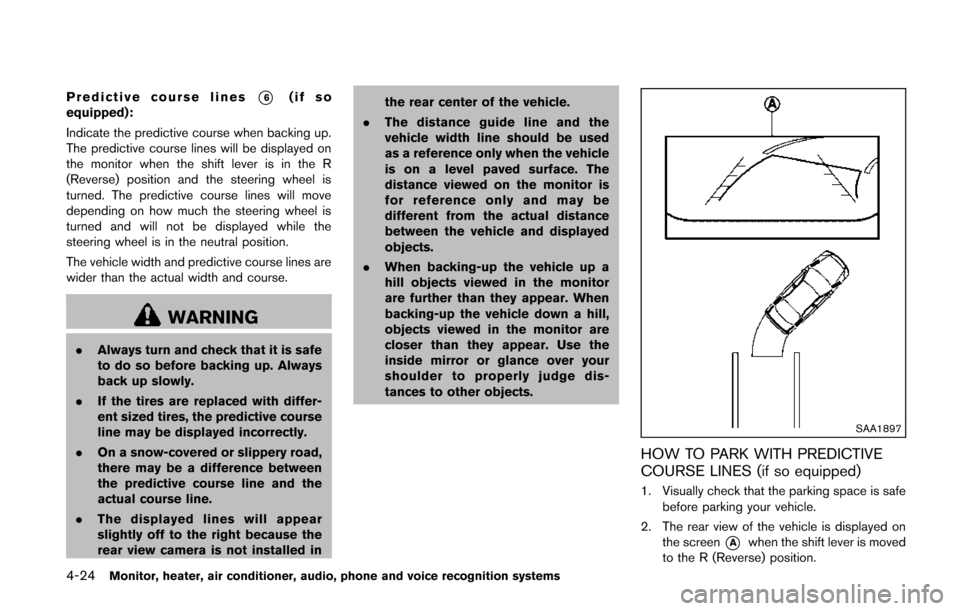
SAA1897
HOW TO PARK WITH PREDICTIVE
COURSE LINES (if so equipped)
1. Visually check that the parking space is safe
before parking your vehicle.
2. The rear view of the vehicle is displayed on the screen
*Awhen the shift lever is moved
to the R (Reverse) position.
Page 213 of 482
4-30Monitor, heater, air conditioner, audio, phone and voice recognition systems
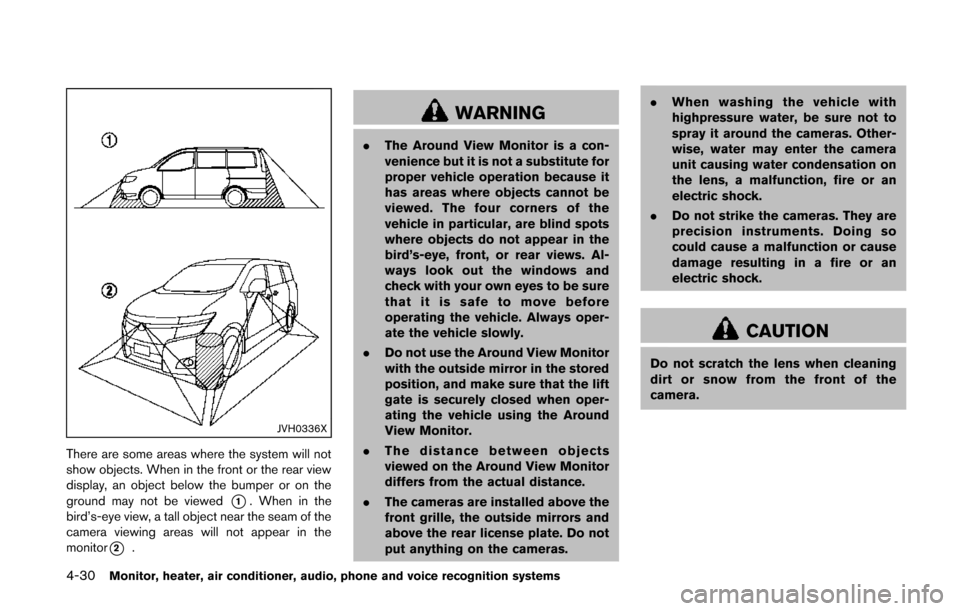
JVH0336X
There are some areas where the system will not
show objects. When in the front or the rear view
display, an object below the bumper or on the
ground may not be viewed
*1. When in the
bird’s-eye view, a tall object near the seam of the
camera viewing areas will not appear in the
monitor
*2.
WARNING
. The Around View Monitor is a con-
venience but it is not a substitute for
proper vehicle operation because it
has areas where objects cannot be
viewed. The four corners of the
vehicle in particular, are blind spots
where objects do not appear in the
bird’s-eye, front, or rear views. Al-
ways look out the windows and
check with your own eyes to be sure
that it is safe to move before
operating the vehicle. Always oper-
ate the vehicle slowly.
. Do not use the Around View Monitor
with the outside mirror in the stored
position, and make sure that the lift
gate is securely closed when oper-
ating the vehicle using the Around
View Monitor.
. The distance between objects
viewed on the Around View Monitor
differs from the actual distance.
. The cameras are installed above the
front grille, the outside mirrors and
above the rear license plate. Do not
put anything on the cameras. .
When washing the vehicle with
highpressure water, be sure not to
spray it around the cameras. Other-
wise, water may enter the camera
unit causing water condensation on
the lens, a malfunction, fire or an
electric shock.
. Do not strike the cameras. They are
precision instruments. Doing so
could cause a malfunction or cause
damage resulting in a fire or an
electric shock.
CAUTION
Do not scratch the lens when cleaning
dirt or snow from the front of the
camera.
Page 215 of 482
4-32Monitor, heater, air conditioner, audio, phone and voice recognition systems
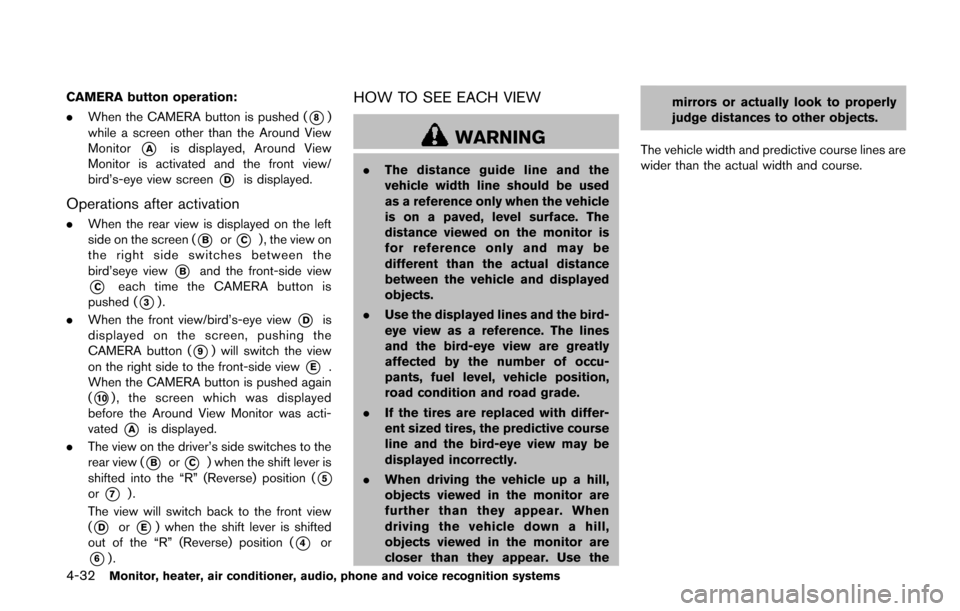
CAMERA button operation:
.When the CAMERA button is pushed (
*8)
while a screen other than the Around View
Monitor
*Ais displayed, Around View
Monitor is activated and the front view/
bird’s-eye view screen
*Dis displayed.
Operations after activation
. When the rear view is displayed on the left
side on the screen (
*Bor*C) , the view on
the right side switches between the
bird’seye view
*Band the front-side view
*Ceach time the CAMERA button is
pushed (
*3).
. When the front view/bird’s-eye view
*Dis
displayed on the screen, pushing the
CAMERA button (
*9) will switch the view
on the right side to the front-side view
*E.
When the CAMERA button is pushed again
(
*10), the screen which was displayed
before the Around View Monitor was acti-
vated
*Ais displayed.
. The view on the driver’s side switches to the
rear view (
*Bor*C) when the shift lever is
shifted into the “R” (Reverse) position (
*5or*7).
The view will switch back to the front view
(
*Dor*E) when the shift lever is shifted
out of the “R” (Reverse) position (
*4or
*6).
HOW TO SEE EACH VIEW
WARNING
. The distance guide line and the
vehicle width line should be used
as a reference only when the vehicle
is on a paved, level surface. The
distance viewed on the monitor is
for reference only and may be
different than the actual distance
between the vehicle and displayed
objects.
. Use the displayed lines and the bird-
eye view as a reference. The lines
and the bird-eye view are greatly
affected by the number of occu-
pants, fuel level, vehicle position,
road condition and road grade.
. If the tires are replaced with differ-
ent sized tires, the predictive course
line and the bird-eye view may be
displayed incorrectly.
. When driving the vehicle up a hill,
objects viewed in the monitor are
further than they appear. When
driving the vehicle down a hill,
objects viewed in the monitor are
closer than they appear. Use the mirrors or actually look to properly
judge distances to other objects.
The vehicle width and predictive course lines are
wider than the actual width and course.
Page 216 of 482
SAA1840Front view
SAA1896Rear view
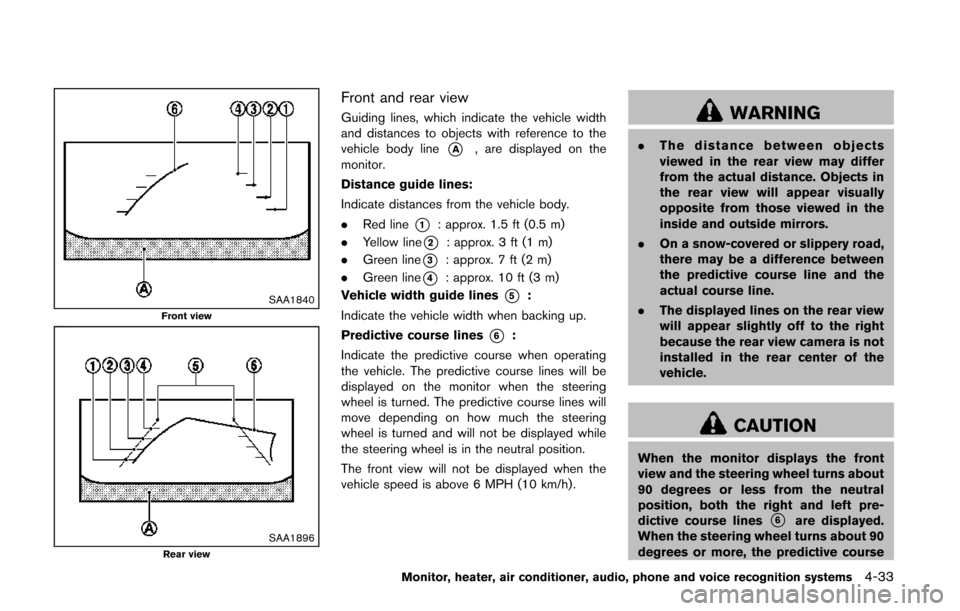
Front and rear view
Guiding lines, which indicate the vehicle width
and distances to objects with reference to the
vehicle body line
*A, are displayed on the
monitor.
Distance guide lines:
Indicate distances from the vehicle body.
. Red line
*1: approx. 1.5 ft (0.5 m)
. Yellow line
*2: approx. 3 ft (1 m)
. Green line
*3: approx. 7 ft (2 m)
. Green line
*4: approx. 10 ft (3 m)
Vehicle width guide lines
*5:
Indicate the vehicle width when backing up.
Predictive course lines
*6:
Indicate the predictive course when operating
the vehicle. The predictive course lines will be
displayed on the monitor when the steering
wheel is turned. The predictive course lines will
move depending on how much the steering
wheel is turned and will not be displayed while
the steering wheel is in the neutral position.
The front view will not be displayed when the
vehicle speed is above 6 MPH (10 km/h).
WARNING
. The distance between objects
viewed in the rear view may differ
from the actual distance. Objects in
the rear view will appear visually
opposite from those viewed in the
inside and outside mirrors.
. On a snow-covered or slippery road,
there may be a difference between
the predictive course line and the
actual course line.
. The displayed lines on the rear view
will appear slightly off to the right
because the rear view camera is not
installed in the rear center of the
vehicle.
CAUTION
When the monitor displays the front
view and the steering wheel turns about
90 degrees or less from the neutral
position, both the right and left pre-
dictive course lines
*6are displayed.
When the steering wheel turns about 90
degrees or more, the predictive course
Monitor, heater, air conditioner, audio, phone and voice recognition systems4-33
Page 217 of 482
4-34Monitor, heater, air conditioner, audio, phone and voice recognition systems
line is displayed only on the opposite
side of the turn.
JVH0337X
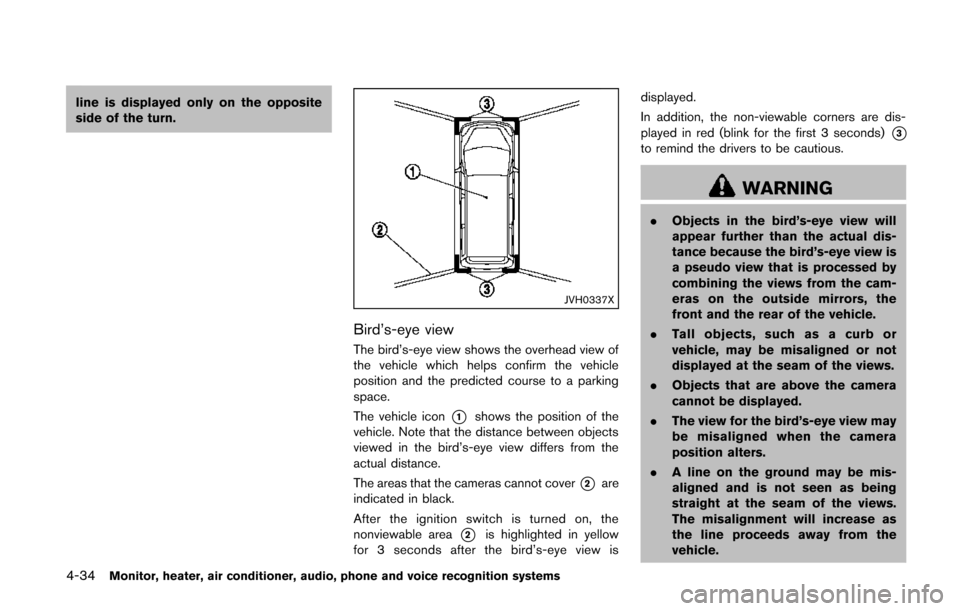
Bird’s-eye view
The bird’s-eye view shows the overhead view of
the vehicle which helps confirm the vehicle
position and the predicted course to a parking
space.
The vehicle icon
*1shows the position of the
vehicle. Note that the distance between objects
viewed in the bird’s-eye view differs from the
actual distance.
The areas that the cameras cannot cover
*2are
indicated in black.
After the ignition switch is turned on, the
nonviewable area
*2is highlighted in yellow
for 3 seconds after the bird’s-eye view is displayed.
In addition, the non-viewable corners are dis-
played in red (blink for the first 3 seconds)
*3to remind the drivers to be cautious.
WARNING
.
Objects in the bird’s-eye view will
appear further than the actual dis-
tance because the bird’s-eye view is
a pseudo view that is processed by
combining the views from the cam-
eras on the outside mirrors, the
front and the rear of the vehicle.
. Tall objects, such as a curb or
vehicle, may be misaligned or not
displayed at the seam of the views.
. Objects that are above the camera
cannot be displayed.
. The view for the bird’s-eye view may
be misaligned when the camera
position alters.
. A line on the ground may be mis-
aligned and is not seen as being
straight at the seam of the views.
The misalignment will increase as
the line proceeds away from the
vehicle.
Page 467 of 482
9-22Technical and consumer information
.Check your hitch, trailer tire pressure,
vehicle tire pressure, trailer light operation,
and trailer wheel lug nuts every time you
attach a trailer to the vehicle.
. Be certain your rearview mirrors conform to
all federal, state or local regulations. If not,
install any mirrors required for towing before
driving the vehicle.
. Determine the overall height of the vehicle
and trailer so the required clearance is
known.
Trailer towing tips
In order to gain skill and an understanding of the
vehicle’s behavior, you should practice turning,
stopping and backing up in an area which is free
from traffic. Steering stability, and braking
performance will be somewhat different than
under normal driving conditions.
.Always secure items in the trailer to prevent
load shift while driving.
. Lock the trailer hitch coupler with a pin or
lock to prevent the coupler from inadver-
tently becoming unlatched.
. Avoid abrupt starts, acceleration or stops.
. Avoid sharp turns or lane changes.
. Always drive your vehicle at a moderate
speed. Some states or provinces have
specific speed limits for vehicles that are towing trailers. Obey the local speed limits.
. When backing up, hold the bottom of the
steering wheel with one hand. Move your
hand in the direction in which you want the
trailer to go. Make small corrections and
back up slowly. If possible, have someone
guide you when you are backing up.
Always block the wheels on both vehicle and
trailer when parking. Parking on a slope is not
recommended; however, if you must do so:
CAUTION
If you move the shift lever to the P
(Park) position before blocking the
wheels and applying the parking brake,
transmission damage could occur.
1. Apply and hold the brake pedal.
2. Have someone place blocks on the downhill side of the vehicle and trailer wheels.
3. After the wheel blocks are in place, slowly release the brake pedal until the blocks
absorb the vehicle load.
4. Apply the parking brake.
5. Shift the transmission into P (Park) . 6. Turn off the engine.
To drive away:
1. Apply and hold the brake pedal.
2. Start the engine.
3. Shift the transmission into gear.
4. Release the parking brake.
5. Drive slowly until the vehicle and trailer are
clear from the blocks.
6. Apply and hold the brake pedal.
7. Have someone retrieve and store the blocks.
. When going down a hill, shift into a lower
gear and use the engine braking effect.
When going up a long grade, downshift the
transmission to a lower gear and reduce
speed to reduce chances of engine over-
loading and/or overheating.
. If the engine coolant rises to an extremely
high temperature when the air conditioning
system is on, turn off the air conditioner.
Coolant heat can be additionally vented by
opening the windows, switching the fan
control to high and setting the temperature
control to the HOT position.
. Trailer towing requires more fuel than normal
circumstances.
. Avoid towing a trailer for the first 500 miles
(800 km) .
Page 477 of 482
10-4
Lights, Exterior and interior light replacement ..... 8-27
Loading information (See vehicle
loading information) .................................................... 9-12
LockAutomatic door locks ............................................. 3-7
Door locks................................................................. 3-5
Lift gate lock.......................................................... 3-26
Power door lock...................................................... 3-5
Locking with mechanical key...................................... 3-5
Loose fuel cap warning................................. 2-21, 3-30
Low outside temperature warning .......................... 2-21
Low tire pressure warning light............................... 2-14
Low tire pressure warning system (See tire
pressure monitoring system (TPMS)) ...................... 5-3
M
Maintenance Battery..................................................................... 8-13
General maintenance ............................................. 8-2
Inside the vehicle .................................................... 8-3
Maintenance indicators....................................... 2-22
Maintenance precautions...................................... 8-5
Maintenance requirements.................................... 8-2
Outside the vehicle................................................. 8-2
Seat belt maintenance........................................ 1-24
Malfunction indicator light (MIL).............................. 2-17
Manual air conditioner................................................ 4-41
Manual front seat adjustment..................................... 1-3
Map lights ..................................................................... 2-56
Master warning light................................................... 2-15
Mechanical key (Intelligent Key system) ................. 3-4
Memory storage, Automatic drive positioner ....... 3-37
Meter Trip computer........................................................ 2-23
Meters and gauges....................................................... 2-5 Instrument brightness control ........................... 2-37 Mirror
Inside mirror........................................................... 3-33
Outside mirrors..................................................... 3-35
Vanity mirror........................................................... 3-36
Monitor, Rearview monitor........................................ 4-23
Mood lights................................................................... 2-58
Moonroof....................................................................... 2-53
Multi-function controller............................................... 4-5
N
New vehicle break-in.................................................. 5-26
NISSAN Mobile entertainment
system (MES) ........................................................... 4-102
NISSAN Vehicle Immobilizer System..................... 2-29
NISSAN voice recognition system ...................... 4-137
O
Odometer........................................................................ 2-6
Off-road recovery.......................................................... 5-7
Oil Capacities and
recommended fuel/lubricants............................... 9-2
Changing engine oil and filter.............................. 8-9
Checking engine oil level...................................... 8-8
Engine oil................................................................... 8-8
Engine oil viscosity.................................................. 9-5
Oil filter replacement indicator ......................... 2-22
Operation, Operational indicators........................... 2-20
Outside air temperature display.............................. 2-25
Outside mirrors............................................................ 3-35
Overdrive OFF switch................................................ 5-15
Overheat, If your vehicle overheats ........................ 6-12
Owner’s Manual/Service Manual
order information ......................................................... 9-28
P
Panic alarm................................................................... 3-23
Parking Brake break-in....................................................... 5-30
Parking brake operation ..................................... 5-17
Parking on hills ..................................................... 5-28
Phone Bluetooth
®hands-free phone system
(models with navigation system).................... 4-114
Bluetooth
®hands-free phone system
(models without navigation system) .............. 4-124
Car phone or CB radio .................................... 4-113
Power Front seat adjustment ............................................ 1-3
Power door lock...................................................... 3-5
Power outlet .......................................................... 2-41
Power sliding door.................................................. 3-9
Power steering fluid............................................. 8-11
Power windows .................................................... 2-51
Precautions Audio operation .................................................... 4-53
Braking precautions............................................. 5-29
Child restraints...................................................... 1-27
Cruise control........................................................ 5-24
Maintenance ............................................................. 8-5
Seat belt usage .................................................... 1-15
Supplemental restraint system.......................... 1-46
When starting and driving .................................... 5-2
Push starting ................................................................ 6-12
Push-button ignition switch............................. 5-8, 5-10
R
Radio.............................................................................. 4-53 Car phone or CB radio .................................... 4-113