2014 NISSAN JUKE key
[x] Cancel search: keyPage 218 of 402
JVH0743X
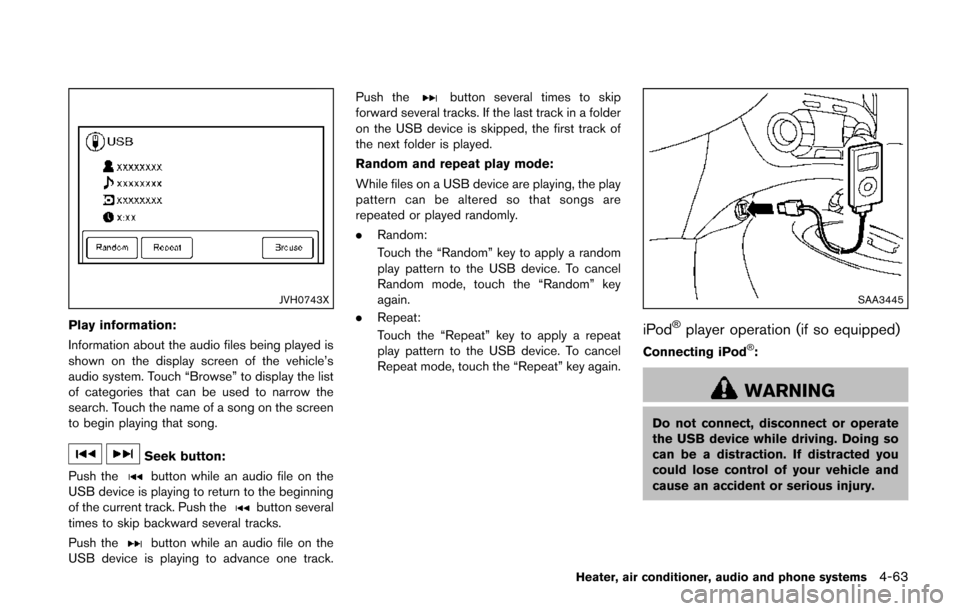
Play information:
Information about the audio files being played is
shown on the display screen of the vehicle’s
audio system. Touch “Browse” to display the list
of categories that can be used to narrow the
search. Touch the name of a song on the screen
to begin playing that song.
Seek button:
Push the
button while an audio file on the
USB device is playing to return to the beginning
of the current track. Push the
button several
times to skip backward several tracks.
Push the
button while an audio file on the
USB device is playing to advance one track. Push the
button several times to skip
forward several tracks. If the last track in a folder
on the USB device is skipped, the first track of
the next folder is played.
Random and repeat play mode:
While files on a USB device are playing, the play
pattern can be altered so that songs are
repeated or played randomly.
. Random:
Touch the “Random” key to apply a random
play pattern to the USB device. To cancel
Random mode, touch the “Random” key
again.
. Repeat:
Touch the “Repeat” key to apply a repeat
play pattern to the USB device. To cancel
Repeat mode, touch the “Repeat” key again.
SAA3445
iPod®player operation (if so equipped)
Connecting iPod®:
WARNING
Do not connect, disconnect or operate
the USB device while driving. Doing so
can be a distraction. If distracted you
could lose control of your vehicle and
cause an accident or serious injury.
Heater, air conditioner, audio and phone systems4-63
Page 220 of 402
JVH0746X
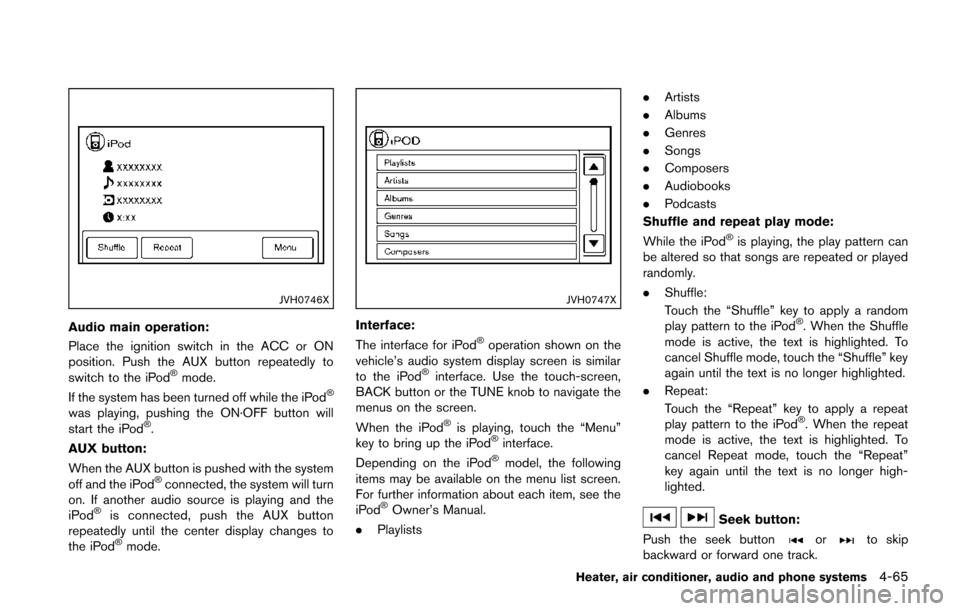
Audio main operation:
Place the ignition switch in the ACC or ON
position. Push the AUX button repeatedly to
switch to the iPod
®mode.
If the system has been turned off while the iPod®
was playing, pushing the ON·OFF button will
start the iPod®.
AUX button:
When the AUX button is pushed with the system
off and the iPod
®connected, the system will turn
on. If another audio source is playing and the
iPod
®is connected, push the AUX button
repeatedly until the center display changes to
the iPod
®mode.
JVH0747X
Interface:
The interface for iPod®operation shown on the
vehicle’s audio system display screen is similar
to the iPod
®interface. Use the touch-screen,
BACK button or the TUNE knob to navigate the
menus on the screen.
When the iPod
®is playing, touch the “Menu”
key to bring up the iPod®interface.
Depending on the iPod®model, the following
items may be available on the menu list screen.
For further information about each item, see the
iPod
®Owner’s Manual.
. Playlists .
Artists
. Albums
. Genres
. Songs
. Composers
. Audiobooks
. Podcasts
Shuffle and repeat play mode:
While the iPod
®is playing, the play pattern can
be altered so that songs are repeated or played
randomly.
. Shuffle:
Touch the “Shuffle” key to apply a random
play pattern to the iPod
®. When the Shuffle
mode is active, the text is highlighted. To
cancel Shuffle mode, touch the “Shuffle” key
again until the text is no longer highlighted.
. Repeat:
Touch the “Repeat” key to apply a repeat
play pattern to the iPod
®. When the repeat
mode is active, the text is highlighted. To
cancel Repeat mode, touch the “Repeat”
key again until the text is no longer high-
lighted.
Seek button:
Push the seek button
orto skip
backward or forward one track.
Heater, air conditioner, audio and phone systems4-65
Page 221 of 402
4-66Heater, air conditioner, audio and phone systems
Push and hold the seek buttonorfor
1.5 seconds while a track is playing to reverse or
fast forward the track being played. The track
plays at an increased speed while reversing or
fast forwarding. When the button is released,
the track returns to normal play speed.
JVH0748X
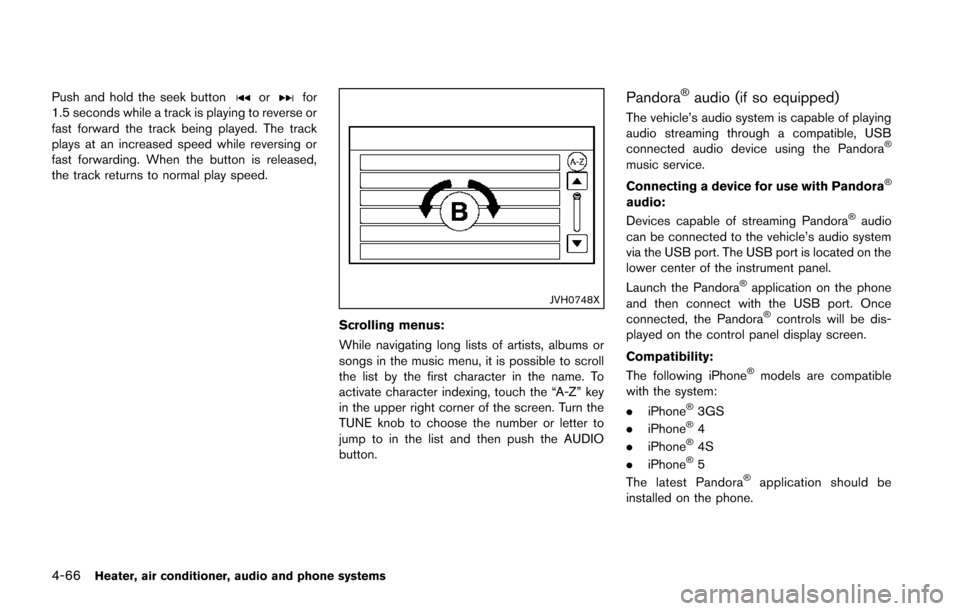
Scrolling menus:
While navigating long lists of artists, albums or
songs in the music menu, it is possible to scroll
the list by the first character in the name. To
activate character indexing, touch the “A-Z” key
in the upper right corner of the screen. Turn the
TUNE knob to choose the number or letter to
jump to in the list and then push the AUDIO
button.
Pandora®audio (if so equipped)
The vehicle’s audio system is capable of playing
audio streaming through a compatible, USB
connected audio device using the Pandora
®
music service.
Connecting a device for use with Pandora
®
audio:
Devices capable of streaming Pandora®audio
can be connected to the vehicle’s audio system
via the USB port. The USB port is located on the
lower center of the instrument panel.
Launch the Pandora
®application on the phone
and then connect with the USB port. Once
connected, the Pandora
®controls will be dis-
played on the control panel display screen.
Compatibility:
The following iPhone
®models are compatible
with the system:
. iPhone
®3GS
. iPhone®4
. iPhone®4S
. iPhone®5
The latest Pandora®application should be
installed on the phone.
Page 222 of 402
JVH0751X
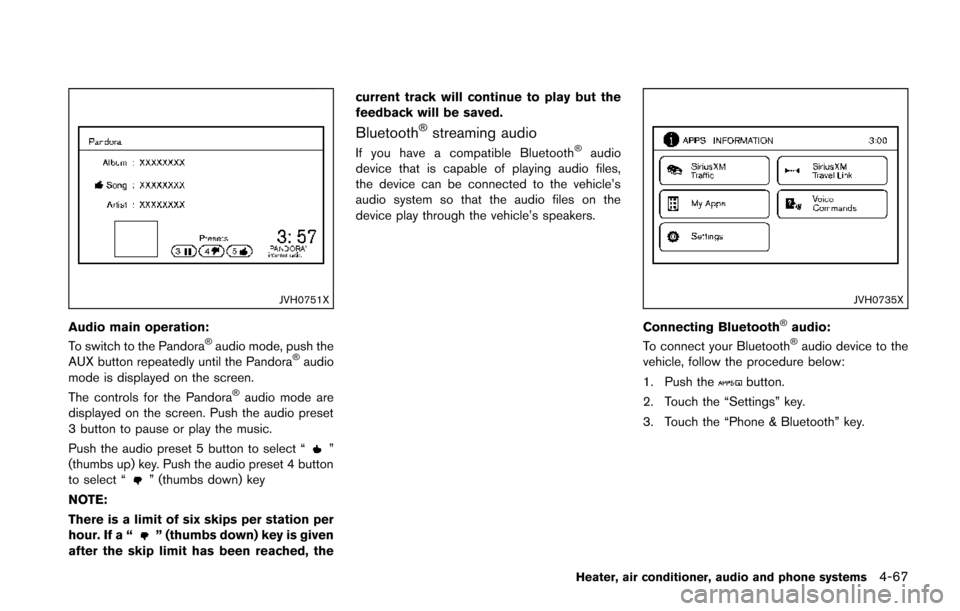
Audio main operation:
To switch to the Pandora®audio mode, push the
AUX button repeatedly until the Pandora®audio
mode is displayed on the screen.
The controls for the Pandora
®audio mode are
displayed on the screen. Push the audio preset
3 button to pause or play the music.
Push the audio preset 5 button to select “
”
(thumbs up) key. Push the audio preset 4 button
to select “
” (thumbs down) key
NOTE:
There is a limit of six skips per station per
hour. If a “
” (thumbs down) key is given
after the skip limit has been reached, the current track will continue to play but the
feedback will be saved.
Bluetooth®streaming audio
If you have a compatible Bluetooth®audio
device that is capable of playing audio files,
the device can be connected to the vehicle’s
audio system so that the audio files on the
device play through the vehicle’s speakers.
JVH0735X
Connecting Bluetooth®audio:
To connect your Bluetooth®audio device to the
vehicle, follow the procedure below:
1. Push the
button.
2. Touch the “Settings” key.
3. Touch the “Phone & Bluetooth” key.
Heater, air conditioner, audio and phone systems4-67
Page 223 of 402
4-68Heater, air conditioner, audio and phone systems
JVH0750X
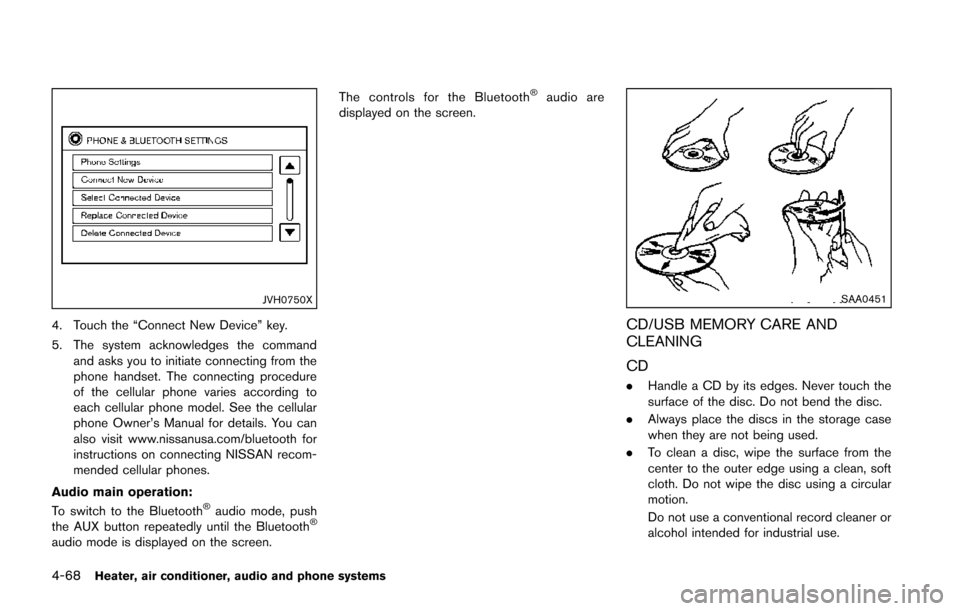
4. Touch the “Connect New Device” key.
5. The system acknowledges the commandand asks you to initiate connecting from the
phone handset. The connecting procedure
of the cellular phone varies according to
each cellular phone model. See the cellular
phone Owner’s Manual for details. You can
also visit www.nissanusa.com/bluetooth for
instructions on connecting NISSAN recom-
mended cellular phones.
Audio main operation:
To switch to the Bluetooth
®audio mode, push
the AUX button repeatedly until the Bluetooth®
audio mode is displayed on the screen. The controls for the Bluetooth
®audio are
displayed on the screen.
SAA0451
CD/USB MEMORY CARE AND
CLEANING
CD
. Handle a CD by its edges. Never touch the
surface of the disc. Do not bend the disc.
. Always place the discs in the storage case
when they are not being used.
. To clean a disc, wipe the surface from the
center to the outer edge using a clean, soft
cloth. Do not wipe the disc using a circular
motion.
Do not use a conventional record cleaner or
alcohol intended for industrial use.
Page 232 of 402
up or down.
NOTE:
You must push the
button within 5
seconds to change the language.
5. If you decide not to change the language, do not push either button. After 5 seconds, the
VR session will end, and the language will
not be changed.
Connecting procedure
NOTE:
The connecting procedure must be per-
formed when the vehicle is stationary. If
the vehicle starts moving during the pro-
cedure, the procedure will be cancelled.
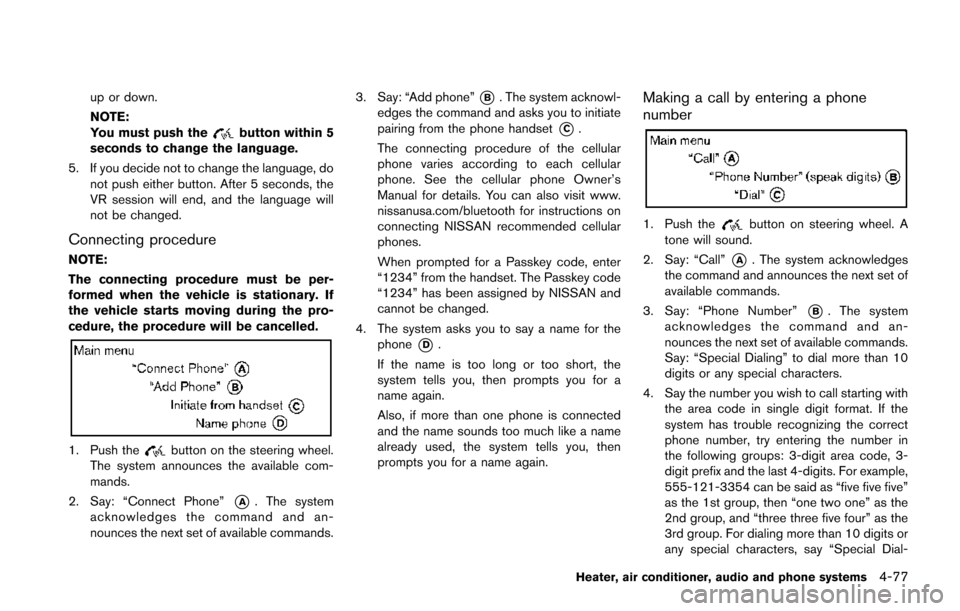
1. Push thebutton on the steering wheel.
The system announces the available com-
mands.
2. Say: “Connect Phone”
*A. The system
acknowledges the command and an-
nounces the next set of available commands. 3. Say: “Add phone”
*B. The system acknowl-
edges the command and asks you to initiate
pairing from the phone handset
*C.
The connecting procedure of the cellular
phone varies according to each cellular
phone. See the cellular phone Owner’s
Manual for details. You can also visit www.
nissanusa.com/bluetooth for instructions on
connecting NISSAN recommended cellular
phones.
When prompted for a Passkey code, enter
“1234” from the handset. The Passkey code
“1234” has been assigned by NISSAN and
cannot be changed.
4. The system asks you to say a name for the phone
*D.
If the name is too long or too short, the
system tells you, then prompts you for a
name again.
Also, if more than one phone is connected
and the name sounds too much like a name
already used, the system tells you, then
prompts you for a name again.
Making a call by entering a phone
number
1. Push thebutton on steering wheel. A
tone will sound.
2. Say: “Call”
*A. The system acknowledges
the command and announces the next set of
available commands.
3. Say: “Phone Number”
*B. The system
acknowledges the command and an-
nounces the next set of available commands.
Say: “Special Dialing” to dial more than 10
digits or any special characters.
4. Say the number you wish to call starting with the area code in single digit format. If the
system has trouble recognizing the correct
phone number, try entering the number in
the following groups: 3-digit area code, 3-
digit prefix and the last 4-digits. For example,
555-121-3354 can be said as “five five five”
as the 1st group, then “one two one” as the
2nd group, and “three three five four” as the
3rd group. For dialing more than 10 digits or
any special characters, say “Special Dial-
Heater, air conditioner, audio and phone systems4-77
Page 242 of 402
One Shot Call
To use the system faster, you may speak the
second level commands with the main menu
command on the main menu. For example, push
the
button and after the tone say, “Call
Redial”.
JVH0735X
CONNECTING PROCEDURE
NOTE:
The connecting procedure must be per-
formed when the vehicle is stationary. If
the vehicle starts moving during the pro-
cedure, the procedure will be cancelled.
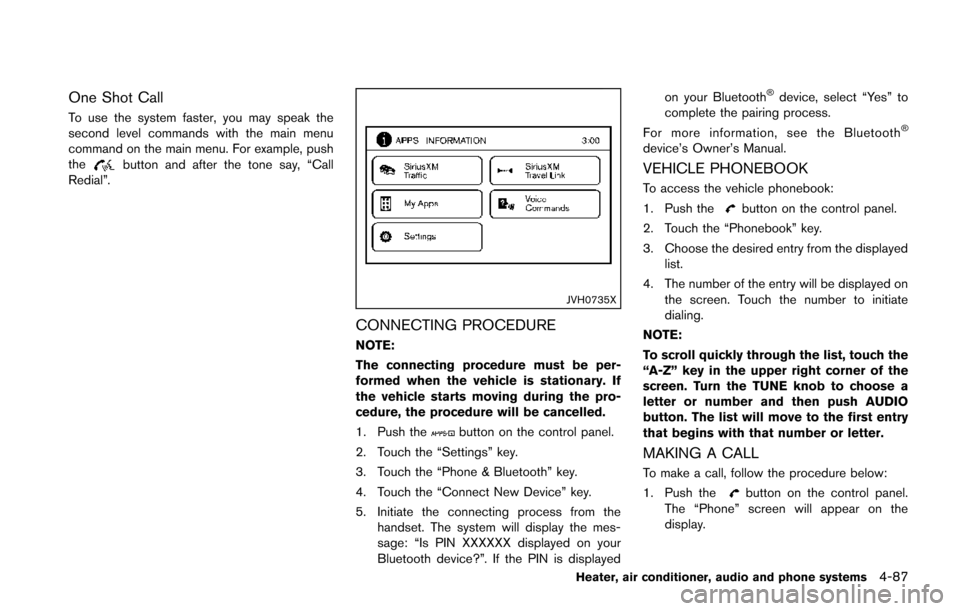
1. Push the
button on the control panel.
2. Touch the “Settings” key.
3. Touch the “Phone & Bluetooth” key.
4. Touch the “Connect New Device” key.
5. Initiate the connecting process from the handset. The system will display the mes-
sage: “Is PIN XXXXXX displayed on your
Bluetooth device?”. If the PIN is displayed on your Bluetooth
®device, select “Yes” to
complete the pairing process.
For more information, see the Bluetooth
®
device’s Owner’s Manual.
VEHICLE PHONEBOOK
To access the vehicle phonebook:
1. Push the
button on the control panel.
2. Touch the “Phonebook” key.
3. Choose the desired entry from the displayed list.
4. The number of the entry will be displayed on the screen. Touch the number to initiate
dialing.
NOTE:
To scroll quickly through the list, touch the
“A-Z” key in the upper right corner of the
screen. Turn the TUNE knob to choose a
letter or number and then push AUDIO
button. The list will move to the first entry
that begins with that number or letter.
MAKING A CALL
To make a call, follow the procedure below:
1. Push the
button on the control panel.
The “Phone” screen will appear on the
display.
Heater, air conditioner, audio and phone systems4-87
Page 243 of 402
4-88Heater, air conditioner, audio and phone systems
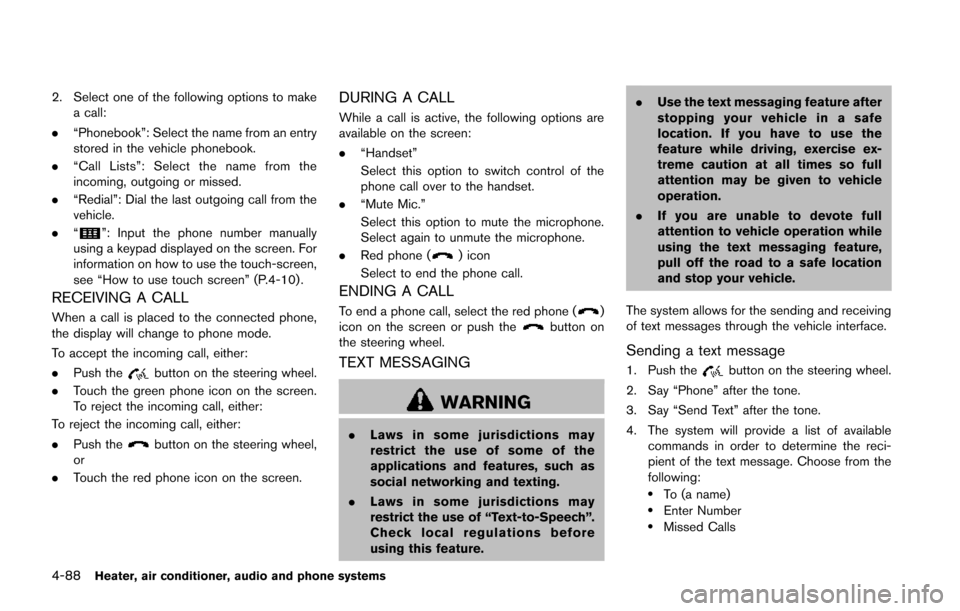
2. Select one of the following options to makea call:
. “Phonebook”: Select the name from an entry
stored in the vehicle phonebook.
. “Call Lists”: Select the name from the
incoming, outgoing or missed.
. “Redial”: Dial the last outgoing call from the
vehicle.
. “
”: Input the phone number manually
using a keypad displayed on the screen. For
information on how to use the touch-screen,
see “How to use touch screen” (P.4-10) .
RECEIVING A CALL
When a call is placed to the connected phone,
the display will change to phone mode.
To accept the incoming call, either:
. Push the
button on the steering wheel.
. Touch the green phone icon on the screen.
To reject the incoming call, either:
To reject the incoming call, either:
. Push the
button on the steering wheel,
or
. Touch the red phone icon on the screen.
DURING A CALL
While a call is active, the following options are
available on the screen:
.“Handset”
Select this option to switch control of the
phone call over to the handset.
. “Mute Mic.”
Select this option to mute the microphone.
Select again to unmute the microphone.
. Red phone (
) icon
Select to end the phone call.
ENDING A CALL
To end a phone call, select the red phone ()
icon on the screen or push thebutton on
the steering wheel.
TEXT MESSAGING
WARNING
. Laws in some jurisdictions may
restrict the use of some of the
applications and features, such as
social networking and texting.
. Laws in some jurisdictions may
restrict the use of “Text-to-Speech”.
Check local regulations before
using this feature. .
Use the text messaging feature after
stopping your vehicle in a safe
location. If you have to use the
feature while driving, exercise ex-
treme caution at all times so full
attention may be given to vehicle
operation.
. If you are unable to devote full
attention to vehicle operation while
using the text messaging feature,
pull off the road to a safe location
and stop your vehicle.
The system allows for the sending and receiving
of text messages through the vehicle interface.
Sending a text message
1. Push thebutton on the steering wheel.
2. Say “Phone” after the tone.
3. Say “Send Text” after the tone.
4. The system will provide a list of available commands in order to determine the reci-
pient of the text message. Choose from the
following:
.To (a name).Enter Number.Missed Calls