2014 NISSAN JUKE key
[x] Cancel search: keyPage 245 of 402
4-90Heater, air conditioner, audio and phone systems
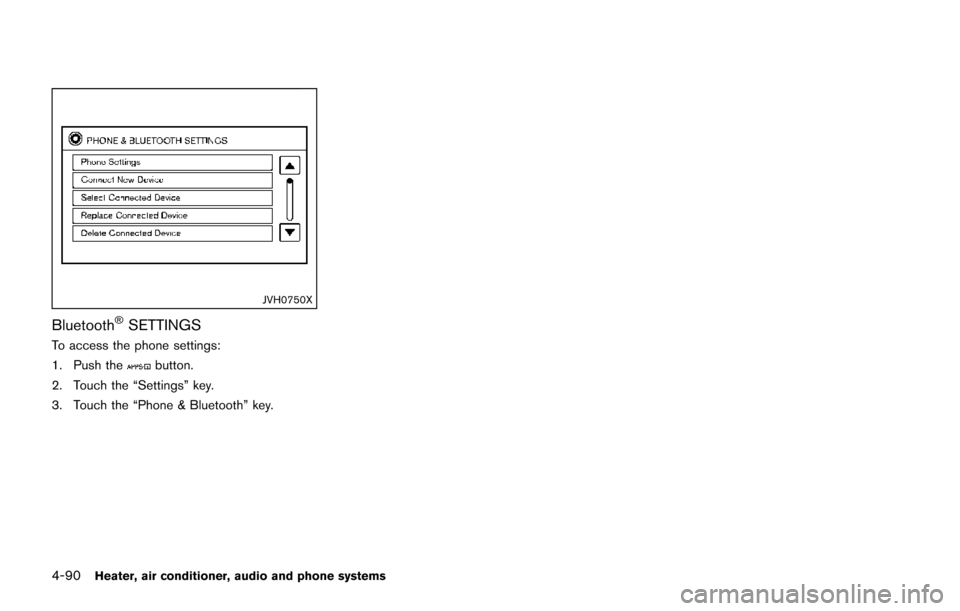
JVH0750X
Bluetooth®SETTINGS
To access the phone settings:
1. Push the
button.
2. Touch the “Settings” key.
3. Touch the “Phone & Bluetooth” key.
Page 247 of 402
4-92Heater, air conditioner, audio and phone systems
PHONE SETTINGS
To access the phone settings:
1. Push the
button.
2. Touch the “Settings” key.
3. Touch the “Phone & Bluetooth” key.
4. Touch the “Phone Settings” key and adjust the following settings as desired:
. Sort Phonebook By:
Touch “First Name” or “Last Name” to
choose how phonebook entries are alpha-
betically displayed on the screen.
. Use Phonebook From:
Touch “Handset” to use the phone’s phone-
book. Select “SIM” to use the phonebook on
the SIM card. Touch “Both” to use both
sources.
. Download Phonebook Now:
Touch to download the phonebook to the
vehicle from the chosen source.
. Record Name for Phonebook Entry:
Touch to record a name for a phonebook
entry for use with the NISSAN Voice
Recognition System.
. Phone Notifications for:
Touch “Driver” to have phone notifications
shown in the vehicle information display.
Touch “Both” to have phone notifications shown in both the vehicle information dis-
play and the center display screen.
. Text Messaging:
Touch to toggle the text message function-
ality on or off.
. Show Incoming Text for:
Touch “Driver” to have incoming text notifi-
cations shown in the vehicle information
display. Touch “Both” to have text notifica-
tions shown in both the vehicle information
display and the center display screen. Touch
“Off” to turn off all text notifications.
. Auto Reply:
Touch to toggle the auto reply functionality
on or off.
. Auto Reply Message:
Touch to indicate preferred message to be
sent when “Auto Reply” function is acti-
vated.
. Use Vehicle’s Signature:
Touch to toggle on or off the addition of the
vehicle signature to outgoing messages
. Custom Text Messages:
Touch this option to select a custom
message to edit. There are 4 customer
message slots available. The NISSAN Voice Recognition system allows
hands-free operation of the systems equipped
on this vehicle, such as the phone and naviga-
tion systems.
To operate NISSAN Voice Recognition, push the
button located on the steering wheel.
When prompted, speak the command for the
system you wish to activate. The command given
is picked up by the microphone and performed
when it is properly recognized. NISSAN Voice
Recognition will provide a voice response as
well as a message in the center display to inform
you of the command results.
NISSAN VOICE RECOGNITION
SYSTEM (if so equipped)
Page 248 of 402
USING THE SYSTEM
Initialization
When the ignition switch is in the ON position,
NISSAN Voice Recognition is initialized, which
takes a few seconds. When completed, the
system is ready to accept voice commands. If
the
button is pushed before the initialization
completes, the system will announce: “Voice
Recognition System not ready. Please wait.”
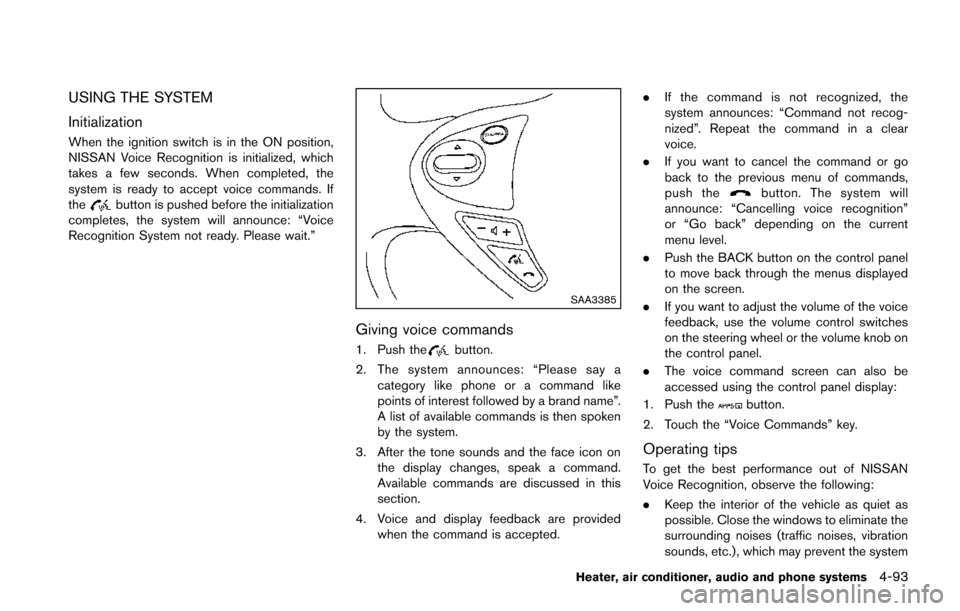
SAA3385
Giving voice commands
1. Push thebutton.
2. The system announces: “Please say a category like phone or a command like
points of interest followed by a brand name”.
A list of available commands is then spoken
by the system.
3. After the tone sounds and the face icon on the display changes, speak a command.
Available commands are discussed in this
section.
4. Voice and display feedback are provided when the command is accepted. .
If the command is not recognized, the
system announces: “Command not recog-
nized”. Repeat the command in a clear
voice.
. If you want to cancel the command or go
back to the previous menu of commands,
push the
button. The system will
announce: “Cancelling voice recognition”
or “Go back” depending on the current
menu level.
. Push the BACK button on the control panel
to move back through the menus displayed
on the screen.
. If you want to adjust the volume of the voice
feedback, use the volume control switches
on the steering wheel or the volume knob on
the control panel.
. The voice command screen can also be
accessed using the control panel display:
1. Push the
button.
2. Touch the “Voice Commands” key.
Operating tips
To get the best performance out of NISSAN
Voice Recognition, observe the following:
. Keep the interior of the vehicle as quiet as
possible. Close the windows to eliminate the
surrounding noises (traffic noises, vibration
sounds, etc.), which may prevent the system
Heater, air conditioner, audio and phone systems4-93
Page 254 of 402
5 Starting and driving
Precautions when starting and driving ................................ 5-3Exhaust gas (carbon monoxide) ...................................... 5-3
Three-way catalyst .............................................................. 5-4
Tire Pressure Monitoring System (TPMS) .................... 5-4
Avoiding collision and rollover ......................................... 5-7
Off-road recovery ................................................................ 5-7
Rapid air pressure loss ...................................................... 5-7
Drinking alcohol/drugs and driving ................................. 5-8
Driving safety precautions ................................................. 5-8
Ignition switch (models without Intelligent
Key system) ........................................................................\
..... 5-10 Continuously Variable Transmission (CVT) ................ 5-11
Manual Transmission (MT) ............................................. 5-11
Key positions ..................................................................... 5-12
Push-button ignition switch (models with Intelligent
Key system) ........................................................................\
..... 5-12
Operating range for engine start function ................. 5-12
Push-button ignition switch operation ........................ 5-13
Push-button ignition switch positions ......................... 5-14
Emergency engine shut off ............................................ 5-14
Intelligent Key battery discharge .................................. 5-14
Before starting the engine ................................................... 5-15
Starting the engine ................................................................ 5-15
Models without Intelligent Key system ....................... 5-15
Models with Intelligent Key system ............................. 5-16 Driving the vehicle ................................................................. 5-17
Continuously Variable Transmission (CVT) ............. 5-17
Manual Transmission (MT) ........................................... 5-23
Integrated control system (if so equipped) .................... 5-25 Drive mode ...................................................................... 5-25
Parking brake ........................................................................\
.. 5-29
Cruise control ........................................................................\
. 5-30 Precautions on cruise control ..................................... 5-30
Cruise control operations ............................................ 5-30
Break-in schedule ................................................................. 5-31
Fuel Efficient Driving Tips ................................................... 5-32
Increasing fuel economy ...................................................... 5-33
All-Wheel Drive (AWD) (if so equipped) ........................ 5-33
All-Wheel Drive (AWD) mode
switch operations ........................................................... 5-33
AWD warning light ........................................................ 5-35
Parking/parking on hills ........................................................ 5-37
Electric power steering system ......................................... 5-38
Brake system ........................................................................\
.. 5-39 Braking precautions ...................................................... 5-39
Brake assist ........................................................................\
.... 5-40 Brake assist ..................................................................... 5-40
Anti-lock Braking System (ABS) ............................... 5-40
Vehicle Dynamic Control (VDC) system ......................... 5-41
Cold weather driving ............................................................ 5-43
Page 263 of 402
5-10Starting and driving
ment even if the other two wheels
are raised off the ground. Make sure
you inform test facility personnel
that your vehicle is equipped with
AWD before it is placed on a
dynamometer. Using the wrong test
equipment may result in drivetrain
damage or unexpected vehicle
movement which could result in
serious vehicle damage or personal
injury.
. When a wheel is off the ground due
to an unlevel surface, do not spin
the wheel excessively (AWD model) .
. Accelerating quickly, sharp steering
maneuvers or sudden braking may
cause loss of control.
. If at all possible, avoid sharp turning
maneuvers, particularly at high
speeds. Your vehicle has a higher
center of gravity than a conventional
passenger car. The vehicle is not
designed for cornering at the same
speeds as conventional passenger
cars. Failure to operate this vehicle
correctly could result in loss of
control and/or a rollover accident.
. Always use tires of the same type,
size, brand, construction (bias, bias- belted or radial) , and tread pattern
on all four wheels. Install traction
devices on the front wheels when
driving on slippery roads and drive
carefully.
. Be sure to check the brakes imme-
diately after driving in mud or water.
See “Brake system” (P.5-39) for wet
brakes.
. Avoid parking your vehicle on steep
hills. If you get out of the vehicle
and it rolls forward, backward or
sideways, you could be injured.
. Whenever you drive off-road
through sand, mud or water as deep
as the wheel hub, more frequent
maintenance may be required. See
the maintenance information in the
“NISSAN Service and Maintenance
Guide”.
. Spinning the front wheels on slip-
pery surfaces may cause the AWD
warning light to flash and the AWD
system to automatically switch from
the AWD mode to the 2WD mode.
This could reduce traction. Be espe-
cially careful when towing a trailer
(AWD model) .WARNING
Never remove or turn the key to the
LOCK position while driving. This may
cause the driver to lose control of the
vehicle and could result in serious
vehicle damage or personal injury.
IGNITION SWITCH (models without
Intelligent Key system)
Page 264 of 402
SSD0392
CONTINUOUSLY VARIABLE TRANS-
MISSION (CVT)
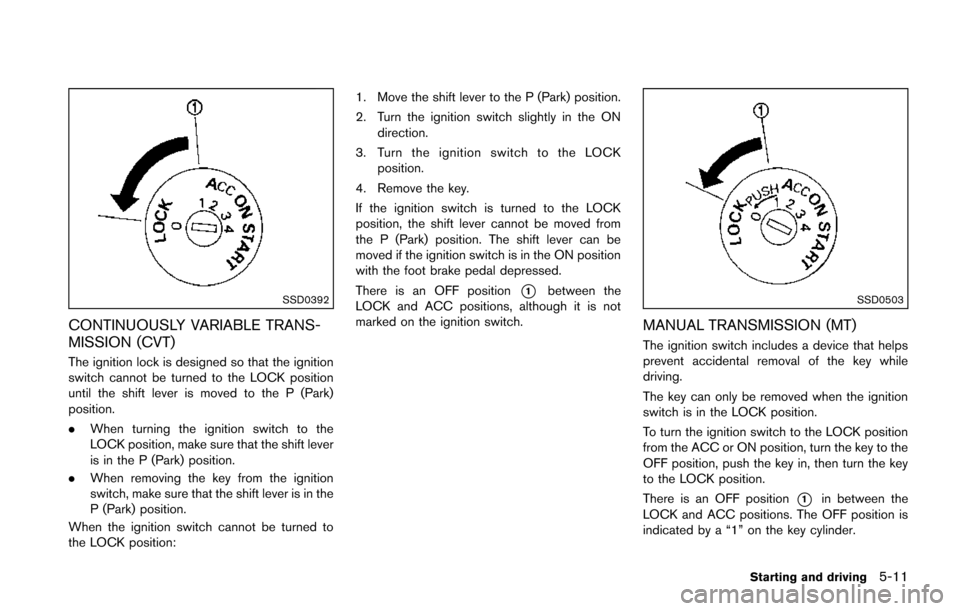
The ignition lock is designed so that the ignition
switch cannot be turned to the LOCK position
until the shift lever is moved to the P (Park)
position.
.When turning the ignition switch to the
LOCK position, make sure that the shift lever
is in the P (Park) position.
. When removing the key from the ignition
switch, make sure that the shift lever is in the
P (Park) position.
When the ignition switch cannot be turned to
the LOCK position: 1. Move the shift lever to the P (Park) position.
2. Turn the ignition switch slightly in the ON
direction.
3. Turn the ignition switch to the LOCK position.
4. Remove the key.
If the ignition switch is turned to the LOCK
position, the shift lever cannot be moved from
the P (Park) position. The shift lever can be
moved if the ignition switch is in the ON position
with the foot brake pedal depressed.
There is an OFF position
*1between the
LOCK and ACC positions, although it is not
marked on the ignition switch.SSD0503
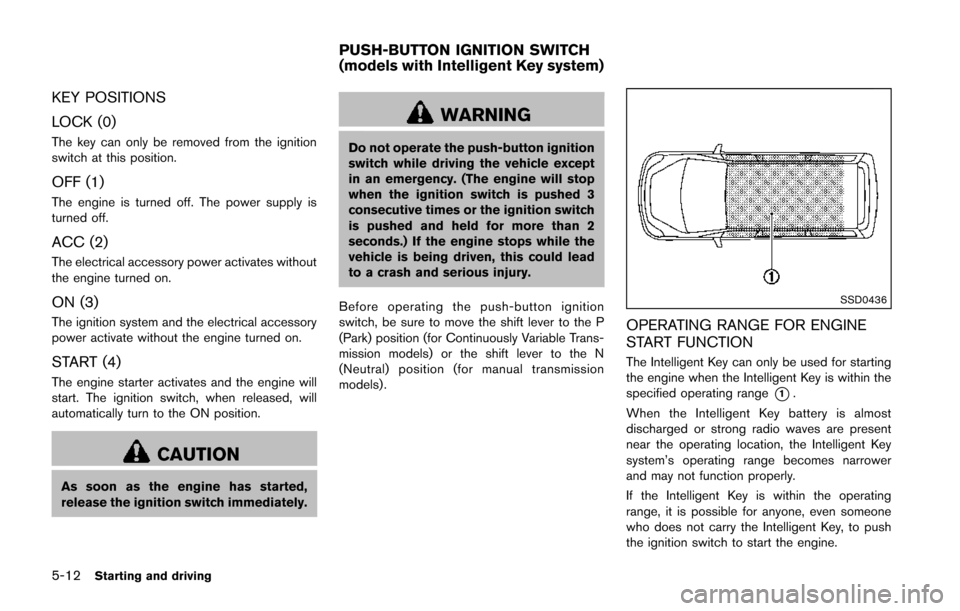
MANUAL TRANSMISSION (MT)
The ignition switch includes a device that helps
prevent accidental removal of the key while
driving.
The key can only be removed when the ignition
switch is in the LOCK position.
To turn the ignition switch to the LOCK position
from the ACC or ON position, turn the key to the
OFF position, push the key in, then turn the key
to the LOCK position.
There is an OFF position
*1in between the
LOCK and ACC positions. The OFF position is
indicated by a “1” on the key cylinder.
Starting and driving5-11
Page 265 of 402
5-12Starting and driving
KEY POSITIONS
LOCK (0)
The key can only be removed from the ignition
switch at this position.
OFF (1)
The engine is turned off. The power supply is
turned off.
ACC (2)
The electrical accessory power activates without
the engine turned on.
ON (3)
The ignition system and the electrical accessory
power activate without the engine turned on.
START (4)
The engine starter activates and the engine will
start. The ignition switch, when released, will
automatically turn to the ON position.
CAUTION
As soon as the engine has started,
release the ignition switch immediately.
WARNING
Do not operate the push-button ignition
switch while driving the vehicle except
in an emergency. (The engine will stop
when the ignition switch is pushed 3
consecutive times or the ignition switch
is pushed and held for more than 2
seconds.) If the engine stops while the
vehicle is being driven, this could lead
to a crash and serious injury.
Before operating the push-button ignition
switch, be sure to move the shift lever to the P
(Park) position (for Continuously Variable Trans-
mission models) or the shift lever to the N
(Neutral) position (for manual transmission
models) .
SSD0436
OPERATING RANGE FOR ENGINE
START FUNCTION
The Intelligent Key can only be used for starting
the engine when the Intelligent Key is within the
specified operating range
*1.
When the Intelligent Key battery is almost
discharged or strong radio waves are present
near the operating location, the Intelligent Key
system’s operating range becomes narrower
and may not function properly.
If the Intelligent Key is within the operating
range, it is possible for anyone, even someone
who does not carry the Intelligent Key, to push
the ignition switch to start the engine.
PUSH-BUTTON IGNITION SWITCH
(models with Intelligent Key system)
Page 266 of 402
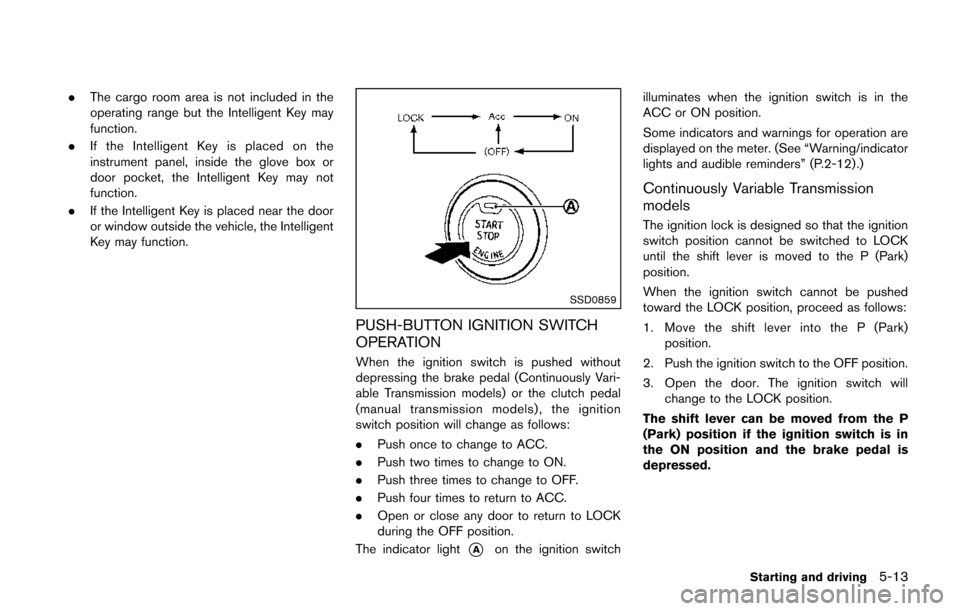
.The cargo room area is not included in the
operating range but the Intelligent Key may
function.
. If the Intelligent Key is placed on the
instrument panel, inside the glove box or
door pocket, the Intelligent Key may not
function.
. If the Intelligent Key is placed near the door
or window outside the vehicle, the Intelligent
Key may function.
SSD0859
PUSH-BUTTON IGNITION SWITCH
OPERATION
When the ignition switch is pushed without
depressing the brake pedal (Continuously Vari-
able Transmission models) or the clutch pedal
(manual transmission models), the ignition
switch position will change as follows:
.Push once to change to ACC.
. Push two times to change to ON.
. Push three times to change to OFF.
. Push four times to return to ACC.
. Open or close any door to return to LOCK
during the OFF position.
The indicator light
*Aon the ignition switch illuminates when the ignition switch is in the
ACC or ON position.
Some indicators and warnings for operation are
displayed on the meter. (See “Warning/indicator
lights and audible reminders” (P.2-12) .)
Continuously Variable Transmission
models
The ignition lock is designed so that the ignition
switch position cannot be switched to LOCK
until the shift lever is moved to the P (Park)
position.
When the ignition switch cannot be pushed
toward the LOCK position, proceed as follows:
1. Move the shift lever into the P (Park)
position.
2. Push the ignition switch to the OFF position.
3. Open the door. The ignition switch will change to the LOCK position.
The shift lever can be moved from the P
(Park) position if the ignition switch is in
the ON position and the brake pedal is
depressed.
Starting and driving5-13