2014 MITSUBISHI OUTLANDER SPORT Display
[x] Cancel search: DisplayPage 123 of 388
Multi information display6-14 Instruments and controls
6
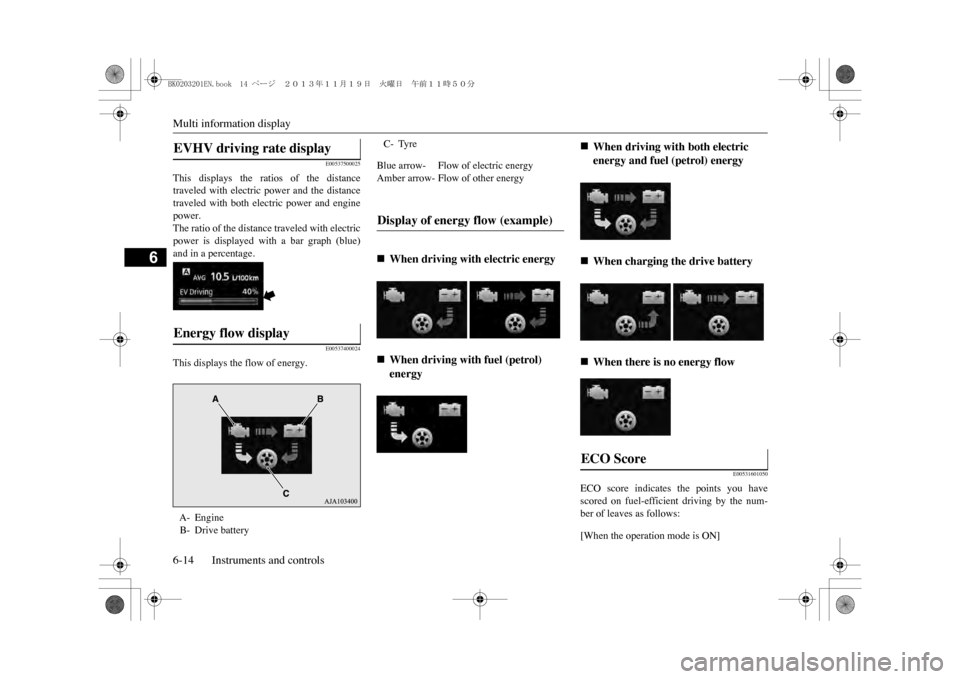
E00537500025
This displays the ratios of the distancetraveled with electric power and the distancetraveled with both electric power and enginepower.The ratio of the distance traveled with electricpower is displayed with a bar graph (blue)and in a percentage.
E00537400024
This displays the flow of energy.
E00531601050
ECO score indicates the points you havescored on fuel-efficient driving by the num-ber of leaves as follows:[When the operation mode is ON]
EVHV driving rate display Energy flow display A- EngineB- Drive battery
C- TyreBlue arrow- Flow of electric energyAmber arrow- Flow of other energyDisplay of energy flow (example)
Page 124 of 388
![MITSUBISHI OUTLANDER SPORT 2014 3.G Owners Manual Multi information display
Instruments and controls 6-15
6
The display shows the score you achieved inthe last several minutes.[When the operation mode is put in OFF]The display shows the ov](/manual-img/19/7545/w960_7545-123.png "MITSUBISHI OUTLANDER SPORT 2014 3.G Owners Manual Multi information display
Instruments and controls 6-15
6
The display shows the score you achieved inthe last several minutes.[When the operation mode is put in OFF]The display shows the ov")
Multi information display
Instruments and controls 6-15
6
The display shows the score you achieved inthe last several minutes.[When the operation mode is put in OFF]The display shows the overall ECO score thefunction has counted from the time when theoperation mode is set to “ON” to the timewhen it is set to “OFF”.
E00522701736
The “Display language”, “Temperature unit”,“Fuel consumption unit”, and “Average fuelconsumption and speed reset method” etc.setting can be modified as desired.1. Stop the vehicle in a safe place.Firmly apply the parking brake, and pressthe electrical parking switch and shift to“P” (PARK) position.
2. Lightly press the multi information dis-play switch a few times to switch theinformation screen to the function settingscreen.Refer to “Information screen” on page6-7.3. Press and hold the multi information dis-play switch for about 2 seconds or more toswitch from the setting mode screen to themenu screen.
Changing the function settings
ECO drive level
Low
High
CAUTIONzFor safety, stop the ve
hicle before operating.
While driving, even if you operate the multiinformation display switch, the function set-ting screen is not displayed.
NOTE
zTo r e t u r n t h e m e n u s c r e e n t o t h e f u n c t i o n s e t -ting screen, press and hold the multi infor-mation display switch fo
r about 2 seconds or
more.zIf no operations are made within about 30seconds of the menu sc
reen being displayed,
the display returns to the function settingscreen.
BK0203201EN.book 15 ページ 2013年11月19日 火曜日 午前11時50分
Page 125 of 388
Multi information display6-16 Instruments and controls
6
4. Select the item to change on the menuscreen and change to the desired setting.Refer to the following items for furtherdetails on the operation methods.Refer to “Changing the reset mode foraverage fuel consumption” on page 6-16.Refer to “Changing the fuel consumptiondisplay unit” on page 6-17.Refer to “Changing the temperature unit”on page 6-17.Refer to “Changing the display language”on page 6-18.Refer to “Changing the language coopera-tive control” on page 6-18.Refer to “Operation sound setting” onpage 6-19.Refer to “Changing the time until “RESTREMINDER” is displayed” on page 6-19.Refer to “Changing the turn-signal sound”on page 6-20.Refer to “Returning to the factory set-tings” on page 6-20.
E00522902054
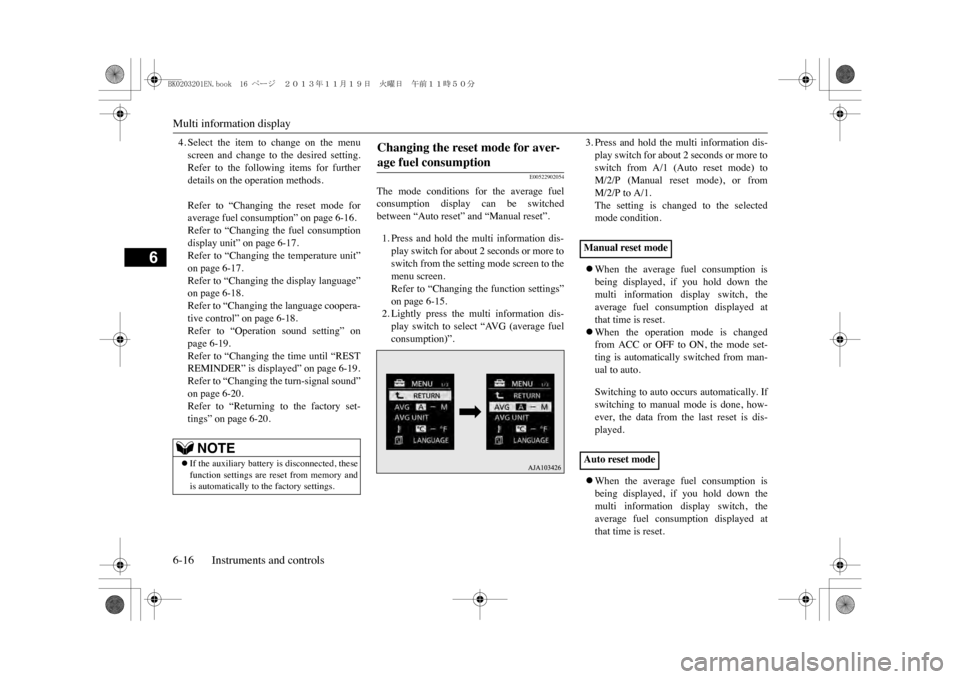
The mode conditions for the average fuelconsumption display can be switchedbetween “Auto reset” and “Manual reset”.1. Press and hold the multi information dis-play switch for about 2 seconds or more toswitch from the setting mode screen to themenu screen.Refer to “Changing the function settings”on page 6-15.2. Lightly press the multi information dis-play switch to select “AVG (average fuelconsumption)”.
3. Press and hold the multi information dis-play switch for about 2 seconds or more toswitch from A/1 (Auto reset mode) toM/2/P (Manual reset mode), or fromM/2/P to A/1.The setting is changed to the selectedmode condition.zWhen the average fuel consumption isbeing displayed, if you hold down themulti information display switch, theaverage fuel consumption displayed atthat time is reset.zWhen the operation mode is changedfrom ACC or OFF to ON, the mode set-ting is automatically switched from man-ual to auto.Switching to auto occurs automatically. Ifswitching to manual mode is done, how-ever, the data from the last reset is dis-played.zWhen the average fuel consumption isbeing displayed, if you hold down themulti information display switch, theaverage fuel consumption displayed atthat time is reset.
NOTE
zIf the auxiliary battery is disconnected, thesefunction settings are reset from memory andis automatically to the factory settings.
Changing the reset mode for aver-age fuel consumption
Manual reset modeAuto reset mode
BK0203201EN.book 16 ページ 2013年11月19日 火曜日 午前11時50分
Page 126 of 388
Multi information display
Instruments and controls 6-17
6
zWhen the operation mode is in ACC orOFF for about 4 hours or longer, the aver-age fuel consumption display is automati-cally reset.
E00523001778
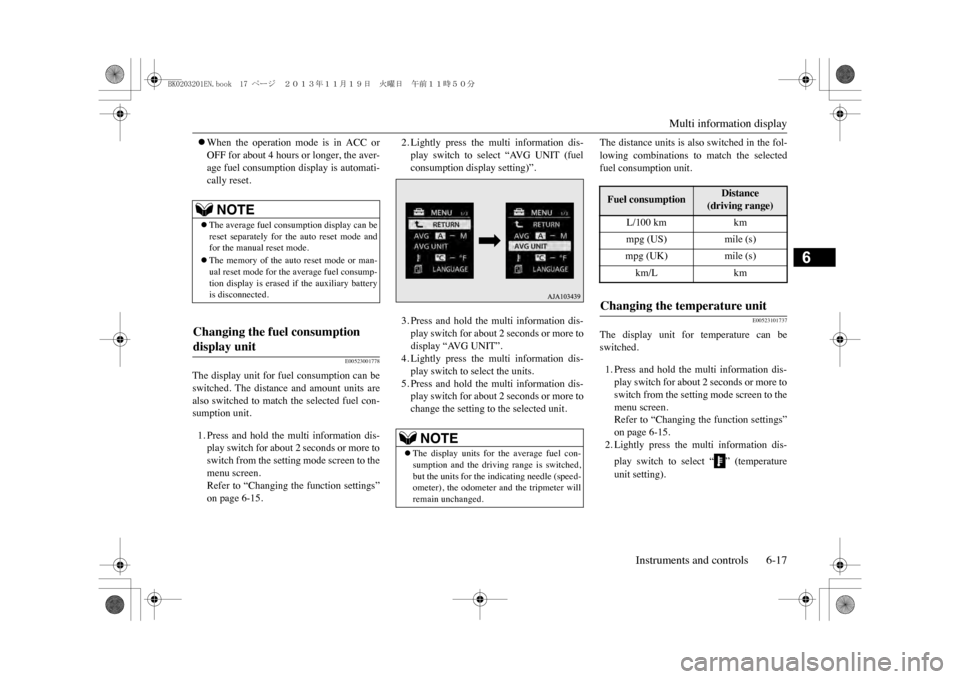
The display unit for fuel consumption can beswitched. The distance and amount units arealso switched to match the selected fuel con-sumption unit.1. Press and hold the multi information dis-play switch for about 2 seconds or more toswitch from the setting mode screen to themenu screen.Refer to “Changing the function settings”on page 6-15.
2. Lightly press the multi information dis-play switch to select “AVG UNIT (fuelconsumption display setting)”.3. Press and hold the multi information dis-play switch for about 2 seconds or more todisplay “AVG UNIT”.4. Lightly press the multi information dis-play switch to select the units.5. Press and hold the multi information dis-play switch for about 2 seconds or more tochange the setting to the selected unit.
The distance units is also switched in the fol-lowing combinations to match the selectedfuel consumption unit.
E00523101737
The display unit for temperature can beswitched.1. Press and hold the multi information dis-play switch for about 2 seconds or more toswitch from the setting mode screen to themenu screen.Refer to “Changing the function settings”on page 6-15.2. Lightly press the multi information dis-play switch to select “ ” (temperatureunit setting).
NOTE
zThe average fuel consumption display can bereset separately for the auto reset mode andfor the manual reset mode.zThe memory of the auto reset mode or man-ual reset mode for the average fuel consump-tion display is erased if the auxiliary batteryis disconnected.
Changing the fuel consumption display unit
NOTE
zThe display units for the average fuel con-sumption and the driving range is switched,but the units for the indicating needle (speed-ometer), the odometer and the tripmeter willremain unchanged.
Fuel consumption
Distance
(driving range)
L/100 km
km
mpg (US)
mile (s)
mpg (UK)
mile (s)
km/L
km
Changing the temperature unit
BK0203201EN.book 17 ページ 2013年11月19日 火曜日 午前11時50分
Page 127 of 388
Multi information display6-18 Instruments and controls
6
3. Press and hold the multi information dis-play switch for about 2 seconds or more toswitch in from °C to °F, or from °F to °C.The setting is changed to the selected tem-perature unit.
E00523201741
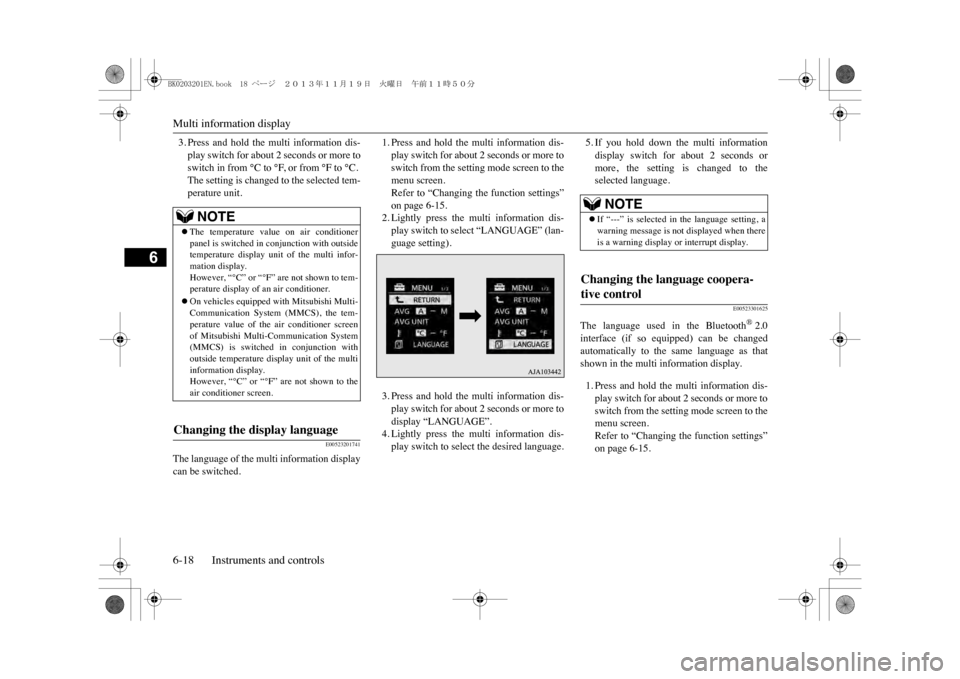
The language of the multi information displaycan be switched.
1. Press and hold the multi information dis-play switch for about 2 seconds or more toswitch from the setting mode screen to themenu screen.Refer to “Changing the function settings”on page 6-15.2. Lightly press the multi information dis-play switch to select “LANGUAGE” (lan-guage setting).3. Press and hold the multi information dis-play switch for about 2 seconds or more todisplay “LANGUAGE”.4. Lightly press the multi information dis-play switch to select the desired language.
5. If you hold down the multi informationdisplay switch for about 2 seconds ormore, the setting is changed to theselected language.
E00523301625
The language used in the Bluetooth
®2.0
interface (if so equipped) can be changedautomatically to the same language as thatshown in the multi information display.1. Press and hold the multi information dis-play switch for about 2 seconds or more toswitch from the setting mode screen to themenu screen.Refer to “Changing the function settings”on page 6-15.
NOTE
zThe temperature value on air conditionerpanel is switched in
conjunction with outside
temperature display unit of the multi infor-mation display.However, “°C” or “°F” are not shown to tem-perature display of an air conditioner.zOn vehicles equipped
with Mitsubishi Multi-
Communication System (MMCS), the tem-perature value of the air conditioner screenof Mitsubishi Multi-Communication System(MMCS) is switched
in conjunction with
outside temperature display unit of the multiinformation display.However, “°C” or “°F” are not shown to theair conditioner screen.
Changing the display language
NOTE
zIf “---” is selected in the language setting, awarning message is not
displayed when there
is a warning display or interrupt display.
Changing the language coopera-tive control
BK0203201EN.book 18 ページ 2013年11月19日 火曜日 午前11時50分
Page 128 of 388
Multi information display
Instruments and controls 6-19
6
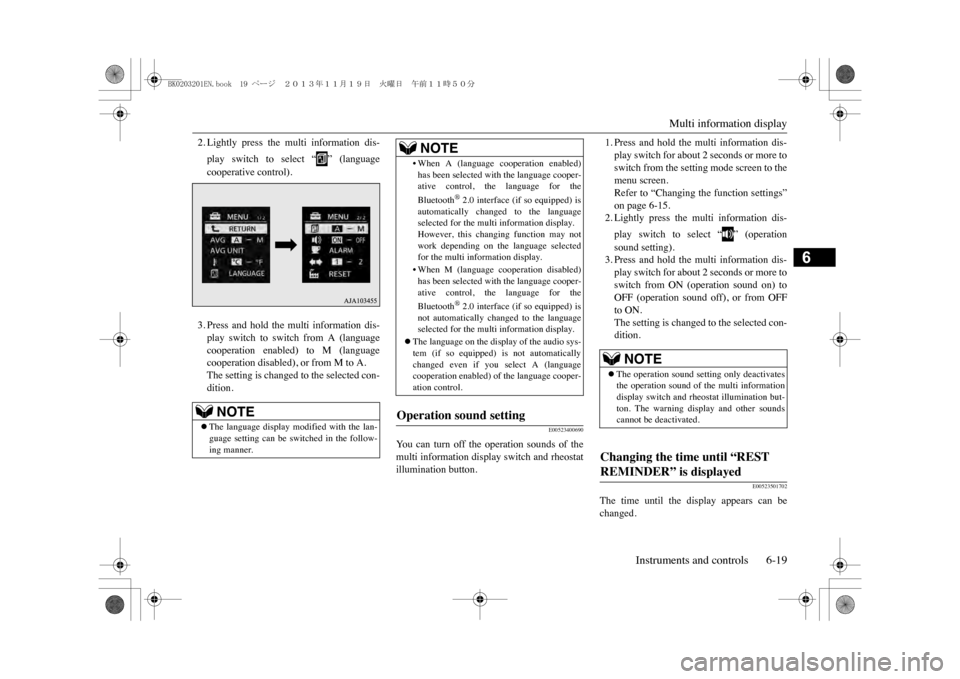
2. Lightly press the multi information dis-play switch to select “ ” (languagecooperative control).3. Press and hold the multi information dis-play switch to switch from A (languagecooperation enabled) to M (languagecooperation disabled), or from M to A.The setting is changed to the selected con-dition.
E00523400690
Yo u c a n t u r n o f f t h e o p e r a t i o n s o u n d s o f t h emulti information display switch and rheostatillumination button.
1. Press and hold the multi information dis-play switch for about 2 seconds or more toswitch from the setting mode screen to themenu screen.Refer to “Changing the function settings”on page 6-15.2. Lightly press the multi information dis-play switch to select “ ” (operationsound setting).3. Press and hold the multi information dis-play switch for about 2 seconds or more toswitch from ON (operation sound on) toOFF (operation sound off), or from OFFto ON.The setting is changed to the selected con-dition.
E00523501702
The time until the display appears can bechanged.
NOTE
zThe language display modified with the lan-guage setting can be switched in the follow-ing manner.
•When A (language
cooperation enabled)
has been selected with the language cooper-ative control, the language for theBluetooth
®2.0 interface (if so equipped) is
automatically changed to the languageselected for the multi information display.However, this changing function may notwork depending on the language selectedfor the multi information display.•When M (language c
ooperation disabled)
has been selected with the language cooper-ative control, the language for theBluetooth
®2.0 interface (if so equipped) is
not automatically changed to the languageselected for the multi information display.
zThe language on the disp
lay of the audio sys-
tem (if so equipped) is not automaticallychanged even if you
select A (language
cooperation enabled) of
the language cooper-
ation control.
Operation sound setting
NOTE
NOTE
zThe operation sound setting only deactivatesthe operation sound of the multi informationdisplay switch and rheostat illumination but-ton. The warning di
splay and other sounds
cannot be deactivated.
Changing the time until “REST REMINDER” is displayed
BK0203201EN.book 19 ページ 2013年11月19日 火曜日 午前11時50分
Page 129 of 388
Multi information display6-20 Instruments and controls
6
1. Press and hold the multi information dis-play switch for about 2 seconds or more toswitch from the setting mode screen to themenu screen.Refer to “Changing the function settings”on page 6-15.2. Lightly press the multi information dis-play switch to select “ALARM” (rest timesetting).3. Press and hold the multi information dis-play switch for about 2 seconds or more todisplay “ALARM”.4. Lightly press the multi information dis-play switch to select the time until the dis-play.5. Press and hold the multi information dis-play switch for about 2 seconds or more,the setting is changed to the selected time.
E00529100396
It is possible to change the turn-signal sound.
1. Press and hold the multi information dis-play switch for about 2 seconds or more toswitch from the setting mode screen to themenu screen.Refer to “Changing the function settings”on page 6-15.2. Lightly press the multi information dis-play switch to select (changing theturn-signal sound).3. Press and hold the multi information dis-play switch for about 2 seconds or more toswitch from 1 (turn-signal sound 1) to 2(turn-signal sound 2), or from 2 to 1.The setting changes to the selected turn-signal sound.
E00523601875
All of the function settings can be returned totheir factory settings.1. Press and hold the multi information dis-play switch for about 2 seconds or more toswitch from the setting mode screen to themenu screen.Refer to “Changing the function settings”on page 6-15.2. Lightly press the multi information dis-play switch to select “RESET” (returningto the factory settings).
3. When you press and hold the multi infor-mation display switch for about 5 secondsor more, the buzzer sounds and all of thefunction settings are returned to the fac-tory settings.
NOTE
zThe drive time is reset when the operationmode of the power switch is put in OFF.
Changing the turn-signal sound
Returning to the factory settings
NOTE
zThe factory settings
are as follows.
•Average fuel consum
ption reset mode: A
(Auto reset)•Fuel consumption display unit: L/100 km•Temperature unit: °C (Celsius)•Display language: ENGLISH or RUSSIAN•Cooperative language
setting: A (language
cooperation enabled)•Operation sounds: ON
(Operation sounds
on)•“REST REMINDER” display: OFF•Turn-signal sound: Turn-signal sound 1
BK0203201EN.book 20 ページ 2013年11月19日 火曜日 午前11時50分
Page 130 of 388
Indicator lamp, warning lamp, and information screen display list
Instruments and controls 6-21
6
E00523701182E00523802034
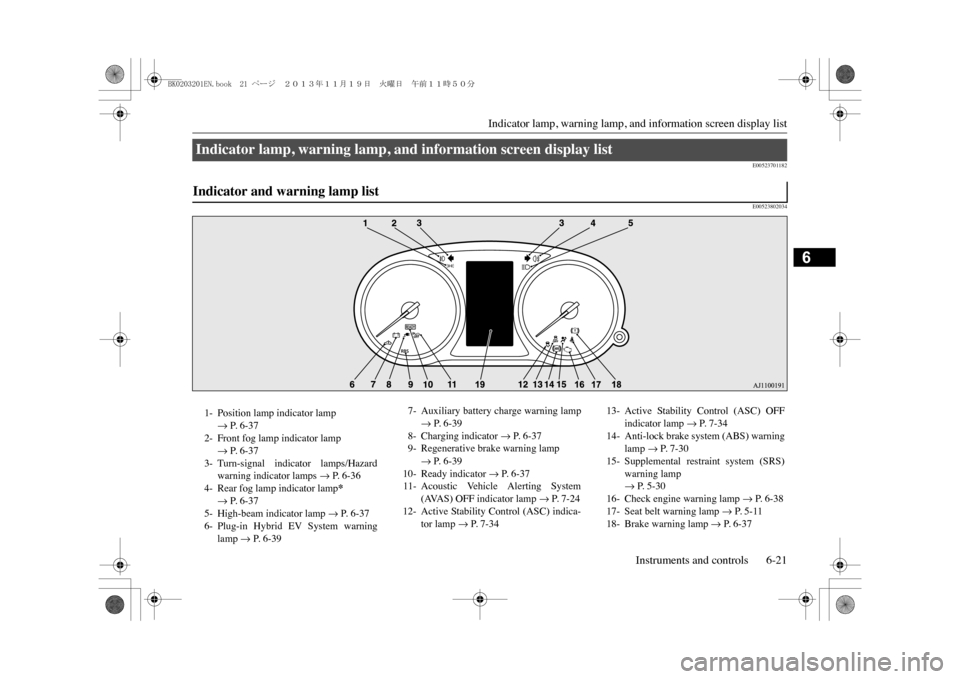
Indicator lamp, warning lamp, and information screen display list Indicator and warning lamp list 1- Position lamp indicator lamp
m P. 6-37
2- Front fog lamp indicator lamp
m P. 6-37
3- Turn-signal indicator lamps/Hazard
warning indicator lamps
m P. 6-36
4- Rear fog lamp indicator lamp
*
m P. 6-37
5- High-beam indicator lamp
m P. 6-37
6- Plug-in Hybrid EV System warning
lamp
m P. 6-39
7- Auxiliary battery charge warning lamp
m P. 6-39
8- Charging indicator
m P. 6-37
9- Regenerative brake warning lamp
m P. 6-39
10- Ready indicator
m P. 6-37
11- Acoustic Vehicle Alerting System
(AVAS) OFF indicator lamp
m P. 7-24
12- Active Stability Control (ASC) indica-
tor lamp
m P. 7-34
13- Active Stability Control (ASC) OFF
indicator lamp
m P. 7-34
14- Anti-lock brake system (ABS) warning
lamp
m P. 7-30
15- Supplemental restraint system (SRS)
warning lampm P. 5-30
16- Check engine warning lamp
m P. 6-38
17- Seat belt warning lamp
m P. 5-11
18- Brake warning lamp
m P. 6-37
BK0203201EN.book 21 ページ 2013年11月19日 火曜日 午前11時50分