2014 MITSUBISHI OUTLANDER SPORT turn signal
[x] Cancel search: turn signalPage 70 of 388
Security alarm system*
Locking and unlocking 4-25
4
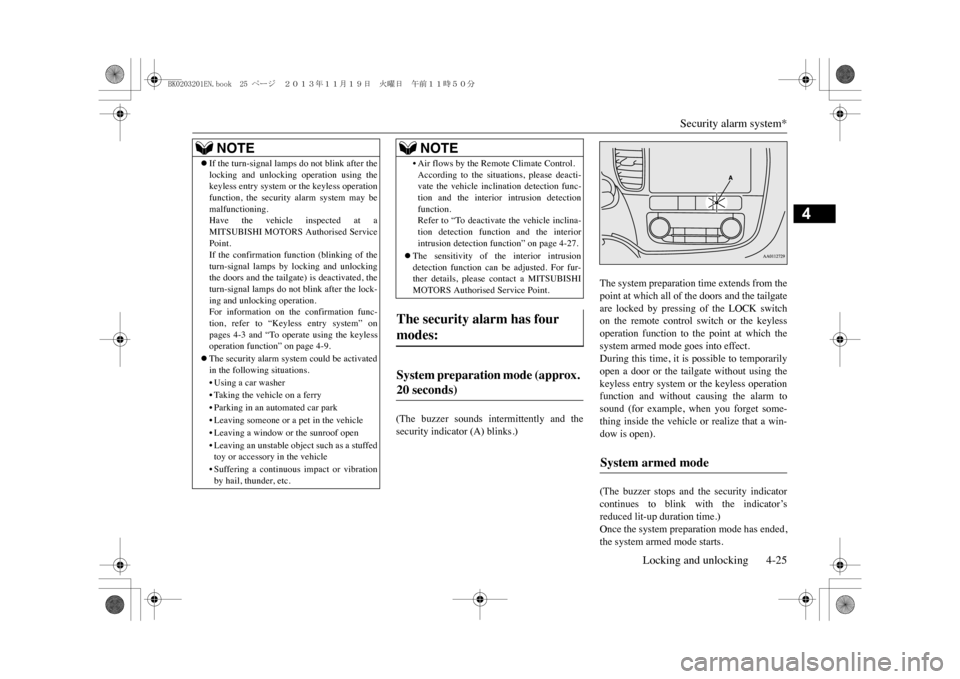
(The buzzer sounds intermittently and thesecurity indicator (A) blinks.)
The system preparation time extends from thepoint at which all of the doors and the tailgateare locked by pressing of the LOCK switchon the remote control switch or the keylessoperation function to the point at which thesystem armed mode goes into effect.During this time, it is possible to temporarilyopen a door or the tailgate without using thekeyless entry system or the keyless operationfunction and without causing the alarm tosound (for example, when you forget some-thing inside the vehicle or realize that a win-dow is open).(The buzzer stops and the security indicatorcontinues to blink with the indicator’sreduced lit-up duration time.)Once the system preparation mode has ended,the system armed mode starts.
zIf the turn-signal lamps do not blink after thelocking and unlocking operation using thekeyless entry system or
the keyless operation
function, the security alarm system may bemalfunctioning.Have the vehicle inspected at aMITSUBISHI MOTORS Authorised ServicePoint.If the confirmation function (blinking of theturn-signal lamps by
locking and unlocking
the doors and the tailgate) is deactivated, theturn-signal lamps do not blink after the lock-ing and unloc
king operation.
For information on the confirmation func-tion, refer to “Keyless entry system” onpages 4-3 and “To opera
te using the keyless
operation function”
on page 4-9.
zThe security alarm system could be activatedin the following situations.•Using a car washer•Taking the vehicle on a ferry•Parking in an automated car park•Leaving someone or a pet in the vehicle•Leaving a window or the sunroof open• Leaving an unstable object such as a stuffedtoy or accessory in the vehicle• Suffering a continuous impact or vibrationby hail, thunder, etc.NOTE
• Air flows by the Remote Climate Control.According to the situations, please deacti-vate the vehicle inclination detection func-tion and the interior intrusion detectionfunction.Refer to “To deactivate the vehicle inclina-tion detection function and the interiorintrusion detection f
unction” on page 4-27.
zThe sensitivity of the interior intrusiondetection function can be adjusted. For fur-ther details, please contact a MITSUBISHIMOTORS Authorised Service Point.
The security alarm has four modes:
System preparation mode (approx. 20 seconds)
NOTE
System armed mode
BK0203201EN.book 25 ページ 2013年11月19日 火曜日 午前11時50分
Page 71 of 388
Security alarm system*4-26 Locking and unlocking
4
If an unlawful opening of any of the doors,tailgate or bonnet is detected during the sys-tem armed mode, the alarm will be activatedto warn people around the vehicle of anabnormal condition.Inside alarm (approx. 10 seconds):
The buzzer sounds, warning those insidethe vehicle of an abnormal condition.(except for vehicles equipped with theinterior alarm sensor)
Outside alarm (approx. 30 seconds):
The turn-signal lamps blink and the horn(the siren for vehicles equipped with theinterior alarm sensor) sounds, warningpeople around the vehicle of an abnormalcondition.
Refer to “Alarm activation” on page 4-28.
It is possible to cancel the system activationduring the system preparation mode or thesystem armed mode.In addition, it is possible to cancel the alarmonce it has been activated.Refer to “Cancelling the system” on page4-28, “Cancelling the alarm” on page 4-29.
E00301701988
Follow the procedure be
low to set the system
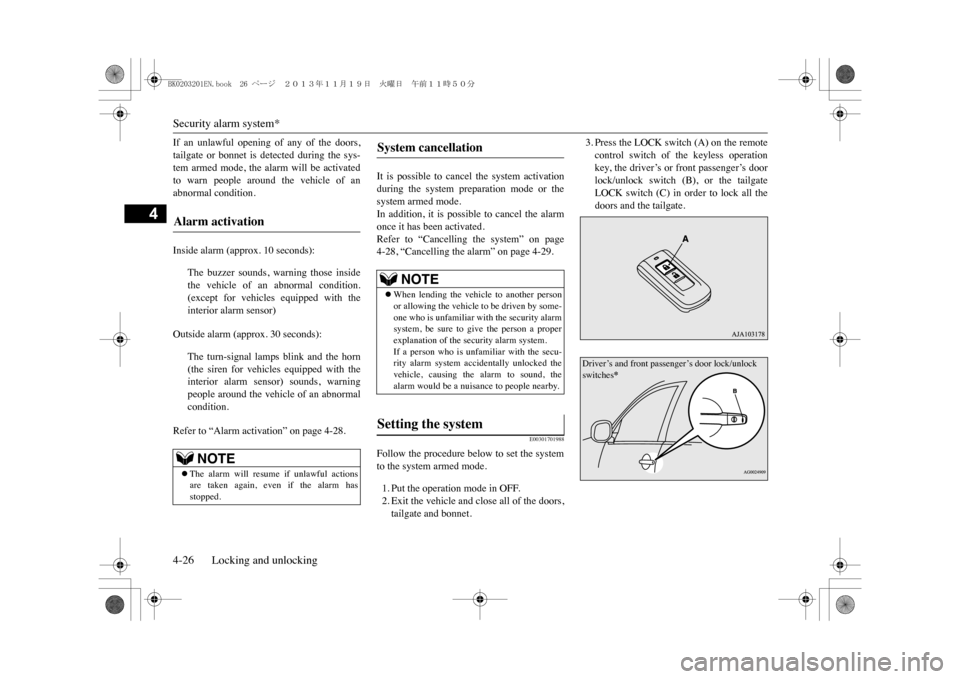
to the system armed mode.1. Put the operation mode in OFF.2. Exit the vehicle and close all of the doors,tailgate and bonnet.
3. Press the LOCK switch (A) on the remotecontrol switch of the keyless operationkey, the driver’s or front passenger’s doorlock/unlock switch (B), or the tailgateLOCK switch (C) in order to lock all thedoors and the tailgate.
Alarm activation
NOTE
zThe alarm will resume if unlawful actionsare taken again, even if the alarm hasstopped.
System cancellation
NOTE
zWhen lending the vehicle to another personor allowing the vehicle to be driven by some-one who is unfamiliar with the security alarmsystem, be sure to give the person a properexplanation of the se
curity alarm system.
If a person who is unfamiliar with the secu-rity alarm system accidentally unlocked thevehicle, causing the alarm to sound, thealarm would be a nuisance to people nearby.
Setting the system
Driver’s and front passenger’s door lock/unlock switches
*
BK0203201EN.book 26 ページ 2013年11月19日 火曜日 午前11時50分
Page 74 of 388
Electric window control
Locking and unlocking 4-29
4
1. The inside alarm will be activated forapproximately 10 seconds. (except forvehicles equipped with the interior alarmsensor)2. The alarm will be activated for approxi-mately 30 seconds.The turn-signal lamps will flash, and thehorn (the siren for vehicles equipped withthe interior alarm sensor) will sound inter-mittently.3. The alarm will resume if unlawful actionsare taken again, even if the alarm hasstopped.
E00302001698
It is possible to halt the activation of an alarmusing the following methods:zPressing the LOCK or UNLOCK switchon the remote control switch.(After pressing of the LOCK switch, thevehicle will lock if all the doors and thetailgate are closed, after which the systempreparation mode will once again go intoeffect.)zPutting the operation mode in ON.zHolding the keyless operation key andlocking or unlocking the doors and thetailgate using the keyless operation func-tion.
E00302201632
The electric windows can only be operatedwith the operation mode in ON.
E00302301822
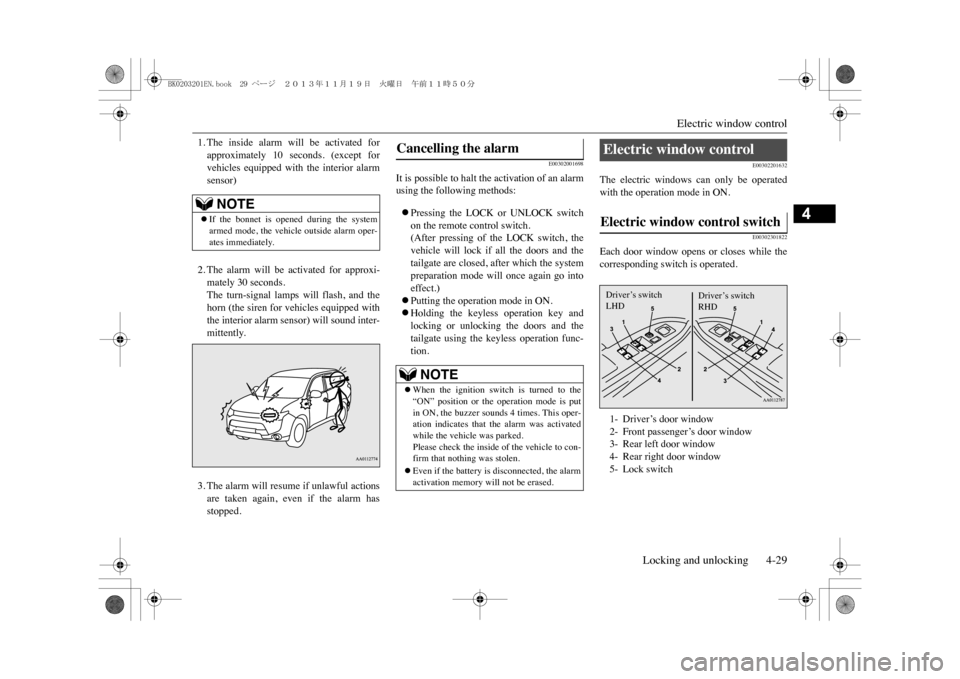
Each door window opens or closes while thecorresponding switch is operated.
NOTE
zIf the bonnet is opened during the systemarmed mode, the vehicl
e outside alarm oper-
ates immediately.
Cancelling the alarm
NOTE
zWhen the ignition switch is turned to the“ON” position or the operation mode is putin ON, the buzzer sounds 4 times. This oper-ation indicates that the alarm was activatedwhile the vehicle was parked.Please check the inside of the vehicle to con-firm that nothi
ng was stolen.
zEven if the battery is disconnected, the alarmactivation memory will not be erased.
Electric window control Electric window control switch 1- Driver’s door window2- Front passenger’s door window3- Rear left door window4- Rear right door window5- Lock switchDriver’s switchLHD
Driver’s switchRHD
BK0203201EN.book 29 ページ 2013年11月19日 火曜日 午前11時50分
Page 110 of 388
6
Instruments and controlsInstruments .......................................................................................6-2Multi information display ................................................................. 6-3Indicator lamp, warning lamp, and information screen display list.....................................................................................................6-21Indicator lamps ...............................................................................6-36Wa r n i n g l a m p s . . . . . . . . . . . . . . . . . . . . . . . . . . . . . . . . . . . . . . . . . . . . . . . . . . . . . . . . . . . . . . . . . . . . . . . . . . . . . . . . 6 - 3 7Information screen display .............................................................6-39Combination headlamps and dipper switch ....................................6-40Headlamp levelling .........................................................................6-44Turn-signal lever ............................................................................. 6-45Hazard warning flasher switch .......................................................6-45ECO mode switch ..........................................................................6-46Fog lamp switch .............................................................................6-46Wi p er and w ashe r sw it ch .. . . .. . .. . . .. . . .. . .. . . .. . . .. . .. . . .. . .. . . .. . . .. . .. . . .. . . .. . .. . . . 6- 4 7Wi p er dei ce r sw it ch * .. . .. . . .. . . .. . .. . . .. . . .. . .. . . .. . . .. . .. . . .. . .. . . .. . . .. . .. . . .. . . .. . .. . . . 6- 5 3Rear window demister switch.........................................................6-53Horn switch.....................................................................................6-54
BK0203201EN.book 1 ページ 2013年11月19日 火曜日 午前11時50分
Page 125 of 388
Multi information display6-16 Instruments and controls
6
4. Select the item to change on the menuscreen and change to the desired setting.Refer to the following items for furtherdetails on the operation methods.Refer to “Changing the reset mode foraverage fuel consumption” on page 6-16.Refer to “Changing the fuel consumptiondisplay unit” on page 6-17.Refer to “Changing the temperature unit”on page 6-17.Refer to “Changing the display language”on page 6-18.Refer to “Changing the language coopera-tive control” on page 6-18.Refer to “Operation sound setting” onpage 6-19.Refer to “Changing the time until “RESTREMINDER” is displayed” on page 6-19.Refer to “Changing the turn-signal sound”on page 6-20.Refer to “Returning to the factory set-tings” on page 6-20.
E00522902054
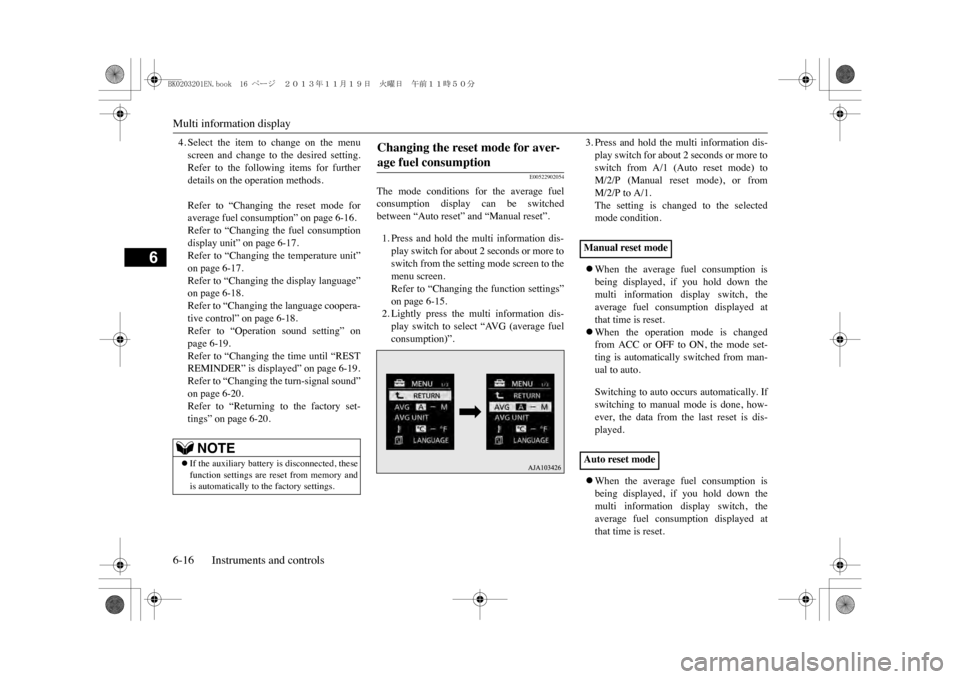
The mode conditions for the average fuelconsumption display can be switchedbetween “Auto reset” and “Manual reset”.1. Press and hold the multi information dis-play switch for about 2 seconds or more toswitch from the setting mode screen to themenu screen.Refer to “Changing the function settings”on page 6-15.2. Lightly press the multi information dis-play switch to select “AVG (average fuelconsumption)”.
3. Press and hold the multi information dis-play switch for about 2 seconds or more toswitch from A/1 (Auto reset mode) toM/2/P (Manual reset mode), or fromM/2/P to A/1.The setting is changed to the selectedmode condition.zWhen the average fuel consumption isbeing displayed, if you hold down themulti information display switch, theaverage fuel consumption displayed atthat time is reset.zWhen the operation mode is changedfrom ACC or OFF to ON, the mode set-ting is automatically switched from man-ual to auto.Switching to auto occurs automatically. Ifswitching to manual mode is done, how-ever, the data from the last reset is dis-played.zWhen the average fuel consumption isbeing displayed, if you hold down themulti information display switch, theaverage fuel consumption displayed atthat time is reset.
NOTE
zIf the auxiliary battery is disconnected, thesefunction settings are reset from memory andis automatically to the factory settings.
Changing the reset mode for aver-age fuel consumption
Manual reset modeAuto reset mode
BK0203201EN.book 16 ページ 2013年11月19日 火曜日 午前11時50分
Page 129 of 388
Multi information display6-20 Instruments and controls
6
1. Press and hold the multi information dis-play switch for about 2 seconds or more toswitch from the setting mode screen to themenu screen.Refer to “Changing the function settings”on page 6-15.2. Lightly press the multi information dis-play switch to select “ALARM” (rest timesetting).3. Press and hold the multi information dis-play switch for about 2 seconds or more todisplay “ALARM”.4. Lightly press the multi information dis-play switch to select the time until the dis-play.5. Press and hold the multi information dis-play switch for about 2 seconds or more,the setting is changed to the selected time.
E00529100396
It is possible to change the turn-signal sound.
1. Press and hold the multi information dis-play switch for about 2 seconds or more toswitch from the setting mode screen to themenu screen.Refer to “Changing the function settings”on page 6-15.2. Lightly press the multi information dis-play switch to select (changing theturn-signal sound).3. Press and hold the multi information dis-play switch for about 2 seconds or more toswitch from 1 (turn-signal sound 1) to 2(turn-signal sound 2), or from 2 to 1.The setting changes to the selected turn-signal sound.
E00523601875
All of the function settings can be returned totheir factory settings.1. Press and hold the multi information dis-play switch for about 2 seconds or more toswitch from the setting mode screen to themenu screen.Refer to “Changing the function settings”on page 6-15.2. Lightly press the multi information dis-play switch to select “RESET” (returningto the factory settings).
3. When you press and hold the multi infor-mation display switch for about 5 secondsor more, the buzzer sounds and all of thefunction settings are returned to the fac-tory settings.
NOTE
zThe drive time is reset when the operationmode of the power switch is put in OFF.
Changing the turn-signal sound
Returning to the factory settings
NOTE
zThe factory settings
are as follows.
•Average fuel consum
ption reset mode: A
(Auto reset)•Fuel consumption display unit: L/100 km•Temperature unit: °C (Celsius)•Display language: ENGLISH or RUSSIAN•Cooperative language
setting: A (language
cooperation enabled)•Operation sounds: ON
(Operation sounds
on)•“REST REMINDER” display: OFF•Turn-signal sound: Turn-signal sound 1
BK0203201EN.book 20 ページ 2013年11月19日 火曜日 午前11時50分
Page 130 of 388
Indicator lamp, warning lamp, and information screen display list
Instruments and controls 6-21
6
E00523701182E00523802034
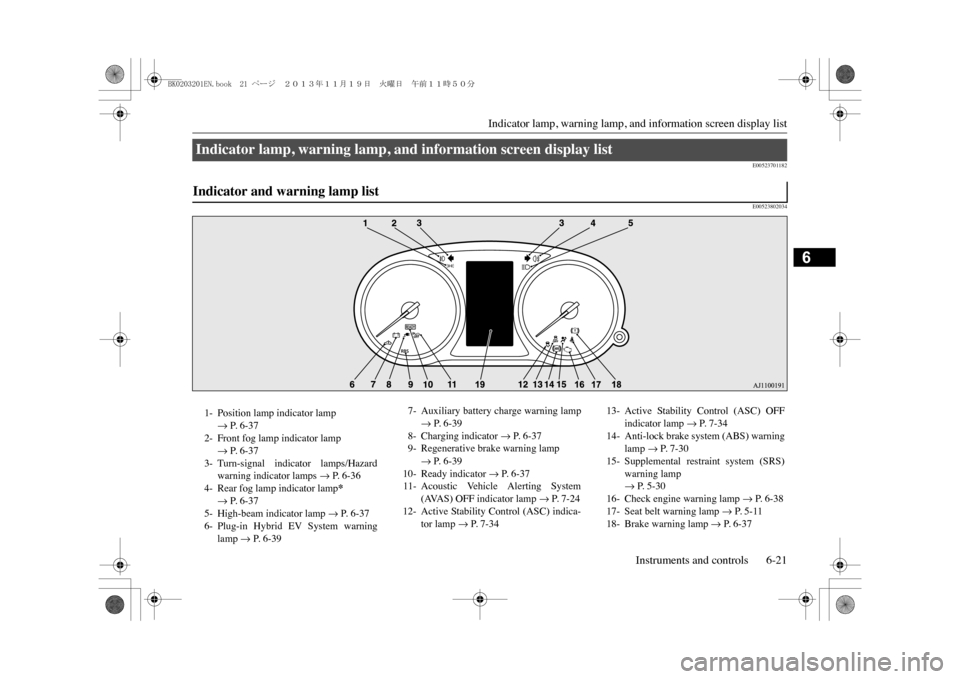
Indicator lamp, warning lamp, and information screen display list Indicator and warning lamp list 1- Position lamp indicator lamp
m P. 6-37
2- Front fog lamp indicator lamp
m P. 6-37
3- Turn-signal indicator lamps/Hazard
warning indicator lamps
m P. 6-36
4- Rear fog lamp indicator lamp
*
m P. 6-37
5- High-beam indicator lamp
m P. 6-37
6- Plug-in Hybrid EV System warning
lamp
m P. 6-39
7- Auxiliary battery charge warning lamp
m P. 6-39
8- Charging indicator
m P. 6-37
9- Regenerative brake warning lamp
m P. 6-39
10- Ready indicator
m P. 6-37
11- Acoustic Vehicle Alerting System
(AVAS) OFF indicator lamp
m P. 7-24
12- Active Stability Control (ASC) indica-
tor lamp
m P. 7-34
13- Active Stability Control (ASC) OFF
indicator lamp
m P. 7-34
14- Anti-lock brake system (ABS) warning
lamp
m P. 7-30
15- Supplemental restraint system (SRS)
warning lampm P. 5-30
16- Check engine warning lamp
m P. 6-38
17- Seat belt warning lamp
m P. 5-11
18- Brake warning lamp
m P. 6-37
BK0203201EN.book 21 ページ 2013年11月19日 火曜日 午前11時50分
Page 145 of 388
Indicator lamps6-36 Instruments and controls
6
The setting for rest interval can be changed.
E00501600100E00501701427
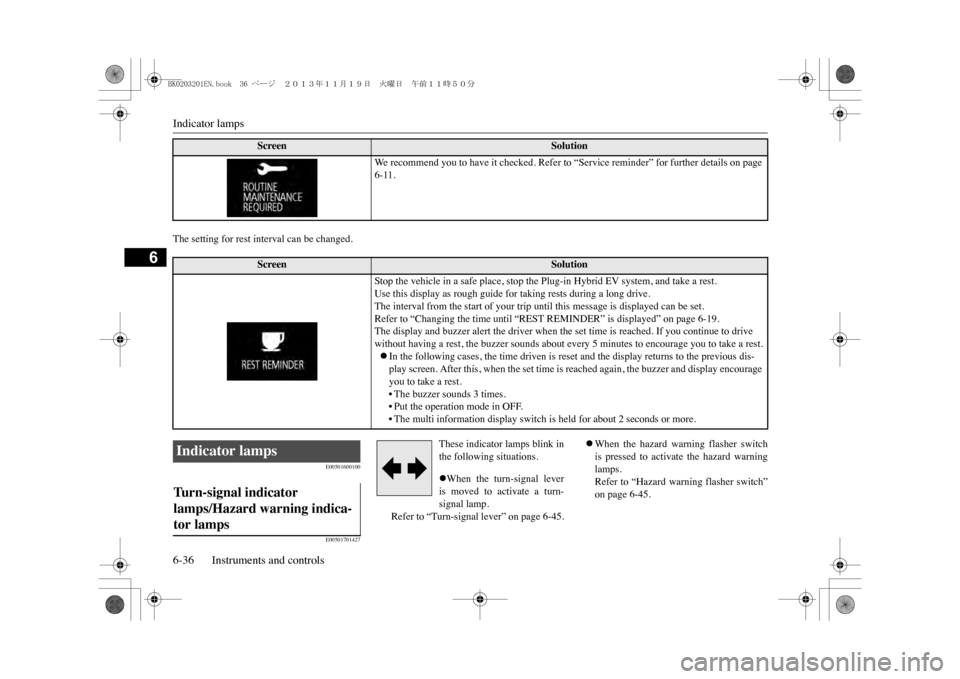
These indicator lamps blink inthe following situations.zWhen the turn-signal leveris moved to activate a turn-signal lamp.
Refer to “Turn-signal lever” on page 6-45.
zWhen the hazard warning flasher switchis pressed to activate the hazard warninglamps.Refer to “Hazard warning flasher switch”on page 6-45.
Screen
Solution
We r e c o m m e n d y o u t o h a v e i t c h e c k e d . R e f e r t o “ S e r v i c e r e m i n d e r ” f o r f u r t h e r d e t a i l s o n p a g e 6-11.
Screen
Solution
Stop the vehicle in a safe place, stop the Plug-in Hybrid EV system, and take a rest.Use this display as rough guide for taking rests during a long drive.The interval from the start of your trip until this message is displayed can be set.Refer to “Changing the time until “REST REMINDER” is displayed” on page 6-19.The display and buzzer alert the driver when the set time is reached. If you continue to drive without having a rest, the buzzer sounds about every 5 minutes to encourage you to take a rest.zIn the following cases, the time driven is reset and the display returns to the previous dis-play screen. After this, when the set time is reached again, the buzzer and display encourage you to take a rest.•The buzzer sounds 3 times.•Put the operation mode in OFF.• The multi information display switch is held for about 2 seconds or more.
Indicator lamps Tu r n - s i g n a l i n d i c a t o r lamps/Hazard warning indica-tor lamps BK0203201EN.book 36 ページ 2013年11月19日 火曜日 午前11時50分