2014 MITSUBISHI OUTLANDER SPORT handle
[x] Cancel search: handlePage 236 of 388
Towing caravans and trailersStarting and driving 7-73
7
allow air to cool the brakes between applica-tions.Furthermore, it might be able to reduce theload of the brakes by using the regenerativebrake force.Leave plenty of room between the front ofyour vehicle and the preceding vehicle.If the caravan begins to sway or becomes dif-ficult to handle, gently slow down or applythe independent trailer brakes (if fitted) NOTthe vehicle brakes. Stop the vehicle andtrailer in a safe location. Examine the tyres ofthe trailer closely for damage. If you find thedamage of tyre, it is recommended that tyresbe inspected by a MITSUBISHI MOTORSAuthorised Service Point or a tyre retailerbefore proceeding further. Note that treadseparation [separation of the tread band fromthe body of the tyre] of trailer tyres which areaged, and/or loaded near their load limit, canbe difficult to detect, especially on caravanswhere tyres are covered.One cause of swaying is poor trailer balanceand until this has been overcome the swayingwill recur. Relocate the load in your trailer orcaravan and re-assess the problem.If the wheels of your vehicle, the trailer orcaravan leave the road surface and enter the
unsealed edge of the road, resist the urge topull it back quickly. Wait for a section wherethe levels of the road and unsealed edge arecomparable and then ease back onto thesealed section of the road with as little swayas possible.Try to maximise the distance between yourcaravan and passing or overtaking semi-trail-ers or other heavy vehicles. This will reducethe suction forces between the two and mini-mise disturbance of the caravan.Do not apply the brakes severely, be alert andanticipate trouble far enough ahead to enableyou to apply the brakes smoothly and evenly.Do not make any manoeuvres before ensuringthat the road behind and in front of your vehi-cle is clear.This will normally occur as a result of somemechanical failure. If your vehicle shouldoverheat, stop and check for a loose or brokenwater pump drive belt/ oil pump/cooling oil, ablocked radiator air intake or a low coolantlevel. If these items are satisfactory the over-heating could be caused by a number of
mechanical causes that would have to bechecked at a MITSUBISHI MOTORSAuthorised Service Point.If your vehicle is in good mechanical condi-tion and it overheats due to heavy traffic con-ditions or high air temperatures, additionalcooling may be obtained by the followingmethods:zReduce your speed by 15 km/h if towingat high speeds.
Normal cruising
Braking Overheating
CAUTIONzIf the engine overheats,
reference should be
made to “Engine overheating” section of“For emergencies” prior to taking any cor-rective action.
BK0203201EN.book 73 ページ 2013年11月19日 火曜日 午前11時50分
Page 265 of 388
Listen to an iPod8-28 For pleasant driving
8
2. Press the /SEL key.Files within the selected folder are dis-played.3. Turn the /SEL key to select the file.4. Press the /SEL key.This plays the selected file (track).
E00738001071
By connecting commercially-availableiPod/iPhone devices to this product, you canplay back tracks on these through the product.
NOTE
zWhile the folder is selected, press the 6key to cancel track search mode.zIf there is no operation for 10 seconds afterselecting the folder, th
en track search mode
will be cancelled.zSelect the folder, and hold down the
/SEL key to start playback from the first
track in that folder.zWhile the file is selected, press the 6 keyto return to the previous operation.zWhile the file is selected, hold down the6 key to cancel track search mode.zIf there is no operation for five seconds afterselecting the file, that file is played back.zDisc operations such as selecting a track willcancel track search mode.
Listen to an iPod
CAUTIONzDo not leave the iP
od/iPhone unattended in
the vehicle.zNever hold these devices in your hand tooperate while driving,
as this is dangerous.
zNo indemnification for data loss resultingwhen the iPod/iPhone is
connected to the
product will be possible.zDepending on how the devices are handled,audio files being damaged or lost, thereforeit is recommended that data be backed up.NOTE
zDepending on the generati
on, model, or soft-
ware version of th
e iPod/iPhone, playback
on this product may not be possible.(mP. 8 - 1 3 ) A d d i t i o n a l l y, p l a y b a c k a s
explained in this docum
ent may not be possi-
ble.zRegarding details such as types ofiPod/iPhone that can be connected to equip-ment by type, and types of files that can beplayed back, refer to “Types of connectabledevices and supported f
ile specifications” on
page 8-63.
zUsage of iPod/iPhone hardware with the lat-est software version is recommended.zRegarding how to connect the iPod/iPhone,refer to “How to connect an iPod” on page8-62.zWhen connecting the iPod/iPhone, use acommercially-available iPod connectioncable.zSet up the device in order that no unsafeactions, such as plugging in the connectioncable are taken while driving.zWhen inserting and removing theiPod/iPhone, for safety’s sake first stop thevehicle.zDepending on the status of the iPod/iPhone,it may take some time until the device is rec-ognized, or playback starts.zDepending on the iPod/iPhone, the buttonfunctions on the product may not operatewhile the iPod/iPhone is connected.ziPod/iPhone specifications and settings maymean that connection is not possible, orresult in differences in operation or display.zDepending on audio data in the iPod/iPhone,track information may not be displayed cor-rectly.zDepending on the status of the vehicle anddevice, the iPod/iPhone may not play backafter starting the Plug-in Hybrid EV system.zData containing copyri
ght information may
not play back.zIt is recommended
that the iPod/iPhone
equaliser settings be set to flat.NOTE
BK0203201EN.book 28 ページ 2013年11月19日 火曜日 午前11時50分
Page 267 of 388
Listen to Audio Files on a USB Device8-30 For pleasant driving
8
4. Press the /SEL key.Repeat steps 1 to 4, and search for tracks.Select the track, and press the /SELkey to play.
E00736501102
By connecting commercially-available USBdevices such as USB memory to this product,
you can play back audio files on thesethrough the product.
NOTE
zWhile the category (1st level) is selected,press the 6 key to
cancel track search
mode.zIf there is no operation for 10 seconds afterselecting the category, then track searchmode will be cancelled.zSelect the category, and hold down the
/SEL key to start playback from the first
track in that category.zWhile the track is selected, press the 6key to return to the previous operation.zWhile the track is selected, hold down the6 key to cancel track search mode.zIf there is no operation for five seconds afterselecting the track, that
file is played back.
ziPod operations such as selecting a track willcancel track search mode.
Listen to Audio Files on a USB Device
CAUTIONzDo not leave the USB device unattended inthe vehicle.zNever hold these devices in your hand tooperate while driving,
as this is dangerous.
zDo not use hard discs, card readers, or mem-ory readers, as damage may occur to these orto the data contained therein. If these areerroneously connected, then put the opera-tion mode of the power switch in OFF, thenremove.zBecause of the risk of data loss, it is recom-mended that files be backed up.zNo guarantee is made as regards damage tothe USB device, nor regarding loss or dam-age to data contained therein.zDepending on how the devices are handled,audio files being damaged or lost, thereforeit is recommended that data be backed up.NOTE
zRegarding details such
as types of USB
devices that can be connected, and USBinput ports, refer to “Device types” on page8-63.zRegarding details of types of files that can beplayed back in equipment by type, refer to“File specifications” on page 8-64.
zRegarding how to c
onnect USB devices,
refer to “How to connect a USB memorydevice” on page 8-61.zWhen connecting a USB device, use a con-nection cable. Failure to use a connectioncable when connecting may place undue loadon, or damage the USB connector.zSet up the device in order that no unsafeactions, such as plugging in the connectioncable are taken while driving.zWhen inserting and removing the USBdevice, for safety’s sa
ke first stop the vehi-
cle.zDo not insert other th
an audio devices into
the USB port. Damage to the device orequipment may result.zDepending on the status of the USB device,it may take some time until the device is rec-ognized, or playback starts.zDepending on the USB device, the buttonfunctions on the product may not operatewhile the USB device is connected.zUSB device specifications and settings maymean that connection is not possible, orresult in differences in operation or display.zDepending on audio data
in the USB device,
track information may not be displayed cor-rectly.zDepending on the status of the vehicle anddevice, the iPod/iPhone may not play backafter starting the Plug-in Hybrid EV system.zData containing copyri
ght information may
not play back.NOTE
BK0203201EN.book 30 ページ 2013年11月19日 火曜日 午前11時50分
Page 269 of 388
Listen to Bluetooth Audio8-32 For pleasant driving
8
Press the SCAN key. Play the first 10 secondsof each of the tracks on the whole USBdevice in order.Hold down the SCAN key.Play the first 10 seconds of the first track ineach folder on the USB device in order.Search folders and files, and select a track.1. Turn the /SEL key to select the folder.
2. Press the /SEL key.Files within the selected folder are dis-played.3. Turn the /SEL key to select the file.4. Press the /SEL key.This plays the selected file (track).
E00736701104
This product can play back tracks on com-mercially-available Bluetooth-capable audiodevices.
Scan Playback (SCAN)
NOTE
zPress this button again during playback ifyou wish to hear that track, and that trackwill play normally.
Folder Scan Playback
NOTE
zPress this button again during playback ifyou wish to hear that track, and that trackwill play normally.
Search Tracks
NOTE
zWhile the folder is selected, press the 6key to cancel track search mode.zIf there is no operation for 10 seconds afterselecting the folder, th
en track search mode
will be cancelled.zSelect the folder, and hold down the /SELkey to start playback from the first track inthat folder.zWhile the file is selected, press the 6 keyto return to the previous operation.zWhile the file is selected, hold down the6 key to cancel track search mode.zIf there is no operation for five seconds afterselecting the file, that file is played back.zOperations such as selecting a track will can-cel track search mode.
Listen to Bluetooth Audio
CAUTIONzNever hold these devices in your hand tooperate while driving, as this is dangerous.zDo not leave the Bl
uetooth audio device
unattended in the vehicle.zDepending on how the devices are handled,audio files being damaged or lost, thereforeit is recommended that data be backed up.NOTE
zDepending on the type
of Bluetooth-capable
audio devices, usage ma
y not be possible, or
functions that can be us
ed may be restricted.
zConfirm together with
the user manuals for
the commercially-available Bluetooth-capa-ble audio devices.zDepending on the type
of Bluetooth-capable
audio devices, volume levels may differ.There is the danger of loud volumes, so priorto use, it is recommended that you turn thevolume down.m “Adjust Volume” (P.8-22)
zDepending on the status
of the Bluetooth
audio device, it may take some time until thedevice is recognized, or playback starts.
BK0203201EN.book 32 ページ 2013年11月19日 火曜日 午前11時50分
Page 327 of 388
How to change a tyre9-16 For emergencies
9
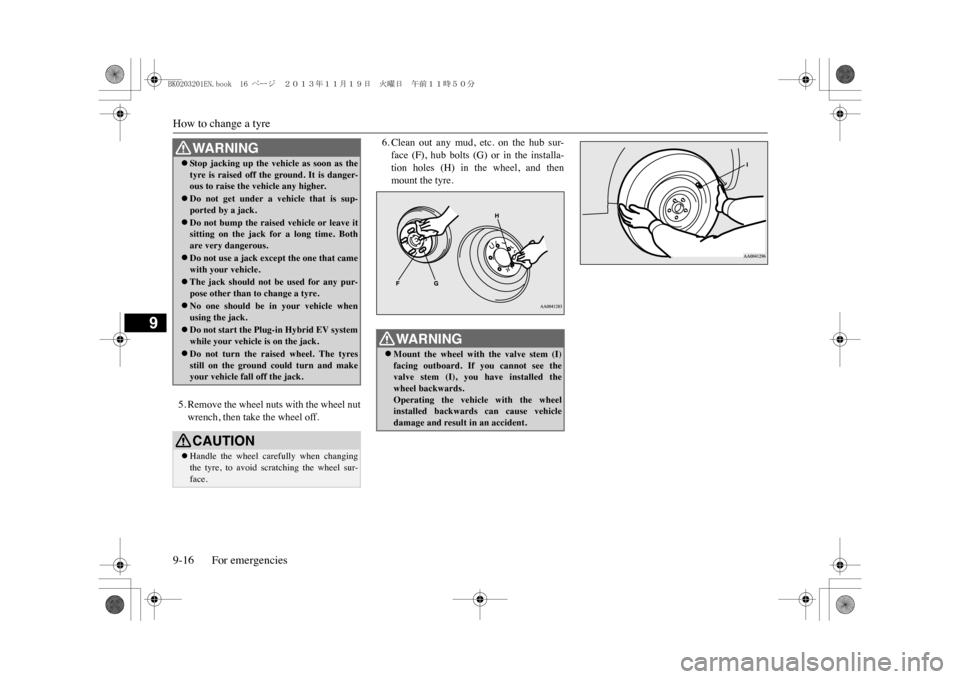
5. Remove the wheel nuts with the wheel nutwrench, then take the wheel off.
6. Clean out any mud, etc. on the hub sur-face (F), hub bolts (G) or in the installa-tion holes (H) in the wheel, and thenmount the tyre.
WA R N I N GzSt o p j a c k i n g u p th e v e h i
cle as soon as the
tyre is raised off the ground. It is danger-ous to raise the vehicle any higher.zDo not get under a vehicle that is sup-ported by a jack.zDo not bump the raised vehicle or leave itsitting on the jack for a long time. Bothare very dangerous.zDo not use a jack except the one that camewith your vehicle.zThe jack should not be used for any pur-pose other than to change a tyre.zNo one should be in your vehicle whenusing the jack.zDo not start the Plug-in Hybrid EV systemwhile your vehicle is on the jack.zDo not turn the raised wheel. The tyresstill on the ground could turn and makeyour vehicle fall off the jack.CAUTIONzHandle the wheel carefully when changingthe tyre, to avoid scratching the wheel sur-face.
WA R N I N GzMount the wheel with the valve stem (I)facing outboard. If you cannot see thevalve stem (I), you have installed thewheel backwards.Operating the vehicle with the wheelinstalled backwards can cause vehicledamage and result in an accident.
BK0203201EN.book 16 ページ 2013年11月19日 火曜日 午前11時50分
Page 338 of 388
Cleaning the exterior of your vehicle
Vehicle care 10-3
10
E00900500207
1. To maintain the value of your new vehi-cle, handle the upholstery carefully andkeep the interior clean.Use a vacuum cleaner and brush to cleanthe seats. If stained, vinyl and syntheticleather should be cleaned with an appro-priate cleaner. Cloth fabrics can becleaned with either upholstery cleaner or amild soap and water solution.2. Clean the carpeting with a vacuumcleaner and remove any stains with carpetcleaner. Oil and grease can be removed bylightly dabbing with a clean colourfastcloth and stain remover.
E00900600950
1. To clean, lightly wipe the leather with asoft cloth soaked in a mild soap and watersolution.2. Dip cloth in fresh water and wring it outwell. Using this cloth, wipe off the deter-gent thoroughly.3. Apply leather protecting agent to the gen-uine leather surface.
E00900700108
If the following is left on your vehicle, it maycause corrosion, discolouration and stains,wash the vehicle as soon as possible.zSeawater, road deicing products.
zSoot and dust, iron powder from factories,chemical substance (acids, alkalis, coal-tar, etc.).zDroppings from birds, carcasses ofinsects, tree sap, etc.
E00900903547
Chemicals contained in the dirt and dustpicked up from the road surface can damagethe paint coat and body of your vehicle if leftin prolonged contact.Frequent washing and waxing is the best wayto protect your vehicle from this damage.This will also be effective in protecting itfrom environmental elements such as rain,snow, salt air, etc.Do not wash the vehicle in direct sunlight.Park the vehicle in the shade and spray it withwater to remove dust. Next, using an ampleamount of clean water and a car washingbrush or sponge, wash the vehicle from top tobottom.Use a mild car washing soap if necessary.Rinse thoroughly and wipe dry with a softcloth. After washing the vehicle, carefullyclean the joints and flanges of the doors, bon-net and other sections where dirt is likely toremain.
Upholstery Genuine leather
*
NOTE
zIf genuine leather is
wet with water or is
washed in water, wipe off water as quickly aspossible with a dry, soft cloth.If left damp, mildew may grow.zOrganic solvents such as benzine, kerosene,alcohol and petrol, acid or alkaline solventsmay discolour the genui
ne leather surface.
Be sure to use neutral detergents.zRemove dirty patche
s or oil substances
quickly as they can stain genuine leather.zThe genuine leather surface may harden andshrink if it is exposed to direct rays of thesun for long hours. When your vehicle isparked, place it in the shade as much as pos-sible.zWhen the temperature of the vehicle interiorrises in summer, vinyl products left on thegenuine leather seat may deteriorate andstick to the seat.
Cleaning the exterior of your vehicle
Was hi n g
BK0203201EN.book 3 ページ 2013年11月19日 火曜日 午前11時50分
Page 362 of 388
Replacement of lamp bulbs
Maintenance 11-21
11
4. Insert a new fuse of the same capacity byusing the fuse puller into the same placein the fuse block.
E01003101805
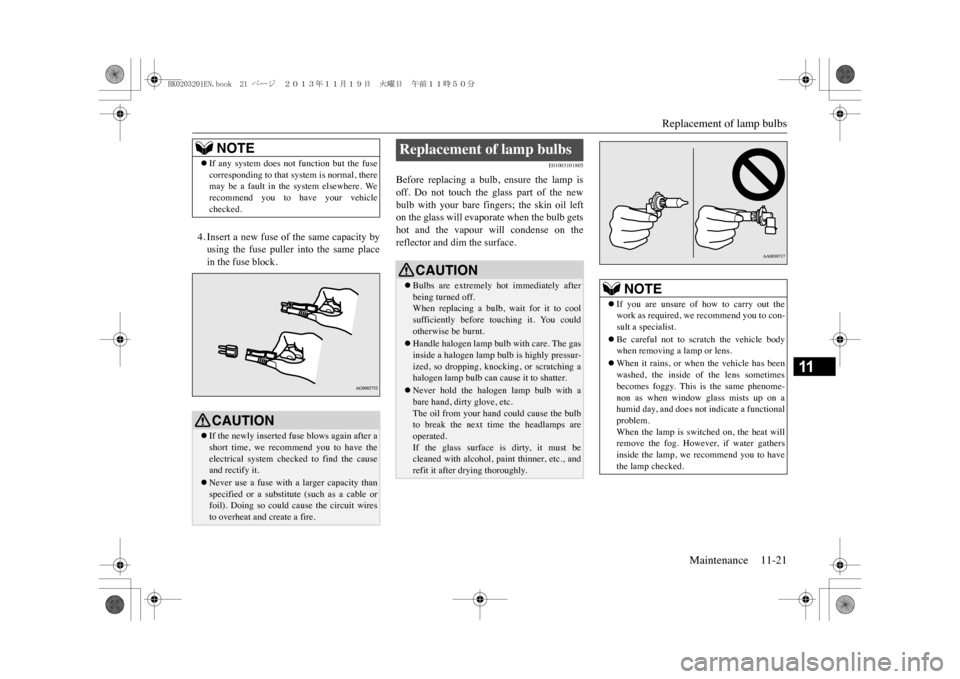
Before replacing a bulb, ensure the lamp isoff. Do not touch the glass part of the newbulb with your bare fingers; the skin oil lefton the glass will evaporate when the bulb getshot and the vapour will condense on thereflector and dim the surface.
NOTE
zIf any system does not function but the fusecorresponding to that system is normal, theremay be a fault in the system elsewhere. Werecommend you to have your vehiclechecked.CAUTIONzIf the newly inserted fuse blows again after ashort time, we recommend you to have theelectrical system checked to find the causeand rectify it.zNever use a fuse with a larger capacity thanspecified or a substitute (such as a cable orfoil). Doing so could cause the circuit wiresto overheat and create a fire.
Replacement of lamp bulbs
CAUTIONzBulbs are extremely hot immediately afterbeing turned off.When replacing a bulb, wait for it to coolsufficiently before
touching it. You could
otherwise be burnt.zHandle halogen lamp bulb with care. The gasinside a halogen lamp
bulb is highly pressur-
ized, so dropping, knocking, or scratching ahalogen lamp bulb can cause it to shatter.zNever hold the haloge
n lamp bulb with a
bare hand, dirty glove, etc.The oil from your hand could cause the bulbto break the next tim
e the headlamps are
operated.If the glass surface is dirty, it must becleaned with alcohol, paint thinner, etc., andrefit it after drying thoroughly.
NOTE
zIf you are unsure of how to carry out thework as required, we
recommend you to con-
sult a specialist.zBe careful not to scratch the vehicle bodywhen removing a lamp or lens.zWhen it rains, or when the vehicle has beenwashed, the inside of the lens sometimesbecomes foggy. This is the same phenome-non as when window glass mists up on ahumid day, and does not
indicate a functional
problem.When the lamp is switched on, the heat willremove the fog. However, if water gathersinside the lamp, we
recommend you to have
the lamp checked.
BK0203201EN.book 21 ページ 2013年11月19日 火曜日 午前11時50分