2014 MITSUBISHI OUTLANDER maintenance
[x] Cancel search: maintenancePage 159 of 451

4-wheel drive operation
Features and controls 5-81
5
N00576700021
While the drive mode is in the “NORMAL” position, if the ECO mode switch is switchedON, the drive mode
will be changed to
“AWC ECO” mode. If the ECO mode switch is switched OFF, thedrive mode will be returned to “NORMAL” mode. Refer to the “ECO
mode switch” on page
5-178.
N00530601179
Your vehicle has been
designed primarily for
use on pavement. But its unique 4 -wheel
drive system allows
you to occasionally travel on unpaved roads, to campgrounds, picnic
sites, and similar
locations.Not only does this ensure better handling on dry, paved roads but al
so permits better trac-
tion when driving on slippery, wet or snow- covered roads and when moving out of mud.But it is not suitable for heavy off road use or towing in rough conditions. It is particularly im
portant to note that 4-
wheel drive may not gi
ve sufficient hill
climbing ability and e
ngine braking on steep
slopes. You should try to avoid driving onsteep slopes. Also, you must exercise caution when driving on sand and mud and when driving through water because sufficie
nt traction may not be
available in certain circumstances.Please avoid driving the vehicle through areas where the tires may get stuck in deep sand or mud.
When the ECO mode switch is ON
NOTE
If the drive mode is switched in any mode after the drive mode is switched in “AWCECO”, the drive mode will not be changed even if the ECO mode switch is switched OFF.
4-wheel drive operation
WA R N I N G Do not over-rely on th
e 4-wheel drive vehi-
cles. Even 4-wheel drive vehicles have lim- its to the system and ability to maintaincontrol and traction. Reckless driving may lead to accidents. Al
ways drive carefully,
taking account of the road conditions. Improperly operating
this vehicle on or
off-pavement can cause an accident orrollover in which you
and your passengers
could be seriously injured or killed.• Follow all instructions and guidelines inthe owner’s manual.• Keep your speed low and do not drivefaster than conditions.
NOTE
Driving on rough roads can be hard on a vehicle. Before you le
ave the pavement, be
sure all scheduled ma
intenance and service
has been done, and that you have inspected your vehicle. Pay spec
ial attention to the
condition of the ti
res, and check the tire pres-
sures. Mitsubishi Motors is not responsible to the operator for any damage or injury caused or liability incurred by improper and negligent operation of a vehicl
e. All techniques of
vehicle operation depend on the skill and experience of the opera
tor and other partici-
pating parties. Any de
viation from the rec-
ommended operating instru
ctions above is at
their own risk. Note that the stopping distance required of the 4-wheel drive vehicle differs very little from that of the front-wheel drive vehicle.When driving on a snow-covered road or a slippery, muddy surface, make sure that you keep a sufficient dist
ance between your vehi-
cle and the one ahead of you. The driving posture s
hould be more upright;
adjust the seat to a good position for easy steering and pedal operati
on. Be sure to wear
the seat belt. After driving on rough roads, check each part of the vehicle
and wash it thoroughly
with water. Refer to the “Inspection and maintenance followi
ng rough road opera-
tion” section and “Vehicle care and Mainte-nance” sections.
BK0200500US.book 81 ページ 2013年2月12日 火曜日 午前9時46分
Page 161 of 451

Inspection and maintenance following rough road operation
Features and controls 5-83
5
Your vehicle may not provide sufficient hill climbing ability and engine braking on steep slope. Avoid driving on steep slopes even though the vehicle is an 4-wheel drive vehi-cle.
N00537800085
If the electrical circuits become wet, furtheroperation of the vehi
cle will be impossible;
therefore, avoid drivi
ng through water unless
absolutely necessary. If driving through wateris unavoidable, use the following procedure: Check the depth of the water and the terrain before attempting to drive through it. Drive
slowly to avoid creating excessive water splashing.
N00530700085
After operating the vehicle in rough road con-ditions, be sure to perform the following inspection and maintenance procedures: Check that the vehicle has not been dam- aged by rocks, gravel, etc.
Carefully wash the
vehicle with water.
Drive the vehicle sl
owly while lightly
depressing the brake pedal in order to dry out the brakes. If the brakes still do not function properly, contact an authorizedMitsubishi Motors dealer or a repair facil- ity of your choice as soon as possible to have the brakes checked. Remove the insects, dr
ied grass, etc. clog-
ging the radiator core. After driving through water, check the engine, transaxle and
differential oil. If
the oil or grease is milky or cloudybecause of water cont
amination, it must
be replaced with new oil. Check the inside of the vehicle. If water entry is found, dry the carpet etc. Inspect the headlights. If water is in the headlight housing, have it drained at anauthorized Mitsubishi Motors dealer or a repair facility of your choice.
N00530801201
Since the driving torque can be applied to thefour wheels, the driving performance of the
If the vehicle become
s stuck in sandy or
muddy roads, it can often be moved with arocking motion. Move the selector leveralternately between the “D” (DRIVE) and “R” (REVERSE) positi
ons while pressing
lightly on the ac
celerator pedal.
Driving on rough road can cause rust on the vehicle; wash the vehi
cle thoroughly as soon
as possible after such use.
Climbing/descending sharp grades Driving through water
NOTE
CAUTION Never drive through water that is deep enough to cover wheel hubs, axles or exhaust pipe. Do not change th
e selector lever posi-
tion while driving through water.Frequent driving through water can adversely affect the life
span of the vehicle;
consult an authorized Mitsubishi Motorsdealer or a repair facili
ty of your choice and
take the necessary measures to prepare, inspect, and repair the vehicle. After driving through water, apply the brakes to be sure they are
functioning properly. If
the brakes are wet a
nd not functioning prop-
erly, dry them out by driving slowly while lightly depressing the brake pedal. Inspecteach part of the vehicle carefully.
Inspection and maintenance following rough road opera-tion
Cautions on the handling of 4-wheel drive vehicles Tires and wheels
BK0200500US.book 83 ページ 2013年2月12日 火曜日 午前9時46分
Page 194 of 451

Tire pressure monitoring system 5-116 Features and controls
5
Each tire, including the spare (if provided), should be checked monthly when cold andinflated to the inflation pressure recom- mended by the vehicle manufacturer on the vehicle placard or tire
inflation pressure label.
(If your vehicle has tires of a different size than the size indicated on the vehicle placard or tire inflation pressure label, you shoulddetermine the proper ti
re inflation pressure
for those tires.) As an added safety feature, your vehicle hasbeen equipped with a tire pressure monitoring system (TPMS) that illuminates a low tire pressure telltale when
one or more of your
tires is significant
ly under-inflated.
Accordingly, when the low tire pressure tell-tale illuminates, you should stop and check your tires as soon as possible, and inflate them to the proper pressure. Driving on a sig-nificantly under-inflated
tire causes the tire to
overheat and can lead
to tire failure.
Under-inflation also reduces fuel efficiency and tire tread life, and may affect the vehi-cle’s handling and stoppi
ng ability. Please
note that the TPMS is
not a substitute for
proper tire maintenance,
and it is the driver’s
responsibility to
maintain corre
ct tire pres-
sure, even if under-inflation has not reached the level to trigger illumination of the TPMSlow tire pressure telltale. Your vehicle has also
been equipped with a
TPMS malfunction indica
tor to indicate when
the system is not operating properly. The TPMS malfunction indicator is combined with the low tire pressure telltale.When the system detects a malfunction, the telltale will flash for approximately one min- ute and then remain c
ontinuously illuminated.
This sequence will c
ontinue upon subsequent
vehicle start-ups as long as the malfunction exists.When the malfunction indicator is illumi- nated, the system may not
be able to detect or
signal low tire pr
essure as intended.
TPMS malfunctions may
occur for a variety
of reasons, including the installation of replacement or alternate tires or wheels on thevehicle that prevent the TPMS from function- ing properly. Always
check the TPMS mal-
function telltale after replacing one or moretires or wheels on your vehicle to ensure that the replacement or alternate tires and wheels
allow the TPMS to continue to function prop- erly.
N00532801511
1. If the tire pressure monitoring systemwarning light illuminates, avoiding hard braking, sharp steering maneuvers and high speeds. You should stop and adjust the tires to the proper inflation pressure as soon as possible. Adjust the spare tire atthe same time. Refer to “Tires” on page 9-14.
NOTE
In addition, the warni
ng display is displayed
on the information screen in the multi-infor-mation display.
If the warning light / display illuminates while driving
NOTE
In addition, the warni
ng display is displayed
on the information screen in the multi-infor- mation display. When inspecting or adjusting the tire pres- sure, do not apply excessive force to the valve stem to
avoid breakage.
After inspecting or adjusting the tire pres- sure, always reinstall the valve cap on thevalve stem. Without the valve cap, di
rt or moisture could
get into the valve, resulting in damage to thetire inflation pressure sensor. Do not use metal valve caps, which may cause a metal reaction,
resulting in corrosion
and damage of the tire
inflation pressure sen-
sors.
BK0200500US.book 116 ページ 2013年2月12日 火曜日 午前9時46分
Page 208 of 451

Multi Information display - Type 1 5-130 Features and controls
5
To return the display to 0, hold down the multi information display switch for about 2seconds or more. Only the currently dis- played value will be reset. Example If trip odometer is
displayed, only trip
odometer wi
ll be reset.
Both trip odometers and can count up to 9999.9 m
iles/kilometers.
When a trip odometer goes past 9999.9 miles/kilometers, it returns to 0.0 miles/ kilometers. When disconnecting th
e battery terminal,
the memories of trip odometer displays
and are cleared, and their displays
return to “0.0 miles/kilometers”.
N00556701237
Displays the approximate time until the nextrecommended periodic inspection. “---” is displayed when the inspection time hasarrived.
1. Shows the time until the next periodic inspection. 2. This informs you that a periodic inspec- tion is due. Contact
an authorized Mit-
subishi Motors dealer or a repair facilityof your choice to have the system checked. At that time, when the ignition switch is switched from the “OFF” or “LOCK” position to the “ON” position or the oper-ation mode is changed from OFF to ON, the warning display is displayed for a few seconds on the information screen. 3. After your vehicle is inspected at an authorized Mitsubishi Motors dealer, it displays the time until the next periodicinspection.
Usage examples for trip odometer , trip odometer
It is possible to measure two currently traveled distances, from home using trip odometer and from a particular point on the way using trip odometer
.
To reset the trip odometer
Service reminder
NOTE
The service reminder ti
me can be modified
by an authorized Mitsubishi Motors dealer,to adjust for severe usage, etc. Refer to “Severe maintenance schedule” in your vehi- cle’s Warranty and Main
tenance Manual. For
further information,
please contact your
authorized Mitsubishi Motors dealer.
NOTE
Shows the distance in units of 100 miles (100 km) and the time in units of 1 month.
BK0200500US.book 130 ページ 2013年2月12日 火曜日 午前9時46分
Page 209 of 451

Multi Information display - Type 1
Features and controls 5-131
5
The “---” display can be
reset while the igni-
tion switch or the operation mode is in OFF. When the display is reset, the time until thenext periodic inspection
is displayed and the
warning display is no longer displayed when the ignition switch is switched from the“OFF” or “LOCK” position to the “ON” position or the operation mode is changed from OFF to ON. 1. When you lightly press the multi informa- tion display switch, the information screen switches to the service reminderdisplay screen.
2. Press and hold the multi information dis- play switch (for about 2 seconds or more) to display “ ” and make it flash. (If there is no operation for about 10 seconds with this indicator flashing, the display returns to the previous screen.) 3. With this indicator flashing, if you lightly press the multi information display switch, the screen sw
itches from “---” to
“CLEAR”. After that, the time until thenext periodic inspection is shown.
N00578400022
When the ignition switch is turned to the “ON” position or the operation mode is put in ON, the system check screen is displayed forabout 4 seconds. If there is no fault, the infor- mation screen is displayed. If there is a fault, the screen changes to warn-ing display. Refer to “Warning display list” on page 5-150.
To reset
CAUTION The customer is responsible for making sure that regular inspections
and maintenance and
periodic inspections
and maintenance are
performed. Inspections and mainte
nance must be per-
formed to prevent accidents and malfunc- tions.
NOTE
The “---” display cannot
be reset while the
ignition switch or the operation mode is inON. When “---” is displaye
d, after a certain dis-
tance and a certain pe
riod of time, the dis-
play is reset and the time until the next periodic inspecti
on is displayed.
If you accidentally rese
t the display, consult
an authorized Mitsubishi Motors dealer for assistance.
System check screen
BK0200500US.book 131 ページ 2013年2月12日 火曜日 午前9時46分
Page 222 of 451
Multi Information display - Type 2 5-144 Features and controls
5
N00556601193
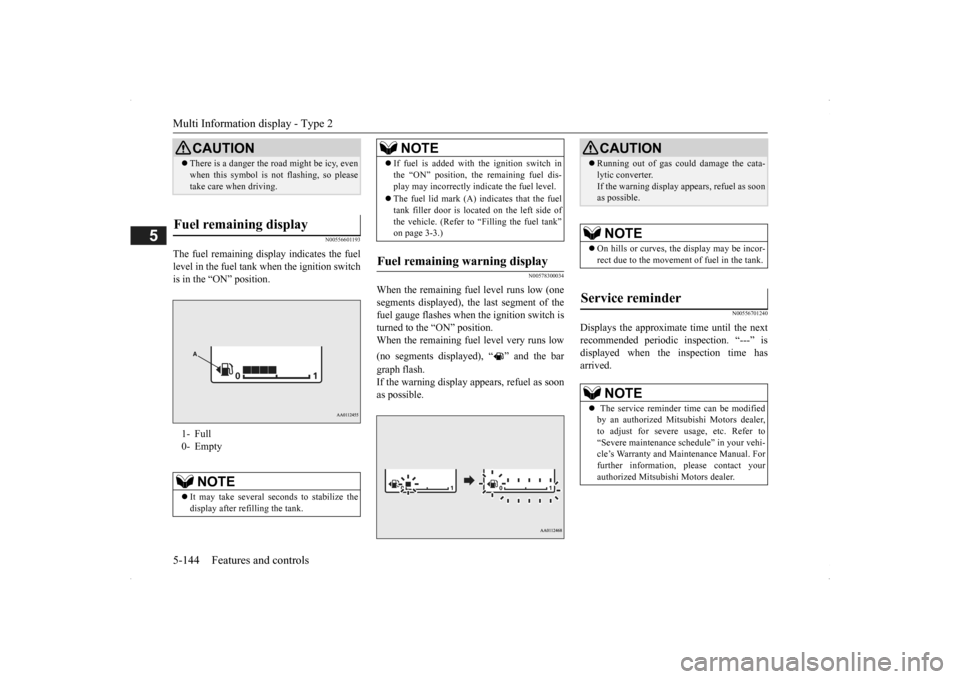
The fuel remaining disp
lay indicates the fuel
level in the fuel tank
when the ignition switch
is in the “ON” position.
N00578300034
When the remaining fuel level runs low (one segments displayed), the last segment of the fuel gauge flashes when
the ignition switch is
turned to the “ON” position. When the remaining fuel level very runs low (no segments displayed), “ ” and the bar graph flash. If the warning display appears, refuel as soon as possible.
N00556701240
Displays the approximate time until the next recommended periodic
inspection. “---” is
displayed when the inspection time has arrived.
CAUTION There is a danger the ro
ad might be icy, even
when this symbol is not flashing, so pleasetake care when driving.
Fuel remaining display 1- Full 0- Empty
NOTE
It may take several se
conds to stabilize the
display after refilling the tank.
If fuel is added with the ignition switch in the “ON” position, th
e remaining fuel dis-
play may incorrectly i
ndicate the fuel level.
The fuel lid mark (A) indicates that the fuel tank filler door is located on the left side ofthe vehicle. (Refer to “Filling the fuel tank” on page 3-3.)
Fuel remaining warning display
NOTE
CAUTION Running out of gas coul
d damage the cata-
lytic converter.If the warning display appears, refuel as soonas possible.NOTE
On hills or curves, the display may be incor- rect due to the movement
of fuel in the tank.
Service reminder
NOTE
The service reminder time can be modified by an authorized Mitsubishi Motors dealer, to adjust for severe usage, etc. Refer to“Severe maintenance sc
hedule” in your vehi-
cle’s Warranty and Ma
intenance Manual. For
further information,
please contact your
authorized Mitsubishi Motors dealer.
BK0200500US.book 144 ページ 2013年2月12日 火曜日 午前9時46分
Page 223 of 451
Multi Information display - Type 2
Features and controls 5-145
5
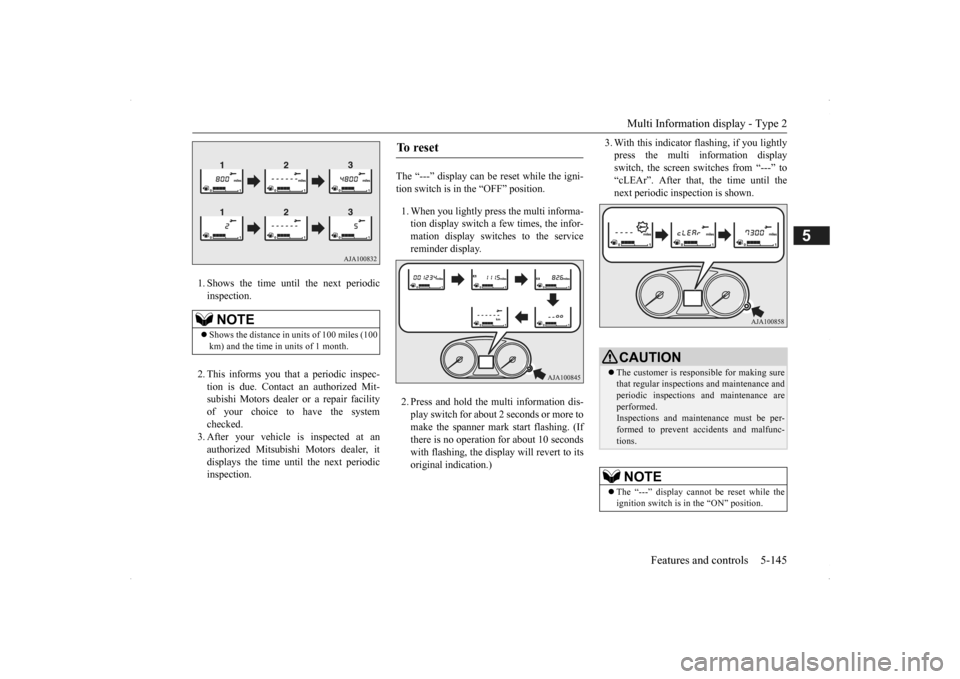
1. Shows the time until the next periodic inspection. 2. This informs you that a periodic inspec- tion is due. Contact
an authorized Mit-
subishi Motors dealer or a repair facilityof your choice to have the system checked. 3. After your vehicle
is inspected at an
authorized Mitsubishi Motors dealer, it displays the time unt
il the next periodic
inspection.
The “---” display can be reset while the igni- tion switch is in the “OFF” position. 1. When you lightly press the multi informa- tion display switch a few times, the infor-mation display switches to the service reminder display. 2. Press and hold the multi information dis- play switch for about
2 seconds or more to
make the spanner mark start flashing. (If there is no operation for about 10 secondswith flashing, the display will revert to its original indication.)
3. With this indicator
flashing, if you lightly
press the multi information displayswitch, the screen switches from “---” to “cLEAr”. After that, the time until the next periodic inspection is shown.
NOTE
Shows the distance in
units of 100 miles (100
km) and the time in units of 1 month.
To r e s e t
CAUTION The customer is responsible for making sure that regular inspections and maintenance andperiodic inspections
and maintenance are
performed. Inspections and mainte
nance must be per-
formed to prevent accidents and malfunc- tions.NOTE
The “---” display cannot
be reset while the
ignition switch is in
the “ON” position.
BK0200500US.book 145 ページ 2013年2月12日 火曜日 午前9時46分
Page 305 of 451

Driving during cold weather
Driving safety 6-5
6
Always obey applicab
le laws and regula-
tions. Be a polite and alert driver. Alwaysleave room for unexpected events, such as sudden braking. If you plan to drive in another country, obey their vehicle re
gistration laws and
make sure you will be able to get the right fuel.
N00629400445
Check the battery. At the same time, check the terminals and wiring. During extremely cold weather, the battery will not be as strong. Also, the battery powerlevel may drop beca
use more power is
used for cold starting and driving. Before driving the vehicle, check to see ifthe engine runs at the proper speed and if the headlights are as
bright as normally.
Charge or replace the battery if necessary.During extreme cold weather, it is possi- ble that a very low battery could freeze.
Warm the engine sufficiently. After start- ing the engine, allow a short warm-uptime to distribute oil to all cylinders. Then drive your vehicle slowly. Stay at low speeds at first so that thetransaxle, transfer case and rear axle oil have time to spread to all lubrication points. Check the engine antifreeze. If there is not enough coolant because of a leak or from engine
overheating, add Mit-
subishi Motors Genuine Super Long Life Coolant Premium or equivalent.Please read this section in conjunction with the “Engine coolant” on page 9-8.
N00629501528
All the parts of the brake system are critical to safety. Have the vehicle serviced by anauthorized Mitsubishi Motors dealer or a repair facility of your
choice at regular inter-
vals according to the “WARRANTY ANDMAINTENANCE MANUAL”.
Check the brake system while driving at a low speed immediately
after starting, espe-
cially when the brakes are wet, to confirmthey work normally. A film of water can be formed on the brake discs and prevent normal braking after driv-ing in heavy rain or through large puddles, or after the vehicle is washed. If this occurs, dry the brakes out by drivi
ng slowly while lightly
depressing the brake pedal. On snowy roads, ice can form on the braking system, making the brakes less effective. While driving in such
conditions, pay close
attention to surrounding vehicles and to the condition of the road surface. From time to time, lightly depress the brake pedal andcheck how effective the brakes are. It is important to take advantage of the engine braking by downshifting while driving on steep downhill roads in order to prevent the brakes from overheating.
Driving during cold weather
WA R N I N G The battery gives o
ff explosive hydrogen
gas. Any spark or flame can cause the bat- tery to explode, which could cause serious injury or death.Always wear protecti
ve clothes and a face
mask when working with your battery, or let a skilled mechanic do it.
WA R N I N G Never open the radiator cap when the radiator is hot. You could be seriously burned.
Braking
When brakes are wet When driving in cold weather When driving downhill
BK0200500US.book 5 ページ 2013年2月12日 火曜日 午前9時46分