Page 5 of 422
Center panel 1-3 Overview
1
N00100701223
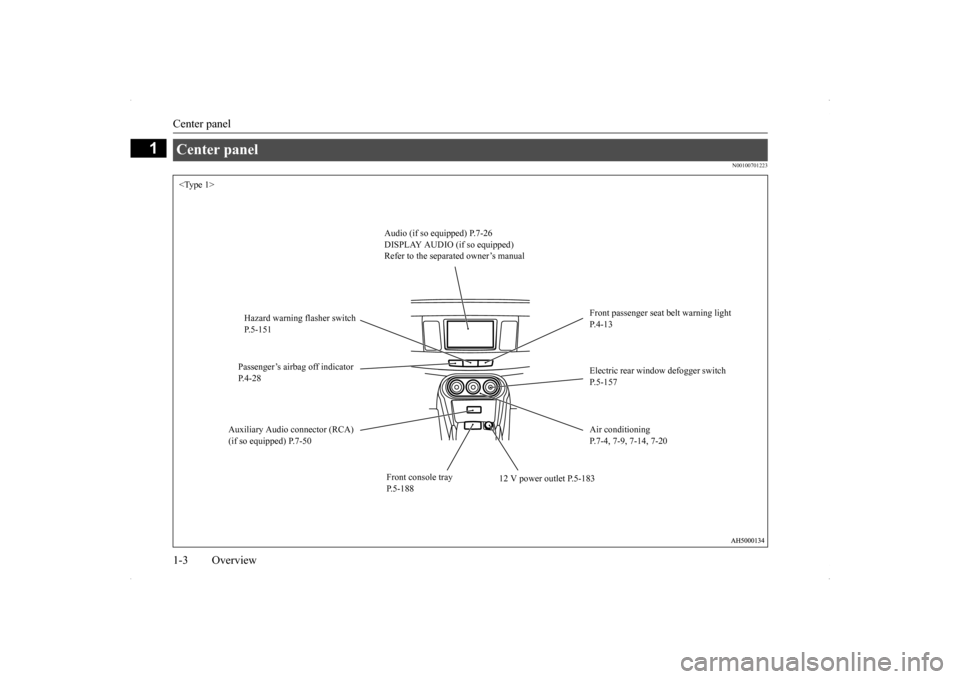
Center panel
Audio (if so equipped) P.7-26 DISPLAY AUDIO (if so equipped) Refer to the separated owner’s manual
Front passenger seat belt warning light P.4-13
Hazard warning flasher switch P.5-151 Passenger’s airbag off indicator P.4-28
Electric rear window defogger switch P.5-157
Auxiliary Audio connector (RCA) (if so equipped) P.7-50
Air conditioning P.7-4, 7-9, 7-14, 7-20
Front console tray P.5-188
12 V power outlet P.5-183
BK0200700US.bo
ok 3 ページ 2013年2月15日 金曜日 午後12時17分
Page 272 of 422
7
Comfort controlsVents ..........................................
.......................................................7-2
Manual air conditioning with MAX A/C mode (if so equipped) .....7-4 Manual air conditioning without MAX A/C mode (if so equipped) 7-9 Automatic air conditioning with Fahr
enheit scale (if so equipped)7-14
Automatic air conditioning with Cels
ius scale (if so equipped) .....7-20
Important air conditioning op
erating tips .......................................7-25
Air purifier .......................
...............................................................7-26
AM/FM radio/CD player (if so equipped) .....................................7-26 Handling of Discs .
.................................................
........................7-29
Audio Files (MP3/WMA/
AAC) ....................................................7-31
Important Points on Safety fo
r the Customer ................................7-35
Operation Keys ...............
...............................................................7-36
Listen to Radio ......
.................................................
........................7-39
Listen to Satellite Radio (if so equipped) .......................................7-40 Listen to CDs ..................
...............................................................7-42
Listen to MP3s ......
.................................................
........................7-43
Listen to an iPod ...
.................................................
........................7-44
Listen to Audio Files on
a USB Device .........................................7-46
Listen to Bluetooth Audio (i
f so equipped) ....................................7-49
Use AUX (if so equippe
d) ..............................................................7-50
Display Indicator ..
.................................................
........................7-52
Audio Quality and Volume Balance Adjustment ...........................7-53System Settings .....
.................................................
........................7-54
Troubleshooting ...............
...............................................................7-57
Antenna ................................................
...........................................7-59
General information about
your radio ............................................7-60
BK0200700US.bo
ok 1 ページ 2013年2月15日 金曜日 午後12時17分
Page 308 of 422
Operation Keys
Comfort controls 7-37
7
N00716700025
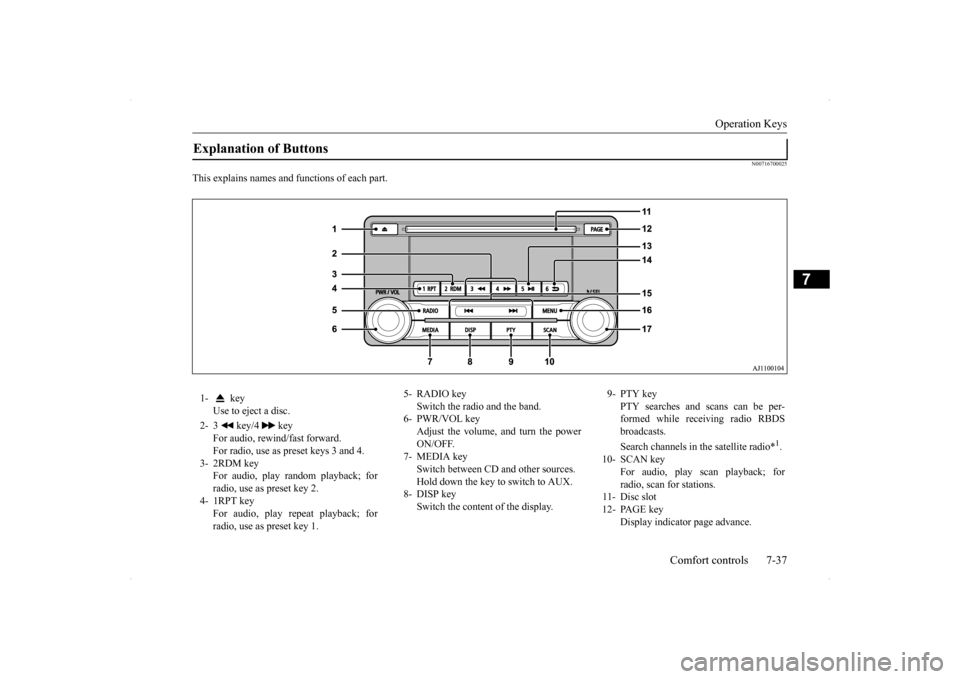
This explains names and functions of each part.Explanation of Buttons 1- key
Use to eject a disc.
2- 3 key/4 key
For audio, rewind/fast forward. For radio, use as preset keys 3 and 4.
3- 2RDM key
For audio, play random playback; for radio, use as preset key 2.
4- 1RPT key
For audio, play repeat playback; forradio, use as preset key 1.
5- RADIO key
Switch the radio and the band.
6- PWR/VOL key
Adjust the volume, and turn the power ON/OFF.
7- MEDIA key
Switch between CD and other sources. Hold down the key to switch to AUX.
8- DISP key
Switch the content of the display.
9- PTY key
PTY searches and scans can be per-formed while receiving radio RBDS broadcasts. Search channels in the satellite radio*
1.
10- SCAN key
For audio, play scan playback; for radio, scan for stations.
11- Disc slot 12- PAGE key
Display indicator page advance.
BK0200700US.bo
ok 37 ページ 2013年2月15日 金曜日 午後12時17分
Page 321 of 422
Use AUX (if so equipped) 7-50 Comfort controls
7
Press the key or key to select the track. This enables selection of the next or previous track. Hold down the 3 key or the 4 key. Fast forward/rewind is possible. Repeat playback, random playback, and scan playback are possible. Press the 1RPT key. Repeat playback of th
e track currently being
played.
Press the 2RDM key. Play the tracks in the Bluetooth Audio device in a random order. Press the SCAN key. Play the first 10 seconds of each of the tracks on the whole Bluetooth Audio device inorder.
N00717600034
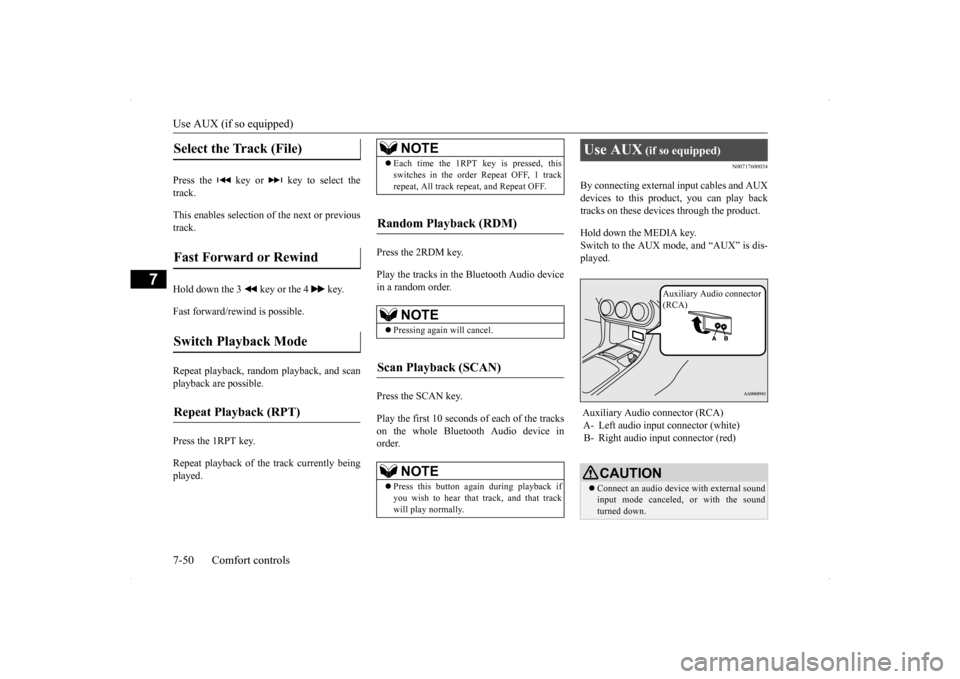
By connecting external input cables and AUXdevices to this product, you can play back tracks on these devices through the product. Hold down the MEDIA key. Switch to the AUX mode, and “AUX” is dis-played.
Select the Track (File)
Fast Forward or Rewind
Switch Playback Mode
Repeat Playback (RPT)
NOTE
Each time the 1RPT key is pressed, this switches in the order Repeat OFF, 1 track repeat, All track repeat, and Repeat OFF.
Random Playback (RDM)
NOTE
Pressing again will cancel.
Scan Playback (SCAN)
NOTE
Press this button again during playback if you wish to hear that track, and that track will play normally.
Use AUX
(if so equipped)
Auxiliary Audio connector (RCA) A- Left audio input connector (white) B- Right audio input connector (red)
CAUTION Connect an audio device with external sound input mode canceled, or with the sound turned down.
Auxiliary Audio connector (RCA)
BK0200700US.bo
ok 50 ページ 2013年2月15日 金曜日 午後12時17分
Page 322 of 422
Use AUX (if so equipped) Comfort controls 7-51
7
Even if not inserted, the product will switch to AUX, therefore take care with volume levels when not inserted.NOTE
Depending on the audio device to be con- nected, noise may be emitted. For power, use the battery power source included in the audio device to be connected. Using the connected audio device whilecharging through the cigarette lighter socket in the vehicle may lead to noise being emit- ted through the speakers. If no audio devices are connected, then do not select the external sound input mode. Ifexternal sound input mode is selected while no audio devices are connected, then sound may be emitted through the speakers.CAUTION
BK0200700US.bo
ok 51 ページ 2013年2月15日 金曜日 午後12時17分