2014 MITSUBISHI LANCER EVOLUTION ignition
[x] Cancel search: ignitionPage 143 of 338
Cruise control 5-82 Features and controls
5
N00518400327
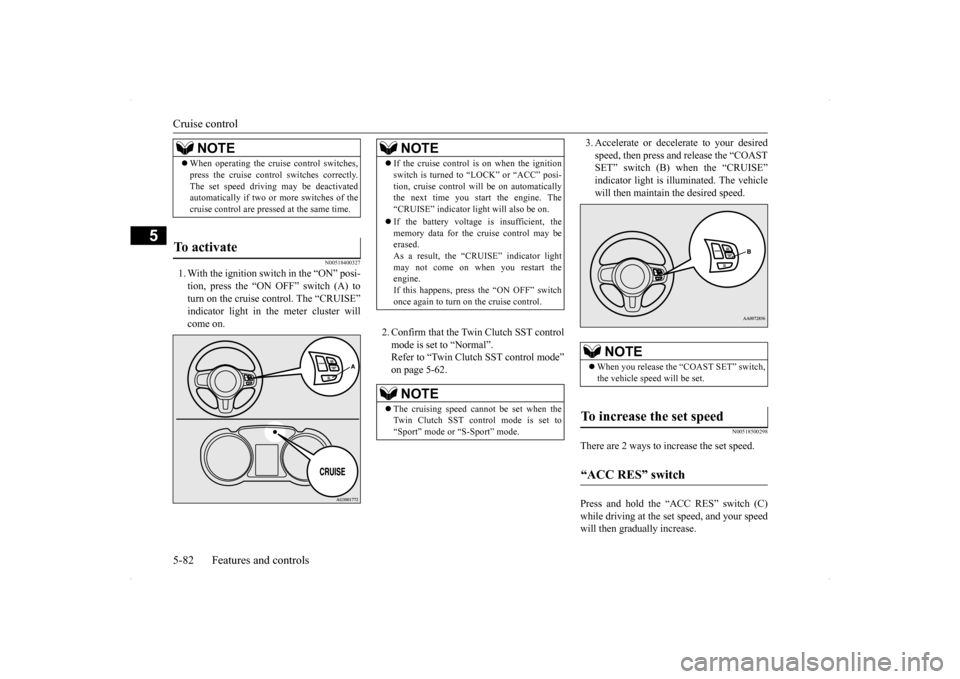
1. With the ignition switch in the “ON” posi- tion, press the “ON OFF” switch (A) to turn on the cruise control. The “CRUISE” indicator light in the meter cluster willcome on.
2. Confirm that the Twin Clutch SST control mode is set to “Normal”. Refer to “Twin Clutch SST control mode”on page 5-62.
3. Accelerate or decelerate to your desired speed, then press and release the “COAST SET” switch (B) when the “CRUISE” indicator light is illuminated. The vehiclewill then maintain the desired speed.
N00518500298
There are 2 ways to increase the set speed. Press and hold the “ACC RES” switch (C) while driving at the set speed, and your speedwill then gradually increase.
NOTE
When operating the cruise control switches, press the cruise control switches correctly. The set speed driving may be deactivated automatically if two or more switches of the cruise control are pressed at the same time.
To activate
NOTE
If the cruise control is on when the ignition switch is turned to “LOCK” or “ACC” posi- tion, cruise control will be on automatically the next time you start the engine. The “CRUISE” indicator light will also be on. If the battery voltage is insufficient, the memory data for the cruise control may beerased. As a result, the “CRUISE” indicator light may not come on when you restart theengine. If this happens, press the “ON OFF” switch once again to turn on the cruise control.NOTE
The cruising speed cannot be set when the Twin Clutch SST control mode is set to “Sport” mode or “S-Sport” mode.
NOTE
When you release the “COAST SET” switch, the vehicle speed will be set.
To increase the set speed “ACC RES” switch
BK0200800US.bo
ok 82 ページ 2013年2月14日 木曜日 午後2時28分
Page 146 of 338
Tire pressure monitoring system
Features and controls 5-85
5
When the Twin Clutch SST control mode is set to “Sport” mode. Refer to “Twin Clutch SST control mode” on page 5-62. When the active stability control (ASC) starts operating. Refer to “Active stability control (ASC)”on page 5-76.
Also, the set speed driving may be deacti- vated as follow: When the engine speed rises and approaches the tachometer’s red zone (the red-colored part of the tachometer dial).
N00518900234
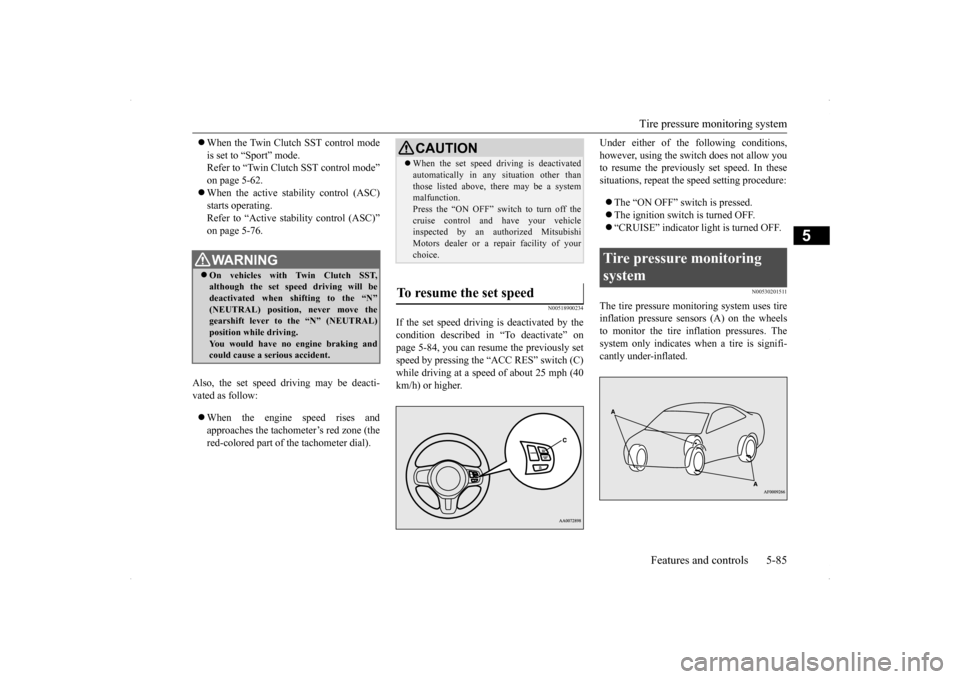
If the set speed driving is deactivated by thecondition described in “To deactivate” onpage 5-84, you can resume the previously set speed by pressing the “ACC RES” switch (C) while driving at a speed of about 25 mph (40km/h) or higher.
Under either of the
following conditions,
however, using the switch does not allow you to resume the previously set speed. In these situations, repeat the speed setting procedure: The “ON OFF” switch is pressed. The ignition switch is turned OFF. “CRUISE” indicator light is turned OFF.
N00530201511
The tire pressure monitoring system uses tire inflation pressure sensors (A) on the wheels to monitor the tire inflation pressures. The system only indicates when a tire is signifi-cantly under-inflated.
WA R N I N G On vehicles with Twin Clutch SST, although the set speed driving will be deactivated when shifting to the “N”(NEUTRAL) position, never move the gearshift lever to the “N” (NEUTRAL) position while driving.You would have no engine braking and could cause a serious accident.
CAUTION When the set speed driving is deactivated automatically in any situation other than those listed above, there may be a system malfunction. Press the “ON OFF” switch to turn off thecruise control and have your vehicle inspected by an authorized Mitsubishi Motors dealer or a repair facility of yourchoice.
To resume the set speed
Tire pressure monitoring system
BK0200800US.bo
ok 85 ページ 2013年2月14日 木曜日 午後2時28分
Page 147 of 338

Tire pressure monitoring system 5-86 Features and controls
5
N00554800110
When the ignition switch is turned to the “ON” position, the tire pressure monitoringsystem warning light normally illuminatesand goes off a few seconds later. If one or more of the vehicle tires (except for the spare tire) is significantly under-inflated, the warning light will remain illuminatedwhile the ignition switch is in the “ON” posi- tion. Refer to “If the warning light/display illumi-nates while driving” on page 5-87 and take the necessary measures.
WA R N I N G The spare wheel does not have a tire infla- tion pressure sensor. When the spare tire is used, the tire pres- sure monitoring system will not work properly.See an authorized Mitsubishi Motors dealer as soon as possible to replace or repair the original tire.NOTE
The tire pressure monitoring system is not a substitute for regularly checking tire infla- tion pressures. Be sure to check the tire inflation pressures as described in “Tires” on page 9-12. Each of the grommets and washers where the tire inflation pressure sensors are mounted should be replaced with new ones when thetire is replaced. For details, contact your authorized Mitsubi- shi Motors dealer.
Grommet
Wa s h e r
Tire inflation pressure sensor
Tire pressure monitoring sys- tem warning light / display
NOTE
In addition, the warning display is displayed on the information screen in the multi-infor- mation display.
CAUTION If the tire pressure monitoring system warn- ing light does not illuminate when the igni- tion switch is turned to the “ON” position, it means that the tire pressure monitoring sys- tem is not working properly. Have the sys-tem inspected by an authorized Mitsubishi Motors dealer. In such situations,
a malfunctioning of the
system may be preventing the monitoring of the tire pressure. Avoid sudden braking, sharp turning and high-speed driving. If a malfunction is detected in the tire pres- sure monitoring system, the tire pressuremonitoring system warning light will blink for approximately 1 minute and then remain continuously illuminated. The warning lightwill issue further warnings each time the engine is restarted as long as the malfunction exists.Check to see whether the warning light goes off after few minutes driving. If it then goes off during driving, there is noproblem. However, if the warning light does not go off, or if it blinks again when the engine isrestarted, have the vehicle inspected by an authorized Mitsubishi Motors dealer. In such situations,
a malfunctioning of the
system may be preventing the monitoring of the tire pressure. For safety reasons, whenthe warning light appears while driving, avoid sudden braking, sharp turning and high-speed driving.
BK0200800US.bo
ok 86 ページ 2013年2月14日 木曜日 午後2時28分
Page 151 of 338

Instrument cluster 5-90 Features and controls
5
This gauge also assist
s in evaluating engine
performance.
N00554900166
Each time you press this button, there is a sound and the brightness of the instruments changes.
CAUTION The red zone indicates an engine speed beyond the range of safe operation. Select the correct shift position (manual transaxle) or (Twin Clutch SST) to control the engine speed so that the tachometer indi- cator does not enter the red zone
Rheostat meter illumination button
NOTE
You can adjust to 8 different levels respec- tively for when the front side-marker and parking lights are illuminated and when they are not. If the vehicle is equipped with the automatic light control, when the light switch is in a position other than the “OFF” position, themeter illumination switches automatically to the adjusted brightness, depending on the brightness outside the vehicle. The brightness level of the instruments is stored when the ignition switch is turned off. If you press and hold the button for longer than about 1 second when the front side-marker and parking lights are illuminated, the brightness level changes to the maximum level. Pressing and holding the button forlonger than about 1 second again returns the brightness level to the previous level.1- Brightness display
2- Rheostat illumination button
BK0200800US.bo
ok 90 ページ 2013年2月14日 木曜日 午後2時28分
Page 152 of 338

Multi-information display
Features and controls 5-91
5
N00555000207
The multi-information display displays warnings, the odometer, tr
ip odometer, service reminder, engine coolant temperature, fue
l remaining, out-
side temperature, Twin Clutch SST contro
l mode, S-AWC (Super-All Wheel Control) co
ntrol mode, gearshift lever position, average
and momen-
tary fuel consumption, driving range, average speed, S-AWC (Super-
All Wheel Control) operation display, instrument brightness,
etc.
It is also possible to change elements such as the
language and units used on the multi-information display.
Multi-information display
With ignition switch in the “OFF” position
With ignition switch in the “ON” position (Twin Clutch SST)
With ignition switch in the “ON” position (manual transaxle)
1- “!” Warning display screen (With igni-
tion switch in the “OFF” position)
P.5-92
2- Information screen (With ignition
switch in the “OFF” position)
P.5-93
Interrupt display screen (With ignition switch in the “OFF” position)
P.5-94
3- Door ajar warning display screen (With
ignition switch in the “OFF” position) P.5-95
4- S-AWC control mode display screen
P.5-96
5- Outside temperature display screen
P.5-101
6- “!” Warning display screen (With igni-
tion switch in the “ON” position)
P.5-96
7- Information screen (With ignition
switch in the “ON” position)
P.5-97
Interrupt display screen (With ignition switch in the “ON” position)
P.5-100
BK0200800US.bo
ok 91 ページ 2013年2月14日 木曜日 午後2時28分
Page 153 of 338

Multi-information display 5-92 Features and controls
5
N00555100165
The multi-information meter switch is a but- ton marked “INFO” on the left side of the dash. Each time the multi-information meter switchis operated, a sound is emitted and the multi- information display changes between infor- mation such as warnings, service reminder,average and momentary fuel consumption, driving range, average speed, and S-AWC operation display.It is also possible to change elements such as the language and units used on the multi-
information display by operating the multi- information meter switch.
N00555200078
If you press the multi-information meter switch and return from the warning display screen to the previous screen, the “!” warningis displayed. Refer to “Returning to the display screen from before the warning display” on page5-94. This mark is also displayed if there is another warning other than the one displayed. Whenthe cause of the warning display is elimi- nated, the “!” warning goes out automatically.
8- Fuel remaining display screen
P.5-101
9- Twin Clutch SST control mode display
screen (if so equipped)
P.5-101
10- Gearshift lever position display screen
(if so equipped) P.5-100
11- Active stability control (ASC) OFF dis-
play screen P.5-78
12- Engine coolant temperature display
P.5-97NOTE
The trip computer function fuel units, tem- perature units, display language, and other settings can be changed.Refer to “Changing the function settings (With ignition switch in the “ON” position)” on page 5-103.
The display screen is different depending on whether the ignition switch in the “OFF” or “ON” position. Refer to “Information screen (With ignition switch in the “OFF” position)” on page 5-93.Refer to “Warning displa
y list (With ignition
switch in the “OFF” position)” on page 5-112.Refer to “Information screen (With ignition switch turned from “OFF” to “ON”)” on page 5-95.Refer to “Information screen (With ignition switch in the “ON” position)” on page 5-97. Refer to “Warning displa
y list (With ignition
switch in the “ON” position)” on page 5-115.
Multi-information meter switch
NOTE
“!” Warning display screen (With ignition switch in the “OFF” position)
BK0200800US.bo
ok 92 ページ 2013年2月14日 木曜日 午後2時28分
Page 154 of 338

Multi-information display
Features and controls 5-93
5
N00555300141
Each time you lightly press the multi-infor- mation meter switch, the display screen switches in the following order.
N00555400139
Each time you lightly press the multi-infor-mation meter switch, the display screen switches. Odometer/Trip odometer
Odome-
ter/Trip odometer
Service reminder
Redisplay of a warning display screen
Odometer/Trip odometer .
Shows the total distance traveled. Shows the distance traveled between two points. To reset the trip odometer
To return the display to 0, hold down the multi-information meter switch for about 2seconds or more. Only the currently dis- played value will be reset. If trip odometer is displayed, only trip odometer will be reset.
NOTE
When the “!” warning is displayed, the warn- ing display screen can be redisplayed on the information screen. Refer to “Information screen (With ignition switch in the “OFF” position)” on page 5-93.Refer to “Information screen (With ignition switch in the “ON” position)” on page 5-97.
Information screen (With igni- tion switch in the “OFF” posi-tion)
1-
Trip odometer
2-
Trip odometer
3- Service reminder4- Redisplay of a warning display screenOdometer/Trip odometer
Odometer Trip odometer Usage examples for trip odometer , trip odometer It is possible to meas
ure two currently trav-
eled distances, from home using trip odom- eter and from a particular point on the way using trip odometer . Example
BK0200800US.bo
ok 93 ページ 2013年2月14日 木曜日 午後2時28分
Page 155 of 338

Multi-information display 5-94 Features and controls
5
N00555500013
Shows the distance and number of months until the next periodic inspection.
Refer to “Service reminder” on page 5-101.
N00559600139
When there is information to be announced, such as a key reminder, the buzzer sounds and switches to the warning display screen. Referto the appropriate page and take the necessarymeasures. When the cause of the warning display is eliminated, the warning display goes outautomatically. Refer to “Warning display list (With ignition switch in the “OFF” position)” on page5-112.
Even if the cause of the warning display is not eliminated, you can return to the screen that was displayed before the warning dis-play. If you press the multi-information meter switch, the display screen switches to thescreen display from before the warning andthe “!” warning is displayed.
NOTE
If there is no warning display, the switching sequence is: odometer/trip odometer
odometer/trip odometer
service
reminder
odometer/trip odometer .
Both tripmeters and can count up to 9999.9 miles/kilometers.When a tripmeter goes past 9999.9 miles/kilometers, it returns to 0.0 miles/kilo- meters. When disconnecting the battery terminal, the memories of tripmeter displays and are cleared, and their displays return to “0.0miles/kilometers”.
Service reminder
Interrupt display screen (With ignition switch in the “OFF” position) 1- Information generated 2- Cause eliminated
Returning to the display screen from before the warning display A- “!” warning
BK0200800US.bo
ok 94 ページ 2013年2月14日 木曜日 午後2時28分