2014 MITSUBISHI LANCER EVOLUTION ignition
[x] Cancel search: ignitionPage 92 of 338

Free-hand Advanced Security Transmit
ter (F.A.S.T.-key) (if so equipped)
Features and controls 5-31
5
1. Turn the ignition switch to the “LOCK” position. If you started the engine with the key, remove the key from the ignition switch.2. Open the driver’s door and turn the com- bination headlights and dimmer switch to the “OFF” position.3. Press the LOCK button (1) for 4 to 10 sec- onds and press the UNLOCK button (2) during this time.4. Release in sequence the LOCK andUNLOCK buttons within 10 seconds of pressing the LOCK button in step 3.
N00544700044
If you are near your vehicle and feel threat-ened, you can activate the alarm to call atten- tion as follows: 1. Press the PANIC button (4) for more than 1 second. 2. The headlights will blink on and off and the horn will sound intermittently forabout 3 minutes. 3. To turn off the alarm, press any button on the remote control transmitter.
N00561300032
Only a F.A.S.T.-key, which has been pro-grammed into the vehicle’s electronics, canlock and unlock all the doors, and start the engine. If you lose the F.A.S.T.-key, you can order aF.A.S.T.-key from an authorized Mitsubishi Motors dealer by referring to the key number. To prevent vehicle theft, the ID codes for allthe F.A.S.T.-keys except the one for the lostF.A.S.T.-key must be programmed again. Take your vehicle and all the remaining F.A.S.T.-keys to your authorized MitsubishiMotors dealer to have your ID codes pro- grammed again.
N00561400033
To add a F.A.S.T.-key, you must already havetwo registered F.A.S.T.-keys. Registering the ID code can be done by anauthorized Mitsubishi Motors dealer. Or it can be done by yourself (except for vehicles sold in Canada). For you to register the IDcode yourself, follow the “Customer F.A.S.T.-key programming” procedure below. If you choose to have an authorized Mitsubi-shi Motors dealer register the ID code, take your vehicle and all remaining F.A.S.T.-keys to an authorized Mitsubishi Motors dealer.
N00561501129
You can program new F.A.S.T.-keys to the system if you have two valid (already regis- tered) F.A.S.T.-keys, blank (not registered)F.A.S.T.-key and emergency key (specially cut for your vehicle at your Mitsubishi Motors dealer).To use the new F.A.S.T.-key, it is necessary to register the key with both the electronic immobilizer and keyless entry system. Alsorefer to “Electronic immobilizer: Customer F.A.S.T.-key programming” on page 5-27. For F.A.S.T.-key programming, follow the procedures below. 1. Remove the emergency key from the F.A.S.T.-key. Refer to “Emergency key” on page 5-21.
Using the panic alarm
Replacement F.A.S.T.-keys
Additional F.A.S.T.-keys
NOTE
You are provided with two F.A.S.T.-keys, but you may register up to four F.A.S.T.-keys.
Customer F.A.S.T.-key program- ming (Except for vehicles sold in Canada)
BK0200800US.bo
ok 31 ページ 2013年2月14日 木曜日 午後2時28分
Page 93 of 338

Free-hand Advanced Security Transmitter (F.A.S.T.-key) (if so equipped) 5-32 Features and controls
5
2. While pushing the lock release buttons (A), remove the cover of the ignition switch. 3. Insert the emergency key into the ignition switch.
4. Insert the valid F.A.S.T.-key into the emergency key. 5. Turn the emergency key with F.A.S.T.- key to the “ON” position. (Perform the following procedure within 30 seconds) 6. Remove the F.A.S.T.-key from the emer-gency key. 7. With the first valid F.A.S.T.-key, press the UNLOCK button (2) and the LOCK but-ton (1) simultaneously for 4 to 10 sec-onds. 8. Release in sequence the LOCK and UNLOCK buttons within 10 seconds ofpressing the LOCK button in step 7. (Per- form the following procedure within 30 seconds)9. With the second valid F.A.S.T.-key, press the UNLOCK button for 4 to 10 seconds and press the LOCK button during thistime.
10. Release in sequence the LOCK and
UNLOCK buttons within 10 seconds of pressing the LOCK button in step 9, and the immobilizer display will blink on theinformation screen in the multi-informa- tion display. (Perform the following pro- cedure within 60 seconds)
11. Press the LOCK button twice with the
blank F.A.S.T.-key and the immobilizer display will come on for 30 seconds onthe information screen in the multi-infor-mation display.
12. This completes the registration of the
F. A . S . T. - k e y.NOTE
The indicator light (5) comes on each time a button is pressed. The keyless entry system does not work if the key is in the ignition switch. The F.A.S.T.-key can be used from about 40 feet (12 m) away. However, this distance may change if your vehicle is near a TVtransmitting tower, a power station, or a radio station. If the UNLOCK button (2) is pressed when all doors are locked and no doors are openedwithin about 30 seconds, the doors will auto- matically re-lock. If the following conditions are observed after pressing the buttons on the remote control transmitter, the battery in the remote controltransmitter may need to be replaced.
BK0200800US.bo
ok 32 ページ 2013年2月14日 木曜日 午後2時28分
Page 96 of 338

Door locks
Features and controls 5-35
5
Move the lock knob to the lock position to lock the door.All doors should be kept locked while driv- ing. The driver’s door can be unlocked without using the lock knob by pulling on the inside door handle. 1. Move the inside lock knob to the locked position.
2. Be sure the keys are not inside the vehi- cle. Close the door.
N00549600211
If the ignition switch is turned off and the driver’s door is opened with the key in the ignition switch, the key reminder buzzer willsound intermittently to remind you to remove the key.
The warning display will be displayed on the information screen in the multi-information display.
N00517300039
When you push the lock knob forward or lockthe door with the power door lock switch in both of the following conditions, the lockknob will automatically return to theunlocked position. The key is in the ignition switch or the ignition switch is in the “ACC” or “ON” position. Driver’s door or front passenger door is opened.
N00503800147
To lock or unlock the door from the inside 1- Lock 2- Unlock To lock the door without using the key
Key reminder system When a key was used to start the engine
Lock out protection Ignition switch return reminder system When the F.A.S.T.-key was used to start the engine
BK0200800US.bo
ok 35 ページ 2013年2月14日 木曜日 午後2時28分
Page 97 of 338

Power door locks 5-36 Features and controls
5
If the driver’s door is opened while the igni- tion switch is in a posi
tion other than “LOCK
(PUSH OFF)”, the ignition switch return reminder buzzer will sound intermittently toremind you to return th
e ignition switch to the
“LOCK (PUSH OFF)” position. The warning display will be displayed on theinformation screen in the multi-information display.
N00509300580
All of the doors can be locked or unlocked by pressing the power door lock switch on the driver’s or the front passenger’s door.
N00563401135
All doors will unlock when the ignitionswitch is turned to the “LOCK” position. All doors will unlock when the gearshift lever (Twin Clutch SST) is moved to the “P” (PARK) position with the ignition switch in the “ON” position.
Power door locks
NOTE
When locking or unlocking with the key on the driver’s door, only the driver’s door will lock or unlock. Repeated continuous operation between lock and unlock could activate the power doorlocking systems built-in protection circuit and prevent the system from operating. If this occurs, wait about 1 minute before oper-ating the power door lock switch.
To lock and unlock the doors Using the power door lock switch 1- Lock 2- Unlock
To unlock the doors You can select the functions to unlock the doors either using the ignition switch posi- tion or using the gearshift lever (Twin Clutch SST) position.These functions are not activated when the vehicle is shipped from the factory. To acti- vate or deactivate these functions, please contact your authorized Mitsubishi Motors dealer.Using the ignition switch position Using the gearshift lever (Twin Clutch SST) position
BK0200800US.bo
ok 36 ページ 2013年2月14日 木曜日 午後2時28分
Page 101 of 338

Theft-alarm system 5-40 Features and controls
5
N00510201270
The theft-alarm system is designed to provide protection from unauthorized entry into thevehicle. This system is operated in three stages: the first is the “armed” stage, the sec- ond is the “alarm” stage, and third is the “dis-armed” stage. If triggered, the system provides both audible and visual alarm sig- nals. Park the vehicle and stop the engine. Arm the system as described below. 1. Turn the ignition switch to the “LOCK” position.Also, if a key was used to start the engine, remove the key from the ignition switch. 2. Make sure that the trunk lid and enginehood are closed.
3. Lock all doors by either the keyless entry system or the F.A.S.T.-key operation. At this time, the theft-alarm indicator (A) on the audio panel flashes for confirma- tion.
4. The system has entered the armed stage after about 20 seconds, when the theft- alarm indicator (A) flashing becomes slower.The theft-alarm indicator (A) continues to flash while the system is in the armed stage.
Theft-alarm system
CAUTION Do not modify or add parts to the theft-alarm system.Doing so could cause the theft-alarm to mal- function.
Armed stage
Arm the system and leave
NOTE
If the engine hood or the trunk lid is open, the theft-alarm indicator (A) illuminates andthe system cannot enter the armed stage. The system enters the armed stage about 20 sec- onds after the engine hood or the trunk lid isclosed. The system will be disarmed if, while the theft-alarm indicator (A) is illuminated, all doors are unlocked by the keyless entry sys- tem, the F.A.S.T.-key operation. The system will be disarmed if, while the theft-alarm indicator is illuminated, the igni-tion switch is turned to the “ON” position. The system will not be
armed if a door or the
trunk lid or the engine hood is not com- pletely closed. If this happens, rearm the sys- tem as described above. The theft-alarm system can be activated when people are riding inside the vehicle or when the windows are open. To prevent acci- dental activation of the alarm, do not set thesystem to the system armed mode while peo- ple are riding in the vehicle.
BK0200800US.bo
ok 40 ページ 2013年2月14日 木曜日 午後2時28分
Page 102 of 338

Theft-alarm system
Features and controls 5-41
5
The alarm will be activated if any of the fol- lowing occur while the vehicle is parked andthe system is armed. One of the doors is opened without using the keyless entry system or the F.A.S.T.- key operation. The engine hood or the trunk lid is opened.
When the alarm is activated: 1. The headlights blink on and off for 3 min- utes. After 3 minutes the headlights automati- cally shut off.2. The horn will sound intermittently for 3 minutes.
The alarm can be deactivated in the following ways. By using the keyless entry system or the F.A.S.T.-key operation to lock or unlock the door. Turn the ignition switch to the “ON” posi- tion.
The system will be disarmed if the following operation is performed. The ignition switch is turned to the “ON” position. All doors are unlocked by the keyless entry system or the F.A.S.T.-key opera-tion.
Alarm stage Type of alarm
NOTE
The alarm will continue to operate for 3 min- utes. At the end of that period, the alarm will automatically shut off to save battery power. The system will then
be rearmed until the
proper disarming step is taken. The alarm will resume if unauthorized actions are taken again, even if the alarm has stopped. While the alarm is operating, a warning is displayed on the information screen in the multi-information display.Horn sounds! Headlights blink on and off!
Alarm deactivation Disarmed stage
BK0200800US.bo
ok 41 ページ 2013年2月14日 木曜日 午後2時28分
Page 103 of 338

Power windows 5-42 Features and controls
5
Use the following procedure to test the sys- tem: 1. Lower the driver’s window.
2. Arm the system as explained in “Armed stage”. 3. Make sure that the theft-alarm indicator comes on and flashes for approximately20 seconds. 4. Wait a few seconds and then unlock the driver’s side door by using the inside doorlock knob and open the door. 5. Check to be sure that the horn sounds intermittently and the headlights blink onand off when the door is opened.6. Disarm the system by unlocking all doors by the keyless entry system or the F.A.S.T.-key operation.
N00510800266
N00548700114
The main switch located on the driver’s door can be used to operate all door windows. A window can be opened or closed by operat- ing the corresponding switch.Press the switch down to open the window, and pull up the switch to close it. If the driver’s door window switch is fullypressed down/pulled up, the driver’s door window automatically opens/closes com- pletely.
NOTE
If the UNLOCK button is pressed when all doors are closed and no door is opened within approximately 30 seconds, re-armingwill automatically occur. The amount of time after unlocking until the vehicle relocks automatically can be adjusted. See an authorized Mitsubishi Motors dealer for details. Once the system has been disarmed, it can- not be rearmed except by repeating the arm-ing procedure.
Testing the theft-alarm system Disarm...by the keyless entry system or F.A.S.T.-key operation
Power windows 1- Open (down) 2- Close (up)
NOTE
Never try to operate the main switch and sub switch in different directions at the same time. This will freeze the window in posi- tion. Operating the power windows repeatedly with the engine stopped will run down the battery. Use the window switches only whilethe engine is running. WA R N I N G Before operating the power windows, make sure that nothing can be trapped(head, hands, fingers, etc.) in the window. Never leave the vehicle with the key in the ignition switch. Never leave a child alone in the vehicle.
Main switch
BK0200800US.bo
ok 42 ページ 2013年2月14日 木曜日 午後2時28分
Page 104 of 338
Power windows
Features and controls 5-43
5
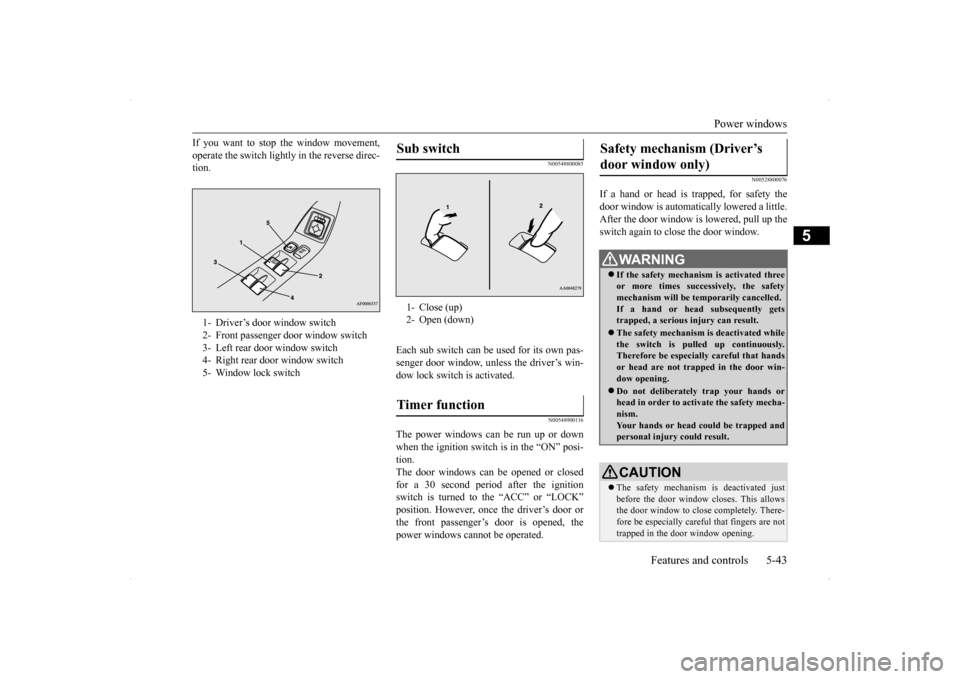
If you want to stop the window movement, operate the switch lightly in the reverse direc- tion.
N00548800085
Each sub switch can be used for its own pas-senger door window, unless the driver’s win- dow lock switch is activated.
N00548900116
The power windows can be run up or down when the ignition switch is in the “ON” posi- tion.The door windows can be opened or closed for a 30 second period after the ignition switch is turned to the “ACC” or “LOCK”position. However, once the driver’s door or the front passenger’s door is opened, the power windows cannot be operated.
N00528800076
If a hand or head is trapped, for safety thedoor window is automatically lowered a little. After the door window is lowered, pull up the switch again to close the door window.
1- Driver’s door window switch 2- Front passenger door window switch3- Left rear door window switch 4- Right rear door window switch 5- Window lock switch
Sub switch 1- Close (up) 2- Open (down)Timer function
Safety mechanism (Driver’s door window only)
WA R N I N G If the safety mechanism is activated three or more times successively, the safetymechanism will be temporarily cancelled. If a hand or head subsequently gets trapped, a serious injury can result. The safety mechanism is deactivated while the switch is pulled up continuously.Therefore be especially careful that hands or head are not trapped in the door win- dow opening. Do not deliberately trap your hands or head in order to activate the safety mecha-nism. Your hands or head could be trapped and personal injury could result.CAUTION The safety mechanism is deactivated just before the door window closes. This allowsthe door window to close completely. There- fore be especially careful that fingers are not trapped in the door window opening.
BK0200800US.bo
ok 43 ページ 2013年2月14日 木曜日 午後2時28分