2014 MITSUBISHI LANCER EVOLUTION fuel
[x] Cancel search: fuelPage 166 of 338

Multi-information display
Features and controls 5-105
5
N00557000214
You can change the mode condition for the average fuel consumption and average speed display to “Auto reset” or “Manual reset.” 1. Press and hold the multi-information meter switch (for about 2 seconds ormore) to switch from the setting modescreen to the menu screen. Refer to “Changing the function settings (With ignition switch in the “ON” posi-tion)” on page 5-103. 2. Lightly press the multi-information meter switch to select “AVG” (average fuel con-sumption and average speed setting).
3. Press and hold the multi-information meter switch (for about 2 seconds or more) to switch in sequence from A or 1 (Auto reset)
M, 2 or P (Manual reset)
A or 1 (Auto reset). The setting is changed to the selected reset condition. If you press and hold the multi-informa- tion meter switch when the average fuelconsumption and average speed are dis- played, these calculations will be reset to zero. When the ignition switch is turned to the “ON” position from the “ACC” or “LOCK” position, the mode settingchanges automatically from manual to auto. Switching to auto occurs automatically. Ifswitching to manual mode is done, how- ever, the data from the last reset is dis- played. When the average fuel consumption and average speed are being displayed, if you hold down the multi-information meter switch, these calculations will be reset tozero.
When the ignition switch has been set to the “ACC” or “LOCK” position for about 4 hours or more, the average fuel con- sumption display and the average speeddisplay will automatically reset.
N00557100101
The fuel consumption display unit can bechanged. The distance, speed, and amountunits are also changed to match the selected fuel consumption unit.
Changing the reset mode for aver- age fuel consumption and average speed
Manual reset mode Auto reset mode
NOTE
The average speed display and average fuel consumption display can be reset separately in both auto reset mode and manual resetmode. The average speed display memories and average fuel consumption memories for auto reset mode and manual reset mode are erased if the battery is disconnected. The initial (default) setting is “Auto reset mode”.
Changing the fuel consumption display unit
BK0200800US.book
105 ページ 2013年2月14日 木曜日 午後2時28分
Page 167 of 338

Multi-information display 5-106 Features and controls
5
1. Press and hold the multi-information meter switch (for about 2 seconds or more) to change from the setting mode screen to the menu screen.Refer to “Changing the function settings (With ignition switch in the “ON” posi- tion)” on page 5-103.2. Lightly press the multi-information meter switch to select “AVG UNIT” (fuel con- sumption display unit setting). 3. Press and hold the multi-information meter switch (for about 2 seconds or more) to display “AVG UNIT” (fuel con-sumption display unit setting).
4. Lightly press the multi-information meter switch to switch in sequence from km/L L/100 km
mpg (US)
mpg (UK)
RETURN
km/L.
5. Press and hold the multi-information meter switch (for about 2 seconds ormore) to change the setting to the selectedunit.
The distance and speed units are also changed in the following combinations to match the selected fuel consumption unit.
N00557200131
The temperature display unit can be switched. 1. Press and hold the multi-information meter switch (for about 2 seconds ormore) to switch from the setting modescreen to the menu screen. Refer to “Changing the function settings (With ignition switch in the “ON” posi-tion)” on page 5-103.
NOTE
The display units for the driving range, the average fuel consumption, the average speed and the momentary fuel consumption are changed, but the units for the indicating nee-dle (speedometer), the odometer and the trip odometer will remain unchanged. If the battery is disconnected, the memory of the unit setting is erased and is automatically set to {mpg (US) or L/100 km}.
Fuel economy
Distance(driving range)
Speed (average speed)
mpg (US) mile (s) mphmpg (UK) mile (s) mphkm /L km km /hL /100 km km km /hChanging the temperature unit
BK0200800US.book
106 ページ 2013年2月14日 木曜日 午後2時28分
Page 170 of 338

Multi-information display
Features and controls 5-109
5
N00563500067
It is possible to change the turn signal sound. 1. Press and hold the multi-information meter switch for about 2 seconds or moreto switch from the setting mode screen to the menu screen. Refer to “Changing the function settings(With ignition switch in the “ON” posi- tion)” on page 5-103. 2. Lightly press the multi-information meter switch to select . (changing the turn signal sound)
3. Press and hold the multi-information meter switch for about 2 seconds or more to switch in sequence from 1 (turn signal sound 1)
2 (turn signal sound 2)
1
(turn signal sound 1). The setting changes to the selected turn signal sound.
N00563600026
It is possible to change the bar graph settingof the momentary fuel consumption display. 1. Press and hold the multi-information meter switch for about 2 seconds or more to switch from the setting mode screen tothe menu screen. Refer to “Changing the function settings (With ignition switch in the “ON” posi-tion)” on page 5-103.
2. Lightly press the multi-information meter switch to select . (changing the momentary fuel consumption display) 3. Press and hold the multi-information meter switch for about 2 seconds or more to switch in sequence from ON (with the green bar graph)
OFF (without the
green bar graph)
ON (with the green
bar graph). The setting changes to the selected bargraph setting.
N00557600177
All of the function settings can be returned totheir factory settings.
Changing the turn signal sound
Changing the momentary fuel con- sumption display
Returning to the factory settings
BK0200800US.book
109 ページ 2013年2月14日 木曜日 午後2時28分
Page 171 of 338
Multi-information display 5-110 Features and controls
5
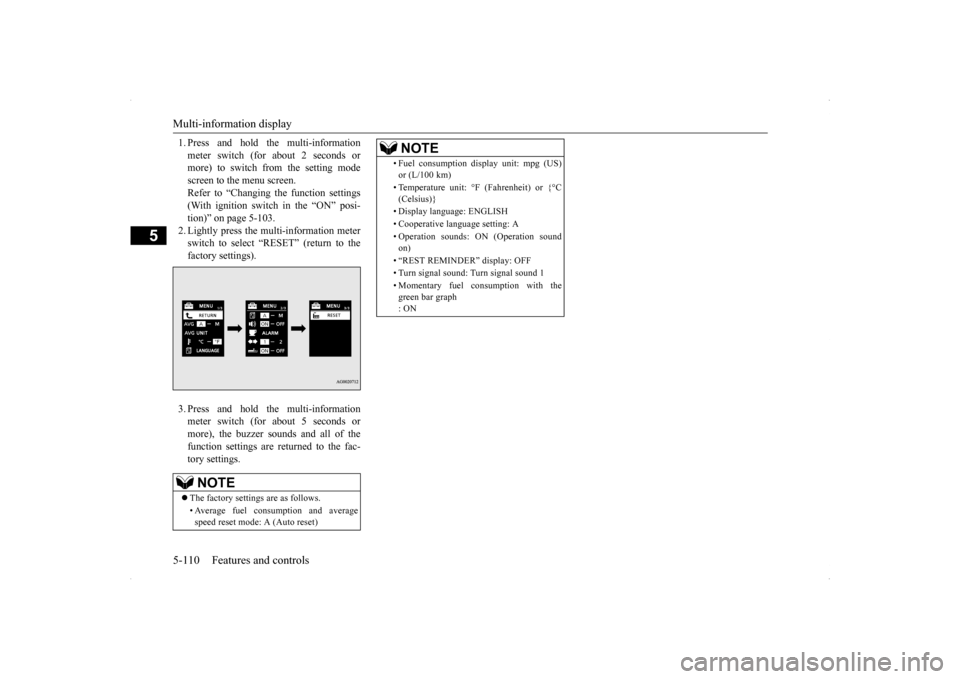
1. Press and hold the multi-information meter switch (for about 2 seconds or more) to switch from the setting mode screen to the menu screen.Refer to “Changing the function settings (With ignition switch in the “ON” posi- tion)” on page 5-103.2. Lightly press the multi-information meter switch to select “RESET” (return to the factory settings). 3. Press and hold the multi-information meter switch (for about 5 seconds or more), the buzzer sounds and all of thefunction settings are returned to the fac- tory settings.NOTE
The factory settings are as follows. • Average fuel consumption and average speed reset mode: A (Auto reset)
• Fuel consumption display unit: mpg (US) or (L/100 km) • Temperature unit: °F (Fahrenheit) or {°C (Celsius)} • Display language: ENGLISH • Cooperative language setting: A • Operation sounds: ON (Operation sound on) • “REST REMINDER” display: OFF• Turn signal sound: Turn signal sound 1 • Momentary fuel consumption with the green bar graph : ONNOTE
BK0200800US.book
110 ページ 2013年2月14日 木曜日 午後2時28分
Page 178 of 338
Indicator light, warning light, an
d information screen display list Features and controls 5-117
5
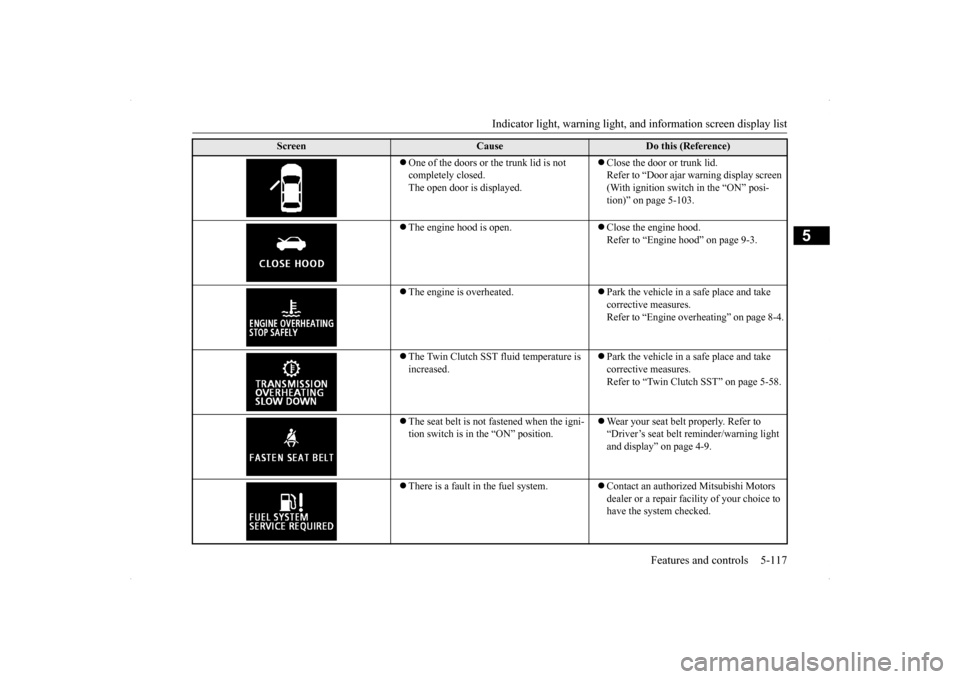
One of the doors or the trunk lid is not completely closed. The open door is displayed.
Close the door or trunk lid. Refer to “Door ajar warning display screen (With ignition switch in the “ON” posi-tion)” on page 5-103.
The engine hood is open.
Close the engine hood. Refer to “Engine hood” on page 9-3.
The engine is overheated.
Park the vehicle in a safe place and take corrective measures.Refer to “Engine overheating” on page 8-4.
The Twin Clutch SST fluid temperature is increased.
Park the vehicle in a safe place and take corrective measures. Refer to “Twin Clutch SST” on page 5-58.
The seat belt is not fastened when the igni- tion switch is in the “ON” position.
Wear your seat belt properly. Refer to “Driver’s seat belt reminder/warning light and display” on page 4-9.
There is a fault in the fuel system.
Contact an authorized Mitsubishi Motors dealer or a repair facility of your choice to have the system checked.
Screen
Cause
Do this (Reference)
BK0200800US.book
117 ページ 2013年2月14日 木曜日 午後2時28分
Page 180 of 338

Indicator light, warning light, an
d information screen display list Features and controls 5-119
5
N00558200183
The operation status of each system is displayed on the information screen. For further details, refer to the appropriate page
for each system.
There is a fault in the S-AWC (Super-All Wheel Control).
Contact an authorized Mitsubishi Motors dealer or a repair facility of your choice to have the system checked.Refer to “S-AWC (Super-All Wheel Con- trol)” on page 5-71.
A safety device in the Twin Clutch SST has been activated due to a possible malfunc-tion in the Twin Clutch SST or in the engine electronic control module.
Contact an authorized Mitsubishi Motors dealer or a repair facility of your choice to have the system checked. Refer to “Twin Clutch SST” on page 5-58.
The fuel is running low.
Refuel as soon as possible. Refer to “Fuel remaining warning display” on page 5-101.
The outside temperature is 37 °F (3 °C) or less.
Be careful driving on frozen ground. The ground may be frozen even when this warning is not displayed, so drive care- fully.
The timing chain may be worn.
Contact an authorized Mitsubishi Motors dealer or a repair facility of your choice to have the system checked.
Other interrupt displays (With igniti
on switch in the “ON” position)
Screen
Cause
Do this (Reference)
BK0200800US.book
119 ページ 2013年2月14日 木曜日 午後2時28分
Page 183 of 338

Warning lights 5-122 Features and controls
5
N00520300147 N00520400483
This light comes on when the ignition switch is turned to the “ON” position (engine off).When the engine is started, the light should go off a few seconds later. A warning is also displayed in the multi-information display.The warning light also illuminates after start-ing the engine under the following condi- tions. When the parking brake is still applied. When the brake fluid level is low. When the brake system circuit is not working properly.
Before driving, be sure that the parking brake is fully released and brake warning light isoff.
N00520500787
This indicator is a part of the onboard diag- nostic (OBD) system which monitors the emissions, engine control system or TwinClutch SST control sy
stem. If a problem is
detected in one of these systems, this indica- tor illuminates or flashes. When the ignitionswitch is turned to the “ON” position, thisindicator normally comes on and goes off after the engine has started. This indicator will come on if the fuel tank filler cap is not properly tightened. If thisindicator comes on and stays on after refuel- ing, stop the engine and check that the cap is properly tightened. (Turn the cap clockwiseuntil you hear clicking sounds.) If this indicator does not go off after several seconds or lights up while driving, have thesystem checked as soon as possible at an authorized Mitsubishi Motors dealer or a repair facility of your choice.
Warning lights Brake warning light
NOTE
Under conditions such as sporty driving, the brake fluid in the tank may move and the warning light may come on temporarily.If the warning light goes out after a while, there is not a problem with the brake system and the vehicle can be driven normally.
CAUTION If the brake warning light and the Anti-lock braking system warning light are illuminated at the same time, the braking force distribu- tion function will not operate, so the vehicle may be destabilized during sudden brakingunder the following conditions.• When the brake warning light does not goout even when the parking brake is released.• When the brake warning light stays onwhile driving.• If the above occurs, avoid sudden brakingand high-speed driving. Park the vehicle in a safe place, and contact an authorized Mit-subishi Motors dealer or a repair facility of your choice as soon as possible.
The vehicle should be brought to a halt in the following manner when brake performance is deteriorated.• Confirm that the vehicle slows down whenyou press down on the brake pedal harderthan usual. In some cases, the brake pedal may go all the way to the floor.• Should the brakes fail, use engine brakingto reduce your speed and slowly apply the parking brake.Depress the brake pedal to illuminate the stop lights to alert the vehicles behind you.
Engine malfunction indicator (“SERVICE ENGINE SOON” or “Check engine light”)
BK0200800US.book
122 ページ 2013年2月14日 木曜日 午後2時28分
Page 184 of 338

Information screen display
Features and controls 5-123
5
N00520600296
This light comes on in the event of a malfunc- tion in the charging system or when the igni- tion switch is turned to the “ON” position (engine off). A warning is also displayed inthe multi-information display. When the engine is started,
the light should go out.
Check to make sure that the light has goneout before driving.
N00558300012 N00558400114
This warning is displayed if the vehicle is being driven with the parking brake stillapplied. The warning light in the instrument cluster only comes on when the parking brake is applied.
CAUTION Driving for a long time with the engine mal- function indicator on may cause more dam- age to the emission control system. This could also affect fuel economy and drivabil- ity. If this indicator does not come on when the ignition switch is turned to the “ON” posi-tion, have the system checked at an autho- rized Mitsubishi Motors dealer or a repair facility of your choice. If the engine malfunction indicator comes on while the engine is running, avoid driving athigh speeds. During vehicle operation with the indicator on, the vehicle may not accelerate when youdepress the accelerator pedal. When the vehicle is stationary with the indi- cator on, you must depress the brake pedalmore firmly than usual since the engine idling speed is higher than usual and a vehi- cle with Twin Clutch SST has a stronger ten-dency to creep forward.
NOTE
Do not disconnect the battery cable when the engine malfunction indicator (“SERVICE ENGINE SOON” or “Check engine light”) is on. The engine electronic control module storescritical OBD information (especially exhaust emission data), which may be lost if the bat- tery cable is disconnected while the enginemalfunction indicator is on. This will make it difficult to diagnose the cause of future prob- lems.
Charging system warning light
CAUTION If the warning light stays on while the engine is running, park your vehicle in a safe place as soon as possible and contact an authorizedMitsubishi Motors dealer or a repair facility of your choice to have the system checked.
Information screen display Brake warning display
CAUTION If a vehicle is driven without releasing the parking brake, the brakes will overheat,resulting in ineffective braking and possible brake failure. If this warning is displayed, release the park-ing brake.
BK0200800US.book
123 ページ 2013年2月14日 木曜日 午後2時28分