2014 MITSUBISHI LANCER EVOLUTION lock
[x] Cancel search: lockPage 133 of 338
S-AWC (Super-All Wheel Control) 5-72 Features and controls
5
and power drive distribution of the center dif- ferential.
N00541500012
The AYC is a system, with a left-right differ-ential limiting function and yaw control func-tion, that enhances cornering performance and stability during
cornering by controlling
the left-right drive power difference of therear wheels, the braking force of all four wheels, and the vehicle yaw moment.
The left-right differential limiting function is a function that enhances driving performance and vehicle stability by preventing idle spin-ning of a wheel when driving on slippery road surfaces or when the road surfaces of the left and right wheels are different. The yaw control function is a function that enhances vehicle cornering performance by controlling the drive power difference of theleft and right wheels
and the braking force
when the vehicle does not turn in response to steering input, such as when the steeringwheel is turned quickly or when driving on slippery road surfaces.
N00542401057
Select the control mode from the followingthree types to suit the driving conditions.
When the ignition switch is set to the “ON” position, operate the AWC switch to change the control mode.Each time the switch is pushed, the control mode changes in the order “TARMAC”
“GRAVEL”
“SNOW”
“TARMAC”.
NOTE
If the parking brake lever is pulled up while the vehicle is moving, the center differential is designed to switch to a free state conditionwhich will allow the rear wheel to lock eas- ier.
AYC (Active yaw control sys- tem)
CAUTION Control of the braking force does not enhance the stopping performance of the vehicle, therefore, pay careful attention to the safety of your surroundings when driv-ing.
Left-right differential limiting function Yaw control function S-AWC control mode
S-AWC control mode
Operation
TA R M A C
Normally, use this control mode. Use this mode for paved roads.
GRAVEL
Use this control mode when driving on somewhat slipperyroad surfaces, such as wet road surfaces and gravel roads.
SNOW
Use this control mode when driving on slippery road sur-faces, such as snow-covered roads.
S-AWC control mode switch
BK0200800US.bo
ok 72 ページ 2013年2月14日 木曜日 午後2時28分
Page 134 of 338

S-AWC (Super-All Wheel Control)
Features and controls 5-73
5
The currently selected control mode is dis- played on the multi-information display. In addition, when the control mode is changed, the selected mode appears on theinterrupt display screen of the information screen in the multi-information display. The control mode display will appear on theinformation screen for a few seconds, and then the original screen will return.
N00542500048
The S-AWC operation status can be displayedon the information screen in the multi-infor- mation display.To display the status, press the multi-informa- tion meter switch to change the information screen.Refer to “Information screen (when the igni- tion switch is “ON”)” on page 5-97.
The S-AWC operation status is displayed.
NOTE
The control mode can be changed while the vehicle is moving. The selected control mode is stored in mem- ory even if the engine is stopped. However, if a battery terminal is discon-nected, the control mode stored in memory will be erased and the control mode will be set to the “TARMAC” mode.
S-AWC control mode display Example: “TARMAC” mode is selected.ç
CAUTION The S-AWC control mode display may flash under aggressive driving conditions. At this time, S-AWC control is temporarily suspended in order to protect the S-AWCdevice, but this will not affect normal driv- ing. After the vehicle is driven for a while, if theS-AWC control mode display remains on, the S-AWC control will start operating again.
S-AWC operation display
Display example AYC operation display The amount of the yaw moment added by AYC is displayed as a bar graph.A, D- Clockwise yaw moment about the
vehicle’s center of gravity
B, C- Counterclockwise yaw moment
about the vehicle’s center of gravity
ACD operation display The strength of the differential limiting action (center differential) of the ACD is displayed in section E of the meter as a bar graph.
BK0200800US.bo
ok 73 ページ 2013年2月14日 木曜日 午後2時28分
Page 135 of 338

Anti-lock braking system 5-74 Features and controls
5
N00542600049
When there is a malfunction in the system, the warning display will appear on the information screen in the multi-information display. In addition, the S-AWC control mode display in section A will go out at the same time.
N00517900295
The anti-lock braking system helps preventthe wheels from locking up when braking.This helps maintain vehicle drivability and steering wheel handling. Always keep a safe distance from the vehicle in front of you. Even if your vehi-cle is equipped with the anti-lock braking system, leave a greater braking distance when:• Driving on gravel or snow-covered roads. • Driving on uneven road surfaces. Operation of anti-lock braking system is not restricted to situations where brakes are applied suddenly. This system mayalso prevent the wheels from locking when you drive over manholes, steel roadwork plates, road markings, or anyuneven road surface.
WA R N I N G Always concentrate on your driving first. Keep your eyes and mind on the road. Dis- tractions while driving can lead to an acci- dent.
S-AWC warning display
CAUTION The system may be malfunctioning. Park your vehicle in a safe place and stop the engine. Restart the engine and check whether the warning display and “SERVICE REQUIRED” go out. If the warning display and “SERVICE REQUIRED” go out, there is no abnormal condition. If the warning display and “SERVICE REQUIRED” do not go out or appear frequently, it is not necessary to stop the vehicle immediately, but we recommendthat you have your vehicle inspected.NOTE
If the ambient temperature drops and the vis- cosity of the AWC control fluid increases,the warning may be displayed. At this time, S-AWC control is temporarily suspended, but this will not affect normaldriving. After the vehicle is driven for a while, if the engine is restarted after the AWC controlfluid warms up or the ambient temperature increases, the S-AWC control will start oper- ating again if the warning display goes out.
Anti-lock braking system Driving hints
BK0200800US.bo
ok 74 ページ 2013年2月14日 木曜日 午後2時28分
Page 136 of 338

Anti-lock braking system
Features and controls 5-75
5
When the anti-lock braking system is in use, you may feel the brake pedal pulsa- tion and the vibrations of the vehicle body and steering wheel. It may also feel as ifthe pedal resists being pressed. In this situation, simply hold the brake pedal down firmly. Do not pump thebrake, which will result in reduced braking performance. An operation noise is emitted from the engine compartment or feel a shock fromthe brake pedal when start driving imme- diately after starting the engine. These are normal sound or operation that the anti-lock braking system makes when per- forming a self-check. It does not indicate a malfunction. The anti-lock braking system can be used after the vehicle has reached a speed over approximately 6 mph (10 km/h). It stopsworking when the vehicle slows below approximately 3 mph (5 km/h).
N00531600632
Warning light Warning display If there is a malfunction in the system, the anti-lock braking system warning light willcome on and the warning display will appear on the information screen in the multi-infor- mation display.Under normal conditions,
the anti-lock brak-
ing system warning light only comes on when the ignition switch is turned to the “ON”position and goes off a few seconds later.
N00531700561
Avoid hard braking and high-speed driving. Stop the vehicle in a safe place. Test the system by restarting the engine anddriving at a speed of about 12 mph (20 km/h) or higher. If the warning light / display then remain offduring driving, there is no abnormal condi- tion.
CAUTION The anti-lock braking system cannot prevent accidents. It is your responsibility to take safety precautions and to drive carefully. To prevent failure of the anti-lock braking system, be sure all 4 wheels and tires are the same size and the same type.
Do not install any aftermarket limited-slip differential (LSD) on yo
ur vehicle. The anti-
lock braking system may stop functioning properly.
Anti-lock braking system warn- ing light / display
CAUTION
CAUTION Any of the following indicates that the anti- lock braking system is not functioning and only the standard brak
e system is working.
(The standard brake system is functioning normally.) If this happens, take your vehicleto an authorized Mitsubishi Motors dealer or a repair facility of your choice.• When the ignition switch is in the “ON”position, the warning light does not come on or it remains on and does not go off.• The warning light comes on while driving.• The warning display appears while driving.
If the warning light / display comes on while driving If only the anti-lock braking sys- tem warning light / display comes on
BK0200800US.bo
ok 75 ページ 2013年2月14日 木曜日 午後2時28分
Page 137 of 338

Active stability control (ASC) 5-76 Features and controls
5
However, if the warning light / display do not disappear, or if they come on again when the vehicle is driven, have the vehicle checked by an authorized Mitsubishi Motors dealer orrepair facility of your choice as soon as possi- ble. Warning light
The anti-lock braking system and brake force distribution function may not work, so hardbraking could make the vehicle unstable. Avoid hard braking and high-speed driving. Stop the vehicle in a safe place and contact an
authorized Mitsubishi Motors dealer or repair facility of your choice.
N00529200035
After driving on snow or icy roads, remove any snow and ice which may have been left around the wheels. On vehicles that have ananti-lock braking system, be careful not to damage the wheel speed sensors (A) or the cables located at each wheel.
N00559100121
The active stability control (ASC) takes over-all control of the anti-lock braking system, traction control function and skid control function to help maintain the vehicle’s controland traction. Please read
this section in con-
junction with the pages on the anti-lock brak- ing system, traction control function and skid control function. Anti-lock braking system
P.5-74
Traction control function
P.5-77
Skid control function
P.5-77
If the anti-lock braking system warning light / display and brake warning light / display come on at the same time
NOTE
The anti-lock braking system warning light and brake warning light illuminate at the same time and the warning displays appearalternately on the information screen in the multi-information display.
After driving on icy roads Front
Active stability control (ASC) Rear
BK0200800US.bo
ok 76 ページ 2013年2月14日 木曜日 午後2時28分
Page 138 of 338

Active stability control (ASC) Features and controls 5-77
5
N00559200021
On slippery surfaces, the traction control function prevents the drive wheels from spin-ning excessive, thus helping the vehicle to start moving from a stopped condition. It also provides sufficient driving force and steeringperformance as the vehicle turns while press- ing the acceleration pedal.
N00546800010
The skid control function is designed to help the driver maintain control of the vehicle onslippery roads or during rapid steering
maneuvers. It works by controlling the engine output and the brake on each wheel.
N00559400209
When the ignition switch is turned to the “ON” position, the ASC automatically turns ON. If the ASC OFF switch is pressed to turn OFF the ASC, the display in the meter comes on. Press the switch again to turn ON the ASC.
CAUTION Do not over-rely on the ASC. Even the ASC cannot prevent the natural laws of physics from acting on the vehicl
e. This system, like
any other system, has limits and cannot help you to maintain traction and control of thevehicle in all circumstances. Reckless driv- ing can lead to accidents. It is the driver’s responsibility to drive carefully. This meanstaking into account the traffic, road and envi- ronmental conditions. Be sure to use the same specified type and size of tire on all four wheels. Otherwise, the ASC may not work properly. Do not install any aftermarket limited-slip differential (LSD) on your vehicle. The ASCmay stop functioning properly.NOTE
An operation noise may be emitted from the engine compartment in the following situa-tions. The sound is associated with checking the operations of the ASC. At this time, you may feel a shock from the brake pedal if youdepress it. These do not indicate a malfunc- tion. • When the ignition switch is set to the “ON” position. • When the vehicle is driven for a while after the engine is turned on.
When the ASC is activated, you may feel a vibration in the vehicle body or hear a whin- ing sound from the engine compartment. This indicates that the system is operating normally. It does not indicate a malfunction. When the anti-lock braking system warning light is illuminated, the ASC is not active.
Traction control function
CAUTION When driving a vehicle on a snowy or icy road, be sure to install snow tires and drivethe vehicle at moderate speeds.
Skid control function
NOTE
NOTE
The skid control function operates at speeds of about 9 mph (15 km/h) or higher.
ASC OFF switch
CAUTION For safety reasons, press the ASC OFF switch when the vehicle is stopped.
BK0200800US.bo
ok 77 ページ 2013年2月14日 木曜日 午後2時28分
Page 143 of 338
Cruise control 5-82 Features and controls
5
N00518400327
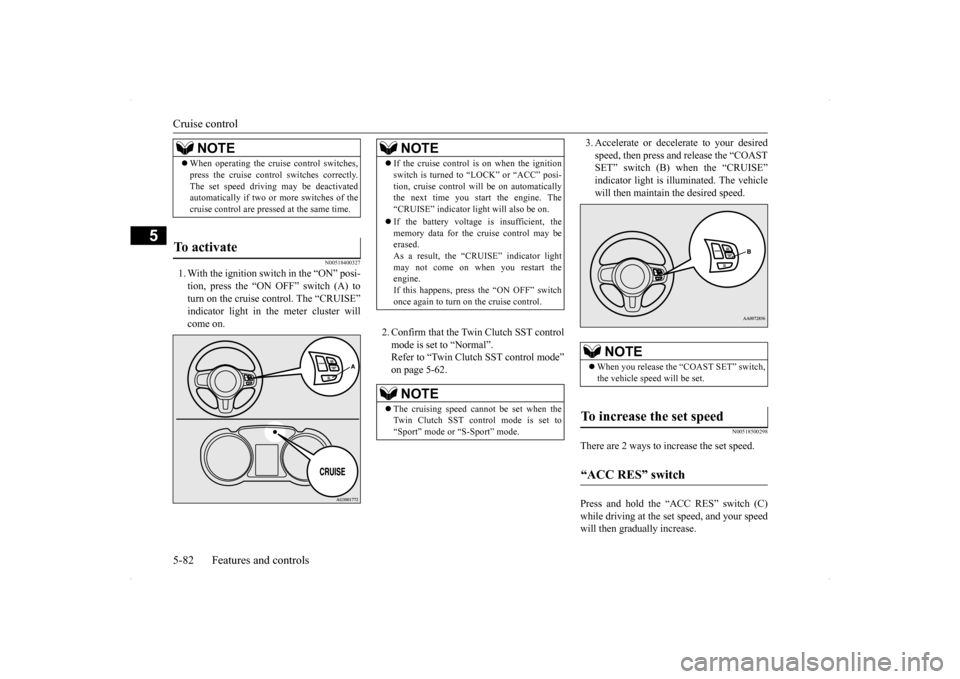
1. With the ignition switch in the “ON” posi- tion, press the “ON OFF” switch (A) to turn on the cruise control. The “CRUISE” indicator light in the meter cluster willcome on.
2. Confirm that the Twin Clutch SST control mode is set to “Normal”. Refer to “Twin Clutch SST control mode”on page 5-62.
3. Accelerate or decelerate to your desired speed, then press and release the “COAST SET” switch (B) when the “CRUISE” indicator light is illuminated. The vehiclewill then maintain the desired speed.
N00518500298
There are 2 ways to increase the set speed. Press and hold the “ACC RES” switch (C) while driving at the set speed, and your speedwill then gradually increase.
NOTE
When operating the cruise control switches, press the cruise control switches correctly. The set speed driving may be deactivated automatically if two or more switches of the cruise control are pressed at the same time.
To activate
NOTE
If the cruise control is on when the ignition switch is turned to “LOCK” or “ACC” posi- tion, cruise control will be on automatically the next time you start the engine. The “CRUISE” indicator light will also be on. If the battery voltage is insufficient, the memory data for the cruise control may beerased. As a result, the “CRUISE” indicator light may not come on when you restart theengine. If this happens, press the “ON OFF” switch once again to turn on the cruise control.NOTE
The cruising speed cannot be set when the Twin Clutch SST control mode is set to “Sport” mode or “S-Sport” mode.
NOTE
When you release the “COAST SET” switch, the vehicle speed will be set.
To increase the set speed “ACC RES” switch
BK0200800US.bo
ok 82 ページ 2013年2月14日 木曜日 午後2時28分
Page 159 of 338

Multi-information display 5-98 Features and controls
5
This displays the average speed from the last reset to the present.There are 2 types of mode settings as follows. For details on how to change the average speed display setting, refer to “Changing thefunction settings (With
ignition switch in the
“ON” position)” on page 5-103.
When the average speed is being dis- played, if you hold down the multi-infor- mation meter switch, these calculations will be reset to zero. When the ignition switch is turned to the “ON” position from the “ACC” or “LOCK” position, the mode settingchanges automatically from manual to auto. Switching to auto occurs automatically. Ifswitching to manual mode is done, how-ever, the data from the last reset is dis- played. When the average speed is being dis- played, if you hold down the multi-infor-mation meter switch, these calculations will be reset to zero. When the ignition switch has been set to the “ACC” or “LOCK” position for about 4 hours or more, the average speed dis- play will automatically reset.
This displays the average fuel consumption from the last reset to the present. There are 2 types of mode settings as follows.For details on how to change the average fuel consumption display setting, refer to “Chang- ing the function settings (With ignition switchin the “ON” position)” on page 5-103. The “ ” mark in the momentary fuel gauge shows the average fuel consumption. When the average fuel consumption is being displayed, if you hold down themulti-information meter switch, these cal- culations will be reset to zero.
When you refuel, the driving range display is updated. However, if you only add a small amount of fuel, the correct value will not be displayed. Fill to a full tank whenever possible. When your vehicle is stopped on an extremely steep hill, the driving range valuemay, change. This is due to the movement of fuel in the tank and does not indicate any breakdown. The display setting can be changed to the preferred units (miles or km).Refer to “Changing the function settings (With ignition switch in the “ON” position)” on page 5-103.
Average speed display
NOTE
Manual reset mode Auto reset mode
NOTE
The average speed display and the average fuel consumption display can be reset sepa-rately in both auto reset mode and manual reset mode.
“---” is displayed when the average speed cannot be measured. The initial (default) setting is “Auto reset mode”. The display setting can be changed to the preferred units (mph or km/h).Refer to “Changing the function settings (With ignition switch in the “ON” position)” on page 5-103. The average speed display memories for auto reset mode and manual reset mode are erasedif the battery is disconnected.
Average fuel consumption display Manual reset mode
NOTE
BK0200800US.bo
ok 98 ページ 2013年2月14日 木曜日 午後2時28分