2014 MERCEDES-BENZ SPRINTER light
[x] Cancel search: lightPage 119 of 338

Activating/deactivating rear-compart-
ment climate control via the control
panel X
Turn the key to position 2in the ignition
lock.
Vehicle with rear-compartment heating/
rear-compartment air conditioning
X To switch on/off: press the0074switch.
If the indicator lamp in the button lights up,
the rear-compartment heating/rear-com-
partment air conditioning is switched on. Switching the cooling with air dehu-
midification function on/off
Important information If you switch off the "Cooling with air dehu-
midification" function, the air inside the vehi-
cle will not be cooled (in warm weather) or
dehumidified. The windows could fog up more
quickly.
The cooling with air dehumidification function
is only available when the engine is running.
The air inside the vehicle is cooled and dehu-
midified according to the temperature
selected.
Condensation may appear on the underside
of the vehicle when in cooling mode. This is
normal and not a sign that there is a malfunc-
tion.
Switching on/off Vehicle with air conditioning
X
Press the 005Abutton.
If the indicator lamp in the button lights up,
cooling with air dehumidification is
switched on. Setting the temperature
Increasing/reducing temperature in
the front compartment via the control
panel Only change the temperature in small incre-
ments. Start at the center position, or at
22 †.
X
Switch on climate control (Y page 116).
X Turn temperature control 0043clockwise to
increase or counterclockwise to reduce the
temperature (Y page 114).
Increasing/reducing temperature in
the rear compartment via the control
panel Only change the temperature in small incre-
ments.
X
Switch on climate control (Y page 116).
X Turn rear-compartment temperature
control 0087(Ypage 115) or rear-compart-
ment air-conditioning system 0044
(Y page 116) clockwise to increase or
counterclockwise to reduce the tempera-
ture.
i Vehicles with additional air conditioning
and heating in the rear compartment: if you
set the temperature control to the center
position, only one of the two climate
control systems works in the rear compart-
ment and in air-recirculation mode
(Y page 120). Setting the air distribution
Air distribution settings The air distribution symbols have the follow-
ing meanings:
0078
Directs air through the center and
side air vents
007E
0085 Directs air to the windshield and the
air vents Operating the climate control system
117Climate control
Page 120 of 338

007C
Directs air to the windshield, the air
vents and into the footwell
007D Directs air to the air vents and into
the footwell
Adjusting X
Switch on climate control (Y page 116).
X Set air-distribution control 0085for the heat-
ing (Y page 113) or air-conditioning system
0083 (Ypage 114) to the corresponding sym-
bol. Setting the airflow
X Switch on climate control (Y page 116).
X Vehicle with heating/rear-compart-
ment heating: set airflow control 0044of the
heating (Y page 113) or of the rear-com-
partment heating ( Ypage 115) to the
desired level.
X Vehicle with air conditioning/rear-com-
partment air conditioning: press the
0095 button to reduce or the 0097button
to increase the airflow.
The blower speeds are shown in bars next
to the buttons. Defrosting the windows
You can use the "defrosting" function to
defrost the windshield or to demist the inside
of the windshield and the side windows.
Only use the following settings until the win-
dows are clear again.
X Vehicle with window heating: switch on
the front (Y page 119) and/or rear window
defroster (Y page 120) .
X Switch on climate control (Y page 116).Vehicle with heating
X
Set temperature control 0043and airflow
control 0044to0085 (Ypage 113).
X Set air-distribution control 0085to007E
0085 (Ypage 113).
X Close the center air vents (Y page 121) and
the air outlets for the headroom and the
rear compartment ( Ypage 121).
X Direct the side air vents towards the side
windows and open the defroster vents for
the side windows (Y page 121).
Vehicle with air conditioning
X Set temperature control 0043to
0085 (Ypage 114).
X Press the 0097button until the maximum
blower output is reached.
All bars in the display next to the button
light up.
X Set air-distribution control 0083to007E
0085 (Ypage 114).
X Close the center air vents (Y page 121) and
the air outlets for the headroom and the
rear compartment ( Ypage 121).
X Direct the side air vents towards the side
windows and open the defroster vents for
the side windows (Y page 121). Clearing condensation from the win-
dows
Windows fogged up on the inside You should only select this setting until the
windows are clear again.
X
Vehicle with window heating: switch on
the front (Y page 119) and/or rear window
defroster (Y page 120) .
X Switch on climate control (Y page 116).
X Switch off air-recirculation mode
(Y page 120). 118
Operating the climate control systemClimate control
Page 121 of 338
Vehicle with heating
X
Set temperature control 0043to a higher tem-
perature (Y page 113).
X Set airflow control 0044to a higher blower
setting. It should be set at least to level two
(Y page 113).
X Set air-distribution control 0085to
007E0085( Ypage 113).
i If the windows still fog up, set the control
as described for defrosting (Y page 118).
Vehicle with air conditioning
X Activate cooling with air dehumidification
(Y page 117).
X Press the 0066button (Y page 114).
The reheat function is switched on. The
indicator lamp in the switch lights up.
To switch off the reheat function, press the
0066 button again. The indicator lamp in
the button goes out.
Windows fogged up on the outside You should only select this setting until the
windshield is clear again.
X Switch on the windshield wipers
(Y page 107).
X Switch on climate control (Y page 116).
X Adjust air distribution to the footwell
(Y page 117).
X Close the air vents (Y page 121). Windshield defroster
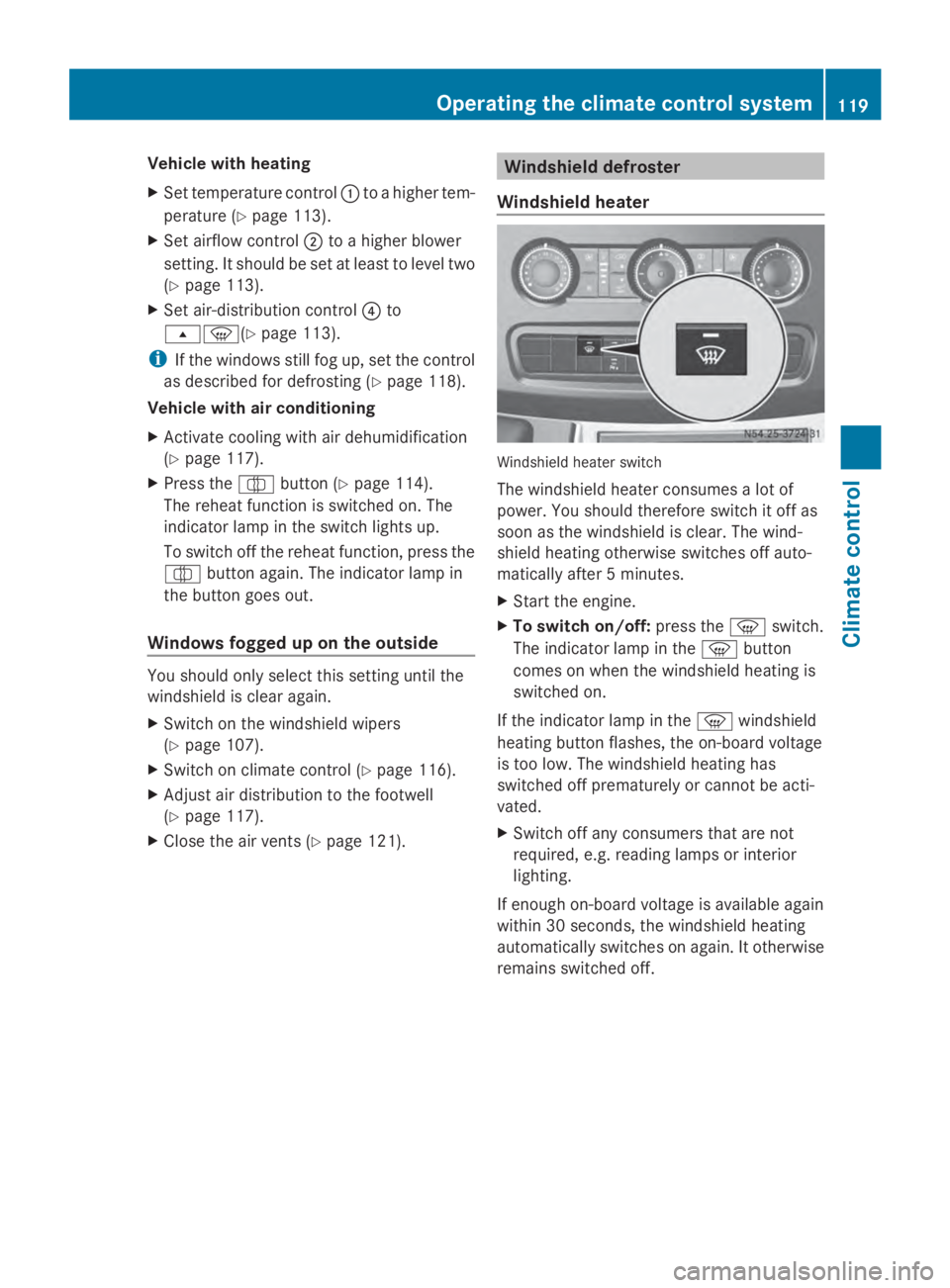
Windshield heater Windshield heater switch
The windshield heater consumes a lot of
power. You should therefore switch it off as
soon as the windshield is clear. The wind-
shield heating otherwise switches off auto-
matically after 5 minutes.
X
Start the engine.
X To switch on/off: press the0085switch.
The indicator lamp in the 0085button
comes on when the windshield heating is
switched on.
If the indicator lamp in the 0085windshield
heating button flashes, the on-board voltage
is too low. The windshield heating has
switched off prematurely or cannot be acti-
vated.
X Switch off any consumers that are not
required, e.g. reading lamps or interior
lighting.
If enough on-board voltage is available again
within 30 seconds, the windshield heating
automatically switches on again. It otherwise
remains switched off. Operating the climate control system
119Climate control
Page 122 of 338
Rear window defroster
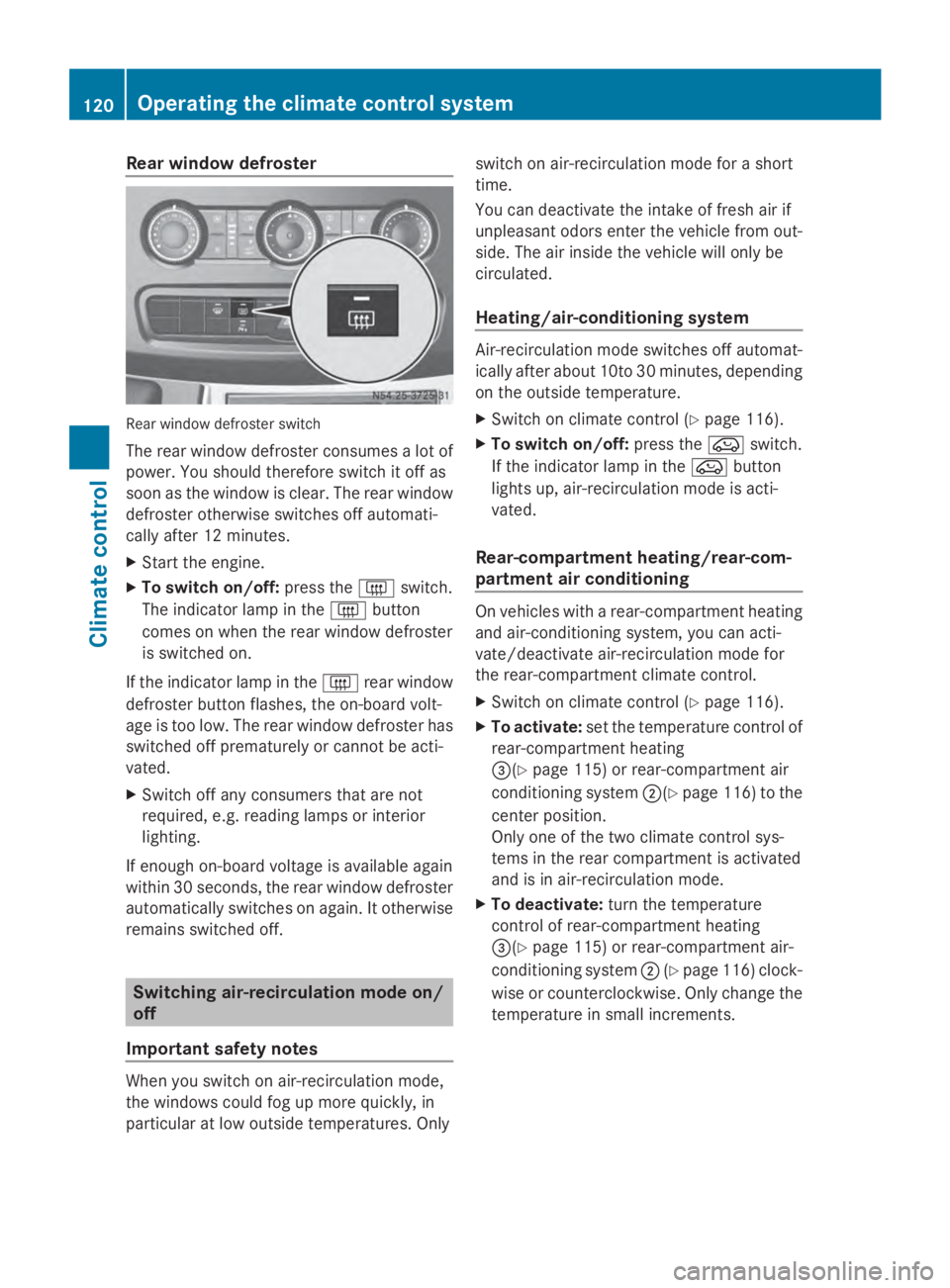
Rear window defroster switch
The rear window defroster consumes a lot of
power. You should therefore switch it off as
soon as the window is clear. The rear window
defroster otherwise switches off automati-
cally after 12 minutes.
X Start the engine.
X To switch on/off: press the0071switch.
The indicator lamp in the 0071button
comes on when the rear window defroster
is switched on.
If the indicator lamp in the 0071rear window
defroster button flashes, the on-board volt-
age is too low. The rear window defroster has
switched off prematurely or cannot be acti-
vated.
X Switch off any consumers that are not
required, e.g. reading lamps or interior
lighting.
If enough on-board voltage is available again
within 30 seconds, the rear window defroster
automatically switches on again. It otherwise
remains switched off. Switching air-recirculation mode on/
off
Important safety notes When you switch on air-recirculation mode,
the windows could fog up more quickly, in
particular at low outside temperatures. Only switch on air-recirculation mode for a short
time.
You can deactivate the intake of fresh air if
unpleasant odors enter the vehicle from out-
side. The air inside the vehicle will only be
circulated.
Heating/air-conditioning system
Air-recirculation mode switches off automat-
ically after about 10to 30 minutes, depending
on the outside temperature.
X Switch on climate control (Y page 116).
X To switch on/off: press the008Aswitch.
If the indicator lamp in the 008Abutton
lights up, air-recirculation mode is acti-
vated.
Rear-compartment heating/rear-com-
partment air conditioning On vehicles with a rear-compartment heating
and air-conditioning system, you can acti-
vate/deactivate air-recirculation mode for
the rear-compartment climate control.
X
Switch on climate control (Y page 116).
X To activate: set the temperature control of
rear-compartment heating
0087(Y page 115) or rear-compartment air
conditioning system 0044(Ypage 116) to the
center position.
Only one of the two climate control sys-
tems in the rear compartment is activated
and is in air-recirculation mode.
X To deactivate: turn the temperature
control of rear-compartment heating
0087(Y page 115) or rear-compartment air-
conditioning system 0044(Ypage 116) clock-
wise or counterclockwise. Only change the
temperature in small increments. 120
Operating the climate control systemClimate control
Page 126 of 338

Operating with the button (control
panel)
i
Switch the heater booster function on or
off with the 006Abutton (Y page 130).
X To activate the auxiliary heating sys-
tem: press the upper section of the 0084
switch for longer than two seconds.
The red indicator lamp in the button lights
up. The auxiliary heating heats or ventilates
the interior to the temperature that you
have set. The blower switches to the first
level.
X To switch off auxiliary heating: press the
upper section of the 0084button.
Or
X Turn the key in the ignition lock to posi-
tion 0.
The red indicator lamp in the button goes
out. The auxiliary heating operates for
another two minutes and then switches off
automatically. Selecting a switch-on time
Important information You can use the on-board computer to define
up to three switch-on times, one of which can
be selected.
The yellow indicator lamp in the 0084button
goes out after 30 minutes, if you:
R have selected the switch-on time and
R turn the key to position 0in the ignition
lock. On-board computer without steering
wheel buttons X
Turn the key to position 2in the ignition
lock.
X Press the 0084button.
The 0084 symbol flashes in the display.
Or
X Press the 0079menu button on the instru-
ment cluster repeatedly until the 0084
symbol flashes in the display.
X Use the 0074or0075 buttons on the instrument
cluster to select the switch-on time 1
1 to 3 3.
The switch-on time selected is displayed.
X Wait 10 seconds for the standard display to
appear.
The switch-on time is selected. The yellow
indicator lamp in the 0084button lights up.
If you do not preselect a switch-on time,
and --:-- --:-- is shown in the display, this
means that the automatic switch-on mode
is switched off. The yellow indicator lamp
in the 0084button goes out.
On-board computer with steering wheel
buttons X
Turn the key to position 2in the ignition
lock.
X Press the 0084button.
The Aux. heat Aux. heat submenu is shown in the
display.
If no switch-on time has been selected, the
selected switch-on time is highlighted or
Timer off
Timer off is highlighted.
i You can also access the Aux. Aux.heat.
heat. sub-
menu via the Settings
Settings(Ypage 190)
menu. 124
Operating the auxiliary heating systemClimate control
Page 127 of 338

X
Use the 0081or0082 button on the steer-
ing wheel to select the desired switch-on
time.
Use the Timer off
Timer off setting to deactivate
automatic switch-on.
X Press the 0080button on the steering
wheel.
The switch-on time is selected. The yellow
indicator lamp in the 0084button lights up. Setting the switch-on time
X Use the same method to select a switch-on
time as described in the "Preselecting a
switch-on time" section.
On-board computer without steering
wheel buttons
X Press the 0045reset button on the instru-
ment cluster.
The hour display flashes.
X Use the 0074and 0075buttons on the instru-
ment cluster to set the hours.
X Press reset button 0045.
The minute display flashes.
X Use the 0074and 0075buttons to set the
minutes.
The switch-on time is set and selected.
On-board computer with steering wheel
buttons
X Press the 0041button on the steering
wheel.
The display shows the Hours
Hours menu.
X Use the 0081and0082 buttons on the
steering wheel to set the hours.
X Press the 0041button.
The display shows the Minutes
Minutes menu.
X Use the 0081and0082 buttons to set the
minutes.
X Press the 0080button.
The switch-on time is set and selected. Operation with the remote control
Important information You can switch the auxiliary heating on/off
and set the operating duration using the
remote control. You can use up to 4 remote
control units on the vehicle. These must be
synchronized for the receiver in your vehicle
(Y
page 126).
The remote control has a maximum range of
approximately 600 meters. This range is
reduced by:
R sources of interference
R solid objects between the remote control
and the vehicle
R the remote control being in an unfavorable
position in relation to the vehicle
R transmitting from an enclosed space
Overview of the remote control 0043
Indicator lamp
0044 To confirm settings
0087 To switch the remote control on/off, set
the operating duration or end or cancel
settings
Indicator lamp 0043lights up in various ways to
show different operating modes: Signaling Meaning
Lights up red Remote control switched
on
Data transferOperating the auxiliary heating system
125Climate control Z
Page 128 of 338

Signaling Meaning
Flashes red Auxiliary heating switched
off
Lights up
green Auxiliary heating switched
on
Flashes green Change operating duration
active
Flashes alter-
nately red and
green Remote control in syn-
chronizing mode
i
When the remote control battery is weak,
indicator lamp 0043flashes red rapidly.
Replace the remote control battery
(Y page 130).
You can find further information on the lamp
status in the "Problems with the auxiliary
heating" section (Y page 132).
Switching the remote control on/off The remote control switches to standby mode
after 10 seconds. Indicator lamp 0043goes out.
X To switch on: press and hold the 00D0
button until indicator lamp 0043lights up red.
If a connection between the remote control
and the receiver in the vehicle has been
established and indicator lamp 0043:
R flashes red, the auxiliary heating is
switched off.
R lights up green, the auxiliary heating is
switched on.
X To switch off: press and hold the 00D0
button until indicator lamp 0043goes out.
Switching the auxiliary heating on/off X
Switch on the remote control.
X To switch on: when indicator lamp 0043
flashes red, press the 0070button.
During data transmission, indicator
lamp 0043lights up red. When indicator lamp
0043lights up green, the
auxiliary heating is switched on.
X To switch off: when indicator lamp 0043
lights up green, press the 0070button.
During data transmission, indicator
lamp 0043lights up red.
When indicator lamp 0043flashes red, the
auxiliary heating is switched off.
Changing the operating duration X
Switch on the remote control.
X When indicator lamp 0043flashes red, press
00D0 and0070 simultaneously.
Indicator lamp 0043flashes green.
X Press the 00D0button repeatedly until the
desired operating duration is shown.
R 20 minutes
Indicator lamp 0043flashes green twice.
R 30 minutes
Indicator lamp 0043flashes green three
times.
R 40 minutes
Indicator lamp 0043flashes green four
times.
X Press the 0070button.
During data transmission, indicator
lamp 0043lights up red.
If indicator lamp 0043emits two long, green
flashes, the selected operating duration is
stored.
i If no adjustment is made, indicator
lamp 0043flashes six times and the remote
control goes into standby mode.
Synchronizing the remote control X
Press the 0084auxiliary heating button in
the control panel (Y page 124) for longer
than 10 seconds.
When you press and hold the 0084button,
the red indicator lamp lights up in the but-
ton. 126
Operating the auxiliary heating systemClimate control
Page 129 of 338

When the red indicator lamp in the
0084
button flashes, the receiver in the vehicle
is ready for synchronizing.
X Press and hold the 00D0remote control
button until indicator lamp 0043lights up red.
If there is an active connection between the
remote control and the receiver, indicator
lamp 0043flashes alternately red and green.
The remote control is in synchronizing
mode.
i If you press the 00D0button again on the
remote control after starting synchroniza-
tion, you will only synchronize this remote
control unit with the receiver. Any other
remote control units that were synchron-
ized will be cleared. Indicator lamp 0043
flashes alternately red and green (very
slowly).
X Press the 0070button on the remote
control.
During data transmission, indicator
lamp 0043lights up red.
When remote control indicator lamp 0043
emits two long green flashes, the selected
operating time is synchronized. The indica-
tor lamp in the 0084auxiliary heating but-
ton goes out. Operation with the timer
Important safety notes This is only for vehicles with a hot-water aux-
iliary heater.
G
DANGER
If a switch-on time has been selected, the
auxiliary heating switches on automatically.
R If the ventilation is insufficient, poisonous
exhaust gases can collect, in particular car-
bon monoxide. This is the case in enclosed spaces, for example. There is a risk of fatal
injuries.
R If highly flammable substances or flamma-
ble materials are nearby, there is a risk of
a risk of fire and explosion.
Always deactivate the preselected switch-on
times if you stop the vehicle in such or similar
situations.
Use the timer to:
R activate/deactivate immediate heating
mode
R set up to three switch-on times
R set the operating duration from 10to
120 minutes or to continuous operation
R set the heating level (preselected temper-
ature) to a range between 10 and 30
Timer overview Timer above the overhead control panel
0043
Program column
0059 Sets preselection memory 1 – 3
(Y page 129)
Sets weekday (Mon. – Sun.)
(Y page 128)
0044 Menu bar
0084 Activates/deactivates immediate
heating mode (Y page 128)
0045 Sets the program times
(Y page 129)
0045 Sets the day, time and the operating
duration (Y page 128)
00D1 Sets the heating level
(Y page 130) Operating the auxiliary heating system
127Climate control Z