2014 MERCEDES-BENZ S-Class lumbar settings
[x] Cancel search: lumbar settingsPage 18 of 434

Reporting safety defects
....................27
Reserve (fuel tank) see Fuel
Reserve fuel
Display message ............................ 286
Warning lamp ................................. 308
Residual heat (climate control) ........163
Restraint system see SRS (Supplemental Restraint
System)
Reversing feature
Panorama sliding sunroo f.............. 103
Roller sunblinds ............................. 104
Side windows ................................... 99
Trunk lid .......................................... .93
Reversing lamps (display message) 282
Roadside Assistance (breakdown) ....24
ROAD SURFACE SCAN ....................... 215
Roller sunblind Panorama roof with power tilt/
sliding pane l.................................. 104
Rear side windows .........................324
Rear window .................................. 325
Roller sunblind of the panorama
roof with power tilt/sliding panel
Operating (front roller sunblind) ....105
Operating (rear roller sunblind) ......105
Roof carrier ........................................ 321
Roof lining and carpets (cleaning
guidelines) ......................................... 361
Roof load (maximum) ........................429 S
Safety Children in the vehicle .....................63
Child restraint systems ....................63
Occupant Classification System
(OCS) ............................................... 51
see Operating safety
Safety system
see Driving safety systems
Seat
Multicontour seat in the rear
compartment ................................. 125
Seat belt buckle extender
Display message ............................ 274Seat belt extender
Important safety notes ....................61
Seat belts
Adjusting the driver's and front-
passenger seat belt .........................60
Adjusting the height ......................... 60
Belt force limiters ............................ 62
Cleaning ......................................... 361
Correct usage .................................. 58
Emergency Tensioning Devices ....... .62
Fastening ......................................... 59
Important safety guidelines .............57
Releasing ......................................... 60
Safety guidelines ............................. 45
Seat belt extender ........................... 61
Warning lamp ................................. 302
Warning lamp (function) ................... 61
Seats
Active multicontour sea t................ 125
Adjusting (electrically) ...................112
Adjusting (rear compartment) ........113
Adjusting the 4-way lumbar
support .......................................... 125
Adjusting the head restraint ..........121
Chauffeur mode ............................. 117
Cleaning the cover .........................361
Correct driver's seat position ........110
Display message ............................ 299
EASY-ENTRY/EXIT system .............129
Important safety notes ..................111
Multicontour seat .......................... 124
Seat heating .................................. 125
Seat heating problem ....................126
Seat ventilation .............................. 126
Seat ventilation problem ................127
Storing settings (memory function) 133
Switching seat heating on/off .......125
Switching seat ventilation on/off ..126
Selector lever
Cleaning ......................................... 360
see Automatic transmission
Sensors (cleaning instructions) .......358
Service menu (on-board computer) .259
Service products Brake fluid ..................................... 426
Coolant (engine) ............................ 426
Engine oil ....................................... 425
Fuel ................................................ 423 16
Index
Page 135 of 434
Using the memory button
You can position the front-passenger side
exterior mirror in such a way that you can see
the rear wheel on that side as soon as you
engage reverse gear. This setting can be
stored using memory button M0043.
X Turn the SmartKey to position 2in the
ignition lock (Y page 171).
X Press button 0087for the exterior mirror on
the front-passenger side.
X Use adjustment button 0044to adjust the
exterior mirror to a position that allows you
to see the rear wheel and the curb.
X Press memory button M0043 and one of the
arrows on adjustment button 0044within
three seconds.
The parking position is stored if the exterior
mirror does not move.
X If the mirror moves out of position, repeat
the steps.
Calling up a stored parking position
setting X
Turn the SmartKey to position 2in the
ignition lock (Y page 171).
X Adjust the exterior mirror on the front-
passenger side using button 0087.
X Engage reverse gear.
The exterior mirror on the front-passenger
side moves to the stored parking position.
The exterior mirror on the front-passenger
side moves back to its original position:
R as soon as you exceed a speed of 9 mph
(15 km/h)
R about ten seconds after you have
disengaged reverse gear
R if you press button 0085for the exterior
mirror on the driver's side Memory function
Important safety notes
G
WARNING
If you use the memory function on the driver's
side while driving, you could lose control of
the vehicle as a result of the adjustments
being made. There is a risk of an accident.
Only use the memory function on the driver's
side when the vehicle is stationary. G
WARNING
When the memory function adjusts the seat
or steering wheel, you and other vehicle
occupants – particularly children – could
become trapped. There is a risk of injury.
While the memory function is making
adjustments, make sure that no one has any
body parts in the sweep of the seat or steering
wheel. If somebody becomes trapped,
immediately release the memory function
position button. The adjustment process is
stopped. G
WARNING
Children could become trapped if they
activate the memory function, particularly
when unattended. There is a risk of injury.
When leaving the vehicle, always take the
SmartKey with you and lock the vehicle. Never
leave children unsupervised in the vehicle. Storing settings
With the memory function, you can store up
to three different settings, e.g. for three
different people.
The following settings are stored as a single
memory preset:
R seat, backrest, head restraint position and
contour of the backrest in the lumbar
region
R multicontour seat: the side bolsters of the
backrest as well as the contour of the Memory function
133Seats, steering wheel and mirrors Z
Page 136 of 434
backrest in the lumbar and shoulder
regions
R active multicontour seat: side bolsters of
the backrest, shoulder of the backrest,
contour of the backrest, dynamic function
level
R seat heating: distribution of the heated
sections of the seat cushion and backrest
R driver's side: position of the exterior
mirrors on the driver's and front-passenger
sides X
Adjust the seat accordingly (Y page 112).
X On the driver's side, adjust the steering
wheel (Y page 127 )and the exterior mirrors
(Y page 131).
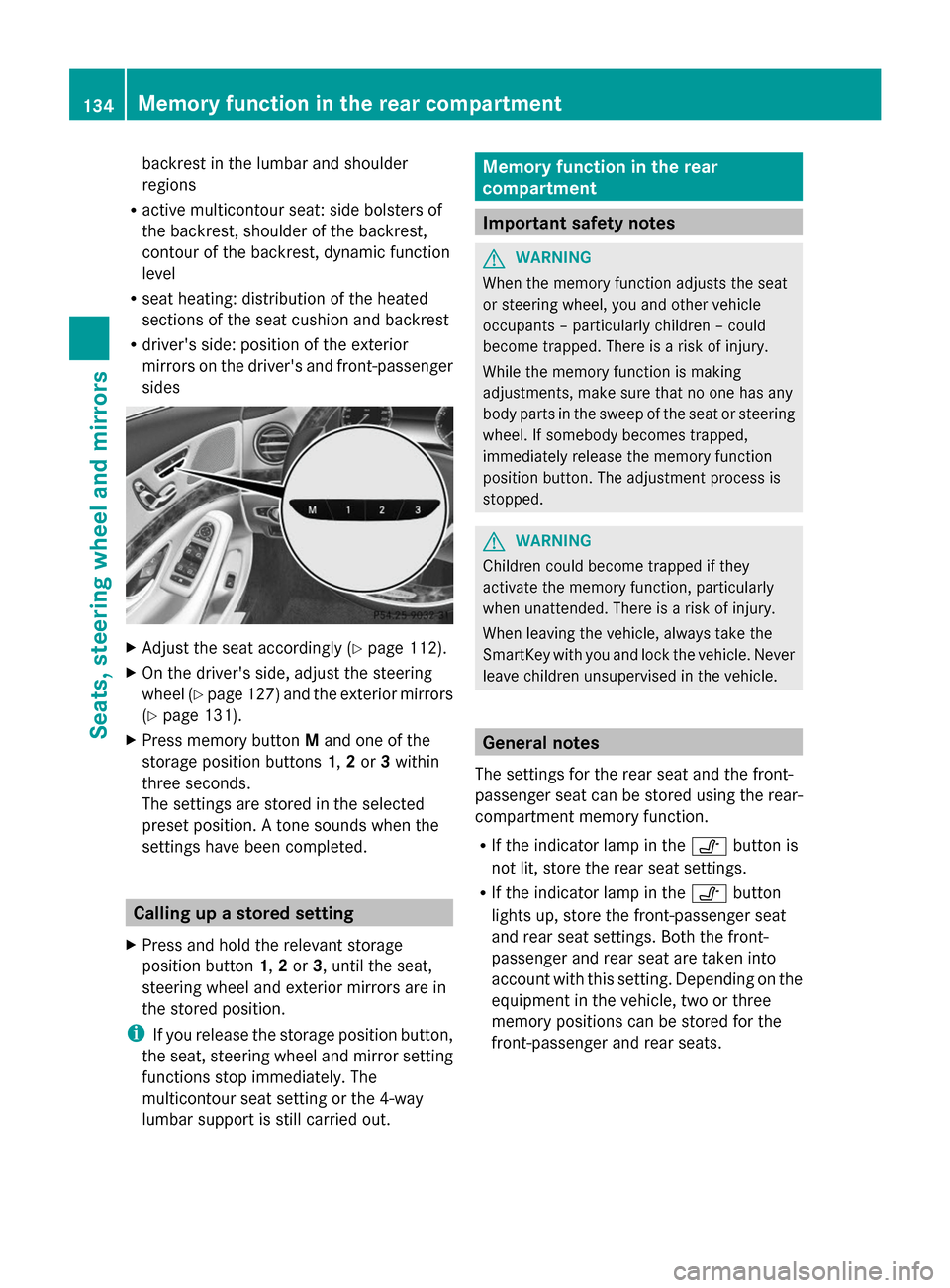
X Press memory button Mand one of the
storage position buttons 1,2or 3within
three seconds.
The settings are stored in the selected
preset position. A tone sounds when the
settings have been completed. Calling up a stored setting
X Press and hold the relevant storage
position button 1,2or 3, until the seat,
steering wheel and exterior mirrors are in
the stored position.
i If you release the storage position button,
the seat, steering wheel and mirror setting
functions stop immediately. The
multicontour seat setting or the 4-way
lumbar support is still carried out. Memory function in the rear
compartment
Important safety notes
G
WARNING
When the memory function adjusts the seat
or steering wheel, you and other vehicle
occupants – particularly children – could
become trapped. There is a risk of injury.
While the memory function is making
adjustments, make sure that no one has any
body parts in the sweep of the seat or steering
wheel. If somebody becomes trapped,
immediately release the memory function
position button. The adjustment process is
stopped. G
WARNING
Children could become trapped if they
activate the memory function, particularly
when unattended. There is a risk of injury.
When leaving the vehicle, always take the
SmartKey with you and lock the vehicle. Never
leave children unsupervised in the vehicle. General notes
The settings for the rear seat and the front-
passenger seat can be stored using the rear-
compartment memory function.
R If the indicator lamp in the 0095button is
not lit, store the rear seat settings.
R If the indicator lamp in the 0095button
lights up, store the front-passenger seat
and rear seat settings. Both the front-
passenger and rear seat are taken into
account with this setting. Depending on the
equipment in the vehicle, two or three
memory positions can be stored for the
front-passenger and rear seats. 134
Memory function in the rear compartmentSeats, steering
wheel and mirrors
Page 137 of 434
Storing settings
General notes With the memory function in the rear, you can
store up to three different settings, e.g. for
three different people.
The following settings are stored as a single
memory preset:
R position of the seat, backrest and head
restraint
R multicontour seat: the side bolsters of the
backrest as well as the contour of the
backrest in the lumbar and shoulder
regions
R seat heating: distribution of the heated
sections of the seat cushion and backrest
if the indicator lamp in the 0095button is
not lit.
The following settings are stored to a memory
position, if the indicator lamp in the 0095
button lights up:
R position of the footrest for the front-
passenger seat, if available
R position of the screen, if available
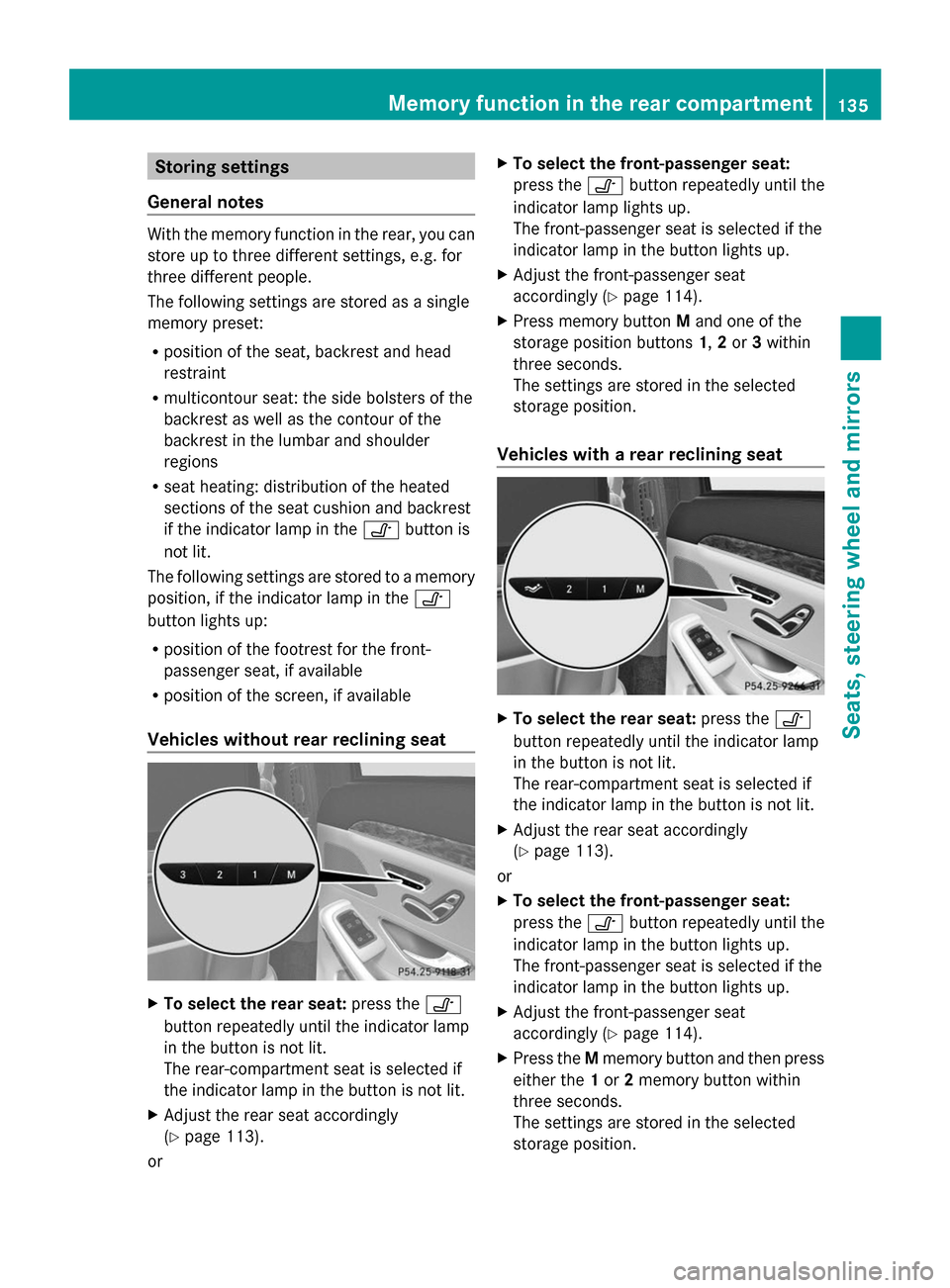
Vehicles without rear reclining seat X
To select the rear seat: press the0095
button repeatedly until the indicator lamp
in the button is not lit.
The rear-compartment seat is selected if
the indicator lamp in the button is not lit.
X Adjust the rear seat accordingly
(Y page 113).
or X
To select the front-passenger seat:
press the 0095button repeatedly until the
indicator lamp lights up.
The front-passenger seat is selected if the
indicator lamp in the button lights up.
X Adjust the front-passenger seat
accordingly (Y page 114).
X Press memory button Mand one of the
storage position buttons 1,2or 3within
three seconds.
The settings are stored in the selected
storage position.
Vehicles with a rear reclining seat X
To select the rear seat: press the0095
button repeatedly until the indicator lamp
in the button is not lit.
The rear-compartment seat is selected if
the indicator lamp in the button is not lit.
X Adjust the rear seat accordingly
(Y page 113).
or
X To select the front-passenger seat:
press the 0095button repeatedly until the
indicator lamp in the button lights up.
The front-passenger seat is selected if the
indicator lamp in the button lights up.
X Adjust the front-passenger seat
accordingly (Y page 114).
X Press the Mmemory button and then press
either the 1or 2memory button within
three seconds.
The settings are stored in the selected
storage position. Memory function in the rear compartment
135Seats, steering wheel and mirrors Z
Page 138 of 434
You cannot store any settings on the button
for setting the reclined position.
The memory positions in the area for the
chauffeur mode can only be set when the
conditions for the chauffeur mode are fulfilled
(Y page 117). Calling up a stored setting
Vehicles without rear reclining seat X
Press and hold the relevant storage
position button 1,2or 3until the rear seat
or the front-passenger seat are in the
stored position.
i The seat adjustment procedure is
interrupted as soon as you release the
storage position button. The multicontour
seat setting or the 4-way lumbar support is
still carried out.
Vehicles with a rear reclining seat X
Press and hold the relevant storage
position button 1or 2until the rear seat or
the front-passenger seat is in the stored
position.
i The seat adjustment procedure is
interrupted as soon as you release the
storage position button. The multicontour
seat setting or the 4-way lumbar support is
still carried out. 136
Memory function in the rear compartmentSeats, steering wheel and mirrors