2014 MERCEDES-BENZ S-Class display
[x] Cancel search: displayPage 161 of 434
display in the rear-compartment display goes
out. The function which has not been changed
manually, however, continues to be
controlled automatically. When the manually
set function switches back to automatic
mode, the AUTO
AUTO display reappears in the rear-
compartment display. Adjusting the climate mode settings
In automatic mode you can select the
following airflow settings for the driver's and
front-passenger areas:
FOCUS high airflow that is set slightly cooler
MEDIUM medium airflow, standard setting
DIFFUS Elow airflow that is set slightly
warmer and with less of a draft
X To set: set the climate mode using
COMAND (see the separate operating
instructions). Setting the temperature
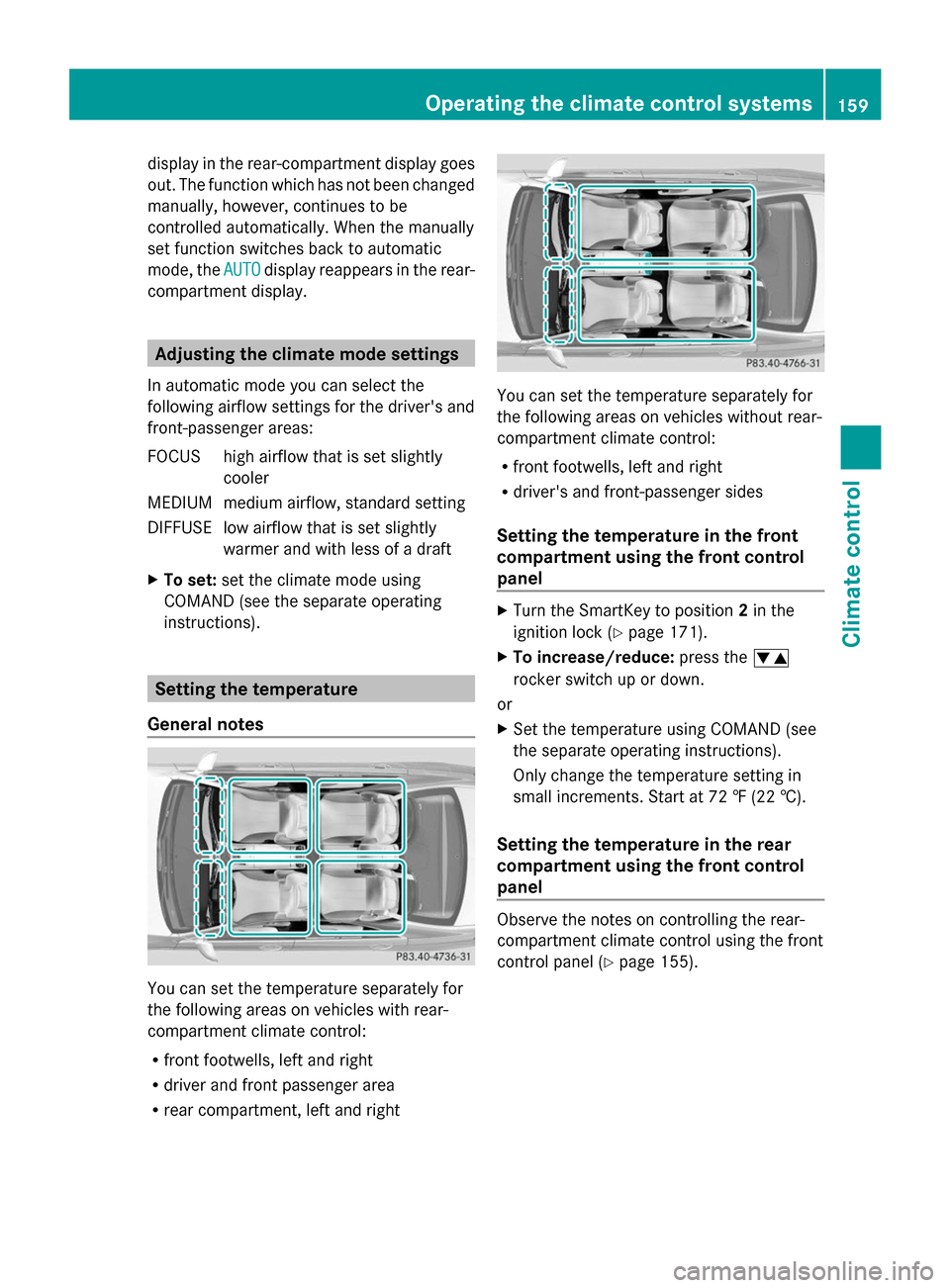
General notes You can set the temperature separately for
the following areas on vehicles with rear-
compartment climate control:
R
front footwells, left and right
R driver and front passenger area
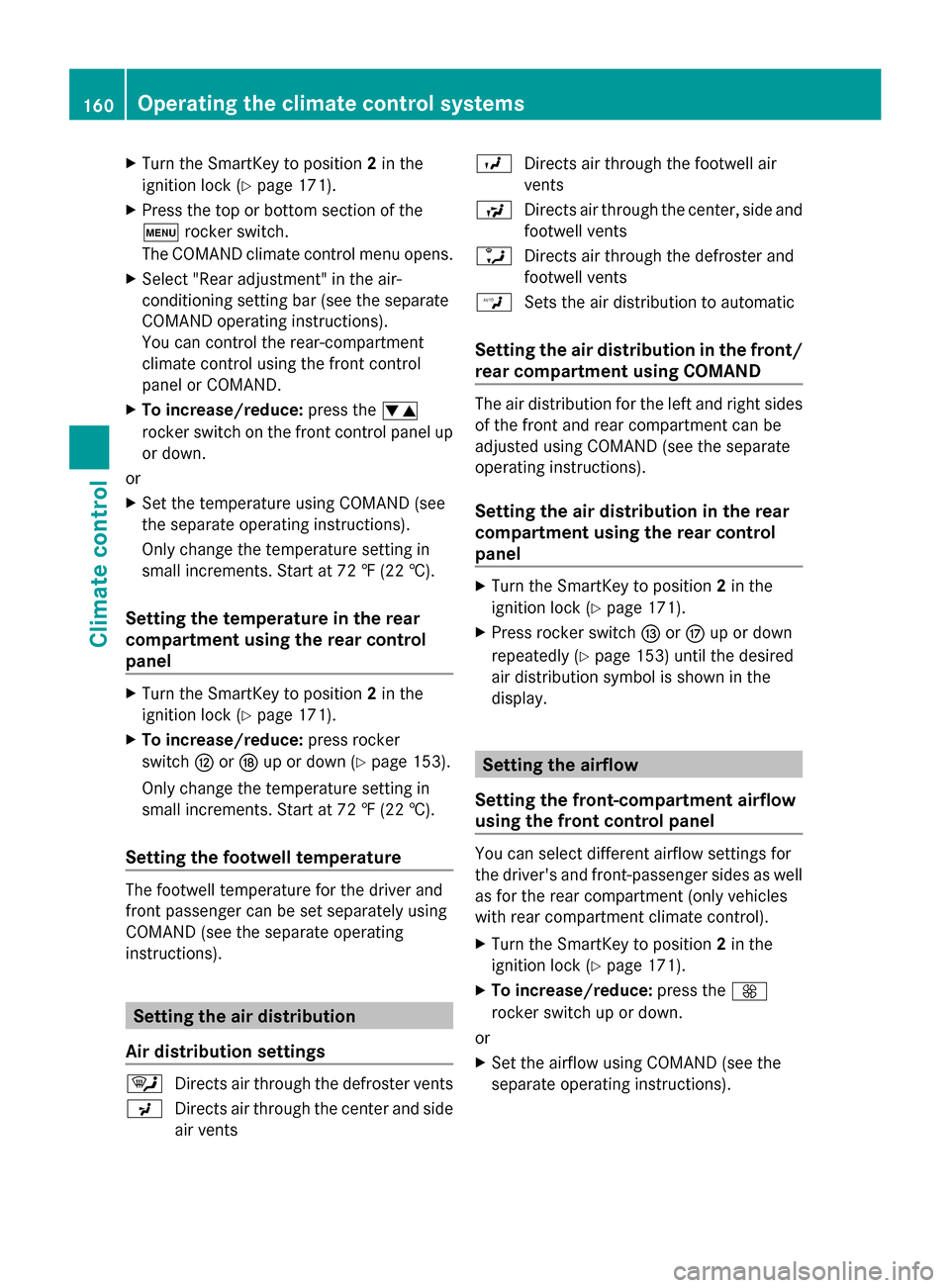
R rear compartment, left and right You can set the temperature separately for
the following areas on vehicles without rear-
compartment climate control:
R
front footwells, left and right
R driver's and front-passenger sides
Setting the temperature in the front
compartment using the front control
panel X
Turn the SmartKey to position 2in the
ignition lock (Y page 171).
X To increase/reduce: press the0082
rocker switch up or down.
or
X Set the temperature using COMAND (see
the separate operating instructions).
Only change the temperature setting in
small increments. Start at 72 ‡ (22 †).
Setting the temperature in the rear
compartment using the front control
panel Observe the notes on controlling the rear-
compartment climate control using the front
control panel (Y
page 155). Operating the climate control systems
159Climate control
Page 162 of 434
X
Turn the SmartKey to position 2in the
ignition lock (Y page 171).
X Press the top or bottom section of the
008A rocker switch.
The COMAND climate control menu opens.
X Select "Rear adjustment" in the air-
conditioning setting bar (see the separate
COMAND operating instructions).
You can control the rear-compartment
climate control using the front control
panel or COMAND.
X To increase/reduce: press the0082
rocker switch on the front control panel up
or down.
or
X Set the temperature using COMAND (see
the separate operating instructions).
Only change the temperature setting in
small increments. Start at 72 ‡ (22 †).
Setting the temperature in the rear
compartment using the rear control
panel X
Turn the SmartKey to position 2in the
ignition lock (Y page 171).
X To increase/reduce: press rocker
switch 0070or0076 up or down (Y page 153).
Only change the temperature setting in
small increments. Start at 72 ‡ (22 †).
Setting the footwell temperature The footwell temperature for the driver and
front passenger can be set separately using
COMAND (see the separate operating
instructions). Setting the air distribution
Air distribution settings 0061
Directs air through the defroster vents
009C Directs air through the center and side
air vents 009B
Directs air through the footwell air
vents
009F Directs air through the center, side and
footwell vents
0086 Directs air through the defroster and
footwell vents
00A2 Sets the air distribution to automatic
Setting the air distribution in the front/
rear compartment using COMAND The air distribution for the left and right sides
of the front and rear compartment can be
adjusted using COMAND (see the separate
operating instructions).
Setting the air distribution in the rear
compartment using the rear control
panel X
Turn the SmartKey to position 2in the
ignition lock (Y page 171).
X Press rocker switch 0071or0075 up or down
repeatedly (Y page 153) until the desired
air distribution symbol is shown in the
display. Setting the airflow
Setting the front-compartment airflow
using the front control panel You can select different airflow settings for
the driver's and front-passenger sides as well
as for the rear compartment (only vehicles
with rear compartment climate control).
X
Turn the SmartKey to position 2in the
ignition lock (Y page 171).
X To increase/reduce: press the0097
rocker switch up or down.
or
X Set the airflow using COMAND (see the
separate operating instructions). 160
Operating the climate control systemsClimate control
Page 163 of 434
Setting the rear compartment airflow
using the front control panel Observe the notes on controlling the rear-
compartment climate control using the front
control panel (Y page 155).
X Turn the SmartKey to position 2in the
ignition lock (Y page 171).
X Press the top or bottom section of the
008A rocker switch.
The COMAND climate control menu opens.
X Select "Rear adjustment" in the air-
conditioning setting bar (see the separate
COMAND operating instructions).
You can control the rear-compartment
climate control using the front control
panel or COMAND.
X To increase/reduce: press the0097
rocker switch on the front control panel up
or down.
or
X Set the airflow using COMAND (see the
separate operating instructions).
Setting the rear compartment airflow
using the rear control panel X
Turn the SmartKey to position 2in the
ignition lock (Y page 171).
X To increase/reduce: press rocker switch
0073 up or down (Y page 153). Switching the synchronization
function on/off
Climate control can be set centrally using the
synchronization function. The settings for
temperature, air distribution and airflow on
the driver's side are adopted for the front-
passenger side and the rear compartment
(vehicles with rear-compartment air
conditioning).
X To activate/deactivate: switch the
synchronization function on or off using COMAND (see the separate operating
instructions).
Vehicles with rear-compartment air
conditioning: the
SYNC
SYNC display appears on
the rear-compartment display.
The synchronization function is deactivated:
R if the settings for the front-passenger side
are changed
R vehicles with rear-compartment air
conditioning: the settings for the rear
compartment are changed. Defrosting the windshield
You can use this function to defrost the
windshield or to defrost the inside of the
windshield and the front side windows.
Switch off the "Windshield defrosting"
function as soon as the windshield is clear
again.
X Turn the SmartKey to position 2in the
ignition lock (Y page 171).
X To activate: press the0064rocker switch
on the front control unit up or down.
The indicator lamp in the 0064rocker
switch lights up.
The climate control system switches to the
following functions:
R high airflow
R high temperature
R air distribution to the windshield and
front side windows
R air-recirculation mode off
R windshield heating on
X To deactivate: press the0064rocker
switch up or down.
The indicator lamp in the 0064rocker
switch goes out. The previously selected
settings are restored. Air-recirculation
mode remains deactivated.
or
X Press the 0058rocker switch up or down. Operating the climate control systems
161Climate control
Page 166 of 434
The heating or ventilation time depends on
the temperature that has been set.
Front control panel X
Turn the SmartKey to position 0in the
ignition lock or remove it (Y page 171).
X To activate: press the004Brocker switch
up or down.
The indicator lamp in the 004Brocker
switch lights up.
X To deactivate: press the004Brocker
switch up or down.
The indicator lamp in the 004Brocker
switch goes out.
i The blower will run at a low speed
regardless of the airflow setting.
i If you activate the residual heat function
at high temperatures, only the ventilation
will be activated. The blower runs at
medium speed.
Rear control panel X
Turn the SmartKey to position 0in the
ignition lock or remove it (Y page 171).
REST appears in the rear compartment
display.
X To activate: press rocker switch 0074up or
down (Y page 153).
The indicator lamp in rocker switch 0074
lights up.
X To deactivate: press rocker switch 0074up
or down (Y page 153).
The indicator lamp in rocker switch 0074goes
out. REST goes out on the rear
compartment display.
i If you do not activate the residual heat
function, REST goes out automatically after
five minutes on the rear compartment
display. Residual heat is deactivated automatically:
R
after approximately 30 minutes if the
residual heat function is activated in the
front or rear compartment
R after approximately 15 minutes if the
residual heat function is activated in the
front and rear compartments
R when the ignition is switched on
R if the battery voltage drops Perfume atomizer
Operating the perfume atomizer G
WARNING
If children open the perfume vial, they could
drink the perfume or it could come into
contact with their eyes. There is a risk of
injury. Do not leave children unsupervised in
the vehicle.
If the perfume liquid has been drunk, consult
a doctor. If perfume comes into contact with
your eyes or skin, rinse the eyes with clean
water. If you continue to experience
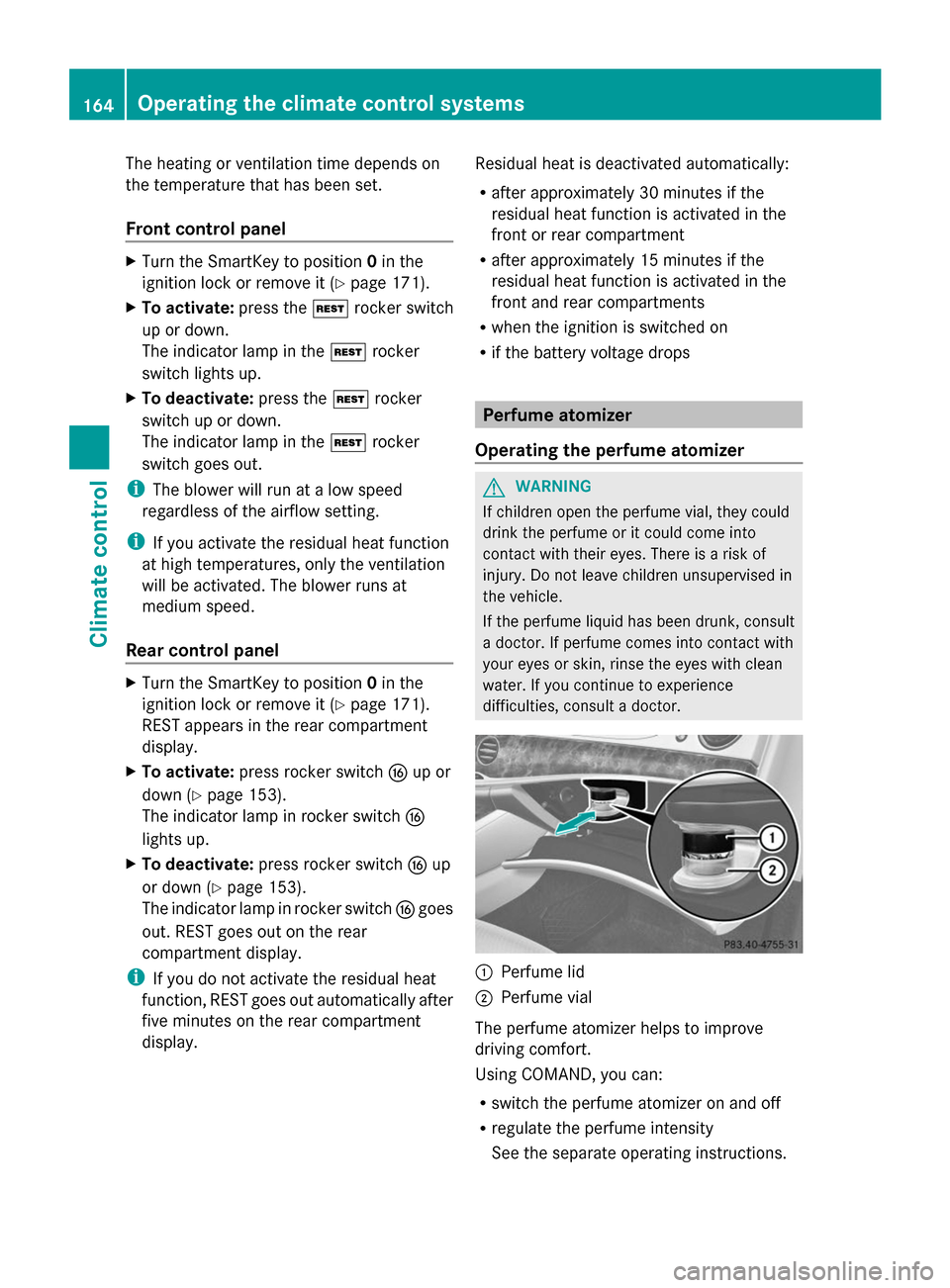
difficulties, consult a doctor. 0043
Perfume lid
0044 Perfume vial
The perfume atomizer helps to improve
driving comfort.
Using COMAND, you can:
R switch the perfume atomizer on and off
R regulate the perfume intensity
See the separate operating instructions. 164
Operating the climate control systemsClimate control
Page 176 of 434

Automatic transmission
X
Shift the transmission to position
P(Y page 179).
The transmission position display in the
multifunction display shows
P(Y page 181).
i You can also start the engine when the
transmission is in position N.
Starting procedure with the SmartKey X
Turn the SmartKey to position 3in the
ignition lock (Y page 171) and release it as
soon as the engine is running.
i To start the engine using the SmartKey
instead of the Start/Stop button, pull the
Start/Stop button out of the ignition lock.
Starting procedure with the Start/Stop
button You can start the engine if a valid SmartKey
is in the vehicle. Always take the SmartKey
with you when leaving the vehicle, even if you
only leave it for a short time. Pay attention to
the important safety notes.
X Depress the brake pedal and keep it
depressed.
X Press the Start/Stop button once
(Y page 171).
The engine starts.
i The Start/Stop button can be used to
start the vehicle manually without inserting
the SmartKey into the ignition lock. The
Start/Stop button must be inserted in the
ignition lock and the SmartKey must be in
the vehicle. This mode for starting the
engine operates independently of the ECO
start/stop automatic engine start function. Pulling away
Automatic transmission G
WARNING
If the engine speed is above the idling speed
and you engage transmission position Dor
R, the vehicle could pull away suddenly. There
is a risk of an accident.
When engaging transmission position Dor R,
always firmly depress the brake pedal and do
not simultaneously accelerate.
X Depress the brake pedal and keep it
depressed.
X Shift the transmission to position Dor R.
X Release the brake pedal.
X Carefully depress the accelerator pedal.
The electric parking brake (Y page 192) is
automatically released.
The red 0049(USA only) or 0024(Canada
only) indicator lamp in the instrument
cluster goes out.
i It is only possible to shift the transmission
from position Pto the desired position if
you depress the brake pedal. Only then is
the parking lock released. If you do not
depress the brake pedal, you can move the
DIRECT SELECT lever but the parking lock
remains engaged.
i The vehicle locks centrally once you have
pulled away. The locking knobs in the doors
drop down.
You can open the doors from the inside at
any time.
You can also deactivate the automatic
locking feature (Y page 92).
i Upshifts take place at higher engine
speeds after a cold start. This helps the
catalytic converter to reach its operating
temperature more quickly. 174
DrivingDriving and pa
rking
Page 177 of 434
Hill start assist
Hill start assist helps you when pulling away
forwards or in reverse on an uphill gradient.
It holds the vehicle for a short time after you
have removed your foot from the brake pedal.
This gives you enough time to move your foot
from the brake pedal to the accelerator pedal
and to depress it before the vehicle begins to
roll. G
WARNING
After a short time, hill start assist will no
longer brake your vehicle and it could roll
away. There is a risk of an accident and injury.
Therefore, quickly move your foot from the
brake pedal to the accelerator pedal. Never
leave the vehicle when it is held by hill start
assist.
X Remove your foot from the brake pedal.
The vehicle is then held for about a second.
X Pull away.
Hill start assist is not active if:
R you are pulling away on a level road or on
a downhill gradient.
R the transmission is in position N.
R the electric parking brake is applied.
R ESP ®
is malfunctioning. ECO start/stop function
Introduction The ECO start/stop function switches the
engine off automatically if the vehicle is
stopped under certain conditions.
The engine starts automatically when the
driver wants to pull away again. The ECO
start/stop function thereby helps you to
reduce the fuel consumption and emissions
of your vehicle. Important safety notes G
WARNING
If the engine is switched off automatically and
you exit the vehicle, the engine is restarted
automatically. The vehicle may begin moving.
There is a risk of accident and injury.
If you wish to exit the vehicle, always turn off
the ignition and secure the vehicle against
rolling away.
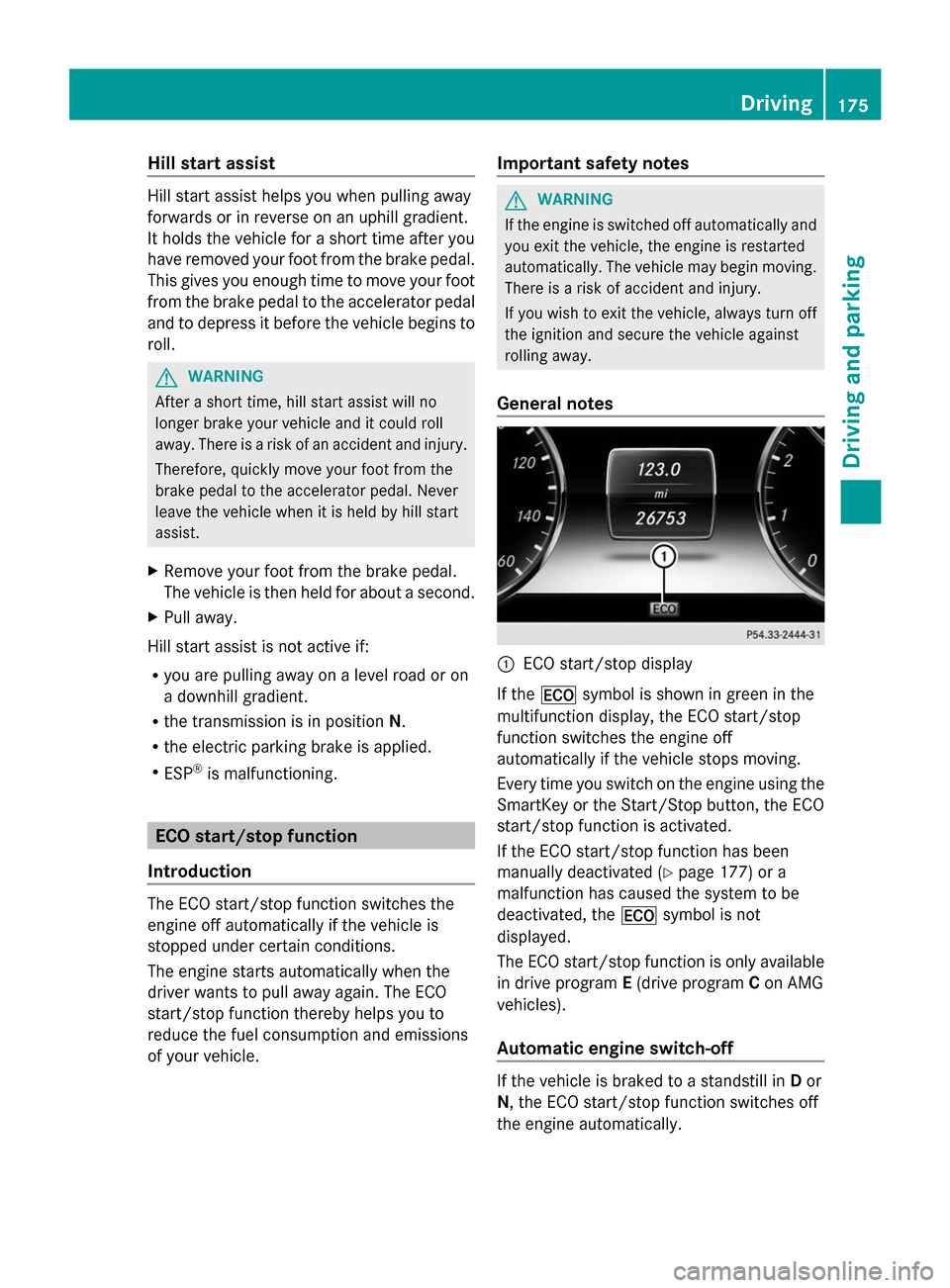
General notes 0043
ECO start/stop display
If the 00A7 symbol is shown in green in the
multifunction display, the ECO start/stop
function switches the engine off
automatically if the vehicle stops moving.
Every time you switch on the engine using the
SmartKey or the Start/Stop button, the ECO
start/stop function is activated.
If the ECO start/stop function has been
manually deactivated (Y page 177) or a
malfunction has caused the system to be
deactivated, the 00A7symbol is not
displayed.
The ECO start/stop function is only available
in drive program E(drive program Con AMG
vehicles).
Automatic engine switch-off If the vehicle is braked to a standstill in
Dor
N, the ECO start/stop function switches off
the engine automatically. Driving
175Driving and parking Z
Page 178 of 434
The ECO start/stop function is operational
and the
00A7symbol is displayed in green in
the multifunction display, if:
R the indicator lamp in the ECO button is lit
green.
R the outside temperature is within the range
that is suitable for the system.
R the engine is at normal operating
temperature.
R the set temperature for the vehicle interior
has been reached.
R the battery is sufficiently charged.
R the system detects that the windshield is
not fogged up when the air-conditioning
system is switched on.
R the hood is closed.
R the driver's door is closed and the driver's
seat belt is fastened.
If conditions for automatic engine switch-off
have not been fulfilled, the 00A7symbol will
be shown in yellow.
i All of the vehicle's systems remain active
when the engine has been stopped
automatically.
i The HOLD function can be activated if the
engine has been switched off
automatically. It is then not necessary to
continue applying the brakes during the
automatic stop phase. When you depress
the accelerator pedal, the engine starts
automatically and the braking effect of the
HOLD function is deactivated.
i All vehicles (apart from AMG
vehicles): automatic engine switch-off can
take place a maximum of four times
consecutively (initial stop then repeated
three times). The 00A7symbol is shown in
yellow in the multifunction display after the
engine has been started automatically for
the fourth time. When the 00A7symbol is
shown in green in the multifunction display,
automatic engine switch-off is again
possible. i
AMG vehicles: times which the engine
can be automatically switched off.
Automatic engine start The engine starts automatically if:
R
you switch off the ECO start/stop function
by pressing the ECO button.
R you switch to drive program Sor M.
R you release the brakes when in
transmission position Dor Nand when the
HOLD function is not active.
R you depress the accelerator pedal.
R you engage reverse gear R.
R you move the transmission out of position
P.
R you unfasten your seat belt or open the
driver's door.
R the vehicle starts to roll.
R the brake system requires this.
R the temperature in the vehicle interior
deviates from the set range.
R the system detects moisture on the
windshield when the air-conditioning
system is switched on.
R the charge level of the battery is too low.
i Shifting the transmission to position P
does not start the engine.
i If you shift the transmission from Rto D,
the ECO start/stop function is available
again once the 00A7symbol reappears in
green in the multifunction display. 176
DrivingDriving and parking
Page 179 of 434
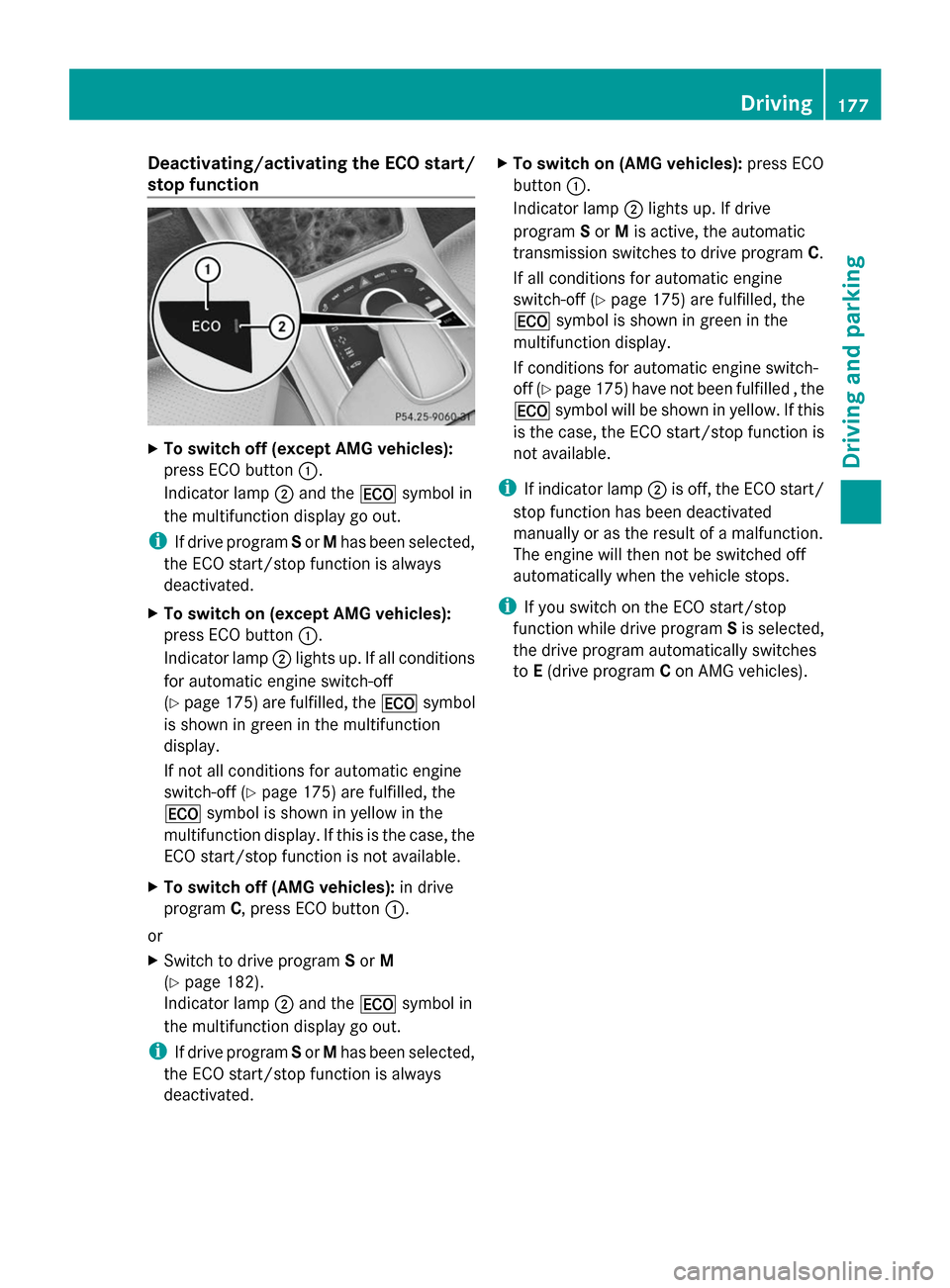
Deactivating/activating the ECO start/
stop function X
To switch off (except AMG vehicles):
press ECO button 0043.
Indicator lamp 0044and the 00A7symbol in
the multifunction display go out.
i If drive program Sor Mhas been selected,
the ECO start/stop function is always
deactivated.
X To switch on (except AMG vehicles):
press ECO button 0043.
Indicator lamp 0044lights up. If all conditions
for automatic engine switch-off
(Y page 175) are fulfilled, the 00A7symbol
is shown in green in the multifunction
display.
If not all conditions for automatic engine
switch-off (Y page 175) are fulfilled, the
00A7 symbol is shown in yellow in the
multifunction display. If this is the case, the
ECO start/stop function is not available.
X To switch off (AMG vehicles): in drive
program C, press ECO button 0043.
or
X Switch to drive program Sor M
(Y page 182).
Indicator lamp 0044and the 00A7symbol in
the multifunction display go out.
i If drive program Sor Mhas been selected,
the ECO start/stop function is always
deactivated. X
To switch on (AMG vehicles): press ECO
button 0043.
Indicator lamp 0044lights up. If drive
program Sor Mis active, the automatic
transmission switches to drive program C.
If all conditions for automatic engine
switch-off (Y page 175) are fulfilled, the
00A7 symbol is shown in green in the
multifunction display.
If conditions for automatic engine switch-
off (Y page 175) have not been fulfilled , the
00A7 symbol will be shown in yellow. If this
is the case, the ECO start/stop function is
not available.
i If indicator lamp 0044is off, the ECO start/
stop function has been deactivated
manually or as the result of a malfunction.
The engine will then not be switched off
automatically when the vehicle stops.
i If you switch on the ECO start/stop
function while drive program Sis selected,
the drive program automatically switches
to E(drive program Con AMG vehicles). Driving
177Driving and pa rking Z