2014 MERCEDES-BENZ S-Class display
[x] Cancel search: displayPage 70 of 434
seat according to the manufacturer's
instructions.
Top Tether
Top Tether provides an additional connection
between a child restraint system, secured
with a LATCH-type (ISOFIX) child seat mount,
and the rear seat. This helps reduce the risk
of injury even further. If the child restraint
system is equipped with a Top Tether belt,
this should always be used. G
WARNING
If the rear seat backrests are not locked, they
could fold forwards in the event of an
accident, heavy braking or sudden changes of
direction. As a result, child restraint systems
cannot perform their intended protective
function. Rear seat backrests that are not
locked can also cause additional injuries, e.g.
in the event of an accident. This poses an
increased risk of injury or even fatal injury.
Always lock rear seat backrests after
installing a Top Tether belt. Observe the lock
verification indicator. Adjust the rear seat
backrests so that they are positioned
vertically.
If the rear seat backrest is not engaged and
locked, this will be shown in the multifunction
display in the instrument cluster. A warning
tone also sounds. G
WARNING
Vehicles with electrically adjustable rear
bench seats:
If you adjust the seat after installing a child
restraint system:
R the seat belt could slacken or become too
tight
R the child restraint system could become
loose, incorrectly positioned or damaged
As a result, the child restraint system may not
be able to provide the intended level of
protection. This poses an increased risk of
injury or even fatal injury. Never adjust the seat after installing the child
restraint system.
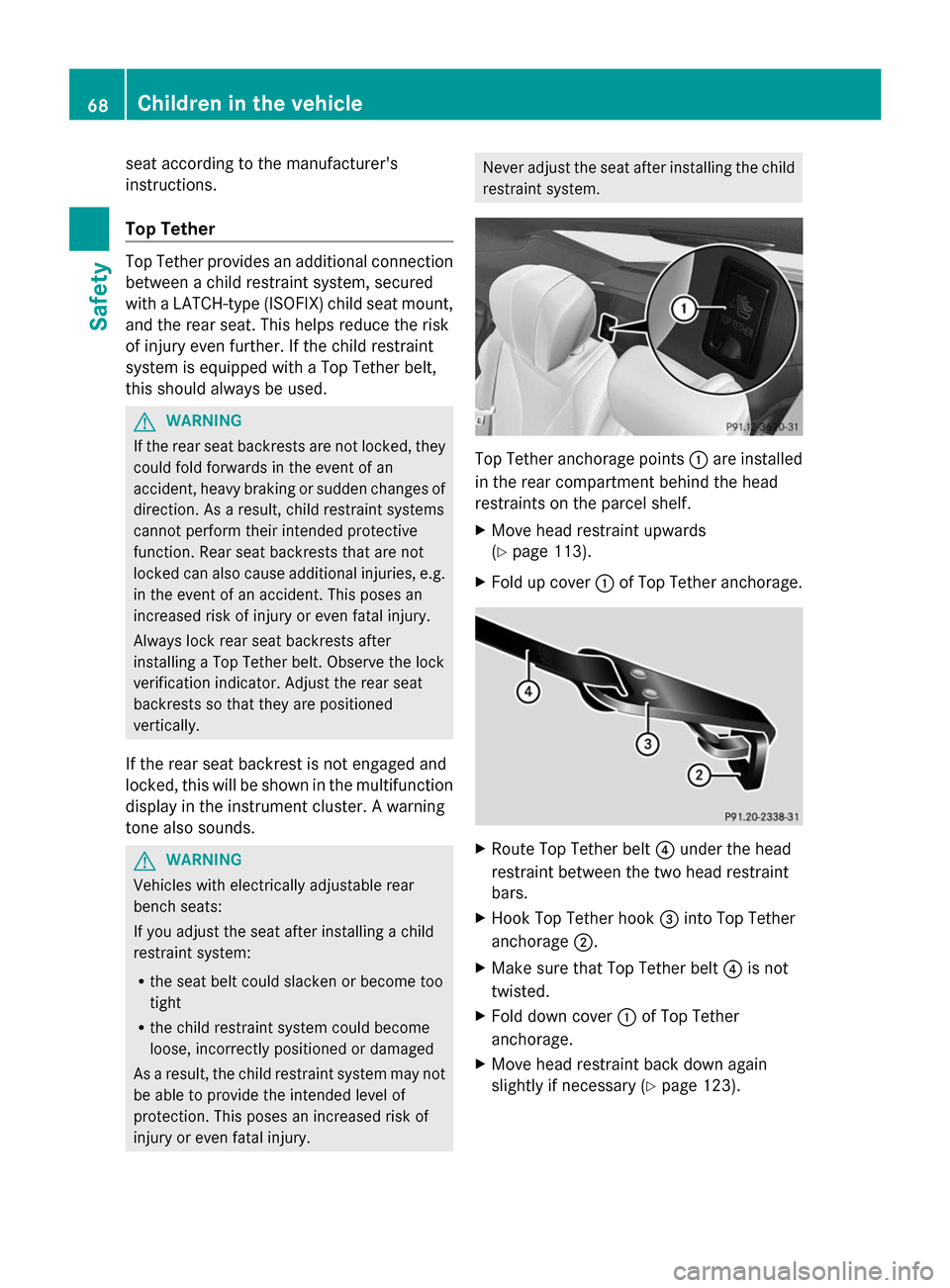
Top Tether anchorage points
0043are installed
in the rear compartment behind the head
restraints on the parcel shelf.
X Move head restraint upwards
(Y page 113).
X Fold up cover 0043of Top Tether anchorage. X
Route Top Tether belt 0085under the head
restraint between the two head restraint
bars.
X Hook Top Tether hook 0087into Top Tether
anchorage 0044.
X Make sure that Top Tether belt 0085is not
twisted.
X Fold down cover 0043of Top Tether
anchorage.
X Move head restraint back down again
slightly if necessary (Y page 123).68
Children in the vehicleSafety
Page 73 of 434

snow chains. Only in this way will the
driving safety systems described in this
section work as effectively as possible. ABS (Anti-lock Braking System)
General information ABS regulates brake pressure in such a way
that the wheels do not lock when you brake.
This allows you to continue steering the
vehicle when braking.
The 0025 ABS warning lamp in the instrument
cluster lights up when the ignition is switched
on. It goes out when the engine is running.
Important safety notes i
Observe the "Important safety notes"
section (Y page 70). G
WARNING
If ABS is faulty, the wheels could lock when
braking. The steerability and braking
characteristics may be severely impaired.
Additionally, further driving safety systems
are deactivated. There is an increased danger
of skidding and accidents.
Drive on carefully. Have ABS checked
immediately at a qualified specialist
workshop.
When ABS is malfunctioning, other systems,
including driving safety systems, will also
become inoperative. Observe the information
on the ABS warning lamp (Y page 304) and
display messages which may be shown in the
instrument cluster (Y page 266).
ABS works from a speed of about 5 mph
(8 km/h), regardless of road-surface
conditions. ABS works on slippery surfaces,
even when you only brake gently. Braking X
If ABS intervenes: continue to depress the
brake pedal vigorously until the braking
situation is over.
X To make a full brake application:
depress the brake pedal with full force.
If ABS intervenes when braking, you will feel
a pulsing in the brake pedal.
The pulsating brake pedal can be an
indication of hazardous road conditions, and
functions as a reminder to take extra care
while driving. BAS (Brake Assist System)
General information BAS operates in emergency braking
situations. If you depress the brake pedal
quickly, BAS automatically boosts the braking
force, thus shortening the stopping distance.
Important safety notes
i
Observe the "Important safety notes"
section (Y page 70). G
WARNING
If BAS is malfunctioning, the braking distance
in an emergency braking situation is
increased. There is a risk of an accident.
In an emergency braking situation, depress
the brake pedal with full force. ABS prevents
the wheels from locking.
Braking X
Keep the brake pedal firmly depressed until
the emergency braking situation is over.
ABS prevents the wheels from locking.
The brakes will function as usual once you
release the brake pedal. BAS is deactivated. Driving safety systems
71Safety Z
Page 76 of 434

Thus, the distance warning function cannot
provide a warning in all critical situations.
There is a risk of an accident.
Always pay careful attention to the traffic
situation and be ready to brake. G
WARNING
The distance warning function cannot always
clearly identify objects and complex traffic
situations.
In such cases, the distance warning function
may:
R give an unnecessary warning
R not give a warning
There is a risk of an accident.
Always pay careful attention to the traffic
situation and do not rely solely on the distance
warning function.
In particular, the detection of obstacles can
be impaired if:
R dirt on the sensors or anything else
covering the sensors
R there is snow or heavy rain
R there is interference by other radar sources
R there are strong radar reflections, for
example in parking garages
R a narrow vehicle traveling in front, e.g. a
motorbike
R a vehicle traveling in front on a different line
relative to the center of your vehicle
R new vehicles or after the COLLISION
PREVENTION ASSIST system has been
serviced
Observe the notes in the section on
breaking-in (Y page 170).
Following damage to the front end of the
vehicle, have the configuration and operation
of the radar sensor checked at a qualified
specialist workshop. This also applies to
collisions at low speeds where there is no
visible damage to the front of the vehicle. Function
X
To activate/deactivate: activate or
deactivate the distance warning function in
the on-board computer (Y page 261).
If the distance warning function is not
activated, the 00D4symbol appears in the
assistance graphics display.
The distance warning function can help you
to minimize the risk of a front-end collision
with a vehicle ahead or reduce the effects of
such a collision. If the distance warning
function detects that there is a risk of a
collision, you will be warned visually and
acoustically. The distance warning function
cannot prevent a collision without your
intervention.
Starting at a speed of around 4 mph
(7 km/h), the distance warning function
warns you if you rapidly approach a vehicle in
front. An intermittent warning tone will then
sound and the 00BAdistance warning lamp
will light up in the instrument cluster.
X Brake immediately in order to increase the
distance from the vehicle in front.
or
X Take evasive action, provided it is safe to
do so.
Due to the nature of the system, particularly
complicated but non-critical driving
conditions may also cause the system to
display a warning.
With the help of the radar sensor system, the
distance warning function can detect
obstacles that are in the path of your vehicle
for an extended period of time.
From a speed of around 40 mph (70 km/h),
the distance warning function can also react
to stationary obstacles, such as stopped or
parked vehicles.
If you approach an obstacle and the distance
warning function detects a risk of a collision,
the system will initially alert you both visually
and acoustically. 74
Driving safety systemsSafety
Page 78 of 434
of reacting to moving objects that have
already been recognized as such at least once
over the period of observation. Adaptive
Brake Assist does not react to stationary
obstacles. ESP
®
(Electronic Stability Program)
General notes i
Observe the "Important safety notes"
section (Y page 70).
ESP ®
monitors driving stability and traction,
i.e. power transmission between the tires and
the road surface.
If ESP ®
detects that the vehicle is deviating
from the direction desired by the driver, one
or more wheels are braked to stabilize the
vehicle. The engine output is also modified to
keep the vehicle on the desired course within
physical limits. ESP ®
assists the driver when
pulling away on wet or slippery roads. ESP ®
can also stabilize the vehicle during braking.
ETS/4ETS (Electronic Traction System) i
Observe the "Important safety notes"
section (Y page 70).
ETS/4ETS traction control is part of ESP ®
.
Traction control brakes the drive wheels
individually if they spin. This enables you to
pull away and accelerate on slippery surfaces,
for example if the road surface is slippery on
one side. In addition, more drive torque is
transferred to the wheel or wheels with
traction.
Traction control remains active, even if you
deactivate ESP ®
.
Important safety notes G
WARNING
If ESP ®
is malfunctioning, ESP ®
is unable to
stabilize the vehicle. Additionally, further
driving safety systems are deactivated. This
increases the risk of skidding and an accident. Drive on carefully. Have ESP
®
checked at a
qualified specialist workshop.
! Vehicles with 4MATIC: switch off the
ignition when the electric parking brake is
being tested on a brake dynamometer.
Application of the brakes by ESP ®
may
otherwise destroy the brake system.
Vehicles without 4MATIC: observe the notes
on ESP ®
(Y page 377) when towing the
vehicle with a raised rear axle.
ESP ®
is deactivated if the 00BBwarning lamp
in the instrument cluster lights up
continuously when the engine is running.
If the 00E5 warning lamp lights up
continuously, ESP ®
is not available due to a
malfunction.
Observe the information on warning lamps
(Y page 305) and display messages which
may be shown in the instrument cluster
(Y page 266).
i Only use wheels with the recommended
tire sizes. Only then will ESP ®
function
properly.
Characteristics of ESP ® General information
If the
00E5 ESP warning lamp goes out before
beginning the journey, ESP ®
is automatically
active.
If ESP ®
intervenes, the 00E5ESP®
warning
lamp flashes in the instrument cluster.
If ESP ®
intervenes:
X Do not deactivate ESP ®
under any
circumstances.
X Only depress the accelerator pedal as far
as necessary when pulling away.
X Adapt your driving style to suit the
prevailing road and weather conditions. 76
Driving safety systemsSafety
Page 80 of 434

when driving straight ahead or cornering
gently.
Important safety notes
Crosswind driving assistance does not work
if ESP ®
is deactivated or disabled because of
a malfunction. EBD (electronic brake force
distribution)
General information EBD monitors and controls the brake
pressure on the rear wheels to improve
driving stability while braking.
Important safety notes i
Observe the "Important safety notes"
section (Y page 70). G
WARNING
If EBD has malfunctioned, the rear wheels can
still lock, e.g. under full braking. This
increases the risk of skidding and an accident.
You should therefore adapt your driving style
to the different handling characteristics. Have
the brake system checked at a qualified
specialist workshop.
Observe information regarding indicator and
warning lamps ( Ypage 304) as well as
display messages (Y page 269).ADAPTIVE BRAKE
ADAPTIVE BRAKE enhances braking safety
and offers increased braking comfort. In
addition to the braking function, ADAPTIVE
BRAKE also has the HOLD function
(Y page 212) and hill start assist
(Y page 175). PRE-SAFE
®
Brake
General information i
Pay attention to the important safety
notes in the "Driving safety systems"
section (Y page 70).
PRE-SAFE ®
Brake is only available for
vehicles with the Driving Assistance package.
For PRE-SAFE ®
Brake to assist you when
driving, the radar sensor system and the
camera system must be switched on and be
operational.
With the help of the radar sensor system and
the camera system, PRE-SAFE ®
Brake can
detect obstacles that are in front of your
vehicle for an extended period of time.
In addition, pedestrians in the path of your
vehicle can be detected.
PRE-SAFE ®
Brake detects pedestrians using
typical characteristics such as the body
contours and posture of a person standing
upright.
i Observe the restrictions described in the
"Important safety notes"
section“ (Y page 78).
PRE-SAFE ®
Brake can help you to minimize
the risk of a collision with a vehicle ahead or
a pedestrian, and reduce the effects of such
a collision. If PRE-SAFE ®
Brake has detected
a risk of collision, you will be warned visually
and acoustically as well as by automatic
braking.
Important safety notes G
WARNING
PRE-SAFE ®
Brake will initially brake your
vehicle by a partial application of the brakes
if a danger of collision is detected. There may
be a collision unless you brake yourself. Even
after subsequent full application of the brakes
a collision cannot always be avoided,
particularly when approaching at too high a
speed. There is a risk of an accident. 78
Driving safety systemsSafety
Page 82 of 434

system checked at a qualified specialist
workshop.
Function X
To activate/deactivate: activate or
deactivate PRE-SAFE ®
Brake in the on-
board computer (Y page 260).
If the PRE-SAFE ®
Brake is not activated, the
00D4 symbol appears in the multifunction
display.
Starting at a speed of around 4 mph
(7 km/h), this function warns you if you
rapidly approach a vehicle in front. An
intermittent warning tone will then sound and
the 00BA distance warning lamp will light up
in the instrument cluster.
X Brake immediately to defuse the situation.
or
X Take evasive action provided it is safe to do
so.
i If there is an increased risk of collision,
preventive passenger protection measures
(PRE-SAFE ®
) are activated.
If the risk of collision with the vehicle in front
remains and you do not brake, take evasive
action or accelerate significantly, the vehicle
may perform automatic emergency braking,
up to the point of full brake application.
Automatic emergency braking is not
performed until immediately prior to an
imminent accident.
You can prevent the intervention of the PRE-
SAFE ®
Brake at any time by:
R depressing the accelerator pedal further
R activating kickdown.
R releasing the brake pedal
The braking action of PRE-SAFE ®
Brake is
ended automatically if:
R you maneuver to avoid the obstacle.
R there is no longer a risk of collision.
R there is no longer an obstacle detected in
front of your vehicle. STEER CONTROL
General information STEER CONTROL helps you by transmitting a
noticeable steering force to the steering
wheel in the direction required for vehicle
stabilization.
This steering assistance is provided in
particular if:
R
both right wheels or both left wheels are on
a wet or slippery road surface when you
brake.
R the vehicle starts to skid.
Important safety notes i
Observe the "Important safety notes"
section (Y page 70).
No steering support is provided from STEER
CONTROL, if:
R ESP ®
is malfunctioning.
R the steering is malfunctioning.
Power steering will, however, continue to
function. Theft deterrent locking system
Immobilizer
The immobilizer prevents your vehicle from
being started without the correct SmartKey.
X To activate with the SmartKey: remove
the SmartKey from the ignition lock.
X To activate with KEYLESS-GO: switch the
ignition off and open the driver's door.
X To deactivate: switch on the ignition.
When leaving the vehicle, always take the
SmartKey with you and lock the vehicle.
Anyone can start the engine if a valid
SmartKey has been left inside the vehicle.
i The immobilizer is always deactivated
when you start the engine.
In the event that the engine cannot be
started when the starter battery is fully 80
Theft deterrent locking systemSafety
Page 112 of 434

Useful information
i This Operator's Manual describes all
models and all standard and optional
equipment of your vehicle available at the
time of publication of the Operator's
Manual. Country-specific differences are
possible. Please note that your vehicle may
not be equipped with all features
described. This also applies to safety-
related systems and functions.
i Read the information on qualified
specialist workshops: (Y page 27).Correct driver's seat position
G
WARNING
You could lose control of your vehicle if you
do the following while driving:
R adjust the driver's seat, head restraint,
steering wheel or mirrors
R fasten the seat belt
There is a risk of an accident.
Adjust the driver's seat, head restraint,
steering wheel and mirror and fasten your
seat belt before starting the engine. X
Observe the safety guidelines on seat
adjustment (Y page 111).
X Check whether you have adjusted seat 0087
properly (Y page 112).
When adjusting the seat, make sure that:
R you are as far away from the driver's air bag
as possible.
R you are sitting in a normal upright position.
R you can fasten the seat belt properly.
R you have moved the backrest to an almost
vertical position.
R you have set the seat cushion angle so that
your thighs are gently supported.
R you can depress the pedals properly.
X Check whether the head restraint is
adjusted properly.
When doing so, make sure that you have
adjusted the head restraint so that the back
of your head is supported at eye level by
the center of the head restraint.
X Observe the safety guidelines on steering
wheel adjustment (Y page 127).
X Make sure that steering wheel 0043is
adjusted properly (Y page 127).
When adjusting the steering wheel, make
sure that:
R you can hold the steering wheel with your
arms slightly bent.
R you can move your legs freely.
R you can see all the displays in the
instrument cluster clearly.
X Observe the safety guidelines for seat belts
(Y page 57).
X Check whether you have fastened seat
belt 0044properly (Y page 59).
The seat belt should:
R fit snugly across your body
R be routed across the middle of your
shoulder
R be routed in your pelvic area across the hip
joints 110
Correct driver's seat positionSeats, steering wheel and mirrors
Page 120 of 434

R
the front-passenger seat head restraint is
inserted and the ignition is switched on
R the front-passenger seat backrest is moved
backwards or the seat is moved in a
longitudinal direction out of the chauffeur
area (Y page 120).
Positioning the front-passenger seat for
chauffeur mode General notes
Pay attention to the important safety notes
(Y page 117). Adjust the seat for chauffeur
mode before the journey (Y page 118). Do not
remove the front-passenger seat head
restraint during the journey.
Adjusting from the rear compartment You can use the override button to disable
this function (Y page 69).
In order for the front-passenger seat to be
positioned in chauffeur mode:
R the front-passenger door must be closed
R the SmartKey must be in the ignition lock
and in position 1or 2(Y page 171)
R the front-passenger seat may not be
occupied
R the front-passenger seat belt must not be
inserted into the buckle X
To select the front-passenger seat:
press button 0043repeatedly until the
indicator lamp in the button lights up.
The front-passenger seat is selected if the
indicator lamp in the button lights up.
X Press button 0044forwards and hold it in this
position.
The seat moves forward.
The seat stops at the threshold of the area
for chauffeur mode.
X Release button 0044.
X Press and hold button 0044again until the
front-passenger seat is in position for
chauffeur mode.
The head restraint on the front-passenger
seat folds forwards. The seat moves
forward.
The To Toview
view the
theext.
ext. mirror,
mirror, adjust
adjust
front-passenger
front-passenger seat
seator
orremove
remove the
the
head
head restraint.
restraint. message appears in the
multifunction display (Y page 299).
i If the front-passenger seat is already at
the threshold to the area for the chauffeur
mode, the position for the chauffeur mode
is set immediately.
i The position for chauffeur mode can be
saved or set using the memory function of
the rear seat (Y page 135). For this the
indicator lamp on button 0043must be lit.
Adjusting from the driver's seat 118
SeatsSeats, steering
wheel and mirrors