2014 MERCEDES-BENZ S-Class reset
[x] Cancel search: resetPage 119 of 434
X
To select the rear seat: press button0043
repeatedly until the indicator lamp in the
button is not lit.
The rear-compartment seat is selected if
the indicator lamp in the button is not lit.
X Adjust the rear seats with buttons 0044to
006C.
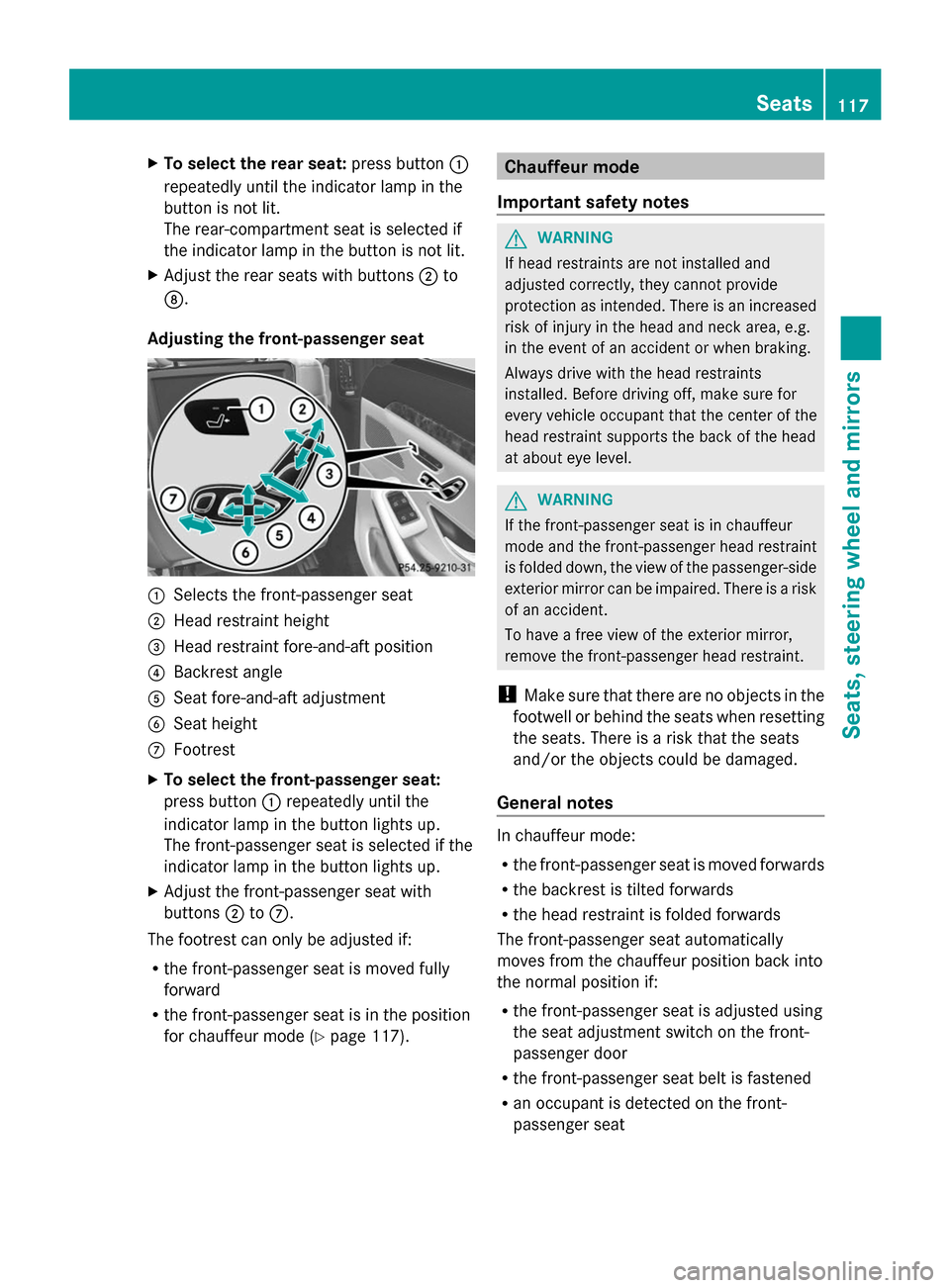
Adjusting the front-passenger seat 0043
Selects the front-passenger seat
0044 Head restraint height
0087 Head restraint fore-and-aft position
0085 Backrest angle
0083 Seat fore-and-aft adjustment
0084 Seat height
006B Footrest
X To select the front-passenger seat:
press button 0043repeatedly until the
indicator lamp in the button lights up.
The front-passenger seat is selected if the
indicator lamp in the button lights up.
X Adjust the front-passenger seat with
buttons 0044to006B.
The footrest can only be adjusted if:
R the front-passenger seat is moved fully
forward
R the front-passenger seat is in the position
for chauffeur mode (Y page 117). Chauffeur mode
Important safety notes G
WARNING
If head restraints are not installed and
adjusted correctly, they cannot provide
protection as intended. There is an increased
risk of injury in the head and neck area, e.g.
in the event of an accident or when braking.
Always drive with the head restraints
installed. Before driving off, make sure for
every vehicle occupant that the center of the
head restraint supports the back of the head
at about eye level. G
WARNING
If the front-passenger seat is in chauffeur
mode and the front-passenger head restraint
is folded down, the view of the passenger-side
exterior mirror can be impaired. There is a risk
of an accident.
To have a free view of the exterior mirror,
remove the front-passenger head restraint.
! Make sure that there are no objects in the
footwell or behind the seats when resetting
the seats. There is a risk that the seats
and/or the objects could be damaged.
General notes In chauffeur mode:
R
the front-passenger seat is moved forwards
R the backrest is tilted forwards
R the head restraint is folded forwards
The front-passenger seat automatically
moves from the chauffeur position back into
the normal position if:
R the front-passenger seat is adjusted using
the seat adjustment switch on the front-
passenger door
R the front-passenger seat belt is fastened
R an occupant is detected on the front-
passenger seat Seats
117Seats, steering wheel and mirrors Z
Page 133 of 434

Adjusting the exterior mirrors
X
Turn the SmartKey to position 1or 2in the
ignition lock (Y page 171).
X Press button 0044for the right-hand exterior
mirror or button 0087for the left-hand
exterior mirror.
The indicator lamp lights up in the button
that has been pressed.
The indicator lamp goes out again after
some time. You can adjust the selected
mirror using adjustment button 0043as long
as the indicator lamp is lit.
X Press adjustment button 0043up, down, or
to the left or right until you have adjusted
the exterior mirror to the correct position.
You should have a good overview of traffic
conditions.
The convex exterior mirrors provide a larger
field of vision.
After the engine has been started, the
exterior mirrors are automatically heated if
the rear window defroster is switched on and
the outside temperature is low. Folding the exterior mirrors in or out
electrically X
Turn the SmartKey to position 1or 2in the
ignition lock (Y page 171).
X Briefly press button 0043.
Both exterior mirrors fold in or out.
i Make sure that the exterior mirrors are
always folded out fully while driving. They
could otherwise vibrate.
i If you are driving faster than 30 mph
(47 km/h), you can no longer fold in the
exterior mirrors.
Setting the exterior mirrors If the battery has been disconnected or
completely discharged, the exterior mirrors
must be reset. The exterior mirrors will
otherwise not fold in when you select the
"Fold in mirrors when locking" function in the
on-board computer.
X
Turn the SmartKey to position 1or 2in the
ignition lock (Y page 171).
X Briefly press button 0043.
Folding the exterior mirrors in or out
automatically This function is only available in vehicles for
Canada.
When the "Automatic mirror folding" function
is activated in COMAND (see the separate
operating instructions): Mirrors
131Seats, steering wheel and mirrors Z
Page 134 of 434

R
the exterior mirrors fold in automatically as
soon as you lock the vehicle from the
outside.
R the exterior mirrors fold out automatically
again as soon as you unlock the vehicle.
i If the exterior mirrors have been folded in
manually, they do not fold out.
Exterior mirror pushed out of position This function is only available in vehicles for
Canada.
If an exterior mirror has been pushed out of
position, proceed as follows:
X Press and hold button 0043until you hear a
click and the mirror engages audibly into
position (Y page 131).
The mirror housing is engaged again and
you can adjust the exterior mirrors as usual
(Y page 131). Automatic anti-glare mirrors
The rear-view mirror and the exterior mirror
on the driver's side automatically go into anti-
glare mode if the following conditions are met
simultaneously:
R the ignition is switched on.
R incident light from headlamps strikes the
sensor in the rear-view mirror.
The mirrors do not go into anti-glare mode if
reverse gear is engaged or if the interior
lighting is switched on. Parking position for the exterior
mirror on the front-passenger side
Setting and storing the parking position Using reverse gear
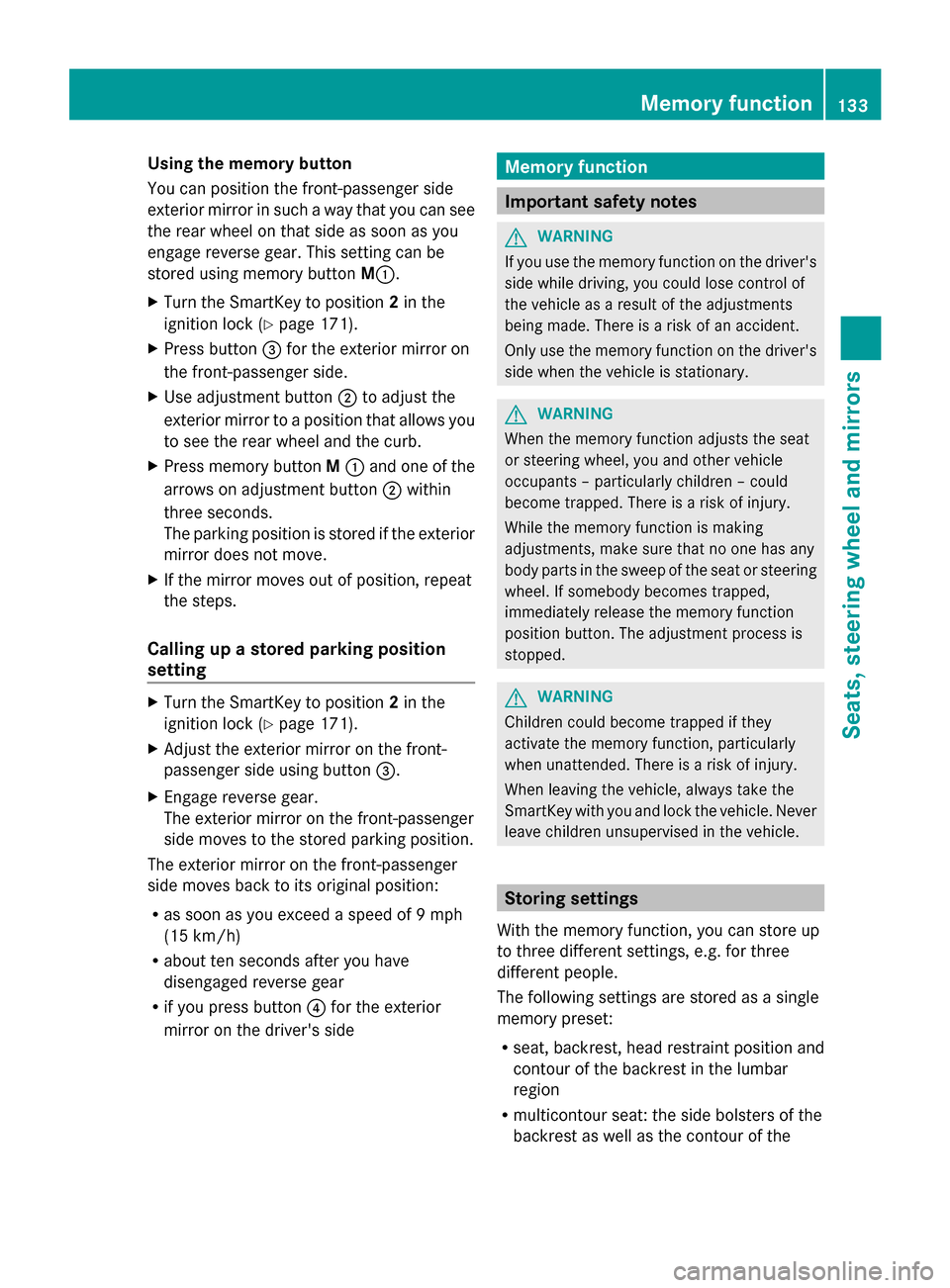
0043
Memory button M
0044 Adjustment button
0087 Button for the front-passenger side
exterior mirror
0085 Button for the driver's side exterior mirror
You can position the front-passenger side
exterior mirror in such a way that you can see
the rear wheel on that side as soon as you
engage reverse gear. You can store this
position.
X Turn the SmartKey to position 2in the
ignition lock ( Ypage 171).
X Press button 0087for the exterior mirror on
the front-passenger side.
X Engage reverse gear.
The exterior mirror on the front-passenger
side moves to the preset parking position.
X Use adjustment button 0044to adjust the
exterior mirror to a position that allows you
to see the rear wheel and the curb.
The parking position is stored.
i If you shift the transmission to another
position, the exterior mirror on the front-
passenger side returns to the driving
position. 132
MirrorsSeats, steering
wheel and mirrors
Page 135 of 434
Using the memory button
You can position the front-passenger side
exterior mirror in such a way that you can see
the rear wheel on that side as soon as you
engage reverse gear. This setting can be
stored using memory button M0043.
X Turn the SmartKey to position 2in the
ignition lock (Y page 171).
X Press button 0087for the exterior mirror on
the front-passenger side.
X Use adjustment button 0044to adjust the
exterior mirror to a position that allows you
to see the rear wheel and the curb.
X Press memory button M0043 and one of the
arrows on adjustment button 0044within
three seconds.
The parking position is stored if the exterior
mirror does not move.
X If the mirror moves out of position, repeat
the steps.
Calling up a stored parking position
setting X
Turn the SmartKey to position 2in the
ignition lock (Y page 171).
X Adjust the exterior mirror on the front-
passenger side using button 0087.
X Engage reverse gear.
The exterior mirror on the front-passenger
side moves to the stored parking position.
The exterior mirror on the front-passenger
side moves back to its original position:
R as soon as you exceed a speed of 9 mph
(15 km/h)
R about ten seconds after you have
disengaged reverse gear
R if you press button 0085for the exterior
mirror on the driver's side Memory function
Important safety notes
G
WARNING
If you use the memory function on the driver's
side while driving, you could lose control of
the vehicle as a result of the adjustments
being made. There is a risk of an accident.
Only use the memory function on the driver's
side when the vehicle is stationary. G
WARNING
When the memory function adjusts the seat
or steering wheel, you and other vehicle
occupants – particularly children – could
become trapped. There is a risk of injury.
While the memory function is making
adjustments, make sure that no one has any
body parts in the sweep of the seat or steering
wheel. If somebody becomes trapped,
immediately release the memory function
position button. The adjustment process is
stopped. G
WARNING
Children could become trapped if they
activate the memory function, particularly
when unattended. There is a risk of injury.
When leaving the vehicle, always take the
SmartKey with you and lock the vehicle. Never
leave children unsupervised in the vehicle. Storing settings
With the memory function, you can store up
to three different settings, e.g. for three
different people.
The following settings are stored as a single
memory preset:
R seat, backrest, head restraint position and
contour of the backrest in the lumbar
region
R multicontour seat: the side bolsters of the
backrest as well as the contour of the Memory function
133Seats, steering wheel and mirrors Z
Page 136 of 434
backrest in the lumbar and shoulder
regions
R active multicontour seat: side bolsters of
the backrest, shoulder of the backrest,
contour of the backrest, dynamic function
level
R seat heating: distribution of the heated
sections of the seat cushion and backrest
R driver's side: position of the exterior
mirrors on the driver's and front-passenger
sides X
Adjust the seat accordingly (Y page 112).
X On the driver's side, adjust the steering
wheel (Y page 127 )and the exterior mirrors
(Y page 131).
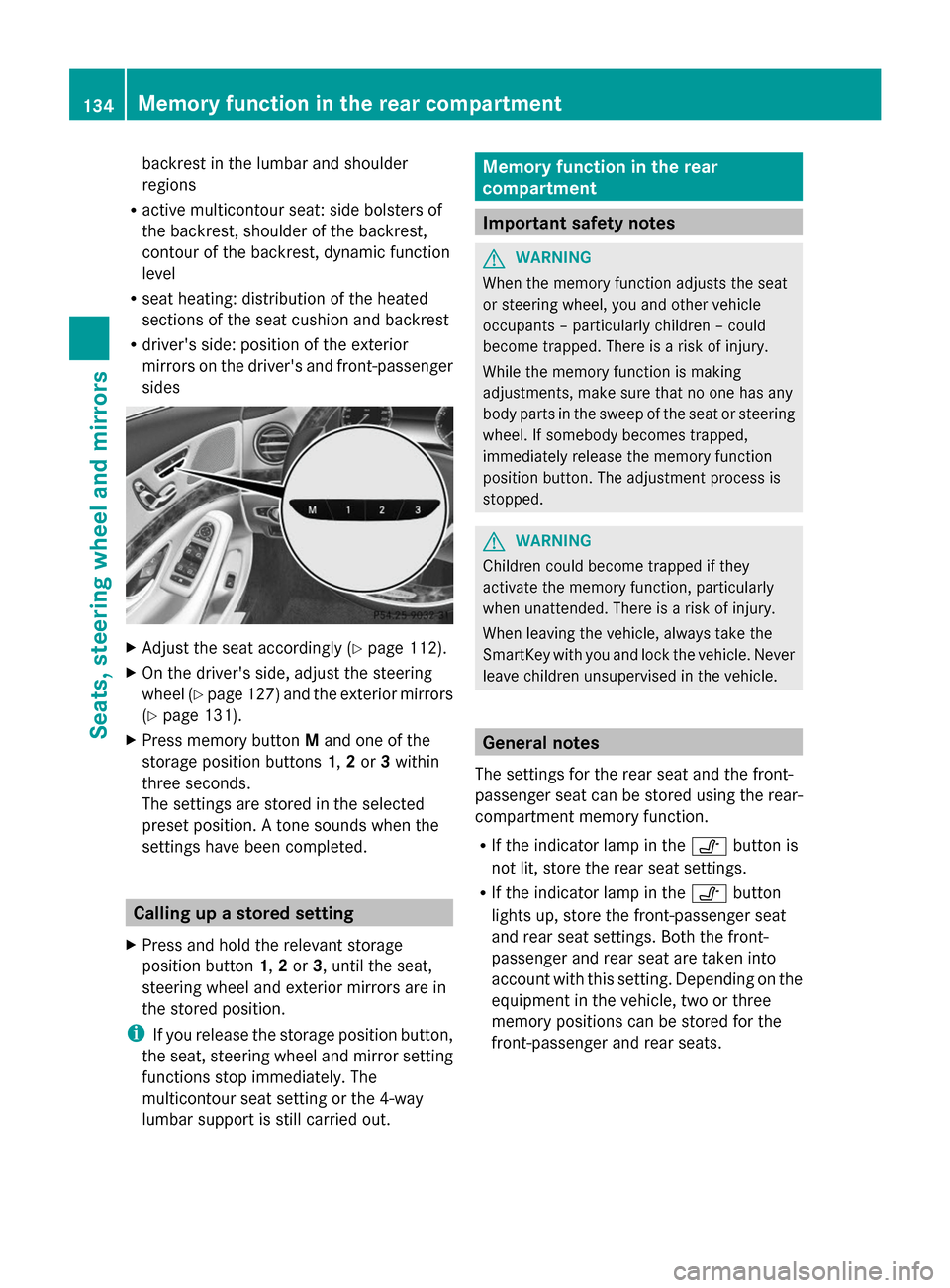
X Press memory button Mand one of the
storage position buttons 1,2or 3within
three seconds.
The settings are stored in the selected
preset position. A tone sounds when the
settings have been completed. Calling up a stored setting
X Press and hold the relevant storage
position button 1,2or 3, until the seat,
steering wheel and exterior mirrors are in
the stored position.
i If you release the storage position button,
the seat, steering wheel and mirror setting
functions stop immediately. The
multicontour seat setting or the 4-way
lumbar support is still carried out. Memory function in the rear
compartment
Important safety notes
G
WARNING
When the memory function adjusts the seat
or steering wheel, you and other vehicle
occupants – particularly children – could
become trapped. There is a risk of injury.
While the memory function is making
adjustments, make sure that no one has any
body parts in the sweep of the seat or steering
wheel. If somebody becomes trapped,
immediately release the memory function
position button. The adjustment process is
stopped. G
WARNING
Children could become trapped if they
activate the memory function, particularly
when unattended. There is a risk of injury.
When leaving the vehicle, always take the
SmartKey with you and lock the vehicle. Never
leave children unsupervised in the vehicle. General notes
The settings for the rear seat and the front-
passenger seat can be stored using the rear-
compartment memory function.
R If the indicator lamp in the 0095button is
not lit, store the rear seat settings.
R If the indicator lamp in the 0095button
lights up, store the front-passenger seat
and rear seat settings. Both the front-
passenger and rear seat are taken into
account with this setting. Depending on the
equipment in the vehicle, two or three
memory positions can be stored for the
front-passenger and rear seats. 134
Memory function in the rear compartmentSeats, steering
wheel and mirrors
Page 137 of 434
Storing settings
General notes With the memory function in the rear, you can
store up to three different settings, e.g. for
three different people.
The following settings are stored as a single
memory preset:
R position of the seat, backrest and head
restraint
R multicontour seat: the side bolsters of the
backrest as well as the contour of the
backrest in the lumbar and shoulder
regions
R seat heating: distribution of the heated
sections of the seat cushion and backrest
if the indicator lamp in the 0095button is
not lit.
The following settings are stored to a memory
position, if the indicator lamp in the 0095
button lights up:
R position of the footrest for the front-
passenger seat, if available
R position of the screen, if available
Vehicles without rear reclining seat X
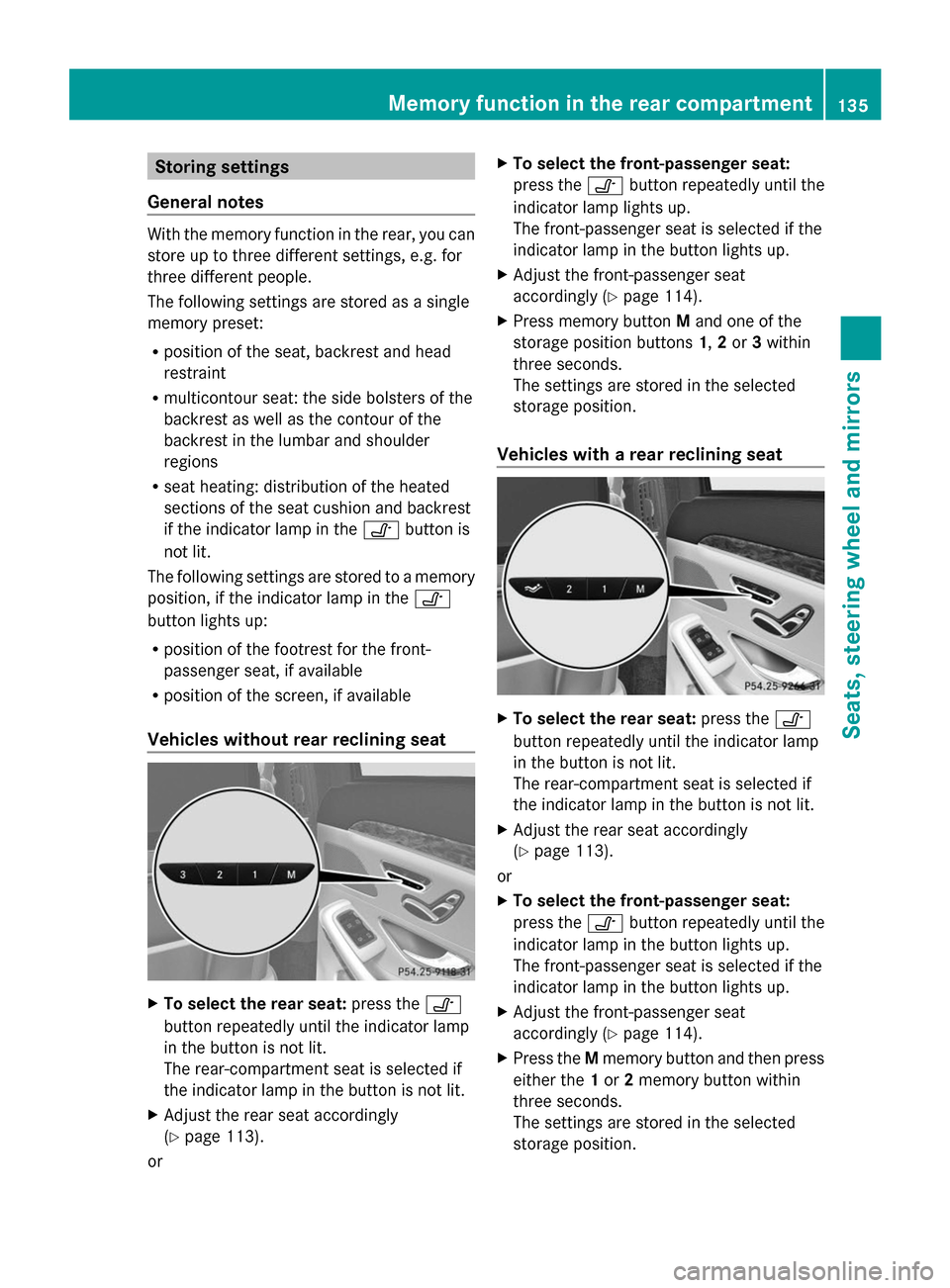
To select the rear seat: press the0095
button repeatedly until the indicator lamp
in the button is not lit.
The rear-compartment seat is selected if
the indicator lamp in the button is not lit.
X Adjust the rear seat accordingly
(Y page 113).
or X
To select the front-passenger seat:
press the 0095button repeatedly until the
indicator lamp lights up.
The front-passenger seat is selected if the
indicator lamp in the button lights up.
X Adjust the front-passenger seat
accordingly (Y page 114).
X Press memory button Mand one of the
storage position buttons 1,2or 3within
three seconds.
The settings are stored in the selected
storage position.
Vehicles with a rear reclining seat X
To select the rear seat: press the0095
button repeatedly until the indicator lamp
in the button is not lit.
The rear-compartment seat is selected if
the indicator lamp in the button is not lit.
X Adjust the rear seat accordingly
(Y page 113).
or
X To select the front-passenger seat:
press the 0095button repeatedly until the
indicator lamp in the button lights up.
The front-passenger seat is selected if the
indicator lamp in the button lights up.
X Adjust the front-passenger seat
accordingly (Y page 114).
X Press the Mmemory button and then press
either the 1or 2memory button within
three seconds.
The settings are stored in the selected
storage position. Memory function in the rear compartment
135Seats, steering wheel and mirrors Z
Page 172 of 434

Useful information
i This Operator's Manual describes all
models and all standard and optional
equipment of your vehicle available at the
time of publication of the Operator's
Manual. Country-specific differences are
possible. Please note that your vehicle may
not be equipped with all features
described. This also applies to safety-
related systems and functions.
i Read the information on qualified
specialist workshops: (Y page 27).Notes on breaking-in a new vehicle
Important safety notes
The sensors of certain drive and driving safety
systems automatically reset during driving for
a certain distance after the vehicle has been
delivered or after repairs have been carried
out. Complete system effectiveness is
reached only after completion of this teach-
in procedure.
New and replaced brake pads and discs only
reach their optimum braking effect after
several hundred kilometers of driving.
Compensate for this by applying greater force
to the brake pedal. The first 1000 miles(1500 km)
The more you look after the engine when it is
new, the more satisfied you will be with its
performance in the future.
R You should therefore drive at varying
vehicle and engine speeds for the first
1000 miles (1500 km).
R Avoid heavy loads, e.g. driving at full
throttle, during this period.
R When shifting gears manually, upshift in
good time, before the tachometer needle
reaches 00C3of the way to the red area of the
tachometer. R
Do not manually shift to a lower gear to
brake the vehicle.
R Try to avoid depressing the accelerator
pedal beyond the point of resistance
(kickdown).
R All vehicles (except AMG vehicles):
ideally, for the first 1,000 miles (1,500 km),
drive in program E.
After 1000 miles (1500 km), you can increase
the engine speed gradually and accelerate
the vehicle to full speed.
Additional breaking-in notes for AMG
vehicles:
R Do not drive faster than 85 mph
(140 km/h) for the first 1,000 miles
(1,500 km).
R Only allow the engine to reach a maximum
engine speed of 4,500 rpm briefly.
R Change gear in good time.
R Ideally, for the first 1,000 miles (1,500 km),
drive in program C.
You should also observe these notes on
breaking in if the engine or parts of the drive
train on your vehicle have been replaced.
Always observe the respective speed limits. Driving
Important safety notes
G
WARNING
Objects in the driver's footwell can restrict the
pedal travel or obstruct a depressed pedal.
The operating and road safety of the vehicle
is jeopardized. There is a risk of an accident.
Make sure that all objects in the vehicle are
stowed correctly, and that they cannot enter
the driver's footwell. Install the floormats
securely and as specified in order to ensure
sufficient clearance for the pedals. Do not use
loose floormats and do not place floormats on
top of one another. 170
DrivingDriving and parking
Page 197 of 434
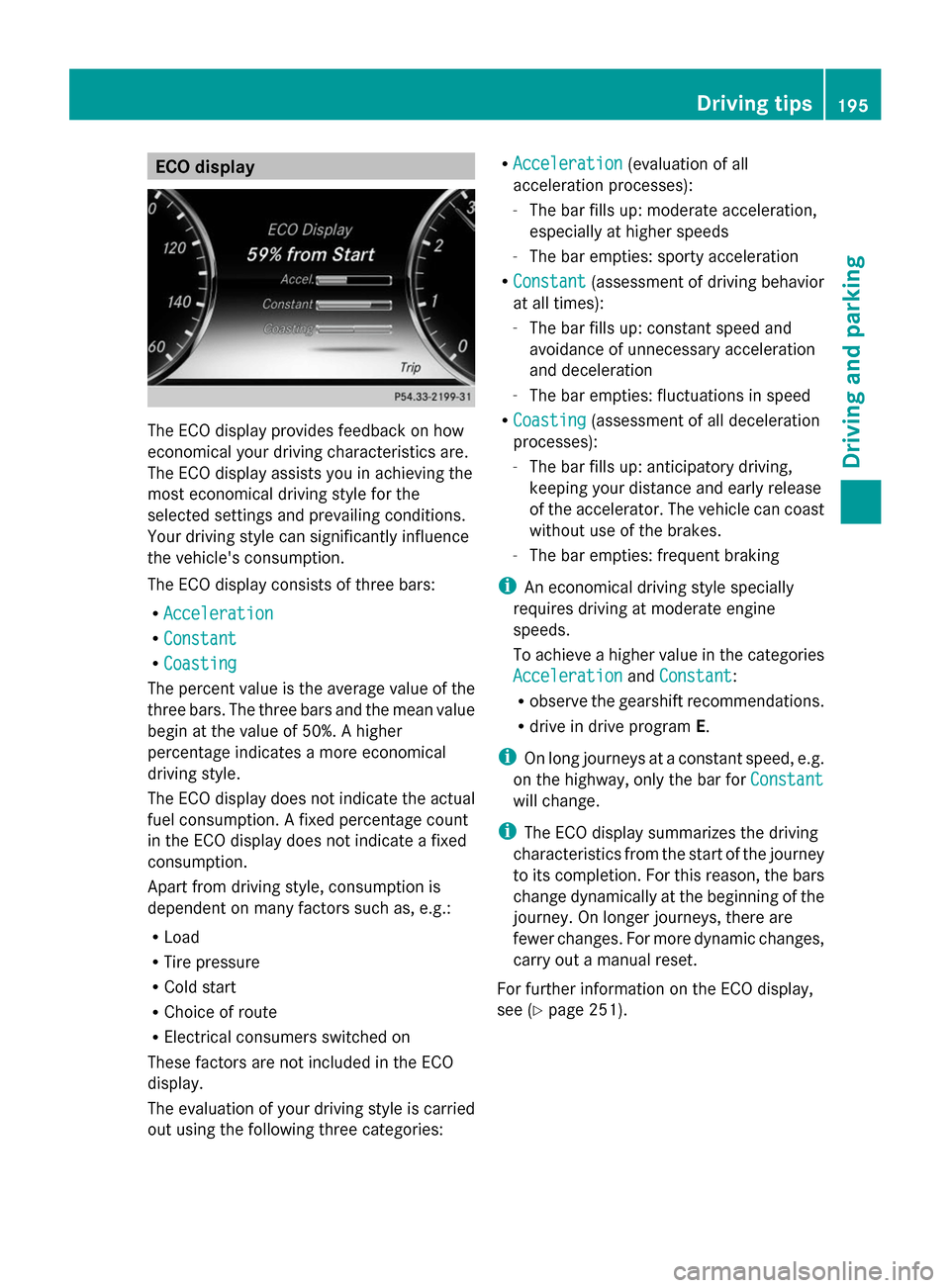
ECO display
The ECO display provides feedback on how
economical your driving characteristics are.
The ECO display assists you in achieving the
most economical driving style for the
selected settings and prevailing conditions.
Your driving style can significantly influence
the vehicle's consumption.
The ECO display consists of three bars:
R Acceleration
Acceleration
R Constant Constant
R Coasting
Coasting
The percent value is the average value of the
three bars. The three bars and the mean value
begin at the value of 50%. A higher
percentage indicates a more economical
driving style.
The ECO display does not indicate the actual
fuel consumption. A fixed percentage count
in the ECO display does not indicate a fixed
consumption.
Apart from driving style, consumption is
dependent on many factors such as, e.g.:
R Load
R Tire pressure
R Cold start
R Choice of route
R Electrical consumers switched on
These factors are not included in the ECO
display.
The evaluation of your driving style is carried
out using the following three categories: R
Acceleration
Acceleration (evaluation of all
acceleration processes):
- The bar fills up: moderate acceleration,
especially at higher speeds
- The bar empties: sporty acceleration
R Constant
Constant (assessment of driving behavior
at all times):
- The bar fills up: constant speed and
avoidance of unnecessary acceleration
and deceleration
- The bar empties: fluctuations in speed
R Coasting Coasting (assessment of all deceleration
processes):
- The bar fills up: anticipatory driving,
keeping your distance and early release
of the accelerator. The vehicle can coast
without use of the brakes.
- The bar empties: frequent braking
i An economical driving style specially
requires driving at moderate engine
speeds.
To achieve a higher value in the categories
Acceleration
Acceleration andConstant Constant:
R observe the gearshift recommendations.
R drive in drive program E.
i On long journeys at a constant speed, e.g.
on the highway, only the bar for Constant
Constant
will change.
i The ECO display summarizes the driving
characteristics from the start of the journey
to its completion. For this reason, the bars
change dynamically at the beginning of the
journey. On longer journeys, there are
fewer changes. For more dynamic changes,
carry out a manual reset.
For further information on the ECO display,
see (Y page 251). Driving tips
195Driving and parking Z