2014 MERCEDES-BENZ S-Class phone
[x] Cancel search: phonePage 86 of 434

Useful information
i This Operator's Manual describes all
models and all standard and optional
equipment of your vehicle available at the
time of publication of the Operator's
Manual. Country-specific differences are
possible. Please note that your vehicle may
not be equipped with all features
described. This also applies to safety-
related systems and functions.
i Read the information on qualified
specialist workshops: (Y page 27).SmartKey
Important safety notes
G
WARNING
If children are left unsupervised in the vehicle,
they could:
R open the doors, thus endangering other
people or road users.
R get out and disrupt traffic.
R operate the vehicle's equipment.
Additionally, children could set the vehicle in
motion if, for example, they:
R release the parking brake.
R shifting the automatic transmission out of
park position P
R Start the engine.
There is a risk of an accident and injury.
When leaving the vehicle, always take the
SmartKey with you and lock the vehicle. Never
leave children or animals unattended in the
vehicle. Always keep the SmartKey out of
reach of children. G
WARNING
If persons, particularly children are subjected
to prolonged exposure to extreme heat or
cold, there is a risk of injury, possibly even
fatal. Never leave children unattended in the
vehicle. G
WARNING
If you attach heavy or large objects to the
SmartKey, the SmartKey could be
unintentionally turned in the ignition lock. This
could cause the engine to be switched off.
There is a risk of an accident.
Do not attach any heavy or large objects to
the SmartKey. Remove any bulky key rings
before inserting the SmartKey into the
ignition lock.
! Keep the SmartKey away from strong
magnetic fields. Otherwise, the remote
control function could be affected.
Strong magnetic fields can occur in the
vicinity of powerful electrical installations.
Do not keep the SmartKey:
R with electronic devices, e.g. a mobile
phone or another SmartKey
R with metallic objects, e.g. coins or metal
foil
R inside metallic objects, e.g. a metal case
This can affect the functionality of the
SmartKey.
Do not keep the SmartKey in the
temperature-controlled cup holder
(Y page 323). On vehicles without KEYLESS-
GO, do not keep it on the parcel shelf or in the
trunk. Otherwise, the SmartKey may not be
detected, e.g. when starting the engine using
the Start/Stop button.
A check which periodically establishes a radio
connection between the vehicle and the
SmartKey determines whether a valid
SmartKey is in the vehicle. This occurs, for
example:
R when starting the engine
R whilst driving
R when the external door handles are
touched
R during convenience closing 84
SmartKeyOpening and closing
Page 174 of 434
Pressing the Start/Stop button several times
in succession corresponds to the different
key positions in the ignition lock. This is only
the case if you are not depressing the brake
pedal.
If you depress the brake pedal and press the
Start/Stop button, the engine starts
immediately.
Do not keep the SmartKey:
R with electronic devices, e.g. a mobile
phone or another SmartKey
R with metallic objects, e.g. coins or metal
foil
R inside metallic objects, e.g. a metal case
This can affect the functionality of the
SmartKey.
Do not keep the SmartKey in the
temperature-controlled cup holder
(Y page 323). Otherwise, the SmartKey will
not be detected, e.g. when starting the engine
with the Start/Stop button.
The Start/Stop button can be removed from
the ignition lock. Then, you can insert the
SmartKey into the ignition lock.
i If you lock the vehicle with the SmartKey's
remote control or with KEYLESS-GO, after
a short time:
R you will not be able to switch on the
ignition with the Start/Stop button.
R you will not be able to start the engine
until the vehicle is unlocked again.
If you lock the vehicle centrally using the
button on the front door (Y page 91), you
can continue to start the engine with the
Start/Stop button.
i You do not have to remove the Start/Stop
button from the ignition lock when you
leave the vehicle. You should, however,
always take the SmartKey with you when
leaving the vehicle. As long as the
SmartKey is in the vehicle: R
the vehicle can be started using the
Start/Stop button
R the electrically powered equipment can
be operated
i The engine can be turned off while the
vehicle is in motion by pressing and holding
the Start/Stop button for approximately
three seconds. This function operates
independently of the ECO start/stop
automatic engine switch-off function.
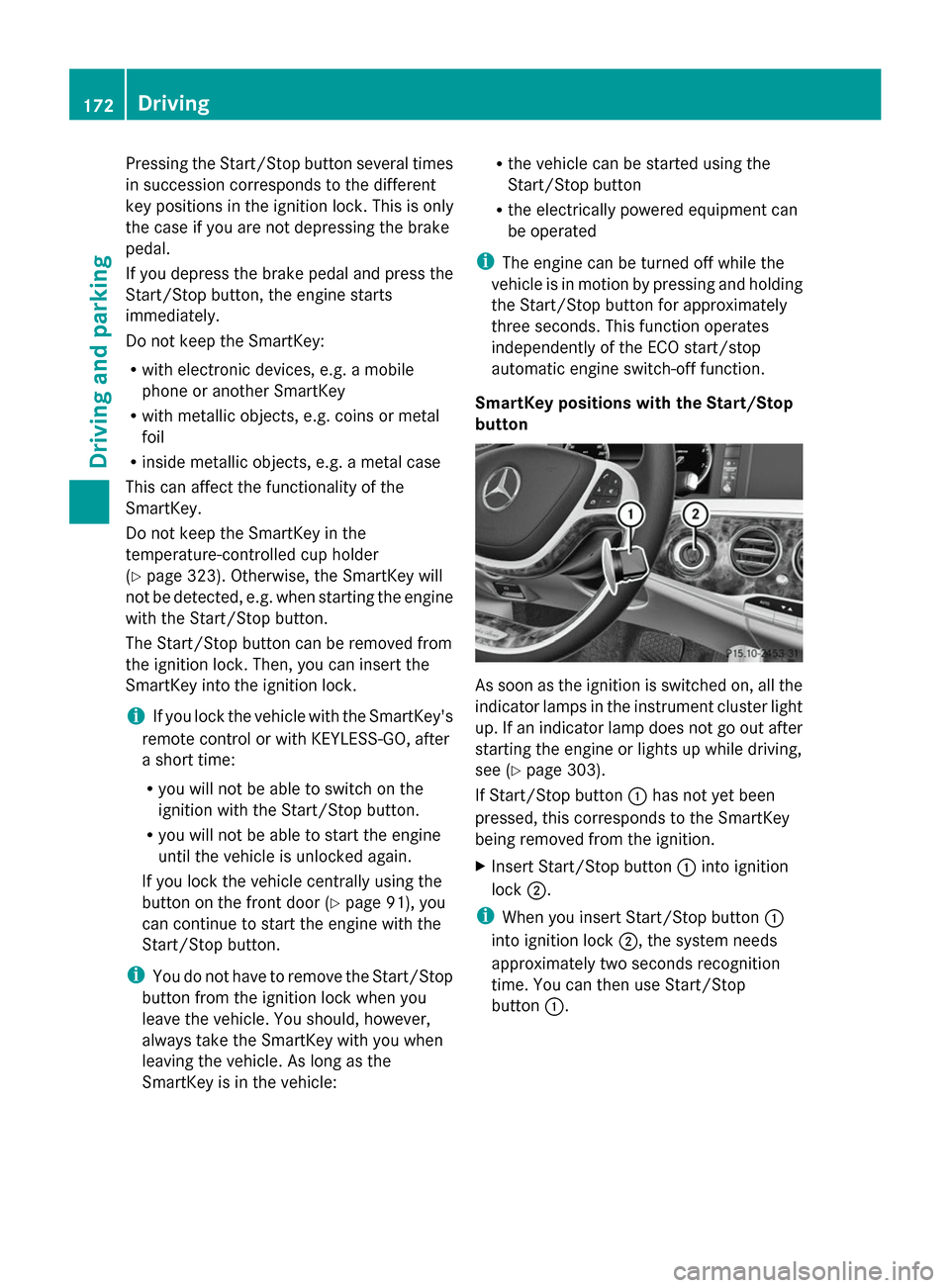
SmartKey positions with the Start/Stop
button As soon as the ignition is switched on, all the
indicator lamps in the instrument cluster light
up. If an indicator lamp does not go out after
starting the engine or lights up while driving,
see (Y
page 303).
If Start/Stop button 0043has not yet been
pressed, this corresponds to the SmartKey
being removed from the ignition.
X Insert Start/Stop button 0043into ignition
lock 0044.
i When you insert Start/Stop button 0043
into ignition lock 0044, the system needs
approximately two seconds recognition
time. You can then use Start/Stop
button 0043. 172
DrivingDriving and parking
Page 196 of 434
Do not switch off the ignition while driving.
G
WARNING
If you operate mobile communication
equipment while driving, you will be
distracted from traffic conditions. You could
also lose control of the vehicle. There is a risk
of an accident.
Only operate this equipment when the vehicle
is stationary.
Observe the legal requirements for the
country in which you are driving. Some
jurisdictions prohibit the driver from using a
mobile phone while driving a vehicle.
If you make a call while driving, always use
hands-free mode. Only operate the telephone
when the traffic situation permits. If you are
unsure, pull over to a safe location and stop
before operating the telephone.
Bear in mind that at a speed of only 30 mph
(approximately 50 km/h), the vehicle covers
a distance of 44 ft (approximately 14 m) per
second.
Drive sensibly – save fuel Observe the following tips to save fuel:
X
The tires should always be inflated to the
recommended tire pressure.
X Remove unnecessary loads.
X Remove roof racks when they are not
needed.
X Warm up the engine at low engine speeds.
X Avoid frequent acceleration or braking.
X Have all maintenance work carried out as
indicated by the service intervals in the
Maintenance Booklet or by the service
interval display.
Fuel consumption also increases when
driving in cold weather, in stop-start traffic
and in hilly terrain. Drinking and driving G
WARNING
Drinking and driving and/or taking drugs and
driving are very dangerous combinations.
Even a small amount of alcohol or drugs can
affect your reflexes, perceptions and
judgment.
The possibility of a serious or even fatal
accident is greatly increased when you drink
or take drugs and drive.
Do not drink or take drugs and drive or allow
anyone to drive who has been drinking or
taking drugs.
Emission control G
WARNING
Combustion engines emit poisonous exhaust
gases such as carbon monoxide. Inhaling
these exhaust gases leads to poisoning. There
is a risk of fatal injury. Therefore never leave
the engine running in enclosed spaces
without sufficient ventilation.
Certain engine systems are designed to keep
the level of poisonous components in exhaust
fumes within legal limits.
These systems only work at peak efficiency if
they are serviced exactly in accordance with
the manufacturer's specifications. For this
reason, all work on the engine must be carried
out by qualified and authorized Mercedes-
Benz technicians.
The engine settings must not be changed
under any circumstances. Furthermore, all
specific service work must be carried out at
regular intervals and in accordance with the
Mercedes-Benz service requirements. Details
can be found in the Maintenance Booklet. 194
Driving
tipsDriving an d parking
Page 251 of 434
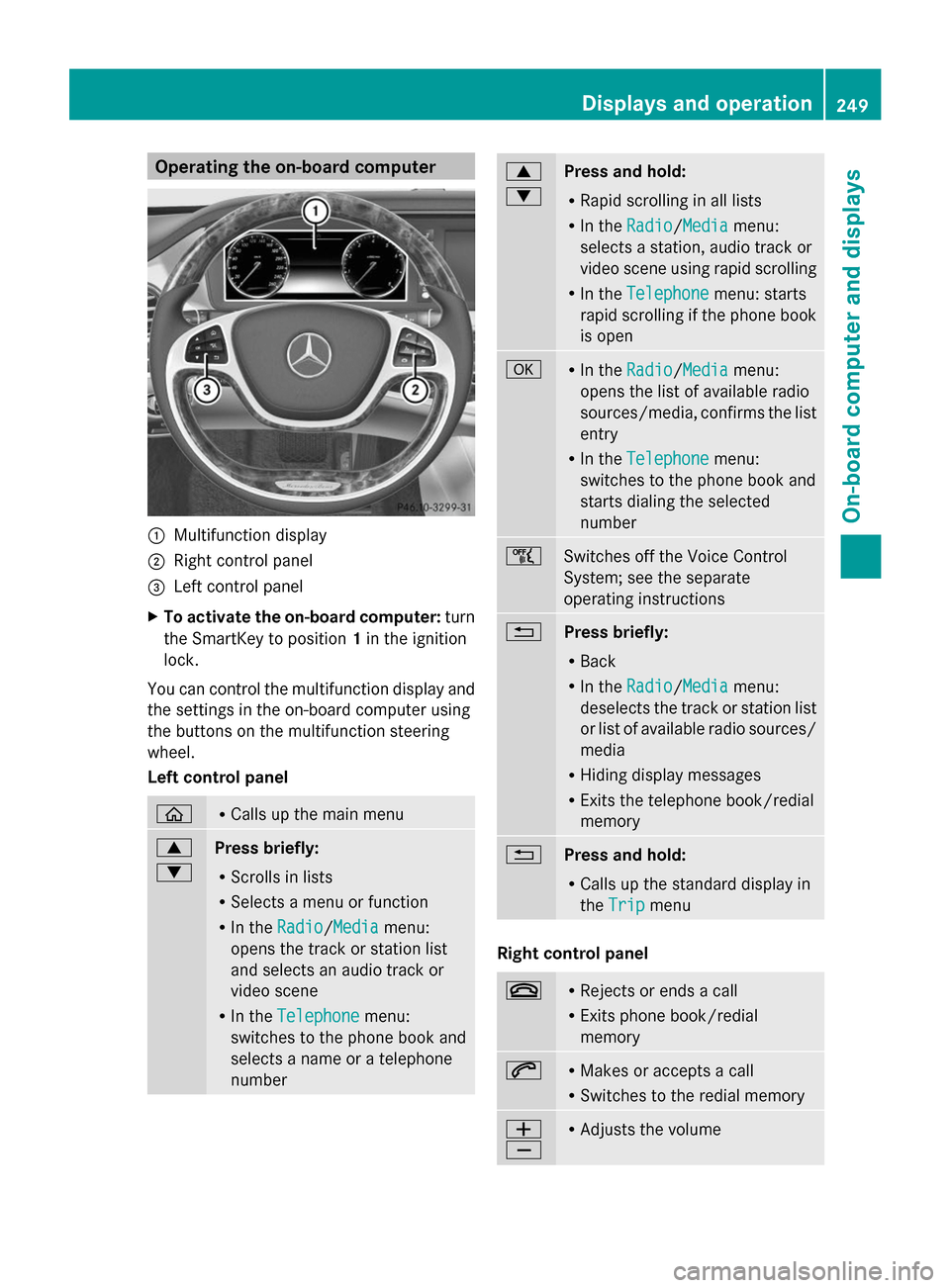
Operating the on-board computer
0043
Multifunction display
0044 Right control panel
0087 Left control panel
X To activate the on-board computer: turn
the SmartKey to position 1in the ignition
lock.
You can control the multifunction display and
the settings in the on-board computer using
the buttons on the multifunction steering
wheel.
Left control panel 00E2 R
Calls up the main menu 0063
0064
Press briefly:
R
Scrolls in lists
R Selects a menu or function
R In the Radio Radio/Media Mediamenu:
opens the track or station list
and selects an audio track or
video scene
R In the Telephone Telephone menu:
switches to the phone book and
selects a name or a telephone
number 0063
0064
Press and hold:
R
Rapid scrolling in all lists
R In the Radio
Radio/Media Mediamenu:
selects a station, audio track or
video scene using rapid scrolling
R In the Telephone Telephone menu: starts
rapid scrolling if the phone book
is open 0076 R
In the Radio Radio/Media Mediamenu:
opens the list of available radio
sources/media, confirms the list
entry
R In the Telephone
Telephone menu:
switches to the phone book and
starts dialing the selected
number 00E1
Switches off the Voice Control
System; see the separate
operating instructions
0038
Press briefly:
R
Back
R In the Radio Radio/Media Mediamenu:
deselects the track or station list
or list of available radio sources/
media
R Hiding display messages
R Exits the telephone book/redial
memory 0038
Press and hold:
R
Calls up the standard display in
the Trip Trip menu Right control panel
0076 R
Rejects or ends a call
R Exits phone book/redial
memory 0061 R
Makes or accepts a call
R Switches to the redial memory 0081
0082 R
Adjusts the volume Displays and operation
249On-board computer and displays Z
Page 252 of 434

0063 R
Mute 00E3
Switches on the Voice Control
System; see the separate
operating instructions
Multifunction display
0043
Upper status bar with the following
possible displays and indicator lamps:
outside temperature (Y page 248)
003E Turn signal, left (Y page 140)
0058 Low-beam headlamps (Y page 139)
0057 High-beam headlamps (Y page 140)
0060 Parking lamps and license plate lamp
(Ypage 139)
003D Turn signal, right (Y page 140)
0044 Display
0087 Lower status bar with the following
possible displays:
Digital speed
00A7 ECO start/stop function (Y page 175)
00D9 HOLD function (Y page 212)
005D Active Parking Assist (Y page 221)
00CE Adaptive Highbeam Assist
(Ypage 142)
00CE Adaptive Highbeam Assist Plus
(Ypage 143)
004F DISTRONIC PLUS Steering Assist
(Ypage 210)
Additional speedometer (Y page 263)X
To call up the menu list in display
panel 0044:press the 00E2button on the
steering wheel.
Display panel 0044shows the selected menu
or submenu and display messages. Menus and submenus
Menu overview
Press the 00E2button on the steering wheel
to call up the list of menus and select a menu.
Operating the on-board computer
(Y page 249).
Depending on the equipment installed in the
vehicle, you can call up the following menus:
R Trip
Trip menu (Y page 250)
R Navi Navi menu (navigation instructions)
(Y page 252)
R Radio
Radio menu (Y page 254)
R Media
Media menu (Y page 255)
R Telephone
Telephone menu (Ypage 257)
R Assistance Info Display
Assistance Info Display menu
(Y page 258)
R Service
Service menu (Ypage 259)
R Settings
Settings menu (Ypage 259)
R AMG
AMG menu in AMG vehicles (Y page 264) Trip menu
Standard display 250
Menus and submenusOn-board computer and displays
Page 259 of 434
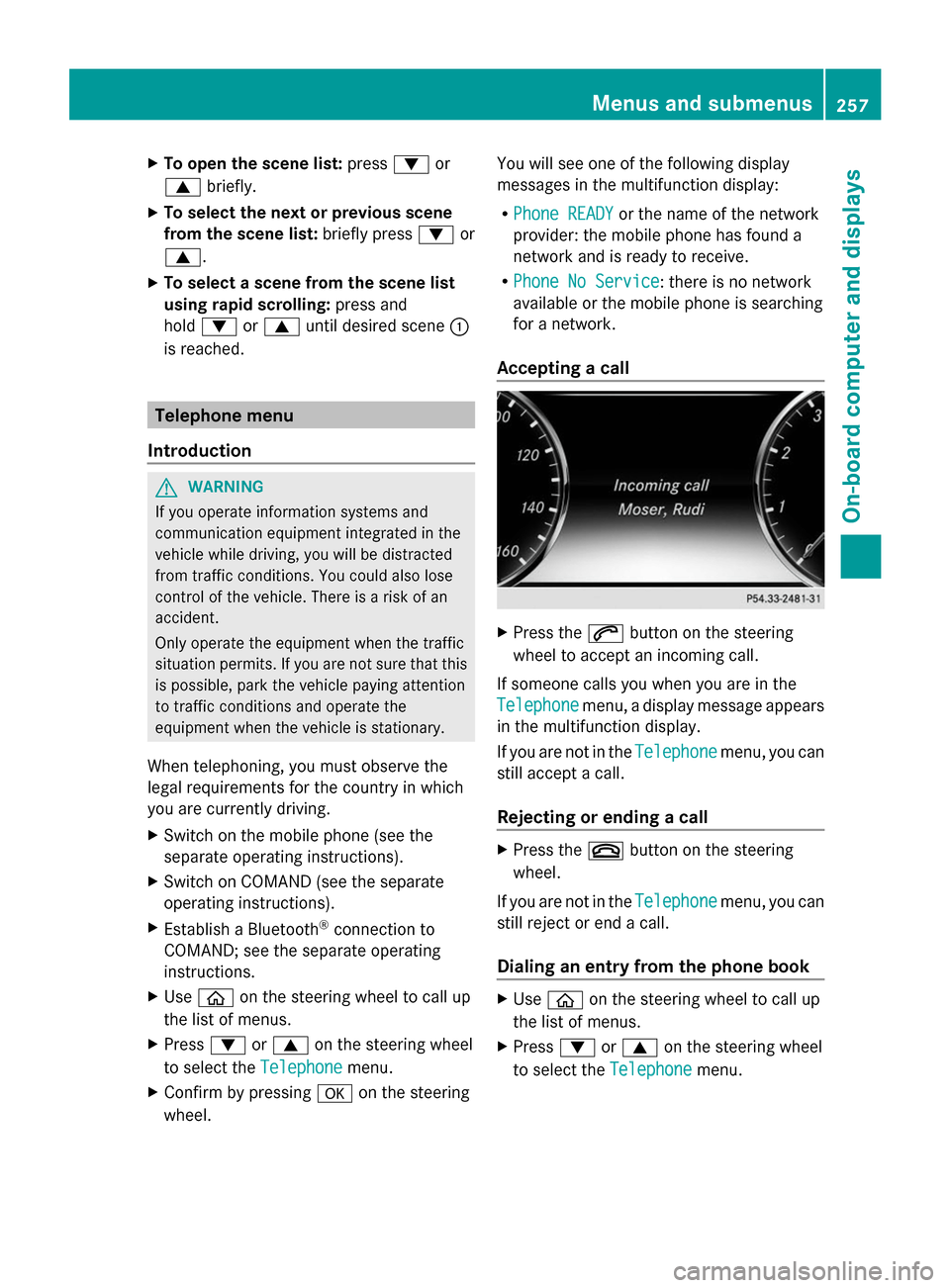
X
To open the scene list: press0064or
0063 briefly.
X To select the next or previous scene
from the scene list: briefly press0064or
0063.
X To select a scene from the scene list
using rapid scrolling: press and
hold 0064 or0063 until desired scene 0043
is reached. Telephone menu
Introduction G
WARNING
If you operate information systems and
communication equipment integrated in the
vehicle while driving, you will be distracted
from traffic conditions. You could also lose
control of the vehicle. There is a risk of an
accident.
Only operate the equipment when the traffic
situation permits. If you are not sure that this
is possible, park the vehicle paying attention
to traffic conditions and operate the
equipment when the vehicle is stationary.
When telephoning, you must observe the
legal requirements for the country in which
you are currently driving.
X Switch on the mobile phone (see the
separate operating instructions).
X Switch on COMAND (see the separate
operating instructions).
X Establish a Bluetooth ®
connection to
COMAND; see the separate operating
instructions.
X Use 00E2 on the steering wheel to call up
the list of menus.
X Press 0064or0063 on the steering wheel
to select the Telephone Telephonemenu.
X Confirm by pressing 0076on the steering
wheel. You will see one of the following display
messages in the multifunction display:
R
Phone READY Phone READY or the name of the network
provider: the mobile phone has found a
network and is ready to receive.
R Phone No Service Phone No Service: there is no network
available or the mobile phone is searching
for a network.
Accepting a call X
Press the 0061button on the steering
wheel to accept an incoming call.
If someone calls you when you are in the
Telephone Telephone menu, a display message appears
in the multifunction display.
If you are not in the Telephone Telephonemenu, you can
still accept a call.
Rejecting or ending a call X
Press the 0076button on the steering
wheel.
If you are not in the Telephone Telephonemenu, you can
still reject or end a call.
Dialing an entry from the phone book X
Use 00E2 on the steering wheel to call up
the list of menus.
X Press 0064or0063 on the steering wheel
to select the Telephone Telephonemenu. Menus and submenus
257On-board computer and displays Z
Page 260 of 434
X
Confirm by pressing 0076on the steering
wheel.
X Press the 0064,0063or0076 button to
switch to the phone book.
X Press the 0064or0063 button to select the
desired name.
or
X To begin rapid scrolling: press and hold
the 0064 or0063 button for longer than
one second.
Rapid scrolling stops when you release the
button or reach the end of the list.
X If only one telephone number is stored
for a name: press the0061or0076 button
to start dialing.
or
X If there is more than one number for a
particular name: press the0061or0076
button to display the numbers.
X Press the 0064or0063 button to select the
number you want to dial.
X Press the 0061or0076 button to start
dialing.
or
X To exit the phone book: press the0076
or 0038 button.
Redialing The on-board computer saves the last names
or numbers dialed in the redial memory.
X Use 00E2 on the steering wheel to call up
the list of menus.
X Press 0064or0063 on the steering wheel
to select the Telephone
Telephone menu.
X Confirm by pressing 0076on the steering
wheel.
X Press the 0061button to switch to the
redial memory.
X Press the 0064or0063 button to select the
desired name or number. X
Press the 0061or0076 button to start
dialing.
or
X To exit the redial memory: press the
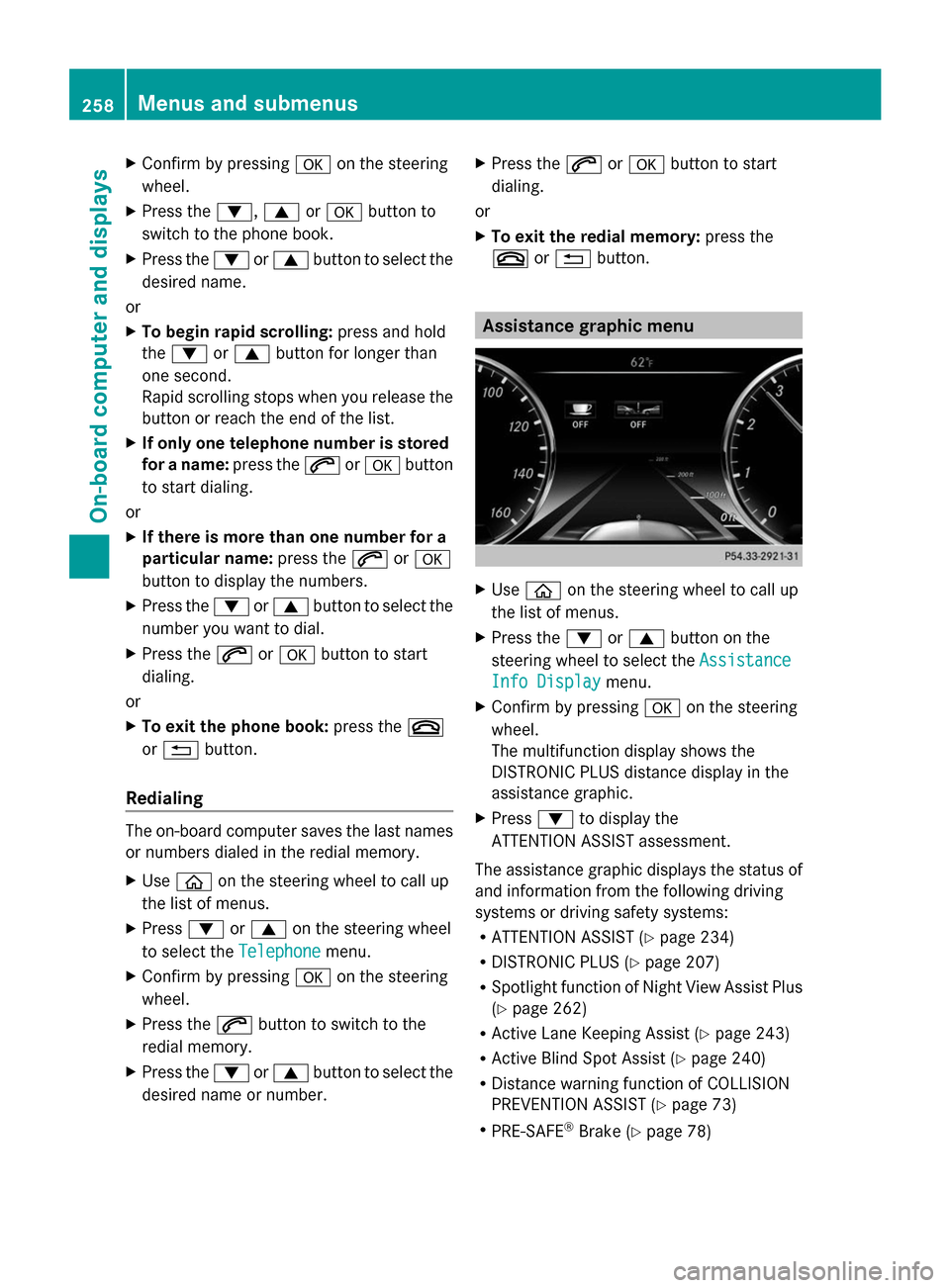
0076 or0038 button. Assistance graphic menu
X
Use 00E2 on the steering wheel to call up
the list of menus.
X Press the 0064or0063 button on the
steering wheel to select the Assistance Assistance
Info Display
Info Display menu.
X Confirm by pressing 0076on the steering
wheel.
The multifunction display shows the
DISTRONIC PLUS distance display in the
assistance graphic.
X Press 0064to display the
ATTENTION ASSIST assessment.
The assistance graphic displays the status of
and information from the following driving
systems or driving safety systems:
R ATTENTION ASSIST (Y page 234)
R DISTRONIC PLUS (Y page 207)
R Spotlight function of Night View Assist Plus
(Y page 262)
R Active Lane Keeping Assist (Y page 243)
R Active Blind Spot Assist (Y page 240)
R Distance warning function of COLLISION
PREVENTION ASSIST (Y page 73)
R PRE-SAFE ®
Brake (Y page 78) 258
Menus and submenusOn-board computer and displays
Page 302 of 434
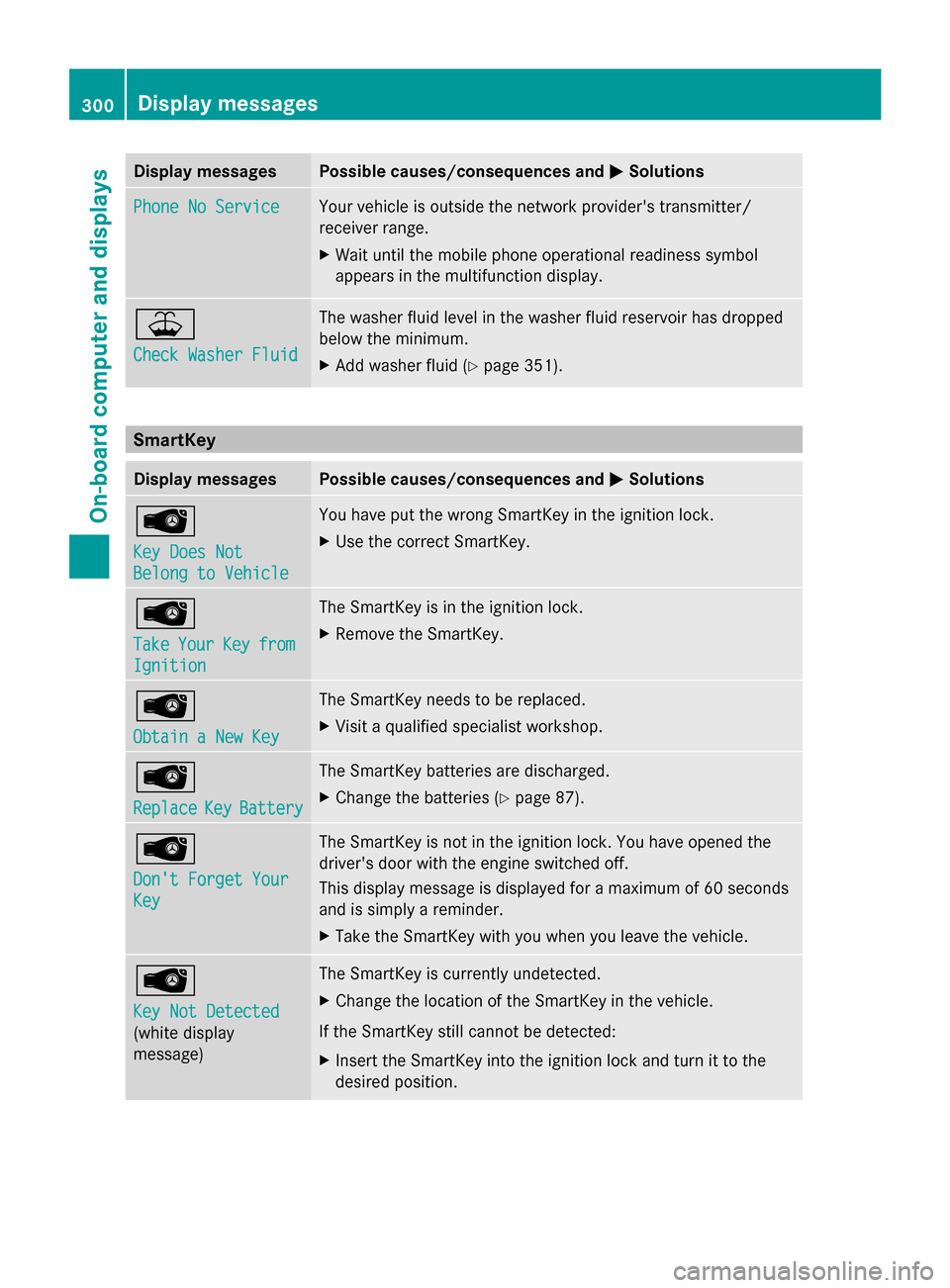
Display messages Possible causes/consequences and
0050
0050Solutions Phone No Service
Phone No Service Your vehicle is outside the network provider's transmitter/
receiver range.
X
Wait until the mobile phone operational readiness symbol
appears in the multifunction display. 00B2
Check Washer Fluid Check Washer Fluid The washer fluid level in the washer fluid reservoir has dropped
below the minimum.
X
Add washer fluid ( Ypage 351). SmartKey
Display messages Possible causes/consequences and
0050 0050Solutions 00AF
Key Does Not Key Does Not
Belong to Vehicle Belong to Vehicle You have put the wrong SmartKey in the ignition lock.
X
Use the correct SmartKey. 00AF
Take Take
Your
YourKey
Keyfrom
from
Ignition
Ignition The SmartKey is in the ignition lock.
X
Remove the SmartKey. 00AF
Obtain a New Key Obtain a New Key The SmartKey needs to be replaced.
X
Visit a qualified specialist workshop. 00AF
Replace Replace
Key
KeyBattery
Battery The SmartKey batteries are discharged.
X
Change the batteries ( Ypage 87). 00AF
Don't Forget Your Don't Forget Your
Key Key The SmartKey is not in the ignition lock. You have opened the
driver's door with the engine switched off.
This display message is displayed for a maximum of 60 seconds
and is simply a reminder.
X
Take the SmartKey with you when you leave the vehicle. 00AF
Key Not Detected Key Not Detected
(white display
message) The SmartKey is currently undetected.
X
Change the location of the SmartKey in the vehicle.
If the SmartKey still cannot be detected:
X Insert the SmartKey into the ignition lock and turn it to the
desired position. 300
Display
messagesOn-board computer and displays