2014 MERCEDES-BENZ S-Class phone
[x] Cancel search: phonePage 320 of 434

Stowage compartment under the armrest
X
To open: press button 0043or0044 and fold
the armrest to the left or right.
Depending on the vehicle's equipment, a USB
port, an AUX-IN jack or a Media Interface are
installed in the stowage compartment. A
Media Interface is a universal interface for
portable audio or video equipment, e.g. for an
iPod ®
, iPhone ®
or MP3 player (see the
separate COMAND operating instructions).
Stowage compartment under the driver's
seat and front-passenger seat G
WARNING
If you exceed the maximum load for the
stowage compartment, the cover may not be
able to restrain the items. Items may be
thrown out of the stowage compartment and
hit vehicle occupants. There is a risk of injury,
particularly in the event of sudden braking or
a sudden change in direction.
Never exceed the maximum permissible load
for the stowage compartment. Stow and
secure heavy objects in the trunk.
The maximum permissible load of the
stowage compartment is 3.3 lbs (1.5 kg). X
To open: pull handle 0043up and fold
cover 0044forwards.
Stowage compartments in the doors You can store items such as a rolled up
fluorescent jacket and a small umbrella in
stowage compartment
0044in the doors.
In doors 0043you can store bottles with a
capacity of up to 34 fl. oz. (1.0 liter).
Stowage space in the rear Stowage compartment in the rear seat
armrest318
Stowage areasStowage and features
Page 321 of 434

Vehicles with a rear bench seat:
X
To open: fold down the seat armrest.
X Pull handle 0043and fold the armrests
upwards. Vehicles with electrically adjustable outer
seats:
X To open: fold down the seat armrest.
X Pull up on handle 0043and fold the armrest
upwards.
Stowage compartment in the rear-
compartment center console Vehicles with individual seats and center
console in the rear:
X Pull up on handle 0043and fold the armrest
upwards.
Depending on the vehicle's equipment, a USB
port, an AUX-IN jack, a mobile phone bracket
or a 115 V or 230 V socket are installed in the
stowage compartment. Stowage box in the rear seat backrest
!
Do not sit on or support your body weight
on the rear seat armrest when it is folded
down, as you could otherwise damage it. Vehicles with a rear bench seat:
X
To open: fold down the rear armrest.
X Pull handle 0043and fold down cover 0044. Vehicles with individual seats and center
console in the rear:
X
To open: fold down the rear armrest.
X Pull handle 0043and fold down cover 0044.
Depending on the vehicle's equipment, a DVD
player is installed instead of a stowage
compartment.
Folding table G
WARNING
If the folding table is folded out while the
vehicle is in motion, passengers can be
thrown against it, particularly in the event of
an accident, heavy braking or a sudden
change of direction. There is a risk of injury. Stowage areas
319Stowage and features
Z
Page 330 of 434
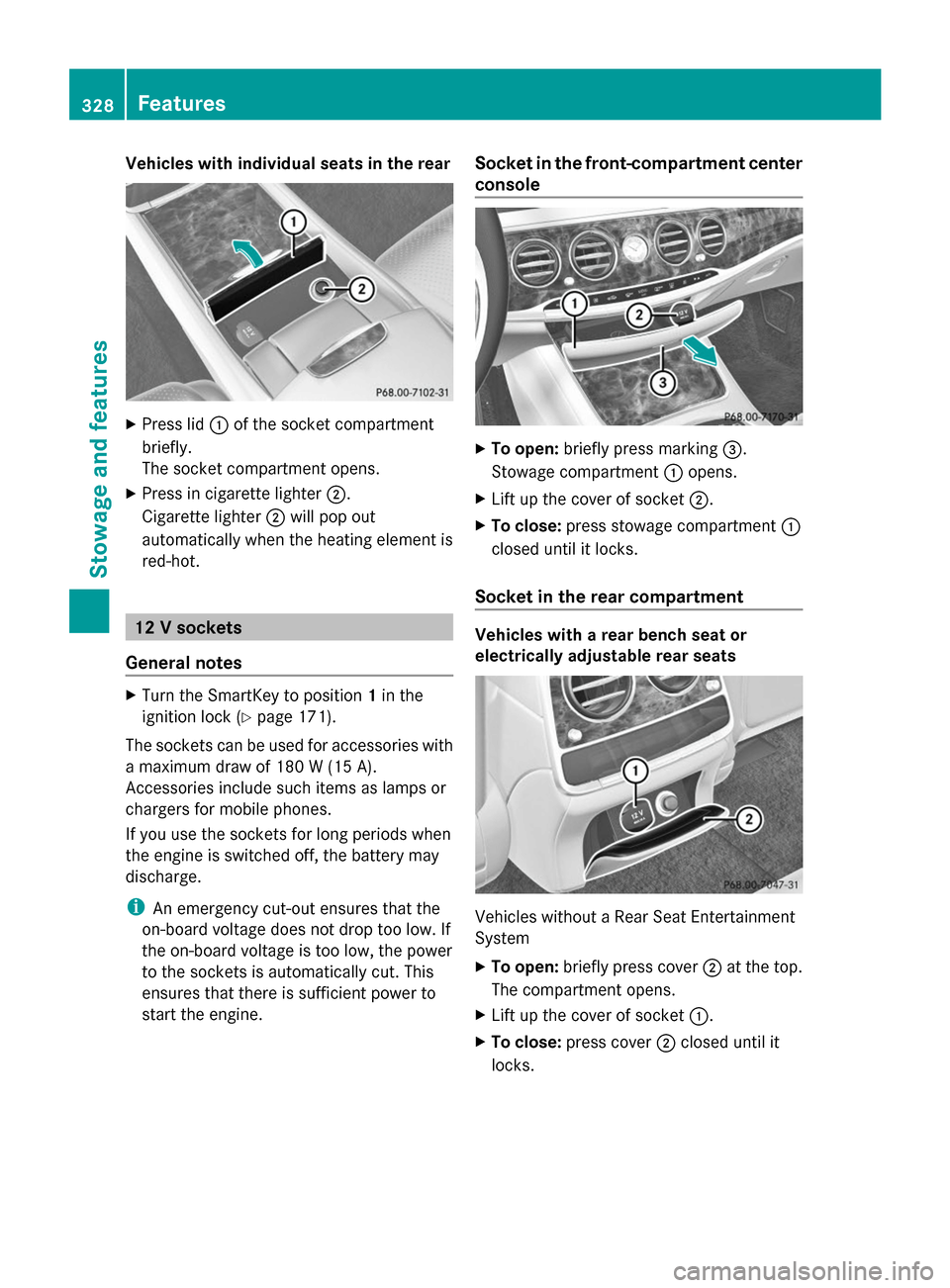
Vehicles with individual seats in the rear
X
Press lid 0043of the socket compartment
briefly.
The socket compartment opens.
X Press in cigarette lighter 0044.
Cigarette lighter 0044will pop out
automatically when the heating element is
red-hot. 12 V sockets
General notes X
Turn the SmartKey to position 1in the
ignition lock (Y page 171).
The sockets can be used for accessories with
a maximum draw of 180 W (15 A).
Accessories include such items as lamps or
chargers for mobile phones.
If you use the sockets for long periods when
the engine is switched off, the battery may
discharge.
i An emergency cut-out ensures that the
on-board voltage does not drop too low. If
the on-board voltage is too low, the power
to the sockets is automatically cut. This
ensures that there is sufficient power to
start the engine. Socket in the front-compartment center
console
X
To open: briefly press marking 0087.
Stowage compartment 0043opens.
X Lift up the cover of socket 0044.
X To close: press stowage compartment 0043
closed until it locks.
Socket in the rear compartment Vehicles with a rear bench seat or
electrically adjustable rear seats
Vehicles without a Rear Seat Entertainment
System
X
To open: briefly press cover 0044at the top.
The compartment opens.
X Lift up the cover of socket 0043.
X To close: press cover 0044closed until it
locks. 328
FeaturesStowage and features
Page 334 of 434
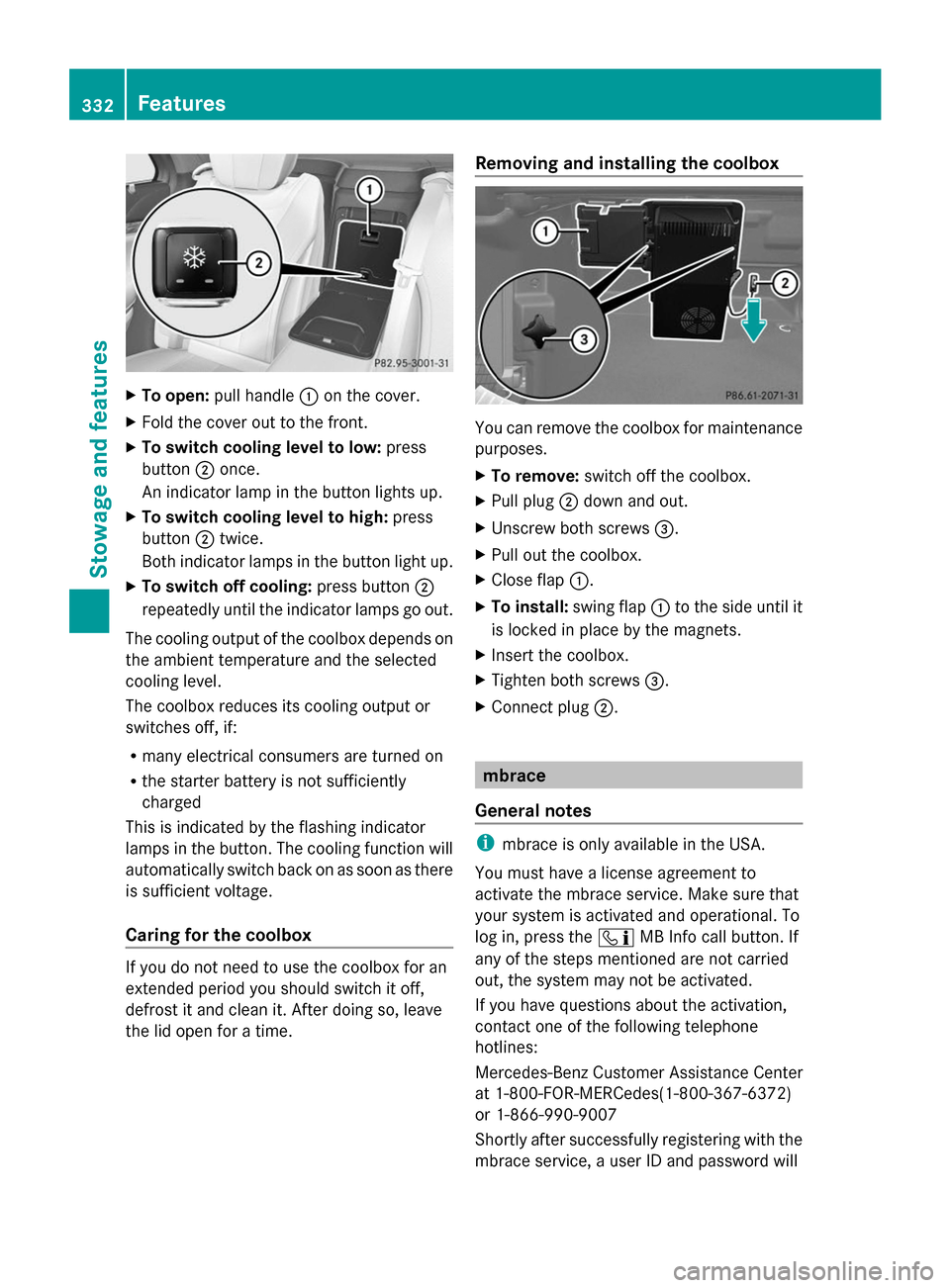
X
To open: pull handle 0043on the cover.
X Fold the cover out to the front.
X To switch cooling level to low: press
button 0044once.
An indicator lamp in the button lights up.
X To switch cooling level to high: press
button 0044twice.
Both indicator lamps in the button light up.
X To switch off cooling: press button0044
repeatedly until the indicator lamps go out.
The cooling output of the coolbox depends on
the ambient temperature and the selected
cooling level.
The coolbox reduces its cooling output or
switches off, if:
R many electrical consumers are turned on
R the starter battery is not sufficiently
charged
This is indicated by the flashing indicator
lamps in the button. The cooling function will
automatically switch back on as soon as there
is sufficient voltage.
Caring for the coolbox If you do not need to use the coolbox for an
extended period you should switch it off,
defrost it and clean it. After doing so, leave
the lid open for a time. Removing and installing the coolbox
You can remove the coolbox for maintenance
purposes.
X
To remove: switch off the coolbox.
X Pull plug 0044down and out.
X Unscrew both screws 0087.
X Pull out the coolbox.
X Close flap 0043.
X To install: swing flap0043to the side until it
is locked in place by the magnets.
X Insert the coolbox.
X Tighten both screws 0087.
X Connect plug 0044. mbrace
General notes i
mbrace is only available in the USA.
You must have a license agreement to
activate the mbrace service. Make sure that
your system is activated and operational. To
log in, press the 00D9MB Info call button. If
any of the steps mentioned are not carried
out, the system may not be activated.
If you have questions about the activation,
contact one of the following telephone
hotlines:
Mercedes-Benz Customer Assistance Center
at 1-800-FOR-MERCedes(1-800-367-6372)
or 1-866-990-9007
Shortly after successfully registering with the
mbrace service, a user ID and password will 332
FeaturesSto
wage an d features
Page 335 of 434

be sent to you by mail. You can use this
password to log onto the mbrace area under
"Owners Online" at http://
www.mbusa.com .
The system is available if:
R it has been activated and is operational
R the corresponding mobile phone network
is available for transmitting data to the
Customer Center
R a service subscription is available
R the starter battery is sufficiently charged
i Determining the location of the vehicle on
a map is only possible if:
R GPS reception is available.
R the vehicle position can be forwarded to
the Customer Assistance Center.
The mbrace system To adjust the volume during a call, proceed
as follows:
X Press the 0081or0082 button on the
multifunction steering wheel.
or
X Use the volume controller of COMAND.
The system offers various services, e.g:
R Automatic and manual emergency call
R Roadside Assistance call
R MB Info call
You can find information and a description of
all available features under "Owners Online"
at http://www.mbusa.com.
System self-test After you have switched on the ignition, the
system carries out a self-diagnosis. A malfunction in the system has been
detected if one of the following occurs:
R
The indicator lamp in the SOS button does
not come on during the system self-test.
R The indicator lamp in the 0052Roadside
Assistance button does not light up during
self-diagnosis of the system.
R The indicator lamp in the 00D9MB Info call
button does not light up during self-
diagnosis of the system.
R The indicator lamp in one or more of the
following buttons continues to light up red
after the system self-diagnosis:
-SOS button
- 0052 Roadside Assistance call button
- 00D9 MB Info call button
R After the system self-diagnosis, the
Inoperative
Inoperative orService Not Service Not
Activated
Activated message appears in the
multifunction display.
If a malfunction is indicated as outlined
above, the system may not operate as
expected. In the event of an emergency, help
will have to be summoned by other means.
Have the system checked at the nearest
authorized Mercedes-Benz Center or contact
the following service hotlines:
Mercedes-Benz Customer Assistance Center
at 1-800-FOR-MERCedes(1-800-367-6372)
or 1-866-990-9007 Features
333Stowage and features Z
Page 336 of 434
Emergency call
Important safety notes
G
WARNING
It can be dangerous to remain in the vehicle,
even if you have pressed the SOS button in an
emergency if:
R you see smoke inside or outside of the
vehicle, e.g. if there is a fire after an
accident
R the vehicle is on a dangerous section of
road
R the vehicle is not visible or cannot easily be
seen by other road users, particularly when
dark or in poor visibility conditions
There is a risk of an accident and injury.
Leave the vehicle immediately in this or
similar situations as soon as it is safe to do
so. Move to a safe location along with other
vehicle occupants. In such situations, secure
the vehicle in accordance with national
regulations, e. g. with a warning triangle.
You must have a license agreement to
activate the mbrace service. Make sure that
your system is activated and operational. To
log in, press the 00D9MB Info call button. If
any of the steps mentioned are not carried
out, the system may not be activated.
If you have questions about the activation,
contact one of the following telephone
hotlines:
Mercedes-Benz Customer Assistance Center
at 1-800-FOR-MERCedes(1-800-367-6372)
or 1-866-990-9007
General notes
An emergency call is dialed automatically if
an air bag or Emergency Tensioning Device is
triggered.
i You cannot end an automatically
triggered emergency call yourself.
An emergency call can also be initiated
manually. As soon as the emergency call has been
initiated, the indicator lamp in the SOS button
flashes. The multifunction display shows the
Connecting Call
Connecting Call message.
The audio output is muted.
Once the connection has been made, the
Call Connected Call Connected message appears in the
multifunction display.
All important information on the emergency
is transmitted, for example:
R Current location of the vehicle (as
determined by the GPS system)
R Vehicle identification number
R Information on the severity of the accident
Shortly after the emergency call has been
initiated, a voice connection is automatically
established between the Customer
Assistance Center and the vehicle occupants.
R If the vehicle occupants respond, the
Mercedes-Benz Customer Assistance
Center attempts to get more information
on the emergency.
R If there is no response from the vehicle
occupants, an ambulance is immediately
sent to the vehicle.
If no voice connection can be established to
the Mercedes-Benz Customer Assistance
Center, the system has been unable to initiate
an emergency call.
This can occur, for example, if the relevant
mobile phone network is not available. The
indicator lamp in the SOS button flashes
continuously.
The Call Failed
Call Failed message appears in the
multifunction display and must be confirmed.
In this case, summon assistance by other
means. 334
FeaturesStowage and features
Page 337 of 434

Making an emergency call
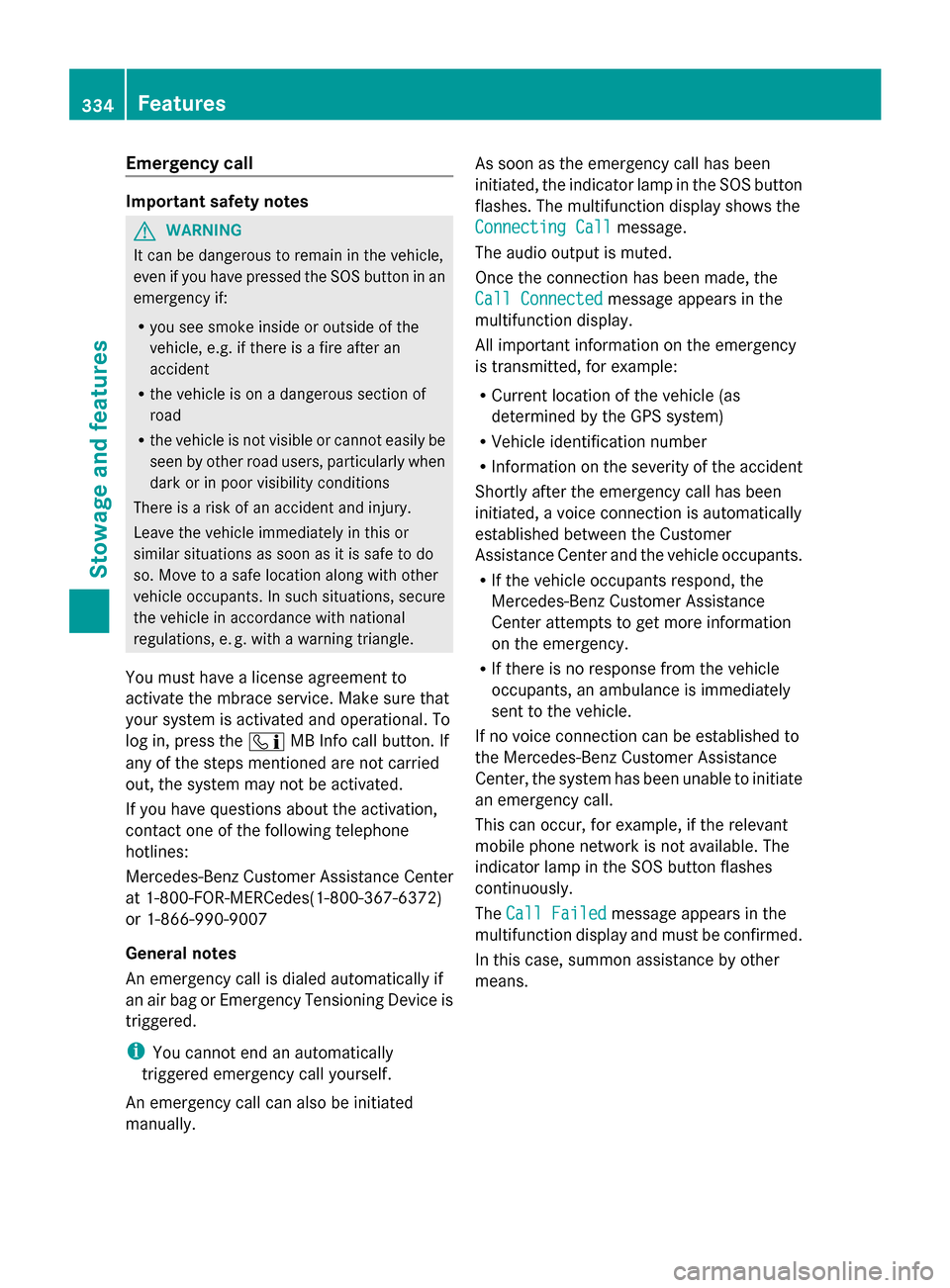
X
To initiate an emergency call
manually: press cover 0043briefly to open.
X Press SOS button 0044briefly.
The indicator lamp in SOS button 0044
flashes until the emergency call is
concluded.
X Wait for a voice connection to the
Mercedes-Benz Customer Assistance
Center.
X After the emergency call, close cover 0043.
i If the mobile phone network is
unavailable, mbrace will not be able to
make the emergency call. If you leave the
vehicle immediately after pressing the SOS
button, you will not know whether mbrace
placed the emergency call. In this case,
always summon assistance by other
means.
Roadside Assistance button X
Press Roadside Assistance button 0043.
This initiates a call to the Mercedes-Benz
Customer Assistance Center.
The indicator lamp in Roadside Assistance
button 0043flashes while the call is active.
The multifunction display shows the
Connecting Call
Connecting Call message. The audio
system is muted.
If a connection can be made, the Call Call
Connected Connected message appears in the
multifunction display.
If a mobile phone network and GPS reception
are available, the system transfers data to the
Mercedes-Benz Customer Assistance Center,
for example:
R Current location of the vehicle
R Vehicle identification number
i The COMAND display indicates that a call
is active. During the call, you can change to
the navigation menu by pressing the NAVI
button on COMAND, for example.
Voice output is not available.
A voice connection is established between
the Mercedes-Benz Customer Assistance
Center and the vehicle occupants.
From the vehicle remote malfunction
diagnosis, the Mercedes-Benz Customer
Assistance Center can ascertain the nature of
the problem (Y page 339).
The Mercedes-Benz Customer Assistance
Center either sends a qualified Mercedes-
Benz technician or makes arrangements for
your vehicle to be transported to the nearest
authorized Mercedes-Benz Center.
You may be charged for services such as
repair work and/or towing.
Further details are available in your mbrace
manual. Features
335Stowage and features Z
Page 338 of 434
i
The system has not been able to initiate
a roadside assistance call, if:
R the indicator lamp for roadside
assistance call button 0052is flashing
continuously.
R no voice connection to the Mercedes-
Benz Customer Assistance Center was
established.
This can occur if the relevant mobile phone
network is not available, for example.
The Call Failed
Call Failed message appears in the
multifunction display.
X To end a call: press the0076button on the
multifunction steering wheel.
or
X Press the corresponding button for ending
a phone call on COMAND.
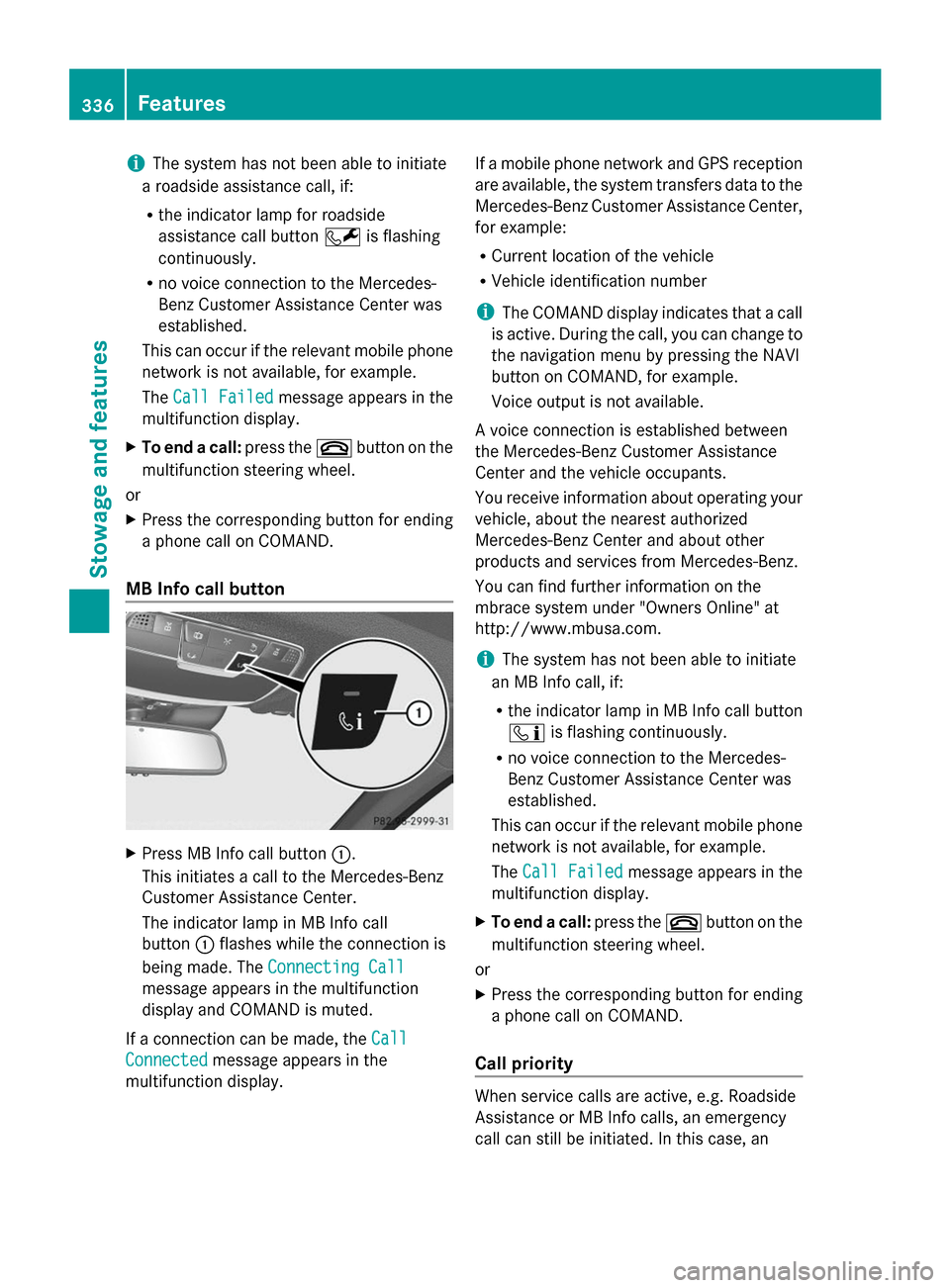
MB Info call button X
Press MB Info call button 0043.
This initiates a call to the Mercedes-Benz
Customer Assistance Center.
The indicator lamp in MB Info call
button 0043flashes while the connection is
being made. The Connecting Call Connecting Call
message appears in the multifunction
display and COMAND is muted.
If a connection can be made, the Call Call
Connected
Connected message appears in the
multifunction display. If a mobile phone network and GPS reception
are available, the system transfers data to the
Mercedes-Benz Customer Assistance Center,
for example:
R
Current location of the vehicle
R Vehicle identification number
i The COMAND display indicates that a call
is active. During the call, you can change to
the navigation menu by pressing the NAVI
button on COMAND, for example.
Voice output is not available.
A voice connection is established between
the Mercedes-Benz Customer Assistance
Center and the vehicle occupants.
You receive information about operating your
vehicle, about the nearest authorized
Mercedes-Benz Center and about other
products and services from Mercedes-Benz.
You can find further information on the
mbrace system under "Owners Online" at
http://www.mbusa.com.
i The system has not been able to initiate
an MB Info call, if:
R the indicator lamp in MB Info call button
00D9 is flashing continuously.
R no voice connection to the Mercedes-
Benz Customer Assistance Center was
established.
This can occur if the relevant mobile phone
network is not available, for example.
The Call Failed
Call Failed message appears in the
multifunction display.
X To end a call: press the0076button on the
multifunction steering wheel.
or
X Press the corresponding button for ending
a phone call on COMAND.
Call priority When service calls are active, e.g. Roadside
Assistance or MB Info calls, an emergency
call can still be initiated. In this case, an336
FeaturesStowage and features