2014 MERCEDES-BENZ S-CLASS COUPE change time
[x] Cancel search: change timePage 191 of 413
Setting a speed
Bear in mind that it may take a brief moment
until the vehicle has accelerated or braked tothe set speed.
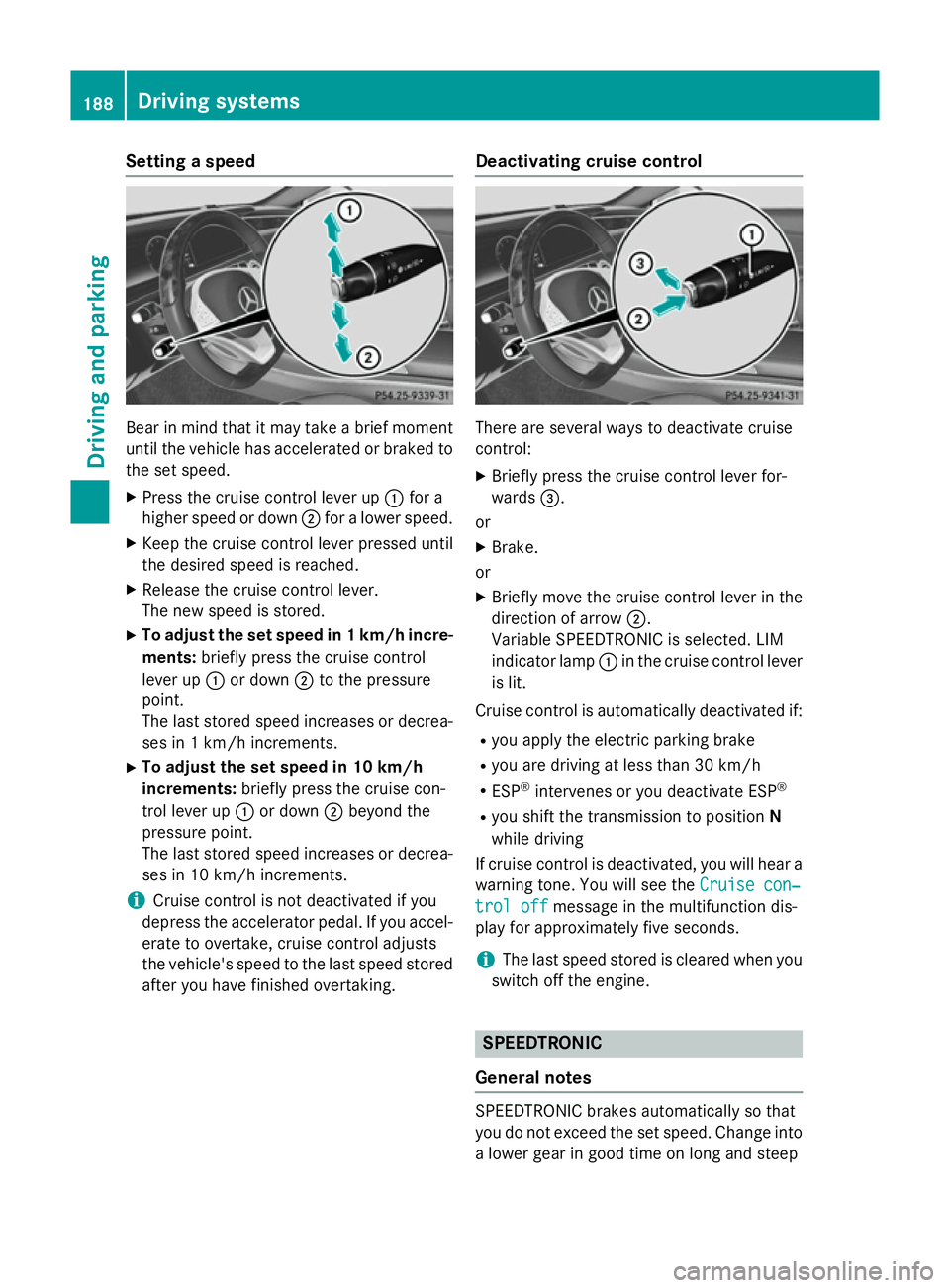
X Press the cruise control lever up :for a
higher speed or down ;for a lower speed.
X Keep the cruise control lever pressed until
the desired speed is reached.
X Release the cruise control lever.
The new speed is stored.
X To adjust the set speed in 1 km/h incre-
ments: briefly press the cruise control
lever up :or down ;to the pressure
point.
The last stored speed increases or decrea- ses in 1 km/h increments.
X To adjust the set speed in 10 km/h
increments: briefly press the cruise con-
trol lever up :or down ;beyond the
pressure point.
The last stored speed increases or decrea- ses in 10 km/h increments.
i Cruise control is not deactivated if you
depress the accelerator pedal. If you accel- erate to overtake, cruise control adjusts
the vehicle's speed to the last speed stored
after you have finished overtaking. Deactivating cruise control There are several ways to deactivate cruise
control:
X Briefly press the cruise control lever for-
wards =.
or X Brake.
or
X Briefly move the cruise control lever in the
direction of arrow ;.
Variable SPEEDTRONIC is selected. LIM
indicator lamp :in the cruise control lever
is lit.
Cruise control is automatically deactivated if:
R you apply the electric parking brake
R you are driving at less than 30 km/h
R ESP ®
intervenes or you deactivate ESP ®
R you shift the transmission to position N
while driving
If cruise control is deactivated, you will hear a
warning tone. You will see the Cruise con‐
Cruise con‐
trol off trol off message in the multifunction dis-
play for approximately five seconds.
i The last speed stored is cleared when you
switch off the engine. SPEEDTRONIC
General notes SPEEDTRONIC brakes automatically so that
you do not exceed the set speed. Change into
a lower gear in good time on long and steep 188
Driving systemsDriving and parking
Page 192 of 413
downhill gradients. Take particular note of
this when driving a laden vehicle. By doing so, you will make use of the braking effect of the engine. This relieves the load on the brake
system and prevents the brakes from over-
heating and wearing too quickly.
Important safety notes If you fail to adapt your driving style, SPEED-
TRONIC can neither reduce the risk of an
accident nor override the laws of physics.
SPEEDTRONIC cannot take into account
road, weather or traffic conditions. SPEED-
TRONIC is only an aid. You are responsible for
the distance to the vehicle in front, for vehicle speed, for braking in good time, and for stay-ing in lane.
If there is a change of drivers, advise the new
driver of the speed stored.
Variable SPEEDTRONIC General notes
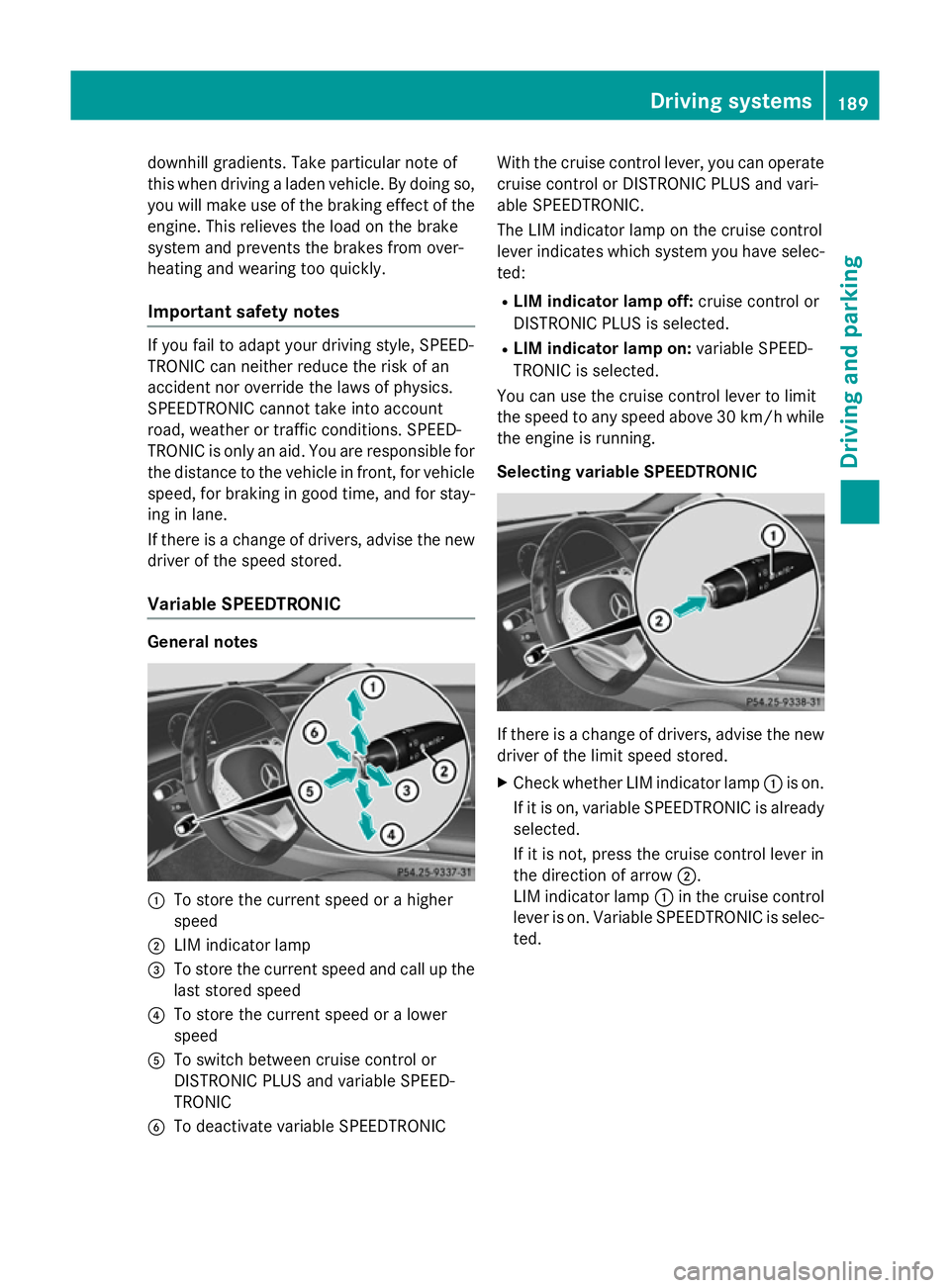
:
To store the current speed or a higher
speed
; LIM indicator lamp
= To store the current speed and call up the
last stored speed
? To store the current speed or a lower
speed
A To switch between cruise control or
DISTRONIC PLUS and variable SPEED-
TRONIC
B To deactivate variable SPEEDTRONIC With the cruise control lever, you can operate
cruise control or DISTRONIC PLUS and vari-
able SPEEDTRONIC.
The LIM indicator lamp on the cruise control
lever indicates which system you have selec-
ted:
R LIM indicator lamp off: cruise control or
DISTRONIC PLUS is selected.
R LIM indicator lamp on: variable SPEED-
TRONIC is selected.
You can use the cruise control lever to limit
the speed to any speed above 30 km/ hwhile
the engine is running.
Selecting variable SPEEDTRONIC If there is a change of drivers, advise the new
driver of the limit speed stored.
X Check whether LIM indicator lamp :is on.
If it is on, variable SPEEDTRONIC is already
selected.
If it is not, press the cruise control lever in
the direction of arrow ;.
LIM indicator lamp :in the cruise control
lever is on. Variable SPEEDTRONIC is selec-
ted. Driving systems
189Driving and parking Z
Page 194 of 413
R
drive slower than the stored speed without
kickdown
R set a new speed or
R call up the last speed stored again.
The SPEEDTRONIC passive
SPEEDTRONIC passive message in the
multifunction display disappears.
Deactivating variable SPEEDTRONIC
It is not possible to deactivate variable
SPEEDTRONIC by braking. There are several ways to deactivate variable
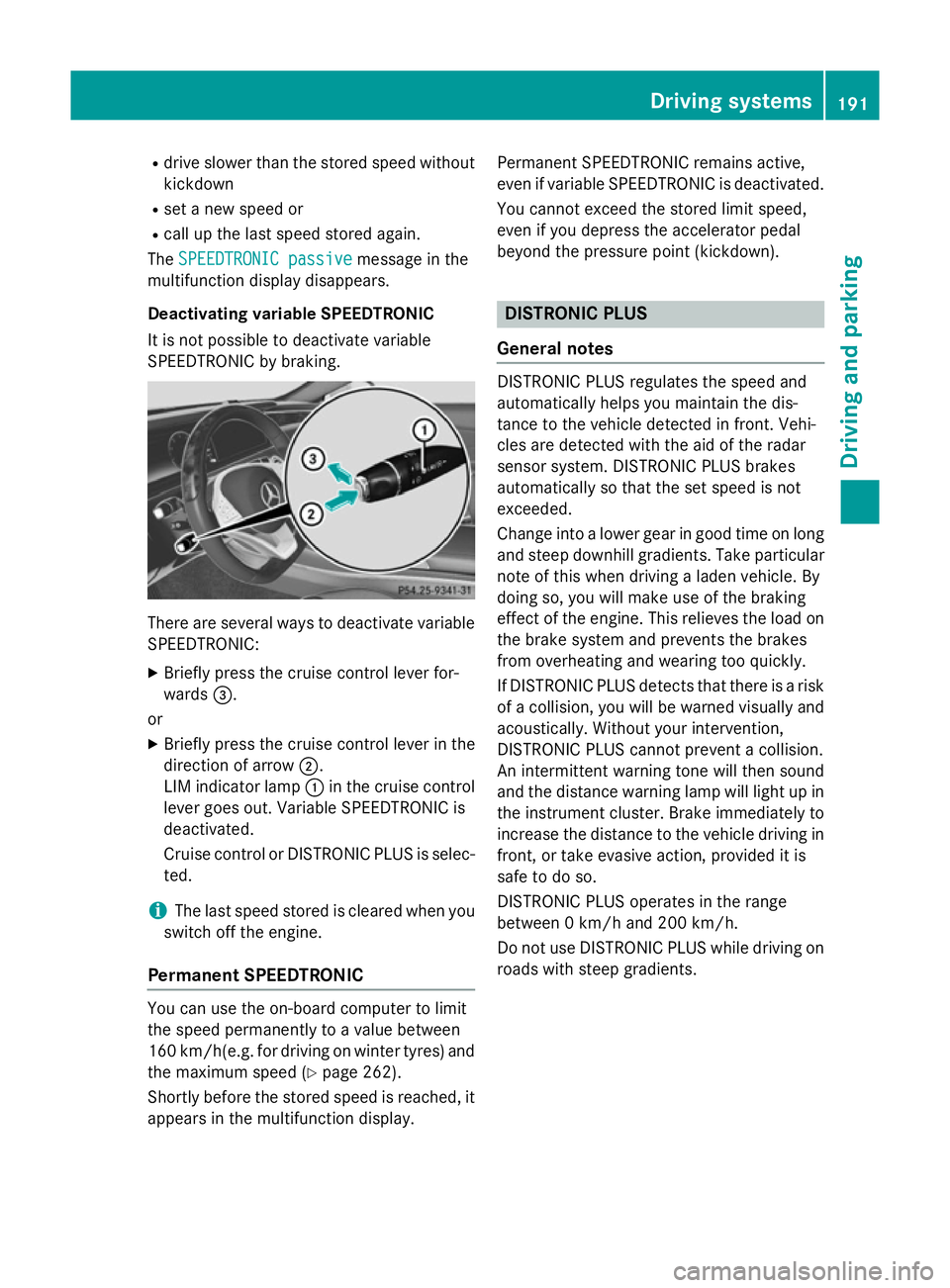
SPEEDTRONIC:
X Briefly press the cruise control lever for-
wards =.
or X Briefly press the cruise control lever in the
direction of arrow ;.
LIM indicator lamp :in the cruise control
lever goes out. Variable SPEEDTRONIC is
deactivated.
Cruise control or DISTRONIC PLUS is selec-
ted.
i The last speed stored is cleared when you
switch off the engine.
Permanent SPEEDTRONIC You can use the on-board computer to limit
the speed permanently to a value between
160 km/ h(e.g. for driving on winter tyres) and
the maximum speed (Y page 262).
Shortly before the stored speed is reached, it
appears in the multifunction display. Permanent SPEEDTRONIC remains active,
even if variable SPEEDTRONIC is deactivated.
You cannot exceed the stored limit speed,
even if you depress the accelerator pedal
beyond the pressure point (kickdown). DISTRONIC PLUS
General notes DISTRONIC PLUS regulates the speed and
automatically helps you maintain the dis-
tance to the vehicle detected in front. Vehi-
cles are detected with the aid of the radar
sensor system. DISTRONIC PLUS brakes
automatically so that the set speed is not
exceeded.
Change into a lower gear in good time on long
and steep downhill gradients. Take particular
note of this when driving a laden vehicle. By
doing so, you will make use of the braking
effect of the engine. This relieves the load on
the brake system and prevents the brakes
from overheating and wearing too quickly.
If DISTRONIC PLUS detects that there is a risk of a collision, you will be warned visually and acoustically. Without your intervention,
DISTRONIC PLUS cannot prevent a collision.
An intermittent warning tone will then sound
and the distance warning lamp will light up in
the instrument cluster. Brake immediately to
increase the distance to the vehicle driving in
front, or take evasive action, provided it is
safe to do so.
DISTRONIC PLUS operates in the range
between 0 km/h and 200 km/h.
Do not use DISTRONIC PLUS while driving on roads with steep gradients. Driving systems
191Driving and parking Z
Page 198 of 413
X
If you want to pull away with
DISTRONIC PLUS: remove your foot from
the brake pedal.
X Briefly pull the cruise control lever towards
you :.
or
X Accelerate briefly.
Your vehicle pulls away and adapts its
speed to that of the vehicle in front. If no
vehicle is detected in front, your vehicle
accelerates to the set speed.
i The vehicle can also pull away when it is
facing an unidentified obstacle or is driving
on a different line from another vehicle. The vehicle then brakes automatically. There is
a risk of an accident. Be ready to brake at all
times.
If there is no vehicle in front, DISTRONIC
PLUS operates in the same way as cruise
control.
If DISTRONIC PLUS detects that the vehicle in front has slowed down, it brakes your vehicle.
In this way, the distance you have selected is maintained.
If DISTRONIC PLUS detects a faster-moving
vehicle in front, it increases the driving speed.
However, the vehicle is only accelerated up to the speed you have stored.
Selecting the drive program
DISTRONIC PLUS supports a sporty driving
style when you select the Sdrive program
(Y page 171). Acceleration behind the vehicle
in front or to the set speed is then noticeably
more dynamic. If you have selected the E
driving program, the vehicle accelerates
more gently. This setting is recommended in
stop-and-start traffic. Changing lanes
If you change to the overtaking lane,
DISTRONIC PLUS supports you if:
R you are driving faster than 70 km/h
R you switch on the respective turn signal
R DISTRONIC PLUS does not detect a danger
of collision
If these conditions are met, your vehicle is
accelerated. Acceleration will be interrupted
if changing lanes takes too long or if the dis-
tance between your vehicle and the vehicle in front becomes too small.
i When you change lanes, DISTRONIC
PLUS monitors the left lane (on left-hand-
drive vehicles) or the right lane (on right-
hand-drive vehicles).
Road and traffic conditions i
The following function is not operational
in all countries.
DISTRONIC PLUS uses additional information
from your navigation system so that it can
adapt to certain traffic situations. This is the
case if, while following a vehicle, DISTRONIC
PLUS is active and you:
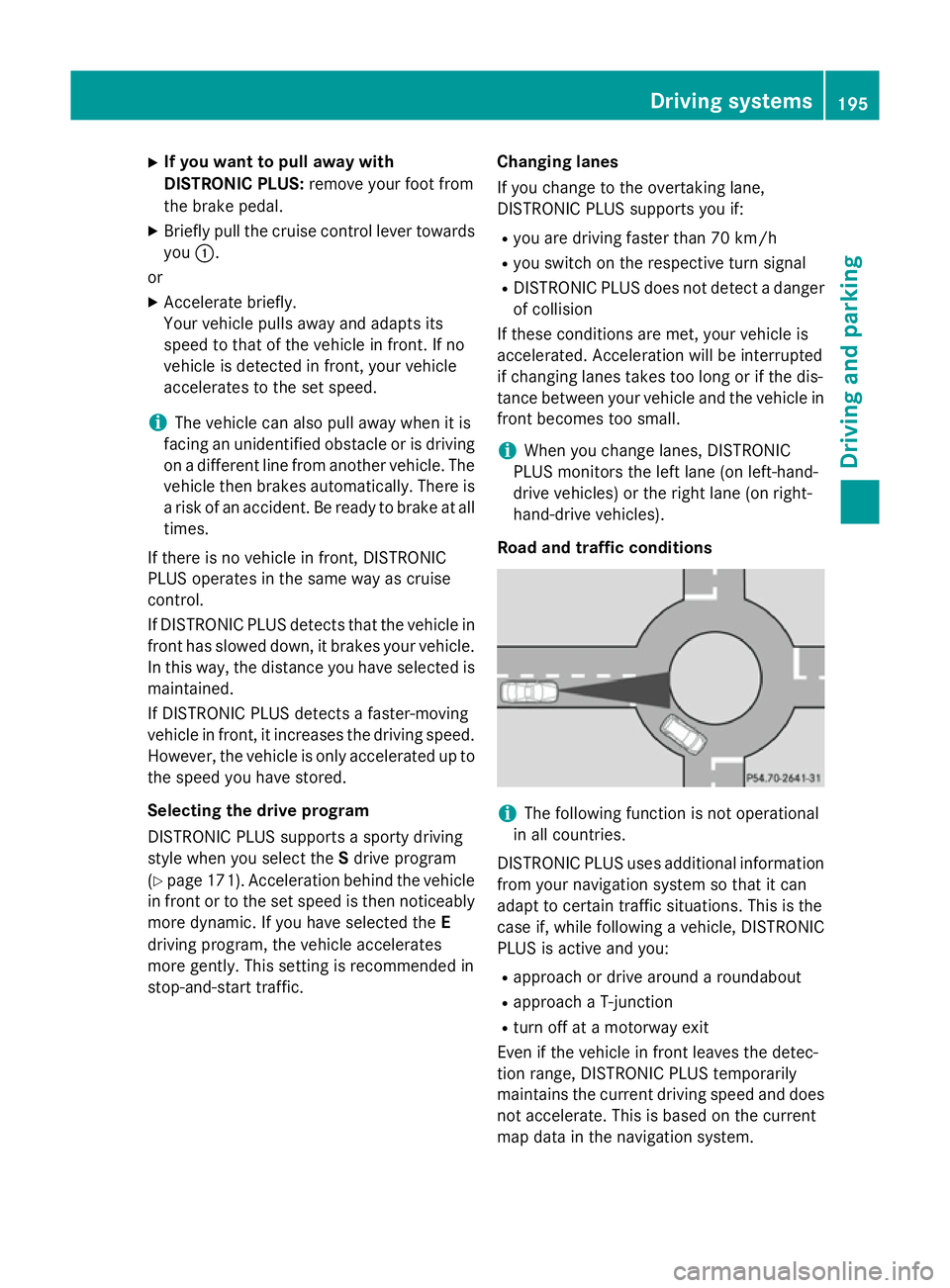
R approach or drive around a roundabout
R approach a T-junction
R turn off at a motorway exit
Even if the vehicle in front leaves the detec-
tion range, DISTRONIC PLUS temporarily
maintains the current driving speed and does not accelerate. This is based on the current
map data in the navigation system. Driving systems
195Driving and parking Z
Page 204 of 413
account lane markings, e.g. when following
vehicles in a traffic jam.
Steering Assist and Stop&Go Pilot do not pro- vide any support if these conditions do not
exist.
DISTRONIC PLUS must be active in order for
the function to be available.
Important safety notes
If you fail to adapt your driving style,
DISTRONIC PLUS with Steering Assist and
Stop&Go Pilot can neither reduce the risk of
an accident nor override the laws of physics.
It cannot take account of road, weather and
traffic conditions. DISTRONIC PLUS with
Steering Assist and Stop&Go Pilot is only an
aid. You are responsible for the distance to
the vehicle in front, for vehicle speed, for
braking in good time, and for staying in lane.
DISTRONIC PLUS with Steering Assist and
Stop&Go Pilot does not detect road and traf-
fic conditions. If you are following a vehicle
which is driving towards the edge of the car-
riageway, your vehicle could come into con-
tact with the kerb or other road boundaries. In the case of deviations in road markings,
beware of other road users, e.g. cyclists, that are directly next to your vehicle.
Obstacles such as traffic pylons on the lane or
projecting out into the lane are not detected.
An inappropriate steering intervention, e.g.
after intentionally driving over a lane marking, can be corrected at any time if you steer
slightly in the opposite direction.
DISTRONIC PLUS with Steering Assist and
Stop&Go Pilot cannot continuously keep your
vehicle in lane. In some cases, the steering
intervention is not sufficient to bring the vehi-
cle back to the lane. In such cases, you must steer the vehicle yourself to ensure that it
does not leave the lane. The system may be impaired or may not func-
tion if:
R there is poor visibility, e.g. due to insuffi-
cient illumination of the road, or due to
snow, rain, fog or spray
R there is glare, e.g. from oncoming traffic,
the sun or reflection from other vehicles
(e.g. if the road surface is wet)
R the windscreen is dirty, misted up, dam-
aged or covered, for instance by a sticker,
in the vicinity of the camera
R no, or several, unclear lane markings are
present for one lane, e.g. in a construction
area
R the lane markings are worn away, dark or
covered up, e.g. by dirt or snow
R the distance to the vehicle in front is too
small and the lane markings thus cannot be
detected
R the lane markings change quickly, e.g.
lanes branch off, cross one another or
merge
R the road is narrow and winding
R there are highly variable shade conditions
on the road
The system is switched to passive and no lon- ger assists you by performing steering inter-
ventions if:
R you actively change lane
R you switch on the turn signal
R you take your hands off the steering wheel
or do not steer for a prolonged period of
time
i Steering Assist and Stop&Go Pilot are
activated again automatically after a lane
change is completed.
Steering Assist and Stop&Go Pilot do not pro- vide any support:
R on very sharp corners
R a loss of tyre pressure or a defective tyre
has been detected and displayed
Pay attention also to the important safety
notes for DISTRONIC PLUS (Y page 192). Driving systems
201Driving and parking Z
Page 218 of 413
X
To cancel the procedure: press the%
button on the multifunction steering wheel or pull away.
or
X To park using Active Parking Assist:
press the abutton on the multifunction
steering wheel.
The Park Assist active Accelerate
Park Assist active Accelerate
and and brake
brake Observe
Observe surroundings
surroundings mes-
sage appears in the multifunction display.
X Release the multifunction steering wheel.
X Reverse the vehicle, being ready to brake at
all times. When reversing, drive at a speed
below 10 km/h. Otherwise, Active Parking Assist will be cancelled.
Active Parking Assist brakes the vehicle toa standstill when the vehicle approaches
the rear border of the parking space.
Manoeuvring may be required in tight park-
ing spaces.
The Park Assist active Select D
Park Assist active Select D
Observe
Observe surroundings surroundings message appears in
the multifunction display.
X Shift the transmission to position Dwhile
the vehicle is stationary.
Active Parking Assist immediately steers in
the other direction.
The Park Assist active Accelerate
Park Assist active Accelerate
and
and brake brake Observe
Observe surroundings
surroundings mes-
sage appears in the multifunction display.
i You will achieve the best results by wait-
ing for the steering procedure to complete before pulling away.
X Drive forwards and be ready to brake at all
times.
Active Parking Assist brakes the vehicle to a standstill.
The Park Assist active Select R
Park Assist active Select R
Observe
Observe surroundings surroundings message appears in
the multifunction display.
As soon as the parking procedure is com-
plete, the Park
Park Assist
Assist switched switched off
offmes-
sage appears in the multifunction display and
a warning tone sounds. The vehicle is now parked. The vehicle is kept stationary without
the driver having to depress the brake pedal. The braking effect is cancelled when you
depress the accelerator pedal.
Active Parking Assist no longer supports you
with steering interventions and brake appli-
cations. When Active Parking Assist is fin-
ished, you must steer and brake again your-
self. PARKTRONIC is still available.
Parking tips:
R The way your vehicle is positioned in the
parking space after parking is dependent
on various factors. These include the posi-
tion and shape of the vehicles parked in
front and behind it and the conditions of the
location. It may be the case that Active
Parking Assist guides you too far into a
parking space, or not far enough into it. In
some cases, it may also lead you across or
onto the kerb. If necessary, you should can-
cel the parking procedure with Active Park- ing Assist.
R You can also preselect transmission posi-
tion D. The vehicle redirects and does not
drive as far into the parking space. Should
the transmission change take place too
early, the parking procedure will be cancel-
led. A sensible parking position can no lon- ger be achieved from this position.
Exiting a parking space In order that Active Parking Assist can sup-
port you when you exit the parking space:
R the border of the parking space must be
high enough at the front and the rear. A
kerb stone is too small, for example.
R the border of the parking space must not be
too wide, as the position of the vehicle must
not exceed an angle of 45° to the starting
position as it is manoeuvred into the park-
ing space.
R a manoeuvring distance of at least 1.0 m
must be available.
Active Parking Assist can only assist you with exiting a parking space if you have parked the Driving systems
215Driving and parking Z
Page 229 of 413
Important safety notes
ATTENTION ASSIST is only an aid. It may not
always detect fatigue or lapses in concentra-
tion until too late, or may not detect them at
all. The system is not a substitute for a well-
rested and attentive driver.
The functionality of ATTENTION ASSIST is
restricted, and warnings may be delayed or
not occur at all:
R if the length of the journey is less than
approximately 30 minutes
R if the road condition is poor, e.g. if the sur-
face is uneven or if there are potholes
R if there is a strong side wind
R if you have adopted a sporty driving style
with high cornering speeds or high rates of
acceleration
R if you are predominantly driving at a speed
below 60 km/h or above 200 km/h
R if you are driving with the active Steer
Assist of DISTRONIC PLUS
R if the time has been set incorrectly
R in active driving situations, such as when
you change lanes or change your speed
ATTENTION ASSIST is reset and starts
assessing your tiredness again when you con- tinue your journey if:
R you switch off the engine
R you take off your seat belt and open the
driver's door, e.g. for a change of drivers or
to take a break
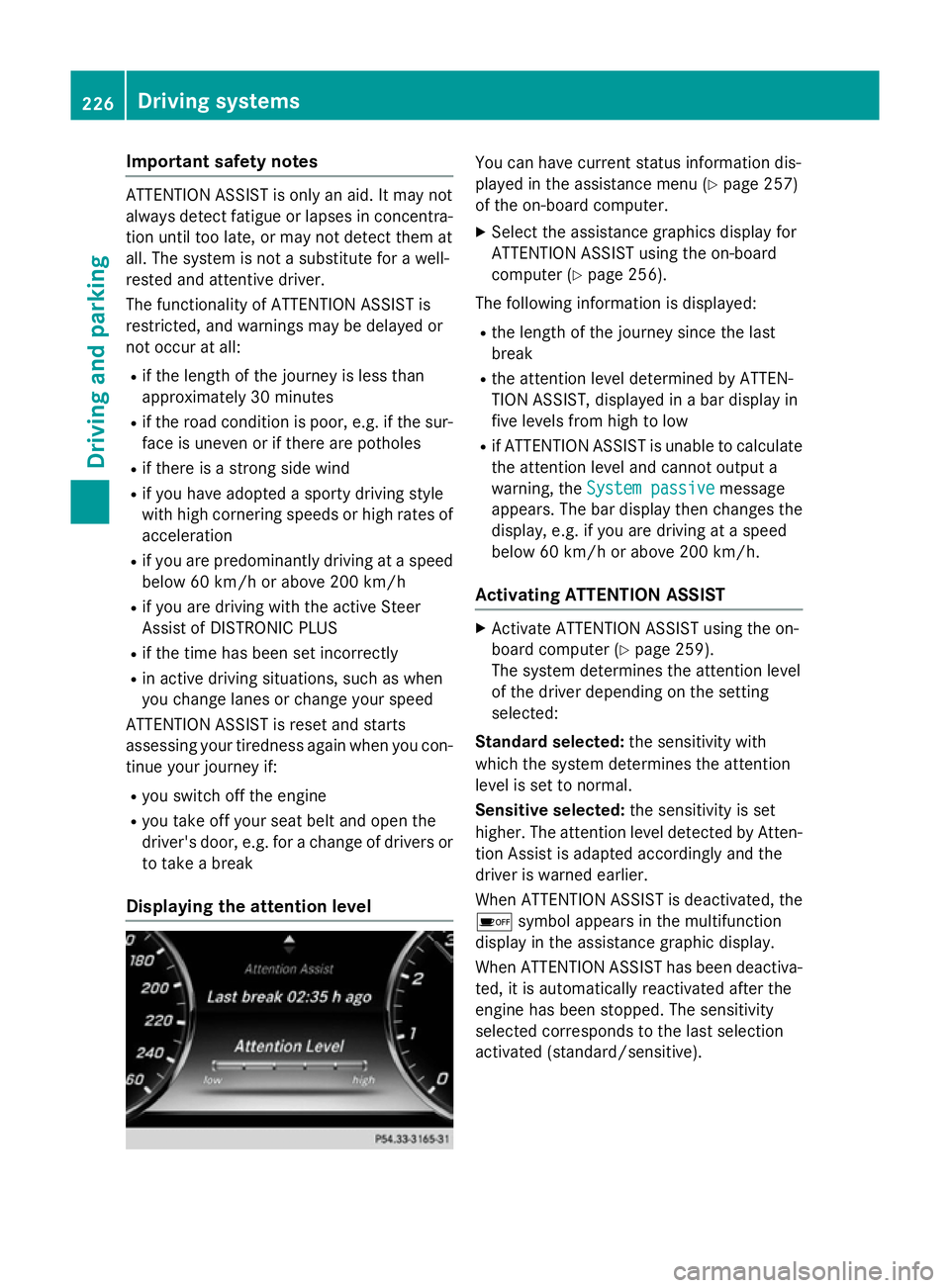
Displaying the attention level You can have current status information dis-
played in the assistance menu (Y
page 257)
of the on-board computer.
X Select the assistance graphics display for
ATTENTION ASSIST using the on-board
computer (Y page 256).
The following information is displayed:
R the length of the journey since the last
break
R the attention level determined by ATTEN-
TION ASSIST, displayed in a bar display in
five levels from high to low
R if ATTENTION ASSIST is unable to calculate
the attention level and cannot output a
warning, the System passive System passive message
appears. The bar display then changes the
display, e.g. if you are driving at a speed
below 60 km/h or above 200 km/h.
Activating ATTENTION ASSIST X
Activate ATTENTION ASSIST using the on-
board computer (Y page 259).
The system determines the attention level
of the driver depending on the setting
selected:
Standard selected: the sensitivity with
which the system determines the attention
level is set to normal.
Sensitive selected: the sensitivity is set
higher. The attention level detected by Atten- tion Assist is adapted accordingly and the
driver is warned earlier.
When ATTENTION ASSIST is deactivated, the é symbol appears in the multifunction
display in the assistance graphic display.
When ATTENTION ASSIST has been deactiva-
ted, it is automatically reactivated after the
engine has been stopped. The sensitivity
selected corresponds to the last selection
activated (standard/sensitive). 226
Driving systemsDriving and pa
rking
Page 230 of 413
Warning in the multifunction display
If fatigue or increasing lapses in concentra-
tion are detected, a warning appears in the
multifunction display: Attention Assist: Attention Assist:
Take a break!
Take a break!
In addition to the message shown in the mul-
tifunction display, you will then hear a warn-
ing tone.
X If necessary, take a break.
X Confirm the message by pressing the a
button on the steering wheel.
On long journeys, take regular breaks in good
time to allow yourself to rest properly. If you
do not take a break and ATTENTION ASSIST
continues to detect increasing lapses in con- centration, you will be warned again after
15 minutes at the earliest. This will only hap-
pen if ATTENTION ASSIST still detects typical indicators of fatigue or increasing lapses in
concentration.
If a warning is output in the multifunction dis-
play, a service station search is performed in
COMAND Online. You can select a service
station and navigation to this service station
will then begin. This function can be activated
and deactivated in COMAND Online. Traffic Sign Assist
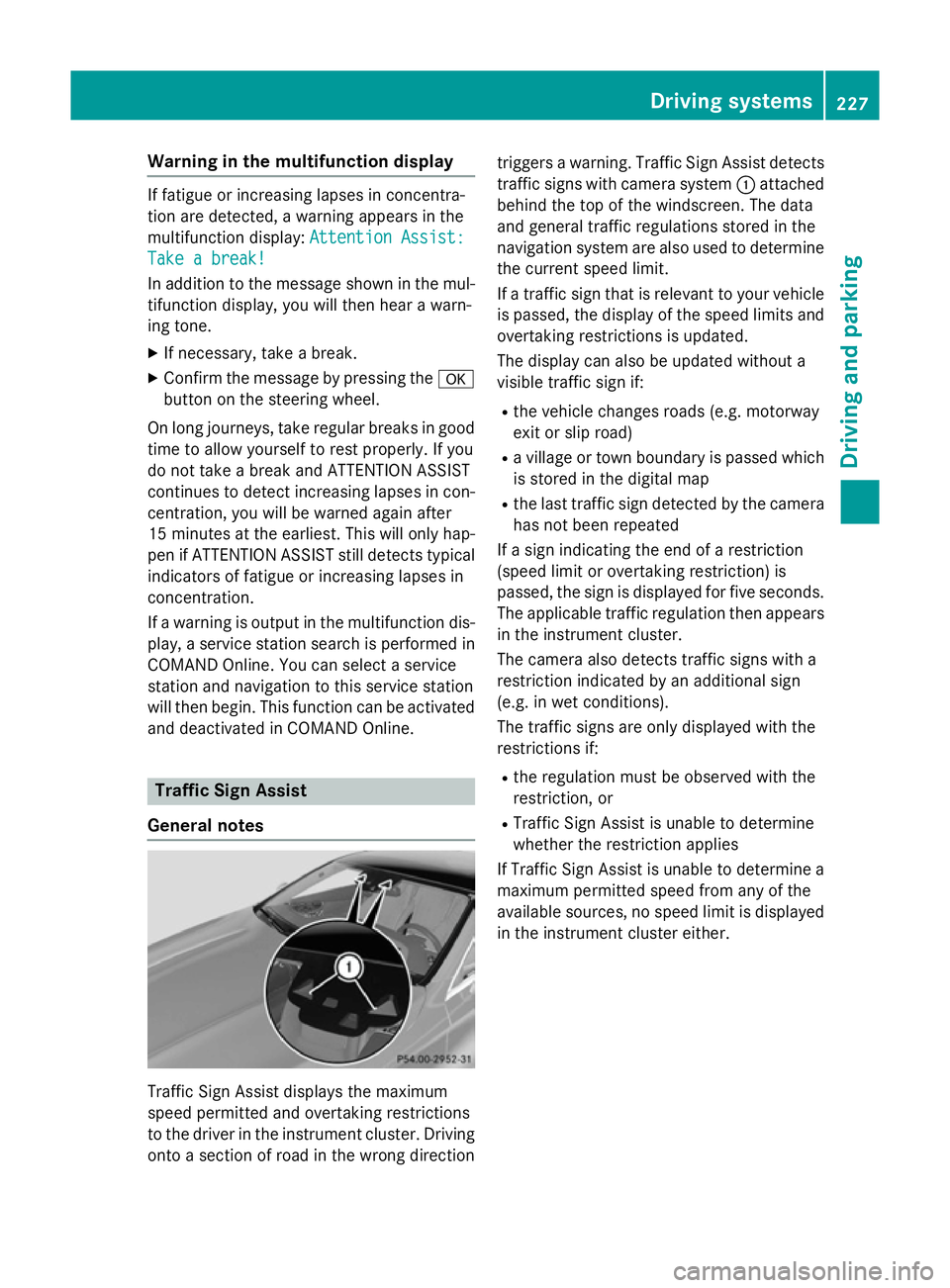
General notes Traffic Sign Assist displays the maximum
speed permitted and overtaking restrictions
to the driver in the instrument cluster. Driving onto a section of road in the wrong direction triggers a warning. Traffic Sign Assist detects
traffic signs with camera system :attached
behind the top of the windscreen. The data
and general traffic regulations stored in the
navigation system are also used to determine
the current speed limit.
If a traffic sign that is relevant to your vehicle is passed, the display of the speed limits and
overtaking restrictions is updated.
The display can also be updated without a
visible traffic sign if:
R the vehicle changes roads (e.g. motorway
exit or slip road)
R a village or town boundary is passed which
is stored in the digital map
R the last traffic sign detected by the camera
has not been repeated
If a sign indicating the end of a restriction
(speed limit or overtaking restriction) is
passed, the sign is displayed for five seconds. The applicable traffic regulation then appears
in the instrument cluster.
The camera also detects traffic signs with a
restriction indicated by an additional sign
(e.g. in wet conditions).
The traffic signs are only displayed with the
restrictions if:
R the regulation must be observed with the
restriction, or
R Traffic Sign Assist is unable to determine
whether the restriction applies
If Traffic Sign Assist is unable to determine a
maximum permitted speed from any of the
available sources, no speed limit is displayed
in the instrument cluster either. Driving systems
227Driving and parking Z