2014 MERCEDES-BENZ G-CLASS SUV ESP
[x] Cancel search: ESPPage 166 of 272

Problem Possible causes/consequences and
M
MSolutions ֌
The yellow ESP
®
and
ESP ®
OFF warning
lamps are lit while the
engine is running. ESP
®
, BAS, the HOLD function, hill start assist and ESP ®
trailer
stabilization are temporarily unavailable.
BAS and the adaptive brake lights may also have failed.
Self-diagnosis is not yet complete.
G WARNING
The brake system continues to function normally, but without the
functions listed above.
The braking distance in an emergency braking situation can thus
increase.
If ESP ®
is not operational, ESP ®
is unable to stabilize the vehicle.
There is an increased risk of skidding and an accident.
X Carefully drive a suitable distance, making slight steering
movements at a speed above 12 mph (20 km/h).
The functions mentioned above are available again when the
warning lamp goes out.
If the warning lamp is still on:
X Observe the additional display messages in the multifunction
display.
X Drive on carefully.
X Visit a qualified specialist workshop. å
The yellow ESP
®
OFF
warning lamp is lit while
the engine is running. You have engaged the differential locks. ABS, ESP
®
, 4ETS and BAS
have been deactivated.
X Disengage the differential locks.
ESP ®
, 4ETS and BAS are subsequently reactivated.
X Observe the additional display messages in the multifunction
display. 6
The red SRS warning
lamp is lit while the
engine is running.
There is a malfunction in the SRS (Supplemental Restraint
System).
G WARNING
The air bags or Emergency Tensioning Devices may either be
triggered unintentionally or, in the event of an accident, may not
be triggered.
There is an increased risk of injury.
X Drive on carefully.
X Have SRS checked at a qualified specialist workshop
immediately.
For further information about SRS, see (Y page 40).164
Warning and indicator lamps in the instrument clusterOn-board computer and displays
Page 169 of 272
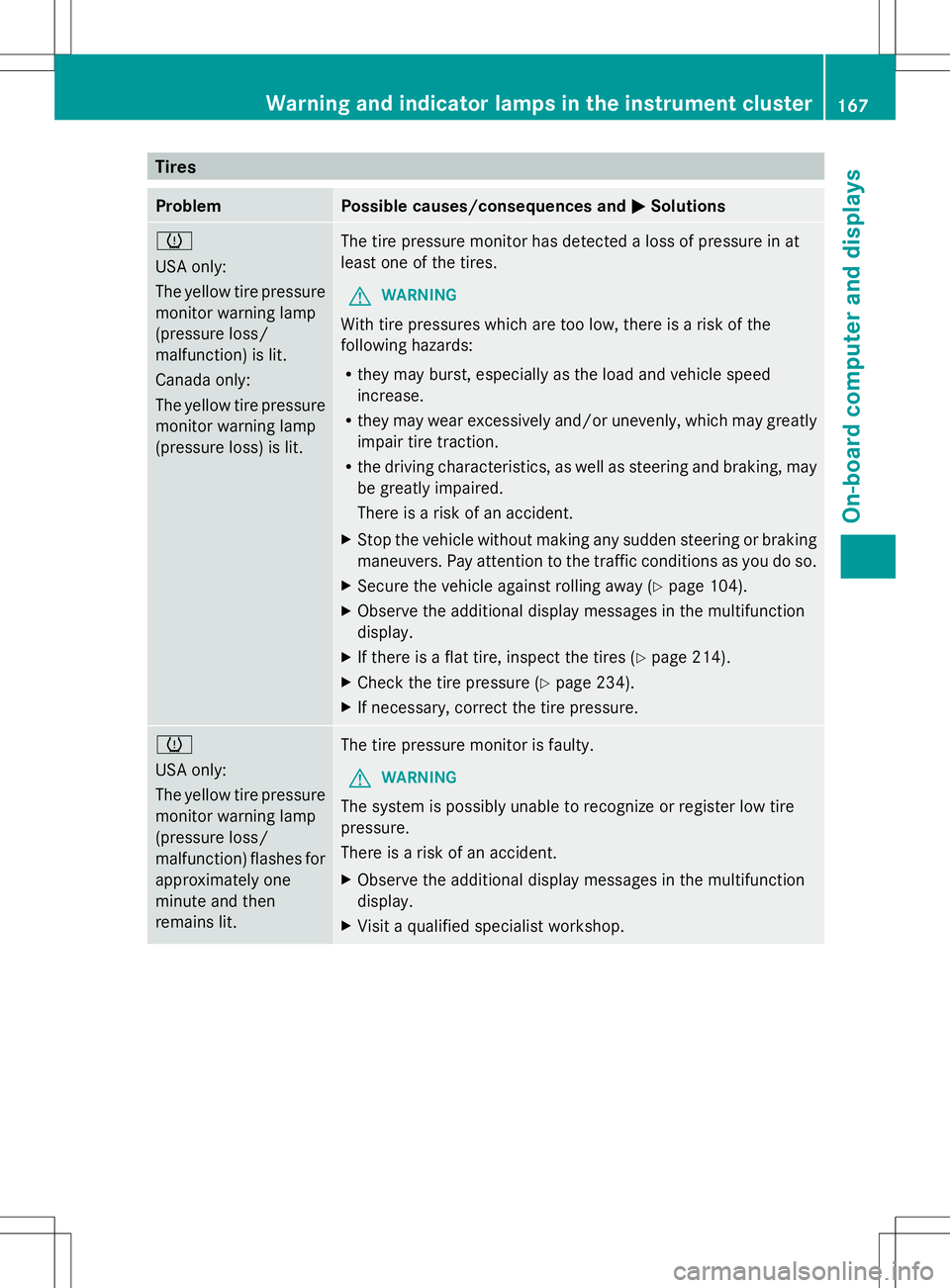
Tires
Problem Possible causes/consequences and
M
MSolutions h
USA only:
The yellow tire pressure
monitor warning lamp
(pressure loss/
malfunction) is lit.
Canada only:
The yellow tire pressure
monitor warning lamp
(pressure loss) is lit. The tire pressure monitor has detected a loss of pressure in at
least one of the tires.
G WARNING
With tire pressures which are too low, there is a risk of the
following hazards:
R they may burst, especially as the load and vehicle speed
increase.
R they may wear excessively and/or unevenly, which may greatly
impair tire traction.
R the driving characteristics, as well as steering and braking, may
be greatly impaired.
There is a risk of an accident.
X Stop the vehicle without making any sudden steering or braking
maneuvers. Pay attention to the traffic conditions as you do so.
X Secure the vehicle against rolling away (Y page 104).
X Observe the additional display messages in the multifunction
display.
X If there is a flat tire, inspect the tires ( Ypage 214).
X Check the tire pressure (Y page 234).
X If necessary, correct the tire pressure. h
USA only:
The yellow tire pressure
monitor warning lamp
(pressure loss/
malfunction) flashes for
approximately one
minute and then
remains lit.
The tire pressure monitor is faulty.
G WARNING
The system is possibly unable to recognize or register low tire
pressure.
There is a risk of an accident.
X Observe the additional display messages in the multifunction
display.
X Visit a qualified specialist workshop. Warning and indicator lamps in the instrument cluster
167On-board computer and displays Z
Page 172 of 272
Useful information
i These operating instructions describe all
the standard and optional equipment of
your COMAND system, as available at the
time of going to print. Country-specific
differences are possible. Please note that
your COMAND system may not be
equipped with all the features described.
This also applies to safety-related systems
and functions.
i Read the information on qualified
specialist workshops: (Y page 27).General notes
The COMAND section in these operating
instructions describes the basic principles for
operating your COMAND and the online and
Internet functions. More information can be
found in the Digital Operator's Manual.
The COMAND section in these operating
instructions describes the basic principles for
operating your COMAND. More information
can be found in the Digital Operator's Manual. Important safety notes
G
WARNING
Making alterations to electronic components
can cause malfunctions.
Radio, satellite radio, amplifier, DVD changer,
navigation module, phone and voice control
are networked. If one component is not
functional or if it has been incorrectly
removed/replaced, this could impair the
operation of other components.
This could seriously jeopardize the
operational safety of your vehicle.
We recommend that you always have
maintenance work on electronic components
carried out at an authorized Mercedes-Benz
Center. G
WARNING
In order to avoid distraction which could lead
to an accident, the driver should only enter
system settings with the vehicle at a standstill
and operate the system only when road,
weather and traffic conditions permit.
Bear in mind that at a speed of only 30 mph
(approximately 50 km/h), the vehicle covers
a distance of 44 feet (approximately 14 m) per
second.
COMAND delivers information to simplify
your choice of route and guide you
comfortably and safely to your destination.
For safety reasons, we recommend that you
bring your vehicle to a standstill, paying
attention to road and traffic conditions,
before making or accepting a telephone call
or viewing navigation maps, instructions or
downloaded information on the COMAND
screen. G
WARNING
While the navigation system provides
directional assistance, the driver must remain
focused on safe driving behavior, especially
attention to traffic and street signs, and
should utilize the system's audio cues while
driving.
The navigation system does not supply any
information on stop signs, yield signs, traffic
regulations or traffic safety rules. Their
observance always remains in the driver's
personal responsibility. DVD maps do not
cover all areas nor all routes within an area. G
WARNING
This equipment complies with FCC radiation
exposure limits set forth for uncontrolled
equipment and meets the FCC radio
frequency (RF) Exposure Guidelines in
Supplement C to OET65.
This equipment has very low levels of RF
energy that is deemed to comply without
maximum permissive exposure evaluation
(MPE). But it is desirable that it should be
installed and operated with at least 8inches 170
Important safety notesCOMAND
Page 173 of 272

(20 cm) and more between the radiator and a
person's body (excluding extremities: hands,
wrists, feet and legs.) Declarations of conformity
Vehicle components which receive
and/or transmit radio waves
i USA only: The wireless devices of this
vehicle comply with Part 15 of the FCC
Rules. Operation is subject to the following
two conditions:
1. These devices may not cause harmful
interference, and
2. These devices must accept any
interference received, including
interference that may cause undesired
operation.
Changes or modifications not expressly
approved by the party responsible for
compliance could void the user's authority
to operate the equipment.
i Canada only: the wireless devices of this
vehicle comply with Industry Canada
license-exempt RSS standard(s). Operation
is subject to the following two conditions:
1. These devices may not cause harmful
interference, and
2. These devices must accept any
interference received, including
interference that may cause undesired
operation. Information on copyright
General information
Information on licenses for free and Open
Source software used in your vehicle and in
the electronic components can be found on
this website: http://www.mercedes-
benz.com/opensource . Registered trademarks
Registered trademarks:
R Bluetooth ®
is a registered trademark of
Bluetooth ®
SIG Inc.
R DTS is a registered trademark of DTS, Inc.
R Dolby and MLP are registered trademarks
of DOLBY Laboratories.
R BabySmart™, ESP ®
and PRE-SAFE ®
are
registered trademarks of Daimler AG.
R HomeLink ®
is a registered trademark of
Prince.
R iPod ®
and iTunes ®
are registered
trademarks of Apple Inc.
R Logic7 ®
is a registered trademark of
Harman International Industries.
R Microsoft ®
and Windows media ®
are
registered trademarks of Microsoft
Corporation.
R SIRIUS is a registered trademark of Sirius
XM Radio Inc.
R HD Radio is a registered trademark of
iBiquity Digital Corporation.
R Gracenote ®
is a registered trademark of
Gracenote, Inc.
R ZAGATSurvey ®
and related brands are
registered trademarks of ZagatSurvey,
LLC. Function restrictions
For safety reasons, some COMAND functions
are restricted or unavailable while the vehicle
is in motion. You will notice this, for example
because either you will not be able to select
certain menu items or COMAND will display
a message to this effect. Function restrictions
171COMAND Z
Page 174 of 272
COMAND operating system
Overview
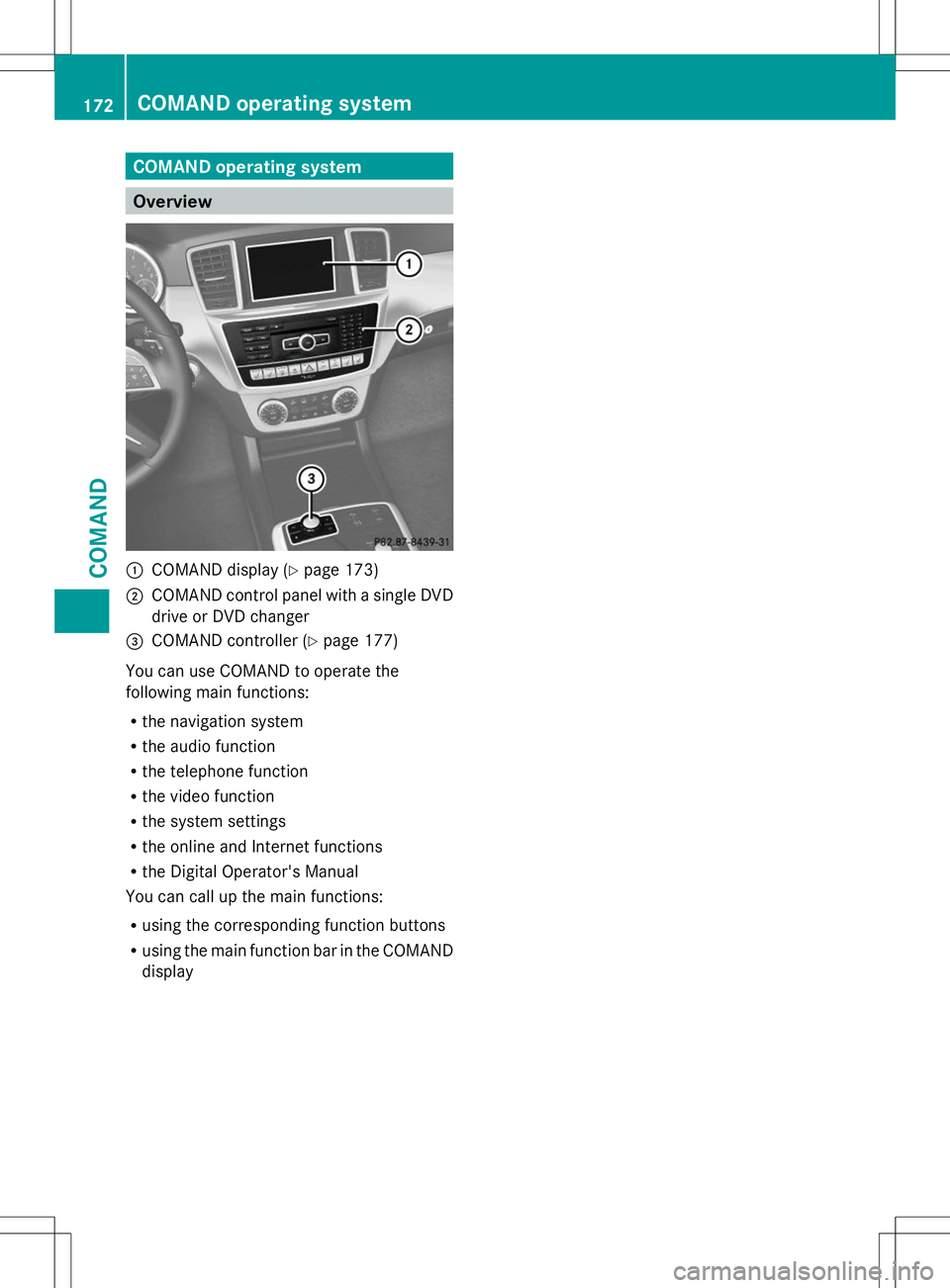
:
COMAND display (Y page 173)
; COMAND control panel with a single DVD
drive or DVD changer
= COMAND controller (Y page 177)
You can use COMAND to operate the
following main functions:
R the navigation system
R the audio function
R the telephone function
R the video function
R the system settings
R the online and Internet functions
R the Digital Operator's Manual
You can call up the main functions:
R using the corresponding function buttons
R using the main function bar in the COMAND
display 172
COMAND operating systemCOMAND
Page 183 of 272
X
To enter using the character bar: enter
the web address in the input line.
As soon as the first letter has been entered
in the input line, a list appears below it. The
list shows web addresses which begin with
the letters you have entered and web
addresses which have already been called
up.
The list is empty the first time you call it up.
X After entering the web address, select the
¬ symbol by sliding VÆand turning
cVd the COMAND controller and press
W to confirm.
The website is called up.
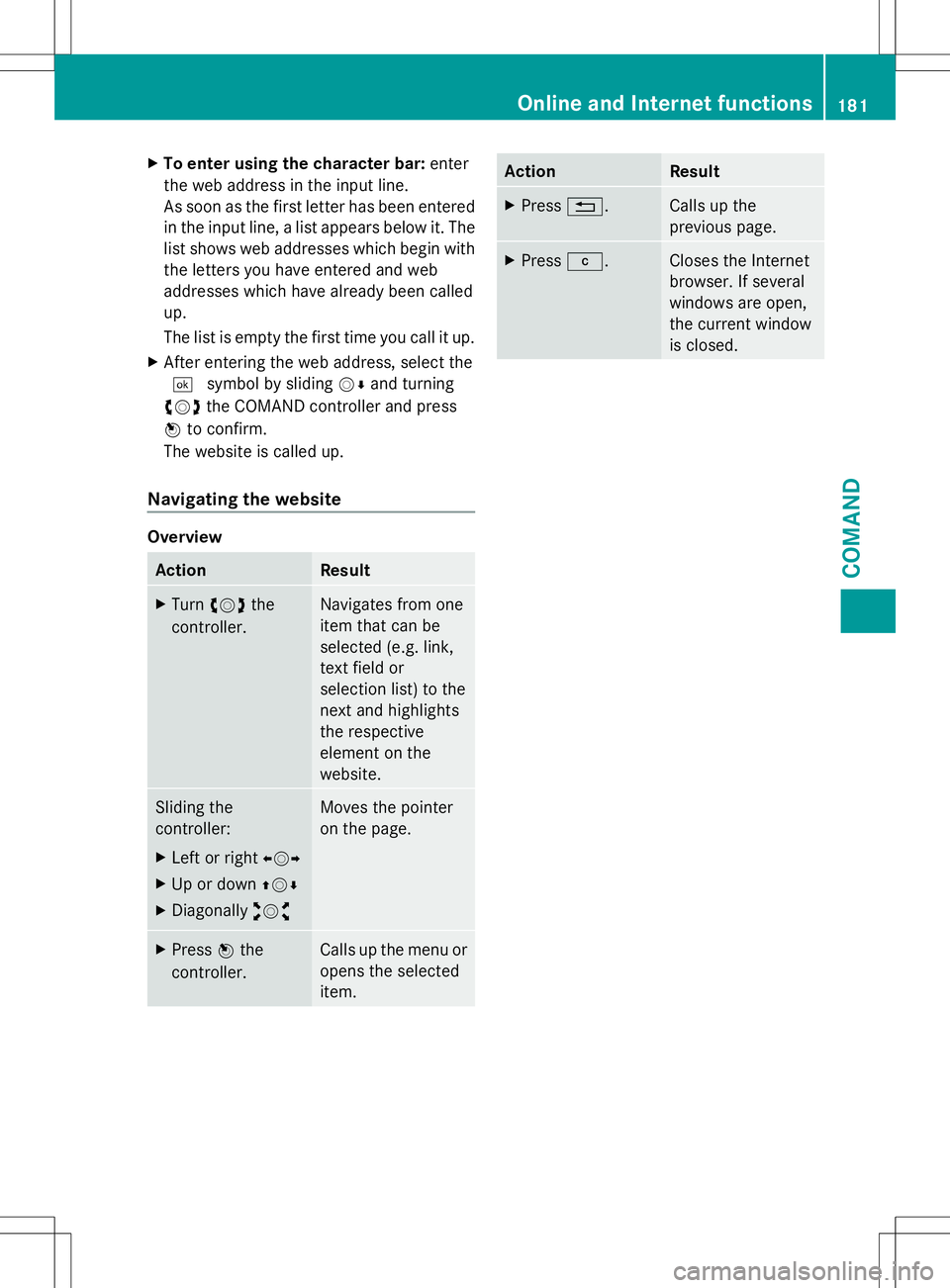
Navigating the website Overview
Action Result
X
Turn cVd the
controller. Navigates from one
item that can be
selected (e.g. link,
text field or
selection list) to the
next and highlights
the respective
element on the
website.
Sliding the
controller:
X
Left or right XVY
X Up or down ZVÆ
X Diagonally aVb Moves the pointer
on the page.
X
Press Wthe
controller. Calls up the menu or
opens the selected
item. Action Result
X
Press %. Calls up the
previous page.
X
Press j. Closes the Internet
browser. If several
windows are open,
the current window
is closed. Online and Internet functions
181COMAND Z
Page 188 of 272

vehicle occupants unless the items are
securely fastened in the vehicle.
To help avoid personal injury during a collision
or sudden maneuver, exercise care when
transporting cargo. G
WARNING
Failure to assure that the seat bench and seat
backrests are locked into place could result
in an increased chance of injury in an
accident.
Never place hands under seat or near any
moving parts while a seat is being adjusted.
For safety reasons, the rear seat bench must
only be adjusted when the vehicle is
stationary.
Never drive a vehicle with the tailgate open.
Deadly carbon monoxide (CO) gases may
enter vehicle interior resulting in
unconsciousness and death.
! Ensure that you remove all containers
from the cup holder in the rear before
folding the seat backrest and the seat
cushion of the rear bench seat forwards.
Observe the loading guidelines (Y page 184).
The rear bench seat is split symmetrically.
The left-hand and right-hand rear seats can
be folded down to increase the cargo
compartment capacity. The following
changes are possible:
R fold the seat backrests forward
R fold the rear bench seat back fully Folding the seat backrest forward To fold forward the seat backrests, proceed
as follows:
X
Open the rear doors.
This allows you better access to release
lever :.
X Remove the center head restraint
(Y page 78).
X Pull catch :in the direction of the arrow.
The corresponding rear seat backrest is not
engaged.
X Fold the backrest forwards.
The rear seat backrest engages audibly. ;
Backrest folded forward
Folding the seat backrest back !
Make sure that the seat belt does not
become trapped when folding the rear seat
backrest back. Otherwise, it could be
damaged. 186
Stowage areasStowage and features
Page 189 of 272

X
Pull release lever :.
The corresponding seat backrest is
released.
X Fold backrest ;backwards in the
direction of the arrow.
The seat catch engages audibly.
X Install the head restraint (Y page 78).
Rear bench seat Folding the rear bench seat forward
X
Fold rear seat backrest (Y page 186)
forwards.
X Pull catch :in the direction of the arrow.
The corresponding rear bench seat is
released.
X Fold rear bench seat ;forwards. ;
Rear bench seat folded forward
Folding the rear bench seat into an
upright position G
WARNING
If the rear bench seat/rear seat and seat
backrest are not engaged they could fold
forwards, e.g. when braking suddenly or in the
event of an accident.
R The vehicle occupant would thereby be
pushed into the seat belt by the rear bench
seat/rear seat or by the seat backrest. The
seat belt can no longer offer the intended
level of protection and could even cause
injuries.
R Objects or loads in the trunk/cargo
compartment cannot be restrained by the
seat backrest.
There is an increased risk of injury.
Before every trip, make sure that the seat
backrests and the rear bench seat/rear seat
are engaged.
X Fold the rear bench seat back.
The seat catch engages audibly.
X Fold the backrest backwards
(Y page 186).
X Install the head restraints (Y page 78). Securing cargo
Important safety notes Distribute the load on the cargo tie-down
rings evenly. Stowage areas
187Stowage and features Z