2014 MERCEDES-BENZ G-CLASS SUV cruise control
[x] Cancel search: cruise controlPage 9 of 272

Notes
............................................. 262
Temperature (on-board computer) .144
Temperature gauge ........................ 142
Warning lamp ................................. 165
Cooling
see Climate control
Cornering light function
Display message ............................ 144
Function/notes ................................ 84
Courtesy lights .................................... 84
Cruise control Cruise control lever .......................110
Display message ............................ 144
Driving system ............................... 109
Function/notes ............................. 109
Selecting ........................................ 110
Cup holder
Center console .............................. 189
Important safety notes ..................189 D
Data see Technical data
Daytime running lamps
Display message ............................ 144
Switching on/off (on-board
computer) ...................................... 144
Declarations of conformity ................. 26
DEF Display message ............................ 144
Delayed switch-off
Exterior lighting (on-board
computer) ...................................... 144
Interior lighting .............................. 144
Differential lock
Disengaging ................................... 134
Front axle ...................................... 133
Rear axle ........................................ 133
Transfer case ................................. 133
Differential locks
Engaging ........................................ 132
General notes ................................ 131
Terrain ........................................... 131
Differential locks (display message) 144
Digital Operator's Manual Contents .......................................... 23
Installation ....................................... 21Introduction
..................................... 21
Keyword search ............................... 23
Operating notes ............................... 22
Visual search ................................... 22
Digital speedometer .........................144
Display (cleaning instructions) ........210
Display messages Calling up (on-board
computer) .............................. 144, 145
Driving systems .....................144, 153
Engine ................................... 144, 152
General notes ................................ 144
Hiding (on-board computer) ...........144
Lights ............................................ .144
Safety systems ...................... 144, 146
Service interval displa y.................. 204
SmartKey ....................................... 144
Tires ...................................... 144, 155
Vehicle .................................. 144, 157
Distance display (on-board
computer) .......................................... 144
Distance recorder ............................. 144
see Odometer
see Trip odometer
Distance warning (warning lamp) ....166
DISTRONIC Display message ............................ 144
DISTRONIC PLUS
Activating ....................................... 116
Activation conditions .....................116
Cruise control lever .......................116
Deactivating ................................... 119
Display message ............................ 144
Displays in the multifunction
displa y........................................... 116
Driving tips .................................... 119
Function/notes ............................. 114
Important safety notes ..................114
Selecting ........................................ 116
Setting the specified minimum
distance ......................................... 116
Warning lamp ................................. 166
Door control panel
Overview .......................................... 37
Doors
Automatic locking (on-board
computer) ...................................... 144
Automatic locking (switch) .............. .69 Index
7
Page 10 of 272

Central locking/unlocking
(SmartKey) ......................................
.66
Display message ............................ 144
Emergency locking ........................... 69
Emergency unlocking .......................69
Important safety notes ....................69
Opening (from inside) ......................69
Overview .......................................... 69
Drinking and driving .........................106
Drive program Automatic ...................................... 101
Display ................................... 100, 101
Manual .......................................... .101
SETUP (on-board computer) ..........144
Driver's door
see Doors
Driving abroad
Symmetrical low bea m.................... 82
Driving in mountainous terrain
Approach/departure angl e............ 106
Driving off-road
see Off-road driving
Driving on flooded roads ..................107
Driving safety systems 4ETS (Electronic Traction System) ...61
ABS (Anti-lock Braking System) .......60
ADAPTIVE BRAKE ............................. 63
Adaptive brake lamps ......................61
BAS (Brake Assist System) ..............60
Electronic brake force distribution ...63
ESP ®
(Electronic Stability Program) .61
Important safety information ...........59
Overview .......................................... 59
Driving system
Variable SPEEDTRONIC .................112
Driving systems
Blind Spot Assist ............................ 121
Cruise control ................................ 109
Display message .................... 144, 153
DISTRONIC PLUS ........................... 114
HOLD function ............................... 123
PARKTRONIC ................................. 125
Rear view camera .......................... 128
SPEEDTRONIC ............................... 112
Driving tips
Automatic transmission .................101
Brakes ........................................... 106DISTRONIC PLUS
........................... 119
Downhill gradient ........................... 106
Drinking and driving .......................106
Driving abroad ................................. 82
Driving in winter ............................ .106
Driving on flooded roads ................107
Driving on sand .............................. 106
Driving on wet roads ......................106
Driving over obstacles ...................106
Exhaust check ............................... 106
Fuel ................................................ 106
General .......................................... 106
Hydroplaning ................................. 106
Icy road surfaces ........................... 106
Limited braking efficiency on
salted road s................................... 106
New brake pads/linings ................106
Off-road driving .............................. 106
Off-road fording .....................106, 107
Snow chains .................................. 230
Symmetrical low bea m.................... 82
Tire ruts ......................................... 106
Towing a trailer .............................. 134
Wet road surface ........................... 106
DSR (Downhill Speed Regulation)
Display message ............................ 144
DVD audio
Operating (on-board computer) .....144
see also Digital Operator's Manual 170
DVD video
Operating (on-board computer) .....144
see also Digital Operator's Manual 170 E
EASY-ENTRY feature ............................ 78
Activating/deactivating .................144
Function/notes ................................ 79
EASY-EXIT feature
Function/notes ................................ 79
Switching on/off ........................... 144
EBD (electronic brake force
distribution)
Display message .................... 144, 148
Function/notes ................................ 63
ECO start/stop function
Deactivating/activating ...................99
General information .........................998
Index
Page 14 of 272

LIM indicator lamp
Cruise control ................................ 110
DISTRONIC PLUS ........................... 116
Variable SPEEDTRONIC .................113
Limit speed
Variable SPEEDTRONIC .................112
Load anchorage ................................. 187
Loading guidelines ............................184
Locking From inside the vehicle (central
locking button) ................................. 69
see Central locking
Locking (doors)
Automatic ........................................ 69
Emergency locking ........................... 69
From inside (central locking
button) ............................................. 69
Locking centrally
see Central locking
Locking verification signal (on-
board computer) ............................... 144
Low-beam headlamps Display message ............................ 144
Setting for driving abroad
(symmetrical) ................................... 82
Switching on/off .............................. 83
LOW RANGE
Display message ............................ 144
LOW RANGE off-road gear ................130
Lumbar support Adjusting the 4-way lumbar
support ............................................ 78M
M+S tires ............................................ 230
Malfunction message see Display messages
Matte finish (cleaning
instructions) .............................. 206, 208
mbrace Call priority .................................... 193
Display message ............................ 144
Emergency call .............................. 190
Important safety notes ..................189
MB info call button ........................192
Roadside Assistance button ..........191 Self-test
......................................... 190
System .......................................... 190
Mechanical key
Function/notes ................................ 67
General notes .................................. 67
Locking vehicle ................................ 69
Removing ......................................... 67
Unlocking the driver's door ..............69
Memory card (audio) .........................144
Memory function ................................. 79
Message memory (on-board
computer) .................................. 144, 145
Messages see Display messages
Mirrors
see Exterior mirrors
see Rear-view mirror
Mounting wheels
Mounting a new wheel ...................252
Raising the vehicle .........................251
Removing a wheel ..........................252
Securing the vehicle against
rolling away ................................... 251
MP3
Operation ....................................... 144
see also Digital Operator's Manual 170
see separate operating instructions
Multicontour seat ................................ 78
Multifunction display Function/notes ............................. 142
Permanent displa y......................... 144
Multifunction steering wheel
Back button ................................... 144
Operating the on-board computer .143
Overview .......................................... 33
Music files
see also Digital Operator's Manual 170 N
Navigation Menu (on-board computer) ............144
see also Digital Operator's Manual 170
see separate operating instructions
Notes on breaking-in a new vehicle ..96 12
Index
Page 18 of 272

Sockets
Front-passenger footwell ...............189
Points to observe before use .........189
Trunk ............................................. 189
Soft top
Cleaning ......................................... 206
SOS
see mbrace
Spare fuses ........................................ 225
Spare wheel Mounting ....................................... 249
Notes/data .................................... 255
Spare wheel bracket at the rear ....213
Stainless-steel spare hub cap ........213
Specialist workshop ............................ 27
Special seat belt retractor .................. 51
Speed, controlling see Cruise control
Speedometer
In the Instrument cluster ...............142
Segments ...................................... 142
Selecting the unit of measurement 144
see Instrument cluster
SPEEDTRONIC
Display message ............................ 144
Selecting ........................................ 113
Variabl e......................................... 112
SRS
see SRS (Supplemental Restraint
System)
SRS (Supplemental Restraint
System)
Display message .................... 144, 149
Introduction ..................................... 40
Warning lamp ................................. 164
Warning lamp (function) ................... 40
Standing lamps
Display message ............................ 144
Switching on/off .............................. 83
Starting the engine
Important safety notes ....................98
Steering (display message) ......144, 157
Steering wheel Adjusting (electrically) .....................79
Buttons (on-board computer) ......... 143
Important safety notes ....................79
Paddle shifters ............................... 101Steering wheel heating
....................79
Storing settings (memory function) .. 79
Steering wheel (cleaning
instructions) ...................................... 210
Steering wheel paddle shifters ........101
Stopwatch (RACETIMER) ................... 144
Stowage areas ................................... 185
Stowage compartments Armrest (under) ............................. 185
Center console .............................. 185
Cup holders ................................... 189
Display message) ........................... 144
Door stowage compartment ..........185
Glove box ...................................... .185
Important safety information .........185
Summer tires ..................................... 230
Supplemental Restraint System see SRS (Supplemental Restraint
System)
Surround lighting (on-board
computer) .......................................... 144
Suspension tuning SETUP (on-board computer) ..........144
Switching air-recirculation mode
on/off ................................................... 94
Switching off the alarm (ATA) ............64
Systems settings (COMAND) see also Digital Operator's Manual 170 T
Tachometer ........................................ 142
Tailgate Display message ............................ 144
Opening dimensions ......................264
Tail lamps
Display message ............................ 144
see Lights
Tank content
Fuel gauge ..................................... 142
Technical data
Capacities ...................................... 258
Tires ............................................... 253
Tires/wheels ................................. 253
Trailer loads ................................... 266
Vehicle data ................................... 264
Wheels ........................................... 25316
Index
Page 21 of 272

Turn signals
Display message ............................ 144
Switching on/off .............................. 83
TWR (Tongue Weight Rating)
(definition) ......................................... 249
Type identification plate see Vehicle identification plate U
Unlocking Emergency unlocking .......................69
From inside the vehicle (central
unlocking button) ............................. 69 V
Variable SPEEDTRONIC Function/notes ............................. 112
Vehicle
Correct use ...................................... 27
Data acquisition ............................... 27
Display message .................... 144, 157
Equipment ....................................... 26
Limited Warranty ............................. 27
Loading .......................................... 237
Locking (in an emergency) ...............69
Locking (SmartKey) .......................... 66
Lowering ........................................ 253
Parking for a long period ................ 106
Pulling away ..................................... 98
Raising ........................................... 251
Securing from rolling away ............251
Towing away .................................. 221
Tow-starting ................................... 221
Transporting .................................. 223
Unlocking (in an emergency) ...........69
Unlocking (SmartKey) ......................66
Vehicle data ................................... 264
Vehicle data ....................................... 264
Vehicle data (off-road driving) Approach/departure angl e............ 265
Fording depth ................................ 264
Maximum gradient climbing ability 265
Vehicle dimensions ...........................264
Vehicle emergency locking ................69
Vehicle identification number see VIN Vehicle identification plate
..............258
Vehicle level (display message) .......144
Vehicle tool kit .................................. 212
Ventilation Setting the airflow ........................... 94
Video
see also Digital Operator's Manual 170
Video (DVD) ........................................ 144
VIN ...................................................... 258
Voice Control System see Separate operating instructions W
Warning and indicator lamps ABS ................................................ 160
Brakes ........................................... 159
Coolant .......................................... 165
Cruise control ................................ 110
Distance warning ........................... 166
DISTRONIC PLUS ........................... 166
ESP ®
.............................................. 162
ESP ®
OFF ....................................... 163
LIM (DISTRONIC PLUS) ..................116
LIM (variable SPEEDTRONIC )......... 113
Overview .......................................... 32
PASSENGER AIR BAG OFF ...............44
Seat belt ........................................ 158
SRS ................................................ 164
Tire pressure monitor ....................167
Warning triangle ................................ 212
Washer fluid Display message ............................ 144
Weather display (COMAND)
see also Digital Operator's Manual 170
Wheel bolt tightening torque ...........253
Wheels Changing a wheel .......................... 249
Checking ........................................ 229
Cleaning ................................ 206, 208
Cleaning (warning) .........................250
Important safety notes ..................228
Interchanging/changing ................249
Mounting a new wheel ...................252
Mounting a wheel .......................... 250
Overview ........................................ 228
Removing a wheel ..........................252
Storing ........................................... 250 Index
19
Page 32 of 272

Dashboard
Function Page
:
Combination switch 83
;
Steering wheel paddle shifters
=
Instrument cluster 142
?
Horn
A
Overhead control panel 36
B
PARKTRONIC warning display 125
C
Climate control systems 92
D
Ignition lock 97
E
Adjusts the steering wheel 79
F
Cruise control lever 110
G
Light switch 82
H
Opens the hood 20130
Dashboa
rdAt a glance
Page 111 of 272
X
Clean the wheels, tires, wheel housings and
the vehicle underside with a water jet;
check for any foreign objects and damage.
X Check whether twigs or other parts of
plants have become trapped. These
increase the risk of fire and can damage
fuel pipes, brake hoses or the rubber
bellows of the axle joints and propeller
shafts.
X After the trip, examine without fail the
entire undercarriage, wheels, tires, brakes,
bodywork structure, steering, chassis and
exhaust system for damage.
X After driving for extended periods across
sand, mud, gravel, water or in similarly dirty
conditions, have the brake discs, wheels,
brake pads/linings and axle joints checked
and cleaned.
X If you notice strong vibrations after off-road
driving, check for foreign objects in the
wheels and drive train and, if necessary,
remove them.
Foreign objects can disturb the balance
and cause vibrations.
X Test the brakes. Driving systems
Cruise control
Important safety notes G
WARNING
The brake pedal moves when cruise control
brakes the vehicle. A foot in the area under
the brake pedal could become trapped. The
movement of the pedal, and therefore the
vehicle's ability to brake, may be restricted by
objects in the area under the brake. There is
a risk of an accident and injury.
Do not place your foot under the brake pedal.
Keep the area under the brake pedal free from
obstructions.
If you fail to adapt your driving style, cruise
control can neither reduce the risk of accident nor override the laws of physics.
Cruise control cannot take account of road,
weather and traffic conditions. Cruise control
is only an aid. You are responsible for the
distance to the vehicle in front, for vehicle
speed and for braking in good time. Adjust
your driving style to the traffic conditions.
Only engage cruise control when the current
road, weather and traffic conditions permit it
to be done safely. Drive carefully and
maintain a suitable distance to the vehicle in
front.
Do not use cruise control:
R
in traffic conditions that do not allow you
to drive at a constant speed, e.g. heavy
traffic, on winding roads or off-road
R on slippery road surfaces. Braking or
accelerating could cause the drive wheels
to lose traction and the vehicle could then
skid
R when there is poor visibility, e.g. due to fog,
heavy rain or snow
General notes Cruise control maintains a constant road
speed for you. On long and steep downhill
gradients, especially if the vehicle is laden,
you must select shift range
1,2or 3in good
time. By doing so, you will make use of the
braking effect of the engine, which relieves
the load on the brake system and prevents
the brakes from overheating and wearing too
quickly.
Use cruise control only if road and traffic
conditions make it appropriate to maintain a
steady speed for a prolonged period. You can
store any road speed above 20 mph
(30 km/h).
i Cruise control should not be activated
during off-road driving. Driving systems
109Driving and parking Z
Page 112 of 272
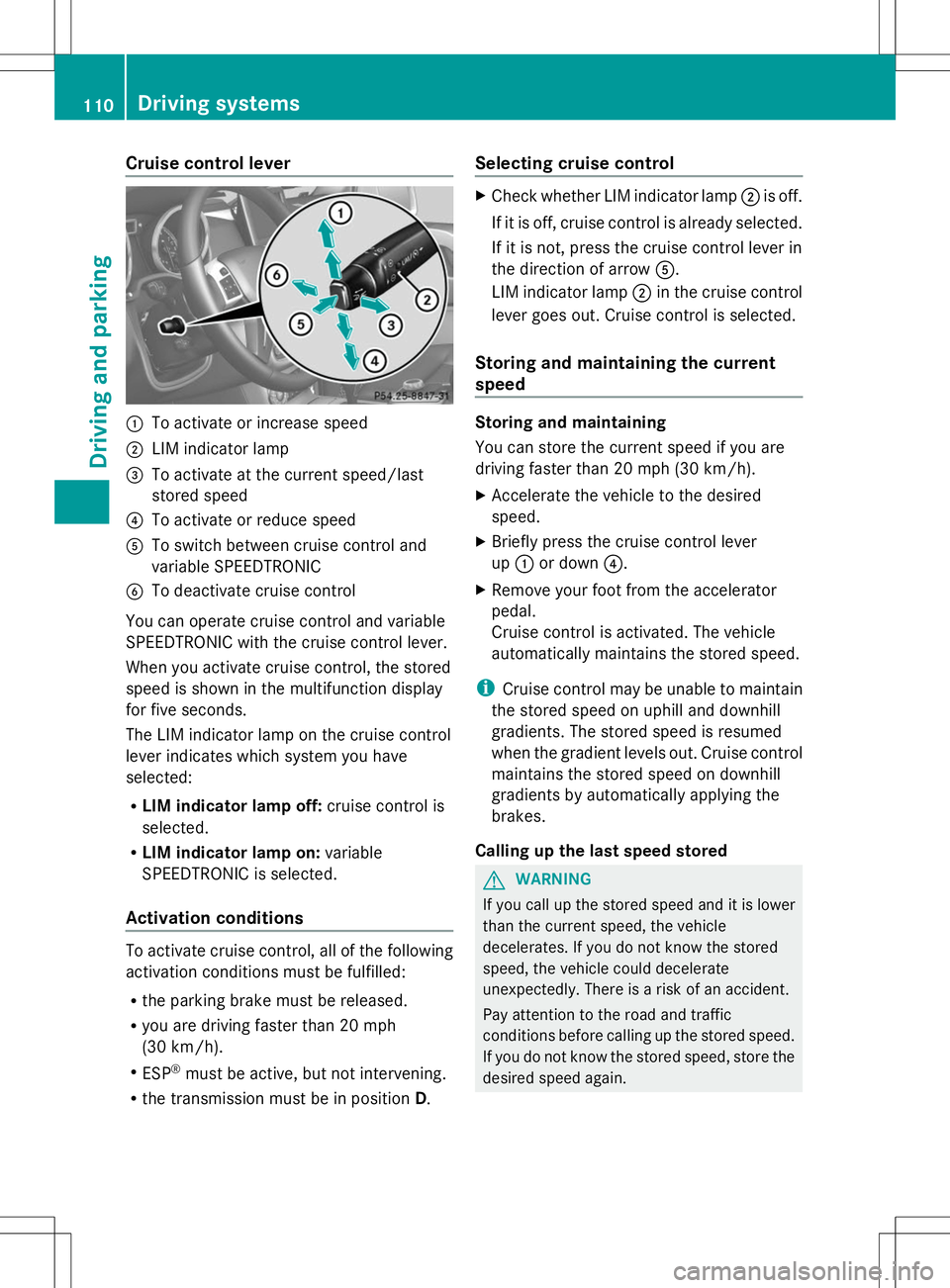
Cruise control lever
:
To activate or increase speed
; LIM indicator lamp
= To activate at the current speed/last
stored speed
? To activate or reduce speed
A To switch between cruise control and
variable SPEEDTRONIC
B To deactivate cruise control
You can operate cruise control and variable
SPEEDTRONIC with the cruise control lever.
When you activate cruise control, the stored
speed is shown in the multifunction display
for five seconds.
The LIM indicator lamp on the cruise control
lever indicates which system you have
selected:
R LIM indicator lamp off: cruise control is
selected.
R LIM indicator lamp on: variable
SPEEDTRONIC is selected.
Activation conditions To activate cruise control, all of the following
activation conditions must be fulfilled:
R the parking brake must be released.
R you are driving faster than 20 mph
(30 km/h).
R ESP ®
must be active, but not intervening.
R the transmission must be in position D.Selecting cruise control X
Check whether LIM indicator lamp ;is off.
If it is off, cruise control is already selected.
If it is not, press the cruise control lever in
the direction of arrow A.
LIM indicator lamp ;in the cruise control
lever goes out. Cruise control is selected.
Storing and maintaining the current
speed Storing and maintaining
You can store the current speed if you are
driving faster than 20 mph (30 km/h).
X
Accelerate the vehicle to the desired
speed.
X Briefly press the cruise control lever
up : or down ?.
X Remove your foot from the accelerator
pedal.
Cruise control is activated. The vehicle
automatically maintains the stored speed.
i Cruise control may be unable to maintain
the stored speed on uphill and downhill
gradients. The stored speed is resumed
when the gradient levels out. Cruise control
maintains the stored speed on downhill
gradients by automatically applying the
brakes.
Calling up the last speed stored G
WARNING
If you call up the stored speed and it is lower
than the current speed, the vehicle
decelerates. If you do not know the stored
speed, the vehicle could decelerate
unexpectedly. There is a risk of an accident.
Pay attention to the road and traffic
conditions before calling up the stored speed.
If you do not know the stored speed, store the
desired speed again. 110
Driving systemsDriving and parking