2014 MERCEDES-BENZ G-CLASS SUV buttons
[x] Cancel search: buttonsPage 7 of 272

Steering wheel paddle shifters
......101
Transmission position
displa y................................... 100, 101
Auxiliary ventilation
Activating/deactivating ...................94
Activating/deactivating (on the
center console) ................................ 94
Problem (display message) ..............94
Axle load, permissible (trailer
towing) ............................................... 266B
Back button ....................................... 178
Backup lamp Display message ............................ 144
Ball coupling
Installing ........................................ 137
BAS (Brake Assist System) .................60
Battery Checking (SmartKey) .......................68
Important safety guidelines
(SmartKey) ....................................... 67
Replacing (SmartKey) ......................68
Battery (vehicle)
Charging ........................................ 217
Display message ............................ 144
Important safety notes ..................215
Jump starting ................................. 219
Overview ........................................ 215
Blind Spot Assist
Activating/deactivating .................144
Display message ............................ 144
Notes/function .............................. 121
Bluetooth ®
see also Digital Operator's Manual 170
Brake fluid
Display message .................... 144, 149
Notes ............................................. 261
Brake fluid level ................................ 204
Brake lamps Adaptive .......................................... .61
Display message ............................ 144
Brakes
ABS .................................................. 60
BAS .................................................. 60
Brake fluid (notes) .........................261
Display message .................... 144, 146 High-performance brake system
....106
Important safety notes ..................106
Maintenance .................................. 106
Parking brake ................................ 105
Riding tips ...................................... 106
Warning lamp ................................. 159
Breakdown
see Flat tire
see Towing away
Brush guard ....................................... 193
Bulbs see Replacing bulbs
Buttons on the COMAND controller 178 C
Calling up a malfunction see Display messages
Care
Carpets .......................................... 210
Car wash ........................................ 206
Chrome parts ................................. 210
Display ........................................... 210
Gear or selector lever ....................210
Headlamps ............................ 206, 209
Interior ........................................... 210
Matte finish ........................... 206, 208
Notes ............................................. 206
Paint ...................................... 206, 208
Plastic trim .................................... 210
Power washer ........................ 206, 207
Rear view camera ..................206, 210
Roof lining ...................................... 210
Seat belt ........................................ 210
Seat cover ..................................... 210
Sensors ................................. 206, 209
Soft top .......................................... 206
Tail pipes ............................... 206, 210
Trim pieces .................................... 210
Washing by hand ...................206, 207
Wheels ................................... 206, 208
Windows ................................ 206, 209
Wiper blades .......................... 206, 209
Wooden trim .................................. 210
Cargo compartment cover
Installing/removing .......................188
Notes/how to use .........................188
Opening and closing ......................188 Index
5
Page 18 of 272

Sockets
Front-passenger footwell ...............189
Points to observe before use .........189
Trunk ............................................. 189
Soft top
Cleaning ......................................... 206
SOS
see mbrace
Spare fuses ........................................ 225
Spare wheel Mounting ....................................... 249
Notes/data .................................... 255
Spare wheel bracket at the rear ....213
Stainless-steel spare hub cap ........213
Specialist workshop ............................ 27
Special seat belt retractor .................. 51
Speed, controlling see Cruise control
Speedometer
In the Instrument cluster ...............142
Segments ...................................... 142
Selecting the unit of measurement 144
see Instrument cluster
SPEEDTRONIC
Display message ............................ 144
Selecting ........................................ 113
Variabl e......................................... 112
SRS
see SRS (Supplemental Restraint
System)
SRS (Supplemental Restraint
System)
Display message .................... 144, 149
Introduction ..................................... 40
Warning lamp ................................. 164
Warning lamp (function) ................... 40
Standing lamps
Display message ............................ 144
Switching on/off .............................. 83
Starting the engine
Important safety notes ....................98
Steering (display message) ......144, 157
Steering wheel Adjusting (electrically) .....................79
Buttons (on-board computer) ......... 143
Important safety notes ....................79
Paddle shifters ............................... 101Steering wheel heating
....................79
Storing settings (memory function) .. 79
Steering wheel (cleaning
instructions) ...................................... 210
Steering wheel paddle shifters ........101
Stopwatch (RACETIMER) ................... 144
Stowage areas ................................... 185
Stowage compartments Armrest (under) ............................. 185
Center console .............................. 185
Cup holders ................................... 189
Display message) ........................... 144
Door stowage compartment ..........185
Glove box ...................................... .185
Important safety information .........185
Summer tires ..................................... 230
Supplemental Restraint System see SRS (Supplemental Restraint
System)
Surround lighting (on-board
computer) .......................................... 144
Suspension tuning SETUP (on-board computer) ..........144
Switching air-recirculation mode
on/off ................................................... 94
Switching off the alarm (ATA) ............64
Systems settings (COMAND) see also Digital Operator's Manual 170 T
Tachometer ........................................ 142
Tailgate Display message ............................ 144
Opening dimensions ......................264
Tail lamps
Display message ............................ 144
see Lights
Tank content
Fuel gauge ..................................... 142
Technical data
Capacities ...................................... 258
Tires ............................................... 253
Tires/wheels ................................. 253
Trailer loads ................................... 266
Vehicle data ................................... 264
Wheels ........................................... 25316
Index
Page 26 of 272

X
To navigate within a contents page: turn
cVd the COMAND controller to scroll the
text up and down.
X To navigate away from the contents
page: slideXVthe COMAND controller to
the left and select back button :.
The previous page opens.
or
X Slide ZVthe COMAND controller upwards
to select topic bar ;.
X Turn cVd or slide ZVÆXVY the COMAND
controller to select the desired section or
sub-section.
The selected topic bar opens including all
the subsections.
X To select link ?
?: when scrolling through
a text, the cursor jumps to links
automatically. When you have selected a
link, press Wthe COMAND controller.
The desired contents page opens.
X To open up warning notes,
environmental notes and malfunction
information: when scrolling through the
text, the cursor jumps automatically to the
drop-down warnings, environmental
information and malfunction information.
When you have selected the note, press
W the COMAND controller.
The warning note, environmental note or
malfunction information opens up on the
same page.
X To navigate away from the Digital
Operator's Manual: press the%
button.
The basic menu for the Digital Operator's
Manual opens.
X Press the %button again.
or
X Slide ¬V the COMAND controller down,
select the Exit
Exit field and press Wto
confirm.
The overview of COMAND functions opens.
X Switching functions from the Digital
Operator's Manual to COMAND using the function button:
press the$,
%, horØ buttons in COMAND.
The desired menu opens.
X To go back to the Digital Operator's
Manual: use the COMAND controller to
select the ®symbol in the menu bar and
press Wto confirm.
The last page called up in the Digital
Operator's Manual is opened.
i For safety reasons, the "Digital Operator's
Manual" function is switched off while you
are driving. 24
Digital Operator's Manual
Page 38 of 272

Overhead control panel
Function Page
:
p
Switches the left-
hand reading lamp on/off 84
;
c
Switches the front
interior lighting on 84
=
u
Switches the rear
interior lighting on/off 84
?
|
Switches the front
interior lighting/automatic
interior lighting control off 84
A
p
Switches the right-
hand reading lamp on/off 84
B
¡
Opens/closes the
sliding sunroof 72
C
F
Roadside Assistance
call button (mbrace
system) 191 Function Page
D
G
SOS button (mbrace
system) 190
E
ï
MB Info call button
(mbrace system) 192
F
Rear-view mirror 79
G
Buttons for the garage door
opener
189
H
Microphone for mbrace
(emergency call system),
telephone and the Voice
Control System
1 ~
1
The Voice Control System is only available in combination with COMAND. Observe the additional operating
instructions. 36
Overhead control panelAt a glance
Page 53 of 272

X
Pull the seat belt smoothly from the seat
belt retractor.
X Engage fixed seat belt tongue ?in
buckle ;. X
Pull movable seat belt tongue Cand route
the seat belt across your body. Without
twisting it, guide the shoulder section of the
seat belt across the middle of your shoulder
and the lap section across your hips.
X Engage movable seat belt tongue Cin
buckle A.
X If necessary, pull upwards on the shoulder
section of the seat belt to tighten the belt
across your body. Further information on releasing the seat
belts with release buttons
Band
=(Y page 51).
Special seat belt retractor
All seat belts in the vehicle with the exception
of the driver's are equipped with a special
seat belt retractor, to which a child restraint
system can be secured. For further
information on the "special seat belt
retractor" (Y page 55).
Belt height adjustment You can adjust the belt height on the driver's
and front-passenger seat, as well as on the
outer rear seats.
Adjust the height so that the upper part of the
seat belt is routed across the center of your
shoulder.
X
To raise: slide the belt sash guide upwards.
The belt sash guide engages in various
positions.
X To lower: draw belt sash guide
release :forwards and hold it.
X Slide the belt sash guide downwards.
X Let go of belt sash guide release :and
make sure that the belt sash guide has
engaged.
Releasing seat belts !
Make sure that the seat belt is fully rolled
up. Otherwise, the seat belt or belt tongue
will be trapped in the door or in the seat
mechanism. This could damage the door, Occupant safety
51Safety Z
Page 71 of 272

X
Insert the front tabs of battery tray
cover :and then press to close it.
X Insert the mechanical key into the
SmartKey.
X Check the function of all SmartKey buttons
on the vehicle. Problems with the SmartKey
You can find information about this in the
Digital Operator's Manual. Doors
Important safety notes
G
WARNING
When leaving the vehicle, always remove the
SmartKey from the ignition lock. Always take
the SmartKey with you and lock the vehicle.
Do not leave children unsupervised in the
vehicle, even if they are secured in a child
restraint system, and do not give them access
to an unlocked vehicle. A child's unsupervised
access to a vehicle could result in an accident
and/or serious personal injury. They could:
R injure themselves on vehicle parts
R be seriously or fatally injured by extreme
heat or cold
R injure themselves or have an accident with
vehicle equipment that may still be in
operation even after the SmartKey has
been removed from the ignition, such as the
seat adjustment, steering wheel
adjustment or memory function.
If children open a door, they could cause
severe or even fatal injury to other persons; if
they get out of the vehicle, they could injure
themselves when doing so or be seriously or
even fatally injured by any passing traffic.
Do not expose the child restraint system to
direct sunlight. The child restraint system's
metal parts, for example, could become very
hot, and a child could be burned on these
parts. G
WARNING
Do not carry heavy or hard objects in the
passenger compartment or cargo
compartment unless they are firmly secured
in place.
Unsecured or improperly positioned cargo
increases a child's risk of injury in the event
of
R strong braking maneuvers
R sudden changes of direction
R an accident G
WARNING
If children are left unsupervised in the vehicle,
they could:
R open the doors, thus endangering other
people or road users.
R get out and disrupt traffic.
R operate the vehicle's equipment.
Additionally, children could set the vehicle in
motion if, for example, they:
R release the parking brake.
R shift the automatic transmission out of park
position P or shift manual transmission into
neutral.
R start the engine.
There is a risk of an accident and injury.
When leaving the vehicle, always take the
SmartKey with you and lock the vehicle. Never
leave children or animals unattended in the
vehicle. Always keep the SmartKey out of
reach of children. Information in the Digital Operator's
Manual
In the Digital Operator's Manual you will find
information on the following topics:
R Unlocking and opening doors from the
inside
R Centrally locking and unlocking the vehicle
from the inside
R Automatic locking feature Doors
69Opening and closing Z
Page 145 of 272

R
Multifunction display
R Outside temperature display Operating the on-board computer
Overview :
Multifunction display
; To switch on the Voice Control System;
see the separate operating instructions
= Right control panel
? Left control panel
A Back button
X To activate the on-board computer: turn
the SmartKey to position 1(Ypage 97) in
the ignition lock.
You can control the multifunction display and
the settings in the on-board computer using
the buttons on the multifunction steering
wheel. Left control panel =
; R
Calls up the menu and menu bar 9
:
Press briefly:
R
Scrolls in lists
R Selects a submenu or function
R In the Audio
Audio menu: selects a
stored station, an audio track or
a video scene
R In the Tel Tel(telephone) menu:
switches to the phone book and
selects a name or telephone
number 9
:
Press and hold:
R
In the Audio Audio menu: selects the
previous/next station or selects
an audio track or a video scene
using rapid scrolling
R In the Tel Tel(telephone) menu:
starts rapid scrolling if the phone
book is open a R
Confirms a selection/display
message
R In the Tel Tel(telephone) menu:
switches to the telephone book
and starts dialing the selected
number
R In the Audio Audio menu: stops the
station search function at the
desired station Right control panel
~ R
Rejects or ends a call
R Exits phone book/redial
memory 6 R
Makes or accepts a call
R Switches to the redial memory Displays and operation
143On-board computer and displays Z
Page 174 of 272
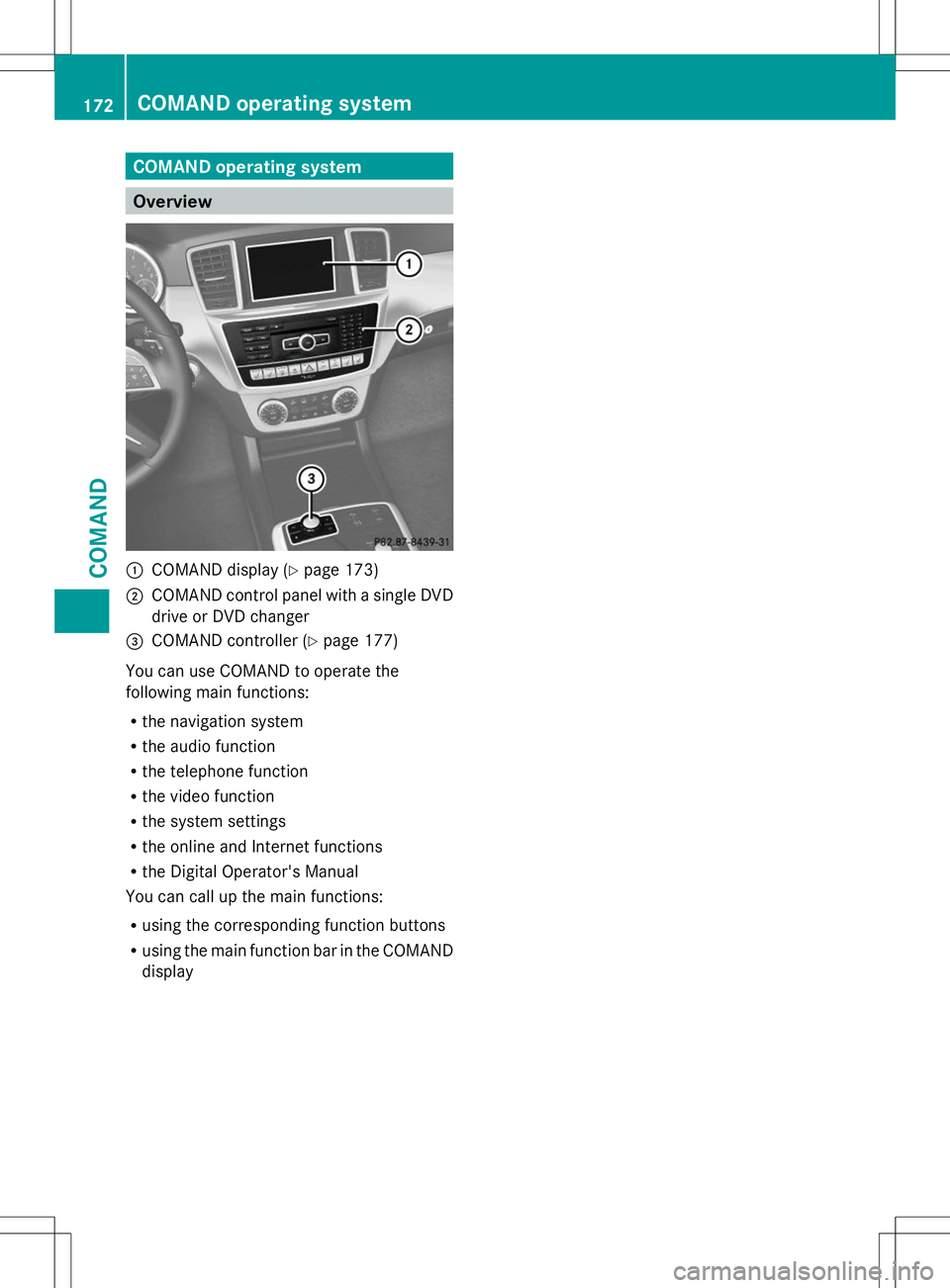
COMAND operating system
Overview
:
COMAND display (Y page 173)
; COMAND control panel with a single DVD
drive or DVD changer
= COMAND controller (Y page 177)
You can use COMAND to operate the
following main functions:
R the navigation system
R the audio function
R the telephone function
R the video function
R the system settings
R the online and Internet functions
R the Digital Operator's Manual
You can call up the main functions:
R using the corresponding function buttons
R using the main function bar in the COMAND
display 172
COMAND operating systemCOMAND