2014 MERCEDES-BENZ CLS-Class ignition
[x] Cancel search: ignitionPage 207 of 382

highlighted in the Night View Assist Plus
display.
Light from the headlamps of oncoming
vehicles does not affect the Night View Assist
Plus displayint
he multifunction display. This
is also the case if you cannot switch on the
high-beam headlamps due to oncoming
traffic.
i Infrared light is not visible to the human
eye and therefore does not glare. Night
View Assist Plus can therefore remain
switched on even if there is oncoming
traffic.
Activating Night View Assist Plus Activation conditions
You can only activate Night View Assist Plus
if:
R the SmartKey is in position 2in the ignition
lock.
R it is dark.
R the light switch is in the 000Dor001D
position.
R reverse gear has not been engaged.
Activating Night View Assist Plus X
Make sure that COMAND is switched on.
X Press button 001A.
The Night View Assist Plus displaya ppears
in the COMAND display.
You can read about how to adjust the
brightness of the COMAND displayint he
COMAND operating instructions. i
The infrared headlamps only switch on
when the vehicle is being driven at speeds
of approximately 6mph (10 km/h). This
means that you do not have the full visual
range while the vehicle is stationary and
cannot check whether Night View Assist
Plus is working.
Pedestrian recognition 001A
Night View Assist Plus display
0010 Pedestrian recognized
0024 Framing
0021 Symbol for active pedestrian recognition
i Animals are not recognized by pedestrian
recognition.
Night View Assist Plus is able to recognize
pedestrians by typical characteristics, e.g. a
silhouette in the shape of aperson.
Pedestrian recognition is then switched on
automatically:
R if Night View Assist Plus is activated
R if you are driving faster than approximately
6m ph (10 km/h)
R the surroundings are dark, e.g. when
driving outside built-up areas without
street lighting
If pedestrian recognition is active,
symbol 0021appears. If pedestrian sare
detected, they are highlighted with framing
0024.Ift he pedestrian recognition system has
brought apedestrian to your attention, look
through the windshield to evaluate the
situation. The actual distance to objectsa nd Driving systems
205Driving and parking Z
Page 211 of 382

indicator lamp goes out and Blin
dSpot Assist
is operational.
If av ehicle is detected within the monitoring
rang eofB lindS pot Assist at speeds above
20 mph (30 km/h), warnin glamp 001Aon the
correspondin gside light supred. This warning
is always emitted when avehicle enters the
blind spot monitoring rang efrom behind or
from the side .When you overtake avehicle,
the warning only occurs if the difference in
speed is less than 7mph (12km/h).
The yellow indicator lamp goes out if reverse
gear is engaged. In this event ,Blind Spot
Assist is no longer active.
The brightness of the indicator/warning
lamps is adjusted automatically according to
the ambient light.
Collision warning
If av ehicle is detected in the monitoring range
of Blind Spot Assist and you switc honthe
correspondin gturn signal, adouble warning
ton esounds. Red warning lamp 001Aflashes. If
the turn signal remains on, vehicles detected
are indicated by the flashing of red warning
lamp 001A.There are no further warning tones.
Switching on Blind Spot Assist
X Make sure that Blind Spot Assist
(Y page 228) is activated in the on-board
computer.
X Turn the SmartKey to position 2in the
ignition lock.
Warning lamps 001Ain the exterior mirrors
light up red for approximately
1.5 seconds and then turn yellow.
Lane Keeping Assist Important safety notes
G
WARNING
Lane Keeping Assist may not always clearly
recognizel ane markings. In this case, Lane Keeping Assist may:
R
give an unnecessary warning
R not give awarning
There is arisk of an accident.
Always pay particular attention to the traffic
situation and stay in lane, in particular if
warned by Lane Keeping Assist. G
WARNING
The Lane Keeping Assist warning does not
return the vehicle to the original lane. There
is ar isk of an accident.
You should always steer, brake or accelerate
yourself, in particular if warned by Lane
Keeping Assist.
If you fail to adapt your driving style, Lane
Keeping Assist can neither reduce the risk of
an accident nor override the laws of physics.
Lane Keeping Assist cannot take into account
the road, traffic and weather conditions. Lane
Keeping Assist is merely an aid. You are
responsible for the distance to the vehicle in
front,f or vehicle speed, for braking in good
time and for staying in your lane.
The Lane Keeping Assist does not keep the
vehicle in the lane.
The system may be impaired or may not
function if:
R there is poor visibility, e.g. due to
insufficient illumination of the road, or due
to snow, rain, fog or spray
R there is glare, e.g. from oncomingt raffic,
the sun or reflections (e.g. when the road
surface is wet)
R the windshield is dirty, fogged up, damaged
or covered, for instancebyas ticker, in the
vicinity of the camera
R there are no, several or unclear lane
markings for alane, e.g. in areas with road
construction work
R the lane markings are worn away,d ark or
covered up, e.g. by dirt or snow Driving systems
209Driving and parking Z
Page 215 of 382

The brightness of the indicator/warning
lamps is adjusted automatically accordin gto
the ambient light.
Visual and acoustic collision warning
If you switch on the turn signals to change
lanes and avehicle is detected in the side
monitoring range, you receive avisual and
acoustic collision warning. You then hear a
double warning tonea nd red warning
lamp 001Aflashes. If the turn signal remains on,
detected vehicles are indicated by the
flashing of red warning lamp 001A.There are no
further warning tones.
Course-correcting brake application G
WARNING
Ac ourse-correctingb rake application cannot
alwaysp reventacollision. There is arisk of
an accident.
Always steer, brake or accelerate yourself,
especially if Active Blind Spot Assist warns
you or makes acourse-correcting brake
application. Always maintain asafe distance
at the sides. If Active Blind Spot Assist detect
sarisk of a
lateral collision in the monitoring range, a course-correcting brake application is carried
out. This is meant to assist you in avoiding a
collision.
If
ac ourse-correcting brake application
occurs, red warning lamp 001Aflashes in the
exterior mirror and adual warning tone
sounds. In addition, the display shown in the
lower image appears in the multifunction
display.
In very rare cases, the system may make an
inappropriate brake application. An
inappropriate course-correcting brake
application may be interrupted at any time if
you steer slightly in the opposite direction or
accelerate, for example.
The course-correcting brake application is
available in the speed range between
20 mph (30 km/h) and 120 mph (200 km/h).
Either no braking application, or acourse-
correcting brake application adapted to the
driving situation occurs if:
R there are vehicles or obstacles, e.g. crash
barriers, located on both sides of your
vehicle.
R av ehicle approaches you too closely at the
side.
R you have adopted asporty driving style with
high cornering speeds.
R you clearly brake or accelerate.
R ad riving safety system intervenes, e.g.
ESP ®
or PRE-SAFE ®
Brake.
R ESP ®
is switched off.
R al oss of tire pressure or adefectiv etire is
detected.
Switching on Active Blind Spot Assist
X Make sure that the radar sensor system
(Y page 232) and Active Blind Spot Assist
(Y page 228) are activated in the on-board
computer.
X Turn the SmartKey to position 2in the
ignition lock.
Warning lamps 001Ain the exterior mirrors
light up red for approximately
1.5 seconds and then turn yellow. Driving systems
213Driving and parking Z
Page 222 of 382
Outsid
etemperature display
You should pay special attention to road
conditions when temperatures are around
freezing point.
The outside temperature display is in the
multifunction display (Y page 221).
Changes in the outside temperature are
displayed after ashort delay. Speedometer with segments
The segments in the speedometer indicate
which speed range is available.
R Cruise control activated (Y page 175):
The segments light up from the stored
speed to the maximum speed.
R DISTRONIC PLUS activated (Y page 177):
One or two segments in the set speed
range light up.
R DISTRONIC PLUS detects avehicle in front:
The segments between the speed of the
vehicle in fron tand the stored speed light
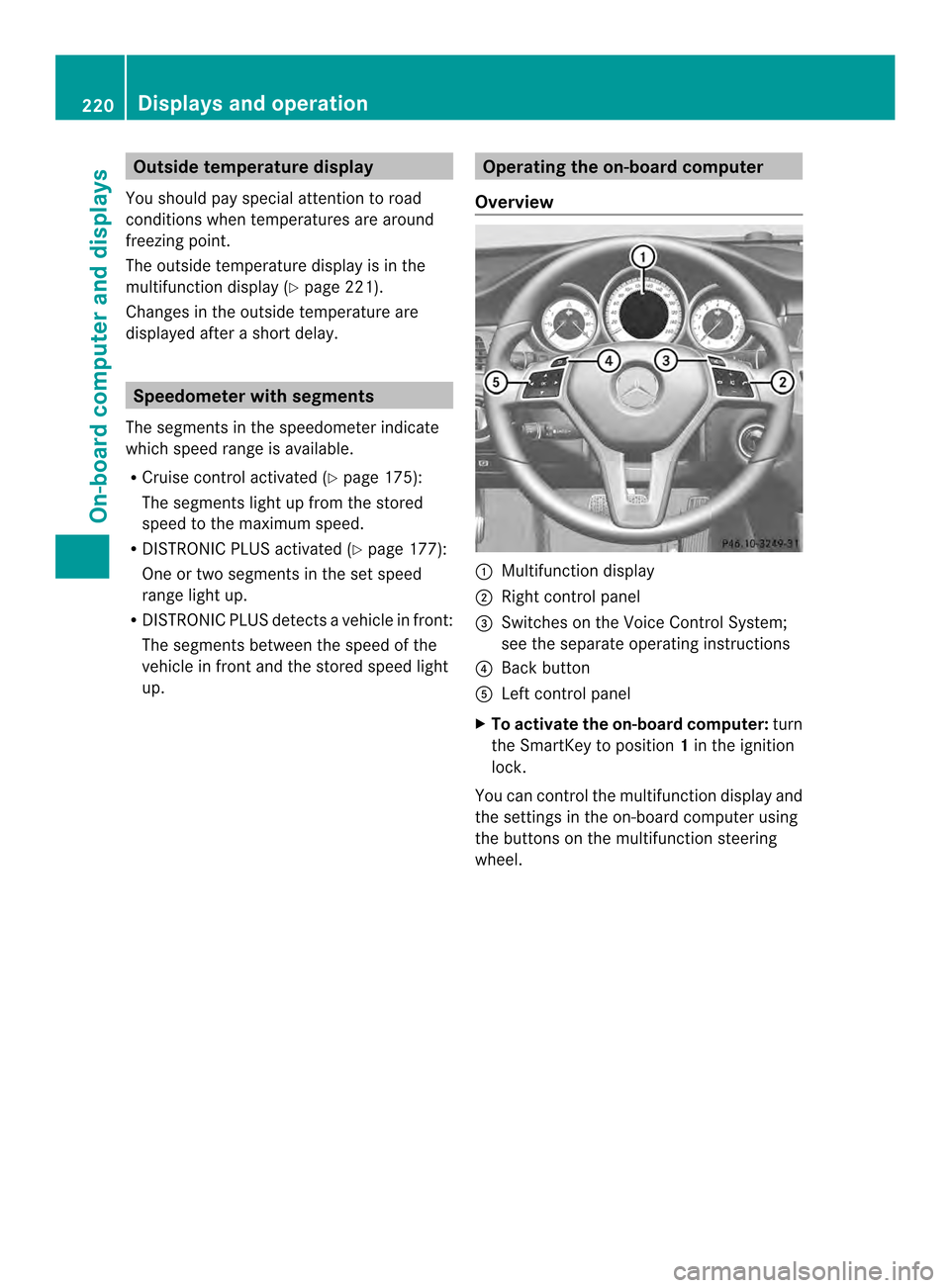
up. Operatin
gthe on-board computer
Overview 001A
Multifunctio ndisplay
0010 Right control panel
0024 Switches on the Voic eControl System;
see the separat eoperating instructions
0021 Bac kbutton
001E Left control panel
X To activat ethe on-board computer: turn
the SmartKey to position 1in the ignition
lock.
You can control the multifunction displaya nd
the settings in the on-board computer using
the buttons on the multifunction steering
wheel. 220
Displays and operationOn-board computer and displays
Page 224 of 382

Text field
001Ashows the selected menu or
submenu as well as display messages.
The following messages may appear in the
multifunction display:
000A Shift recommendation (Y page 161)
000300080009 Active Parking Assist (Y page 196)
0010 Adaptive Highbeam Assist
(Ypage 122)
000C ECO start/stop function
(Ypage 150)
0007 HOLD function (Y page 186)Menus and submenus
Menu overview
Press the 000Aor0004 button on the
steerin gwheel to call up the menu bar and
select amenu.
Operating the on-board computer
(Y page 220).
Dependin gonthe equipment installed in the
vehicle, you can call up the following menus:
R Trip menu (Y
page 222)
R Navi menu (navigation instructions)
(Y page 224)
R Audio menu (Y
page 225)
R Tel menu (telephone) (Y
page 226)
R DriveAssist menu (assistance)
(Y page 227)
R Serv. menu (Y
page 229)
R Settings menu (settings) (Y
page 229)
R AMG menu in AMG vehicles (Y
page 234) Trip menu
Standard display X
Press and hold the 0002button on the
steerin gwheel until the Trip menu with
trip odometer 001Aand odometer 0010is
shown.
Trip computer "From Start" or "From
Reset" Example: trip computer "From Start"
001A
Distance
0010 Time
0024 Average speed
0021 Average fuel consumption
X Press the 000Aor0004 button on the
steerin gwheel to select the Trip menu.
X Press 0006or0005 to select From Start or
From Reset .
The values in the From Start submenu are
calculated from the start of ajourney whilst
the values in the From Reset submenu are
calculated from the last time the submenu
was reset (Y page 223).
The From Start trip computer is
automatically reset when:
R the ignition has been switched off for more
than four hours.
R 999 hours have been exceeded.
R 9,999 miles have been exceeded. 222
Menus and submenusOn-board computer and displays
Page 225 of 382

The
From Reset trip computer is
automatically reset if the value exceeds
9,999 hours or 99,99 9miles.
ECO display Example: ECO display
X
Press the 000Aor0004 button on the
steerin gwheel to select the Trip menu.
X Select ECO DISPLAY with
0006 or0005.
If the ignition remains switched off for longer
than four hours, the ECO display will be
automatically reset.
Further information on the ECO display
(Y page 170).
Displaying the range and current fuel
consumption X
Press the 000Aor0004 button on the
steerin gwheel to select the Trip menu.
X Press the 0006or0005 button to select the
curren tfuel consumption (not for AMG
vehicles) and the approximate range.
The approximate range that can be covered
depends on the fuel level and your current
driving style. If there is only asmall amount
of fuel left in the fuel tank,t he display shows
av ehicle being refueled 0014instead of the
range. Digital speedometer 001A
Shift recommendation (Y page 161)
0010 Digital speedometer
X Press the 000Aor0004 button on the
steerin gwheel to select the Trip menu.
X Press the 0006or0005 button to select the
digital speedometer.
i If the gearshift recommendation is shown
at the top of the multifunction display ,itis
no longer shown at the bottom of the
multifunction display.
Resetting values Example: resetting the trip computer "From Start"
X Press the 000Aor0004 button on the
steerin gwheel to select the Trip menu.
X Press the 0006or0005 button to select the
function that you wish to reset.
X Press the 000Cbutton.
X Press the 0005button to select Yes and
press the 000Cbutton to confirm.
You can reset the values of the following
functions:
R Trip odometer
R "From Start" trip computer
R "From Reset" trip computer
R ECO display Menus and submenus
223On-board computer and displays Z
Page 233 of 382

X
Press 0005or0006 to select the Day Lights: function.
If the Day Lights: have been switched on,
the cone of light and the 0004symbol in
the multifunction display are shown in red.
X Press the 000Cbutton to save the setting.
Further information on daytime running
lamps (Y page 117).
Setting the brightness of the ambient
lighting
X Press the 000Aor0004 button on the
steerin gwheel to select the Sett. menu.
X Press the 0005or0006 button to select the
Lights submenu.
X Press 000Cto confirm.
X Press the 0005or0006 button to select the
Amb. Light +/-. function.
You will see the selected setting.
X Press 000Cto confirm.
X Press the 0005or0006 button to adjust the
brightness to any level from Off to
Level 5 (bright).
X Press the 000Cor0002 button to save the
setting.
Setting the ambient lighting color
X Press the 000Aor0004 button on the
steerin gwheel to select the Sett. menu.
X Press the 0005or0006 button to select the
Lights submenu.
X Press 000Cto confirm.
X Press the 0005or0006 button to select the
Ambient Light Color function.
X Press 000Cto confirm.
X Press the 0005or0006 button to set the
color to SOLAR ,
NEUTRAL or
POLAR .
X Press the 000Cor0002 button to save the
setting. Activating/deactivating surround
lighting and exterior lighting delayed
switch-off
X
Press the 000Aor0004 button on the
steerin gwheel to select the Sett. menu.
X Press the 0005or0006 button to select the
Lights submenu.
X Press 000Cto confirm.
X Press 0005or0006 to select the
Surround Lighting function.
When the Surround Lighting function is
activated, the light cone and the area
around the vehicle are displaye dinred in
the multifunction display.
X Press the 000Cbutton to save the setting.
Deactivating delayed switch-off of the
exterior lighting temporarily:
X Before leaving the vehicle, turn the
SmartKey to position 0in the ignition lock.
X Turn the SmartKey to position 2in the
ignition lock.
The exterior lighting delayed switch-off is
deactivated.
Delayed switch-off of the exterior lighting is
reactivated the next time you start the
engine.
If you have activated the Surround Lighting function and the light switch is set
to 000D,t he following functions are activated
when it is dark:
R Surround lighting: the exterior lighting
remains lit for 40 seconds after unlocking
with the SmartKey. If you start the engine,
the surround lighting is switched off and
the automatic headlamp mode is activated
(Y page 117).
R Exterior lighting delayed switch-off: the
exterior lighting remains lit for 60seconds
after the engine is switched off. If you close
all the doors and the trunkl id, the exterior
lighting goes off after 5seconds.
i Depending on your vehicle's equipment,
when the surround lighting and delayed Menus and submenus
231On-boardcomputer and displays Z
Page 234 of 382

switch-off exterior lighting are on, the
following light up:
R
Parking lamps
R Low-beam headlamps
R Daytime running lamps
R Side marker lamps
R Surround lighting in the exterior mirrors
Activating/deactivating the interior
lighting delayed switch-off
If you activate the Interior LightingDelay function,t
he interior lighting remains
on for 20seconds after you remove the
SmartKey from the ignition lock.
X Press the 000Aor0004 button on the
steering wheel to select the Sett. menu.
X Press the 0005or0006 button to select the
Lights submenu.
X Press 000Cto confirm.
X Press 0005or0006 to select the Light. Delay function.
When the Interior Lighting Delay function is activated, the vehicle interior is
displayed in red in the multifunction
display.
X Press the 000Cbutton to save the setting.
Vehicle Activating/deactivating the automatic
door locking mechanism
X Press the 000Aor0004 button on the
steering wheel to select the Sett. menu.
X Press 0005or0006 to select the Vehicle submenu.
X Press 000Cto confirm.
X Press 0005or0006 to select the Auto. Door Locks function.
When the Automatic Door Lock function
is activated, the vehicle doors are displayed
in red in the multifunction display.
X Press the 000Cbutton to save the setting. If you activate the
Automatic Door Lock function,t
he vehicle is centrally locked above
as peed of around 9mph (15 km/h).
For further information on the automatic
locking feature, see (Y page 83).
Activating/deactivating the acoustic
locking verification signal
If you switch on the Acoustic Lock function,
an acoustic signal sounds when you lock the
vehicle.
X Press the 000Aor0004 button on the
steering wheel to select the Sett. menu.
X Press 0005or0006 to select the Vehicle submenu.
X Press 000Cto confirm.
X Press the 0005or0006 button to select the
Acoustic Lock function.
If the Acoustic Lock function is activated,
the 000F symbol in the multifunction
displayl ights up red.
X Press the 000Cbutton to save the setting.
Activating/deactivating the radar sensor
system
X Press the 000Aor0004 button on the
steering wheel to select the Sett. menu.
X Press 0005or0006 to select the Vehicle submenu.
X Press 000Cto confirm.
X Press the 0006or0005 button to select
Radar Sensor (See Oper. Manual): .
You will see the selected setting: Enabled or
Disabled .
X Press the 000Cbutton to save the setting.
The following systems are switched off when
the radar sensor system is deactivated:
R DISTRONIC PLUS (Y page 177)
R BAS PLUS (Y page 67)
R PRE-SAFE ®
Brake (Y page 72)
R Blind Spot Assist (Y page 207)
R Active Blind Spot Assist (Y page 211)232
Menus and submenusOn-board computer and displays