2014 MERCEDES-BENZ CLS-Class ignition
[x] Cancel search: ignitionPage 171 of 382

Parking brake
G
WARNING
If you must brake the vehicle with the parking
brake, the braking distance is considerably
longer and the wheels could lock. There is an
increased danger of skidding and accidents.
Only use the parking brake to brake the
vehicle when the service brake is faulty. Do
not apply the parking brake too firmly. If the
wheels lock, release the parking brake until
the wheels begin turninga gain.G
WARNING
If you leave children unsupervised in the
vehicle, they could set it in motion by, for
example:
R releasing the parking brake
R shifting the automatic transmission out of
the parking position P
R startingt he engine.
They could also operate the vehicle's
equipment. There is arisk of an accident and
injury.
When leaving the vehicle, always take the
SmartKey with you and lock the vehicle. Never
leave children unsupervised in the vehicle. If you brake the vehicle with the parking
brake, the brake lamps will not light up. X
To apply: depress parking brake 0010firmly.
When the engine is running, the 0004(USA
only) or 0001(Canada only) indicator lamp
lights up in the instrumen tcluster.
X To release: depressthe brak epedal and
keep it depressed.
X Pull release handle 001A.
When the ignition is switched on or the
engine is running, the 0004(USA only) or
0001 (Canada only) indicator lamp goes out
in the instrumen tcluster. Parking th
evehicle for along period
If you leave th evehicle parked for longer than
four weeks, th ebattery may be damage dby
exhaustive discharging.
If you leave th evehicle parked for longer than
six weeks, th evehicle may suffer damage as
ar esult of lack of use.
X Visit aqualifie dspecialist workshop and
seek advice.
i You can obtain informatio nabout trickle
chargers from aqualifie dspecialist
workshop. Driving tips
General notes
Important safety notes G
WARNING
If you switch off th eignitio nwhile driving,
safety-relevant functions are only available
with limitations, or not at all. This could affect,
for example, the power steering and the brake
boosting effect.Y ou will require considerably
more effort to steer and brake. There is arisk
of an accident.
Do not switch off the ignition while driving. G
WARNING
If you operate mobile communication
equipment while driving, you will be Driving tips
169Driving and parking
Z
Page 175 of 382

Servicing the brakes
!
If the red brake warning lamp lights up in
the instrumen tcluster and you hear a
warnin gtonew hile the engine is running,
the brak efluid level may be too low.
Observe additional warnin gmessages in
the multifunction display.
The brak efluid level may be too low due to
brak epad wear or leakin gbrak elines.
Have the brak esystem checked
immediately. This work should be carried
out at aqualified specialist workshop.
! Vehicles with 4MATIC: function or
performanc etests may only be carried out
on a2 -axle dynamometer. If you are
planning to have the vehicle tested on such
ad ynamometer, contac tanauthorized
Mercedes-Ben zCenter to obtain further
information first. Otherwise, you could
damage the drive train or the brak esystem.
! Vehicles with 4MATIC: as the ESP®
system operates automatically, the engine
and the ignition must be switched off
(SmartKey in position 0or 1in the ignition
lock or Start/Stop button in position 0or
1)w hile the parking brak eisbeing tested
on abrak edynamometer.
Brakin gmaneuvers triggere dautomatically
by ESP ®
may seriousl ydamag ethe brake
system.
! Vehicles with 4MATIC: as theESP®
system operate sautomatically, th eengine
and th eignition system must be switched
off (SmartKey in position 0or 1in the
ignition loc korStart/Sto pbutto nin
position 0or 1)w hen:
R testing th eparking brak eonabrake
dynamometer.
R you inten dtohave th evehicl etow ed with
on eoft heaxle sraised.
Braking maneuvers triggered automatically
by ESP ®
may seriousl ydamag ethe brake
system. All check
sand maintenance work on the
brak esystem must be carried out at a
qualified specialist workshop. Consult a
qualified specialist worksho ptoarrangethis.
Hav ebrak epads installed and brak efluid
replace dataq ualified specialist workshop.
If th ebrak esystem has only been subject to
moderat eloads ,you should test the
functionalit yofyour brakes at regular
intervals. To do so, press firmly on th ebrake
pedal when driving at ahigh speed. This
improve sthe gripoft hebrak epads.
You can fin dadescription of Brake Assist
(BAS) on (Y page 67)orofBASPLU Son
( Ypage 67).
The braking characteristics of th evehicl ecan
be seriousl yimpaired if:
R brak epads other than those recommended
are installed
R ther ecommended brak efluid is no tused
Safe braking can no longer be guaranteed.
AMG high-performance and ceramic
brakes The high-performance brake system is
installed only on the CLS 63 AMG.
The AMG brake systems are designed for
heavy loads. This may lead to noise when
braking. This will depend on:
R
Speed
R Braking force
R Environmental conditions, such as
temperature and humidity
The wear of individualc omponentsofthe
brake system, such as the brake pads/linings
or brake discs, depends on the individual
driving style and operating conditions.
For this reason, it is impossibletos tate a
mileage that will be valid under all
circumstances. An aggressive driving style
will lead to high wear. You can obtain further
information aboutt his from your authorized
Mercedes-Ben zCenter. Driving tips
173Driving and parking Z
Page 191 of 382

again after th
evehicle has been driven a
certain distance. AIRMATIC
Vehicle level Important safety notes
G
WARNING
When th evehicle is bein glowered, people
could become trapped if their limbs are
between th evehicle body and th ewheel sor
underneat hthe vehicle .There is arisk of
injury.
Make sure no one is underneath the vehicle
or in the immediate vicinity of the wheel
arches when the vehicle is being lowered. G
WARNING
Vehicles with level control:
The vehicle is slightly lowered if:
R you have selected comfort suspension
tuning and
R you lock the vehicle within approximately
60 seconds of switching off the engine
You and people in the vicinity of the wheel
arch or the underbody may thus become
trapped. There is arisk of injury.
Make sure that nobody is in the vicinity of the
wheel arch or the underbody when you lock
the vehicle.
! The vehicle is lowered by about 15 mm if:
R you have selected "Comfort tuning"
R you switch off the engine and then
R you lock the vehicle within approximately
60 seconds
When parking, position your vehicle so that
it does not make contact with the curb as
the vehicle is lowered. Your vehicle could
otherwise be damaged.
If you lock the vehicle within 60 seconds of
switching the engine off, it lowers slightly to
the selected Comfort suspension mode. Your vehicle regulates its height
automatically
.All-round level control ensures
the best possible suspension and constant
groun dclearance, even with aladen vehicle.
When you drive fast ,the vehicle is lowered
automatically to improve drivin gsafet yand to
reduc efuel consumption.
The followin gvehicle levels are possible:
R normal
R raised: the vehicle is raised by about
0.80 in (20 mm) when compared with the
normal level
R lowered: the vehicle is raised by about
0.40 in (10 mm) when compared with the
normal level
i These changes in level are so slight that
you are hardly aware of them.
The "Normal" and "Raised" vehicle levels can
be set manually.
The "Lowered” vehicle level is set
automatically:
R at speeds above 70 mph (11 3km/ h)
R if you have selected "Sports tuning"
(Y page 190)
Setting th evehicle level
Selec tthe "Normal" settin gfor normal road
surfaces and "Raised" for drivin gwith snow
chain soronp articularly poor road surfaces.
Your selection remain sstored even if you
remove the SmartKey fro mthe ignition lock.
Setting raised level X
Start the engine. Driving systems
189Driving and parking Z
Page 192 of 382

If indicator lamp
0010is not lit:
X Press the 001Abutton.
Indicator lamp 0010lights up. The vehicle
heightisa djusted to raised level.
The Vehicle Rising message appears in
the display.
The "Raised level" setting is canceled if you:
R drive at aspeed over approximately
75 mph (120 km/h)
R drive for approximately three minutes at a
speed over 50 mph (80 km/h)
The "Raised level" remains active when you
are not driving within these speed ranges.
Setting the normal level
X Start the engine.
If indicator lamp 0010is lit:
X Press the 001Abutton.
Indicator lamp 0010goes out. The vehicle is
adjusted to normal level.
Suspension tuning General notes
The electronically controlled damping system
works continuously. This improves driving
safety and ride comfort.
The damping is tuned individually to each
wheel and depends on:
R your driving style, e.g. sporty
R the road surface condition, e.g. bumps
R your individuals election, i.e. sports or
comfort
Your selection remains stored even if you
remove the SmartKey from the ignition lock. Sports tuning The firmer suspension tuning in Sport mode
ensures even better contact with the road.
Select this mode when employing
asporty
driving style, e.g. on winding country roads.
X Press button 001A.
Indicator lamp 0010lights up. Sports
suspension tuning is selected.
The AIRMATIC SPORT message appears in
the multifunction display.
Comfort tuning
In comfort mode, the driving characteristics
of your vehicle are more comfortable.
Therefore, select this mode if you favor a
more comfortable driving style. Select
comfort mode also when driving fast on
straight roads, e.g. on straight stretches of
freeway.
X Press button 001A.
Indicator lamp 0024lights up. Comfort tuning
is selected.
The AIRMATIC COMFORT message appears
in the multifunction display. AMG adaptive sport suspension
system
Important safety notes G
WARNING
When the vehicle is being lowered, people
could become trapped if their limbs are
between the vehicle body and the wheels or 190
Driving systemsDriving and parking
Page 195 of 382
Load compensation
The vehicle can compensat
edifferences in
th ev ehicle level by raisin gorlowering the
rear axle. This is the case, for example, if
people get out or if luggage is being loaded.
Load compensation takes place if:
R ad oor or the trunk lid/tailgate is opened
R the parked vehicle is unlocked
For larger level changes, the engine must be
running. 4MATIC (permanent four-wheel drive)
If you fail to adapt your driving style, 4MATIC
can neither reduce the risk of accident nor
override the laws of physics. 4MATIC cannot
take account of road, weather and traffic
conditions. 4MATIC is only an aid. You are
responsible for the distance to the vehicle in
front,f or vehicle speed, for braking in good
time and for staying in your lane.
If ad rive wheel spins due to insufficien tgrip:
R Only depress the accelerator peda lasfar
as necessary when pulling away.
R Accelerate less when driving.
! Never tow the vehicl ewith one axle
raised. This may damage the transfer case.
Damag eofthis sort is not covered by the
Mercedes-Benz Limited Warranty. All
wheels must remai neithe ront he ground
or be fully raised. Observe the instructions
for towing the vehicle with all wheels in full
contact with the ground.
i In wintry driving conditions, the maximum
effect of 4MATIC can only be achieved if
you use winter tires (M+S tires), with snow
chains if necessary.
4MATIC ensures that allf our wheels are
permanently driven. Together with ESP ®
,it
improves the traction of you rvehicle
whenever adrive wheel spins due to
insufficient grip. PARKTRONIC
Important safet ynotes PARKTRONIC is an electronic parkin
gaid with
ultrasonic sensors. It indicates visually and
audibly the distanc ebetween your vehicle
and an object.
PARKTRONIC is only an aid. It is not a
replacemen tfor your attention to your
immediate surroundings. You are always
responsible for safe maneuvering, parking
and exiting aparkin gspace. When
maneuvering, parkin gorpulling out of a
parkin gspace, make sure that ther eare no
persons, animals or objects in the area in
which you are maneuvering.
! When parking, pay particular attention to
objects above or below the sensors, such
as flower pots or trailer drawbars.
PARKTRONIC does not detec tsuch objects
when they are in th eimmediat evicinity of
th ev ehicle. You could damag ethe vehicle
or the objects.
The sensors may not detect snow and other
objectst hat absorb ultrasonic waves.
Ultrasonic sources such as an automatic
car wash, the compressed-air brakes on a
truck or apneumatic drill could cause
PARKTRONIC to malfunction.
PARKTRONIC may not function correctly on
uneven terrain.
PARKTRONIC is activated automatically when
you:
R switch on the ignition
R shift the transmission to position D,Ror N
R release the parking brake
PARKTRONIC is deactivated at speeds above
11 mph (18 km/h). It is reactivated at lower
speeds.
PARKTRONIC monitors the area around your
vehicle using six sensors in the front bumper
and four sensors in the rear bumper. Driving systems
193Driving and parking Z
Page 197 of 382
Warning displays
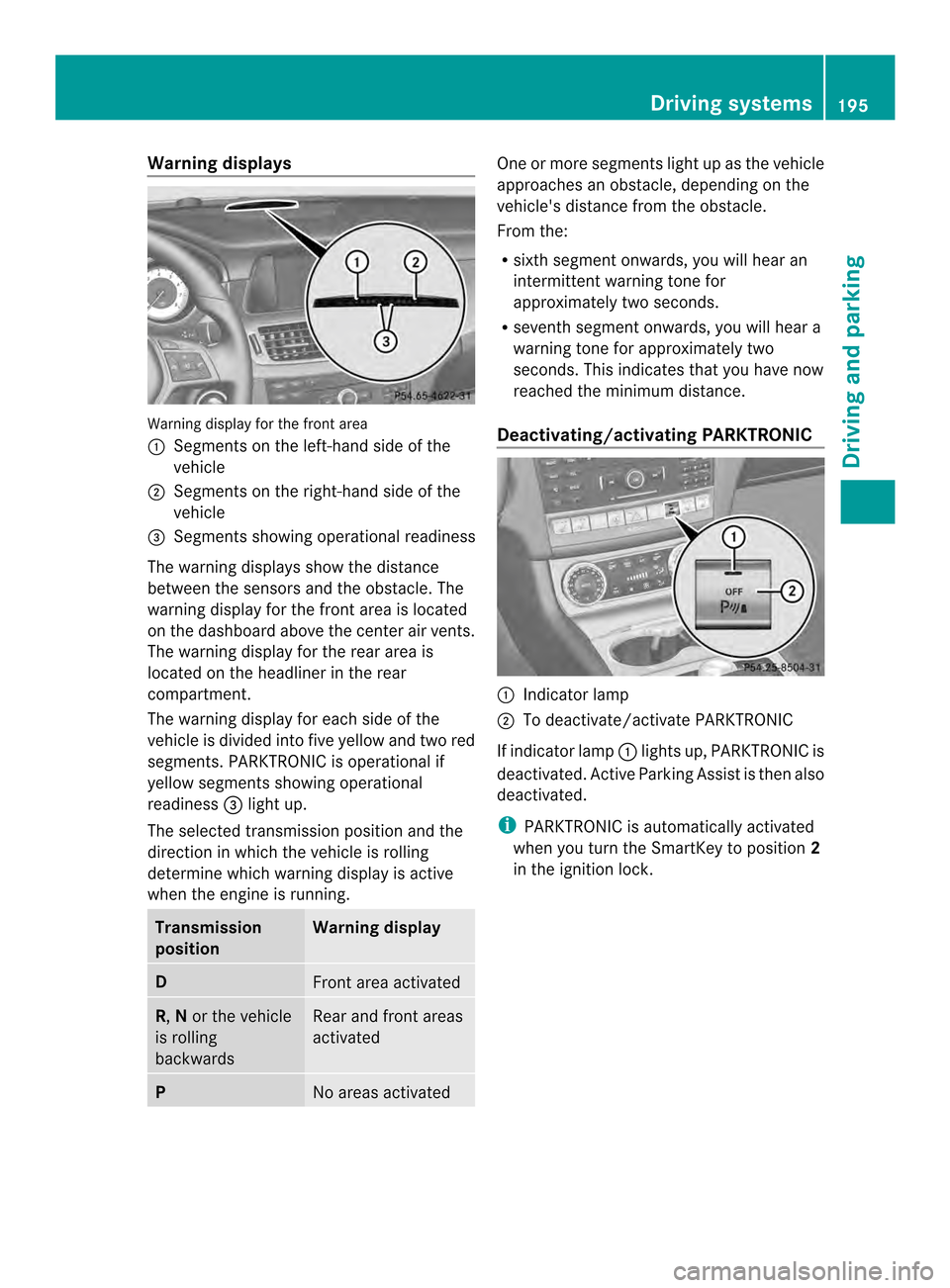
Warning display for the front area
001A
Segments on the left-hand side of the
vehicle
0010 Segments on the right-hand side of the
vehicle
0024 Segments showing operational readiness
The warning displays show the distance
between the sensors and the obstacle. The
warning displayf or the front area is located
on the dashboard above the center airv ents.
The warning display for the rear area is
located on the headliner in the rear
compartment.
The warning display for each side of the
vehicle is divided intof ive yellow and two red
segments. PARKTRONIC is operational if
yellow segments showing operational
readiness 0024light up.
The selected transmission position and the
direction in which the vehicle is rolling
determine which warning display is active
when the engin eisrunning. Transmission
position Warning display
D
Fron
tarea activated R,
Nor the vehicle
is rolling
backwards Rear and fron
tareas
activated P
No areas activated One or more segments light up as the vehicle
approaches an obstacle, depending on the
vehicle's distanc
efrom the obstacle.
From the:
R sixt hsegmen tonwards ,you will hea ran
intermitten twarnin gtonef or
approximately two seconds.
R sevent hsegment onwards, you will hear a
warning tonef or approximately two
seconds. This indicates that you have now
reached the minimum distance.
Deactivating/activating PARKTRONIC 001A
Indicator lamp
0010 To deactivate/activate PARKTRONIC
If indicator lamp 001Alights up, PARKTRONIC is
deactivated. Active Parking Assist is then also
deactivated.
i PARKTRONIC is automatically activated
when you turn the SmartKey to position 2
in the ignition lock. Driving systems
195Driving and parking Z
Page 198 of 382

Problems with PARKTRONIC
Problem Possible causes/consequences and
000B Solutions
Only the red segments
in the PARKTRONIC
warning displaysa
re lit.
You also hear awarning
tone for approximately
two seconds.
PARKTRONIC is then
deactivated and the
indicator lamp on the
PARKTRONIC button
lights up. PARKTRONIC has malfunctioned and has switched off.
X
If problems persist, have PARKTRONIC checked at aqualified
specialist workshop. Only the red segments
in the PARKTRONIC
warning displaysa
re lit.
PARKTRONIC is then
deactivated. The PARKTRONIC sensors are dirty or there is interference.
X
Cleant he PARKTRONIC sensors (Y page 315).
X Switch the ignition back on. The problem may be caused by an external source of radio or
ultrasound waves.
X
See if PARKTRONIC functions in adifferent location. Active Parking Assist
General notes Active Parking Assist is an electronic parking
aid with ultrasound. It measures the road on
both sides of the vehicle. Aparking symbol
indicates asuitable parking space. Active
steering interventio ncan assis tyou during
parking. You may also use PARKTRONIC
(Y page 193).
Important safety notes Active Parking Assist is merely an aid. It is not
ar
eplacement for your attention to your
immediate surroundings. You are always
responsible for safe maneuvering, parking
and exitin gaparking space. Make sure that
no persons, animals or object sare in the
maneuvering range.
When PARKTRONIC is switched off, Active
Parking Assist is also unavailable. G
WARNING
The vehicle swings out when parking and in
doing so could cross into the opposite lane.
This could result in acollision with another
road user. There is arisk of an accident.
Pay attention to other road users when
parking. Stop the vehicle if necessary or
cancel the Active Parking Assist parking
procedure.
! If unavoidable, you should drive over
obstacles such as curbs slowly and not at
as harp angle. Otherwise, you may damage
the wheels or tires.
Active Parking Assist may possibly indicate
parking spaces which are not suitable for
parking, for example:
R where parking or stopping is prohibited
R in front of driveways or entrances and exits
R on unsuitable surfaces 196
Driving systemsDriving and parking
Page 202 of 382

R
if the camera is exposed to very bright light
R if the area is lit by fluorescen tlight or LED
lighting (th edisplay may flicker)
R if there is asudden change in temperature,
e.g. when drivin gintoah eatedgarage in
winter
R if the camera lens is dirt yorobstructed
R if the rear of your vehicle is damaged. In
this event, have the camera position and
settin gchecked at aqualified specialist
workshop.
General notes Example: Coupe
Rear view camera
001Ais located in the handle
strip of the trunk lid.
Rear view camera 001Ais an optical parking and
maneuverin gaid. It shows the area behind
your vehicle with guide lines in the COMAND
display.
The area behin dthe vehicle is displayed as a
mirror image, as in the rear view mirror.
i The tex tofmessages shown in the
COMAND display depends on the language
setting. The following are examples of rear
view camera messages in the COMAND
display. Activating/deactivating the rear view
camera X
To activate: make sure that the SmartKey
is in position 2in the ignition lock.
X Make sure that the "Activation by Rgear"
setting is active in COMAND ,see the
separate COMAND operatin ginstructions.
X Engage revers egear.
The area behind the vehicle is shown in the
COMAND display with guide lines.
To deactivate: the rear view camera is
deactivated if you:
R shift the transmission to position P
R drive 33 ft (10 m) forwards
R shift the transmission from Rto another
position after 15 seconds
R drive forwards at aspeed of over 5mph
(10 km/h)
Displays in the COMAND display The rear view camera may show
adistorted
view of obstacles, show them incorrectly or
not at all. The rear view camera does not show
objects in the following positions:
R very close to the rear bumper
R under the rear bumper
R in the area immediately above the tailgate
handle
! Objects not at ground level may appear to
be further away than they actually are, e.g.:
R the bumper of aparked vehicle
R the drawbar of atrailer
R the ball coupling of atrailer tow hitch
R the rear section of an HGV
R as lanted post
Use the guidelines only for orientation.
Approac hobjects no further than the
bottom-most guideline. 200
Driving systemsDriving and parking