2014 MERCEDES-BENZ CLS-Class ESP
[x] Cancel search: ESPPage 79 of 382
If you do not open the vehicle within
approximately 40 seconds of unlocking:
R
the vehicle is locked again.
R the theft deterrent locking system is
armed again.
X To lockc entrally:pressthe 000F button.
The SmartKey centrally locks/unlocks:
R thed oors
R thet runk lid
R thef uel filler flap
The tur nsignals flash onc ewhen unlocking
and three times when locking.
You can also set an audible signal to confirm
that the vehicle has been locked. The audible
signal can be activated and deactivated using
the on-board computer (Y page 232).
When it is dark, the surround lighting also
comes on if it is activated in the on-board
computer (Y page 231). KEYLESS-GO
General notes Bear in mind that the engine can be started
by any of the vehicle occupants if there is a
KEYLESS-GO key in the vehicle.
Locking/unlocking centrally You can start, lock or unlock the vehicle using
KEYLESS-GO. To do this, you only need carry
the SmartKey with you. You can combine the
functions of KEYLESS-GO with those of a
conventional SmartKey. Unlock the vehicle
by using KEYLESS-GO, for instance, and lock
it using the 000Fbutton on the SmartKey.
When locking or unlocking with KEYLESS-GO,
the distance between the SmartKey and the
corresponding door handle must not be
greater than 3ft(1m). KEYLESS-GO checksw
hetheravalid
SmartKey is in the vehicle by periodically
establishing aradio connection between the
vehicle and the SmartKey. This happens:
R when the external door handles are
touched
R when startingt he engine
R while the vehicle is in motion X
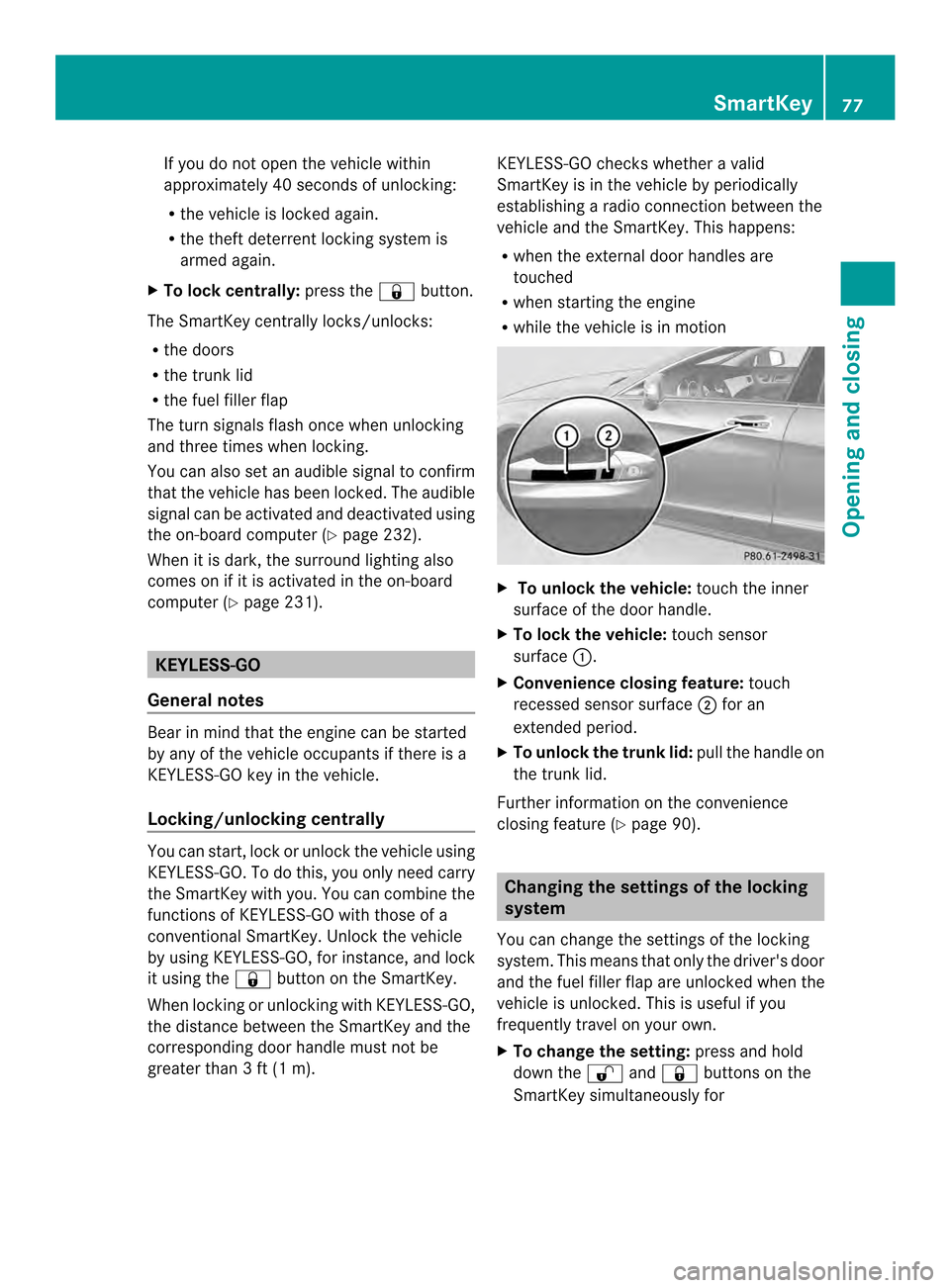
To unlock the vehicle: touch the inner
surface of the door handle.
X To lock the vehicle: touch sensor
surface 001A.
X Convenience closing feature: touch
recessed sensor surface 0010for an
extended period.
X To unlock the trunk lid: pull the handle on
the trunk lid.
Further information on the convenience
closing feature (Y page 90). Changing the settings of the locking
system
You can change the settings of the locking
system. This means that only the driver's door
and the fuel filler flap are unlocked when the
vehicle is unlocked. This is useful if you
frequently travel on your own.
X To change the setting: press and hold
down the 0014and000F buttons on the
SmartKey simultaneously for SmartKey
77Opening and closing Z
Page 87 of 382

especially if the vehicle is in motion
.There is
ar isk of poisoning.
Always switch off the engine before opening
the trunk lid. Never drive with the trunk lid
open. G
WARNING
If persons, particularly children are subjected
to prolonged exposure to extremeh eat or
cold, there is arisk of injury, possibly even
fatal. Never leave children unattended in the
vehicle.
! The trunk lid swings upwards when
opened. Therefore, make sure that there is
sufficient clearance above the trunk lid.
i Opening dimensions of the trunk lid
(Y page 379).
You should preferably place luggage or loads
in the cargo compartment. Observe the
loading guidelines (Y page 278).
Do not leave the SmartKey in the trunk.Y ou
could otherwise lock yourself out.
Vehicles without trunk lid remote closing
feature: the trunk lid can be:
R opened and closed manually from outside
R opened automatically from outside
R opened automatically from inside
R locked separately
R unlocked with the mechanical key
R opened with the emergency release button
Vehicles with trunk lid remote closing
feature: the trunk lid can be:
R opened and closed manually from outside
R opened and closed automatically from
outside
R opened and closed automatically from
inside
R locked separately
R unlocked with the mechanical key
R opened with the emergency release button Opening/closing from outside
Opening X
Press the 0014button on the SmartKey.
X Pull handle 001A.
Closing X
Pull the trunk lid down using recess 001A.
X If necessary, lock the vehicle with
the 000F button on the SmartKey
(Y page 76) or with KEYLESS-GO
(Y page 77).
i IfaK EYLESS-GO key is detected in the
trunk,t he trunk lid cannot be locked and
will open again. Trunk
85Opening and closing Z
Page 88 of 382

Opening/closing automatically from
outside
Important safet ynotes G
WARNING
Combustion engine semit poisonous exhaust
gases such as carbon monoxide. Exhaust
gases can enter the vehicle interior if the
trun klid is open when the engin eisrunning,
especially if the vehicle is in motion. There is
ar isk of poisoning.
Always switc hoff the engin ebefor eopening
the trunk lid. Never drive with the trunk lid
open.
! The trunk lid swing supwards when
opened. Therefore, make sure that there is
sufficient clearance above the trunk lid.
i Opening dimension softhe trunk lid
(Y page 379).
Opening You can open the trunk lid automatically
using the SmartKey or the handle in the trunk
lid.
X Press and hold the 000Bbutton on the
SmartKey until the trunk lid opens.
or
X If the trunk is unlocked, pull the trunk lid
handle and release it again immediately
(Y page 85).
Closing G
WARNING
Part soft he body could becom etrapped
durin gautomatic closing of the trunk lid.
Moreover, people, e.g. children, may be
standing in the closing area or may enter the
closing area durin gthe closing process. There
is ar isk of injury.
Make sure that nobody is in the vicinity of the
closing area durin gthe closing process. Use one of the followin
goptions to sto pthe
closing process:
R Press the 000Bbutton on the key.
R press the remote operating switc honthe
driver's door.
R Press the closing or locking button on the
trunk lid.
R Pull the trunk lid handle. Example: closing and locking button (vehicle with
the trunk lid remote closing feature and KEYLESS-
GO)
001A
Closing button
0010 Lockin gbutton
X To close: press closing button 001Ain the
trunk lid.
Vehicles with th etrunk lid remote closing
featur eand KEYLESS-GO: you can
simultaneously clos eand lock the trunk lid.
X Press locking button 0010in the trunk lid.
i If you leave aKEYLESS-GO key in the
trunk ,the trunk lid will not lock. Opening/closing automatically from
inside
Important safet ynotes G
WARNING
Part soft he body could becom etrapped
durin gautomatic closing of the trunk lid.
Moreover, people, e.g. children, may be
standing in the closing area or may enter the 86
TrunkOpening and closing
Page 89 of 382
closing are
aduring the closing process .There
is ar isk of injury.
Make sure that nobody is in the vicinity of the
closing area during the closing process.
Use one of the following options to stop the
closing process:
R Press the 000Bbutton on the key.
R press the remote operating switch on the
driver's door.
R Press the closing or locking button on the
trunk lid.
R Pull the trunk lid handle. G
WARNING
The trunk lid can be automatically opened or
closed even if the SmartKey is not in the
vehicle. If children are left unsupervised in the
vehicle, they could activate the functions.
There is arisk of injury.
When leaving the vehicle, always take the
SmartKey with you and lock the vehicle. Never
leave children unsupervised in the vehicle. G
WARNING
Combustion engines emit poisonous exhaust
gases such as carbon monoxide. Exhaust
gases can enter the vehicle interior if the
trunk lid is open when the engine is running,
especially if the vehicle is in motion. There is
ar isk of poisoning.
Always switch off the engine before opening
the trunk lid. Never drive with the trunk lid
open.
i Opening dimensions of the trunk lid
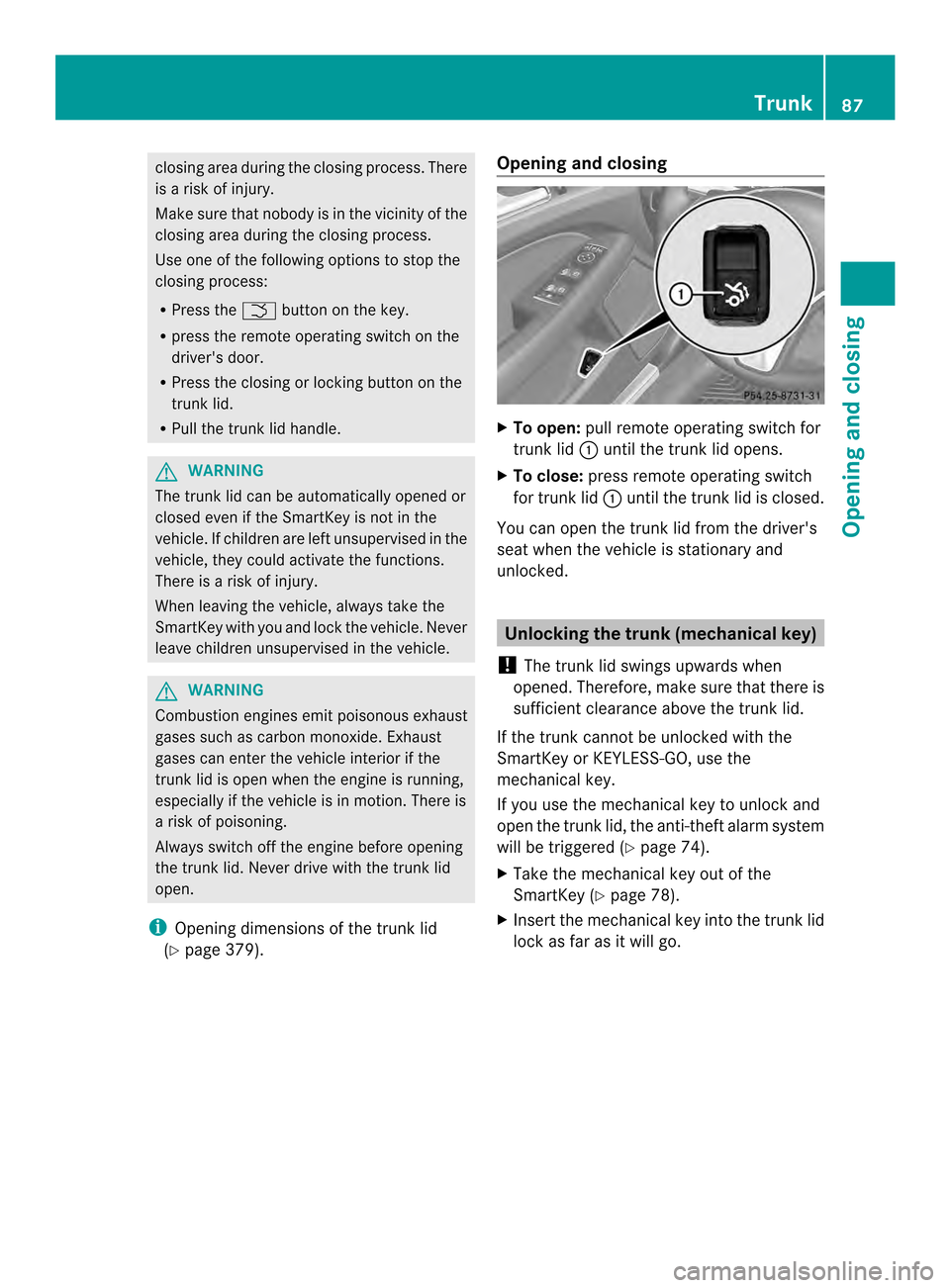
(Y page 379). Opening and closing X
To open: pull remote operating switch for
trunk lid 001Auntil the trunk lid opens.
X To close: press remote operating switch
for trunk lid 001Auntil the trunk lid is closed.
You can open the trunk lid from the driver's
seat when the vehicle is stationary and
unlocked. Unlocking the trunk (mechanical key)
! The trunk lid swings upwards when
opened. Therefore, make sure that there is
sufficient clearance above the trunk lid.
If the trunk cannot be unlocked with the
SmartKey or KEYLESS-GO, use the
mechanical key.
If you use the mechanical key to unlock and
open the trunk lid, the anti-theft alarm system
will be triggered (Y page 74).
X Take the mechanical key out of the
SmartKey (Y page 78).
X Insert the mechanical key into the trunk lid
lock as far as it will go. Trunk
87Opening and closing Z
Page 91 of 382

block
sorrestrict saside window during the
closin gprocess, the side window opens again
automatically. However ,the automatic
reversing feature is only an aid and does not
relieve you of the responsibility of paying
attention when closin gaside window. G
WARNING
The reversing feature does not react:
R to soft ,light and thin objects, e.g. small
fingers
R over the last 4mmofthe closing movement
R during resetting
R when closing the side window again
manually immediately after automatic
reversing
This means that the reversing feature cannot
prevent someone being trapped in these
situations. There is arisk of injury.
Make sure that no body parts are in close
proximity during the closing procedure. If
someone becomes trapped, press the switch
to open the side window again. Opening and closing the side
windows
The switches for all side windows are located
on the driver's door. There is also aswitch on
each door for the corresponding side window.
The switches on the driver's door take
precedence. 001A
Front left
0010 Front right 0024
Rear right
0021 Rear left
X Turn the SmartKey to position 1or 2in the
ignition lock.
X To open: press the corresponding switch.
X To close: pull the corresponding switch.
i If you press the switch beyond the point
of resistance, an automatic opening/
closing process is started in the
corresponding direction. You can stop
automatic operation by operating the
switch again.
i You can continue to operate the side
windows after you switch off the engine or
remove the SmartKey. This function is
available for up to five minutes or until the
driver's or front-passenger door is opened.
i When the override feature for the side
windows is activated (Y page 65), the side
windows cannot be operated from the rear. Convenienceo
pening
General notes You can ventilate the vehicle before you start
driving. To do this, the SmartKey is used to
carry out the following functions
simultaneously:
R
unlock the vehicle
R open the side windows
R open the sliding sunroof
R switch on the seat ventilation for the
driver's seat
i The convenience opening feature can
only be operated using the SmartKey. The
SmartKey must be close to the driver's
door handle. Side windows
89Opening and closing Z
Page 93 of 382

X
Touch recessed sensor surface 001Aon the
door handle until the side windows and the
sliding sunroof are fully closed.
i Make sure you only touch recessed
sensor surface 001A.
X Make sure that all the side windows and the
sliding sunroof are closed.
X To interrupt convenience closing:
release recessed sensor surface 001Aon the
door handle. Resetting the side windows
If as ide window can no longer be closed fully,
you must reset it.
X Close all the doors.
X Turn the SmartKey to position 1or 2in the
ignition lock.
X Pull the corresponding switch on the door
control panel until the side window is
completely closed (Y page 89).
X Hold the switch for an additional second.
If the side window opens again slightly:
X Immediately pull the corresponding switch
on the door control panel until the side
window is completely closed (Y page 89).
X Hold the switch for an additional second.
X If the corresponding side window remains
closed after the button has been released,
the side window has been reset correctly.
If this is not the case, repeat the steps
above again. Side windows
91Opening and closing Z
Page 94 of 382

Problems with the side windows
G
WARNING
If you close aside window again immediately after it has been blocked or reset, the side window
closes with increased or maximum force. The reversing feature is then not active. Parts of the
body could be trapped in the closing area in the process. This poses an increased risk of injury
or even fatal injury.
Make sure that no parts of the body are in the closing area. To stop the closing process, release
the switch or push the switch again to reopen the side window. Problem Possible causes/consequences and
000B Solutions
As
ide window cannot
be closed because it is
blocked by objects, e.g.
leaves in the window
guide. X
Remove the objects.
X Close the side window. As
ide window cannot
be closed and you
cannot see the cause. If
as ide window is obstructed durin gclosing and reopen sagain
slightly:
X Immediately after the window blocks, pull the corresponding
switc hagain until the side window has closed.
The side window is closed with increased force.
If as ide window is obstructed again durin gclosing and reopens
again slightly:
X Immediately after the window blocks, pull the corresponding
switc hagain until the side window has closed.
The side window is closed without the anti-entrapmen tfeature. Sliding sunroof
Important safet
ynotes G
WARNING
While opening and closing the sliding sunroof,
body parts in close proximity could become
trapped. There is arisk of injury.
Make sure that no body parts are in close
proximity during the opening and closing
procedures.
If somebody becomes trapped:
R release the switch immediately, or
R during automatic operation ,push the
switch briefly in any direction The openin
gorclosing procedure will be
stopped. G
WARNING
If children operate the sliding sunroof they
could become trapped, particularly if they are
left unsupervised. There is arisk of injury.
When leaving the vehicle, alway stake the
SmartKey with you and lock the vehicle. Never
leave children unsupervised in the vehicle.
! Only open the sliding sunroof if it is free
of snow and ice. Otherwise, malfunctions
may occur. 92
Sliding sunroofOpening and closing
Page 95 of 382

Do not allo
wanything to protrude fro mthe
sliding sunroof. Otherwise, the seals could
be damaged.
! The weather can change abruptly. It could
start to rain or snow. Make sure that the
sliding sunroof is closed when you leave the
vehicle. The vehicle electronicsc an be
damaged if water enters the vehicle
interior.
i Resonance noises can occur in addition
to the usuala irflow noises when the sliding
sunroof is open. They are caused by minor
pressure fluctuations in the vehicle interior.
Change the position of the sliding sunroof
or open aside window slightly to reduce or
eliminate these noises. Sliding sunroof reversing feature
The sliding sunroof is equipped with an
automatic reversing feature. If asolid object
blocks or restrictst he sliding sunroof during
the closing process, the sliding sunroof opens
again automatically .However, the automatic
reversing feature is only an aid and does not
relieve you of the responsibility of paying
attention when closing the sliding sunroof. G
WARNING
The reversing feature does not react:
R to soft, light and thin objects, e.g. small
fingers
R over the last 4mmofthe closing movement
R during resetting
R when closing the sliding sunroof again
manually immediately after automatic
reversing
This means that the reversing feature cannot
prevent someone being trapped in these
situations. There is arisk of injury.
Make sure that no body parts are in close
proximity during the closing procedure. If somebody becomes trapped:
R
release the switch immediately, or
R during automatic operation, push the
switch briefly in any direction
The closing process is stopped. Operating the sliding sunroof
Opening and closing Overhead control panel
001A
To raise
0010 To open
0024 To close/lower
X Turn the SmartKey to position 1or 2in the
ignition lock.
X Press or pull the 0006switch in the
corresponding direction.
i If you press the 0006switch beyond the
point of resistance, an automatic opening/
closing process is started in the
corresponding direction. You can stop
automatic operation by operating the
switch again.
i The automatic opening and raising
feature is available only when the sliding
sunroof is closed.
The sun protection cover automatically opens
along with the sliding sunroof. You can open
or close the sun protection cover manually
when the sliding sunroof is raised or closed.
i You can continue to operate the sliding
sunroof after switching off the engine or Sliding sunroof
93Opening and closing Z