2014 MERCEDES-BENZ B-CLASS SPORTS cruise control
[x] Cancel search: cruise controlPage 9 of 360
Switching the rea
rwindow
defroster on/off ............................ 130
Switching the ZONE function on/
off .................................................. 129
Cockpit
Overview .......................................... 30
see Instrument cluster
COLLISIO NPREVENTION ASSIST
Activating/deactivating the
distance warning function .............. 200
Displa ymessage ............................ 208
Operation/notes .............................. 64
COLLISIO NPREVENTION ASSIST
PLUS Activating/deactivating .................201
Display message ............................ 215
Operation/notes .............................. 66
COMAND
see separate operating instructions
Combination switch ..........................106
Compass Calibrating ..................................... 277
Calling up ....................................... 276
Setting ........................................... 276
Consumptio nstatistic s(on -board
computer) .......................................... 194
Convenience closing feature ..............84
Convenience opening feature ............84
Coolan t(engine)
Checkin gthe level ......................... 283
Display message ............................ 224
Filling capacity ............................... 352
Important safety notes ..................351
Temperature gauge ........................ 190
Warning lamp ................................. 245
Cooling
see Climate control
Copyright ............................................. 27
Cornerin glight function
Changing bulbs .............................. 114
Display message ............................ 220
Function/notes ............................. 107
Crash-responsive emergency
lighting ............................................... 110
Cruis econtrol
Activatio ncondition s..................... 161
Cruise control leve r....................... 161Deactivating ................................... 162
Display message ............................ 230
Driving system ............................... 160
Function/notes ............................. 160
Important safety notes ..................161
Setting aspeed .............................. 162
Storing and maintaining current
speed ............................................. 161
Cup holder
Cente rconsole .............................. 262
Important safety notes ..................261
Rea rcompartmen t......................... 262
Customer Assistanc eCenter (CAC) ...25
Customer Relations Department .......25 D
Dashboard see Instrument cluster
Dashboard lighting
see Instrument cluster lighting
Data
see Technical data
Daytime runnin glamps
Display message ............................ 223
Switching on/off (on-board
computer) ...................................... 203
Switching on/off (switch) ..............105
Dealerships
see Qualified specialist workshop
Declarations of conformity ................. 24
Delaye dswitch-off
Exterio rlighting (on-board
computer )...................................... 204
Interior lighting .............................. 204
Diagnostic sconnection ...................... 24
Digital speedometer .........................195
DIRECT SELECTl ever
see Automatic transmission
Displa y(cleaning instructions) ........290
Display messages ASSYST PLUS ................................ 284
Calling up (on-board computer) .....207
Driving systems ............................. 226
Engine ............................................ 224
General notes ................................ 207
Hiding (on-board computer) ...........207
Lights ............................................ .220 Index
7
Page 10 of 360
Safety systems
.............................. 208
SmartKey ....................................... 237
Tire s............................................... 231
Vehicle .......................................... .233
Distanc edisplay (on-board
computer) .......................................... 199
Distanc erecorder ............................. 193
see Odometer
see Trip odometer
Distanc ewarning function
Activating/deactivating .................200
Function/notes ................................ 64
Warning lamp ................................. 247
DISTRONIC PLUS
Activatio ncondition s..................... 164
Cruise control leve r....................... 164
Deactivating ................................... 167
Display message ............................ 228
Displaysint he multifunction
displa y........................................... 168
Driving tips .................................... 170
Function/notes ............................. 162
Important safety notes ..................163
Setting the specified minimum
distance ......................................... 167
Warning lamp ................................. 247
Doors
Automatic locking (on-board
computer) ...................................... 205
Automatic locking (switch) .............. .80
Central locking/unlocking
(SmartKey) ...................................... .74
Control panel ................................... 37
Display message ............................ 235
Emergency locking ........................... 81
Emergency unlocking .......................81
Important safety notes ....................79
Opening (from inside) ......................79
Drinking and driving .........................155
Drinks holder see Cuph older
Drive program
Automatic ...................................... 147
Display (DIREC TSELECT lever) ......144
Manual .......................................... .147
Driver's door
see Doors Driving abroad
Mercedes-Benz Service .................285
Symmetrical low bea m.................. 104
Driving on flooded roads ..................159
Driving safety systems ABS (Anti-lock Braking System) .......63
ADAPTIVE BRAKE ............................. 69
Adaptive Brake Assist ......................65
Adaptive brake lamps ......................67
BAS (Brake Assist System) ..............64
COLLISION PREVENTION ASSIST ....64
COLLISION PREVENTION ASSIST
PLUS ................................................ 66
Distance warning function ...............64
Electronic brake force distribution ...69
ESP ®
(Electronic Stability
Program) .................................... 67, 68
ETS (Electroni cTraction System) .....67
Important safety information ...........63
Overview .......................................... 63
STEER CONTROL ............................. 70
Driving systems
Active Parking Assist .....................175
ATTENTION ASSIST ........................183
Blind Spot Assist ............................ 184
Cruise control ................................ 160
Display message ............................ 226
DISTRONI CPLUS ........................... 162
HOLD function ............................... 171
Lane Keeping Assist ......................186
Lane Tracking package ..................184
PARKTRONI C................................. 172
Rea rview camera .......................... 179
Driving tips
Automatic transmission .................146
Brakes ........................................... 157
Break-in period .............................. 136
Checking brake lining thickness ....158
DISTRONI CPLUS ........................... 170
Downhill gradient ........................... 157
Drinking and driving .......................155
Driving abroad ............................... 104
Driving in winter ............................ .160
Driving on flooded road s................ 159
Driving on wet road s...................... 159
Exhaus tcheck ............................... 155
Fuel ................................................ 155
General .......................................... 1558
Index
Page 18 of 360
SmartKey
Changing the battery .......................76
Changing the programming .............75
Checking the battery .......................76
Convenience closing feature ............84
Convenience opening feature ..........84
Display message ............................ 237
Door central locking/unlocking .......74
Important safety notes ....................74
Loss ................................................. 78
Mechanical key ................................ 75
Positions (ignition lock) .................137
Problem (malfunction) .....................78
Starting the engine ........................138
SmartKey position s(ignition lock) ..137
Sno wchains ...................................... 315
Sockets Center console .............................. 264
Luggage compartment ...................265
Points to observe before use .........264
Rea rcompartmen t......................... 265
Specialist workshop ............................ 25
Speed, controlling see Cruise control
Speedometer
Activating/deactivating the
additiona lspeedometer .................202
Digita l............................................ 195
In the Instrument cluster .................31
Segments ...................................... 191
Selecting the unit of measurement 202
see Instrument cluster
SRS
see SRS (Supplemental Restraint
System)
SRS (Supplemental Restraint
System)
Display message ............................ 216
Introduction ..................................... 40
Warning lamp ................................. 244
Warning lamp (function) ................... 41
Standin glamps
Changing bulbs .............................. 113
Display message ............................ 222
Switching on/off ........................... 106
Start/stop function
see ECO start/stop function
Starting (engine) ................................ 137 Status overview (on-board
computer)
.......................................... 199
STEE RCONTROL .................................. 70
Steering (display message) ..............236
Steering wheel Adjusting (manually )........................ 98
Button overview ............................... 33
Buttons (on-board computer) ......... 191
Cleaning ......................................... 290
Important safety notes ....................98
Paddle shifters ............................... 147
Steering wheel paddle shifters ........147
Stowage areas ................................... 251
Stowage compartments Armrest (front) ............................... 252
Armrest (under) ............................. 252
Center console .............................. 251
Cuph olders ................................... 261
Eyeglasses compartment ...............251
Glove box ...................................... .251
Important safety information .........251
Parce lnet ...................................... 253
Under driver's seat/front-
passenger sea t.............................. 252
Stowage space
Center console (rear) .....................252
Summer tires ..................................... 314
Sun visor ............................................ 263
Surround lighting (on-board
computer) .......................................... 204
Switchin gair-recirculation mode
on/off ................................................. 132
Switchin goff the alarm (ATA) ............70 T
Tachometer ........................................ 191
Tailgate Display message ............................ 235
Emergency unlocking .......................82
Important safety notes ....................81
Opening/closing (from outside) .......82
Opening dimensions ......................353
Tail lamps
Display message ............................ 221
see Lights
Tank content
Fuel gauge ....................................... 3116
Index
Page 162 of 360
Winter driving
General notes G
WARNING
If you shift dow nonaslippery road surface in
an attempt to increase the engine's braking
effect, the drive wheels could lose their grip.
There is an increased danger of skidding and
accidents.
Do not shift down for additional engine
braking on aslippery road surface. G
DANGER
If the exhaust pipe is blocked or adequate
ventilation is not possible,p oisonous gases
such as carbon monoxide (CO) may enter the
vehicle. This is the case, e.g. if the vehicle
becomes trapped in snow. There is arisk of
fatal injury.
If you leave the engine or the auxiliary heating
running, make sure the exhaust pipe and area
around the vehicle are clear of snow. To
ensure an adequate supply of fresh air, open
aw indow on the side of the vehicle that is not
facing into the wind.
Have your vehicle winterproofed at aqualified
specialist workshop at the onset of winter.
Observe the notes in the "Winter operation"
section (Y page 314).
Driving with summer tires Observe the notes in the "Winter operation"
section (Y
page 314).
Slippery road surfaces G
WARNING
If you shift down on aslippery road surface in
an attempt to increase the engine's braking
effect, the drive wheels could lose their grip.
There is an increased danger of skidding and
accidents.
Do not shift down for additional engine
braking on aslippery road surface. If the vehicle threatens to skid or cannot be
stopped when moving at low speed:
X Shift the transmission to position N.
Drive particularlyc arefully on slippery road
surfaces. Avoid sudden acceleration, steering
and braking maneuvers. Do not use the cruise
control or DISTRONIC PLUS.
The outside temperature indicator is not
designed to serve as an ice-warning device
and is therefore unsuitablef or that purpose.
Changes in the outside temperature are
displayed after ashort delay.
Indicated temperatures just above the
freezing point do not guarantee that the road
surface is free of ice. The road may still be icy,
especially in wooded areas or on bridges. You
should pay special attention to road
conditions when temperatures are around
freezing point.
i For more information on driving with
snow chains, see (Y page 315). Driving systems
Cruise control
General notes Cruise control maintains
aconstant road
speed for you. It brakes automaticallyino rder
to avoid exceeding the set speed. On long and
steep downhill gradients, especially if the
vehicle is laden, you must select alow gear in
good time. For this, you will need to have
selected manual drive program
M(Y page 147). By doing so, you will make
use of the braking effect of the engine. This
relieves the load on the brake system and
prevents the brakes from overheating and
wearing too quickly.
Use cruise control only if road and traffic
conditions make it appropriate to maintain a
steady speed for aprolonged period. You can
store any road speed above 20 mph
(30 km/h). 160
Driving systemsDriving and parking
Page 163 of 360
Important safety notes
If you fail to adapt your driving style, cruise
control can neither reduce th eriskofan
acciden tnor override the laws of physics.
Cruise control cannot take into account the
road, traffic and weather conditions. Cruise
control is only an aid. You are responsible for
the distance to the vehicle in front,f or vehicle
speed, for braking in good time and for
staying in your lane.
Do not use cruise control:
R in road and traffic conditions which do not
allow you to maintain aconstant speed e.g.
in heavy traffic or on winding roads
R on slippery road surfaces. Brakin gor
accelerating could cause the drive wheels
to lose traction and the vehicle could then
skid
R when there is poor visibility, e.g. due to fog,
heavy rain or snow
If there is achange of drivers, advise the new
driver of the speed stored.
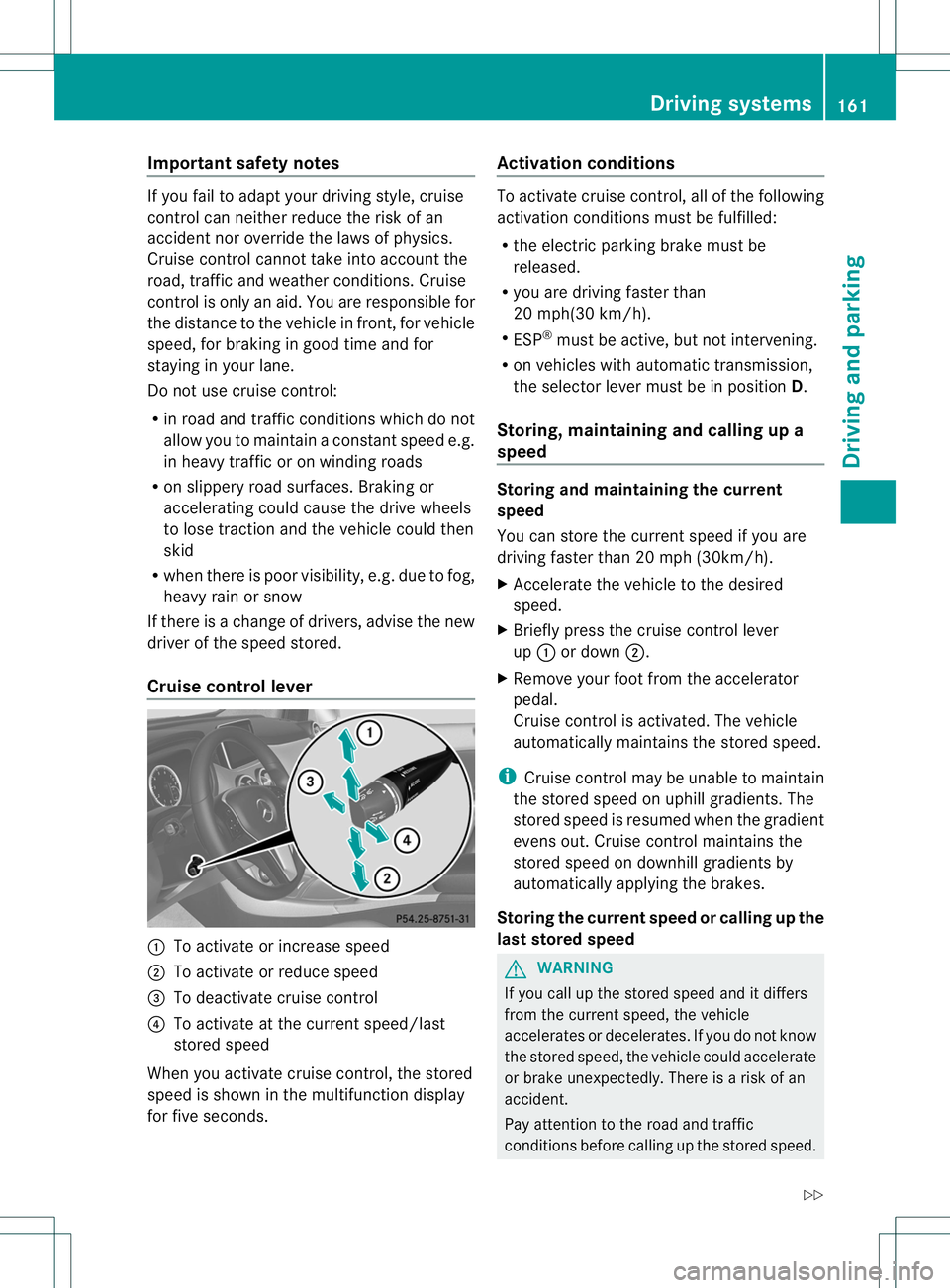
Cruise control lever 001A
To activate or increase speed
0010 To activate or reduce speed
0023 To deactivate cruise control
0021 To activate at the current speed/last
stored speed
When you activate cruise control, the stored
speed is shown in the multifunction display
for five seconds. Activation conditions To activate cruise control, all of the following
activation conditions must be fulfilled:
R the electric parking brake must be
released.
R you are driving faster than
20 mph(30 km/h).
R ESP ®
must be active, but not intervening.
R on vehicles with automatic transmission,
the selector lever must be in position D.
Storing, maintaining and calling up a
speed Storing and maintaining the current
speed
You can store the current speed if you are
driving faster than 20 mph (30km/h).
X Accelerate the vehicle to the desired
speed.
X Briefly press the cruise control lever
up 001A or down 0010.
X Remove your foot from the accelerator
pedal.
Cruise control is activated. The vehicle
automatically maintains the stored speed.
i Cruise control may be unable to maintain
the stored speed on uphill gradients. The
stored speed is resumed when the gradient
evens out. Cruise control maintains the
stored speed on downhill gradients by
automatically applying the brakes.
Storing the current speed or calling up the
last stored speed G
WARNING
If you call up the stored speed and it differs
from the current speed, the vehicle
accelerates or decelerates. If you do not know
the stored speed, the vehicle could accelerate
or brake unexpectedly. There is arisk of an
accident.
Pay attention to the road and traffic
conditions before calling up the stored speed. Driving systems
161Driving and parking
Z
Page 164 of 360
If you do not know the stored speed,s
tore the
desire dspeed again.
X Briefly pullt he cruise control lever towards
you 0021.
X Remove yourf oot from the accelerator
pedal.
The first time cruise control is activated, it
stores the current speed or regulates the
speed of the vehicle to the previously
stored speed.
Setting aspeed Kee
pinm ind tha titmay tak eabriefm oment
until the vehicle has accelerated or braked to
the speed set.
X Press the cruise control lever up 001Afor a
higher speed or down 0010for alower speed.
X To adjust the set speed in 1mph
increments (1 km/h increments): briefly
press the cruise control lever up 001Aor
down 0010to the pressure point.
Every time the cruise control lever is
pressed up 001Aor down 0010the last speed
stored is increased or reduced.
X To adjust the set speed in 5mph
increments (10 km/h increments):
briefly press the cruise control lever
up 001A or down 0010to the pressure point.
Every time the cruise control lever is
pressed up 001Aor down 0010the last speed
stored is increased or reduced.
i Cruise control is not deactivated if you
depress the accelerator pedal. For
example, if you accelerate briefly to
overtake, cruise control adjusts the
vehicle's speed to the last speed stored
after you have finished overtaking. Deactivating cruise control There are several ways to deactivate cruise
control:
X
Briefly press the cruise control lever
forwards 0023.
or
X Brake.
Cruise control is automatically deactivated if:
R the vehicle is secured with the electric
parking brake
R you are driving at less than 20 mph
(30 km/h)
R ESP ®
intervenes or you deactivate ESP ®
R you shift the transmission to position N
while driving
If cruise control is deactivated, you will hear
aw arning tone. You will see the Cruise Control Off message in the multifunction
display for approximately five seconds.
i When you switch off the engine, the last
speed stored is cleared. DISTRONIC PLUS
General notes DISTRONIC PLUS regulates the speed and
automatically helps you maintain the
distance to the vehicle detected in front.
Vehicles are detected with the aid of the radar
sensor system. DISTRONIC PLUS brakes
automatically so that the set speed is not
exceeded.
Change into
alower gear in good time on long
and steep downhill gradients. This is
especially important if the vehicle is laden. By
doing so, you will make use of the braking
effect of the engine. This relieves the load on
the brake system and prevent sthe brakes
from overheating and wearing too quickly.
If DISTRONIC PLUS detect sthat there is arisk
of ac ollision, you will be warned visually and
acoustically. DISTRONIC PLUS cannot
prevent acollision without your intervention. 162
Driving systemsDriving and parking
Page 165 of 360
An intermittent warning tone will then sound
and the distance warning lamp will light up in
the instrument cluster .Brake immediatel yin
order to increase the distance to the vehicle
in front or take evasive action provided it is
safe to do so.
For DISTRONI CPLUStoa ssist you, the radar
sensor system must be operational.
DISTRONIC PLUS is automatically
deactivated if:
R you are driving slower than 15 mph
(25 km/h) and there is no longer avehicle
in front or
R the vehicle in front is no longer detected
If there is no vehicle in front,D ISTRONIC
PLUS operates in the same way as cruise
control in the speed range between 20 mph
(30 km/h) and 120 mph (200 km/h) .Ifa
vehicle is driving in front of you, it operates in
the speed range between 0mph (0 km/h) and
120 mph (200 km/h).
Do not use DISTRONIC PLUS while driving on
roads with steep gradients.
As DISTRONIC PLUS transmits radar waves,
it can resemble the radar detector softhe
responsible authorities. You can refer to the
relevant chapter in the Operator's Manual if
question sare asked about this.
i This device complies with RSS-210 of
Industry Canada. Operation is subjec tto
the following two conditions:
1. This device ma ynot cause harmful
interference, and
2. thi sdevic emusta ccep tany interference
received, including interference tha tmay
caus eundesired operatio nofthe device.
Removal, tampering, or altering of the
device will void any warranties, and is not
permitted. Do not tamper with, alter, or use
in any non-approved way.
Any unauthorized modification to this
device could void the user's authority to
operate the equipment. Important safety notes G
WARNING
DISTRONIC PLUS does not react to:
R people or animals
R stationary obstacles on the road, e.g.
stopped or parked vehicles
R oncominga nd crossing traffic
As aresult, DISTRONIC PLUS may neither give
warnings nor interveneins uch situations.
There is arisk of an accident.
Always pay careful attention to the traffic
situation and be ready to brake. G
WARNING
DISTRONIC PLUS cannot always clearly
identify other road users and complex traffic
situations.
In such cases, DISTRONIC PLUS may:
R give an unnecessary warning and then
brake the vehicle
R neither give awarning nor intervene
R accelerate unexpectedly
There is arisk of an accident.
Continue to drive carefully and be ready to
brake, in particular when warned to do so by
DISTRONIC PLUS. G
WARNING
DISTRONIC PLUS brakes your vehicle with up
to 40% of the maximum braking force. If this
braking force is insufficient, DISTRONIC PLUS
warns you visuallya nd audibly. There is arisk
of an accident.
In such cases, apply the brakes yourself and
try to take evasive action. Driving systems
163Driving and parking Z
Page 166 of 360
!
If DISTRONIC PLUS or the HOLD function
is activated, the vehicle brakes
automaticallyinc ertain situations. To
prevent damage to the vehicle, deactivate
DISTRONIC PLUS and the HOLD function in
the following or other similars ituations:
R when towin gthe vehicle
R in the car wash
If you fail to adapt your drivin gstyle,
DISTRONIC PLUS can neither reduc ethe risk
of accident nor override the laws of physics.
DISTRONIC PLUS cannot tak einto account
the road, traffic and weather conditions.
DISTRONI CPLUSiso nlyana id.Y ou are
responsibl efor the distance to the vehicl ein
front, for vehicl espeed ,for braking in good
time and for staying in your lane.
Do not use DISTRONIC PLUS:
R in road and traffic conditions which do not
allow you to maintain aconstant speed e.g.
in heavy traffic or on winding roads
R on slippery road surfaces. Brakin gor
accelerating could cause the drive wheels
to lose traction and the vehicle could then
skid
R when there is poor visibility, e.g. due to fog,
heavy rain or snow
DISTRONIC PLUS may not detect narrow
vehicles driving in front,e .g. motorcycles, or
vehicles driving on adifferent line.
In particular, the detection of obstacles can
be impaired if:
R dirt on the sensors or anything else
coverin gthe sensors
R snow or heavy rain
R interferenc ebyother radar sources
R strongr adar reflections, for example, in
parking garages
If DISTRONIC PLUS no longer detect sa
vehicle in front,D ISTRONIC PLUS may
unexpectedly accelerate the vehicle to the
stored speed. This speed may:
R
be too high if you are driving in afilter lane
or an exit lane
R be so high when driving in the right-hand
lane that you overtak evehicles in the left-
hand lane
R be so high when driving in the left-hand lane
that you overtak evehicles in the right-hand
lane
If there is achange of drivers, advise the new
driver of the speed stored.
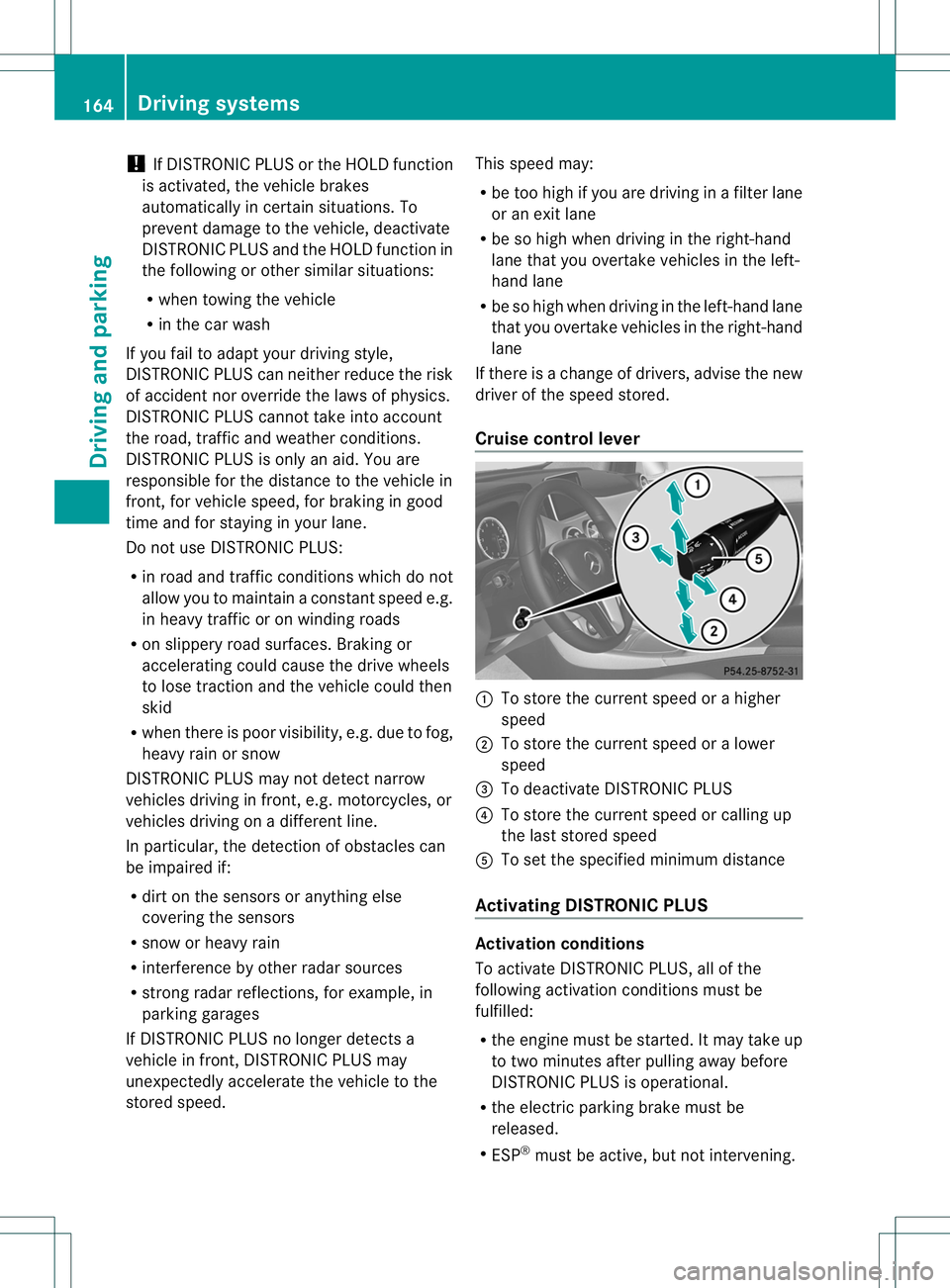
Cruise control lever 001A
To store the current speed or ahigher
speed
0010 To store the current speed or alower
speed
0023 To deactivate DISTRONIC PLUS
0021 To store the current speed or calling up
the last stored speed
001E To set the specified minimum distance
Activating DISTRONIC PLUS Activation conditions
To activate DISTRONIC PLUS, all of the
following activation conditions must be
fulfilled:
R
the engine must be started. It may take up
to two minutes after pullinga way before
DISTRONIC PLUS is operational.
R the electric parking brake must be
released.
R ESP ®
must be active, but not intervening. 164
Driving systemsDriving and parking