2014 LINCOLN MKZ ECU
[x] Cancel search: ECUPage 76 of 468

You must have two previously
programmed intelligent access keys
inside your vehicle and the new
unprogrammed intelligent access keys
readily accessible. See an authorized
dealer to have the spare key
programmed if two previously
programmed keys are not available.
Make sure that your vehicle is off
before beginning this procedure. Make
sure that you close all the doors
before beginning and that they remain
closed throughout the procedure.
Perform all steps within 30 seconds
of starting the sequence. Stop and
wait for at least one minute before
starting again if you perform any steps
out of sequence.
Read and understand the entire
procedure before you begin.
E155835
1. Remove the rubber covering (A) inthe cupholder. Place the first
programmed key in the backup
slot (B) at the bottom of the
cupholder.
2. Wait 5 seconds, and then press the START/STOP button.
3. Remove the intelligent access key. 4. Within 10 seconds, place a second
programmed intelligent access key
in the backup slot and press the
START/STOP button.
5. Wait 5 seconds, and then press the START/STOP button again.
6. Remove the intelligent access key.
7. Wait 5 seconds, then place the unprogrammed intelligent access
key in the backup slot and press
the START/STOP button.
Programming is now complete. Verify
the remote control functions operate
and your vehicle starts with the new
intelligent access key.
If programming was not successful,
wait 10 seconds and repeat Steps 1
through 7. If you are still unsuccessful,
take your vehicle to your authorized
dealer.
ANTI-THEFT ALARM (IF
EQUIPPED)
The system will warn you of an
unauthorized entry to your vehicle. It
will be triggered if any door, the
luggage compartment or the hood is
opened without using the key, remote
control or keyless entry keypad.
The direction indicators will flash and
the horn will sound if unauthorized
entry is attempted while the alarm is
armed.
Take all remote controls to an
authorized dealer if there is any
potential alarm problem with your
vehicle.
73
Security
Page 77 of 468

Arming the Alarm
The alarm is ready to arm when there
is not a key in the ignition.
Electronically lock the vehicle to arm
the alarm.
Disarming the Alarm
Disarm the alarm by any of the
following actions:
• Unlock the doors or luggagecompartment with the remote
control or keyless entry keypad.
• Switch the ignition on or start the vehicle.
• Use a key in the driver’s door to unlock the vehicle, then switch the
ignition on within 12 seconds.
Note: Pressing the panic button on the
remote control will stop the horn and
signal indicators, but will not disarm
the system.
74
Security
Page 115 of 468

Doors and Locks
Action
Message
Displays when the door(s) listed is not completely
closed and the vehicle is moving.
X Door Ajar
Displays when the door(s) listed is not completely closed.
Displays when the luggage compartment is not completely closed.
Trunk Ajar
Displays when the hood is not completely closed.
Hood Ajar
Displays when the door switches have been disabled.
Switches Inhibited
Security Mode
Displayed when there is a system malfunction with thechild locks. Contact your authorized dealer as soon as possible.
Child Lock Malfunc-
tion Service Required
Displays the factory keypad code after the keypad hasbeen reset. See Keyless Entry (page 67).
Factory Keypad Code
XXXXX
Driver Alert
Action
Message
Stop and rest as soon as it is safe to do so.
Driver Alert Warning
Rest Now
Take a rest break soon.
Driver Alert Warning
Rest Suggested
Fuel
Action
Message
Displayed as an early reminder of a low fuel condition.
Fuel Level Low
Displayed when the fuel fill inlet may not be properly closed.
Check Fuel Fill Inlet
112
Information Displays
Page 125 of 468
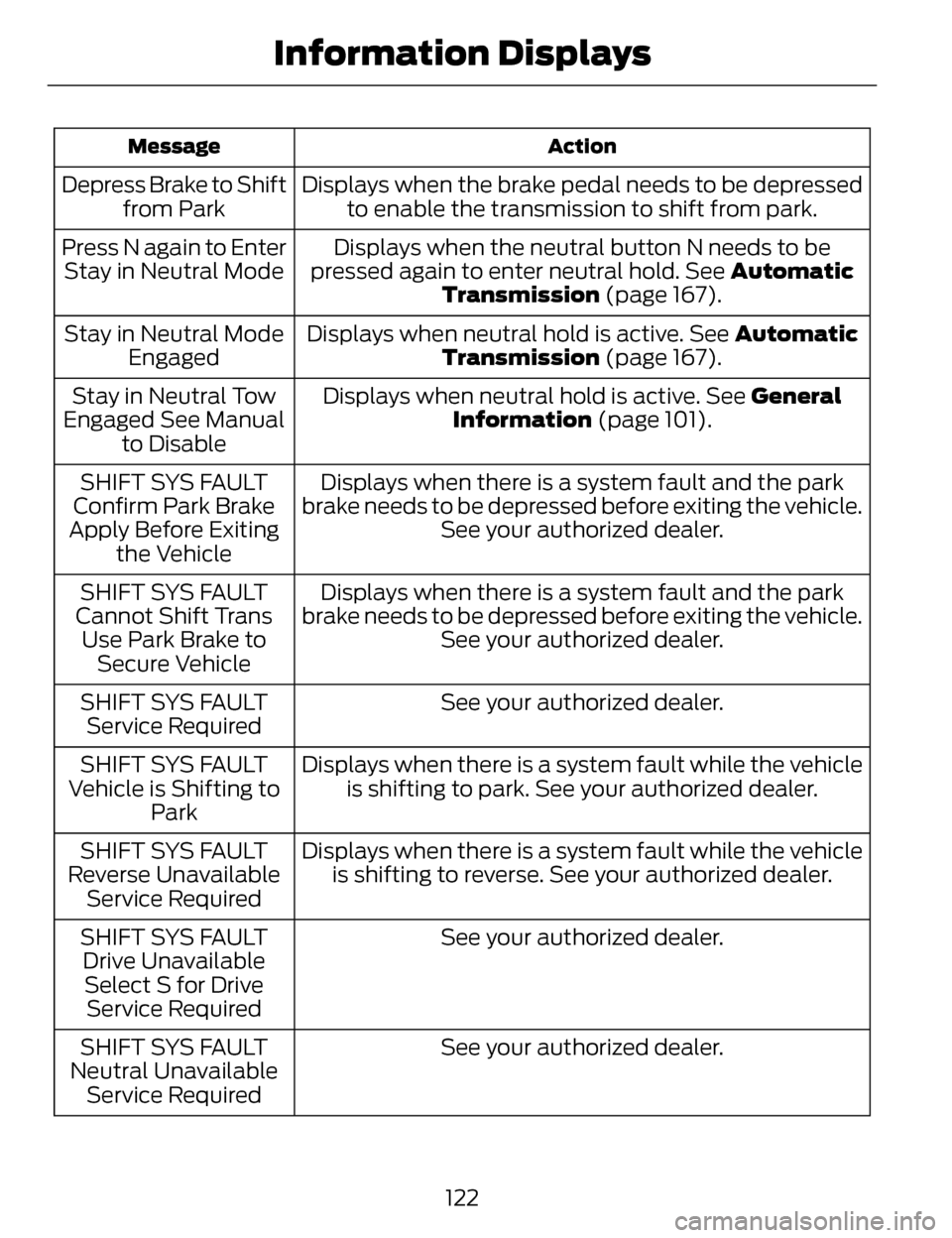
Action
Message
Displays when the brake pedal needs to be depressed
to enable the transmission to shift from park.
Depress Brake to Shift
from Park
Displays when the neutral button N needs to be
pressed again to enter neutral hold. See Automatic Transmission (page 167).
Press N again to Enter
Stay in Neutral Mode
Displays when neutral hold is active. See Automatic
Transmission (page 167).
Stay in Neutral Mode
Engaged
Displays when neutral hold is active. See General
Information (page 101).
Stay in Neutral Tow
Engaged See Manual to Disable
Displays when there is a system fault and the park
brake needs to be depressed before exiting the vehicle. See your authorized dealer.
SHIFT SYS FAULT
Confirm Park Brake
Apply Before Exiting the Vehicle
Displays when there is a system fault and the park
brake needs to be depressed before exiting the vehicle. See your authorized dealer.
SHIFT SYS FAULT
Cannot Shift Trans Use Park Brake to Secure Vehicle
See your authorized dealer.
SHIFT SYS FAULT
Service Required
Displays when there is a system fault while the vehicleis shifting to park. See your authorized dealer.
SHIFT SYS FAULT
Vehicle is Shifting to Park
Displays when there is a system fault while the vehicleis shifting to reverse. See your authorized dealer.
SHIFT SYS FAULT
Reverse Unavailable Service Required
See your authorized dealer.
SHIFT SYS FAULT
Drive UnavailableSelect S for Drive Service Required
See your authorized dealer.
SHIFT SYS FAULT
Neutral Unavailable Service Required
122
Information Displays
Page 146 of 468

HomeLink Wireless Control
System (If Equipped)
WARNING
Do not use the system with any
garage door opener that does
not have the safety stop and reverse
feature as required by U.S. Federal
Safety Standards (this includes any
garage door opener manufactured
before April 1, 1982). A garage door
opener which cannot detect an object,
signaling the door to stop and reverse,
does not meet current federal safety
standards. Using a garage door opener
without these features increases the
risk of serious injury or death.
Note: Make sure that the garage door
and security device are free from
obstruction when you are
programming. Do not program the
system with the vehicle in the garage.
Note: Make sure you keep the original
remote control transmitter for use in
other vehicles as well as for future
system programming.
Note: We recommend that upon the
sale or lease termination of your
vehicle, you erase the programmed
function buttons for security reasons.
See Erasing the function button codes
later in this section.
Note: You can program a maximum
of three devices. To change or replace
any of the three devices after it has
been initially programmed, you must
first erase the current settings. See
Erasing the function button codes later
in this section.
E142657
The universal garage door opener
replaces the common hand-held
garage door opener with a
three-button transmitter that is
integrated into the driver’s sun visor.
The system includes two primary
features, a garage door opener and a
platform for remote activation of
devices within the home. As well as
being programmed for garage doors,
the system transmitter can be
programmed to operate entry gate
operators, security systems, entry
door locks and home or office lighting.
Additional system information can be
found online at www.homelink.com
or by calling the toll-free help line on
1-800-355-3515.
In-vehicle programming
This process is to program your
hand-held transmitter and your
in-vehicle HomeLink button.
Note: Put a new battery in the
hand-held transmitter. This will ensure
quicker training and accurate
transmission of the radio-frequency
signal.
143
Universal Garage Door Opener
Page 195 of 468

When automatic steering is finished,
the touch screen displays a message
and a chime sounds, indicating that
the active park assist process is done.
The driver is responsible for checking
the parking job and making any
necessary corrections before putting
the transmission in P (Park).
Deactivating the Park Assist
Feature
The system can be deactivated
manually by:
• pressing the active park assistbutton
• grabbing the steering wheel
• driving above approximately 50 mph (80 km/h) for 30 seconds
during an active park search • driving above 6 mph (10 km/h)
during automatic steering
• turning off the traction control system.
Certain vehicle conditions can also
deactivate the system, such as:
• Traction control has activated on a slippery or loose surface.
• There is an anti-lock brake system activation or failure.
• Something touches the steering wheel.
If a problem occurs with the system,
a warning message is displayed,
followed by a chime. Occasional
system messages may occur in
normal operation. For recurring or
frequent system faults, contact an
authorized dealer to have your vehicle
serviced.
Troubleshooting the System
The system does not look for a space
The traction control system may be off
The transmission is in R (Reverse); the vehicle must be moving forward to
detect a parking space
The system does not offer a particular space
Something may be contacting the front bumper or side sensors
There is not enough room on both sides of the vehicle in order to park
There is not enough space for the parking maneuver on the opposite side of
the parking space
192
Parking Aids
Page 244 of 468

DRIVING THROUGH WATER
Note:Driving through deep water
above the recommended levels can
cause vehicle damage.
If driving through deep or standing
water is unavoidable, proceed very
slowly. Never drive through water that
is higher than the bottom of the wheel
rims (for cars) or the bottom of the
hubs (for trucks).
E142667
When driving through water, traction
or brake capability may be limited.
Also, water may enter your engine’s
air intake and severely damage your
engine or your vehicle may stall.
Once through the water, always dry
the brakes by moving your vehicle
slowly while applying light pressure
on the brake pedal. Wet brakes do not
stop the vehicle as quickly as dry
brakes.
FLOOR MATS
E142666
WARNINGS
Always use floor mats that are
designed to fit the foot well of
your vehicle. Only use floor mats that
leave the pedal area unobstructed.
Only use floor mats that are firmly
secured to retention posts so that
they cannot slip out of position and
interfere with the pedals or impair safe
operation of your vehicle in other
ways.
Pedals that cannot move freely
can cause loss of vehicle control
and increase the risk of serious
personal injury.
Always make sure that the floor
mats are properly attached to
the retention posts in the carpet that
are supplied with your vehicle. Floor
mats must be properly secured to
both retention posts to ensure mats
do not shift out of position.
241
Driving Hints
Page 245 of 468

WARNINGS
Never place floor mats or any
other covering in the vehicle foot
well that cannot be properly secured
to prevent them from moving and
interfering with the pedals or the
ability to control the vehicle.
Never place floor mats or any
other covering on top of already
installed floor mats. Floor mats
should always rest on top of vehicle
carpeting surface and not another
floor mat or other covering. Additional
floor mats or any other covering will
reduce the pedal clearance and
potentially interfere with pedal
operation.
Check attachment of floor mats
on a regular basis. Always
properly reinstall and secure floor
mats that have been removed for
cleaning or replacement.
Always make sure that objects
cannot fall into the driver foot
well while the vehicle is moving.
Objects that are loose can become
trapped under the pedals causing a
loss of vehicle control.
Failure to properly follow floor
mat installation or attachment
instructions can potentially cause
interference with pedal operation
causing loss of control of vehicle.
To install floor mats, position the
floor mat so that the eyelet is
over the retention post and press
down to lock in.
To remove the floor mat, reverse
the installation procedure.
242
Driving Hints