2014 LINCOLN MKZ HYBRID comfort control
[x] Cancel search: comfort controlPage 42 of 445

not properly restrained or are otherwise
out of position at the time of airbag
deployment. Thus, it is extremely important
that occupants be properly restrained as
far away from the airbag module as
possible while maintaining vehicle control.
Routine maintenance of the airbags is not
required.
DRIVER AND PASSENGER
AIRBAGS
WARNINGS
Never place your arm or any objects
over an airbag module. Placing your
arm over a deploying airbag can result in
serious arm fractures or other injuries.
Objects placed on or over the airbag
inflation area may cause those objects to
be propelled by the airbag into your face
and torso causing serious injury. Airbags can kill or injure a child in a
child seat. Never place a rear-facing
child seat in front of an active airbag. If you
must use a forward-facing child seat in the
front seat, move the seat upon which the
child seat is installed all the way back. The driver and front passenger airbags
will deploy during significant frontal and
near frontal crashes.
The driver and passenger front airbag
system consists of:
•
driver and passenger airbag modules.
• front passenger sensing system. · crash sensors and monitoring
system with readiness indicator.
See Crash Sensors and Airbag
Indicator (page 46).
Proper Driver and Front Passenger
Seating Adjustment WARNING
National Highway Traffic Safety
Administration (NHTSA)
recommends a minimum distance of at
least 10 inches (25 centimeters) between
an occupant’ s chest and the driver airbag
module. To properly position yourself away from
the airbag:
•
Move your seat to the rear as far as
you can while still reaching the pedals
comfortably.
• Recline the seat slightly (one or two
degrees) from the upright position.
After all occupants have adjusted their
seats and put on safety belts, it is very
important that they continue to sit properly.
A properly seated occupant sits upright,
leaning against the seat back, and
centered on the seat cushion, with their
feet comfortably extended on the floor.
Sitting improperly can increase the chance
40
MKZ (CC9) Supplementary Restraints SystemE151127
Page 107 of 445

Information
Displays a number of different system tutorials. Use
the up or down arrows to scroll through the tutorials.
Then press OK to view.
Tutorial
Warnings
Displays the associated driver alert graphic.
Driver Alert
MyKeys (Number of MyKeys programmed)
MyKey
MyKey Miles (km) (Distance traveled using a
programmed MyKey)
Admin Keys (Number of admin keys)
All active warnings will display first if applicable. The
system check menu may appear different based upon
equipment options and current vehicle status. Use the
up or down arrow buttons to scroll through the list.
System
Check
Settings In this mode, you can configure
different driver setting choices.
Note:
Some items are optional and may
not appear. Settings
Menu level 5
Menu level 4
Menu level 3
Menu level 2
—
On or Off
Traction Control
Driver Assist
—
Sport, Normal or Comfort
Drive Control
—
On (default on key cycle)
or Off
Blindspot
High, Normal orLow
Sensitivity
Collision Warn
—
Adaptive or Normal
Cruise Control
—
On (default on key cycle)
or Off
Cross Traffic
105
MKZ (CC9) Information DisplaysE100023
Page 128 of 445

Note:
When you select windshield
defrosting and defogging, the instrument
panel and footwell level functions
automatically switch off and air
conditioning switches on. Outside air flows
into your vehicle.
Heating the Interior Quickly
1. Press the AUTO button.
2. Adjust the temperature control to the desired setting.
Recommended Settings for Heating
1. Press the AUTO button.
2. Adjust the temperature control to a comfortable setting.
Cooling the Interior Quickly
1. Press the MAX A/C button.
2. Adjust the temperature control to the desired setting.
Recommended Settings for Cooling
1. Press the AUTO button.
2. Adjust the temperature to a comfortable setting.
Side Window Defogging in Cold
Weather
1. Press the defrost button.
2. Adjust the temperature control to the desired setting. HEATED WINDOWS AND
MIRRORS
Heated Rear Window
Note:
You must switch the ignition on to
use this feature.
Press the button to clear the rear window
of thin ice and fog. Press the button again
within 10 minutes to switch it off. It
switches off automatically after 10 minutes,
or when you switch the ignition off.
Do not use razor blades or other sharp
objects to clean the inside of the rear
window or to remove decals from the
inside of the rear window. This may
cause damage to the heated grid lines,
which your warranty does not cover.
Heated Exterior Mirror
Note: Do not remove ice from the mirrors
with a scraper or attempt to readjust the
mirror glass if it has frozen in place. These
actions could cause damage to the glass
and mirrors.
Note: Do not clean the housing or glass
of any mirror with harsh abrasives, fuel or
other petroleum-based cleaning products.
Both heated mirrors remove ice, mist and
fog when you switch on the heated rear
window.
CABIN AIR FILTER
Your vehicle is equipped with a cabin air
filter. It is located behind the glove box.
126
MKZ (CC9) Climate Control
Page 129 of 445

The particulate filtration system reduces
the concentration of airborne particles
such as dust, spores and pollen in the air
supplied to the interior of your vehicle.
Note:
To prevent foreign objects from
entering the system, make sure the cabin
air is in place at all times. Running the
system without a filter in place could result
in degradation or damage to the system.
The particulate filtration system gives you
and your passengers the following
benefits:
• It improves your driving comfort by
reducing particle concentration.
• It improves the interior compartment
cleanliness.
• It protects the climate control
components from particle deposits.
Replace the filter at regular intervals. See
Scheduled Maintenance (page 412).
For additional cabin air filter information,
or to replace the filter, see an authorized
dealer.
REMOTE START
The climate control system adjusts the
cabin temperature during remote start.
You cannot adjust the system during
remote start operation. Turn the ignition
on to return the system to its previous
settings. You can now make adjustments.
You need to turn certain
vehicle-dependent features back on, such
as:
• heated seats
• cooled seats
• heated steering wheel •
heated mirrors
• heated rear window.
You can adjust the settings using the
information display controls.
See
Information Displays (page 97).
Automatic Settings
You can set the climate control to operate
in AUTO mode through the information
display setting: Remote Start > Climate
Control > Heater-A/C > Auto. The climate
control system automatically sets the
interior temperature to 72°F (22°C).
In hot weather, the system is set to 72°F
(22°C). Cooled seats are set to high (if
available, and selected to AUTO in the
information display).
In moderate weather, the system either
heats or cools (based on previous
settings). The rear defroster, heated
mirrors and heated/cooled seats do not
automatically turn on.
In cold weather, the system is set to 72°F
(22°C). The heated seats and heated
steering wheel are set to high (if available,
and selected to AUTO in the information
display). The rear defroster and heated
mirrors automatically turn on.
Last Settings
You can set the climate control to operate
using the last climate control settings
through the information display setting:
Remote Start > Climate Control >
Heater–A/C > Last Settings. The climate
control system automatically uses the
settings last selected before turning off
the vehicle.
127
MKZ (CC9) Climate Control
Page 131 of 445
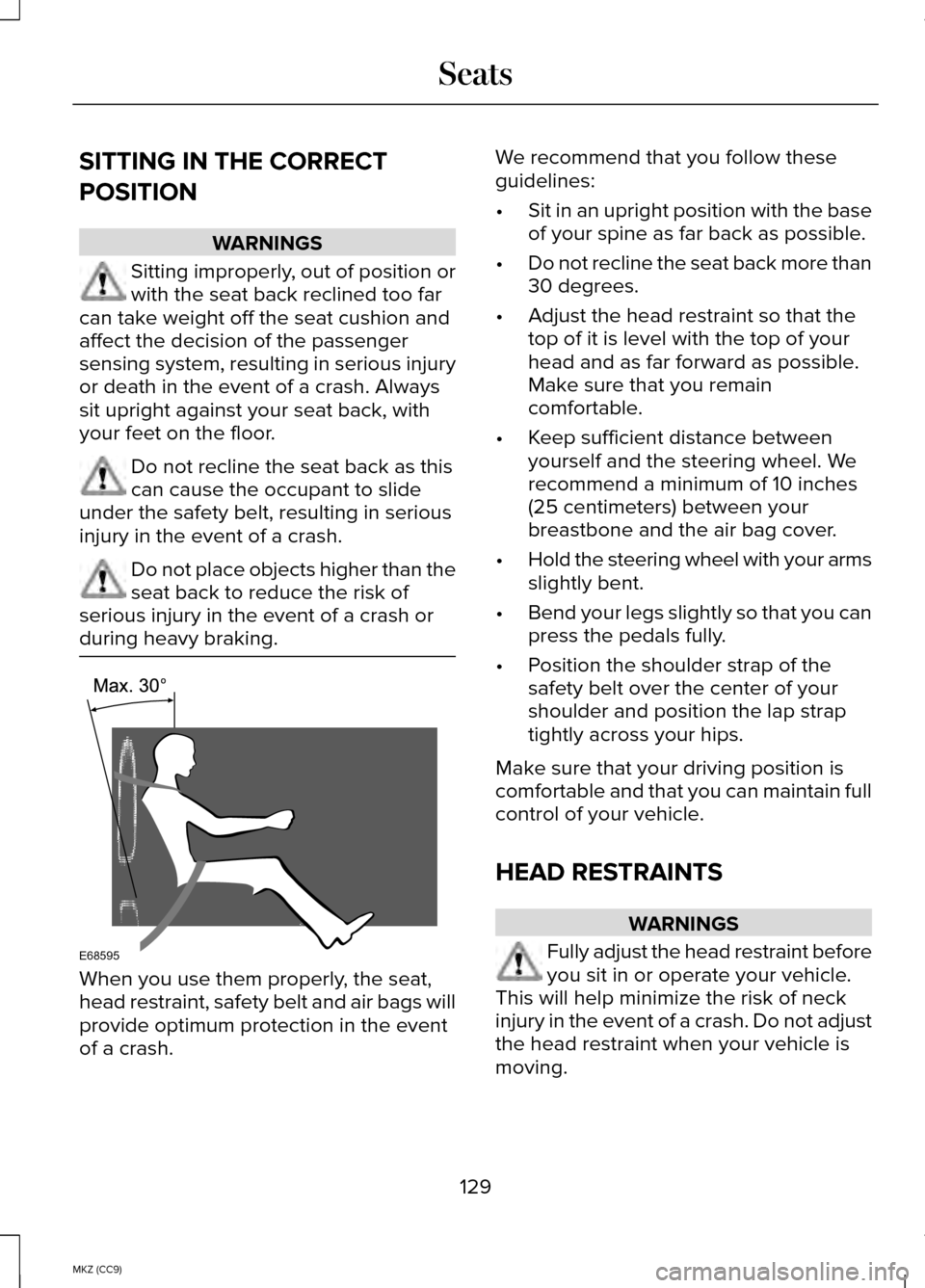
SITTING IN THE CORRECT
POSITION
WARNINGS
Sitting improperly, out of position or
with the seat back reclined too far
can take weight off the seat cushion and
affect the decision of the passenger
sensing system, resulting in serious injury
or death in the event of a crash. Always
sit upright against your seat back, with
your feet on the floor. Do not recline the seat back as this
can cause the occupant to slide
under the safety belt, resulting in serious
injury in the event of a crash. Do not place objects higher than the
seat back to reduce the risk of
serious injury in the event of a crash or
during heavy braking. When you use them properly, the seat,
head restraint, safety belt and air bags will
provide optimum protection in the event
of a crash. We recommend that you follow these
guidelines:
•
Sit in an upright position with the base
of your spine as far back as possible.
• Do not recline the seat back more than
30 degrees.
• Adjust the head restraint so that the
top of it is level with the top of your
head and as far forward as possible.
Make sure that you remain
comfortable.
• Keep sufficient distance between
yourself and the steering wheel. We
recommend a minimum of 10 inches
(25 centimeters) between your
breastbone and the air bag cover.
• Hold the steering wheel with your arms
slightly bent.
• Bend your legs slightly so that you can
press the pedals fully.
• Position the shoulder strap of the
safety belt over the center of your
shoulder and position the lap strap
tightly across your hips.
Make sure that your driving position is
comfortable and that you can maintain full
control of your vehicle.
HEAD RESTRAINTS WARNINGS
Fully adjust the head restraint before
you sit in or operate your vehicle.
This will help minimize the risk of neck
injury in the event of a crash. Do not adjust
the head restraint when your vehicle is
moving.
129
MKZ (CC9) SeatsE68595
Page 197 of 445

Adaptive cruise control, distance between vehicle settings
Dynamic beha-
vior
Distance gap
Time gap,
seconds
Graphic display,
bars indicated
between vehicles
Set speed
yd (m)
mph ( km/h)
Sport
31 yd (28 m)
1
1
62 mph
(100 km/h)
Normal
43 yd (39 m)
1.4
2
62 mph
(100 km/h)
Normal
55 yd (50 m)
1.8
3
62 mph
(100 km/h)
Comfort
67 yd (61 m)
2.2
4
62 mph
(100 km/h)
Each time you start the vehicle, the system
will select the last chosen gap for the
current driver.
Disengaging the System
Press the brake pedal or press CNCL. The
last set speed will display in grey but will
not erase.
Overriding the System WARNING
Whenever the driver is overriding
the system by pressing the
accelerator pedal, the system will not
automatically apply the brakes to maintain
separation from any vehicle ahead. You can override the set speed and gap
distance by pressing the accelerator pedal. When you override the system,
the green indicator light
illuminates and the lead vehicle
graphic does not show in the information
display.
The system will resume operation when
you release the accelerator pedal. The
vehicle speed will decrease to the set
speed, or a lower speed if following a
slower vehicle.
Changing the Set Speed
• Accelerate or brake to the desired
speed, then press and release SET+.
• Press and hold
SET+ or SET- until the
desired set speed shows on the
information display. The vehicle speed
will gradually change to the selected
speed.
• Press and release
SET+ or SET-. The
set speed will change in approximately
1 mph (2 km/h) increments.
195
MKZ (CC9) Cruise ControlE144529
Page 214 of 445

System Limitations
WARNING
The collision warning system
’s brake
support can only help reduce the
speed at which a collision occurs if the
driver applies the vehicle ’s brakes. The
brake pedal must be pressed just like any
typical braking situation. Due to the nature of radar technology,
there may be certain instances where
vehicles do not provide a collision warning.
These include:
•
Stationary vehicles or vehicles moving
below 6 mph (10 km/h).
• Pedestrians or objects in the roadway.
• Oncoming vehicles in the same lane.
• Severe weather conditions (see
blocked sensor section).
• Debris build-up on the grille near the
headlamps (see blocked sensor
section).
• Small distance to vehicle ahead.
• Steering wheel and pedal movements
are large (very active driving style).
•
If the front end of the vehicle is hit or
damaged, the radar sensing zone may be
altered causing missed or false collision
warnings. See your authorized dealer to
have your collision warning radar checked
for proper coverage and operation. DRIVE CONTROL
LINCOLN DRIVE CONTROL
Lincoln Drive Control delivers the Lincoln
driving experience through a suite of
sophisticated electronic vehicle systems.
These systems continuously monitor your
driving inputs and the road conditions to
optimize ride comfort, steering, handling,
powertrain response and sound. You can
preset your preferences for these systems
within the information display. Lincoln
Drive Control will respond to your
preferences based on what gear position
you select. This provides a single location
to control multiple systems performance
settings.
Lincoln Drive Control consists of the
following systems:
•
Continuously controlled damping
dynamically adjusts the shock
absorbers stiffness in real time to
match the road surface and driver
inputs. This system continuously
monitors your vehicle ’s motion (roll,
pitch, bounce), suspension position,
load, speed, road conditions, and
steering to adjust the suspension
damping for optimal vehicle control.
• Electronically power-assisted steering
adjusts steering effort and feel based
on your vehicle speed and your inputs.
• Active noise control utilizes your
vehicle electronics to enhance the
acoustic experience.
212
MKZ (CC9) Driving Aids
Page 215 of 445

•
Electronic stability control and traction
control maintain your vehicle control
in adverse conditions or high
performance driving.
• Electronic throttle control enhances
the powertrain response to your inputs.
These systems have a range of modes
which you can choose from in order to
customize your ideal driving experience:
• Comfort – Provides a more relaxed
driving experience, maximizing
comfort. Your steering effort decreases
and the suspension movement is more
fluid. Comfort mode is ideal when you
desire enhanced traveling comfort.
• Normal – Delivers a balanced
combination of comfortable, controlled
ride and confident handling. This mode
provides an engaging drive experience
and a direct connection to the road
without sacrificing any of the
composure demanded from a luxury
vehicle.
• Sport – Provides a sportier driving
experience. The suspension stiffens,
with an emphasis on handling and
control. The engine responds more
directly to your inputs and takes on a
more powerful tone. Sport mode is
ideal for use during more spirited
driving.
Using Lincoln Drive Control
You can configure which of the Drive
Control modes are active when your
vehicle is in Drive (D) or in Sport (S). The
configuration remains active until modified
from the main menu on the information
display. To change your vehicle
’s Drive Control
settings from the main menu on the
information display:
1. Choose Settings.
2. Choose Vehicle.
3. Choose Drive Control.
4. Select the shift position you would like
to configure, either D or S.
5. Choose from Comfort, Normal, or Sport
modes as your preferred setting in
D.
6. Choose from Normal or Sport modes as your preferred setting in S.
Note: Lincoln Drive Control has diagnostic
checks that continuously monitor the
system to ensure proper operation.
Certain types of system errors will gray
out the mode selections within the
information display, preventing you from
changing states when the gear position
is changed. Other types of errors will
produce a temporary message that states
Drive Control Malfunction. If either
condition persists for multiple key cycles,
have your vehicle checked by an
authorized dealer.
213
MKZ (CC9) Driving Aids