2014 LINCOLN MKZ HYBRID SD card
[x] Cancel search: SD cardPage 66 of 445

You can operate the keypad with the
factory-set 5-digit entry code. The code is
located on the owner’
s wallet card in the
glove box and is available from an
authorized dealer. You can also create up
to five of your own 5-digit personal entry
codes.
Programming a Personal Entry Code
To create your own personal entry code:
1. Enter the factory-set code.
2. Press 1·2 on the keypad within five
seconds.
3. Enter your personal 5-digit code. You must enter each number within five
seconds of each other.
4. Press
1·2 on the keypad to save
personal code 1.
The doors will lock then unlock to confirm
that programming was successful.
To program additional personal entry
codes, repeat Steps 1-3, then for Step 4:
• press
3·4 to save personal code 2
• press
5·6 to save personal code 3
• press
7·8 to save personal code 4
• press
9·0 to save personal code 5.
You may also program a personal entry
code through the MyLincoln Touch system.
See
Settings (page 323).
Tips:
• Do not set a code that uses five of the
same number.
• Do not use five numbers in sequential
order.
• The factory-set code will work even if
you have set your own personal code. Recalling Memory Positions
The programmed entry codes will recall
driver memory positions as follows:
•
Entry code 1 will recall driver 1 memory
positions.
• Entry code 2 will recall driver 2
memory positions.
• Entry code 3 will recall driver 3
memory positions.
Note: Personal entry codes 4 and 5 will
not recall memory positions.
Erasing a Personal Code
1. Enter the factory-set 5-digit code.
2. Press and release
1·2 on the keypad
within five seconds.
3. Press and hold
1·2 for two seconds.
You must do this within five seconds
of completing Step 2.
All personal codes are now erased and
only the factory-set 5–digit code will work.
Anti-Scan Feature
The keypad will go into an anti-scan mode
if you enter the wrong code seven times
(35 consecutive button presses). This
mode disables the keypad for one minute
and the keypad lamp will flash.
The anti-scan feature will turn off after:
• one minute of keypad inactivity
• pressing the unlock button on the
remote control
• switching the ignition on
• unlocking your vehicle using intelligent
access.
64
MKZ (CC9) Locks
Page 221 of 445

Examples: For a 5000 pound (2268
kilogram) conventional trailer, multiply
5000 by 0.10 and 0.15 to obtain a
proper tongue load range of 500 to
750 pounds (227 to 340 kilograms).
For an 11500 pound (5216 kilogram)
fifth wheel trailer, multiply by 0.15 and
0.25 to obtain a proper king pin load
range of 1725 to 2875 pounds (782 to
1304 kilograms). WARNINGS
Do not exceed the GVWR or the
GAWR specified on the Safety
Compliance Certification Label. Do not use replacement tires
with lower load carrying
capacities than the original tires
because they may lower the vehicle ’s
GVWR and GAWR limitations.
Replacement tires with a higher limit
than the original tires do not increase
the GVWR and GAWR limitations. Exceeding any vehicle weight
rating limitation could result in
serious damage to the vehicle and/or
personal injury. Steps for determining the correct
load limit:
1. Locate the statement "The
combined weight of occupants and
cargo should never exceed XXX
kg or XXX lb." on your vehicle ’s
placard.
2. Determine the combined weight
of the driver and passengers that
will be riding in your vehicle. 3. Subtract the combined weight of
the driver and passengers from
XXX kg or XXX lb.
4. The resulting figure equals the available amount of cargo and
luggage load capacity. For
example, if the “XXX” amount
equals 1,400 lb. and there will be
five 150 lb. passengers in your
vehicle, the amount of available
cargo and luggage load capacity
is 650 lb. (1400-750 (5 x 150) = 650
lb.)
5. Determine the combined weight
of luggage and cargo being loaded
on the vehicle. That weight may
not safely exceed the available
cargo and luggage load capacity
calculated in Step 4.
6. If your vehicle will be towing a
trailer, load from your trailer will be
transferred to your vehicle. Consult
this manual to determine how this
reduces the available cargo and
luggage load capacity of your
vehicle.
The following gives you a few
examples on how to calculate the
available amount of cargo and
luggage load capacity:
*Suppose your vehicle has a
1400-pound (635-kilogram) cargo and
luggage capacity. You decide to go
golfing. Is there enough load capacity
to carry you, four of your friends and
all the golf bags? You and four friends
average 220 pounds (99 kilograms)
each and the golf bags weigh
approximately 30 pounds (13.5
kilograms) each. The calculation would
219
MKZ (CC9) Load Carrying
Page 239 of 445
If you are in another foreign country,
contact the nearest authorized dealer. In
the event your inquiry is unresolved,
communicate your concern with the
dealership
’s Sales Manager, Service
Manager or Customer Relations Manager.
If you require additional assistance or
clarification, please contact the respective
Customer Relationship Center as
previously listed.
Customers in the U.S. should call
1-800-392-3673.
ORDERING ADDITIONAL
OWNER'S LITERATURE
To order the publications in this portfolio,
contact Helm, Incorporated at:
HELM, INCORPORATED
47911 Halyard Drive
Plymouth, Michigan 48170
Attention: Customer Service
Or to order a free publication catalog, call
toll free: 1-800-782-4356
Monday-Friday 8:00 a.m. - 6:00 p.m. EST
Helm, Incorporated can also be reached
by their website:
www.helminc.com
(Items in this catalog may be purchased
by credit card, check or money order.)
Obtaining a French Owner’ s Manual
French Owner’ s Manual can be obtained
from your authorized dealer or by
contacting Helm, Incorporated using the
contact information listed previously in this
section. REPORTING SAFETY DEFECTS
(U.S. ONLY)
If you believe that your vehicle has a
defect which could cause a crash or
could cause injury or death, you
should immediately inform the
National Highway Traffic Safety
Administration (NHTSA) in addition to
notifying Ford Motor Company.
If NHTSA receives similar complaints,
it may open an investigation, and if it
finds that a safety defect exists in a
group of vehicles, it may order a recall
and remedy campaign. However,
NHTSA cannot become involved in
individual problems between you, your
dealer, or Ford Motor Company.
To contact NHTSA, you may call the
Vehicle Safety Hotline toll-free at
1-888-327-4236 (TTY:
1-800-424-9153); go to
http://www.safercar.gov; or write to:
Administrator
1200 New Jersey Avenue, Southeast
Washington, D.C. 20590
You can also obtain other information
about motor vehicle safety from
http://www.safercar.gov.
237
MKZ (CC9) Customer AssistanceE142557
Page 298 of 445
Summer Tires
Your Ford vehicle may be equipped
with summer tires to provide superior
performance on wet and dry roads.
Summer tires do not have the Mud
and Snow (M+S or M/S) tire traction
rating on the tire side wall. Since
summer tires do not have the same
traction performance as All-season or
Snow tires, Ford does not recommend
using summer tires when
temperatures drop to approximately
40°F (5°C) or below (depending on tire
wear and environmental conditions)
or in snow and ice conditions. Like any
tire, summer tire performance is
affected by tire wear and
environmental conditions. If you must
drive in those conditions, Ford
recommends using Mud and Snow
(M+S, M/S), All-season or Snow tires.
USING SNOW CHAINS
WARNINGS
If you choose to install snow tires on
your vehicle, they must be the same
size, construction, and load range as the
original tires listed on the tire placard, and
they must be installed on all four wheels.
Mixing tires of different size or construction
on your vehicle can adversely affect your
vehicle's handling and braking, and may
lead to loss of vehicle control. Do not use snow chains or cables
on this vehicle as they may cause
damage to your vehicle which may lead
to loss of vehicle control. Snow chains have not been approved for
use on your vehicle.
The original equipment tires on your
vehicle may have an all-weather tread
design to provide traction, handling, and
braking performance in year-round driving.
You may install snow tires for improved
traction when driving in areas with
sustained periods of snow or icy driving
conditions.
TIRE PRESSURE MONITORING
SYSTEM
WARNING
The tire pressure monitoring system
is NOT a substitute for manually
checking tire pressure. The tire pressure
should be checked periodically (at least
monthly) using a tire gauge, see Inflating
your tires in this chapter. Failure to
properly maintain your tire pressure could
increase the risk of tire failure, loss of
control, vehicle rollover and personal
injury. Each tire, including the spare (if
provided), should be checked
monthly when cold and inflated
to the inflation pressure recommended by
the vehicle manufacturer on the vehicle
placard or tire inflation pressure label. (If
your vehicle has tires of a different size
than the size indicated on the vehicle
placard or tire inflation pressure label, you
should determine the proper tire inflation
pressure for those tires.)
296
MKZ (CC9) Wheels and Tires
Page 314 of 445
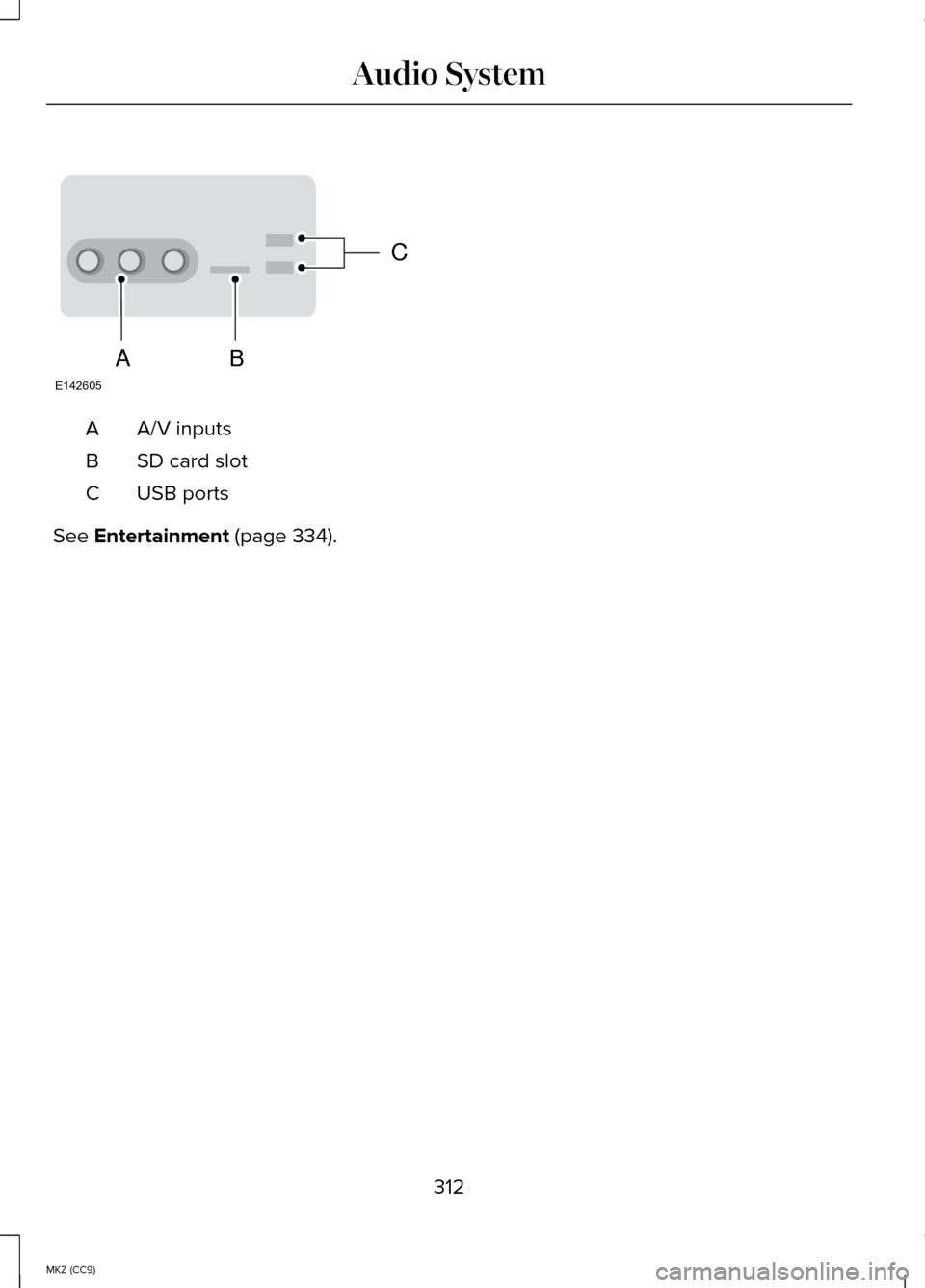
A/V inputs
A
SD card slot
B
USB ports
C
See Entertainment (page 334).
312
MKZ (CC9) Audio SystemC
BA
E142605
Page 317 of 445
Press to access your home screen.
Depending on your vehicle
’s option
package and software, your screens may
vary in appearance from the descriptions
in this section. Your features may also be
limited depending on your market. Check
with an authorized dealer for availability. INFORMATION
Press to select any of the following:
• Services
• Travel Link
• Alerts
• Calendar
• Apps
ENTERTAINMENT
Press to select any of the following:
• AM
• FM
• SIRIUS
• CD
• USB
• BT Stereo
• SD Card
• A/V In Using the Touch-Sensitive Controls
on Your System
To turn a feature on and off, just touch the
graphic with your finger. To get the best
performance from the touch-sensitive
controls:
•
Do not press hard on the controls.
They are sensitive to light touch.
• Use your bare finger to touch the
center of a touch-control graphic.
Touching off-center of the graphic may
affect operation of a nearby control.
• Make sure your hands are clean and
dry.
• Keep metal and other conductive
material away from the surface of the
touchscreen as this may cause
electronic interference (for example,
inadvertently turning on a feature other
than the one you meant to turn on).
Depending on your vehicle and option
package, you may also have these controls
on your bezel:
• Power: Switch the media or climate
features off and on.
• VOL: Control the volume of playing
media.
• Fan: Control the speed of the climate
system fan.
• Seek and Tune buttons: Use as you
normally would in media modes.
• Eject: Eject a CD from the
entertainment system.
• SOURCE:
Touch the word repeatedly
to see all available media modes. The
screen does not change, but you see
the media change in the lower left
status bar.
315
MKZ (CC9) MyLincoln Touch™E142608
Page 323 of 445

What Can I Say?
To access the available voice commands
for the current session, do one of the
following:
•
During a voice session, press the help
icon (?) in the lower left status bar of
the screen.
• Say, "What can I say?" for an on-screen
listing of the possible voice commands
associated with your current voice
session.
• Press the voice icon. After the tone,
say, "Help" for an audible list of
possible voice commands.
Helpful Hints
• Make sure the interior of your vehicle
is as quiet as possible. Wind noise from
open windows and road vibrations may
prevent the system from correctly
recognizing spoken commands.
• After pressing the voice icon, wait until
after the tone sounds and Listening
appears before saying a command.
Any command spoken before this does
not register with the system.
• Speak naturally, without long pauses
between words.
• At any time, you can interrupt the
system while it is speaking by pressing
the voice icon.
Accessing a List of Available Commands
• If you use the touchscreen, press the
Settings icon >
Help > Voice
Command List.
• If you use the steering wheel control,
press the voice icon. After the tone,
speak your command clearly. Available voice commands
"Audio list of commands"
"Bluetooth audio list of commands" "Browse list of commands""CD list of commands"
"Climate control list of commands" "List of commands"
"Navigation list of commands" *
"Phone list of commands" "Radio list of commands"
"SD card list of commands"
"Sirius satellite list of commands" **
"Travel link list of commands" *
"USB list of commands"
"Voice instructions list of commands" "Voice settings list of commands" "Help"
* This command is only available when
your vehicle is equipped with the
navigation system, and the navigation
system SD card is in the card slot.
** This command is only available when you
have an active SIRIUS satellite radio
subscription.
321
MKZ (CC9) MyLincoln Touch™
Page 326 of 445

From this screen, you can also make other
adjustments such as 12-hour or 24-hour
mode, activate GPS time synchronization
and have the system automatically update
new time zones.
You can also turn the outside air
temperature display off and on. It appears
at the top center of the touchscreen, next
to the time and date.
The system automatically saves any
updates you make to the settings.
Display
You can adjust the touchscreen display
through the touchscreen or by pressing
the voice button on your steering wheel
controls and when prompted, say, "Display
settings".
Press the Settings icon >
Display, to access and make
adjustments using the
touchscreen.
• Brightness
allows you to make the
screen display brighter or dimmer.
• Auto DIM
, when set to On, lets you
use the Auto Dim Manual Offset
feature. When set to
Off, screen
brightness does not change.
• Mode
allows you to set the screen to
a certain brightness or have the system
automatically change based on the
outside light level, or turn the display
off.
• If you select
AUTO or NIGHT, you
have the options of turning the
display's Auto Dim feature on or off
and changing the Auto Dim Manual
Offset feature. •
Auto Dim Manual Offset
allows you
to adjust screen dimming as the
outside lighting conditions change
from day to night. This feature also
allows you to adjust screen brightness
using the instrument panel dimming
control.
• Edit Wallpaper
•You can have your touchscreen
display the default photo or upload
your own.
Uploading Photos for Your Home Screen
Wallpaper
Note: You cannot load photos directly
from your camera. You must access the
photos either from your USB mass storage
device or from an SD card.
Note: Photographs with extremely large
dimensions (such as 2048 x 1536) may not
be compatible and appear as a blank
(black) image on the display.
Your system allows you to upload and
view up to 32 photos. To access, press the Settings
icon > Display > Edit Wallpaper,
and then follow the system
prompts to upload your photographs.
Only the photograph(s), which meets the
following conditions, display:
• Compatible file formats are as follows:
.jpg, .gif, .png, .bmp
• Each file must be 1.5 MB or less.
• Recommended dimensions: 800 x 384
324
MKZ (CC9) MyLincoln Touch™E142607 E142607