Page 235 of 652
235
2-4. Using other driving systems
2
When driving
RX350/270_EE
Accelerate or decelerate the
vehicle to the desired speed,
and push the lever down to set
the speed.
“SET” will be displayed.
The vehicle speed at the
moment the lever is released
becomes the set speed.
■Adjusting the set speed
To change the set speed, operate the lever until the desired set
speed is displayed.
Increases the speed
Decreases the speed
Fine adjustment: Momentarily
move the lever in the desired
direction.
Large adjustment: Hold the
lever in the desired direction.
In the vehicle-to-vehicle distance control mode, the set speed will be
increased or decreased as follows:
STEP2
RX350_270_EE_48D77E.book 235 ページ 2014年1月24日 金曜日 午前10時4分
Page 240 of 652

240
2-4. Using other driving systems
RX350/270_EE
Selecting conventional constant speed control mode
Constant speed control mode differs from vehicle-to-vehicle distance
control mode. When constant speed control mode is selected, your vehi-
cle will maintain a set speed regardless of whether or not there are other
vehicles in the lane ahead.
Press the “ON-OFF” button to
activate the cruise control.
Press the button again to deacti-
vate the cruise control.
Switch to constant speed con-
trol mode.
(Push the lever forward and
hold for approximately one sec-
ond.)
Constant speed control mode indi-
cator will come on.
When in constant speed control
mode, to return to vehicle-to-vehi-
cle distance control mode, push
the lever forward again and hold
for approximately 1 second.
After the desired speed has been
set, it is not possible to return to
vehicle-to-vehicle distance control
mode.
If the “ENGINE START STOP”
switch is turned off and then turned
to IGNITION ON mode again, the
vehicle will automatically return to
vehicle-to-vehicle distance control
mode.
RX350_270_EE_48D77E.book 240 ページ 2014年1月24日 金曜日 午前10時4分
Page 257 of 652
257
2-4. Using other driving systems
2
When driving
RX350/270_EE
Selecting vehicle height
■Height modes
●“HI” mode: For driving on bumpy roads
30 mm (1.2 in.) higher than the normal height
“HI” mode cannot be selected when vehicle speed exceeds 30 km/h (19
mph).
●“N” mode: For ordinary driving
Normal height
●“LO” mode: For sporty driving
Vehicle front: 20 mm (0.8 in.) lower than the normal height
Vehicle rear: 5 mm (0.2 in.) lower than the normal height
●Luggage mode: For easy entry/exit and easy luggage loading/
unloading
30 mm (1.2 in.) lower than the normal height
■Height selector switch
Press the height selector switch for approximately 1 second.
Driver’s side instrument panel
Higher
Pressing this switch while the vehi-
cle is in luggage mode changes the
vehicle height to that of “N” mode.
Lower
Pressing this switch while the vehi-
cle is in “LO” mode changes the
vehicle height to that of luggage
mode.
RX350_270_EE_48D77E.book 257 ページ 2014年1月24日 金曜日 午前10時4分
Page 259 of 652

259
2-4. Using other driving systems
2
When driving
RX350/270_EE
■Operating conditions
After stopping the engine, the vehicle will remain lowered for a maximum of 60
seconds.
●Height selector switch (driver's side instrument panel)
• While the engine is running, any vehicle height mode can be selected.
• Luggage mode can only be selected when the shift lever is in P position.
●Height selector switch (luggage compartment)
• When the engine is running and the shift lever is in the P position, any vehicle
height other than “LO” mode can be selected.
• When the “ENGINE START STOP” switch is turned off, the vehicle height
can only be lowered (only the “∨” side of the switch can be operated).
This switch can only be operated when the back door is open.
●Height control off switch
When the vehicle is stopped with the “ENGINE START STOP” switch in IGNI-
TION ON mode, vehicle height control can be disabled/re-enabled.
■When changing vehicle height modes
Before operating the height selector switch to raise/lower the vehicle height,
ensure that there are no objects in the surrounding area that could damage the
vehicle.
■When “N” mode is selected
During high speed driving, the vehicle height will automatically change to that of
“LO” mode.
■When “HI” mode is selected
The vehicle height will change to that of “N” mode when vehicle speed reaches 50
km/h (31 mph) or when vehicle speed has exceeded 30 km/h (19 mph) for approx-
imately 10 seconds. Even if vehicle speed is reduced below 30 km/h (19 mph), the
vehicle height will not automatically return to “HI” mode.
■When “LO” mode is selected
The vehicle height will change to that of “N” mode when the engine is restarted.
RX350_270_EE_48D77E.book 259 ページ 2014年1月24日 金曜日 午前10時4分
Page 260 of 652

260
2-4. Using other driving systems
RX350/270_EE
■When luggage mode is selected
If the vehicle begins to move while still in luggage mode, the vehicle will automati-
cally change to “N” mode once speed exceeds 8 km/h (5 mph). Even if vehicle
speed is reduced below 8 km/h (5 mph), the vehicle height will not automatically
return to luggage mode.
■Operating sound of the air suspension
When the vehicle height is lowered, such as when entering and loading the vehicle,
or when the height selector switch is operated, the sound of the compressor oper-
ating or the mode changing may be heard. This does not indicate a malfunction.
■Automatic leveling function
Regardless of the number of occupants and the luggage load, vehicle height in any
mode is always adjusted to a fixed height by the automatic leveling function.
■Vehicle height mode change time
●If the height control is operated continuously to lower the vehicle, the suspen-
sion air tank may become full, causing operation of the vehicle height lowering
control to become slow.
●To protect the compressor, the system will only raise the vehicle for a total of
100 consecutive seconds. If it takes longer than this to reach the selected
height, operation may be suspended shortly and then restart. However, it may
not be possible to change the vehicle's height mode at this time.
■The electronically modulated air suspension will not operate when
The vehicle height control may not be able to change modes when the vehicle runs
over a high curb or other rugged surfaces where the suspension is stretched.
RX350_270_EE_48D77E.book 260 ページ 2014年1月24日 金曜日 午前10時4分
Page 261 of 652

261
2-4. Using other driving systems
2
When driving
RX350/270_EE
CAUTION
■The electronically modulated air suspension must be turned off when
The electronically modulated air suspension must be turned off in the following situ-
ations as vehicle height may change due to the automatic leveling function, and, you
may catch part of your body in the vehicle and cause an accident, resulting in death
or serious injury.
●Any of the wheels is stuck in a ditch.
●It is necessary to jack up the vehicle.
●It is necessary to tow the vehicle with part of it lifted.
●When connecting/disconnecting a trailer
For safety, stop the engine if necessary.
■“HI” mode
●“HI” mode should only be used when driving on rough roads, for example when
driving off-road. Because the vehicle's center of gravity will become higher when
in the mode, the vehicle may become unstable when turning abruptly and cause
an accident, resulting in death or serious injury.
●Do not select “HI” mode when loading cargo on the roof luggage carrier.
Because the vehicle's center of gravity will become higher when in the mode, the
vehicle may become unstable when turning abruptly, and cause an accident,
resulting in death or serious injury.
RX350_270_EE_48D77E.book 261 ページ 2014年1月24日 金曜日 午前10時4分
Page 264 of 652
264
2-4. Using other driving systems
RX350/270_EE
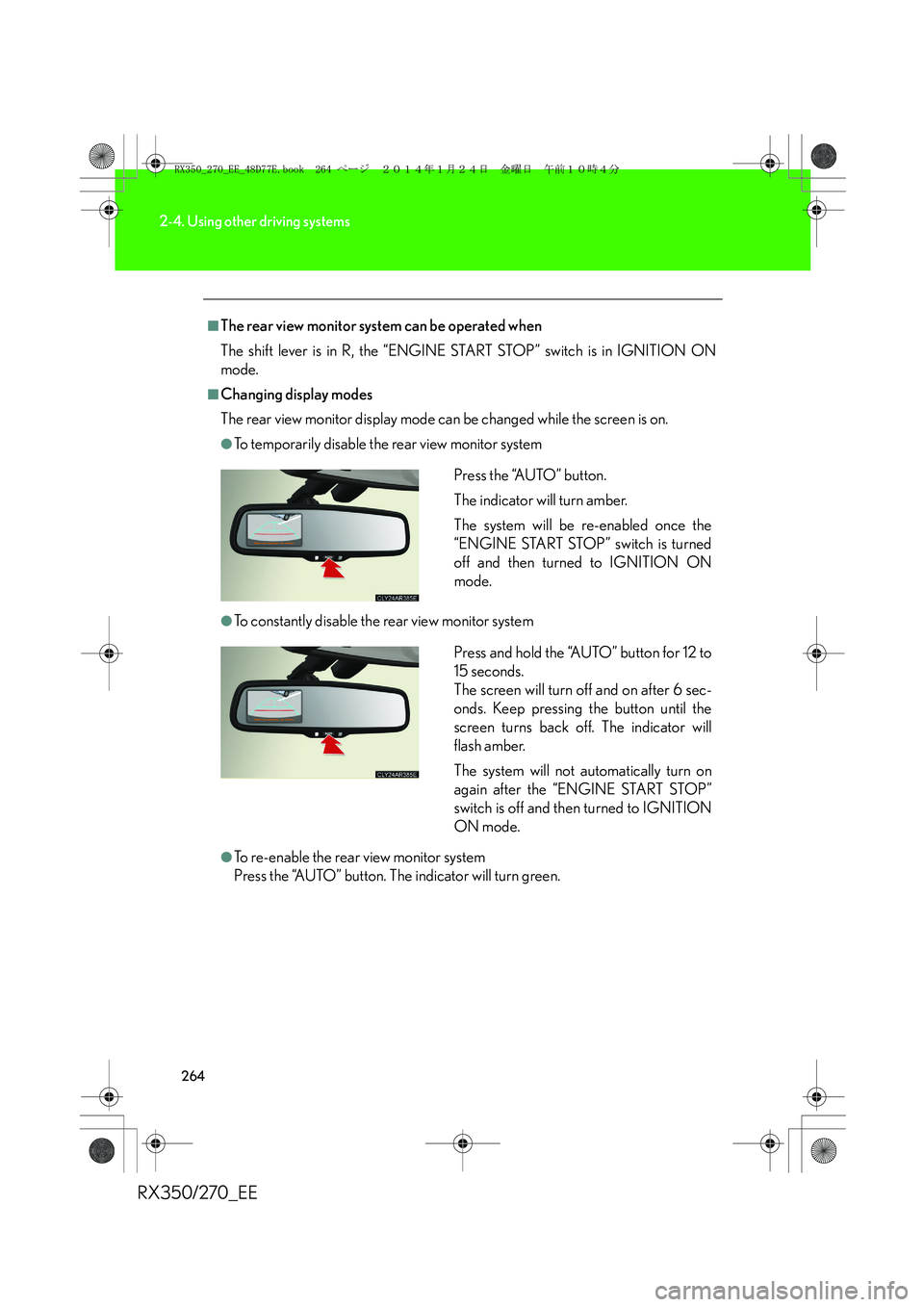
■The rear view monitor system can be operated when
The shift lever is in R, the “ENGINE START STOP” switch is in IGNITION ON
mode.
■Changing display modes
The rear view monitor display mode can be changed while the screen is on.
●To temporarily disable the rear view monitor system
●To constantly disable the rear view monitor system
●To re-enable the rear view monitor system
Press the “AUTO” button. The indicator will turn green.Press the “AUTO” button.
The indicator will turn amber.
The system will be re-enabled once the
“ENGINE START STOP” switch is turned
off and then turned to IGNITION ON
mode.
Press and hold the “AUTO” button for 12 to
15 seconds.
The screen will turn off and on after 6 sec-
onds. Keep pressing the button until the
screen turns back off. The indicator will
flash amber.
The system will not automatically turn on
again after the “ENGINE START STOP”
switch is off and then turned to IGNITION
ON mode.
RX350_270_EE_48D77E.book 264 ページ 2014年1月24日 金曜日 午前10時4分
Page 268 of 652

268
2-4. Using other driving systems
RX350/270_EE
■Rear view monitor system camera
■Smear effectThe rear view monitor system camera is
located on the back door as shown in the
illustration.
In the following cases, it may become difficult
to see the images on the screen, even when
the system is functioning correctly.
●The vehicle is in a dark area, such as at
night.
●The temperature near the lens is
extremely high or low.
●Water droplets are on the camera lens
or humidity is high, such as when it
rains.
●Foreign matter, such as snow or mud,
adheres to the camera lens.
●The sun or headlights are shining
directly into the camera lens.
●A bright object such as a white wall is
reflected in the mirror surface over the
monitor.
●The camera has scratches or dirt on it.
If a bright light, such as sunlight reflected
off the vehicle body, is picked up by the
camera, a smear effect* characteristic to
the camera may occur.
*: Smear effect A phenomenon that
occurs when a bright light is picked up by
the camera; when transmitted by the
camera, the light source appears to have
a vertical streak above and below it.
RX350_270_EE_48D77E.book 268 ページ 2014年1月24日 金曜日 午前10時4分

