Page 159 of 612
1593-2. Opening, closing and locking the doors and trunk
3
Operation of each component
IS300h_EE(OM53C61E)
IS300h_EE_OM53C61E.book 159 ページ 2014年5月20日 火曜日 午後5時40分
Page 160 of 612
1603-2. Opening, closing and locking the doors and trunk
IS300h_EE(OM53C61E)
IS300h_EE_OM53C61E.book 160 ページ 2014年5月20日 火曜日 午後5時40分
Page 161 of 612
1613-2. Opening, closing and locking the doors and trunk
3
Operation of each component
IS300h_EE(OM53C61E)
IS300h_EE_OM53C61E.book 161 ページ 2014年5月20日 火曜日 午後5時40分
Page 162 of 612
1623-2. Opening, closing and locking the doors and trunk
IS300h_EE(OM53C61E)
IS300h_EE_OM53C61E.book 162 ページ 2014年5月20日 火曜日 午後5時40分
Page 163 of 612

1633-2. Opening, closing and locking the doors and trunk
3
Operation of each component
IS300h_EE(OM53C61E)
CAUTION
■Caution regarding interference with electronic devices
●People with implantable cardiac pacemakers, cardiac resynchronization therapy-
pacemakers or implantable cardioverter defibrillators should maintain a reasonable
distance between themselves and the smart entry & start system antennas.
(→P. 1 4 9 )
The radio waves may affect the operation of such devices. If necessary, the entry
function can be disabled. Ask any authorized Lexus dealer or repairer, or another
duly qualified and equipped professional for details, such as the frequency of radio
waves and timing of the emitted radio waves. Then, consult your doctor to see if you
should disable the entry function.
●Users of any electrical medical device other than implantable cardiac pacemakers,
cardiac resynchronization therapy-pacemakers or implantable cardioverter defibril-
lators should consult the manufacturer of the device for information about its opera-
tion under the influence of radio waves.
Radio waves could have unexpected effects on the operation of such medical
devices.
Ask any authorized Lexus dealer or repairer, or another duly qualified and equipped
professional for details on disabling the entry function.
IS300h_EE_OM53C61E.book 163 ページ 2014年5月20日 火曜日 午後5時40分
Page 166 of 612
1663-3. Adjusting the seats
IS300h_EE(OM53C61E)
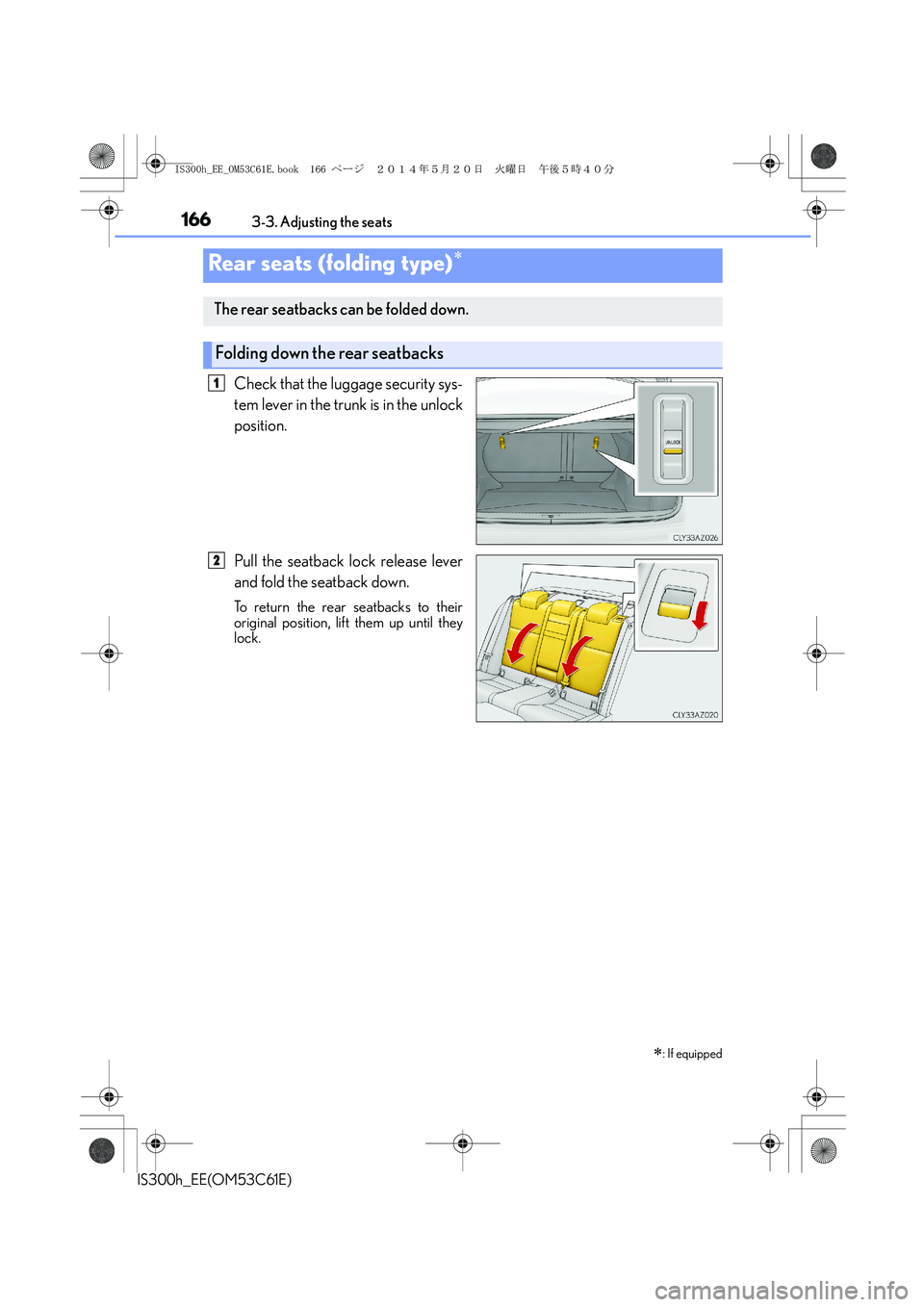
Check that the luggage security sys-
tem lever in the trunk is in the unlock
position.
Pull the seatback lock release lever
and fold the seatback down.
To return the rear seatbacks to their
original position, lift them up until they
lock.
Rear seats (folding type)∗
∗
: If equipped
The rear seatbacks can be folded down.
Folding down the rear seatbacks
1
2
IS300h_EE_OM53C61E.book 166 ページ 2014年5月20日 火曜日 午後5時40分
Page 167 of 612
1673-3. Adjusting the seats
3
Operation of each component
IS300h_EE(OM53C61E)
→P. 1 4 5
Luggage security system
CAUTION
Observe the following precautions. Failure to do so may result in death or serious injury.
■When folding the rear seatbacks down
●Do not fold the seatbacks down while driving.
●Stop the vehicle on level ground, set the parking brake and shift the shift lever to P.
●Do not allow anyone to sit on a folded seatback or in the trunk while driving.
●Do not allow children to enter the trunk.
■After returning the rear seatback to the upright position
●Check that the seat belts are not twisted or caught in the seatback.
●Make sure that the seatback is securely
locked in position by lightly pushing it back
and forth.
If the seatback is not securely locked, the red
marking will be visible on the seatback lock
release knob. Make sure that the red marking
is not visible.
IS300h_EE_OM53C61E.book 167 ページ 2014年5月20日 火曜日 午後5時40分
Page 171 of 612

1713-3. Adjusting the seats
3
Operation of each component
IS300h_EE(OM53C61E)
Each electronic key (including a card key) can be registered to recall your pre-
ferred driving position.
■Registering procedure
Record your driving position to button “1”, “2” or “3” before performing the
following:
Carry only the key you want to register, and then close the driver’s door. If 2 or
more keys are in the vehicle, the driving position cannot be recorded properly.
Check that the shift lever is in P.
Turn the power switch to ON mode.
Recall the driving position that you want to record.
While pressing the recalled but-
ton, press and hold the door lock
switch (either lock or unlock) until
the buzzer sounds.
If the button could not be registered,
the buzzer sounds continuously for
approximately 3 seconds.
■Recall procedure
Carry the electronic key that has been registered to the driving position,
and then unlock and open the driver’s door using the entry function or
wireless remote control.
The driving position will move to the recorded position (not including the steering
wheel). However, the seat will move to a position slightly behind the recorded posi-
tion in order to make entering the vehicle easier.
If the driving position is in a position that has already been recorded, the seat and
outside rear view mirrors will not move.
Turn the power switch to ACCESSORY mode or ON mode, or fasten a
seat belt.
The seat and steering wheel will move to the recorded position.
Memory recall function (driver’s side only)
1
2
3
4
1
2
IS300h_EE_OM53C61E.book 171 ページ 2014年5月20日 火曜日 午後5時40分