Page 95 of 612

951-3. Theft deterrent system
1
For safety and security
IS300h_EE(OM53C61E)
Vehicles employing this system have
labels on the window glass of both front
doors.
Turn the power switch off, have all the passengers exit the vehicle and ensure that
all the doors are closed.
Using the entry function:
Touch the sensor area on the outside door handle twice within 5 seconds.
Using the wireless remote control:
Press twice within 5 seconds.
Using the entry function: Hold the outside door handle.
Using the wireless remote control: Press .
Double locking system
Unauthorized access to the vehicle is prevented by disabling the door unlock-
ing function from both the interior and exterior of the vehicle.
Setting the double locking system
Canceling the double locking system
CAUTION
■Double locking system precaution
Never activate the double locking system when there are people in the vehicle
because all the doors cannot be opened from inside the vehicle.
IS300h_EE_OM53C61E.book 95 ページ 2014年5月20日 火曜日 午後5時40分
Page 96 of 612
961-3. Theft deterrent system
IS300h_EE(OM53C61E)
The alarm uses light and sound to give an alert when an intrusion is detected.
The alarm is triggered in the following situations when the alarm is set:
●A locked door or trunk is unlocked or opened in any way other than using the
entry function or wireless remote control. (The door will lock again automati-
cally.)
●The hood is opened.
●The intrusion sensor detects something moving inside the vehicle. (An
intruder gets in the vehicle.) (if equipped)
●The tilt sensor detects a change of vehicle inclination. (if equipped)
Close the doors, trunk and hood, and
lock all the doors using the entry func-
tion or wireless remote control. The
system will be set automatically after
30 seconds.
The indicator light changes from being
on to flashing when the system is set.
Alarm∗
∗
: If equipped
The alarm
Setting the alarm system
IS300h_EE_OM53C61E.book 96 ページ 2014年5月20日 火曜日 午後5時40分
Page 97 of 612
971-3. Theft deterrent system
1
For safety and security
IS300h_EE(OM53C61E)
Do one of the following to deactivate or stop the alarm:
●Unlock the doors or open the trunk using the entry function or wireless
remote control.
●Start the hybrid system. (The alarm will be deactivated or stopped after a few
seconds.)
■System maintenance
The vehicle has a maintenance-free type alarm system.
■Items to check before locking the vehicle
To prevent unexpected triggering of the alarm and vehicle theft, make sure of the follow-
ing:
●Nobody is in the vehicle.
●The windows and moon roof (if equipped) are closed before the alarm is set.
●No valuables or other personal items are left in the vehicle.
Deactivating or stopping the alarm
IS300h_EE_OM53C61E.book 97 ページ 2014年5月20日 火曜日 午後5時40分
Page 98 of 612
981-3. Theft deterrent system
IS300h_EE(OM53C61E)
■Triggering of the alarm
The alarm may be triggered in the following situations:
(Stopping the alarm deactivates the alarm system.)
■Alarm-operated door lock
In the following situations, the doors are locked automatically to prevent intruders:
●The doors are unlocked manually without the mechanical key and the alarm is trig-
gered.
●While the alarm is operating, the doors are unlocked manually without the mechanical
key.
●The doors or trunk are unlocked using the
mechanical key.
●A person inside the vehicle opens a door, the
trunk or hood, or unlocks the vehicle using a
inside lock button.
●The 12-volt battery is recharged or replaced
when the vehicle is locked. (→P. 5 4 9 )
NOTICE
■To ensure the system operates correctly
Do not modify or remove the system. If modified or removed, the proper operation of
the system cannot be guaranteed.
IS300h_EE_OM53C61E.book 98 ページ 2014年5月20日 火曜日 午後5時40分
Page 100 of 612
1001-3. Theft deterrent system
IS300h_EE(OM53C61E)
■Canceling and automatic re-enabling of the intrusion sensor and tilt sensor
●The alarm will still be set even when the intrusion sensor and tilt sensor are canceled.
●After the intrusion sensor and tilt sensor are canceled, pressing the power switch or
unlocking the doors using the entry function or wireless remote control will re-enable
the intrusion sensor and tilt sensor.
●The intrusion sensor and tilt sensor will automatically be re-enabled when the alarm
system is deactivated.
■Intrusion sensor detection considerations
The sensor may trigger the alarm in the following situations:
●Places with extreme vibrations or noises, or situations in which the vehicle is subject to
repeated impacts or vibrations:
• When parked in a parking garage
• When the vehicle is transported on a ferry, trailer, train, etc.
• When ice adhering to the vehicle is removed
• When the vehicle is in an automatic or high-pressure car wash
• When in a hail or lightning storm
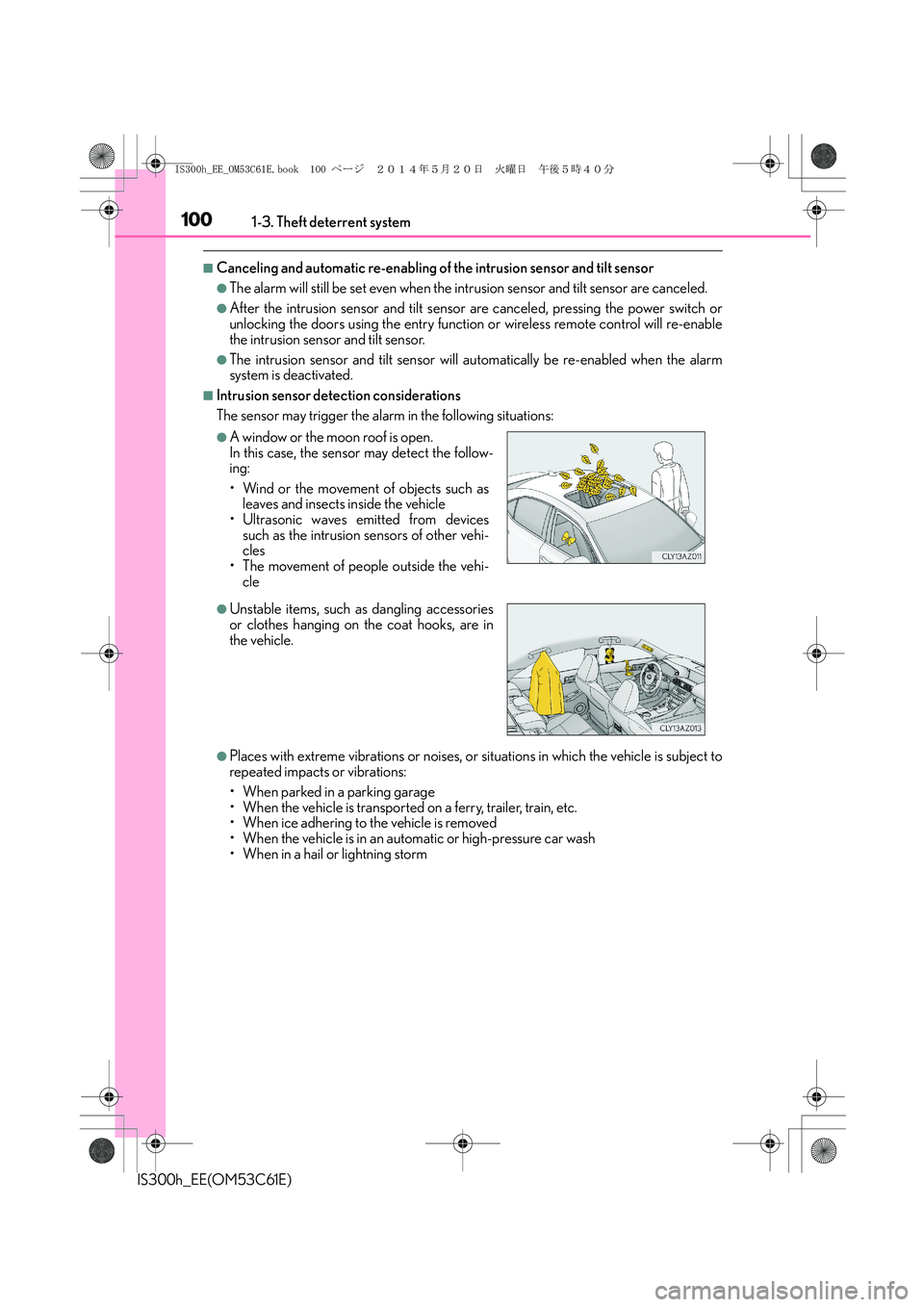
●A window or the moon roof is open.
In this case, the sensor may detect the follow-
ing:
• Wind or the movement of objects such as
leaves and insects inside the vehicle
• Ultrasonic waves emitted from devices
such as the intrusion sensors of other vehi-
cles
• The movement of people outside the vehi-
cle
●Unstable items, such as dangling accessories
or clothes hanging on the coat hooks, are in
the vehicle.
IS300h_EE_OM53C61E.book 100 ページ 2014年5月20日 火曜日 午後5時40分
Page 129 of 612
129
3
Operation of
each component
IS300h_EE(OM53C61E)
3-1. Key information
Keys .................................................. 130
3-2. Opening, closing and locking
the doors and trunk
Doors ............................................... 136
Trunk ................................................. 143
Smart entry & start system.......149
3-3. Adjusting the seats
Front seats.......................................164
Rear seats........................................166
Driving position memory......... 168
Head restraints ............................. 173
3-4. Adjusting the steering
wheel and mirrors
Steering wheel .............................. 176
Inside rear view mirror...............178
Outside rear view mirrors ....... 180
3-5. Opening, closing the
windows and moon roof
Power windows ............................ 184
Moon roof .......................................187
IS300h_EE_OM53C61E.book 129 ページ 2014年5月20日 火曜日 午後5時40分
Page 130 of 612
130
IS300h_EE(OM53C61E)3-1. Key information
The following keys are provided with the vehicle.
Electronic keys
• Operating the smart entry & start
system (→P. 1 4 9 )
• Operating the wireless remote con-
trol function
Mechanical keys
Key number plate
Card key (electronic key) (if
equipped)
Operating the smart entry & start sys-
tem (→P. 1 4 9 )
Locks the doors (→P. 136)
Closes the windows and moon roof
*
(→P. 136)
Unlocks the doors (→P. 136)
Opens the windows and moon roof
*
(→P. 136)
Opens the trunk (→P. 1 4 4 )
*: These settings must be customized at any authorized Lexus dealer or repairer, or
another duly qualified and equipped professional.
Keys
The keys
1
2
3
4
Wireless remote control
1
2
3
4
5
IS300h_EE_OM53C61E.book 130 ページ 2014年5月20日 火曜日 午後5時40分
Page 131 of 612
1313-1. Key information
3
Operation of each component
IS300h_EE(OM53C61E)
To take out the mechanical key, push
the release button and take the key out.
The mechanical key can only be
inserted in one direction, as the key only
has grooves on one side. If the key can-
not be inserted in a lock cylinder, turn it
over and re-attempt to insert it.
After using the mechanical key, store it
in the electronic key. Carry the mechan-
ical key together with the electronic key.
If the electronic key battery is depleted
or the entry function does not operate
properly, you will need the mechanical
key. (→P. 544)
Using the mechanical key
IS300h_EE_OM53C61E.book 131 ページ 2014年5月20日 火曜日 午後5時40分


