Page 9 of 382

23
Your vehicle at a glance
INSTRUMENT PANEL OVERVIEW
1. Driver’s airbag ................................3-93
2. Light control / Turnsignals ...............................3-137, 3-139
3. Instrument cluster.........................3-116
4. Wiper/Washer ...............................3-141
5. Auto cruise control* ........................4-11
6. Audio controls* .............................3-197
7. Steering wheel .............................3-106
8. Ignition switch ...................................4-3
9. Digital clock ..................................3-193
10. Climate control system* ..3-147, 3-159
11. Hazard warning flasher switch ...3-146
12. Seat warmer* ...............................3-45
13. Shift lever .......................................4-5
14. Cigar lighter or Power outlet* .....3-189
15. Power outlet................................3-193
16. Ashtray* ......................................3-189
17. Passenger’s airbag .......................3-94
18. Vent controls ...................3-151, 3-166
19. Glove box ...................................3-187
20. Sunglass holder* ........................3-187
21. Sunvisor .....................................3-192
22. Power sliding door and power tailgate controls* ...........................3-17
23. Sunroof* .......................................3-33
24. Conversation mirror ....................3-115
25. Trip computer* ............................3-121
26. Day/night rearview mirror ...........3-110
* : if equipped
OVQ029002N
Page 11 of 382
Interior lights / 3-133Lighting / 3-137
Wipers and washers / 3-141 Horn / 3-145
Defroster / 3-145
Hazard warning flasher / 3-146
Manual climate control system / 3-147
Automatic climate control system / 3-159
Windshield defrosting and defogging / 3-173 Cluster ionizer / 3-176
Luggage net holder / 3-176 Roof rack / 3-177
Homelink® wireless control system / 3-178
Homelink® Wireless control system with rearview display / 3-182
Storage compartment / 3-186 Interior features / 3-189 Antenna / 3-195
Steering wheel mounted controls / 3-196 Audio system / 3-197
Sirius satellite radio information / 3-215 Rear seat entertainment system / 3-231
Features of your vehicle3
Page 26 of 382
317
Features of your vehicle
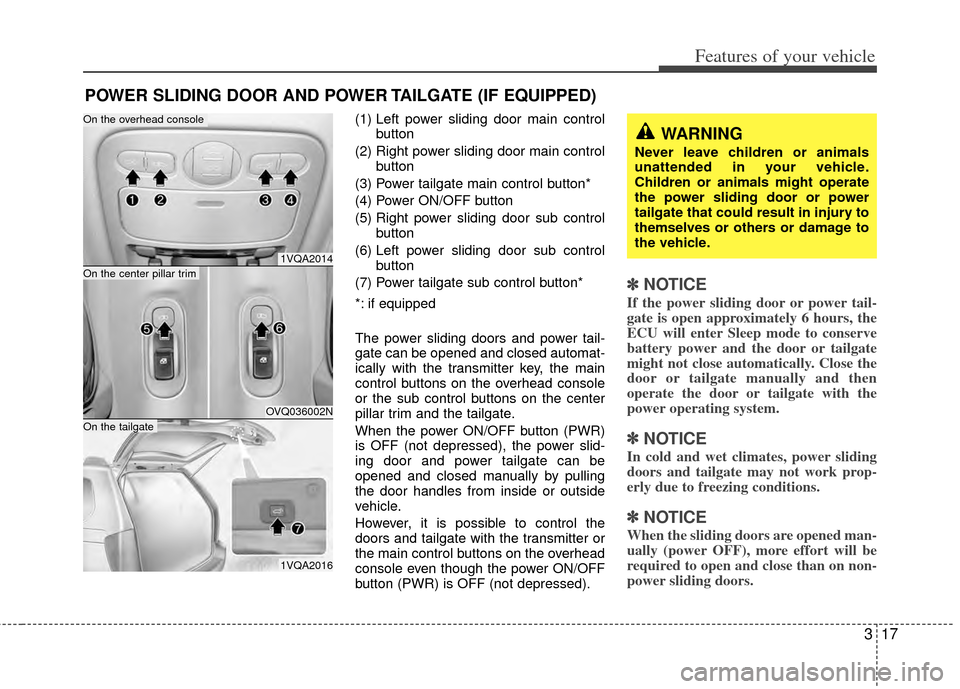
(1) Left power sliding door main controlbutton
(2) Right power sliding door main control button
(3) Power tailgate main control button*
(4) Power ON/OFF button
(5) Right power sliding door sub control button
(6) Left power sliding door sub control button
(7) Power tailgate sub control button*
*: if equipped
The power sliding doors and power tail-
gate can be opened and closed automat-
ically with the transmitter key, the main
control buttons on the overhead console
or the sub control buttons on the center
pillar trim and the tailgate.
When the power ON/OFF button (PWR)
is OFF (not depressed), the power slid-
ing door and power tailgate can be
opened and closed manually by pulling
the door handles from inside or outside
vehicle.
However, it is possible to control the
doors and tailgate with the transmitter or
the main control buttons on the overhead
console even though the power ON/OFF
button (PWR) is OFF (not depressed).
✽ ✽ NOTICE
If the power sliding door or power tail-
gate is open approximately 6 hours, the
ECU will enter Sleep mode to conserve
battery power and the door or tailgate
might not close automatically. Close the
door or tailgate manually and then
operate the door or tailgate with the
power operating system.
✽ ✽NOTICE
In cold and wet climates, power sliding
doors and tailgate may not work prop-
erly due to freezing conditions.
✽ ✽NOTICE
When the sliding doors are opened man-
ually (power OFF), more effort will be
required to open and close than on non-
power sliding doors.
POWER SLIDING DOOR AND POWER TAILGATE (IF EQUIPPED)
1VQA2014
OVQ036002N
1VQA2016
On the center pillar trim
On the tailgate
On the overhead console
WARNING
Never leave children or animals
unattended in your vehicle.
Children or animals might operate
the power sliding door or power
tailgate that could result in injury to
themselves or others or damage to
the vehicle.
Page 37 of 382
Features of your vehicle
28
3
Automatic power window down
(driver’s window)
Depressing the power window switch
momentarily to the second detent posi-
tion (9) completely lowers the driver’s
window even when the switch is
released. To stop the window at the
desired position while the window is in
operation, pull up the switch momentarily
to the opposite direction of the window
movement.
If the power window is not operated cor-
rectly, the automatic power window sys-
tem must be reset as follows:
1. Turn the ignition key to ON position.
2. Close driver’s window and continue
pulling up on driver’s power window
switch for at least 1 second after the
window is completely closed. Power window lock switch
The driver can disable the power window
switches on the front and rear passen-
gers' doors by pressing the power win-
dow lock switch to lock position
(pressed).
When the power window lock switch is
pressed, the driver's master control can-
not operate the front and rear passen-
gers' power windows and rear quarter
windows.
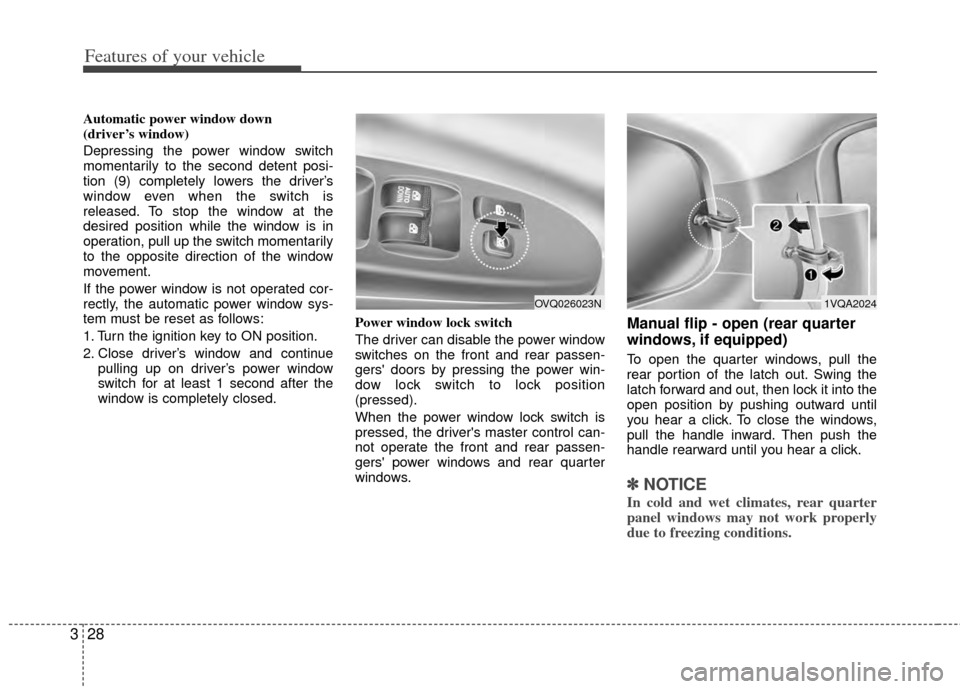
Manual flip - open (rear quarter
windows, if equipped)
To open the quarter windows, pull the
rear portion of the latch out. Swing the
latch forward and out, then lock it into the
open position by pushing outward until
you hear a click. To close the windows,
pull the handle inward. Then push the
handle rearward until you hear a click.
✽ ✽
NOTICE
In cold and wet climates, rear quarter
panel windows may not work properly
due to freezing conditions.
1VQA2024OVQ026023N
Page 42 of 382
333
Features of your vehicle
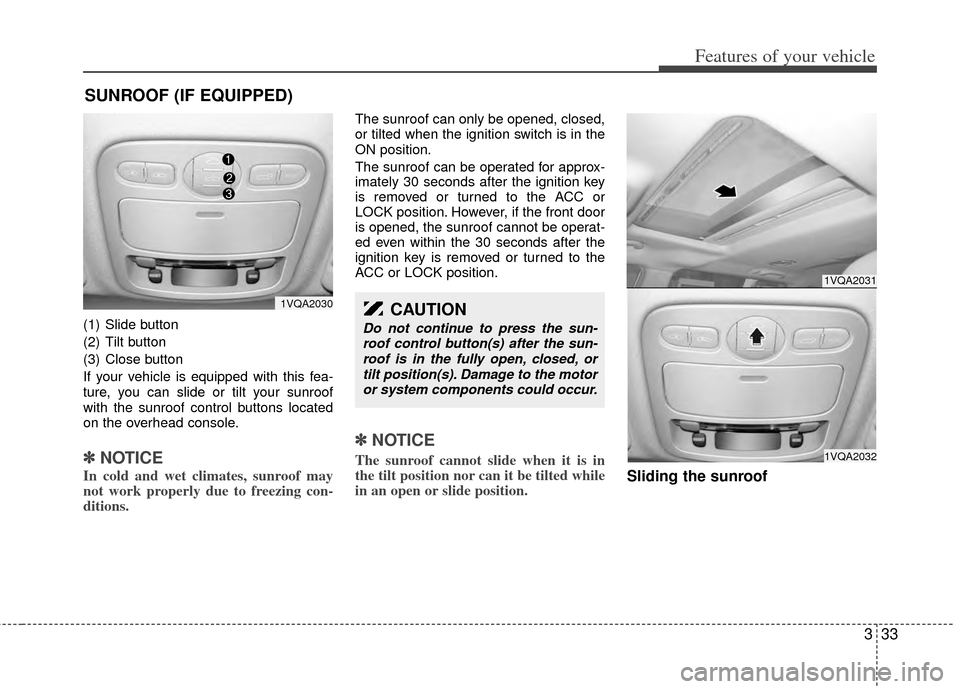
(1) Slide button
(2) Tilt button
(3) Close button
If your vehicle is equipped with this fea-
ture, you can slide or tilt your sunroof
with the sunroof control buttons located
on the overhead console.
✽ ✽NOTICE
In cold and wet climates, sunroof may
not work properly due to freezing con-
ditions.
The sunroof can only be opened, closed,
or tilted when the ignition switch is in the
ON position.
The sunroof can be operated for approx-
imately 30 seconds after the ignition key
is removed or turned to the ACC or
LOCK position. However, if the front door
is opened, the sunroof cannot be operat-
ed even within the 30 seconds after the
ignition key is removed or turned to the
ACC or LOCK position.
✽ ✽NOTICE
The sunroof cannot slide when it is in
the tilt position nor can it be tilted while
in an open or slide position.
Sliding the sunroof
SUNROOF (IF EQUIPPED)
1VQA2031
1VQA2032
CAUTION
Do not continue to press the sun-
roof control button(s) after the sun-roof is in the fully open, closed, ortilt position(s). Damage to the motoror system components could occur.
1VQA2030
Page 156 of 382
3147
Features of your vehicle
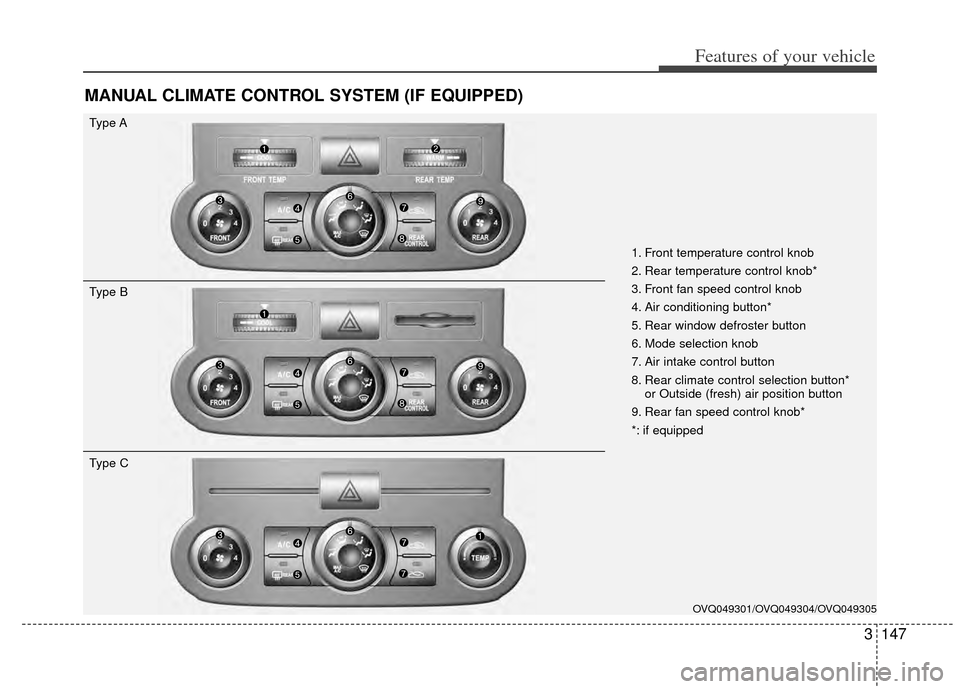
MANUAL CLIMATE CONTROL SYSTEM (IF EQUIPPED)
OVQ049301/OVQ049304/OVQ049305
1. Front temperature control knob
2. Rear temperature control knob*
3. Front fan speed control knob
4. Air conditioning button*
5. Rear window defroster button
6. Mode selection knob
7. Air intake control button
8. Rear climate control selection button*or Outside (fresh) air position button
9. Rear fan speed control knob*
*: if equipped
Type A
Type B
Type C
Page 161 of 382
Features of your vehicle
152
3
✽
✽
NOTICE
It should be noted that prolonged oper-
ation of the heating in recirculated air
position will cause fogging of the wind-
shield and side windows and the air
within the passenger compartment will
become stale.
In addition, prolonged use of the air
conditioning with the “recirculated air
position” selected, will result in exces-
sively dry air in the passenger compart-
ment.
Air conditioning button
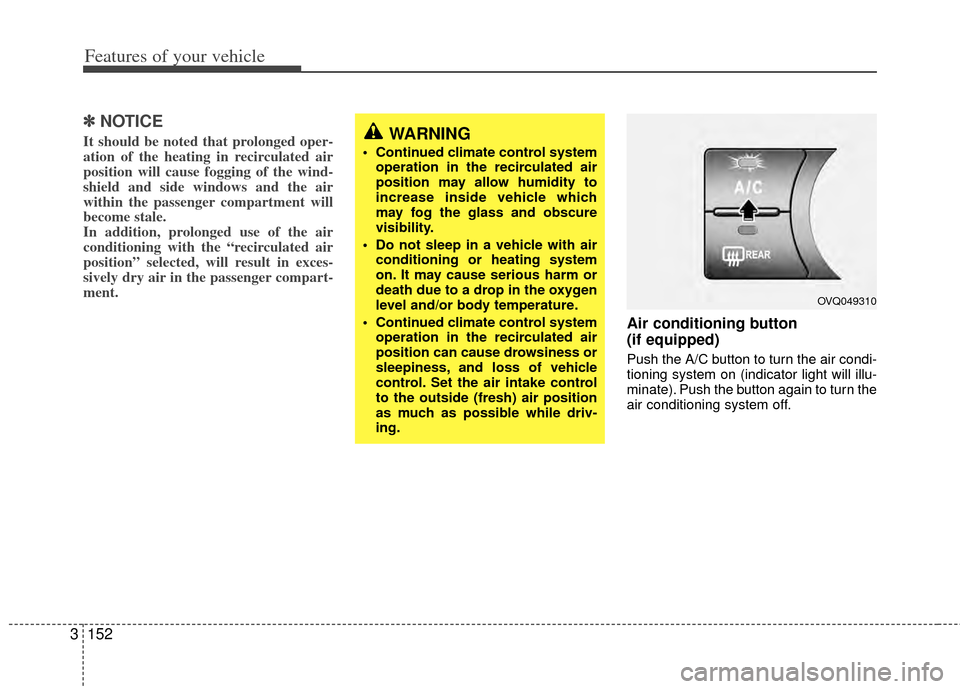
(if equipped)
Push the A/C button to turn the air condi-
tioning system on (indicator light will illu-
minate). Push the button again to turn the
air conditioning system off.
WARNING
• Continued climate control system
operation in the recirculated air
position may allow humidity to
increase inside vehicle which
may fog the glass and obscure
visibility.
Do not sleep in a vehicle with air conditioning or heating system
on. It may cause serious harm or
death due to a drop in the oxygen
level and/or body temperature.
Continued climate control system operation in the recirculated air
position can cause drowsiness or
sleepiness, and loss of vehicle
control. Set the air intake control
to the outside (fresh) air position
as much as possible while driv-
ing.
OVQ049310
Page 162 of 382
3153
Features of your vehicle
Rear climate control
(if equipped)
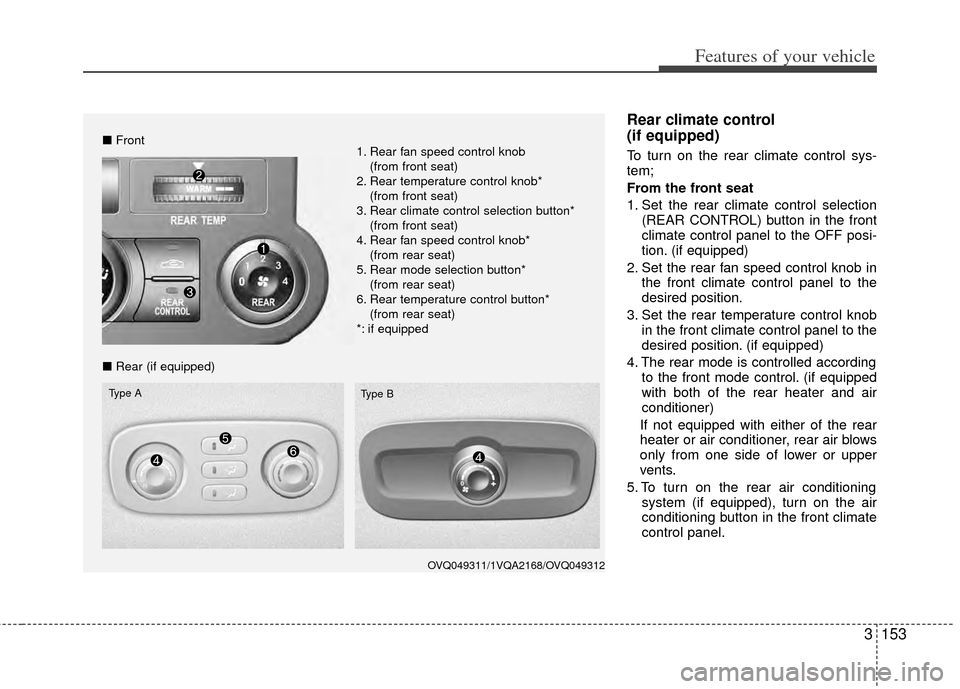
To turn on the rear climate control sys-
tem;
From the front seat
1. Set the rear climate control selection(REAR CONTROL) button in the front
climate control panel to the OFF posi-
tion. (if equipped)
2. Set the rear fan speed control knob in the front climate control panel to the
desired position.
3. Set the rear temperature control knob in the front climate control panel to the
desired position. (if equipped)
4. The rear mode is controlled according to the front mode control. (if equipped
with both of the rear heater and air
conditioner)
If not equipped with either of the rear
heater or air conditioner, rear air blows
only from one side of lower or upper
vents.
5. To turn on the rear air conditioning system (if equipped), turn on the air
conditioning button in the front climate
control panel.
OVQ049311/1VQA2168/OVQ049312
■Front
■ Rear (if equipped)
Type A
Type B
1. Rear fan speed control knob
(from front seat)
2. Rear temperature control knob* (from front seat)
3. Rear climate control selection button* (from front seat)
4. Rear fan speed control knob* (from rear seat)
5. Rear mode selection button* (from rear seat)
6. Rear temperature control button* (from rear seat)
*: if equipped