Page 163 of 382
Features of your vehicle
154
3
From the rear seat (if equipped)
1. Set the rear climate control selection
(REAR CONTROL) button in the front
climate control panel to the ON posi-
tion.
2. Set the rear fan speed control knob on the rear climate control panel to the
desired position.
3. Set the rear temperature control knob on the rear climate control panel to the
desired position. (if equipped)
4. Select the desired rear mode button on the rear climate control panel. (if
equipped)
If not equipped with either of the rear
heater or air conditioner, rear air blows
only from one side of lower or upper
vents.
5. To turn on the rear air conditioning system (if equipped), turn on the air
conditioning button in the front climate
control panel.
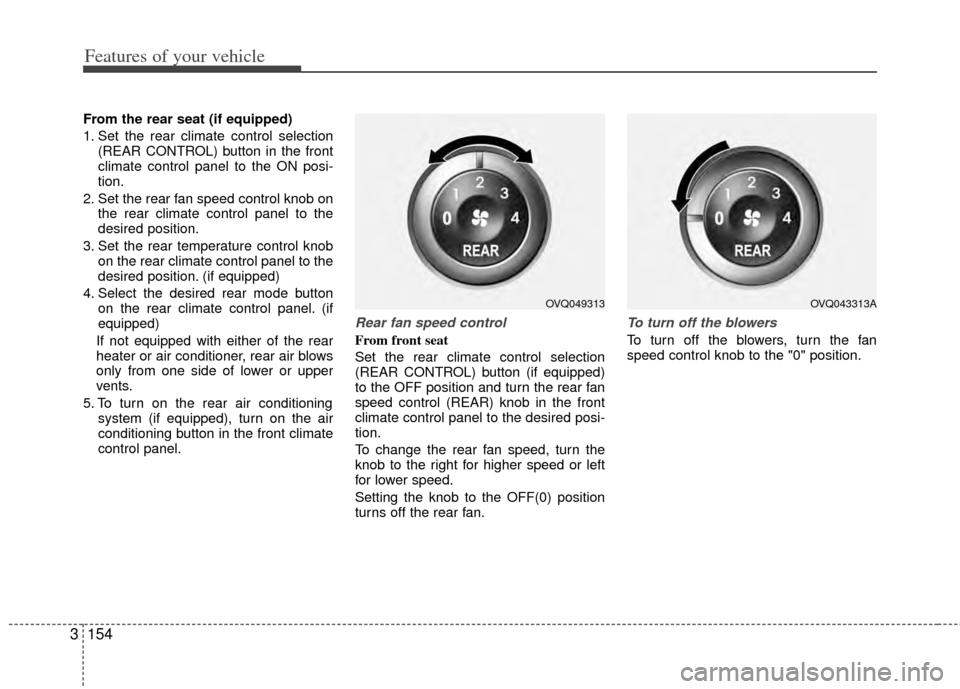
Rear fan speed control
From front seat
Set the rear climate control selection
(REAR CONTROL) button (if equipped)
to the OFF position and turn the rear fan
speed control (REAR) knob in the front
climate control panel to the desired posi-
tion.
To change the rear fan speed, turn the
knob to the right for higher speed or left
for lower speed.
Setting the knob to the OFF(0) position
turns off the rear fan.
To turn off the blowers
To turn off the blowers, turn the fan
speed control knob to the "0" position.
OVQ049313OVQ043313A
Page 164 of 382
3155
Features of your vehicle
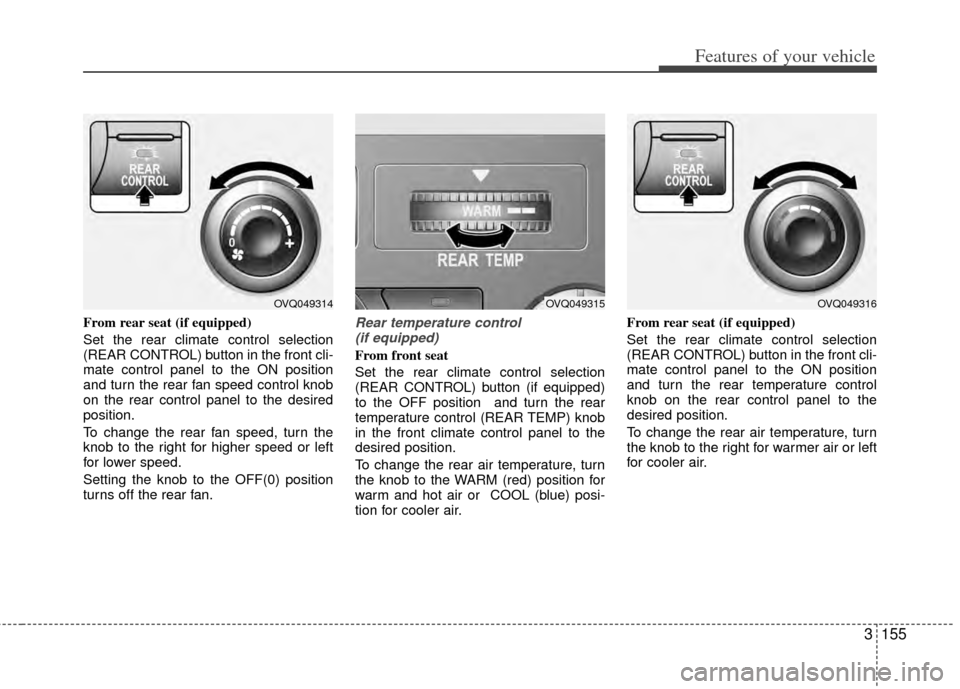
From rear seat (if equipped)
Set the rear climate control selection
(REAR CONTROL) button in the front cli-
mate control panel to the ON position
and turn the rear fan speed control knob
on the rear control panel to the desired
position.
To change the rear fan speed, turn the
knob to the right for higher speed or left
for lower speed.
Setting the knob to the OFF(0) position
turns off the rear fan.Rear temperature control (if equipped)
From front seat
Set the rear climate control selection
(REAR CONTROL) button (if equipped)
to the OFF position and turn the rear
temperature control (REAR TEMP) knob
in the front climate control panel to the
desired position.
To change the rear air temperature, turn
the knob to the WARM (red) position for
warm and hot air or COOL (blue) posi-
tion for cooler air. From rear seat (if equipped)
Set the rear climate control selection
(REAR CONTROL) button in the front cli-
mate control panel to the ON position
and turn the rear temperature control
knob on the rear control panel to the
desired position.
To change the rear air temperature, turn
the knob to the right for warmer air or left
for cooler air.
OVQ049314OVQ049315OVQ049316
Page 165 of 382
Features of your vehicle
156
3
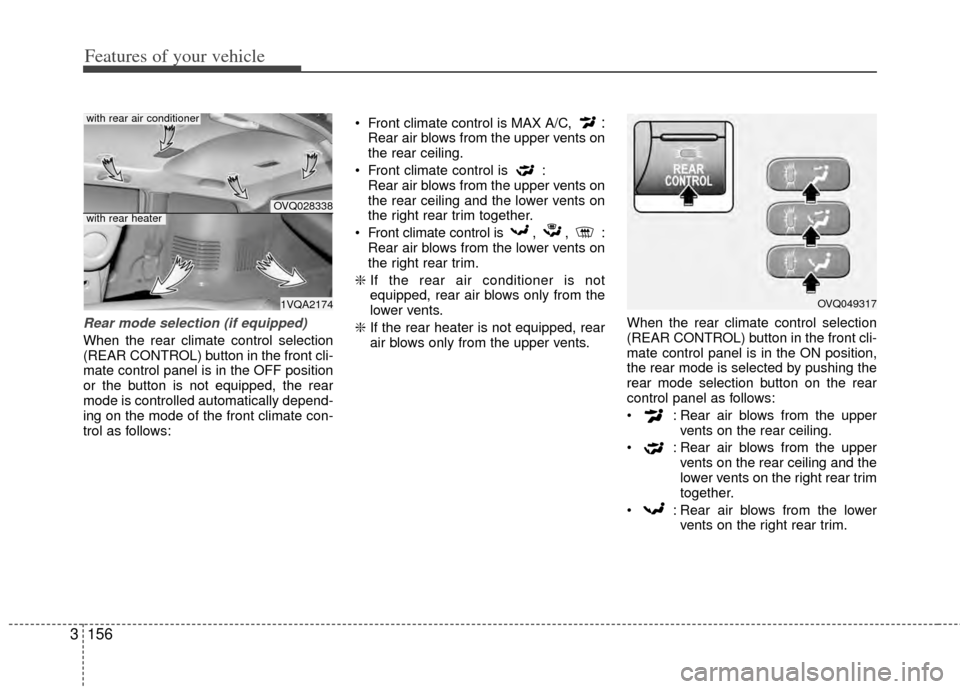
Rear mode selection (if equipped)
When the rear climate control selection
(REAR CONTROL) button in the front cli-
mate control panel is in the OFF position
or the button is not equipped, the rear
mode is controlled automatically depend-
ing on the mode of the front climate con-
trol as follows: Front climate control is MAX A/C,
:Rear air blows from the upper vents on
the rear ceiling.
Front climate control is : Rear air blows from the upper vents on
the rear ceiling and the lower vents on
the right rear trim together.
Front climate control is , , : Rear air blows from the lower vents on
the right rear trim.
❇ If the rear air conditioner is not
equipped, rear air blows only from the
lower vents.
❇ If the rear heater is not equipped, rear
air blows only from the upper vents. When the rear climate control selection
(REAR CONTROL) button in the front cli-
mate control panel is in the ON position,
the rear mode is selected by pushing the
rear mode selection button on the rear
control panel as follows:
: Rear air blows from the upper
vents on the rear ceiling.
: Rear air blows from the upper vents on the rear ceiling and the
lower vents on the right rear trim
together.
: Rear air blows from the lower vents on the right rear trim.
OVQ028338
1VQA2174
with rear air conditioner
with rear heater
OVQ049317
Page 168 of 382
3159
Features of your vehicle
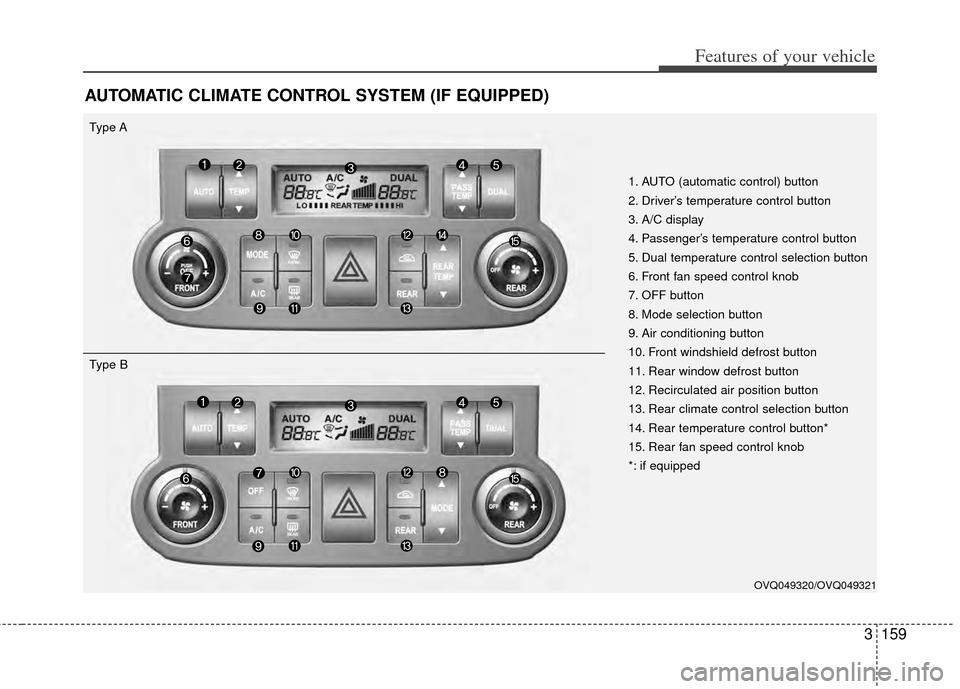
AUTOMATIC CLIMATE CONTROL SYSTEM (IF EQUIPPED)
1. AUTO (automatic control) button
2. Driver’s temperature control button
3. A/C display
4. Passenger’s temperature control button
5. Dual temperature control selection button
6. Front fan speed control knob
7. OFF button
8. Mode selection button
9. Air conditioning button
10. Front windshield defrost button
11. Rear window defrost button
12. Recirculated air position button
13. Rear climate control selection button
14. Rear temperature control button*
15. Rear fan speed control knob
*: if equipped
Type A
OVQ049320/OVQ049321
Type B
Page 169 of 382
Features of your vehicle
160
3
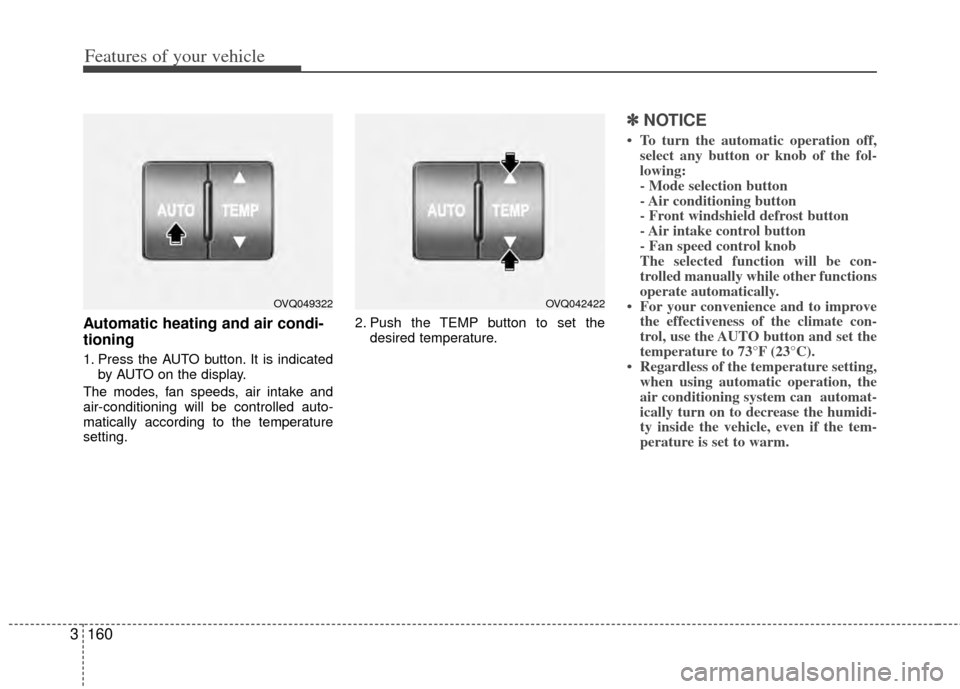
Automatic heating and air condi-
tioning
1. Press the AUTO button. It is indicated
by AUTO on the display.
The modes, fan speeds, air intake and
air-conditioning will be controlled auto-
matically according to the temperature
setting. 2. Push the TEMP button to set the
desired temperature.
✽ ✽NOTICE
• To turn the automatic operation off,
select any button or knob of the fol-
lowing:
- Mode selection button
- Air conditioning button
- Front windshield defrost button
- Air intake control button
- Fan speed control knob
The selected function will be con-
trolled manually while other functions
operate automatically.
• For your convenience and to improve the effectiveness of the climate con-
trol, use the AUTO button and set the
temperature to 73°F (23°C).
• Regardless of the temperature setting, when using automatic operation, the
air conditioning system can automat-
ically turn on to decrease the humidi-
ty inside the vehicle, even if the tem-
perature is set to warm.
OVQ049322OVQ042422
Page 172 of 382
3163
Features of your vehicle
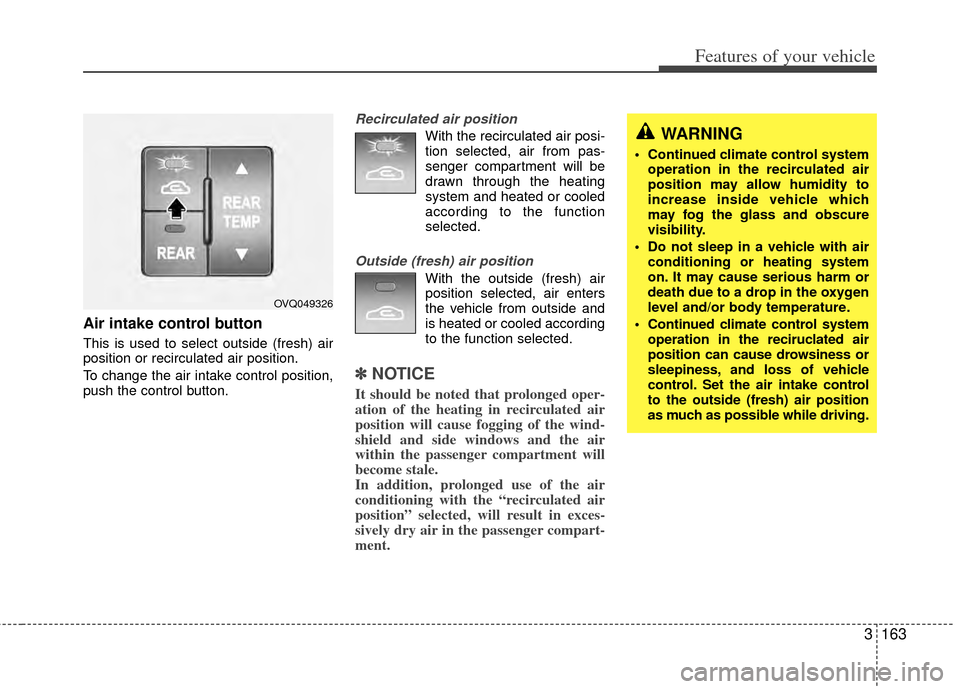
Air intake control button
This is used to select outside (fresh) air
position or recirculated air position.
To change the air intake control position,
push the control button.
Recirculated air position
With the recirculated air posi-tion selected, air from pas-
senger compartment will be
drawn through the heating
system and heated or cooled
according to the function
selected.
Outside (fresh) air position
With the outside (fresh) airposition selected, air enters
the vehicle from outside and
is heated or cooled according
to the function selected.
✽ ✽ NOTICE
It should be noted that prolonged oper-
ation of the heating in recirculated air
position will cause fogging of the wind-
shield and side windows and the air
within the passenger compartment will
become stale.
In addition, prolonged use of the air
conditioning with the “recirculated air
position” selected, will result in exces-
sively dry air in the passenger compart-
ment.
WARNING
Continued climate control system
operation in the recirculated air
position may allow humidity to
increase inside vehicle which
may fog the glass and obscure
visibility.
Do not sleep in a vehicle with air conditioning or heating system
on. It may cause serious harm or
death due to a drop in the oxygen
level and/or body temperature.
Continued climate control system operation in the reciruclated air
position can cause drowsiness or
sleepiness, and loss of vehicle
control. Set the air intake control
to the outside (fresh) air position
as much as possible while driving.
OVQ049326
Page 176 of 382
3167
Features of your vehicle
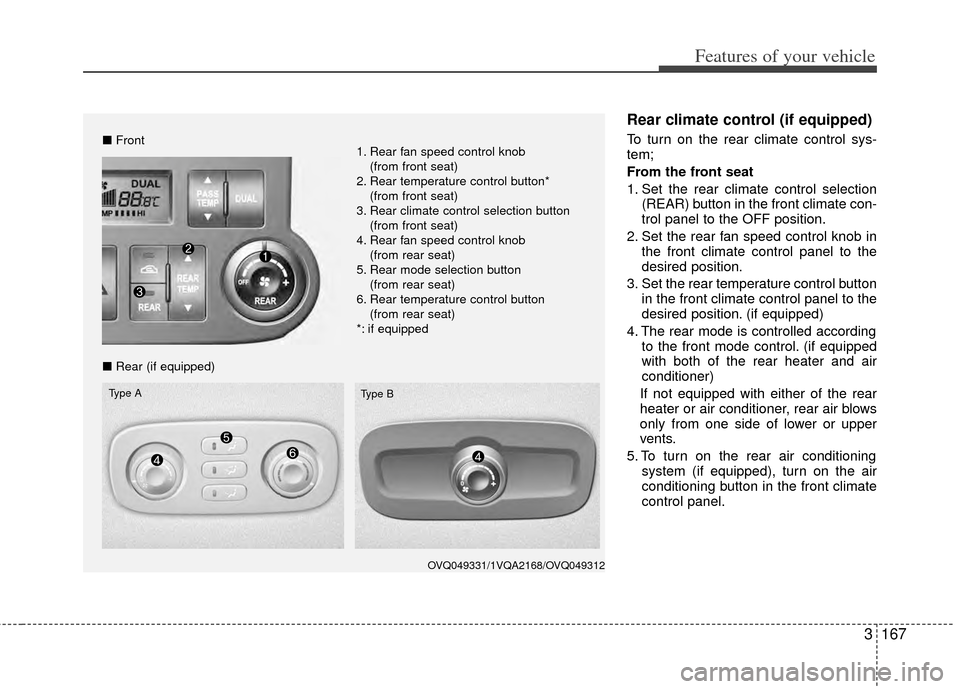
Rear climate control (if equipped)
To turn on the rear climate control sys-
tem;
From the front seat
1. Set the rear climate control selection(REAR) button in the front climate con-
trol panel to the OFF position.
2. Set the rear fan speed control knob in the front climate control panel to the
desired position.
3. Set the rear temperature control button in the front climate control panel to the
desired position. (if equipped)
4. The rear mode is controlled according to the front mode control. (if equipped
with both of the rear heater and air
conditioner)
If not equipped with either of the rear
heater or air conditioner, rear air blows
only from one side of lower or upper
vents.
5. To turn on the rear air conditioning system (if equipped), turn on the air
conditioning button in the front climate
control panel.
OVQ049331/1VQA2168/OVQ049312
■Front
■ Rear (if equipped)
Type A
Type B
1. Rear fan speed control knob
(from front seat)
2. Rear temperature control button* (from front seat)
3. Rear climate control selection button (from front seat)
4. Rear fan speed control knob (from rear seat)
5. Rear mode selection button (from rear seat)
6. Rear temperature control button (from rear seat)
*: if equipped
Page 177 of 382
Features of your vehicle
168
3
From the rear seat (if equipped)
1. Set the rear climate control selection
(REAR) button in the front climate con-
trol panel to the ON position.
2. Set the rear fan speed control knob on the rear climate control panel to the
desired position.
3. Set the rear temperature control knob on the rear climate control panel to the
desired position. (if equipped)
4. Select the desired rear mode button on the rear climate control panel. (if
equipped)
If not equipped with either of the rear
heater or air conditioner, rear air blows
only from one side of lower or upper
vents.
5. To turn on the rear air conditioning system (if equipped), turn on the air
conditioning button in the front climate
control panel.
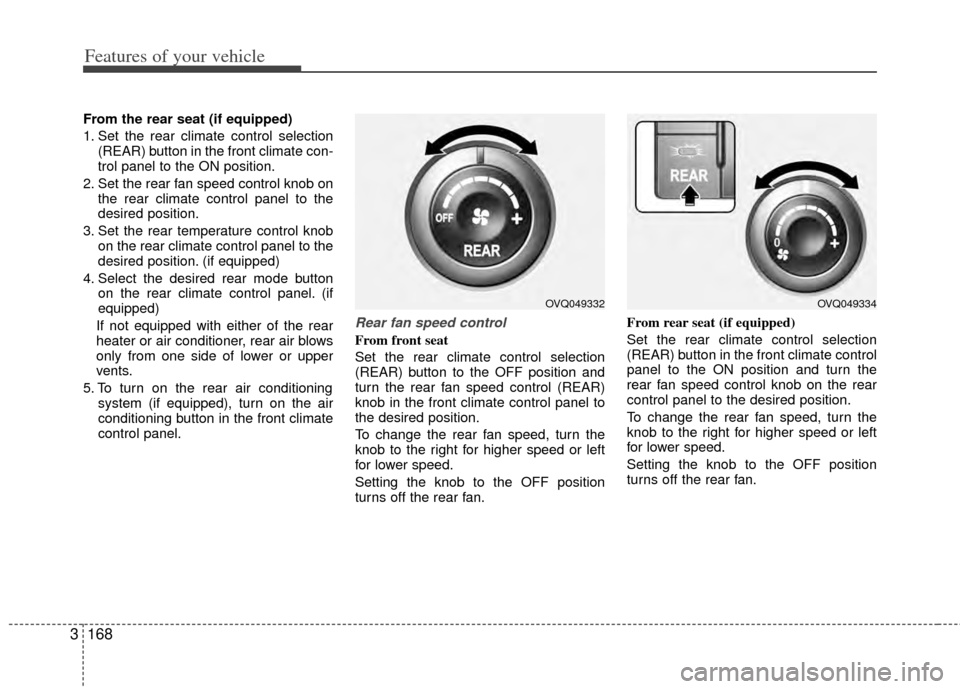
Rear fan speed control
From front seat
Set the rear climate control selection
(REAR) button to the OFF position and
turn the rear fan speed control (REAR)
knob in the front climate control panel to
the desired position.
To change the rear fan speed, turn the
knob to the right for higher speed or left
for lower speed.
Setting the knob to the OFF position
turns off the rear fan. From rear seat (if equipped)
Set the rear climate control selection
(REAR) button in the front climate control
panel to the ON position and turn the
rear fan speed control knob on the rear
control panel to the desired position.
To change the rear fan speed, turn the
knob to the right for higher speed or left
for lower speed.
Setting the knob to the OFF position
turns off the rear fan.
OVQ049332OVQ049334