Page 216 of 665

3-120
Convenient features of your vehicle
Operating condition
•This system will activate when the
Par king Assist System button is
pressed with the engine running.
•The Parking Assist System button
turns on automatically and activates
the Parking Assist System when you
move the shift lever to the R
(Reverse) position. However, if vehi-
cle speed exceeds 10 km/h, the sys-
tem will not warn you even though
objects are detected, and if vehicle
speed exceeds 20 km/h, the system
will turn off automatically. To turn on
the system, press the Parking Assist
System button.
•When more than two objects are
sensed at the same time, the clos-
est one will be recognized first.
Distance
from object
Warning indicator
Warning soundWhen driving
forward
When driving
rearward
100cm~61cmFront-Buzzer beeps
intermittently
120cm~61cmRear-Buzzer beeps
intermittently
60cm~31cm
FrontBuzzer beeps
frequently
Rear-Buzzer beeps
frequently
30cm
FrontBuzzer sounds
continuously
Rear-Buzzer sounds
continuously
•The indicator may differ from the illustration as objects or sensors
status. If the indicator blinks, we recommend that the system be
checked by an authorized HYUNDAI dealer.
•If the audible warning does not sound or if the buzzer sounds inter-
mittently when shifting into R (Reverse) position, this may indicate a
malfunction with the Parking Assist System. If this occurs, we rec-
ommend that you have your vehicle checked by an authorized
HYUNDAI dealer as soon as possible.
NOTICE
Types of warning sound and indicator
Page 217 of 665

3-121
Convenient features of your vehicle
3
Non-operational conditions of
Parking Assist System
Parking Assist System may not
operate normally when:
•Moisture is frozen to the sensor.
•Sensor is covered with foreign mat-
ter, such as snow or water, or the
sensor cover is blocked.
There is a possibility of Parking
Assist System malfunction when:
•Driving on uneven road surfaces
such as unpaved roads, gravel,
bumps, or gradient.
•Objects generating excessive noise
such as vehicle horns, loud motor-
cycle engines, or truck air brakes
can interfere with the sensor.
•Heavy rain or water spray is present.
•Wireless transmitters or mobile
phones are present near the sensor.
•The sensor is covered with snow.
•Any non-factory equipment or
accessories have been installed, or
if the vehicle bumper height or sen-
sor installation has been modified.
Detecting range may decrease when:
•Outside air temperature is
extremely hot or cold.
•Undetectable objects smaller than
1 m and narrower than 14 cm in
diameter.
The following objects may not be
recognized by the sensor:
•Sharp or slim objects such as
ropes, chains or small poles.
•Objects, which tend to absorb sen-
sor frequency such as clothes,
spongy material or snow.
Information
Sensor may not recognize objects less
than 30 cm from the sensor, or it may
sense an incorrect distance.
Do not push, scratch or strike the
sensor with any hard objects that
could damage the surface of the
sensor. Sensor damage could
occur.
NOTICE
i
Yo u r n e w v e h i c l e w a r r a n t y d o e s
not cover any accidents or dam-
age to the vehicle or injuries to
its occupants related to a
Parking Assist System. Always
drive safely and cautiously.
WARNING
Page 218 of 665
3-122
Convenient features of your vehicle
DEFROSTER
To prevent damage to the conduc-
tors bonded to the inside surface
of the rear window, never use
sharp instruments or window
cleaners containing abrasives to
clean the window.
Information
If you want to defrost and defog the
front windshield, refer to “Windshield
Defrosting and Defogging” in this
chapter.
Rear window defroster
The defroster heats the window to
remove frost, fog and thin ice from
the interior and exterior of the rear
window, while engine is running.
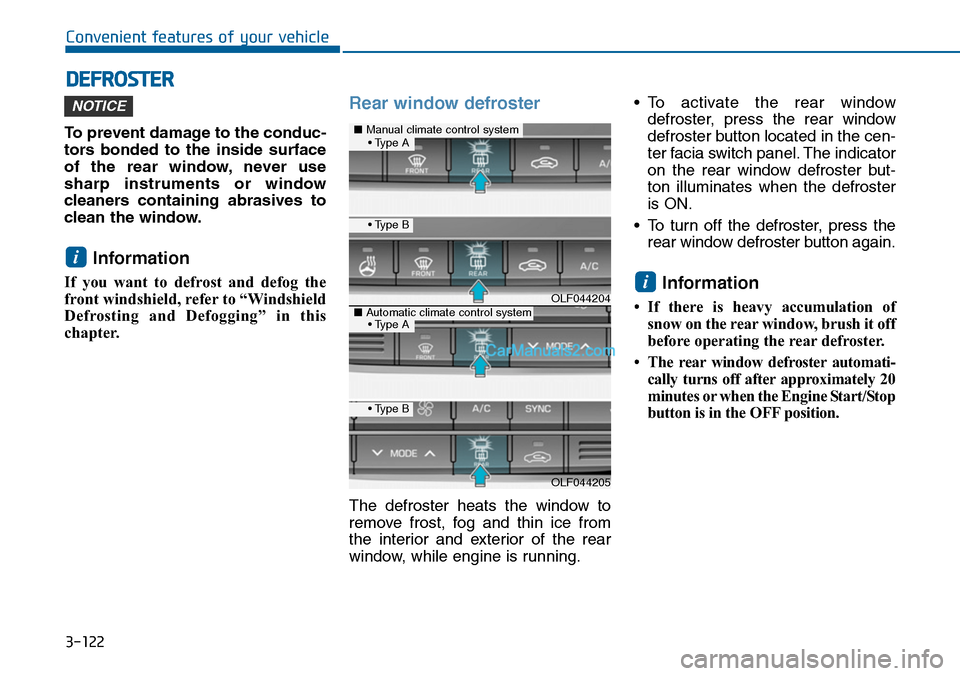
•To activate the rear window
defroster, press the rear window
defroster button located in the cen-
ter facia switch panel. The indicator
on the rear window defroster but-
ton illuminates when the defroster
is ON.
•To turn off the defroster, press the
rear window defroster button again.
Information
•If there is heavy accumulation of
snow on the rear window, brush it off
before operating the rear defroster.
•The rearwindow defrosterautomati-
cally turns off after approximately 20
minutes or when the Engine Start/Stop
button is in the OFF position.
i
i
NOTICE
OLF044204
OLF044205
■Manual climate control system
■Automatic climate control system
• Type B
• Type B
• Type A
• Type A
Page 220 of 665
3-124
Convenient features of your vehicle
MANUAL CLIMATE CONTROL SYSTEM (IF EQUIPPED)
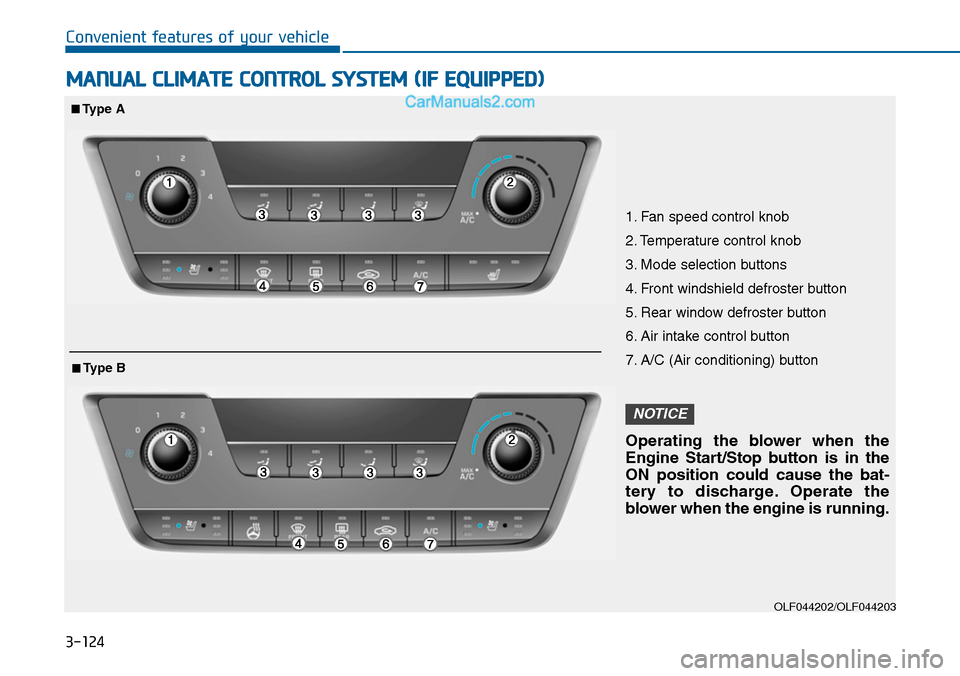
OLF044202/OLF044203
1. Fan speed control knob
2. Temperature control knob
3. Mode selection buttons
4. Front windshield defroster button
5. Rear window defroster button
6. Air intake control button
7. A/C (Air conditioning) button
Operating the blower when the
Engine Start/Stop button is in the
ON position could cause the bat-
tery to discharge. Operate the
blower when the engine is running.
NOTICE
■Type A
■Type B
Page 221 of 665
3-125
Convenient features of your vehicle
3
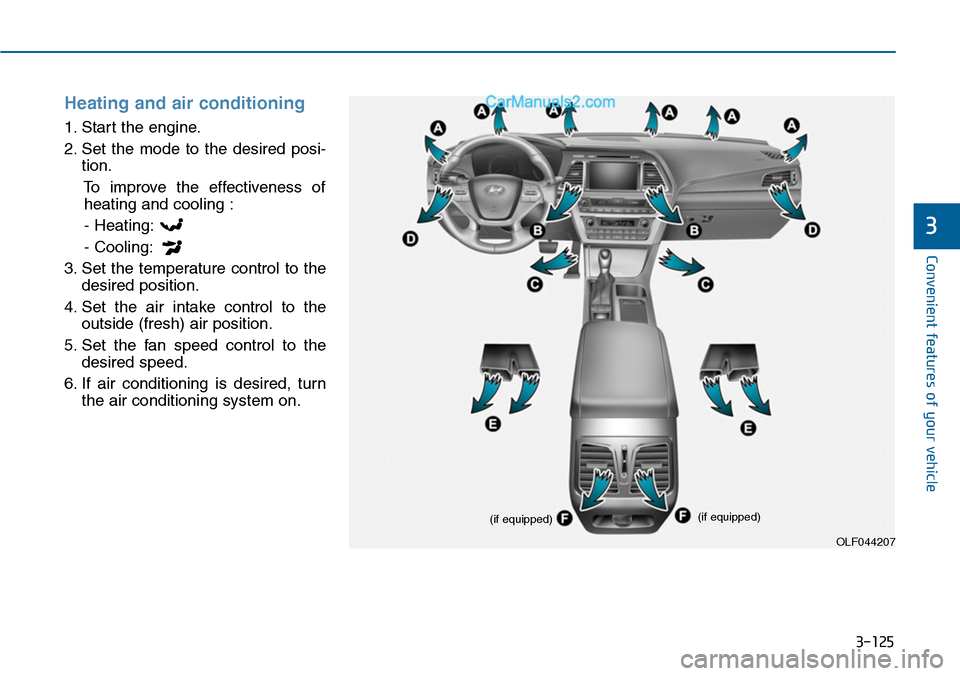
Heating and air conditioning
1. Start the engine.
2. Set the mode to the desired posi-
tion.
To improve the effectiveness of
heating and cooling :
- Heating:
- Cooling:
3. Set the temperature control to the
desired position.
4. Set the air intake control to the
outside (fresh) air position.
5. Set the fan speed control to the
desired speed.
6. If air conditioning is desired, turn
the air conditioning system on.
OLF044207
(if equipped)(if equipped)
Page 227 of 665
3-131
Convenient features of your vehicle
3
Air conditioning
HYUNDAI Air Conditioning Systems
are filled with R-134a refrigerant.
1. Start the engine. Push the air con-
ditioning button.
2. Set the mode to the position.
3. Set the air intake control to the out-
side air or recirculated air position.
4. Adjust the fan speed control and
temperature control to maintain
maximum comfort.
Information
• When using the air conditioning sys-
tem, monitor the temperature gauge
closely while driving up hills or in
heavy traffic when outside tempera-
tures are high. Air conditioning sys-
tem operation may cause engine
overheating. Continue to use the
blower fan but turn the air condi-
tioning system off if the temperature
gauge indicates engine overheating.
•When opening the windows in
humid weather air conditioning
may create water droplets inside the
vehicle. Since excessive water
droplets may cause damage to elec-
trical equipment, air conditioning
should only be used with the win-
dows closed.
Air conditioning system operation
tips
•If the vehicle has been parked in
direct sunlight during hot weather,
open the windows for a short time
to let the hot air inside the vehicle
escape.
•To help reduce moisture inside of
the windows on rainy or humid
days, decrease the humidity inside
the vehicle by operating the air
conditioning system.
•During air conditioning system
operation, you may occasionally
notice a slight change in engine
speed as the air conditioning com-
pressor cycles. This is a normal
system operation characteristic.
•Use the air conditioning system
ever y month only for a few minutes
to ensure maximum system per-
formance.
•When using the air conditioning
system, you may notice clear water
dripping (or even puddling) on the
ground under the passenger side
of the vehicle. This is a normal sys-
tem operation characteristic.
i
Page 230 of 665
3-134
Convenient features of your vehicle
AUTOMATIC CLIMATE CONTROL SYSTEM (IF EQUIPPED)
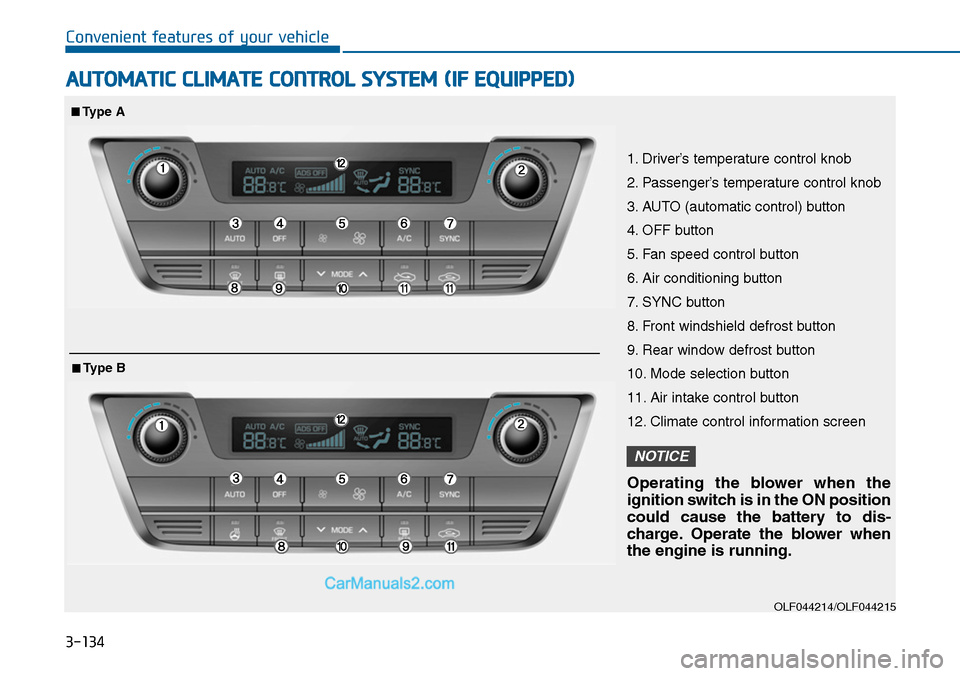
OLF044214/OLF044215
1. Driver’s temperature control knob
2. Passenger’s temperature control knob
3. AUTO (automatic control) button
4. OFF button
5. Fan speed control button
6. Air conditioning button
7. SYNC button
8. Front windshield defrost button
9. Rear window defrost button
10. Mode selection button
11. Air intake control button
12. Climate control information screen
Operating the blower when the
ignition switch is in the ON position
could cause the battery to dis-
charge. Operate the blower when
the engine is running.
NOTICE
■Type A
■Type B
Page 232 of 665
3-136
Convenient features of your vehicle
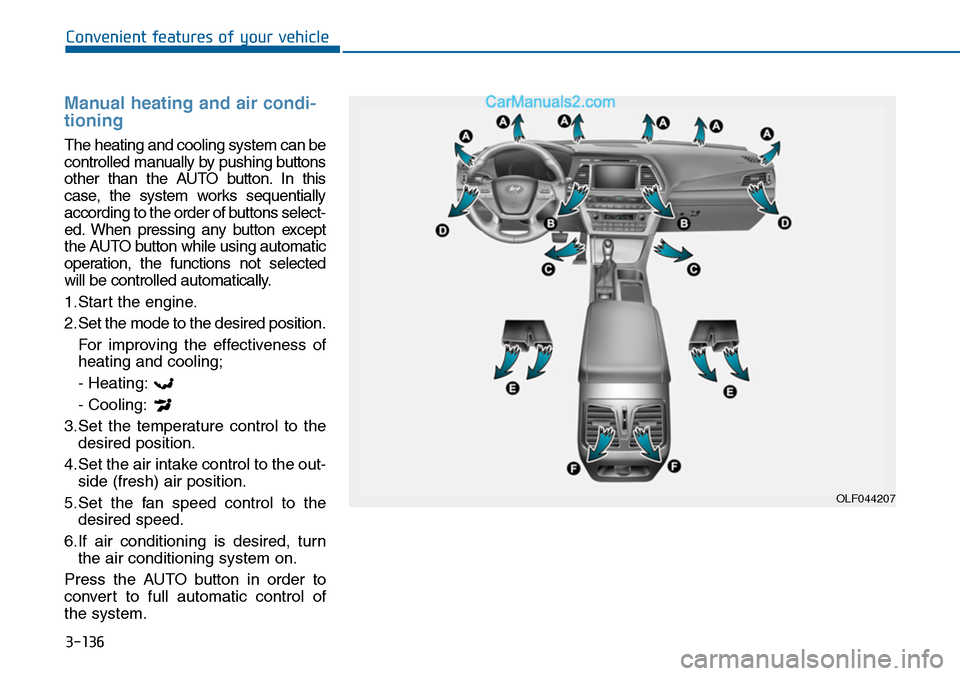
Manual heating and air condi-
tioning
The heating and cooling system can be
controlled manually by pushing buttons
other than the AUTO button. In this
case, the system works sequentially
according to the order of buttons select-
ed. When pressing any button except
the AUTO button while using automatic
operation, the functions not selected
will be controlled automatically.
1.Start the engine.
2.Set the mode to the desired position.
For improving the effectiveness of
heating and cooling;
- Heating:
- Cooling:
3.Set the temperature control to the
desired position.
4.Set the air intake control to the out-
side (fresh) air position.
5.Set the fan speed control to the
desired speed.
6.If air conditioning is desired, turn
the air conditioning system on.
Press the AUTO button in order to
convert to full automatic control of
the system.
OLF044207