4203
Features of your vehicle
SYSTEM CONTROLLERS
AND FUNCTIONS
❈Display and settings may differ
depending on the selected audio.
Audio Head Unit
(for RDS model)
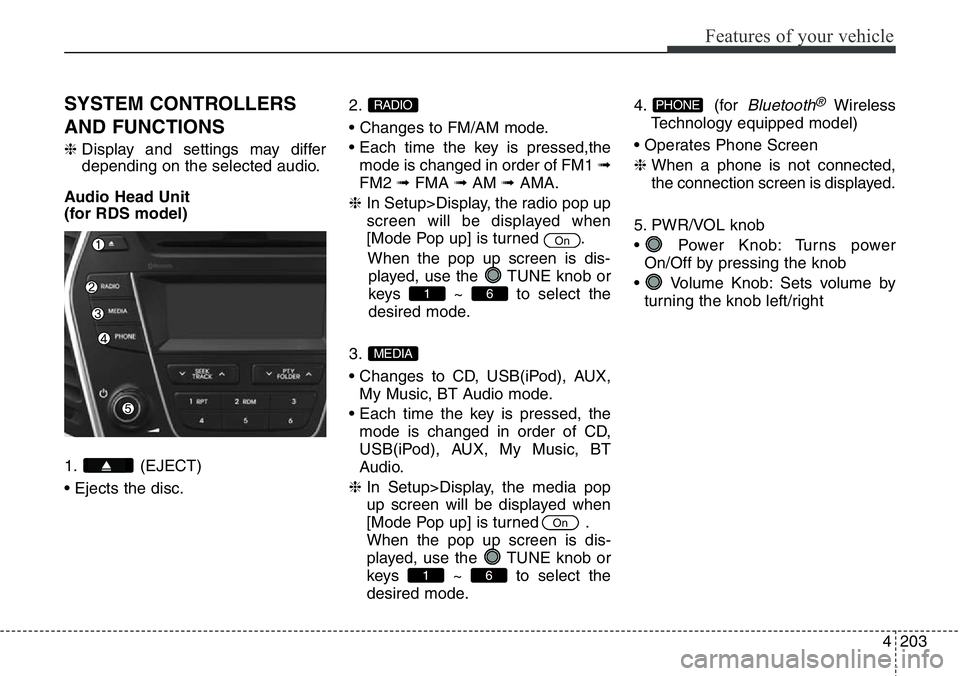
1. (EJECT)
• Ejects the disc.2.
• Changes to FM/AM mode.
• Each time the key is pressed,the
mode is changed in order of FM1 ➟
FM2 ➟FMA ➟AM ➟AMA.
❈ In Setup>Display, the radio pop up
screen will be displayed when
[Mode Pop up] is turned .
When the pop up screen is dis-
played, use the TUNE knob or
keys ~ to select the
desired mode.
3.
• Changes to CD, USB(iPod), AUX,
My Music, BT Audio mode.
• Each time the key is pressed, the
mode is changed in order of CD,
USB(iPod), AUX, My Music, BT
Audio.
❈ In Setup>Display, the media pop
up screen will be displayed when
[Mode Pop up] is turned .
When the pop up screen is dis-
played, use the TUNE knob or
keys ~ to select the
desired mode.4. (for
Bluetooth®Wireless
Technology equipped model)
• Operates Phone Screen
❈ When a phone is not connected,
the connection screen is displayed.
5. PWR/VOL knob
• Power Knob: Turns power
On/Off by pressing the knob
• Volume Knob: Sets volume by
turning the knob left/rightPHONE
61
On
MEDIA
61
On
RADIO
Page 305 of 711
Features of your vehicle
204 4
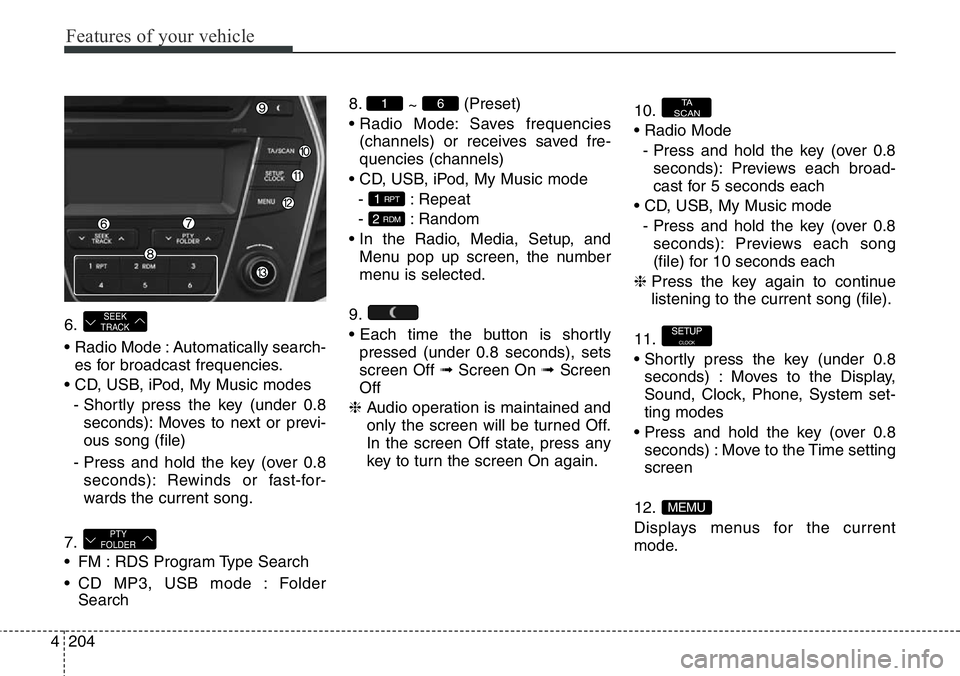
6.
• Radio Mode : Automatically search-
es for broadcast frequencies.
• CD, USB, iPod, My Music modes
- Shortly press the key (under 0.8
seconds): Moves to next or previ-
ous song (file)
- Press and hold the key (over 0.8
seconds): Rewinds or fast-for-
wards the current song.
7.
• FM : RDS Program Type Search
• CD MP3, USB mode : Folder
Search8.
~ (Preset)
• Radio Mode: Saves frequencies
(channels) or receives saved fre-
quencies (channels)
• CD, USB, iPod, My Music mode
- : Repeat
- : Random
• In the Radio, Media, Setup, and
Menu pop up screen, the number
menu is selected.
9.
• Each time the button is shortly
pressed (under 0.8 seconds), sets
screen Off ➟Screen On ➟Screen
Off
❈ Audio operation is maintained and
only the screen will be turned Off.
In the screen Off state, press any
key to turn the screen On again.10.
• Radio Mode
- Press and hold the key (over 0.8
seconds): Previews each broad-
cast for 5 seconds each
• CD, USB, My Music mode
- Press and hold the key (over 0.8
seconds): Previews each song
(file) for 10 seconds each
❈ Press the key again to continue
listening to the current song (file).
11.
• Shortly press the key (under 0.8
seconds) : Moves to the Display,
Sound, Clock, Phone, System set-
ting modes
• Press and hold the key (over 0.8
seconds) : Move to the Time setting
screen
12.
Displays menus for the current
mode.
MEMU
SETUPCLOCK
TA
SCAN
2 RDM
1 RPT
61
PTY
FOLDER
SEEK
TRACK
Page 306 of 711
4205
Features of your vehicle
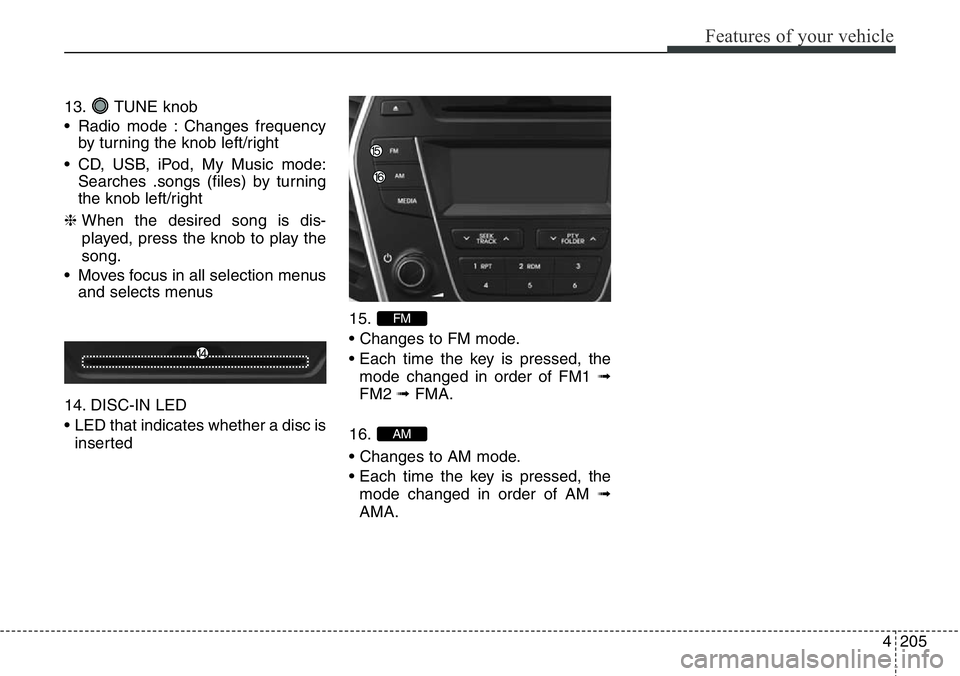
13. TUNE knob
• Radio mode : Changes frequency
by turning the knob left/right
• CD, USB, iPod, My Music mode:
Searches .songs (files) by turning
the knob left/right
❈ When the desired song is dis-
played, press the knob to play the
song.
• Moves focus in all selection menus
and selects menus
14. DISC-IN LED
• LED that indicates whether a disc is
inserted15.
• Changes to FM mode.
• Each time the key is pressed, the
mode changed in order of FM1 ➟
FM2 ➟ FMA.
16.
• Changes to AM mode.
• Each time the key is pressed, the
mode changed in order of AM ➟
AMA.
AM
FM
Page 307 of 711
Features of your vehicle
206 4
Audio Head Unit
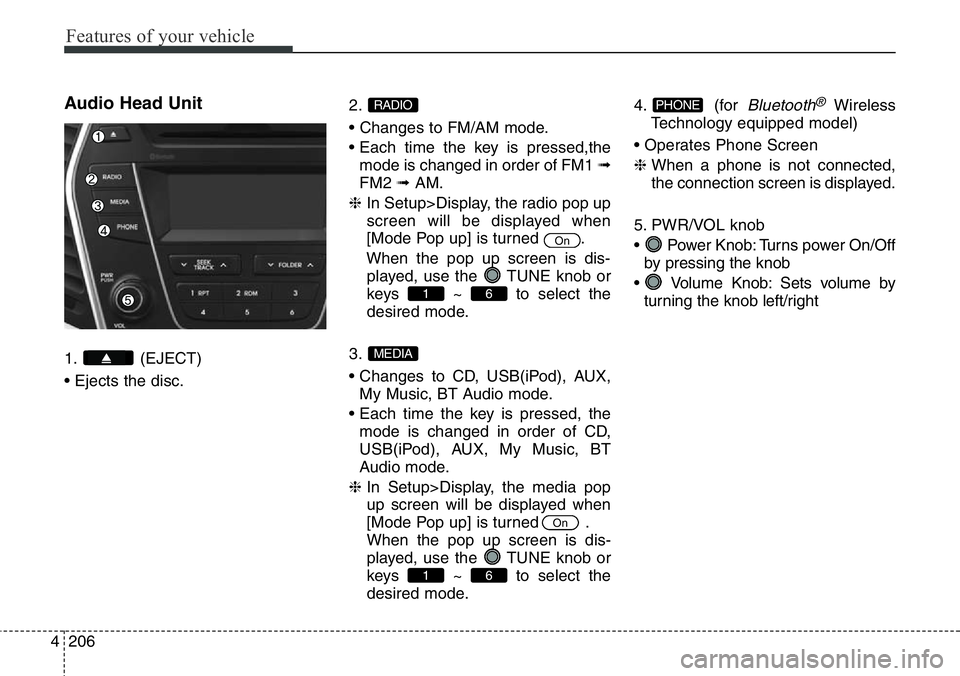
1. (EJECT)
• Ejects the disc.2.
• Changes to FM/AM mode.
• Each time the key is pressed,the
mode is changed in order of FM1 ➟
FM2 ➟AM.
❈ In Setup>Display, the radio pop up
screen will be displayed when
[Mode Pop up] is turned .
When the pop up screen is dis-
played, use the TUNE knob or
keys ~ to select the
desired mode.
3.
• Changes to CD, USB(iPod), AUX,
My Music, BT Audio mode.
• Each time the key is pressed, the
mode is changed in order of CD,
USB(iPod), AUX, My Music, BT
Audio mode.
❈ In Setup>Display, the media pop
up screen will be displayed when
[Mode Pop up] is turned .
When the pop up screen is dis-
played, use the TUNE knob or
keys ~ to select the
desired mode.4. (for
Bluetooth®Wireless
Technology equipped model)
• Operates Phone Screen
❈ When a phone is not connected,
the connection screen is displayed.
5. PWR/VOL knob
• Power Knob: Turns power On/Off
by pressing the knob
• Volume Knob: Sets volume by
turning the knob left/rightPHONE
61
On
MEDIA
61
On
RADIO
Page 308 of 711
4207
Features of your vehicle
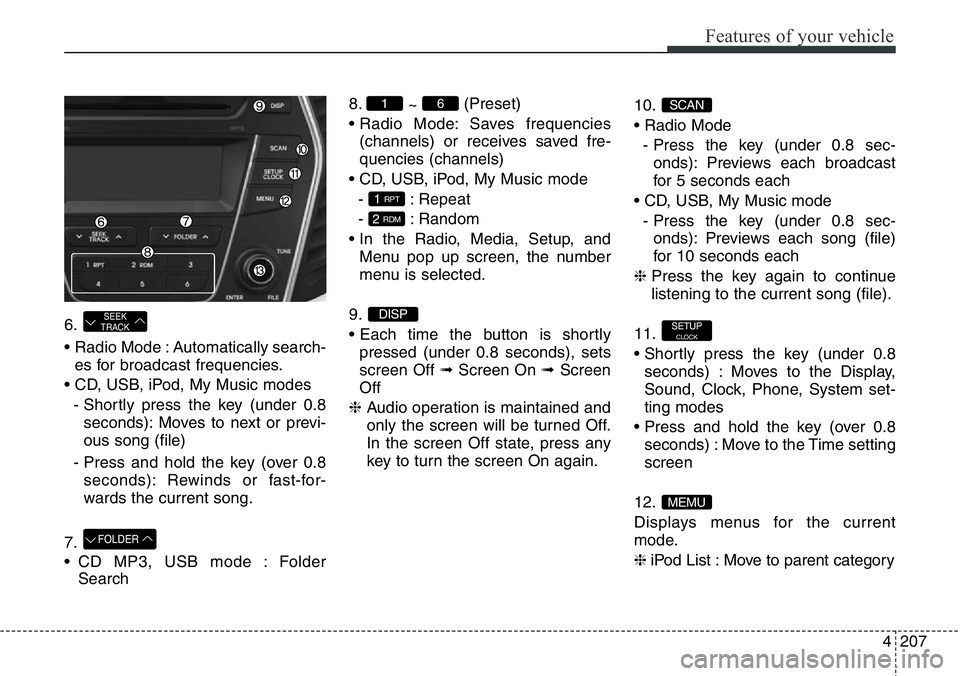
6.
• Radio Mode : Automatically search-
es for broadcast frequencies.
• CD, USB, iPod, My Music modes
- Shortly press the key (under 0.8
seconds): Moves to next or previ-
ous song (file)
- Press and hold the key (over 0.8
seconds): Rewinds or fast-for-
wards the current song.
7.
• CD MP3, USB mode : Folder
Search8.
~ (Preset)
• Radio Mode: Saves frequencies
(channels) or receives saved fre-
quencies (channels)
• CD, USB, iPod, My Music mode
- : Repeat
- : Random
• In the Radio, Media, Setup, and
Menu pop up screen, the number
menu is selected.
9.
• Each time the button is shortly
pressed (under 0.8 seconds), sets
screen Off ➟Screen On ➟Screen
Off
❈ Audio operation is maintained and
only the screen will be turned Off.
In the screen Off state, press any
key to turn the screen On again.10.
• Radio Mode
- Press the key (under 0.8 sec-
onds): Previews each broadcast
for 5 seconds each
• CD, USB, My Music mode
- Press the key (under 0.8 sec-
onds): Previews each song (file)
for 10 seconds each
❈ Press the key again to continue
listening to the current song (file).
11.
• Shortly press the key (under 0.8
seconds) : Moves to the Display,
Sound, Clock, Phone, System set-
ting modes
• Press and hold the key (over 0.8
seconds) : Move to the Time setting
screen
12.
Displays menus for the current
mode.
❈ iPod List : Move to parent category
MEMU
SETUPCLOCK
SCAN
DISP
2 RDM
1 RPT
61
FOLDER
SEEK
TRACK
Page 309 of 711
Features of your vehicle
208 4
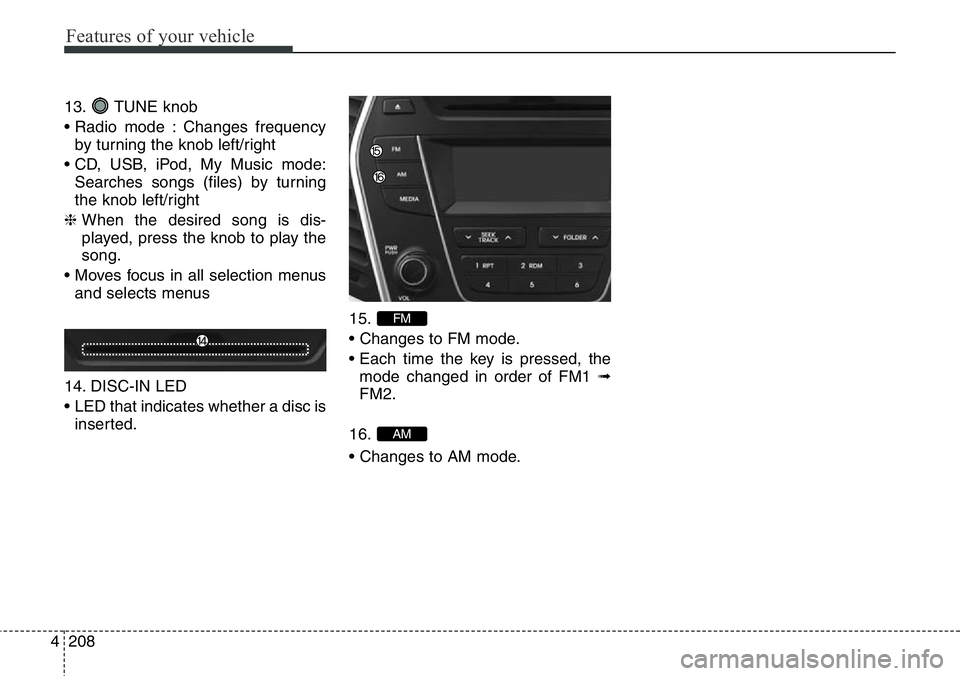
13. TUNE knob
• Radio mode : Changes frequency
by turning the knob left/right
• CD, USB, iPod, My Music mode:
Searches songs (files) by turning
the knob left/right
❈ When the desired song is dis-
played, press the knob to play the
song.
• Moves focus in all selection menus
and selects menus
14. DISC-IN LED
• LED that indicates whether a disc is
inserted.15.
• Changes to FM mode.
• Each time the key is pressed, the
mode changed in order of FM1 ➟
FM2.
16.
• Changes to AM mode.
AM
FM
Page 334 of 711
4233
Features of your vehicle
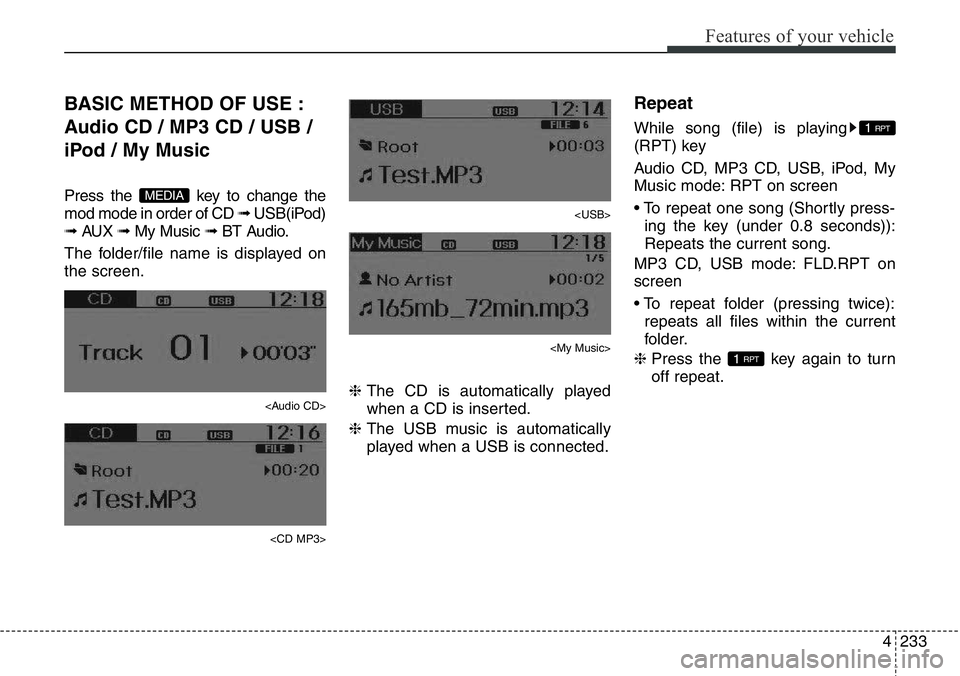
BASIC METHOD OF USE :
Audio CD / MP3 CD / USB /
iPod / My Music
Press the key to change the
mod mode in order of CD ➟ USB(iPod)
➟ AUX ➟ My Music ➟ BT Audio.
The folder/file name is displayed on
the screen.
Page 335 of 711
Features of your vehicle
234 4
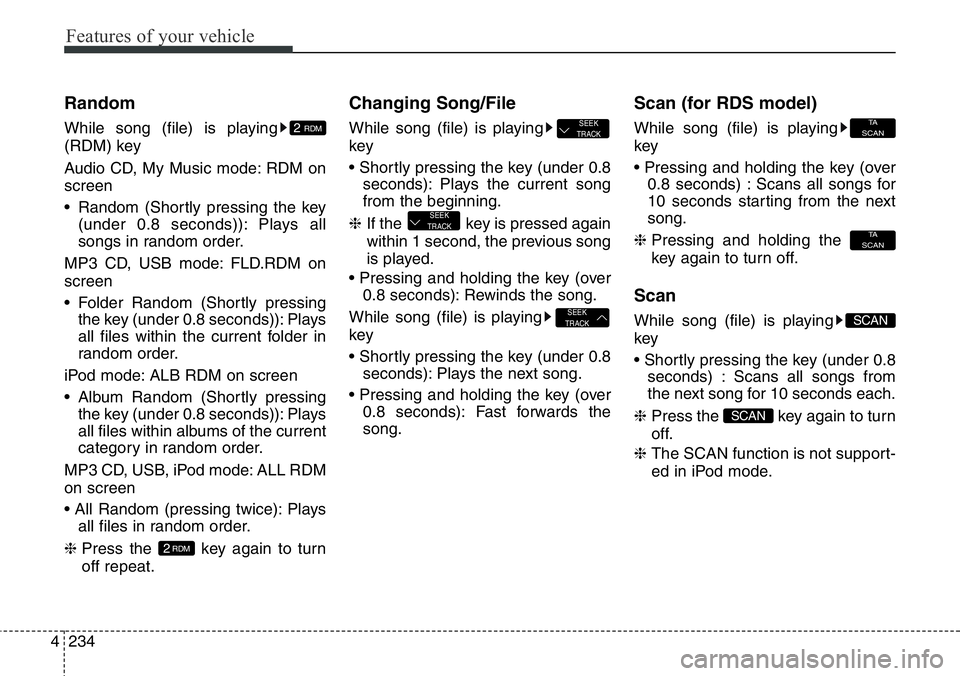
Random
While song (file) is playing
(RDM) key
Audio CD, My Music mode: RDM on
screen
• Random (Shortly pressing the key
(under 0.8 seconds)): Plays all
songs in random order.
MP3 CD, USB mode: FLD.RDM on
screen
• Folder Random (Shortly pressing
the key (under 0.8 seconds)): Plays
all files within the current folder in
random order.
iPod mode: ALB RDM on screen
• Album Random (Shortly pressing
the key (under 0.8 seconds)): Plays
all files within albums of the current
category in random order.
MP3 CD, USB, iPod mode: ALL RDM
on screen
• All Random (pressing twice): Plays
all files in random order.
❈ Press the key again to turn
off repeat.
Changing Song/File
While song (file) is playing
key
• Shortly pressing the key (under 0.8
seconds): Plays the current song
from the beginning.
❈ If the key is pressed again
within 1 second, the previous song
is played.
• Pressing and holding the key (over
0.8 seconds): Rewinds the song.
While song (file) is playing
key
• Shortly pressing the key (under 0.8
seconds): Plays the next song.
• Pressing and holding the key (over
0.8 seconds): Fast forwards the
song.
Scan (for RDS model)
While song (file) is playing
key
• Pressing and holding the key (over
0.8 seconds) : Scans all songs for
10 seconds starting from the next
song.
❈ Pressing and holding the
key again to turn off.
Scan
While song (file) is playing
key
• Shortly pressing the key (under 0.8
seconds) : Scans all songs from
the next song for 10 seconds each.
❈ Press the key again to turn
off.
❈ The SCAN function is not support-
ed in iPod mode.
SCAN
SCAN
TA
SCAN
TA
SCAN
SEEK
TRACK
SEEK
TRACK
SEEK
TRACK
2RDM
2 RDM